Summary
Welcome to the November Power Platform monthly feature update! This edition covers news from October and November, including all the exciting news brought to the community during Power Platform Community Conference. Below you can find a summary of product, community, and learning updates from Power Platform in one easy place. Now, let’s dive in!
Get started with the latest updates today!
Jump into Power Apps, Power Automate, and Power Pages to try the latest updates, you can use an existing environment or get started for free using the Developer plan.
Power Apps
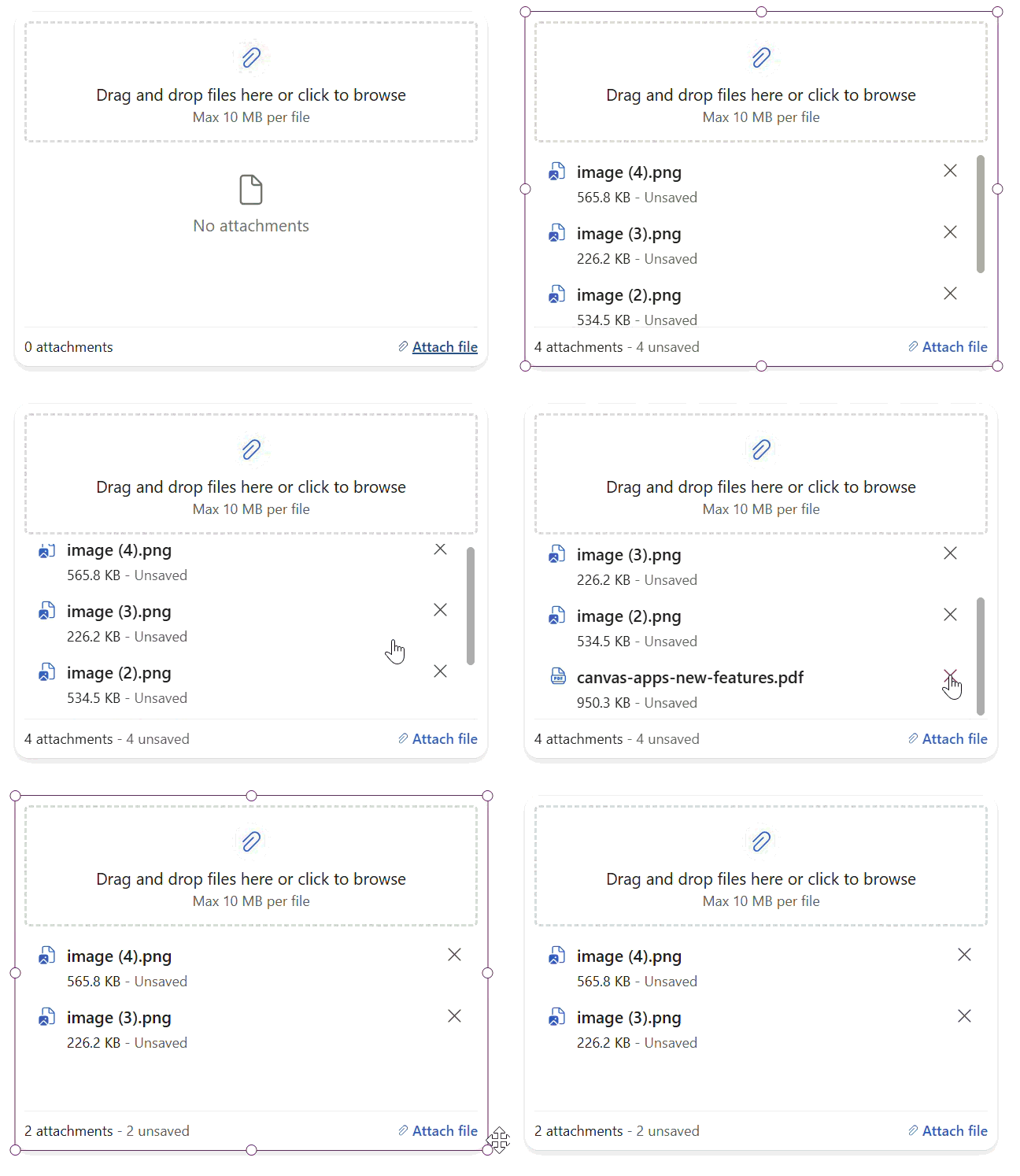
Public preview: Build flexible file experiences with modern attachments

The new modern attachments control gives makers a Fluent file experience that works inside forms or as a standalone control on a canvas. Build custom upload screens without the classic control’s form-only constraint, while giving users multi-file selection, image thumbnails, file validation, and drag-and-drop on the web.
Makers can configure the maximum number and size of files, accepted file types, multiple-file behavior, styling, and file events. Preview supports SharePoint list attachments and Dataverse attachment scenarios. Mobile users select files through the device picker.
Building modern apps
Build richer canvas apps with new modern controls

New modern controls bring more ready-to-use Fluent experiences to canvas apps. Avatar group shows teams at a glance, persona combines identity and supporting details, metrics card highlights key values with supporting text and trend context, card gallery turns records into responsive card views, and modern attachments supports file experiences inside or outside forms. These controls reduce the number of individual elements makers need to assemble for common app patterns.
The next wave includes navigation, breadcrumb, facet, accordion, and carousel, targeted by the end of 2026, along with general availability work for attachments. Together, these investments give makers more reusable building blocks for richer canvas experiences, with less time spent recreating common interface patterns.
Browse larger datasets with automatic loading and numbered pages in data grid

Modern data grid adds two ways to browse data incrementally: automatically load more records as users scroll, or show numbered pages with a configurable page size. Makers can choose the browsing pattern that fits the app rather than loading the full result set up front.
Search can work with the loaded records or use the maker’s data-source filtering formula. Sorting can be delegated when the connected source supports it. Existing apps retain their current behavior unless pagination is enabled, because the pagination property defaults to none.
Create responsive SharePoint custom forms with an updated form template

The SharePoint customize forms experience has an updated form template with a responsive, multi-column layout instead of the earlier single-column starting point. The generated form adapts its fields to the available width, giving makers a more flexible foundation for SharePoint list forms. Organize the fields for your workflow, customize the form in Power Apps Studio, and validate the experience in its SharePoint host. The refreshed template reduces the layout work needed to create a form that works across wider and narrower views.
New SharePoint and app from data templates

The new modern template is available across all app-from-data flows in Power Apps, not just SharePoint-connected app creation. You can also start directly from a SharePoint list by selecting integrate > Power Apps > create an app. Start with responsive browse, new-item, and edit-item screens built with modern controls, with data-aware views and record actions that reduce the work needed to turn your data into an app. Review the generated screens and fields, then tailor the app to your workflow. Responsive layouts and modern controls give makers a consistent starting point without rebuilding common browse and edit patterns from scratch.
Reveal masked Dataverse values on demand in canvas apps
Canvas apps can request an unmasked value from a secured Dataverse column with the Dataverse.Unmask Power Fx function. Makers can build an explicit reveal action for sensitive information while keeping the normal view masked.
Dataverse continues to enforce table, record, and column permissions, including the appropriate read unmasked permission. The function returns a single column value; it does not change the stored record, remove its masking rule, or reveal the value elsewhere in the app. Preview began in October, and makers must update their apps to add the reveal experience.
AI powered development
Public preview: Explore business apps in Work IQ

Your business data doesn’t have to stay inside your apps. Now in public preview, business apps in Work IQ lets you find and work with data from Power Apps model-driven apps through natural-language conversations, without opening the app. At the Power Platform Community Conference, our “Work, Reimagined” session explored how this extends the value of the apps and business processes you already use.
Ask for records from an app view, explore the details, or create and update records in conversation. For example, you can ask which projects are blocked, then review and confirm an update to a project record. Work IQ uses your app’s existing views, forms, and Dataverse data, respects your permissions, and applies supported business rules. You review and explicitly confirm changes before they are submitted.
Customers told us they want to keep control of their data and get measurable value from AI. We’re listening to that feedback as we develop business apps in Work IQ, helping you work with the business information you already have, with your existing permissions and control over changes. Explore the public preview to learn how to get started.
Public preview: Understand Dataverse records faster with AI row summary

AI-powered row summary is coming to the modern data grid in canvas apps. Users can generate a concise AI summary for an eligible Dataverse row directly from the grid, helping them understand important record information without opening the record or scanning every field.
To enable the experience, connect the modern data grid to a Dataverse table that already has row summary configured, then set ShowAIRowSummary to true. The feature is opt-in and off by default. Preview rollout begins October 12, 2026 and will roll out gradually.
Public preview: Generative pages can now run server-side business logic with Dataverse custom APIs

Generative pages can now call Dataverse custom APIs, connecting AI-generated experiences to server-side business logic. This lets you build pages that do more than display and update records: users can trigger operations such as approving an order, recalculating a price, or validating a transaction, while keeping the underlying logic in Dataverse.
Support is available both in the generative page designer in Power Apps and through the generative pages plugin for external AI code generation tools. Select an existing custom API in your environment, then describe when the page should call it, which inputs to provide, and how to use the response. Global and table-bound actions and functions are supported, and calls run in the context of the signed-in user, subject to Dataverse security.
Public preview: Monitor generative page performance and errors with application insights

Building a tailored user experience is only part of the job of building a great model-driven app. You also need visibility into how it behaves when users interact with it. Generative pages now support automatic telemetry export to Azure application insights, helping you investigate page-load performance, unhandled errors, data operations, and navigation.
Once an administrator configures application insights data export for the environment in the Power Platform admin center, Power Apps automatically reports supported telemetry for generative pages. There’s no need to add telemetry calls, install the application insights JavaScript SDK, or include a connection string in your page. The capability works for all published generative pages.
Public preview: Integration of GitHub enables agentic authoring of canvas apps in Power Apps studio

Your canvas apps already run real business processes, and now you can edit and maintain them with the power of an agentic coauthor. Sign in with your GitHub account and an agent works right beside your canvas—using your existing apps, data sources, connectors, and governance. There’s nothing to rebuild or migrate! You also control when and where you spend your tokens: let the agent handle the complex, tedious work, like rolling out a change across every screen, and make quick edits by hand without using tokens at all. Because it’s still a canvas app, you can switch between the two whenever you want. The result is AI-powered tools for maintaining and improving the business solutions you rely on today, while you control your token spend and work out your broader AI adoption plan. Turn on the tenant setting in the Power Platform admin center and get started. This functionality integrates GitHub login and is billed via GitHub. See details about usage, data handling and billing here.
Power Automate
Create and share reusable desktop flow templates

Power Automate for desktop now enables makers to create reusable desktop flow templates that help teams standardize automation logic and start new automations from an established structure. Templates can capture common patterns such as error handling, logging, reporting, and other reusable automation components, reducing repetitive authoring work and promoting consistency across desktop flows.
Makers can create a template from a new automation or save an existing desktop flow as a separate template, then edit, test, debug, and publish it before others use it. New flows created from a published template are independent copies, so they can be adapted without changing the source template, while later template updates apply to future flows rather than existing ones.
Public preview: Schedule desktop flows directly with scheduled triggers

Scheduled triggers in Power Automate let makers run desktop flows on a recurring schedule without creating and maintaining a separate cloud flow. From Automation center, users can create a schedule, select the desktop flow and execution connection, choose attended or unattended run mode, and define the start date, time, recurrence, and time zone in one streamlined experience.
The centralized experience also makes schedules easier to manage and understand. Makers can view enabled and disabled triggers, filter by flow or connection reference, and review upcoming projected runs in one place, with recurrence options for minutes, hours, days, weeks, or months. This preview capability supports desktop flows and is being gradually rolled out across regions.
Public preview: Build and debug desktop flows in flowchart mode
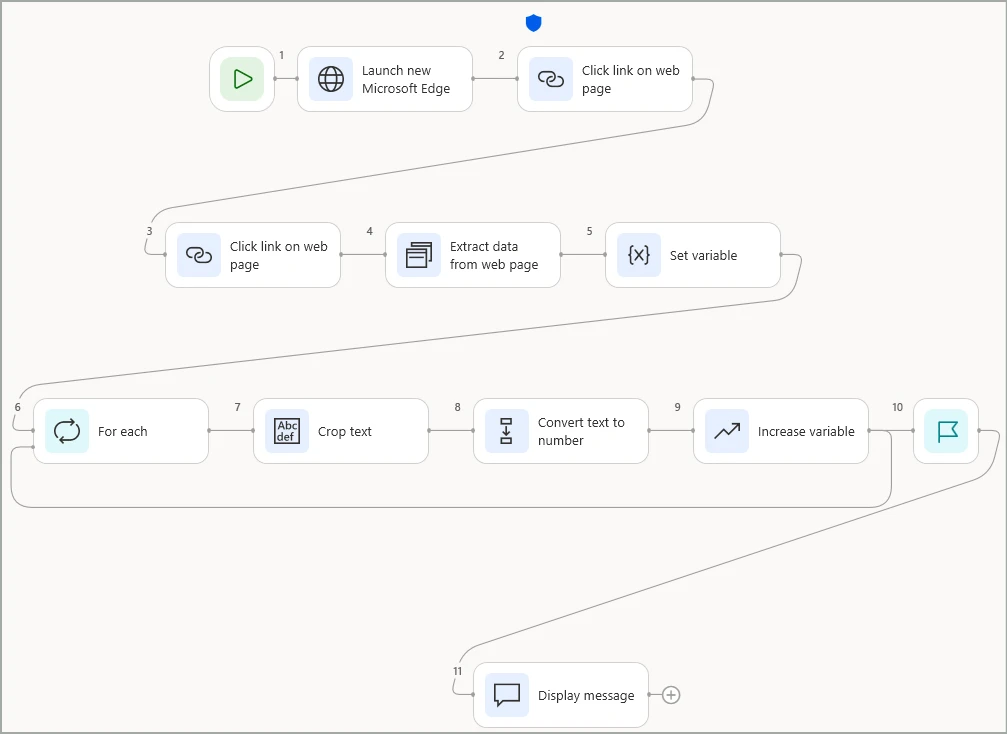
Flowchart mode introduces a visual canvas for authoring desktop flows, representing actions as nodes and execution paths as connecting edges. The new layout makes branches, loops, and other complex logic easier to understand, while allowing makers to create a flow directly in flowchart mode or switch an existing flow between flowchart and sequence views.
Makers can add actions directly on nodes or between connected nodes, configure conditional and loop structures through dedicated visual layouts, and navigate larger automations with pan, zoom, a minimap, and layout controls. During debugging, executed nodes and traversed paths are highlighted, status indicators show successful or failed actions, and the errors pane can take makers directly to the node that needs attention.
Managed platform
Public preview: The new Power Platform admin plugin in Cowork brings agentic governance directly into admins’ daily flow of work

The Power Platform admin plugin in Cowork (preview) is now available, bringing agentic governance directly into the admin flow of work. Admins can ask natural-language questions and get tenant-grounded insights across environments, ownership, policy impact, and overall governance posture without switching across multiple tools.
This helps teams move faster from investigation to action by quickly identifying high-priority risks, understanding where governance gaps exist, and planning remediation with clearer context. It’s an early but important step toward agent-first administration, where governance tasks become simpler, more proactive, and easier to operationalize at scale.
Public preview: Route Power Platform monitor alert notifications to any connector backed destination

An alert is only valuable if it reaches the people who can act on it. With the new “when an alert fires” trigger in the Power Platform for admins v2 connector, you can route Power Platform monitor alert notifications to any connector-backed destination. This brings important signals directly into the tools and workflows your teams already use. Send high-severity alerts to your operations team’s Microsoft Teams channel and automatically create Azure DevOps work items for medium and low-severity alerts, all within a single flow. By connecting alerts to your existing response processes, you can reduce manual handoffs, spend less time checking multiple tools, and help teams move from detection to action faster.
Public preview: Take your monitor metrics further via data export

Your monitoring insights shouldn’t be limited to the last 30 days, or to the admin center. Export Power Platform monitor metrics through an API and retain them in your own storage beyond monitor’s 30-day retention window, building historical dashboards that reveal long-term trends. Combine those metrics with custom business and operational data you collect to uncover patterns, add context, and create dashboards tailored to the questions that matter most to your organization. With data exported in OpenTelemetry format, you can bring monitor insights into analytics tools such as Azure Data Explorer, Splunk, and Datadog. Share the resulting dashboards with non-admin teammates who don’t have access to the Power Platform admin center, giving more people the visibility they need to make informed decisions, in the tools they already use.
Learning updates
Training paths and labs
New
- Apply client-side logic in model-driven Power Apps
- Build automation and agent integrations
- Build Dataverse experiences with Power Apps code apps
- Build professional Power Apps experiences
- Build reusable controls with Power Apps component framework
- Connect external APIs with Power Platform custom connectors
- Connect Power Apps code apps to platform services
- Consume Dataverse MCP servers from MCP clients
- Deliver Power Platform solutions through governed ALM
- Deploy and operate secure Power Apps code apps
- Design and deliver secure Power Platform solutions
- Design extensible Microsoft Power Platform solution components
- Diagnose advanced Microsoft Dataverse API failures
- Evaluate Microsoft Power Platform solution implementation options
- Extend Dataverse with code and Azure compute
- Get started with Microsoft Power Platform development
- Harden Dataverse extensions for production workloads
- Implement business logic with Microsoft Dataverse plug-ins
- Implement resilient Power Automate cloud-flow logic
- Integrate custom agents with Microsoft Power Platform
- Integrate Dataverse with services and external data
- Perform reliable operations with Microsoft Dataverse APIs
- Process Power Platform workloads with Azure Functions
- Publish Microsoft Dataverse events to external services
- Synchronize external data reliably with Microsoft Dataverse
Updated
- Customize a canvas app in Power Apps
- Integrate agents with enterprise systems in Microsoft Copilot Studio (GitHub Copilot)
- Integrate Dataverse Azure solutions
- Introduction and prerequisites for Power Pages – Online workshop
- Power Pages workspace site design – Online workshop
Power Apps maker
New
- Add filtered view security to record ownership tables
- Business Applications in Work IQ
- Filtered record ownership
- Attachments modern control in canvas apps (preview) – Power Apps
- Build canvas apps with the authoring agent in Power Apps canvas studio (preview)
- FAQ about finding data in a view with AI
- FAQ about row summaries in model-driven apps
- Migrate apps created from Power Apps Vibe
- Persona Modern Control in Canvas Apps: Properties and Examples
- Reveal a masked Dataverse column value
- Use the pop-out formula bar in canvas apps
Updated
- About table relationships for Microsoft Dataverse
- Add a Copilot control to a canvas app (preview)
- Add a custom Copilot to a canvas app
- Add agents to your model-driven app
- Add Copilot chat for app users in model-driven apps
- Add Microsoft 365 Copilot chat for app users in canvas apps (preview)
- Add Microsoft 365 Copilot for app users in model-driven apps
- Add reporting features to your model-driven app
- Add the rich text editor control to a model-driven app with Power Apps
- Azure Synapse Link Advance Configuration
- Badge Modern Control in Canvas Apps: Properties and Examples
- Build and edit model-driven apps with AI code generation tools
- Business skills overview
- Column data types in Microsoft Dataverse
- Configure your environment and link to Microsoft Fabric
- Connect to Dataverse with model context protocol (MCP)
- Copilot answer modern control in Power Apps
- Create a custom table that has components with Power Apps
- Create a relationship between tables by using a lookup column
- Create and edit 1:N (one-to-many) or N:1 (many-to-one) table relationships using solution explorer
- Create and edit elastic tables
- Create and edit generative pages with AI code generation tools
- Create and edit One-to-many or Many-to-one table relationships using Power Apps portal
- Create and edit tables using Power Apps
- Create and use business skills
- Customize Copilot chat in model-driven apps
- Customize Microsoft 365 Copilot in Power Apps
- Customize Microsoft Copilot in Power Apps (preview)
- Dataverse data in Microsoft Copilot
- Dataverse semantic model frequently asked questions (preview)
- Display custom icons alongside values in list views with Power Apps
- Enable your app and custom tools in Microsoft Copilot
- FAQ for Power Apps in agents
- Fine-tune semantic model signals (preview)
- Generate a page using natural language with model-driven apps in Power Apps
- Generate MCP App widgets with AI code generation tools
- Improve copilot responses from Microsoft Dataverse
- Manage model-driven app settings in the Power Apps app designer
- Overview of Copilot answer control for canvas apps
- Overview of Dataverse semantic model (preview)
- Overview of the model-driven app designer
- Prompt columns in Microsoft Dataverse
- RDL sandboxing
- Recent modern control updates in canvas apps – Power Apps
- Share a canvas app with your organization
- Steps to building a model-driven app
- Types of tables
- Use managed identities for Azure with your Azure data lake storage
- What is Dataverse intelligence?
- Access data in SQL Server
- Add agents to your model-driven app
- Add and configure controls in canvas apps
- Add filtered view security to record ownership tables
- Attachments control in Power Apps
- Azure Synapse Link for Dataverse
- Build an app in Teams using Power Apps and Dataverse for Teams to retrieve Power Platform videos for readiness
- Build and edit model-driven apps with AI code generation tools
- Business Applications in Work IQ
- Change release channels for model-driven apps
- Comparing Microsoft Lists, Dataverse for Teams, and Dataverse
- Configure a row summary for a model-driven app
- Configure your environment and link to Microsoft Fabric
- Connect to Microsoft Dataverse
- Connect to SharePoint from a canvas app
- Connect to SQL Server from Power Apps overview
- Create a dependent drop-down list in a canvas app
- Create a table in Teams
- Create an Azure Synapse Link for Dataverse with Azure Data Lake in Power Apps
- Create an Azure Synapse Link for Dataverse with your Azure Synapse Workspace
- Create and configure model-driven app interactive experience dashboards
- Create and edit generative pages with AI code generation tools
- Create apps in Microsoft Teams by using Power Apps
- Create or edit a model-driven app system chart in Power Apps
- Create or edit model-driven app dashboards
- Create your first app in Teams
- Data Grid modern control in canvas apps – Power Apps
- Data types and sizes for Access data migration to Dataverse
- Dataverse for Teams environment language
- Dataverse for Teams vs. Dataverse
- Delete or edit a table in Dataverse for Teams
- Display custom icons alongside values in list views with Power Apps
- Edit table data in Excel and publish it back to Dataverse for Teams
- Enable consistent experience across sessions using LoadData and SaveData functions.
- Enable users to discuss ideas
- Export Microsoft Dataverse data in Delta Lake format
- FAQ about using AI responsibly in Power Apps
- FAQs for Dataverse for Teams
- Frequently asked questions when transitioning from legacy data integration services to Fabric link and Azure Synapse Link for Dataverse
- Get started with formulas in canvas apps
- Granting permission to tables in Dataverse for Microsoft Teams
- How to check license designation for an app
- How to export Ideas data for reporting
- Known issues and limitations for Dataverse for Teams
- Limitations of controls in canvas apps
- Microsoft Dataverse for Teams overview
- Migrate Microsoft Access data to Microsoft Dataverse
- Migrate Microsoft Access data to Microsoft Dataverse for Teams
- Modern controls and properties in canvas apps
- Move customizations between environments
- Overview of the Power Apps app in Microsoft Teams
- Performance considerations for Power Apps
- Power Apps and Microsoft Teams integration – Overview
- Prompt columns in Microsoft Dataverse
- Release channel for your model-driven app
- Responsible AI FAQ for Copilot in the timeline
- Set permission and share your app using Power Apps in Teams
- Share a canvas app with guest users
- Small data payloads in Power Apps
- System tables and columns in Dataverse and Dataverse for Teams
- Table relationships in Dataverse for Teams
- Troubleshooting common issues with link to Fabric with Microsoft Dataverse
- Understand data sources for canvas apps
- Understand delegation in a canvas app
- Understand Power Apps Studio in Dataverse for a Teams environment
- Understand Power Apps Studio: Components and Features
- Use data source environment variables in canvas apps
- Use environment variables frequently asked questions
- Use environment variables in Power Platform solutions
- Use Find and Replace in the formula bar
- Use managed identities for Azure with your Azure data lake storage
- View Dataverse for Teams table data in Power BI Desktop (preview)
- Work with Dataverse for Teams formula table columns
- Work with Dataverse for Teams table columns
Power Apps user and mobile
New
Updated
- AI features overview
- Mobile offline for model-driven apps overview
- Modern, refreshed look for model-driven apps
- Use Copilot chat in model-driven apps
- Use Microsoft Copilot in canvas apps (preview)
- Use Microsoft Copilot in model-driven apps
- Use the lookup column on a row
- View, compose and respond to email
- What is Dataverse search?
- Work with model-driven apps offline (classic mode)
- Advanced find
- Modern, refreshed look for model-driven apps
- Quickstart: Your first Power Apps native app
- Set personal options in model-driven apps
- View, compose and respond to email
- What is Dataverse search?
Power Automate
New
- Create Desktop Flow Templates in Power Automate
- Get started with the Power Automate plugin for GitHub Copilot CLI and Claude Code
- Schedule desktop flows with Scheduled triggers (preview)
- Use flowchart mode in Power Automate for desktop (preview)
Updated
- Associate flows with apps
- Automate webpages
- Billing and metering questions
- Change the owner of a cloud flow in Power Automate
- Common ways to use a form in a flow
- Create a cloud flow in a solution
- Create a cloud flow in Power Automate
- Create your first cloud flow using Copilot
- Explore the Power Automate home page
- HTTP actions reference
- Operator role for Power Automate
- Restore deleted flows in Power Automate
- Run a cloud flow on a schedule in Power Automate
- Sign up and sign in
- Trigger a cloud flow based on email properties in Power Automate
- Triggers
- Understand platform limits and avoid throttling
- Use expressions in conditions in Power Automate
- Use lists of rows in flows
- Create an actionable message in Power Automate
- Export and import a non-solution flow
- Install Power Automate browser extensions
- Power Fx in desktop flows
- Power Platform actions
- Power Platform templates for process mining
- Store and manage values in variables in Power Automate
- Trigger flows with actions
- Troubleshoot a cloud flow
Power Pages
New
- Client API control types (preview)
- Client API Controls Reference (Preview)
- Client API for Copilot Studio Agents (Preview)
- Client API Forms, Tabs, and Sections (Preview)
- Client API Initialization (Preview)
- Client API Languages: Get and Set Website Languages (Preview)
- Client API Lists for Rows, Columns, Cells, and Events (Preview)
- Client API Server Endpoints and Cloud Flows (Preview)
- Client API User Authentication Methods (Preview)
- Dataverse Records, Files, and Images Client API (Preview)
- Power Pages Client API Examples (Preview)
- Power Pages Client APIs Overview (Preview)
- Transfer ownership of a Power Pages site
- Power Pages Application Lifecycle Management (ALM) white paper
Updated
- Access user and website details with server objects
- Add geolocation
- Add lists
- FAQs about using OpenID Connect in Power Pages
- List configuration
- Lists overview
- Migrate standard data model sites to enhanced data model
- Roles required for Power Pages administration
- Set up an OpenID Connect provider
- Set up an OpenID Connect provider with Microsoft Entra ID
- Tutorial: How to add a rich text component to a form
- Add AI-generated code using Copilot (preview)
- Client API control types
- Client API Controls Reference
- Client API for Copilot Studio Agents
- Client API Forms, Tabs, and Sections
- Client API Initialization
- Client API Languages: Get and Set Website Languages
- Client API Lists for Rows, Columns, Cells, and Events
- Client API Server Endpoints and Cloud Flows
- Client API User Authentication Methods
- Configure non-production Power Pages site visibility
- Copresence in Power Pages
- Dataverse Records, Files, and Images Client API
- FAQ for AI-generated code using Copilot
- Get started with the Power Pages plugin for GitHub Copilot CLI and Claude Code
- Important upcoming changes and deprecations in Power Pages
- Migrate standard data model sites to enhanced data model
- Overview of the Power Pages portals Web API
- Power Pages Client API Examples
- Power Pages Client APIs Overview
- Power Pages white papers
- Roles required for Power Pages administration
- Site visibility in Power Pages
- Transfer ownership of a Power Pages site
- Use governance controls to disable anonymous access
- Use governance controls to disable external service calls
- Use governance controls to manage site authentication
Power Platform administration
New
- Add users without licenses to activity recipient fields (preview)
- Agentic Support FAQ for Power Platform Admin Center
- Business Applications in Work IQ administration overview (preview)
- Configure maker guidelines for Copilot Studio (preview)
- Default settings
- Environment routing for Microsoft Copilot Managed Runtime
- Filter-based security in Microsoft Dataverse (preview)
- Manage AI experience access to Business Applications in Work IQ (preview)
- Manage data with governance policies in Dataverse
- Manage participation in Business Applications in Work IQ (preview)
- Monitor Power Automate usage and find flow group candidates
- Quickstart: Set up Business Applications in Work IQ for a pilot (preview)
- Review user, agent, and application access for Business Applications in Work IQ (preview)
- Secure intelligent document processing with Azure Virtual Network support
- Set up OAuth 2.0 authentication for the SAP OData connector (preview)
- Understand costs for Business Applications in Work IQ (preview)
- Agentic governance with Power Platform Admin in Cowork
- Agentic Support FAQ for Power Platform Admin Center
- Build a student recruitment solution with Power Platform
- Configure knowledge sources for agents (preview)
- Configure skills in the Power Platform admin center
- Data export migration: Power Platform inventory API field mapping
- Dataverse.Unmask function
- Filter-based security in Microsoft Dataverse (preview)
- Governance prompt library for Power Platform Admin in Cowork
- Implement the Transactional Outbox pattern with Dataverse
- Manage costs for agents powered by the Customer Conversation harness
- Modernize employee HR support with a multi-agent solution
- Modernize frontline applications with Power Platform
- Modernize legacy applications with React web resources and Dataverse custom APIs
- Power Platform Admin in Cowork (preview)
- Turn governance answers into reports and automations
- View information about plugin steps
Updated
- Admin deployment page
- Back up and restore environments
- Block unmanaged customizations in Dataverse environments
- Column-level security
- Connect Microsoft Power Platform and SAP
- Create alerts for your resources
- Create Entra agent users (preview)
- Create users
- Dataverse capacity-based storage details
- Dataverse capacity-based storage overview
- Deep dive on specific licenses
- Enable maker welcome content
- Environment routing
- Extend Dataverse capacity for 45 days
- Get support in the Power Platform admin center
- Issues and FAQs about pay-as-you-go plans
- Manage advanced connector policies programmatically
- Manage Copilot Credits and capacity for Copilot Studio
- Manage feature settings
- Microsoft Azure Virtual Network support
- Microsoft Dataverse reference architectures and solution ideas
- Move data across regions for Copilots, AI agents, and generative AI features
- Overview of pipelines in Power Platform
- Overview of Power Platform and Copilot Studio reference architectures
- Ownership-based security in Microsoft Dataverse
- Pay-as-you-go meters
- Power Automate licensing FAQ
- Power Automate reference architectures and solution ideas
- Power Platform and Dynamics 365 macro region geography
- Power Platform inventory
- Power Platform inventory API
- Power Platform inventory schema reference
- Programmability and extensibility
- Programmability and extensibility – What’s new or changed
- Requests limits and allocations
- Restore deleted Microsoft Dataverse table records
- Role-based access control for Power Platform admin center (preview)
- Rules for environment groups
- Storage management in Dataverse and finance and operations apps
- Tutorial: Copy a Lifecycle Services environment to a unified environment
- Tutorial: Provision a new environment with an ERP-based template
- Types of Power Automate add-ons
- Types of Power Automate licenses
- View and manage on-premises data gateways
- What’s new in the Power Platform and Copilot Studio Architecture Center
- When premium flows are subject to license enforcement
- About the Microsoft Dataverse for Teams environment
- About trial environments: standard and subscription-based
- Access audit data with Azure Synapse Link and Power BI
- Add users without licenses to activity recipient fields (preview)
- Allow external language models for generative responses
- Automatic deletion of Power Platform environments
- Back up and restore environments
- Control environment creation and management
- Copilot Studio reference architectures and solution ideas
- Create and manage environments in the Power Platform admin center
- Create and manage masking rules
- Create pipelines using the platform host
- Create users
- Data storage and governance in Power Platform
- Dataverse capacity-based storage details
- Dataverse for Teams environment management
- Deep dive on specific licenses
- Default settings (preview)
- Develop a tenant environment strategy to adopt Power Platform at scale
- Enable maker welcome content
- Environment capacity management & alerting
- Environment routing
- Environment routing for Microsoft Copilot Managed Runtime
- Establish governance policies to manage Microsoft Dataverse for Teams environments
- Establish tenant hygiene with the CoE Starter Kit
- Formula reference – canvas apps
- General availability deployment
- Get early access to upcoming updates
- Implement reactive governance controls
- Important changes (deprecations) coming in Power Platform
- Licensing overview for Microsoft Power Platform
- Manage advanced connector policies programmatically
- Manage application users in the Power Platform admin center
- Manage Copilot Credits and capacity for Copilot Studio
- Manage costs for agents powered by the GitHub Copilot harness
- Manage Dataverse auditing
- Manage feature settings
- Manage service updates for unified environments
- Managed environments overview
- Metrics and recommendations for Copilot Studio
- Microsoft Azure Virtual Network support
- Microsoft Dataverse reference architectures and solution ideas
- Migrate default and Dataverse for Teams environments
- Move data across regions for Copilots, AI agents, and generative AI features
- Organize your solutions in Power Platform
- Overview of Power Platform and Copilot Studio reference architectures
- Ownership-based security in Microsoft Dataverse
- Pay-as-you-go meters
- Power Apps licensing FAQs
- Power Apps reference architectures and solution ideas
- Power Automate reference architectures and solution ideas
- Power Platform and Dynamics 365 macro region geography
- Power Platform environments overview
- Power Platform governance overview and strategy
- Power Platform licensing FAQs
- Programmability and extensibility – What’s new or changed
- Requests limits and allocations
- Restore deleted Microsoft Dataverse table records
- Role-based access control for Power Platform admin center (preview)
- Rules for environment groups
- Set up Dataverse for Teams environment management
- Set up Innovation Backlog components
- Set up self-service analytics to export inventory and usage data (preview)
- Special system users and application users
- Tenant-to-tenant migrations
- Tutorial: Assign roles to service principals (preview)
- Tutorial: Install the Finance and Operations Provisioning app
- Understand agent counts across admin surfaces
- View and manage on-premises data gateways
- View known issues
- View Power Pages activity logs in Microsoft Purview
- What’s new in Microsoft Power Platform guidance
- What’s new in the Power Platform and Copilot Studio Architecture Center
Power Platform developer
New
- Ask Questions Using a Dataverse Semantic model (Preview)
- Filtered record ownership with code (preview)
- Get Started with the Dataverse Ask APIs (Preview)
- Manage Dataverse semantic models (Preview)
- Use Dataverse Ask APIs for Natural-Language Questions (Preview)
- Connector methods for generative pages
- Dataverse action and function methods for generative pages
- Dataverse table methods for generative pages
- Debug JavaScript Web Resources with Local Overrides
- Page methods for generative pages
Updated
- Asynchronous client operations
- Code Apps System Configuration
- Community Tools for Microsoft Dataverse
- Configure the behavior and format of the date and time column using code (Microsoft Dataverse)
- Getting started
- How to: Connect Your Code App to Data
- How to: Get context data
- Logging and tracing (Microsoft Dataverse)
- Power Apps CLI Command Reference
- Power Apps CLI environment variables
- Power Apps Code Apps: Features and Requirements
- Query data
- Quick guide to Dataverse
- Use metadata to customize tables and columns
- Work with Dataverse Data Using Python SDK
- Workflow to write, deploy, debug, and troubleshoot X++ code across multiple environments
- Create a Developer Environment with the Power Apps Developer Plan
- Creating side panes by using a client API in model-driven apps
- dataApi reference for generative pages
- Dataverse table/entity reference
- How to: Connect Your Code App to Data
- How to: Get context data
- Impersonate another user (Microsoft Dataverse)
- Microsoft Dataverse Auditing Overview for Developers
- Navigate to and from a generative page using client API
- Page Results Using FetchXml
- Page Results Using OData From Microsoft Dataverse Web API
- Perform Conditional Operations Using the Dataverse Web API
- Perform operations using the Web API (Microsoft Dataverse)
- Power Apps CLI Command Reference
- Power Apps CLI environment variables
- Power Apps Developer Plan Guide: Features and Benefits
- Restore Deleted Records with Code
- Search Dataverse Records with the Query API
- Style components with modern theming
- Use Choices Columns to Store Multiple Selected Options
- Use Image Column Data in Microsoft Dataverse
- Use Insomnia with Dataverse Web API
- Use metadata to customize tables and columns
- Work with data using code in Microsoft Dataverse (PowerApps)
- Work with Table Definitions in Microsoft Dataverse
- Write your first client script in model-driven apps
Power Platform connectors
Updated
- Connectors architecture
- Create a custom connector from scratch
- Custom connector frequently asked questions for Copilot Studio, Azure Logic Apps, Power Automate, and Power Apps.
- Prepare Copilot Studio and Power Platform connector files for certification
- Use a webhook as a trigger for Azure Logic Apps and Power Automate
- Use custom code in a custom connector
- Create a custom connector from a Postman collection
- Create a custom connector from an OpenAPI definition
- Create a custom connector from scratch
AI Builder
Updated
The post What’s new in Power Platform: October/November 2026 feature update appeared first on Microsoft Power Platform Blog.