A Unified Control Center for Queue Monitoring and SLA Tracking
Work queues in Power Automate are structured lists that let you assign, track, and manage work items across users or automations in an organized, scalable way.
We’re excited to announce powerful new enhancements to work queues in the automation center that will transform how your teams manage and monitor automated workflows. With the introduction of work queue alerts and the new aggregated operator view, we’re giving businesses unprecedented visibility and control over their automation operations.
What’s New
Work Queue Alerts for Admin in Monitoring Hub
With monitoring in the Power Platform Admin Center (PPAC), you can track the health and the performance of your automation queues. View real-time metrics on items pending action, exceptions requiring resolution, and queue status to maintain visibility across your automation operations.
Now, you can also configure proactive alerts to notify you when SLA violation counts exceed thresholds defined by your organization’s administrator. Receive timely notifications when queues require attention, ensuring you can respond before service level agreements are compromised.
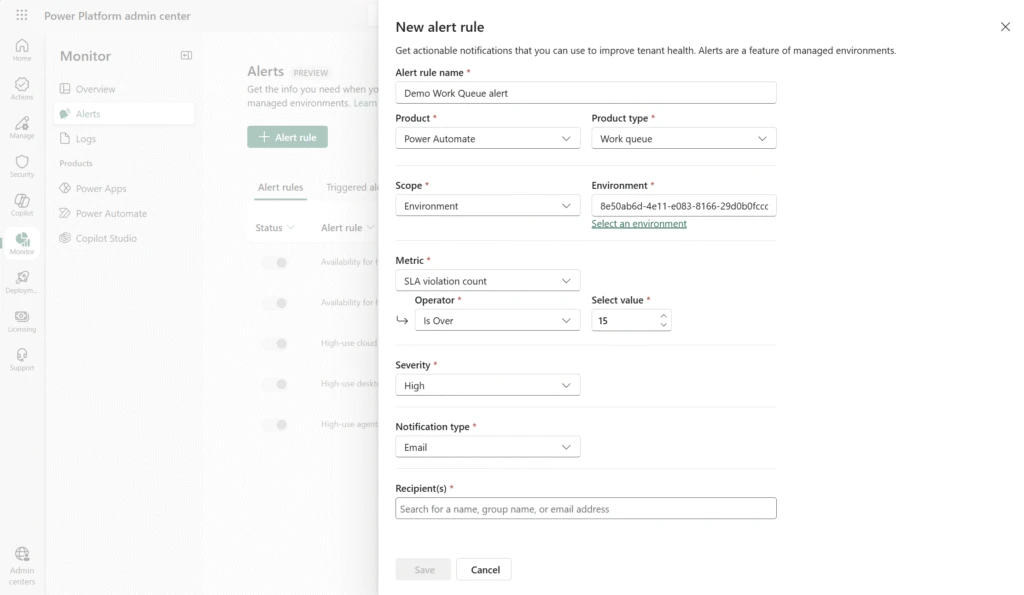
With SLA violation alerts, you can stay informed and responsive with notifications about your automation queues. No more manual monitoring; the system comes to you.
Aggregated View for Operators in Automation Center
Operators now have a unified, comprehensive dashboard in the automation center that aggregates work queue data across your entire automation estate.
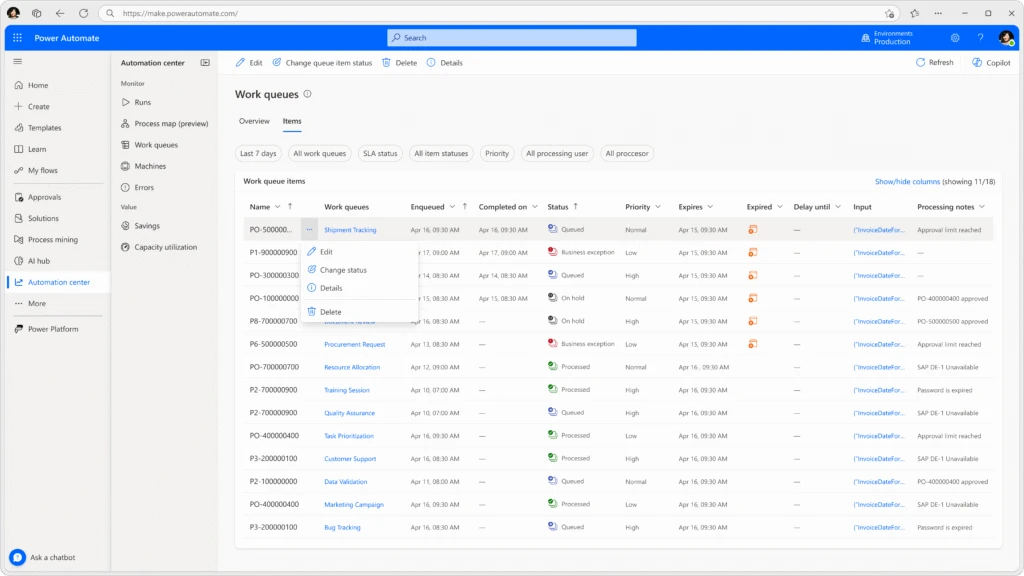
This consolidated view enables operators to monitor multiple queues simultaneously, prioritize work effectively, and respond to issues faster than ever before.
Top 5 benefits of using Work Queues in Power Automate
- Increased efficiency & scalability – Work queues allow you to decouple complex processes, enabling different parts of an automation to run asynchronously and independently.
- Better resource utilization – Because work items are stored centrally, you can optimize robot usage, balance load, and reduce the number of machines required.
- Consistent prioritization of work – Work queues natively support priority-based execution, making sure the most important items are processed first.
- Centralized monitoring & exception handling – Work queues provide a human‑in‑the‑loop monitoring experience, helping fusion teams track the status of items, manage exceptions, and take corrective actions.
- Improved resiliency & fault tolerance – By decoupling work and allowing multiple robots to process items in parallel, work queues offer better fault isolation.
Transform Your Automation Operations Today
These enhancements represent our commitment to making automation not just powerful, but manageable at enterprise scale. Work queues with alerts and aggregated operator views give your teams the tools they need to run automation operations with confidence, efficiency, and complete control.
Ready to experience these capabilities? navigate to the automation center in Power Automate and discover how work queues can elevate your automation program from task execution to strategic business operations.
The post New enhancements to work queues that will transform how your teams manage and monitor automated workflows. appeared first on Microsoft Power Platform Blog.
Related Posts
 Change owner of a solution flow
 SharePoint and the Workflow Conundrum
 Introducing the section backgrounds in SharePoint Pages and News
 August 2023 update of Power Automate for desktop
 What's new for SharePoint Server Subscription Edition – March 2023
 Get the most out of Office 365 ATP in the shift to remote work