

The next frontier in enterprise intelligent automations with Microsoft Power Automate
The latest AI experiences in Power Automate are redefining the boundaries of what is possible in enterprise automation—transforming how we optimize and manage business processes to achieve more. Developers can now create advanced automation faster, business...

NOW ON DEMAND: “Create and share Copilot agents in SharePoint in a few clicks”
The "Create and share Copilot agents in SharePoint in a few clicks" is our latest 'Meet the Makers' webinar is just around the corner. This is a great opportunity to learn more from our primary product maker lead, CJ Tan. Karuana Gatimu interviews CJ to uncover more...
Webinar reminder: “Create and share Copilot agents in SharePoint in a few clicks” [Oct. 16, 8am PDT]
The "Create and share Copilot agents in SharePoint in a few clicks" is our latest 'Meet the Makers' webinar is just around the corner. This is a great opportunity to learn more from our primary product maker lead, CJ Tan. Karuana Gatimu interviews CJ to uncover more...
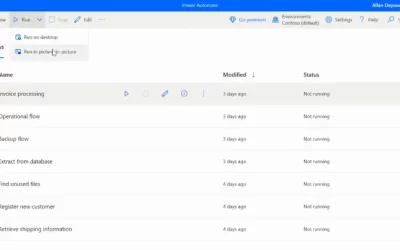
Work and automate simultaneously with picture-in-picture in Power Automate
Traditionally, attended automation takes over users’ mouse, keyboard, and screen, halting their current activity. Picture-in-Picture in Power Automate for desktop lets you run attended desktop flows within a virtual window that mirrors your desktop. It allows...

Managing your organization's brand with the SharePoint brand center
The SharePoint brand center introduces a central location for your organization to manage and create brand assets for Microsoft 365. The new Brand center brings together the power of your organization asset libraries and your organization's brand assets to create and...

Using site templates for SharePoint in Microsoft 365
SharePoint site templates come in all shapes and sizes, save time and address numerous scenarios, and provide an opportunity to programmatically adhere to your organization’s preferred custom site creation policies. Using a template when creating SharePoint sites...

Introducing the new SharePoint start experience
We are excited to introduce the new SharePoint start experience to make it easy for authors to create personal pages or publish ones to target SharePoint sites. This feature is in a preview phase to collect initial feedback and enhance the final product....

Improvements to the title area at the top of SharePoint Pages and News
We are thrilled to announce that authors will now have the option to remove the title area, which is no longer mandatory at the top of a page. This title area is being rebranded as a Banner web part with new layouts, allowing you to add one or more banners to any...
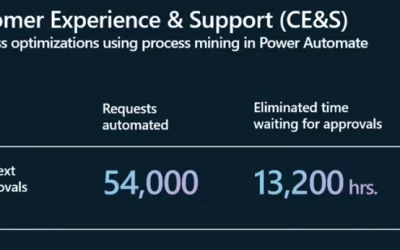
Elevating Efficiency: How Microsoft Customer Experience & Success streamlines operations with process mining in Power Automate
In an earlier blog, we showed you how the Microsoft Customer and Partner Solutions (MCAPS) organization is optimizing internal processes using Copilot for automation and process mining in Microsoft Power Automate. In this blog, we explore how another Microsoft...