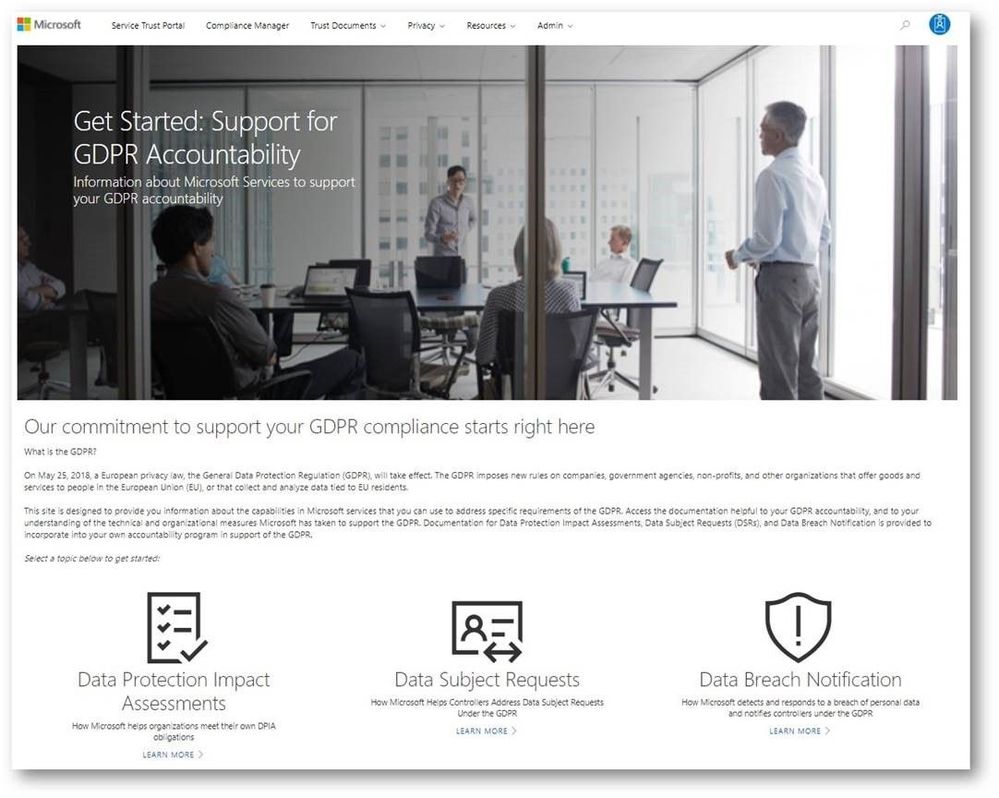
While the GDPR poses new challenges for organizations working to support the privacy rights of individuals, it also encourages companies to become more accountable for developing and leveraging innovative technology to protect personal and sensitive information. Given the sheer volume of available resources across Microsoft’s many platforms and services, it can be challenging to find the right resources to support GDPR. To address these challenges, we’ve enhanced the Service Trust Portal (STP), to centralize resources to help you with your needs around data protection, compliance, and privacy, and of course, the GDPR.
The STP continues to include independent third-party audit reports, such as FedRAMP, ISO, and SOC reports, in-depth information such as whitepapers, security assessment reports, and data protection guides. In February this year, we released a new tool on the STP called Compliance Manager, which helps organizations to manage compliance activities and perform risk assessments on Microsoft Cloud services.
To help you navigate the collection of GDPR resources, we’re publicly previewing a new Privacy area on the STP which provides you with guidance on how Microsoft services will support you in the event of a personal data breach, and with tools and technical documents to help you respond to data subject requests. You can find more details about each scenario below:
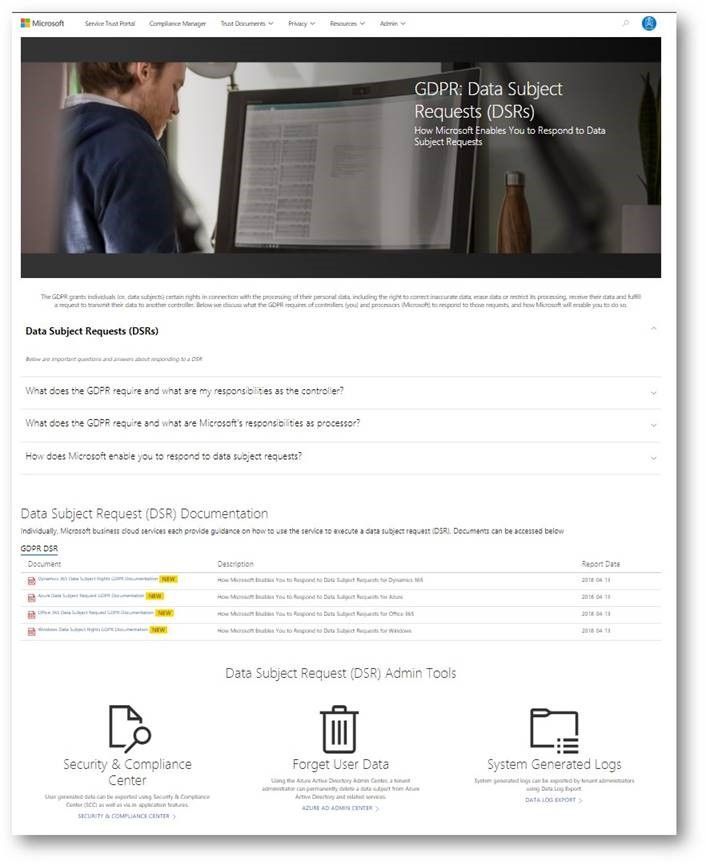
Data subject requests resources
The GPDR provides data subjects with increased rights to control their personal data, including the ability to obtain a copy of their personal data and to have their personal data erased from data systems used by a data controller.
The new data subject requests (DSR) section in STP centralizes all the DSRs resources, and provides you with tools and guidance that you can leverage to locate, export, and erase data across Microsoft’s Cloud services.
Breach notification resources
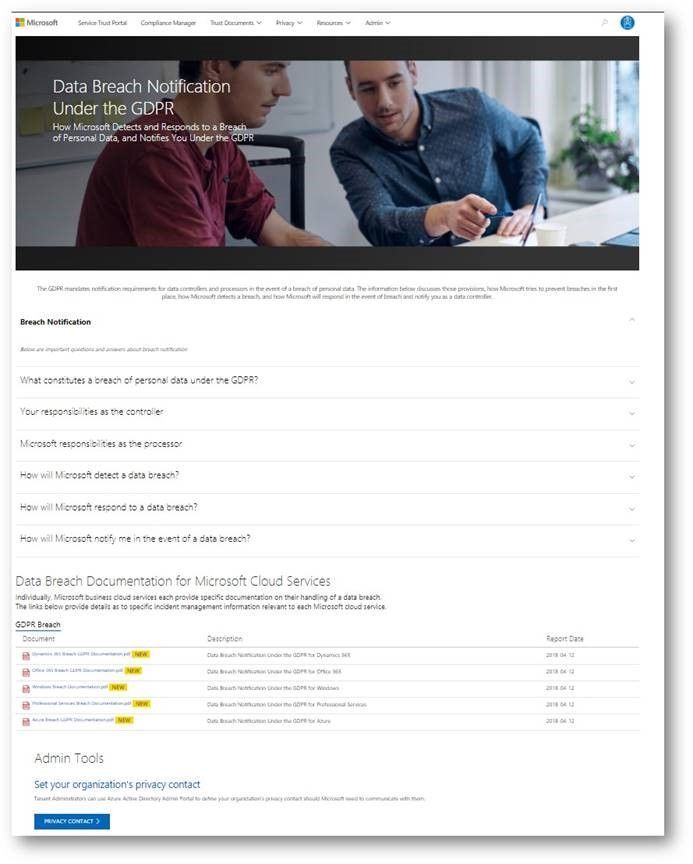
The GDPR imposes specific requirements around breach notification. After becoming aware of a breach of personal data that puts individuals at risk, data controllers must notify the supervisory authority and data subjects without undue delay. These requirements are similar to other regulations, such as the Health Insurance Portability and Accountability Act (HIPAA).
The data breach notification section of the new Privacy area describes how Microsoft services support your personal data breach obligations, and which tools to use to make sure Microsoft can reach to appropriate people in your organization without delay.
Data Protection Impact Assessments documents
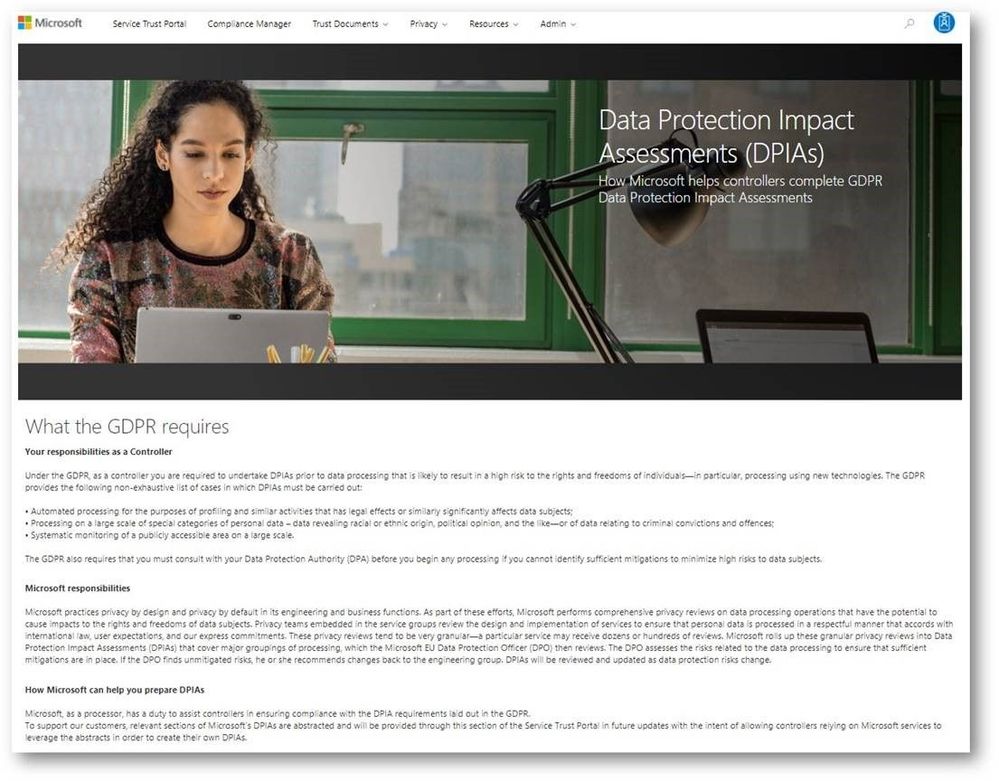
A critical part of GDPR preparedness involves creating Data Protection Impact Assessments (DPIAs) of data processing activities that are likely to result in high risk to the rights and freedoms of individuals.
Coming soon, the data protection impact assessments (DPIAs) section will provide organizations with information you need to create your own DPIAs as a data controller. We will share DPIA-related information for specific Microsoft Cloud services in the next few weeks.
Compliance Manager updates
In addition to the new sections we introduced above, we highly recommend that organizations manage their GDPR compliance activities using Compliance Manager, which provides you with a holistic assessment and built-in tools for end-to-end GDPR compliance management, mapping the GDPR obligations to operational and technical controls used by Microsoft services to support GDPR compliance. You can use Compliance Manager and the information it provides to enhance your accountability and compliance programs.
In addition, we just released the updated version of the GDPR Detailed Assessment, a question-driven assessment tool for preparing for the GDPR. It now integrates with Compliance Manager, directing organizations to specific controls in Compliance Manager and providing guidance for every GDPR scenario in the assessment questionnaire. The updated GDPR Detailed Assessment toolkit can be downloaded here.
Check out the new GDPR and privacy-related resources we’ve introduced today on Service Trust Portal, which is available publicly but requires you to log in using your Microsoft subscription accounts (Azure, Dynamics 365, or Office 365 account, etc.) to access restricted documents like audit reports and tools like Compliance Manager.
While the GDPR poses new challenges for organizations working to support the privacy rights of individuals, it also encourages companies to become more accountable for developing and leveraging innovative technology to protect personal and sensitive information. Given the sheer volume of available resources across Microsoft’s many platforms and services, it can be challenging to find the right resources to support GDPR. To address these challenges, we’ve enhanced the Service Trust Portal (STP), to centralize resources to help you with your needs around data protection, compliance, and privacy, and of course, the GDPR.
The STP continues to include independent third-party audit reports, such as FedRAMP, ISO, and SOC reports, in-depth information such as whitepapers, security assessment reports, and data protection guides. In February this year, we released a new tool on the STP called Compliance Manager, which helps organizations to manage compliance activities and perform risk assessments on Microsoft Cloud services.
To help you navigate the collection of GDPR resources, we’re publicly previewing a new Privacy area on the STP which provides you with guidance on how Microsoft services will support you in the event of a personal data breach, and with tools and technical documents to help you respond to data subject requests. You can find more details about each scenario below:
Data subject requests resources
The GPDR provides data subjects with increased rights to control their personal data, including the ability to obtain a copy of their personal data and to have their personal data erased from data systems used by a data controller.
The new data subject requests (DSR) section in STP centralizes all the DSRs resources, and provides you with tools and guidance that you can leverage to locate, export, and erase data across Microsoft’s Cloud services.
Breach notification resources
The GDPR imposes specific requirements around breach notification. After becoming aware of a breach of personal data that puts individuals at risk, data controllers must notify the supervisory authority and data subjects without undue delay. These requirements are similar to other regulations, such as the Health Insurance Portability and Accountability Act (HIPAA).
The data breach notification section of the new Privacy area describes how Microsoft services support your personal data breach obligations, and which tools to use to make sure Microsoft can reach to appropriate people in your organization without delay.
Data Protection Impact Assessments documents
A critical part of GDPR preparedness involves creating Data Protection Impact Assessments (DPIAs) of data processing activities that are likely to result in high risk to the rights and freedoms of individuals.
Coming soon, the data protection impact assessments (DPIAs) section will provide organizations with information you need to create your own DPIAs as a data controller. We will share DPIA-related information for specific Microsoft Cloud services in the next few weeks.
Compliance Manager updates
In addition to the new sections we introduced above, we highly recommend that organizations manage their GDPR compliance activities using Compliance Manager, which provides you with a holistic assessment and built-in tools for end-to-end GDPR compliance management, mapping the GDPR obligations to operational and technical controls used by Microsoft services to support GDPR compliance. You can use Compliance Manager and the information it provides to enhance your accountability and compliance programs.
In addition, we just released the updated version of the GDPR Detailed Assessment, a question-driven assessment tool for preparing for the GDPR. It now integrates with Compliance Manager, directing organizations to specific controls in Compliance Manager and providing guidance for every GDPR scenario in the assessment questionnaire. The updated GDPR Detailed Assessment toolkit can be downloaded here.
Check out the new GDPR and privacy-related resources we’ve introduced today on Service Trust Portal, which is available publicly but requires you to log in using your Microsoft subscription accounts (Azure, Dynamics 365, or Office 365 account, etc.) to access restricted documents like audit reports and tools like Compliance Manager.
The threat landscape is continually evolving and in talking with organizations we hear about the many challenges you face in managing your security position to protect against these threats. From having too many security solutions with various places to configure lots of controls, a lack of knowledge around which controls are the most effective, and being unable to benchmark yourself against other organizations, we can understand why security teams are having trouble finding the right balance of security and productivity while staying on top of everything.
With Office 365 Secure Score we made this easier by helping you understand your security position, giving you advice on what controls you should consider enabling, and helping you understand how your score compared to other organizations. We saw a lot of interest around Secure Score and a common piece of feedback we heard was that it was great that we were doing this for Office 365 but what about the other Microsoft solutions? Over the past few months we have been working on this and today Office 365 Secure Score is now Microsoft Secure Score. Microsoft Secure Score builds on top of what was in Office 365 Secure Score and adds even more.
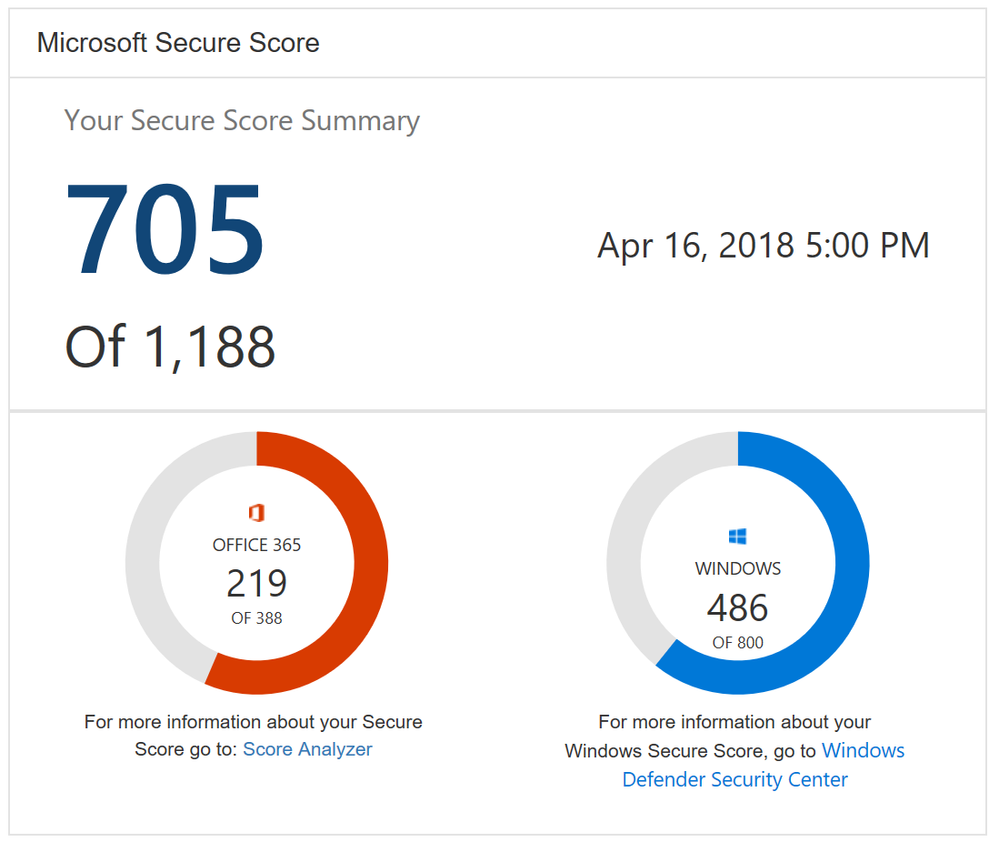
One new feature you will notice as soon as you log in is the new Microsoft score which is made up of your Office 365 Secure Score and your Windows Secure Score. The Windows score come from Windows Defender Advanced Threat Protection (ATP) which provides information about the status of your antivirus, OS security updates, firewall, and other controls. To get the details of your Windows score, you can click on the “Windows Defender Security Center” link below your Windows score to go directly to the dashboard in Windows Defender ATP.
Microsoft Secure Score Summary
Beyond adding Windows to Secure Score, we also now support Microsoft Intune. This surfaces though the existing mobile device management (MDM) controls. Previously we used the telemetry from the Office 365 MDM solution. However, we know that some of you are using Intune and were clicking on the Third Party button to give yourself points as you were meeting the spirit of these controls. This will no longer be necessary. If you are using Intune, we recommend that you remove the third party tag from these controls so they can be scored based on your Intune data.
Lastly, we heard from many organizations that they loved the compare your score section where we show how you benchmark against the Office 365 average score and the recently added Office 365 seat size average score. What they also wanted to see was a score based on organizations in the same industry. This new industry average is now rolling out and should be available to everyone by April 20th. Based on what industry you designate in the Service Assurance section of the Office 365 Security and Compliance Center we will show you the average score for that industry. Note that if you change your industry designation, the new average will not appear until your score is recalculated.
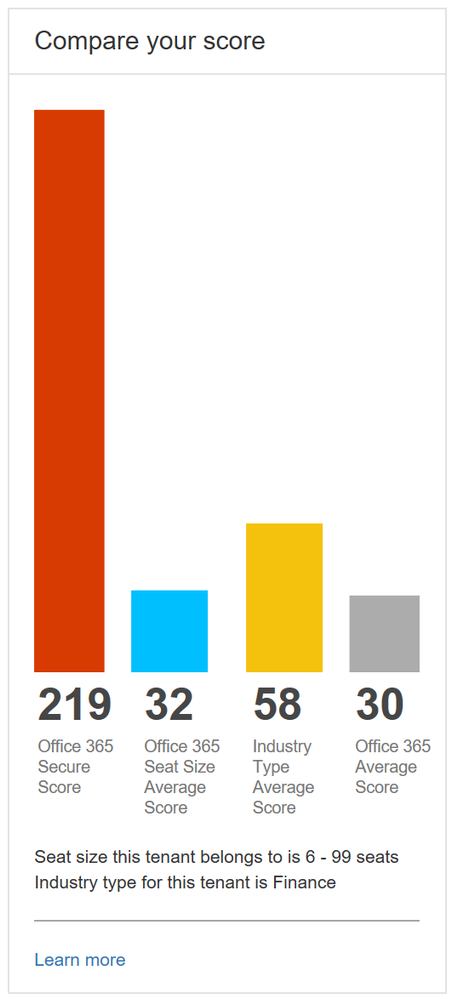
Industry average score to help you better benchmark your organization
This is just the first step in building out Microsoft Secure Score. Over the coming months we will continue to add new functionality and add additional solutions to provide you an even better experience.
To try out Microsoft Secure Score now you can go to https://securescore.microsoft.com and log in with your administrative credentials or click on the Secure Score widget on the Office 365 Security and Compliance Center home page. We also created a new Microsoft Mechanics video that can give you a quick overview of the solution if you have not used Secure Score before.
As always, the team loves the feedback and comments so feel free to leave them below. If you happen to be at the RSA conference in San Francisco this week swing by the Microsoft booth to say hi and check out the sessions we are running.
The threat landscape is continually evolving and in talking with organizations we hear about the many challenges you face in managing your security position to protect against these threats. From having too many security solutions with various places to configure lots of controls, a lack of knowledge around which controls are the most effective, and being unable to benchmark yourself against other organizations, we can understand why security teams are having trouble finding the right balance of security and productivity while staying on top of everything.
With Office 365 Secure Score we made this easier by helping you understand your security position, giving you advice on what controls you should consider enabling, and helping you understand how your score compared to other organizations. We saw a lot of interest around Secure Score and a common piece of feedback we heard was that it was great that we were doing this for Office 365 but what about the other Microsoft solutions? Over the past few months we have been working on this and today Office 365 Secure Score is now Microsoft Secure Score. Microsoft Secure Score builds on top of what was in Office 365 Secure Score and adds even more.
One new feature you will notice as soon as you log in is the new Microsoft score which is made up of your Office 365 Secure Score and your Windows Secure Score. The Windows score come from Windows Defender Advanced Threat Protection (ATP) which provides information about the status of your antivirus, OS security updates, firewall, and other controls. To get the details of your Windows score, you can click on the “Windows Defender Security Center” link below your Windows score to go directly to the dashboard in Windows Defender ATP.
Microsoft Secure Score Summary
Beyond adding Windows to Secure Score, we also now support Microsoft Intune. This surfaces though the existing mobile device management (MDM) controls. Previously we used the telemetry from the Office 365 MDM solution. However, we know that some of you are using Intune and were clicking on the Third Party button to give yourself points as you were meeting the spirit of these controls. This will no longer be necessary. If you are using Intune, we recommend that you remove the third party tag from these controls so they can be scored based on your Intune data.
Lastly, we heard from many organizations that they loved the compare your score section where we show how you benchmark against the Office 365 average score and the recently added Office 365 seat size average score. What they also wanted to see was a score based on organizations in the same industry. This new industry average is now rolling out and should be available to everyone by April 20th. Based on what industry you designate in the Service Assurance section of the Office 365 Security and Compliance Center we will show you the average score for that industry. Note that if you change your industry designation, the new average will not appear until your score is recalculated.
Industry average score to help you better benchmark your organization
This is just the first step in building out Microsoft Secure Score. Over the coming months we will continue to add new functionality and add additional solutions to provide you an even better experience.
To try out Microsoft Secure Score now you can go to https://securescore.microsoft.com and log in with your administrative credentials or click on the Secure Score widget on the Office 365 Security and Compliance Center home page. We also created a new Microsoft Mechanics video that can give you a quick overview of the solution if you have not used Secure Score before.
As always, the team loves the feedback and comments so feel free to leave them below. If you happen to be at the RSA conference in San Francisco this week swing by the Microsoft booth to say hi and check out the sessions we are running.
The threat landscape is continually evolving and in talking with organizations we hear about the many challenges you face in managing your security position to protect against these threats. From having too many security solutions with various places to configure lots of controls, a lack of knowledge around which controls are the most effective, and being unable to benchmark yourself against other organizations, we can understand why security teams are having trouble finding the right balance of security and productivity while staying on top of everything.
With Office 365 Secure Score we made this easier by helping you understand your security position, giving you advice on what controls you should consider enabling, and helping you understand how your score compared to other organizations. We saw a lot of interest around Secure Score and a common piece of feedback we heard was that it was great that we were doing this for Office 365 but what about the other Microsoft solutions? Over the past few months we have been working on this and today Office 365 Secure Score is now Microsoft Secure Score. Microsoft Secure Score builds on top of what was in Office 365 Secure Score and adds even more.
One new feature you will notice as soon as you log in is the new Microsoft score which is made up of your Office 365 Secure Score and your Windows Secure Score. The Windows score come from Windows Defender Advanced Threat Protection (ATP) which provides information about the status of your antivirus, OS security updates, firewall, and other controls. To get the details of your Windows score, you can click on the “Windows Defender Security Center” link below your Windows score to go directly to the dashboard in Windows Defender ATP.
Microsoft Secure Score Summary
Beyond adding Windows to Secure Score, we also now support Microsoft Intune. This surfaces though the existing mobile device management (MDM) controls. Previously we used the telemetry from the Office 365 MDM solution. However, we know that some of you are using Intune and were clicking on the Third Party button to give yourself points as you were meeting the spirit of these controls. This will no longer be necessary. If you are using Intune, we recommend that you remove the third party tag from these controls so they can be scored based on your Intune data.
Lastly, we heard from many organizations that they loved the compare your score section where we show how you benchmark against the Office 365 average score and the recently added Office 365 seat size average score. What they also wanted to see was a score based on organizations in the same industry. This new industry average is now rolling out and should be available to everyone by April 20th. Based on what industry you designate in the Service Assurance section of the Office 365 Security and Compliance Center we will show you the average score for that industry. Note that if you change your industry designation, the new average will not appear until your score is recalculated.
Industry average score to help you better benchmark your organization
This is just the first step in building out Microsoft Secure Score. Over the coming months we will continue to add new functionality and add additional solutions to provide you an even better experience.
To try out Microsoft Secure Score now you can go to https://securescore.microsoft.com and log in with your administrative credentials or click on the Secure Score widget on the Office 365 Security and Compliance Center home page. We also created a new Microsoft Mechanics video that can give you a quick overview of the solution if you have not used Secure Score before.
As always, the team loves the feedback and comments so feel free to leave them below. If you happen to be at the RSA conference in San Francisco this week swing by the Microsoft booth to say hi and check out the sessions we are running.







