The threat landscape is continually evolving and in talking with organizations we hear about the many challenges you face in managing your security position to protect against these threats. From having too many security solutions with various places to configure lots of controls, a lack of knowledge around which controls are the most effective, and being unable to benchmark yourself against other organizations, we can understand why security teams are having trouble finding the right balance of security and productivity while staying on top of everything.
With Office 365 Secure Score we made this easier by helping you understand your security position, giving you advice on what controls you should consider enabling, and helping you understand how your score compared to other organizations. We saw a lot of interest around Secure Score and a common piece of feedback we heard was that it was great that we were doing this for Office 365 but what about the other Microsoft solutions? Over the past few months we have been working on this and today Office 365 Secure Score is now Microsoft Secure Score. Microsoft Secure Score builds on top of what was in Office 365 Secure Score and adds even more.
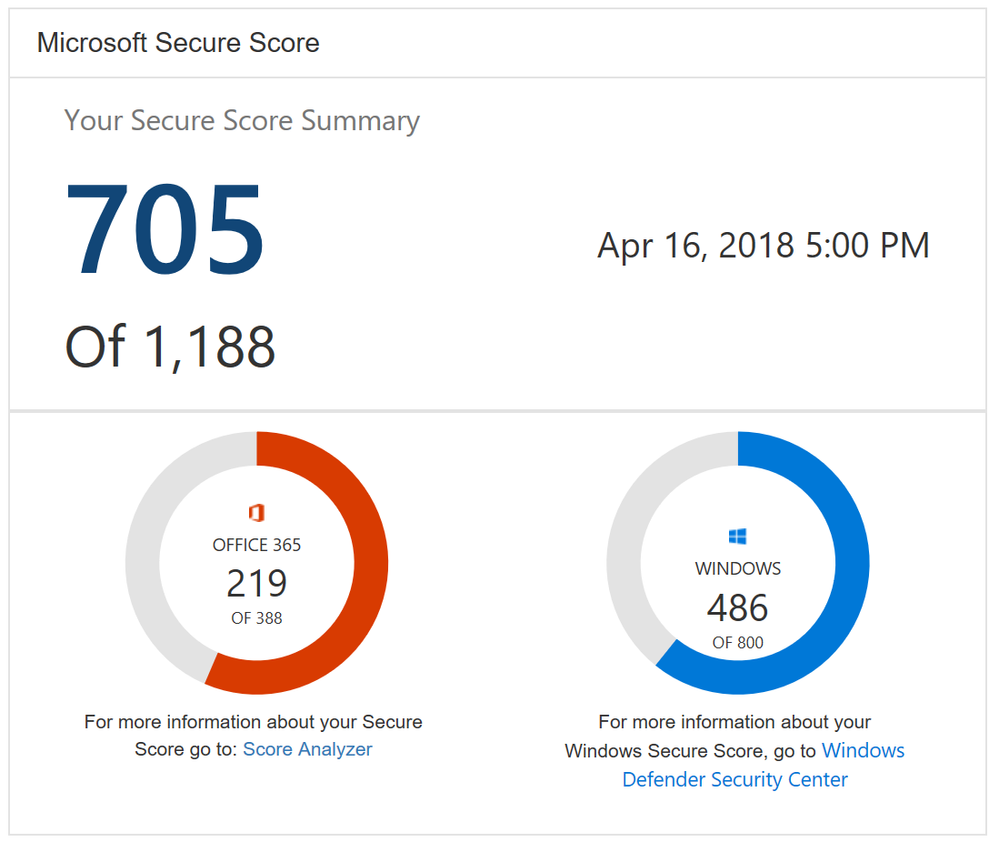
One new feature you will notice as soon as you log in is the new Microsoft score which is made up of your Office 365 Secure Score and your Windows Secure Score. The Windows score come from Windows Defender Advanced Threat Protection (ATP) which provides information about the status of your antivirus, OS security updates, firewall, and other controls. To get the details of your Windows score, you can click on the “Windows Defender Security Center” link below your Windows score to go directly to the dashboard in Windows Defender ATP.
Microsoft Secure Score Summary
Beyond adding Windows to Secure Score, we also now support Microsoft Intune. This surfaces though the existing mobile device management (MDM) controls. Previously we used the telemetry from the Office 365 MDM solution. However, we know that some of you are using Intune and were clicking on the Third Party button to give yourself points as you were meeting the spirit of these controls. This will no longer be necessary. If you are using Intune, we recommend that you remove the third party tag from these controls so they can be scored based on your Intune data.
Lastly, we heard from many organizations that they loved the compare your score section where we show how you benchmark against the Office 365 average score and the recently added Office 365 seat size average score. What they also wanted to see was a score based on organizations in the same industry. This new industry average is now rolling out and should be available to everyone by April 20th. Based on what industry you designate in the Service Assurance section of the Office 365 Security and Compliance Center we will show you the average score for that industry. Note that if you change your industry designation, the new average will not appear until your score is recalculated.
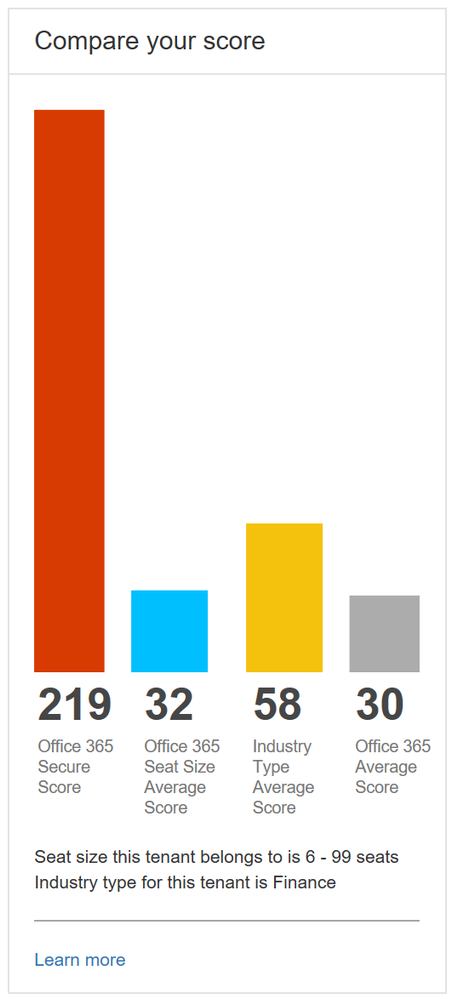
Industry average score to help you better benchmark your organization
This is just the first step in building out Microsoft Secure Score. Over the coming months we will continue to add new functionality and add additional solutions to provide you an even better experience.
To try out Microsoft Secure Score now you can go to https://securescore.microsoft.com and log in with your administrative credentials or click on the Secure Score widget on the Office 365 Security and Compliance Center home page. We also created a new Microsoft Mechanics video that can give you a quick overview of the solution if you have not used Secure Score before.
As always, the team loves the feedback and comments so feel free to leave them below. If you happen to be at the RSA conference in San Francisco this week swing by the Microsoft booth to say hi and check out the sessions we are running.
We conclude our phish blog series by announcing some exciting capabilities that further enhance the anti-phish stack in Office 365. In our previous blogs, we announced enhanced anti-impersonation capabilities and anti-spoofing capabilities which help stop sophisticated spear phishing and email spoofing campaigns. Today, we’re excited to announce new capabilities augmenting our protection against content based phish lures. Additionally, today we’re announcing roll out of “Internal Safe Links’ which protects users from the industry wide concern of phishing occurring when hackers gain access to an internal enterprise account and leverage the internal account to launch a phishing campaign on internal users. Users are far more likely to trust, open, and execute actions in an email sent from another user in their organization than from an external source. Phishing with compromised internal accounts is a powerful technique used by hackers to move laterally across an organization and gain a stronger foothold into the enterprise. Hackers can penetrate deeper into an organization, harvesting more user credentials, personally identifiable information (PII), and perhaps enterprise intellectual property. Our customers often ask for a solution to help mitigate intra-org phishing campaigns so we are especially excited to deliver this new feature.
GA of ‘Internal Safe Links’
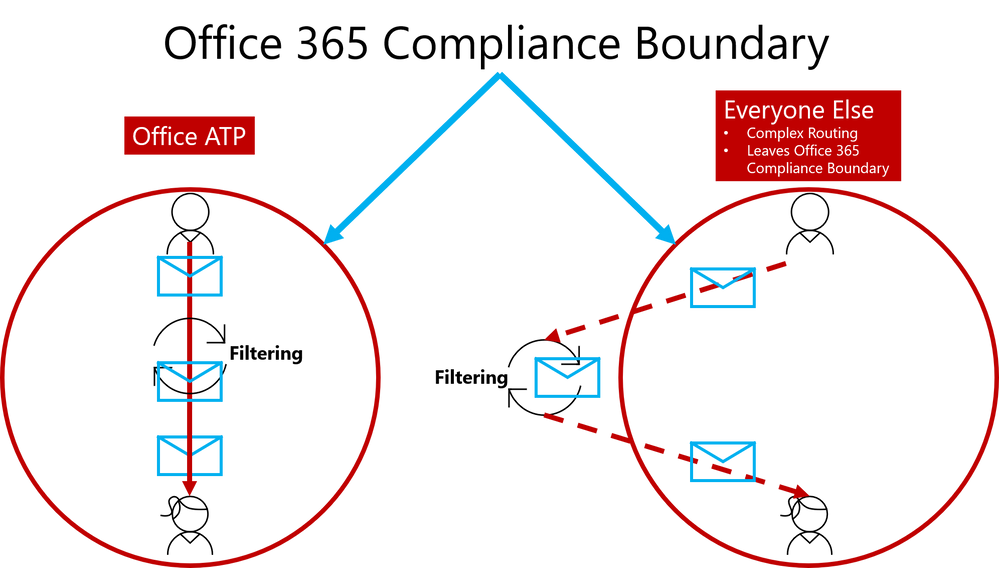
To help customers eliminate impact from phishing campaigns launched via compromised accounts, we’re excited to launch ‘Internal Safe Links’, which enables the Office 365 Advanced Threat Protection (ATP) Safe Links policy to protect intra-org emails. With Safe Links now protecting intra-org emails, Office 365 ATP helps greatly reduce if not eliminate this lethal and widespread phishing technique. Also, Office 365 ATP is the only threat protection service that can provide intra-org email scanning without routing emails outside the compliance boundary of Office 365.
Figure 1. Internal Safe Links is unique to Office ATP by enabling direct routing and ensuring emails remain within the compliance boundaries of Office 365
This provides Office 365 ATP customers a critical advantage since their emails will always remain within the Office 365 Compliance Boundary which is especially important as compliance requirements are increasingly scrutinized with the launch of the General Data Protection Regulation (GDPR). Other solutions offering intra-org email link scanning must route emails outside the Office 365 Compliance Boundary. Solutions using this approach create a gap in maintaining the compliance standards guaranteed by Office 365. Office 365 ATP’s Internal Safe Links will protect users from internal phishing campaigns and is the only solution that ensures emails always meet the necessary compliance standards set in Office 365. Other solutions also add unnecessary complexity to email routing since they must leave the Office 365 boundary to scan links for intra-org emails. Complex email routing can lead to unforeseen impact on enterprise mail flow, potentially causing email delivery delays, incorrect setup of mail flow, and even undelivered email. Internal Safe Links follows the Office ATP ethos of making setup as easy as possible. The feature can be turned on or off by pushing the corresponding radio button in the Safe Links policy. The feature will be ‘off’ by default.
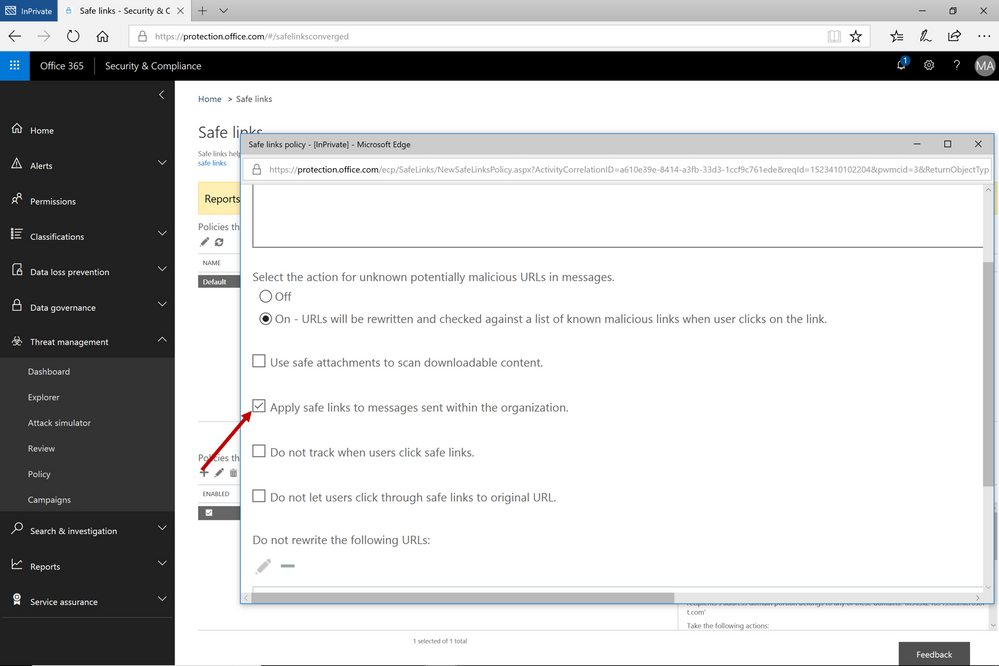 Figure 2. Easy setup with a on/off button to execute the feature capability
Continued Enhancements in Link Content Detonation of Phish Lures
As we alluded to in the first blog of this series, emails contain many types of phish lures which can lead to malicious websites. These lures can come in various forms but are usually associated with a link to a malicious website.
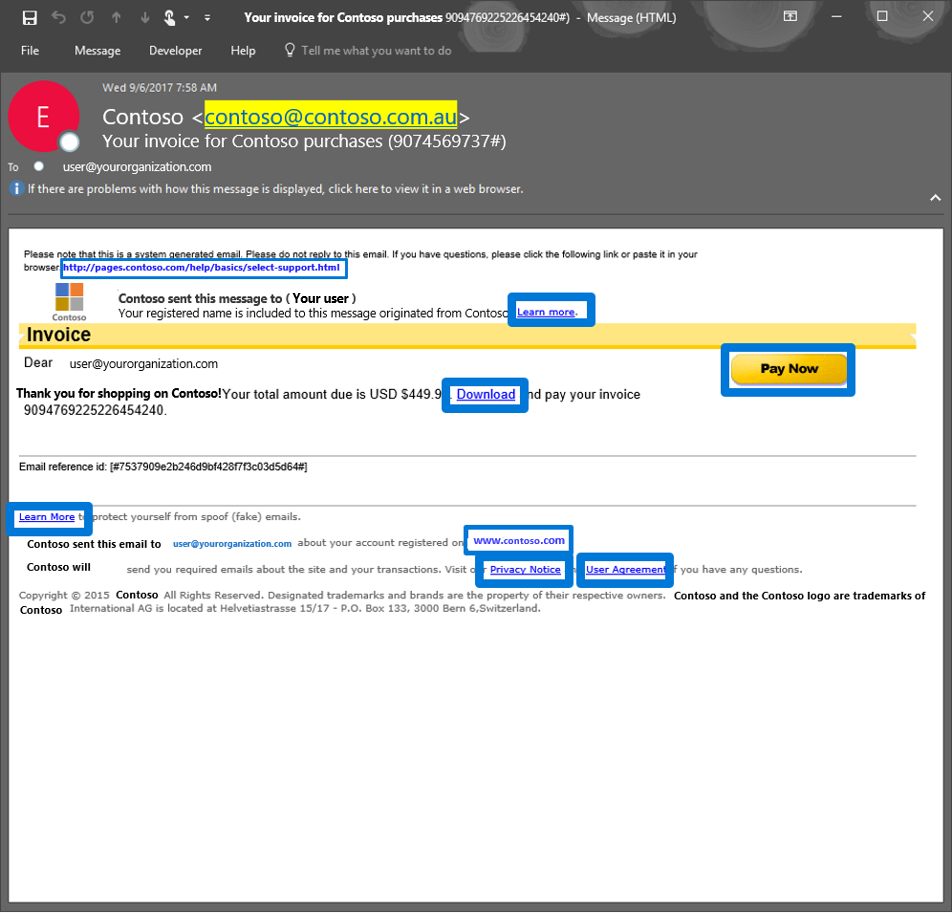 Figure 3. Generic email with several phish lures in the email
Office 365 applies several algorithms and heuristics to determine when a link should be detonated during mail flow to detect various attacks such as:
- Pages that automatically download malware
- Phishing pages
These techniques are not limited to the email body. Office 365 ATP also detonates phish lures within email attachments, helping ensure protection across all components of an email.
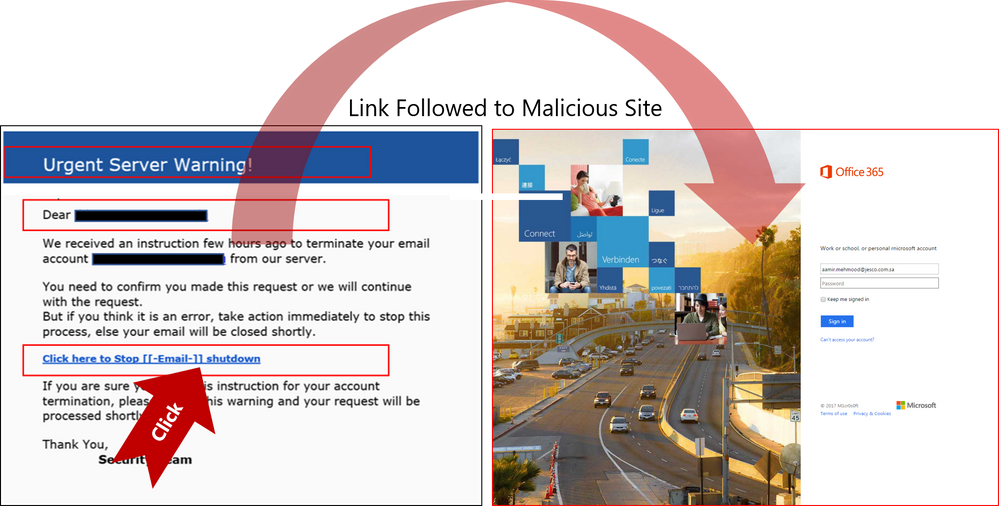 Figure 4. Real Example of Office 365 ATP following suspicious link to the destination a URL points to and scanning that page for potential malware or phish
Send Us Your Feedback
Below are some other helpful articles on Office 365 and Office 365 ATP anti-phish, anti-spoof, and holistic phish protection capabilities:
Once you experience the new Internal Safe Links and phish lure detonation capabilities for Office 365 Advanced Threat Protection, provide us your feedback so we can continue improving and adding features that will allow Office ATP to be the premiere advanced security service for Office 365. If you have not tried Office 365 ATP for your organization yet, you should begin a free Office 365 E5 trial today and start securing your organization from the modern threat landscape.
We conclude our phish blog series by announcing some exciting capabilities that further enhance the anti-phish stack in Office 365. In our previous blogs, we announced enhanced anti-impersonation capabilities and anti-spoofing capabilities which help stop sophisticated spear phishing and email spoofing campaigns. Today, we’re excited to announce new capabilities augmenting our protection against content based phish lures. Additionally, today we’re announcing roll out of “Internal Safe Links’ which protects users from the industry wide concern of phishing occurring when hackers gain access to an internal enterprise account and leverage the internal account to launch a phishing campaign on internal users. Users are far more likely to trust, open, and execute actions in an email sent from another user in their organization than from an external source. Phishing with compromised internal accounts is a powerful technique used by hackers to move laterally across an organization and gain a stronger foothold into the enterprise. Hackers can penetrate deeper into an organization, harvesting more user credentials, personally identifiable information (PII), and perhaps enterprise intellectual property. Our customers often ask for a solution to help mitigate intra-org phishing campaigns so we are especially excited to deliver this new feature.
GA of ‘Internal Safe Links’
To help customers eliminate impact from phishing campaigns launched via compromised accounts, we’re excited to launch ‘Internal Safe Links’, which enables the Office 365 Advanced Threat Protection (ATP) Safe Links policy to protect intra-org emails. With Safe Links now protecting intra-org emails, Office 365 ATP helps greatly reduce if not eliminate this lethal and widespread phishing technique. Also, Office 365 ATP is the only threat protection service that can provide intra-org email scanning without routing emails outside the compliance boundary of Office 365.
Figure 1. Internal Safe Links is unique to Office ATP by enabling direct routing and ensuring emails remain within the compliance boundaries of Office 365
This provides Office 365 ATP customers a critical advantage since their emails will always remain within the Office 365 Compliance Boundary which is especially important as compliance requirements are increasingly scrutinized with the launch of the General Data Protection Regulation (GDPR). Other solutions offering intra-org email link scanning must route emails outside the Office 365 Compliance Boundary. Solutions using this approach create a gap in maintaining the compliance standards guaranteed by Office 365. Office 365 ATP’s Internal Safe Links will protect users from internal phishing campaigns and is the only solution that ensures emails always meet the necessary compliance standards set in Office 365. Other solutions also add unnecessary complexity to email routing since they must leave the Office 365 boundary to scan links for intra-org emails. Complex email routing can lead to unforeseen impact on enterprise mail flow, potentially causing email delivery delays, incorrect setup of mail flow, and even undelivered email. Internal Safe Links follows the Office ATP ethos of making setup as easy as possible. The feature can be turned on or off by pushing the corresponding radio button in the Safe Links policy. The feature will be ‘off’ by default.
Figure 2. Easy setup with a on/off button to execute the feature capability
Continued Enhancements in Link Content Detonation of Phish Lures
As we alluded to in the first blog of this series, emails contain many types of phish lures which can lead to malicious websites. These lures can come in various forms but are usually associated with a link to a malicious website.
Figure 3. Generic email with several phish lures in the email
Office 365 applies several algorithms and heuristics to determine when a link should be detonated during mail flow to detect various attacks such as:
- Pages that automatically download malware
- Phishing pages
These techniques are not limited to the email body. Office 365 ATP also detonates phish lures within email attachments, helping ensure protection across all components of an email.
Figure 4. Real Example of Office 365 ATP following suspicious link to the destination a URL points to and scanning that page for potential malware or phish
Send Us Your Feedback
Below are some other helpful articles on Office 365 and Office 365 ATP anti-phish, anti-spoof, and holistic phish protection capabilities:
Once you experience the new Internal Safe Links and phish lure detonation capabilities for Office 365 Advanced Threat Protection, provide us your feedback so we can continue improving and adding features that will allow Office ATP to be the premiere advanced security service for Office 365. If you have not tried Office 365 ATP for your organization yet, you should begin a free Office 365 E5 trial today and start securing your organization from the modern threat landscape.
We conclude our phish blog series by announcing some exciting capabilities that further enhance the anti-phish stack in Office 365. In our previous blogs, we announced enhanced anti-impersonation capabilities and anti-spoofing capabilities which help stop sophisticated spear phishing and email spoofing campaigns. Today, we’re excited to announce new capabilities augmenting our protection against content based phish lures. Additionally, today we’re announcing roll out of “Internal Safe Links’ which protects users from the industry wide concern of phishing occurring when hackers gain access to an internal enterprise account and leverage the internal account to launch a phishing campaign on internal users. Users are far more likely to trust, open, and execute actions in an email sent from another user in their organization than from an external source. Phishing with compromised internal accounts is a powerful technique used by hackers to move laterally across an organization and gain a stronger foothold into the enterprise. Hackers can penetrate deeper into an organization, harvesting more user credentials, personally identifiable information (PII), and perhaps enterprise intellectual property. Our customers often ask for a solution to help mitigate intra-org phishing campaigns so we are especially excited to deliver this new feature.
GA of ‘Internal Safe Links’
To help customers eliminate impact from phishing campaigns launched via compromised accounts, we’re excited to launch ‘Internal Safe Links’, which enables the Office 365 Advanced Threat Protection (ATP) Safe Links policy to protect intra-org emails. With Safe Links now protecting intra-org emails, Office 365 ATP helps greatly reduce if not eliminate this lethal and widespread phishing technique. Also, Office 365 ATP is the only threat protection service that can provide intra-org email scanning without routing emails outside the compliance boundary of Office 365.
Figure 1. Internal Safe Links is unique to Office ATP by enabling direct routing and ensuring emails remain within the compliance boundaries of Office 365
This provides Office 365 ATP customers a critical advantage since their emails will always remain within the Office 365 Compliance Boundary which is especially important as compliance requirements are increasingly scrutinized with the launch of the General Data Protection Regulation (GDPR). Other solutions offering intra-org email link scanning must route emails outside the Office 365 Compliance Boundary. Solutions using this approach create a gap in maintaining the compliance standards guaranteed by Office 365. Office 365 ATP’s Internal Safe Links will protect users from internal phishing campaigns and is the only solution that ensures emails always meet the necessary compliance standards set in Office 365. Other solutions also add unnecessary complexity to email routing since they must leave the Office 365 boundary to scan links for intra-org emails. Complex email routing can lead to unforeseen impact on enterprise mail flow, potentially causing email delivery delays, incorrect setup of mail flow, and even undelivered email. Internal Safe Links follows the Office ATP ethos of making setup as easy as possible. The feature can be turned on or off by pushing the corresponding radio button in the Safe Links policy. The feature will be ‘off’ by default.
Figure 2. Easy setup with a on/off button to execute the feature capability
Continued Enhancements in Link Content Detonation of Phish Lures
As we alluded to in the first blog of this series, emails contain many types of phish lures which can lead to malicious websites. These lures can come in various forms but are usually associated with a link to a malicious website.
Figure 3. Generic email with several phish lures in the email
Office 365 applies several algorithms and heuristics to determine when a link should be detonated during mail flow to detect various attacks such as:
- Pages that automatically download malware
- Phishing pages
These techniques are not limited to the email body. Office 365 ATP also detonates phish lures within email attachments, helping ensure protection across all components of an email.
Figure 4. Real Example of Office 365 ATP following suspicious link to the destination a URL points to and scanning that page for potential malware or phish
Send Us Your Feedback
Below are some other helpful articles on Office 365 and Office 365 ATP anti-phish, anti-spoof, and holistic phish protection capabilities:
Once you experience the new Internal Safe Links and phish lure detonation capabilities for Office 365 Advanced Threat Protection, provide us your feedback so we can continue improving and adding features that will allow Office ATP to be the premiere advanced security service for Office 365. If you have not tried Office 365 ATP for your organization yet, you should begin a free Office 365 E5 trial today and start securing your organization from the modern threat landscape.
We conclude our phish blog series by announcing some exciting capabilities that further enhance the anti-phish stack in Office 365. In our previous blogs, we announced enhanced anti-impersonation capabilities and anti-spoofing capabilities which help stop sophisticated spear phishing and email spoofing campaigns. Today, we’re excited to announce new capabilities augmenting our protection against content based phish lures. Additionally, today we’re announcing roll out of “Internal Safe Links’ which protects users from the industry wide concern of phishing occurring when hackers gain access to an internal enterprise account and leverage the internal account to launch a phishing campaign on internal users. Users are far more likely to trust, open, and execute actions in an email sent from another user in their organization than from an external source. Phishing with compromised internal accounts is a powerful technique used by hackers to move laterally across an organization and gain a stronger foothold into the enterprise. Hackers can penetrate deeper into an organization, harvesting more user credentials, personally identifiable information (PII), and perhaps enterprise intellectual property. Our customers often ask for a solution to help mitigate intra-org phishing campaigns so we are especially excited to deliver this new feature.
GA of ‘Internal Safe Links’
To help customers eliminate impact from phishing campaigns launched via compromised accounts, we’re excited to launch ‘Internal Safe Links’, which enables the Office 365 Advanced Threat Protection (ATP) Safe Links policy to protect intra-org emails. With Safe Links now protecting intra-org emails, Office 365 ATP helps greatly reduce if not eliminate this lethal and widespread phishing technique. Also, Office 365 ATP is the only threat protection service that can provide intra-org email scanning without routing emails outside the compliance boundary of Office 365.
Figure 1. Internal Safe Links is unique to Office ATP by enabling direct routing and ensuring emails remain within the compliance boundaries of Office 365
This provides Office 365 ATP customers a critical advantage since their emails will always remain within the Office 365 Compliance Boundary which is especially important as compliance requirements are increasingly scrutinized with the launch of the General Data Protection Regulation (GDPR). Other solutions offering intra-org email link scanning must route emails outside the Office 365 Compliance Boundary. Solutions using this approach create a gap in maintaining the compliance standards guaranteed by Office 365. Office 365 ATP’s Internal Safe Links will protect users from internal phishing campaigns and is the only solution that ensures emails always meet the necessary compliance standards set in Office 365. Other solutions also add unnecessary complexity to email routing since they must leave the Office 365 boundary to scan links for intra-org emails. Complex email routing can lead to unforeseen impact on enterprise mail flow, potentially causing email delivery delays, incorrect setup of mail flow, and even undelivered email. Internal Safe Links follows the Office ATP ethos of making setup as easy as possible. The feature can be turned on or off by pushing the corresponding radio button in the Safe Links policy. The feature will be ‘off’ by default.
Figure 2. Easy setup with a on/off button to execute the feature capability
Continued Enhancements in Link Content Detonation of Phish Lures
As we alluded to in the first blog of this series, emails contain many types of phish lures which can lead to malicious websites. These lures can come in various forms but are usually associated with a link to a malicious website.
Figure 3. Generic email with several phish lures in the email
Office 365 applies several algorithms and heuristics to determine when a link should be detonated during mail flow to detect various attacks such as:
- Pages that automatically download malware
- Phishing pages
These techniques are not limited to the email body. Office 365 ATP also detonates phish lures within email attachments, helping ensure protection across all components of an email.
Figure 4. Real Example of Office 365 ATP following suspicious link to the destination a URL points to and scanning that page for potential malware or phish
Send Us Your Feedback
Below are some other helpful articles on Office 365 and Office 365 ATP anti-phish, anti-spoof, and holistic phish protection capabilities:
Once you experience the new Internal Safe Links and phish lure detonation capabilities for Office 365 Advanced Threat Protection, provide us your feedback so we can continue improving and adding features that will allow Office ATP to be the premiere advanced security service for Office 365. If you have not tried Office 365 ATP for your organization yet, you should begin a free Office 365 E5 trial today and start securing your organization from the modern threat landscape.







