We understand that shadow IT is a problem for many organizations. This is why we built Productivity App Discovery in Office 365 Cloud App Security. For those of you not familiar with this, it gives you the ability to understand what cloud services are being used in your organization that have similar functionality to Office 365. Today we are excited to announce enhancements to this feature based on feedback to help you do a more thorough investigation of the discovered apps.
The biggest changes to Productivity App Discovery revolve around providing user and IP address information. After you create a new report, the dashboard will show you a count of users as part of the summary and a new widget that shows you the top users and top addresses to help identify the most dominant users of cloud apps in your organization.
New look to Productivity App Discovery dashboard
You will also notice that the dashboard has three new tabs. Discovered apps, IP addresses, and Users. The Discovered apps tab shows you additional details for the discovered applications like the amount of traffic, the number of users and when the application was as seen. By clicking on one of the apps you can see additional details specific to that application like which users and IP addresses are accessing it, along with trend data. The discovered app tab also includes a way to create a query for specific apps that match your criteria. For example, you can create a query that shows you apps that were last seen after a specific date with more than 30 people using the app. By hovering over an app, you may see a subdomains popup. This will provide visibility into different instances of the app in use in the organization. For example, personal instance of Dropbox vs corporate.
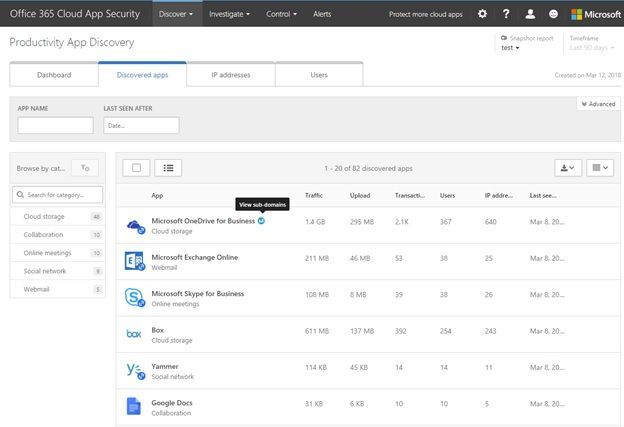 Discovered apps tab in Productivity App Discovery
In the IP Addresses tab, you see the top 100 IPs accessing discovered cloud services. If you want more details on an IP, you can click on it to get a summary of the transactions and traffic along with the details of which apps that IP was accessing, and which users were using the IP.
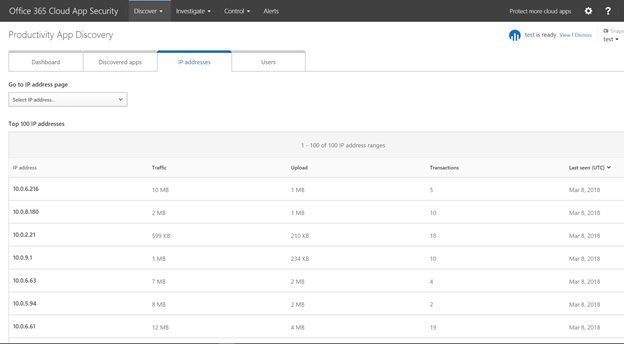 IP addresses tab in Productivity App Discovery
Lastly the Users tab shows you the top 100 users with same details as the IP Addresses tab. Here you can search for a specific user or click their name in the list and pivot the report to see a summary of their cloud services usage along with the specific apps they were using and the IP addresses.
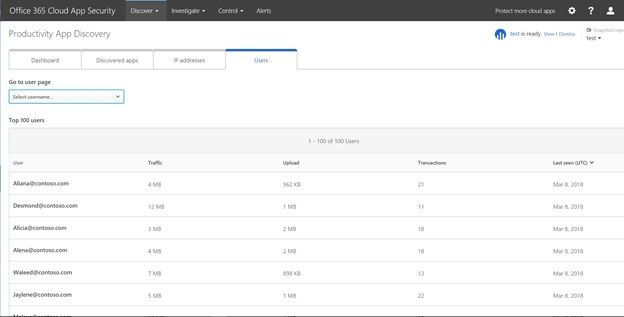 Users tab in Productivity App Discovery
These enhancements are going to make investigating shadow IT and educating users on which cloud services are approved by the organization easier. If you own Office 365 E5 or the standalone SKU for Office 365 Cloud App Security you can check out the new features by logging in at https://portal.cloudappsecurity.com. To learn more about the new features check out the support article here. As always please reach out in the comments if you have questions, comments, or visit the uservoice site to suggest a feature made available in Office 365 Cloud App Security.
We understand that shadow IT is a problem for many organizations. This is why we built Productivity App Discovery in Office 365 Cloud App Security. For those of you not familiar with this, it gives you the ability to understand what cloud services are being used in your organization that have similar functionality to Office 365. Today we are excited to announce enhancements to this feature based on feedback to help you do a more thorough investigation of the discovered apps.
The biggest changes to Productivity App Discovery revolve around providing user and IP address information. After you create a new report, the dashboard will show you a count of users as part of the summary and a new widget that shows you the top users and top addresses to help identify the most dominant users of cloud apps in your organization.
New look to Productivity App Discovery dashboard
You will also notice that the dashboard has three new tabs. Discovered apps, IP addresses, and Users. The Discovered apps tab shows you additional details for the discovered applications like the amount of traffic, the number of users and when the application was as seen. By clicking on one of the apps you can see additional details specific to that application like which users and IP addresses are accessing it, along with trend data. The discovered app tab also includes a way to create a query for specific apps that match your criteria. For example, you can create a query that shows you apps that were last seen after a specific date with more than 30 people using the app. By hovering over an app, you may see a subdomains popup. This will provide visibility into different instances of the app in use in the organization. For example, personal instance of Dropbox vs corporate.
Discovered apps tab in Productivity App Discovery
In the IP Addresses tab, you see the top 100 IPs accessing discovered cloud services. If you want more details on an IP, you can click on it to get a summary of the transactions and traffic along with the details of which apps that IP was accessing, and which users were using the IP.
IP addresses tab in Productivity App Discovery
Lastly the Users tab shows you the top 100 users with same details as the IP Addresses tab. Here you can search for a specific user or click their name in the list and pivot the report to see a summary of their cloud services usage along with the specific apps they were using and the IP addresses.
Users tab in Productivity App Discovery
These enhancements are going to make investigating shadow IT and educating users on which cloud services are approved by the organization easier. If you own Office 365 E5 or the standalone SKU for Office 365 Cloud App Security you can check out the new features by logging in at https://portal.cloudappsecurity.com. To learn more about the new features check out the support article here. As always please reach out in the comments if you have questions, comments, or visit the uservoice site to suggest a feature made available in Office 365 Cloud App Security.


By meeting compliance requirements of the US and State Governments, Office 365 US Government empowers agencies to realize a modern workplace supported by devices and services. Increased collaboration breaks down siloes within and across agencies, and secure mobility allows civil servants to remain productive in the field and away from desks. Cost savings and data center footprint reduction can be re-invested into digitizing citizen services.
Microsoft delivers Office 365 secure productivity and communication services like email, document creation apps and storage, intranet sites, and instant messaging/telephony to the US Government from three environments designed to meet the unique data handling regulations for controlled unclassified information. Architected according to NIST controls, FedRAMP requirements, and the DISA Security Requirements Guidelines, these environments store content in the continental United States, are operated by US citizens, and are authorized to hold Federal, criminal justice, Federal tax, and covered defense information.
We want to answer a few questions about the Office 365 US Government environments and offerings: What services and applications are included, why is the roadmap different from Enterprise offerings, and what services will be released in the future and when?
To answer this question in a meaningful way, we must explain the compliance commitments, audit process, and accreditation requirements. But if you want to skip ahead, the roadmap for Office 365 Government Community Cloud (GCC), Government Community Cloud (GCC) High, and DoD can be found at the end of this post.
The Office 365 GCC environment is designed for Federal, State, and Local government and has been available for about five years. With millions of monthly active users, agencies across the country are benefitting from cloud productivity and security services that meet their compliance requirements.
The Office 365 GCC High environment is designed for Federal agencies, defense industry, aerospace industry, and other organizations holding Controlled Unclassified Information. Introduced more recently, the GCC High offerings are ideal for national security organizations and companies with International Traffic in Arms Regulations (ITAR) data or Defense Federal Acquisition Regulations Supplement (DFARS) requirements.
The Office 365 DoD environment is designed for the US Department of Defense exclusively.
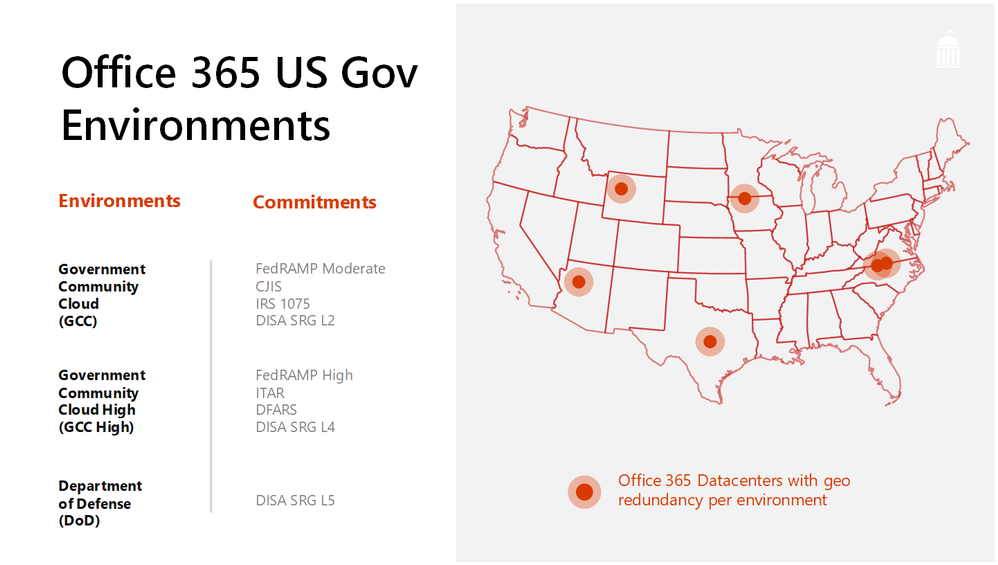 Office 365 US Government environments and associated compliance commitments
Every service introduced into the US Government offerings has undergone a third party review to ensure that we meet our compliance commitments to you. We complete audits regularly to make new capabilities available as frequently as possible. Release cycles differ from Enterprise offerings for new services, but once available, the service will align with the commercial user experience.
The October audit is complete, and Microsoft has received the 3PAO report, so we can confirm what will be released in the coming weeks. We will be sharing an updated roadmap at the Microsoft Government Tech Summit taking place in Washington DC on March 5-6, so stay tuned and don’t hesitate to register to attend! Information will be published online also.
Upcoming Events:
Learn More:
Engage:
Technical:
Brian Levenson is the product manager for Microsoft 365 for US Government. Follow him on Twitter (@brian_levenson) and LinkedIn (Brian Levenson) for the latest in government technology and Microsoft 365 news.

Office 365 groups expiration policies allow administrators to set an expiration timeframe for any Office 365 group. Once that timeframe is set, owners of these groups get notification emails reminding them to renew these groups if they still need them. Groups not renewed will automatically be deleted.
Starting today, this feature is now Generally Available!
<script type=’text/javascript’ src=’https://cloudblogs.microsoft.com/enterprisemobility/wp-content/themes/cloudperspectives/dist/scripts/flexibility.js?ver=3.7.2′></script>
We’ve listened to your feedback and made it even more intuitive for users to decide whether they want to renew their group. The newly redesigned notification emails now provide one-click access to the group content, and also allow the group to be deleted if it’s no longer needed.
Office 365 groups expiration can be configured from the Azure Active Directory portal, as well as programmatically via Azure Active Directory PowerShell. Learn more about how to configure Office 365 groups expiration. For more information head over read the full announcement by Alex Simons over on the EMS Blog.
The Office 365 groups expiration policy feature will require an Azure AD Premium license for every user who is a member of an Office 365 group configured for expiration. Visit Office 365 Support for more licensing details.

Introduction:
Electronic communication and collaboration services[1] such as Outlook.com, Skype, Gmail, Slack, and OneDrive are not merely channels for communication between people, people and businesses, or people and automation (such as bots or support agents)[2]. They also help individuals manage their day thanks to services that are tightly integrated into the communications experience. These include calendar services, reminders, task management capabilities, travel planning, package tracking, and a great many other ways to help people do more with their time.
Providing these productivity and time-enhancing capabilities can, and should, be done without compromising the confidentiality of their communication and whilst respecting data protection[3].
Examples of productivity service capabilities
In this paper, we will use the three following examples of productivity-enhancing services:
- The user books a trip from Brussels to Cairo. They receive a flight itinerary via email. The email service, using data within the itinerary, adds the trip to the user’s calendar including flight times, hotel and car hire information, restaurant bookings, and other relevant travel data. It prompts the user to create an “out of office” message for the relevant time, helps to cancel or rearrange meetings that overlap with the trip, monitors flight status and alerts the user to any changes in flight arrival or departure times, and may even prompt the user to depart for the airport in time to catch their flight.
- The user receives an email from a colleague asking them to “send the presentation before noon on July 27th”. The email service recognizes that the user is being asked to complete a task to a deadline, and adds it to the user’s task list. As the deadline approaches, the service reminds the user of the request so that they do not miss the deadline for completion.
- The user orders a pair of shoes from Zalando. Zalando emails a receipt to the user which includes a tracking number for the shoes which will be arriving next Thursday. The email service recognizes the tracking number and adds a reminder to the user’s calendar for next Thursday. The service periodically monitors the progress of the delivery, alerting the user to the projected arrival date.
Message processing data flow:
To provide these productivity features from within the electronic communications service the content follows a conceptually simple flow:
Starting with “A” the message is received by the recipient’s email service. The message’s body and attachments are passed onto the data enrichment processor (“B”) whose goal is to examine and enrich the message or attachment to make better use of the user’s time, deliver capabilities that make them more effective or efficient, or deliver experiences they find valuable. The data enrichment processor has several steps, where each step performs a specific detection or enrichment. In the examples listed above, for instance, some of the steps include detecting that a message is a trip manifest, that it contains a shipping manifest or confirmation, or that it features a task for the user to complete. These are just some examples of possible enrichments for different types of data or experiences.
The enrichment processing steps use a variety of technologies to detect and extract what they require. These include simple regular expressions (such as matching a phone number in a message body or attachment), pattern matchers (flight manifest and other forms of “machine to human” communications are produced using consistent templates where logic can be written to detect the templates and extract the necessary data), detect and extract embedded schema.org annotations[4], and even very complicated machine learning systems that extract information from natural language text (such as our requested task example).
In addition to delivering the message to the user’s mailbox, they may also (“C”) update the user’s calendar (such as with the trip times, or date when the shoes are to be delivered) and the user’s list of tasks (such as the requested task example) in “D”. They may also interact with external services, such as subscribing to a data feed (“E”) of flight change notifications or services that notify subscribers of changes in travel times or package delivery timelines. When feeds are unavailable, the service may use a polling-based mechanism to periodically requests updates from other services, such as requesting flight updates from the airline or checking on progress of the user’s shoe order.
As with the detection of spam and malware, many of these detections or enrichments are probabilistic; the service cannot assert with certainty they are correct. While there are standards like schema.org where the sender can include the necessary metadata in the message (such as flight information, or package delivery information) so it is always correct, there will always be cases (such as task detection) where the receiving service must infer it from the readable content of the message body or attachment.
The updates, notifications, calendar entries, tasks, or other objects are presented to the user (“F”) who can indicate if the service was right or wrong in what it detected. The original message, the user’s judgement of what the service inferred correctly or incorrectly, and any subsequent correction, can all be added to a database of messages and correct or incorrect inferences (“G”) that are used to train the next version of the data enrichment processor. This allows the service to “learn” over time and become more effective.
All this processing is particularly important for messages as they are received and added to the recipient’s mailbox. Enriching the message before it is exposed to the user means that they can immediately see if it is a travel manifest, if it includes the delivery timeline for their shoes, or if they are being asked to do something. This helps the user be more productive and better judge how to spend their time. These enrichments are also performed, however, against already received and processed messages, such as the feed processor (“E”) and subsequent processing described above. This means messages that were missed by earlier iterations of the data enrichment logic will be correctly processed.
Messages are very dynamic. For instance, businesses frequently change the templates they use to send out travel manifests. Consequently, the communications and collaboration service must adapt quickly to such changes, lest the value of the productivity enhancements be reduced or eliminated altogether. For example, if a user is not being informed that flight times have changed, they may miss their flight; if they are not reminded to complete a task, they may miss an important deadline or commitment.
Privacy: data protection and confidentiality implications
Protecting both the personal data of senders and recipients, as well as the confidentiality of communications, during message processing (“A” – “F” above) can be done with no loss of efficacy for the data enrichment server since that service is acting like a stateless function. The service processes the message and creates new metadata containing the data extracted from the message. It may also create new calendar entries, tasks, feed subscriptions, or other artifacts which are associated with the user and used to deliver productivity-enriching experiences. As the recipient’s communication service allows processing and access to the content on their behalf, it is the user’s expectation that these services will enhance their productivity. Failing to process every message for every user risks limiting productivity benefits for users.
Protecting personal data and confidentiality during the model building phase (“G” – “H” above) is done by selection of algorithms and approaches that preserve privacy and confidentiality; those in which personal data is not retained or exposed (for example, selection of privacy preserving machine learning feature vectors) or by restricting the use of the communication to building productivity capabilities[5].
In both the processing phase (“A” – “F”) and the model building phase (“G” – “H”) it is impossible to gather consent from the sender and all recipients[6]. Most electronic communications rely on open standards (such as SMTP[7]), which do not include provisions for consent gathering (in large part because the traditional communications they were intended to replace was the postal service, in which the sender had no control over what happened to the communications once it was sent to the recipient). In addition, the communication is often asynchronous; requiring the sender and all recipients to consent to processing prior to the first recipient seeing it would introduce significant delays and poor user experiences[8], even if it were possible[9].
For model building (“G” – “H”) it is impossible for a model to benefit a single user or only the users involved in the communications. That model building (aka training) phase is essential for the machine learning algorithm to learn the template/patterns of communications, such as the format of the message from the airline with flight information. A typical user never receives enough instances of a templated message to train the processor. Even if they did, the productivity feature would not be enabled until they had received enough instances. Given how often templates change, this would mean the feature would seldom be able to recognize anything for a user. For instance, roughly the first ten times you receive a flight manifest from BA.COM for a single flight segment flight within Europe, the productivity feature would not work for you because it hadn’t seen enough instances to train a usable recognizer. After having seen enough messages, it would start to work for a specific carrier, format of message, and type of flight. If a message is from a different carrier it would fail, as the template is different. If you book a trip with two flight segments it would fail, as it has only seen single segment manifests until now. And if the airline changed the format of the message it would fail, as it has only seen the previous version – and so on. The feature provides value because it can learn the patterns from messages received by anyone, whilst persevering privacy and confidentiality (such as k-anonymization[10]) – in the same way a cashier in a grocery store learns how to process your groceries more efficiently and effectively, by dealing with all customers. If that cashier couldn’t apply learnings from processing other customers’ groceries, your own grocery orders would like be processed very slowly indeed.
References
[1] It is difficult to differentiate communication from collaboration, and messages from other collaboration artifacts. Consider a document being jointly authored by many people, each of whom leaves comments in the document to express ideas and input. Those same comments would be transmitted as email, chats, or through voice rather than comments in a document. Rather than treat them as separate, we recognize collaboration and communication as inked and refer to them interchangeably.
[2] https://venturebeat.com/2016/09/05/the-chatbot-revolution-in-customer-support/
[3] Privacy, the protection of personal data, and confidentiality are frequently treated as synonymous, but we draw a distinction. For the purposes of this paper we treat privacy as protecting knowledge of who a piece of data is about, and confidentiality as protecting that information. As an example, consider a piece of data that indicates Bob is interested in buying a car. Privacy can be achieved by removing any knowledge the data is about Bob; knowing simply that someone is interested in buying a car protects Bob’s privacy. Protecting confidentiality is preventing Bob’s data from being exposed to anyone but him. While, in this specific instance, Bob may only be concerned with the protection of his personal data, if the information were instead related to Microsoft’s interest in buying LinkedIn, Microsoft would be very interested in protecting the confidentiality of that data.
[4] http://schema.org/
[5] Services like Office365 that provide subscription-funded productivity services to users are incentivized to preserve the confidentiality of user data; the user is the customer, not the product.
[6] Note that most electronic communications are not person-to-person, they often involve many parties, up to thousands or tens of thousands in instances such as a large conference call or Q&A session.
[7] https://tools.ietf.org/html/rfc5321
[8] Consider an example in which I have never previously sent you an email, but then send you one. Your email service wants to scan that email for any requests I may be making, so it can create a task and reminder for you to respond. I am unaware your email service does this kind of processing and have not consented to it. To gain my consent, your email service would somehow need to get in touch (perhaps by sending me an email asking if it is ok for my message to you to be so processed).
[9] Often communications are sent to accounts that are no longer active. If I send an email to three people at a company, it is possible one of them may no longer be employed there and the message is therefore undeliverable. Even if it is delivered, the intended recipient cannot consent to processing because they are no longer able to access that account.
[10] https://dataprivacylab.org/dataprivacy/projects/kanonymity/paper3.pdf