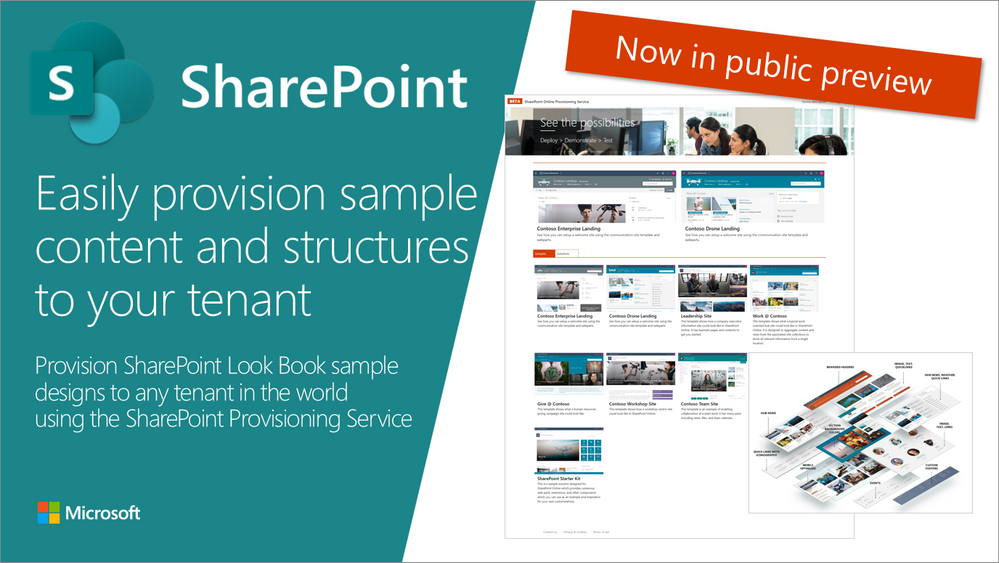
SharePoint Look Book site is an awesome web site having pictures on example modern portals build with SharePoint Online. These designs demonstrate what’s possible with the modern SharePoint and we will be releasing updated guidance on the Look Book also in future.
Having example pictures and written clarifications of the structures around the sites built with modern SharePoint is great, but wouldn’t it be even more awesome if you could provision actual site collections and structures based on those designs so that you can even adjust those based on your needs?
That would be awesome!
We thought so as well and started building a specific service to enable you to easily provision sample content and scenarios to any SharePoint tenant.
How to use the service?
It’s as easy as following these simple steps:
- Move to the provisioning service at https://provisioning.sharepointpnp.com
- Select a template which you want to use (remember to check template specific prerequisites if any)
- Click “Add to your tenant“
- Sign-in to your tenant
- Provide requested metadata like the URL to be used
- Confirm and wait for an email notification when provisioning is completed
See the following 2-minute video as a quick introduction on how the service works in practice.
Right now the service is in public preview like mentioned as we keep on polishing up the experience and the provided templates.
What are the prerequisites for the usage?
You will need to be a tenant administrator to be able to use the service. This is due to the cross tenant capabilities, which the templates might contain, like Microsoft Teams structures, SharePoint solutions, Site Designs, and Themes. We are looking into enabling simple templates also for site collection administrators in the future without tenant administrator requirements. Notice also that currently, SharePoint administrator permissions are not sufficient.
Notice also that some of the initially provided templates also contain other prerequisites, like having a tenant app catalog created for SharePoint Framework solutions or having the tenant administrator as a term store administrator before the provisioning is started. Please check the prerequisites specifically for SharePoint Starter Kit or for the Custom Learning templates.
Currently, templates have been also tested properly only for the English language, so please provide us feedback based on your experiences with non-English tenants.
Can I use the service in my production environment?
We do recommend testing the templates in a test environment to ensure that you are aware of how they work. Some of the initially provided templates, like Each provided template, has a detailed description of the contained content which is getting provisioned. You can get a test tenant by using a trial Office 365 tenants or by subscribing to the Office 365 developer program (if you are a developer).
Can I use the templates also outside of the service?
Absolutely. We are providing all used templates as an open-source solution through GitHub repository. If you are an IT Pro or a developer, you can also use those templates by using code or PowerShell.
Please provide us feedback on the service and share any issues with us which you might have as part of using it. Thank you for your input advance.
Office 365 ATP offers unparalleled protection from targeted and zero-day attacks over email and other collaboration vectors. Building over the massive threat intelligence signal available in the Microsoft Intelligent Security Graph and pairing it with sophisticated Machine Learning algorithms, Office 365 ATP offers security teams best-in-class prevention, detection and response capabilities to keep their organizations secure with stellar effectiveness and efficiency. And today we’re extremely excited to announce new Automation capabilities in Office 365 ATP that further amplify the efficiency of security teams as they investigate and respond to threats within their organization.
The broad intelligence of the Microsoft Security Graph that supports all of the Advanced Threat Protection products from Microsoft and the deep integration between them forms the backbone of Microsoft Threat Protection that offers security teams amazing capabilities to protect their organizations across their users, devices, email, applications, data and infrastructure. And the automation capabilities we’re announcing today further strengthen the overall automation story of Microsoft Threat Protection.
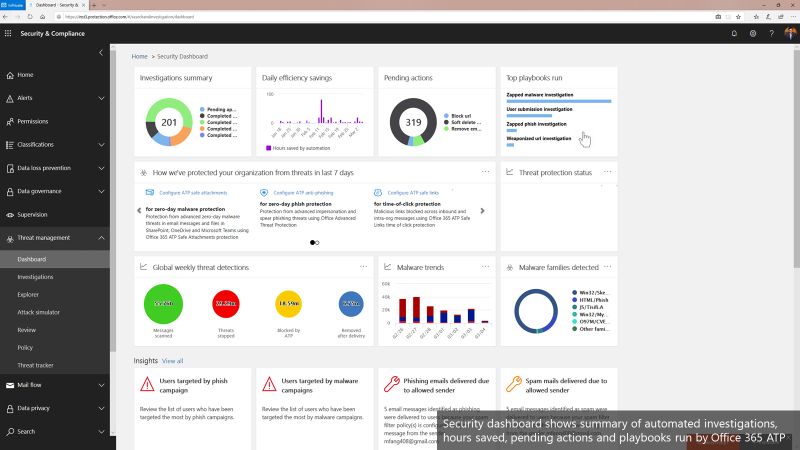
Security Dashboard showing summary of automated investigations
Challenges faced by SecOps today
To set some context, we continue to hear from customers that dealing with incident response quickly and effectively is a big challenge facing their SecOps teams. One key issue is the lack of available resources and expertise needed to analyze signals and respond to incidents in an efficient way. There are just too many alerts to investigate and signals to correlate. And SecOps teams are constantly struggling with budget and time.
A typical Security team member goes through the following cycle of investigation day in and day out.
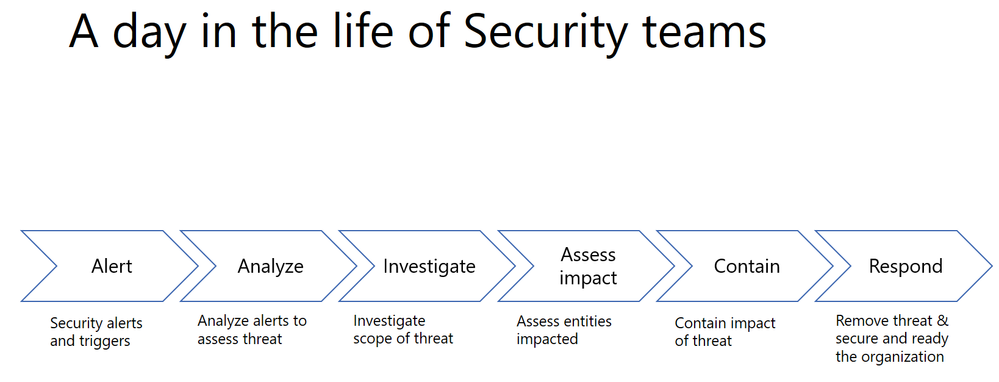
Every single security alert goes through the above process and with the huge volume of alerts that need to be looked at, it can quickly become challenging for security teams to scale. Intelligent correlation of signals and automatic investigation of alerts can significantly reduce the manual effort and time for incident response.
Automation can significantly reduce the time, effort and resources needed for incident response
Last year, we shared how Office 365 ATP can help security teams become more effective and efficient in the threat investigation and response process. This research from Forrester also revealed huge cost savings when using our Office 365 Threat Intelligence service.

The new automation capabilities in Office 365 ATP goes even further in being able to bring more effectiveness and efficiency into SecOps flows.
Introducing new security playbooks within Office 365 ATP
Security playbooks are the foundation of automated incident response. They are the back-end policies that admins can select to trigger automatic investigation. The playbooks are built off our experience with real-world security scenarios. Based on our visibility and experience into the threat landscape we’ve designed these playbooks which tackle the most frequent threats.
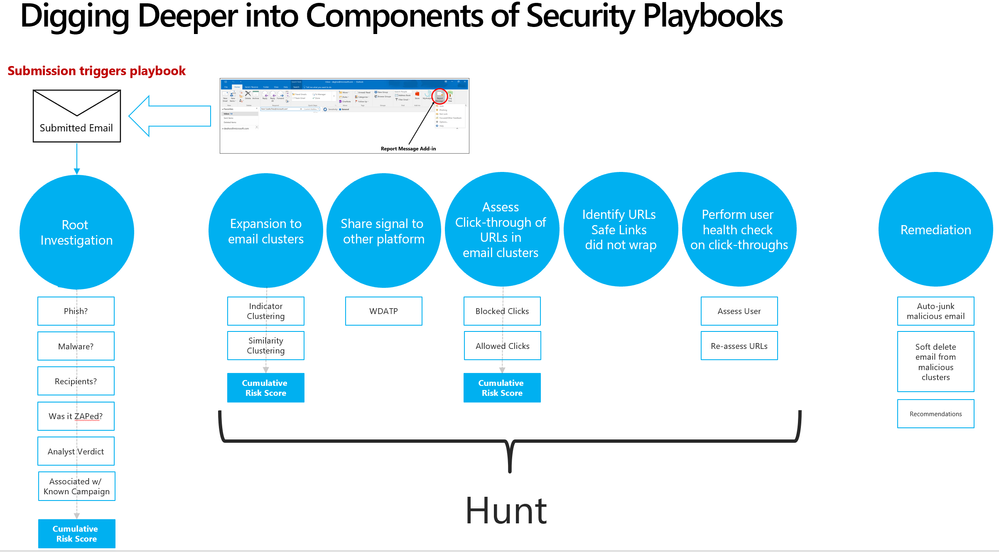 Security playbooks are the foundation of AIR
We’re delighted to announce the public preview of two playbooks that help investigate key threats and alerts within Office 365 with recommended actions for containment and mitigation.
- User reports a phishing email— This alert will trigger an automatic investigation using the User Reported Messages Playbook when users use the “Report Message” button to report a phishing email.
- User clicks on a malicious link— This alert will trigger an automatic investigation using the Weaponized URL playbook when an Office 365 ATP Safe Links protected URL clicked by a user is determined to be malicious through detonation (change in verdict) or if the user overrides (clicks through) the Office 365 ATP Safe Links warning pages.
Over the new few weeks and months we’ll continue to add even more playbooks.
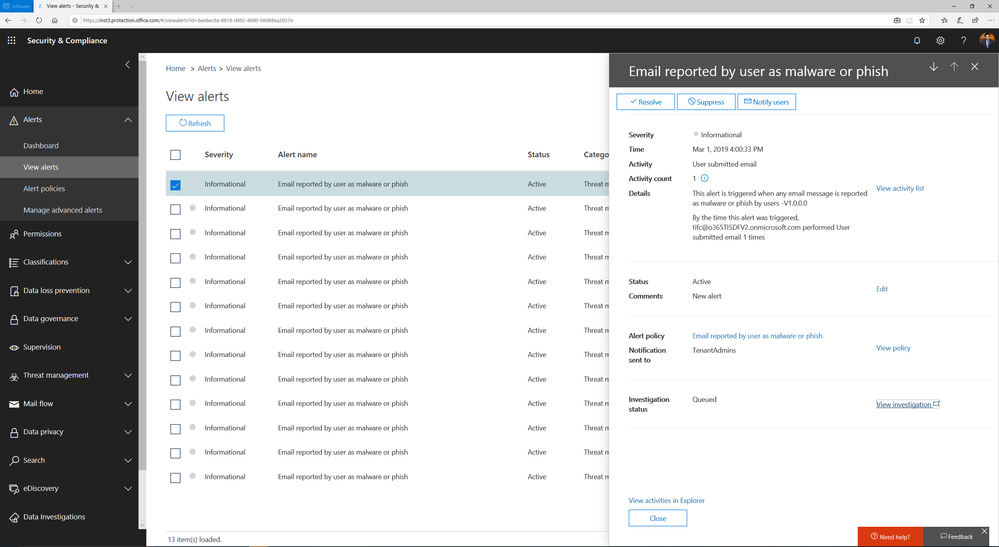 Alert automatically triggers investigation when a user reports an email as phish
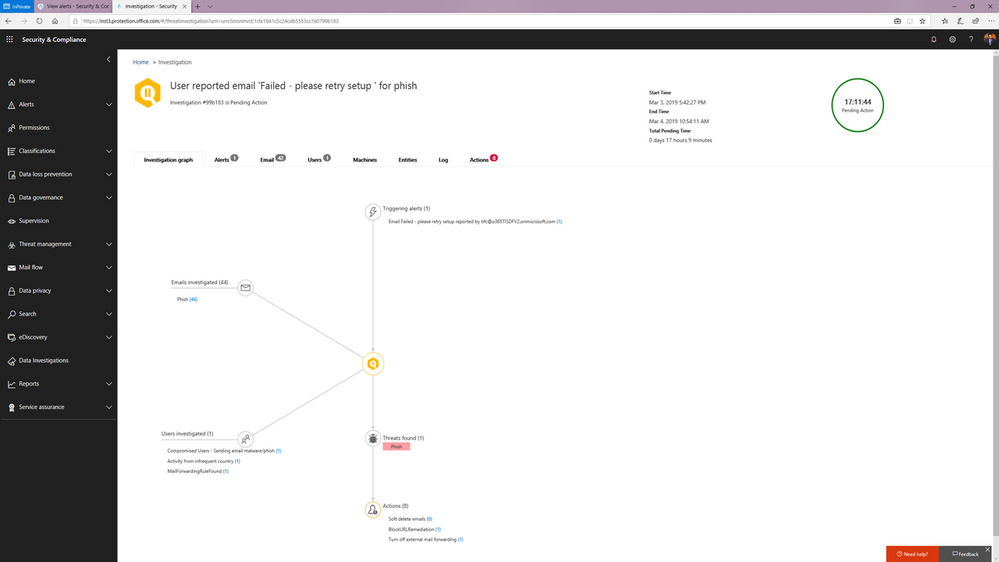 Investigation graph showing a summary of relevant emails and users with threats and recommended actions.
You can learn more about how the SecOps teams can use these playbooks in this article.
Watch below:
to see the playbooks in action.
Triggering an automated investigation from the Threat Explorer
In addition to these playbooks, we’re also adding the ability to manually trigger automated investigations from the Threat Explorer. The Threat Explorer has become an invaluable tool for many security teams to hunt for and investigate threats within the O365 productivity suite as security teams use it to search for bad actors or IOCs. With the new ability to trigger an automatic investigation from within the Threat Explorer, security teams can leverage the efficiency and effectiveness gains that come with automation as part their hunting/investigation flow. This allows them to gain visibility into any potential threat instantly with relevant recommendations.
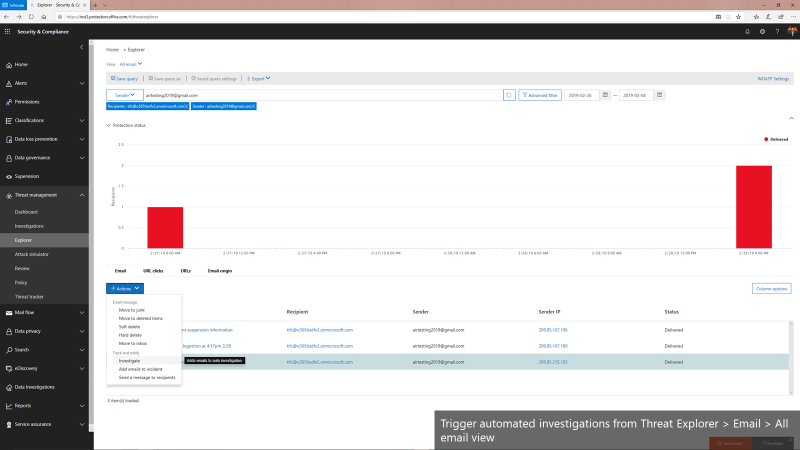 Triggering automated investigations from the Threat Explorer for All email view
We’re only getting started
Automation for incident response will become a much more important part of an enterprise-grade security solution. It can help mitigate more threats in real-time, reduce the time for detection and recovery, and ultimately, improve the efficiency, accuracy, and overall security for any organization. Just as important, it frees up time for the organization’s key security expertise to focus on more complicated problems – getting more out of their most trained experts.
The automation capabilities announced today paired with the automation within the Microsoft Defender Advanced Threat Protection offering form the backbone of the powerful integrated automated protection that comes as part of the Microsoft Threat Protection stack to enable better
detection, more insightful investigations, and more rapid remediation across multiple vectors such as emails, users and devices.
This is just the beginning. We’ll be rolling out more playbooks to address the most common threat scenarios. We invite you to try these playbooks out and provide feedback.
Office 365 ATP offers unparalleled protection from targeted and zero-day attacks over email and other collaboration vectors. Building over the massive threat intelligence signal available in the Microsoft Intelligent Security Graph and pairing it with sophisticated Machine Learning algorithms, Office 365 ATP offers security teams best-in-class prevention, detection and response capabilities to keep their organizations secure with stellar effectiveness and efficiency. And today we’re extremely excited to announce new Automation capabilities in Office 365 ATP that further amplify the efficiency of security teams as they investigate and respond to threats within their organization.
The broad intelligence of the Microsoft Security Graph that supports all of the Advanced Threat Protection products from Microsoft and the deep integration between them forms the backbone of Microsoft Threat Protection that offers security teams amazing capabilities to protect their organizations across their users, devices, email, applications, data and infrastructure. And the automation capabilities we’re announcing today further strengthen the overall automation story of Microsoft Threat Protection.
Security Dashboard showing summary of automated investigations
Challenges faced by SecOps today
To set some context, we continue to hear from customers that dealing with incident response quickly and effectively is a big challenge facing their SecOps teams. One key issue is the lack of available resources and expertise needed to analyze signals and respond to incidents in an efficient way. There are just too many alerts to investigate and signals to correlate. And SecOps teams are constantly struggling with budget and time.
A typical Security team member goes through the following cycle of investigation day in and day out.
Every single security alert goes through the above process and with the huge volume of alerts that need to be looked at, it can quickly become challenging for security teams to scale. Intelligent correlation of signals and automatic investigation of alerts can significantly reduce the manual effort and time for incident response.
Automation can significantly reduce the time, effort and resources needed for incident response
Last year, we shared how Office 365 ATP can help security teams become more effective and efficient in the threat investigation and response process. This research from Forrester also revealed huge cost savings when using our Office 365 Threat Intelligence service.
The new automation capabilities in Office 365 ATP goes even further in being able to bring more effectiveness and efficiency into SecOps flows.
Introducing new security playbooks within Office 365 ATP
Security playbooks are the foundation of automated incident response. They are the back-end policies that admins can select to trigger automatic investigation. The playbooks are built off our experience with real-world security scenarios. Based on our visibility and experience into the threat landscape we’ve designed these playbooks which tackle the most frequent threats.
Security playbooks are the foundation of AIR
We’re delighted to announce the public preview of two playbooks that help investigate key threats and alerts within Office 365 with recommended actions for containment and mitigation.
- User reports a phishing email— This alert will trigger an automatic investigation using the User Reported Messages Playbook when users use the “Report Message” button to report a phishing email.
- User clicks on a malicious link— This alert will trigger an automatic investigation using the Weaponized URL playbook when an Office 365 ATP Safe Links protected URL clicked by a user is determined to be malicious through detonation (change in verdict) or if the user overrides (clicks through) the Office 365 ATP Safe Links warning pages.
Over the new few weeks and months we’ll continue to add even more playbooks.
Alert automatically triggers investigation when a user reports an email as phish
Investigation graph showing a summary of relevant emails and users with threats and recommended actions.
You can learn more about how the SecOps teams can use these playbooks in this article.
Watch below:
to see the playbooks in action.
Triggering an automated investigation from the Threat Explorer
In addition to these playbooks, we’re also adding the ability to manually trigger automated investigations from the Threat Explorer. The Threat Explorer has become an invaluable tool for many security teams to hunt for and investigate threats within the O365 productivity suite as security teams use it to search for bad actors or IOCs. With the new ability to trigger an automatic investigation from within the Threat Explorer, security teams can leverage the efficiency and effectiveness gains that come with automation as part their hunting/investigation flow. This allows them to gain visibility into any potential threat instantly with relevant recommendations.
Triggering automated investigations from the Threat Explorer for All email view
We’re only getting started
Automation for incident response will become a much more important part of an enterprise-grade security solution. It can help mitigate more threats in real-time, reduce the time for detection and recovery, and ultimately, improve the efficiency, accuracy, and overall security for any organization. Just as important, it frees up time for the organization’s key security expertise to focus on more complicated problems – getting more out of their most trained experts.
The automation capabilities announced today paired with the automation within the Microsoft Defender Advanced Threat Protection offering form the backbone of the powerful integrated automated protection that comes as part of the Microsoft Threat Protection stack to enable better
detection, more insightful investigations, and more rapid remediation across multiple vectors such as emails, users and devices.
This is just the beginning. We’ll be rolling out more playbooks to address the most common threat scenarios. We invite you to try these playbooks out and provide feedback.
Office 365 ATP offers unparalleled protection from targeted and zero-day attacks over email and other collaboration vectors. Building over the massive threat intelligence signal available in the Microsoft Intelligent Security Graph and pairing it with sophisticated Machine Learning algorithms, Office 365 ATP offers security teams best-in-class prevention, detection and response capabilities to keep their organizations secure with stellar effectiveness and efficiency. And today we’re extremely excited to announce new Automation capabilities in Office 365 ATP that further amplify the efficiency of security teams as they investigate and respond to threats within their organization.
The broad intelligence of the Microsoft Security Graph that supports all of the Advanced Threat Protection products from Microsoft and the deep integration between them forms the backbone of Microsoft Threat Protection that offers security teams amazing capabilities to protect their organizations across their users, devices, email, applications, data and infrastructure. And the automation capabilities we’re announcing today further strengthen the overall automation story of Microsoft Threat Protection.
Security Dashboard showing summary of automated investigations
Challenges faced by SecOps today
To set some context, we continue to hear from customers that dealing with incident response quickly and effectively is a big challenge facing their SecOps teams. One key issue is the lack of available resources and expertise needed to analyze signals and respond to incidents in an efficient way. There are just too many alerts to investigate and signals to correlate. And SecOps teams are constantly struggling with budget and time.
A typical Security team member goes through the following cycle of investigation day in and day out.
Every single security alert goes through the above process and with the huge volume of alerts that need to be looked at, it can quickly become challenging for security teams to scale. Intelligent correlation of signals and automatic investigation of alerts can significantly reduce the manual effort and time for incident response.
Automation can significantly reduce the time, effort and resources needed for incident response
Last year, we shared how Office 365 ATP can help security teams become more effective and efficient in the threat investigation and response process. This research from Forrester also revealed huge cost savings when using our Office 365 Threat Intelligence service.
The new automation capabilities in Office 365 ATP goes even further in being able to bring more effectiveness and efficiency into SecOps flows.
Introducing new security playbooks within Office 365 ATP
Security playbooks are the foundation of automated incident response. They are the back-end policies that admins can select to trigger automatic investigation. The playbooks are built off our experience with real-world security scenarios. Based on our visibility and experience into the threat landscape we’ve designed these playbooks which tackle the most frequent threats.
Security playbooks are the foundation of AIR
We’re delighted to announce the public preview of two playbooks that help investigate key threats and alerts within Office 365 with recommended actions for containment and mitigation.
- User reports a phishing email— This alert will trigger an automatic investigation using the User Reported Messages Playbook when users use the “Report Message” button to report a phishing email.
- User clicks on a malicious link— This alert will trigger an automatic investigation using the Weaponized URL playbook when an Office 365 ATP Safe Links protected URL clicked by a user is determined to be malicious through detonation (change in verdict) or if the user overrides (clicks through) the Office 365 ATP Safe Links warning pages.
Over the new few weeks and months we’ll continue to add even more playbooks.
Alert automatically triggers investigation when a user reports an email as phish
Investigation graph showing a summary of relevant emails and users with threats and recommended actions.
You can learn more about how the SecOps teams can use these playbooks in this article.
Watch below:
to see the playbooks in action.
Triggering an automated investigation from the Threat Explorer
In addition to these playbooks, we’re also adding the ability to manually trigger automated investigations from the Threat Explorer. The Threat Explorer has become an invaluable tool for many security teams to hunt for and investigate threats within the O365 productivity suite as security teams use it to search for bad actors or IOCs. With the new ability to trigger an automatic investigation from within the Threat Explorer, security teams can leverage the efficiency and effectiveness gains that come with automation as part their hunting/investigation flow. This allows them to gain visibility into any potential threat instantly with relevant recommendations.
Triggering automated investigations from the Threat Explorer for All email view
We’re only getting started
Automation for incident response will become a much more important part of an enterprise-grade security solution. It can help mitigate more threats in real-time, reduce the time for detection and recovery, and ultimately, improve the efficiency, accuracy, and overall security for any organization. Just as important, it frees up time for the organization’s key security expertise to focus on more complicated problems – getting more out of their most trained experts.
The automation capabilities announced today paired with the automation within the Microsoft Defender Advanced Threat Protection offering form the backbone of the powerful integrated automated protection that comes as part of the Microsoft Threat Protection stack to enable better
detection, more insightful investigations, and more rapid remediation across multiple vectors such as emails, users and devices.
This is just the beginning. We’ll be rolling out more playbooks to address the most common threat scenarios. We invite you to try these playbooks out and provide feedback.
Office 365 ATP offers unparalleled protection from targeted and zero-day attacks over email and other collaboration vectors. Building over the massive threat intelligence signal available in the Microsoft Intelligent Security Graph and pairing it with sophisticated Machine Learning algorithms, Office 365 ATP offers security teams best-in-class prevention, detection and response capabilities to keep their organizations secure with stellar effectiveness and efficiency. And today we’re extremely excited to announce new Automation capabilities in Office 365 ATP that further amplify the efficiency of security teams as they investigate and respond to threats within their organization.
The broad intelligence of the Microsoft Security Graph that supports all of the Advanced Threat Protection products from Microsoft and the deep integration between them forms the backbone of Microsoft Threat Protection that offers security teams amazing capabilities to protect their organizations across their users, devices, email, applications, data and infrastructure. And the automation capabilities we’re announcing today further strengthen the overall automation story of Microsoft Threat Protection.
Security Dashboard showing summary of automated investigations
Challenges faced by SecOps today
To set some context, we continue to hear from customers that dealing with incident response quickly and effectively is a big challenge facing their SecOps teams. One key issue is the lack of available resources and expertise needed to analyze signals and respond to incidents in an efficient way. There are just too many alerts to investigate and signals to correlate. And SecOps teams are constantly struggling with budget and time.
A typical Security team member goes through the following cycle of investigation day in and day out.
Every single security alert goes through the above process and with the huge volume of alerts that need to be looked at, it can quickly become challenging for security teams to scale. Intelligent correlation of signals and automatic investigation of alerts can significantly reduce the manual effort and time for incident response.
Automation can significantly reduce the time, effort and resources needed for incident response
Last year, we shared how Office 365 ATP can help security teams become more effective and efficient in the threat investigation and response process. This research from Forrester also revealed huge cost savings when using our Office 365 Threat Intelligence service.
The new automation capabilities in Office 365 ATP goes even further in being able to bring more effectiveness and efficiency into SecOps flows.
Introducing new security playbooks within Office 365 ATP
Security playbooks are the foundation of automated incident response. They are the back-end policies that admins can select to trigger automatic investigation. The playbooks are built off our experience with real-world security scenarios. Based on our visibility and experience into the threat landscape we’ve designed these playbooks which tackle the most frequent threats.
Security playbooks are the foundation of AIR
We’re delighted to announce the public preview of two playbooks that help investigate key threats and alerts within Office 365 with recommended actions for containment and mitigation.
- User reports a phishing email— This alert will trigger an automatic investigation using the User Reported Messages Playbook when users use the “Report Message” button to report a phishing email.
- User clicks on a malicious link— This alert will trigger an automatic investigation using the Weaponized URL playbook when an Office 365 ATP Safe Links protected URL clicked by a user is determined to be malicious through detonation (change in verdict) or if the user overrides (clicks through) the Office 365 ATP Safe Links warning pages.
Over the new few weeks and months we’ll continue to add even more playbooks.
Alert automatically triggers investigation when a user reports an email as phish
Investigation graph showing a summary of relevant emails and users with threats and recommended actions.
You can learn more about how the SecOps teams can use these playbooks in this article.
Watch below:
to see the playbooks in action.
Triggering an automated investigation from the Threat Explorer
In addition to these playbooks, we’re also adding the ability to manually trigger automated investigations from the Threat Explorer. The Threat Explorer has become an invaluable tool for many security teams to hunt for and investigate threats within the O365 productivity suite as security teams use it to search for bad actors or IOCs. With the new ability to trigger an automatic investigation from within the Threat Explorer, security teams can leverage the efficiency and effectiveness gains that come with automation as part their hunting/investigation flow. This allows them to gain visibility into any potential threat instantly with relevant recommendations.
Triggering automated investigations from the Threat Explorer for All email view
We’re only getting started
Automation for incident response will become a much more important part of an enterprise-grade security solution. It can help mitigate more threats in real-time, reduce the time for detection and recovery, and ultimately, improve the efficiency, accuracy, and overall security for any organization. Just as important, it frees up time for the organization’s key security expertise to focus on more complicated problems – getting more out of their most trained experts.
The automation capabilities announced today paired with the automation within the Microsoft Defender Advanced Threat Protection offering form the backbone of the powerful integrated automated protection that comes as part of the Microsoft Threat Protection stack to enable better
detection, more insightful investigations, and more rapid remediation across multiple vectors such as emails, users and devices.
This is just the beginning. We’ll be rolling out more playbooks to address the most common threat scenarios. We invite you to try these playbooks out and provide feedback.







