Data privacy continues to be top-of-mind for businesses. For example, nearly one-third of global enterprises view compliance with new privacy laws, like the EU General Data Protection Regulation (GDPR), as one of the biggest IT hurdles that their organizations face1.
The arrival of the California Consumer Privacy Act (CCPA) will impact many large businesses with customers who reside in California. With more than 39 million individuals residing in California2 and transacting with businesses worldwide, the scope of the CCPA is significant. Businesses around the world need to start formulating a compliance strategy now so they are well prepared when enforcement begins in January 2020.
Today, we want to share five tips that can help your organization to get ready for new privacy regulations such as CCPA with Microsoft 365:
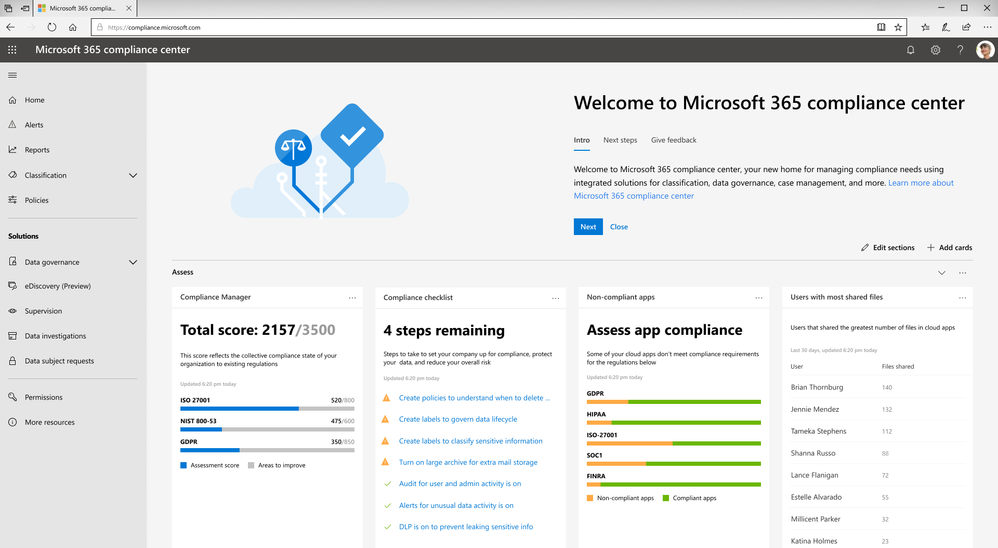
Tip 1: Leverage the GDPR assessment in Compliance Manager
With many commonalities between GDPR and CCPA, such as data subject rights of access, erasure, and portability, organizations can leverage their GDPR program to start tackling CCPA compliance now.
To help businesses assess Microsoft cloud services and find applicable technology solutions to implement GDPR controls, we released Compliance Manager in 2018. Compliance Manager is a cloud-based tool that gives you step-by-step guidance to help you implement, track and record your data-protection controls. You can get started by using the GDPR assessment in Compliance Manager today.
Tip 2: Establish a process to efficiently respond to Data Subject Requests
According to a blog post by Julie Brill, U.S consumers are highly aware of their privacy rights with the highest engagement of approximately 2 million users signing into the Microsoft privacy dashboard to manage their information in 4 months since GDPR came into effect. With that in mind, we encourage you to start building out your data subject access requests process today, because CCPA requires a 12-month look-back period.
To get ready to respond to this high demand of data access requests, we encourage you to start using the Data Subject Requests (DSRs) tool in the new Microsoft 365 compliance center, which allows your privacy and compliance teams to respond more efficiently to DSRs in a timely manner.
Tip 3: Discover, classify & label, and protect sensitive data
The CCPA will impose penalties for data breaches of consumers’ personal information. As organizations live in a world with a tsunami of data across their digital estate, understanding where their most sensitive data is and how to protect it is critical to reduce compliance risks.
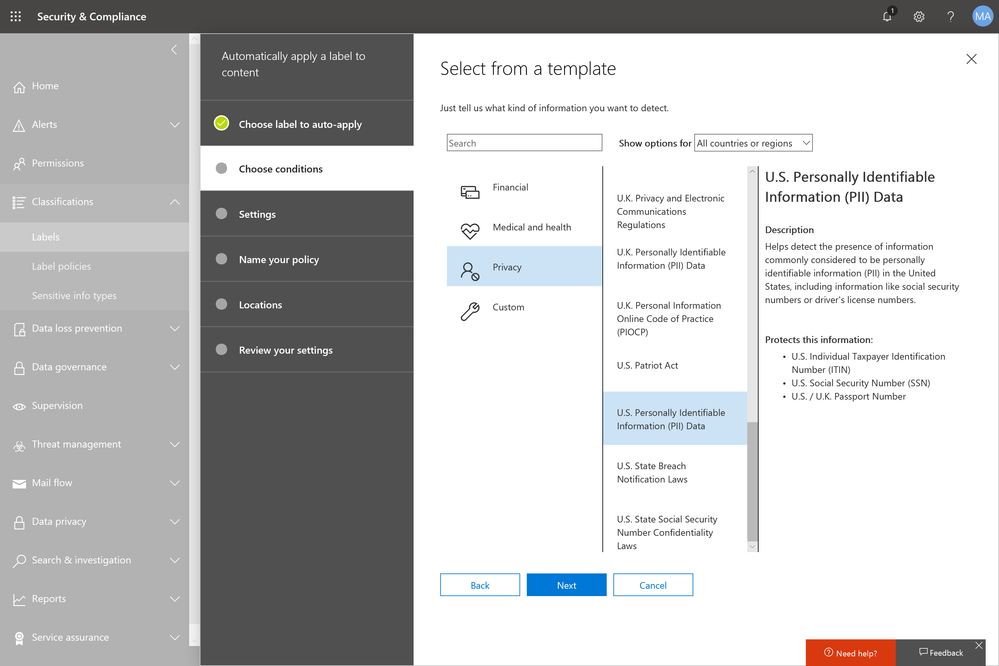
Microsoft Information Protection harnesses an integrated and intelligent approach to target the 80 percent of corporate data that is estimated to be “dark” or un-classified and unprotected3. You can start to make use of the U.S. PII sensitive data types to automatically discover, classify, and protect personal data to help you with CCPA compliance.
Tip 4: Use encryption to protect and control your sensitive emails
Regulations like GDPR and CCPA see encryption as an effective method to protect personal information from unauthorized parties in the event of a data breach.
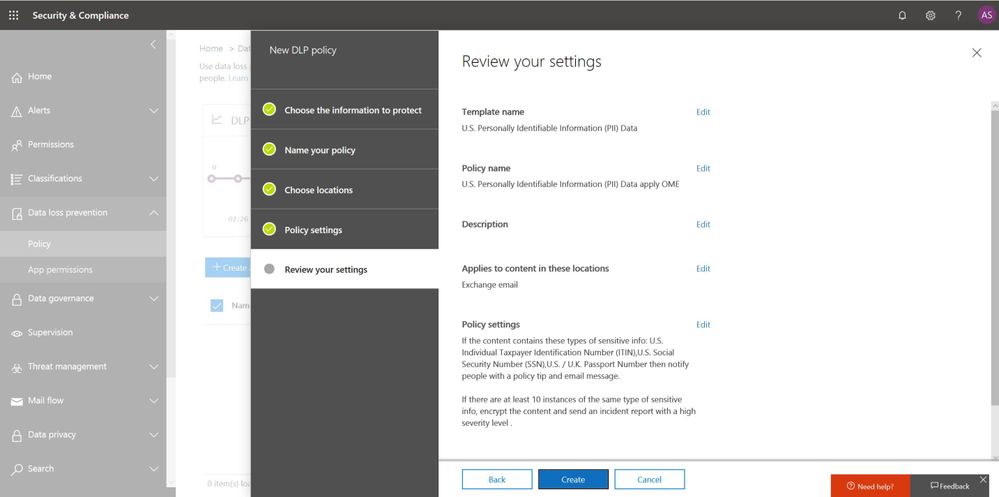
Office 365 Message Encryption enables users to protect sensitive emails shared with anyone inside and outside of your organization. If your tenant is eligible, Office 365 Message Encryption will be on by default. You can get started by setting up a Data Loss Prevention policy that applies Office 365 Message Encryption to U.S. PII sensitive data types.
Also start educating your end users to apply protection such as “do not forward” or “encrypt-only” directly from Outlook (either desktop or web version). Watch this video to learn more.
Tip 5: Champion consumer privacy rights to build a sustainable business
While the CCPA brings prominent challenges to many businesses who were not subject to GDPR, we encourage those organizations to view CCPA and other privacy laws as an opportunity to enhance their privacy programs and embrace privacy as a corporate value to build trust with customers.
Check out the “Championing privacy rights to drive differentiation” webcast with Microsoft CIO Kurt DelBene, CISO Bret Arsenault, and a featured speaker, Enza Iannopollo of Forrester, who discuss the new era of privacy expectations and how to invest in privacy as a business driver.
Learn more about the Microsoft cloud
At Microsoft, we are committed to partnering with you to keep advancing our solutions to help you protect your digital estate in a more compliant manner. Here are some additional resources to help you in your ongoing compliance journey:
- Download our e-book to learn more about how to protect digital privacy.
- Experience first-hand how Microsoft solutions can help solve your business challenges by registering for an upcoming hands-on online experience (US only). Click here for free Microsoft 365 Compliance product training outside the US.
- Learn more about the new Information Protection and Compliance offering in Microsoft 365
1 Forrester. “Global Business Technographics Security Survey, 2018.” August 2018. www.forrester.com/Global+Business+Technographics+Security+Survey+2018/-/E-sus4551.
2 Public Policy Institute of California. “Just the Facts: California’s Population.” www.ppic.org/publication/californias-population/.
3 Andrew Trice. “The Future of Cognitive Computing.” IBM blog. November 2015. www.ibm.com/blogs/bluemix/2015/11/future-of-cognitive-computing/.
Data privacy continues to be top-of-mind for businesses. For example, nearly one-third of global enterprises view compliance with new privacy laws, like the EU General Data Protection Regulation (GDPR), as one of the biggest IT hurdles that their organizations face1.
The arrival of the California Consumer Privacy Act (CCPA) will impact many large businesses with customers who reside in California. With more than 39 million individuals residing in California2 and transacting with businesses worldwide, the scope of the CCPA is significant. Businesses around the world need to start formulating a compliance strategy now so they are well prepared when enforcement begins in January 2020.
Today, we want to share five tips that can help your organization to get ready for new privacy regulations such as CCPA with Microsoft 365:
Tip 1: Leverage the GDPR assessment in Compliance Manager
With many commonalities between GDPR and CCPA, such as data subject rights of access, erasure, and portability, organizations can leverage their GDPR program to start tackling CCPA compliance now.
To help businesses assess Microsoft cloud services and find applicable technology solutions to implement GDPR controls, we released Compliance Manager in 2018. Compliance Manager is a cloud-based tool that gives you step-by-step guidance to help you implement, track and record your data-protection controls. You can get started by using the GDPR assessment in Compliance Manager today.
Tip 2: Establish a process to efficiently respond to Data Subject Requests
According to a blog post by Julie Brill, U.S consumers are highly aware of their privacy rights with the highest engagement of approximately 2 million users signing into the Microsoft privacy dashboard to manage their information in 4 months since GDPR came into effect. With that in mind, we encourage you to start building out your data subject access requests process today, because CCPA requires a 12-month look-back period.
To get ready to respond to this high demand of data access requests, we encourage you to start using the Data Subject Requests (DSRs) tool in the new Microsoft 365 compliance center, which allows your privacy and compliance teams to respond more efficiently to DSRs in a timely manner.
Tip 3: Discover, classify & label, and protect sensitive data
The CCPA will impose penalties for data breaches of consumers’ personal information. As organizations live in a world with a tsunami of data across their digital estate, understanding where their most sensitive data is and how to protect it is critical to reduce compliance risks.
Microsoft Information Protection harnesses an integrated and intelligent approach to target the 80 percent of corporate data that is estimated to be “dark” or un-classified and unprotected3. You can start to make use of the U.S. PII sensitive data types to automatically discover, classify, and protect personal data to help you with CCPA compliance.
Tip 4: Use encryption to protect and control your sensitive emails
Regulations like GDPR and CCPA see encryption as an effective method to protect personal information from unauthorized parties in the event of a data breach.
Office 365 Message Encryption enables users to protect sensitive emails shared with anyone inside and outside of your organization. If your tenant is eligible, Office 365 Message Encryption will be on by default. You can get started by setting up a Data Loss Prevention policy that applies Office 365 Message Encryption to U.S. PII sensitive data types.
Also start educating your end users to apply protection such as “do not forward” or “encrypt-only” directly from Outlook (either desktop or web version). Watch this video to learn more.
Tip 5: Champion consumer privacy rights to build a sustainable business
While the CCPA brings prominent challenges to many businesses who were not subject to GDPR, we encourage those organizations to view CCPA and other privacy laws as an opportunity to enhance their privacy programs and embrace privacy as a corporate value to build trust with customers.
Check out the “Championing privacy rights to drive differentiation” webcast with Microsoft CIO Kurt DelBene, CISO Bret Arsenault, and a featured speaker, Enza Iannopollo of Forrester, who discuss the new era of privacy expectations and how to invest in privacy as a business driver.
Learn more about the Microsoft cloud
At Microsoft, we are committed to partnering with you to keep advancing our solutions to help you protect your digital estate in a more compliant manner. Here are some additional resources to help you in your ongoing compliance journey:
- Download our e-book to learn more about how to protect digital privacy.
- Experience first-hand how Microsoft solutions can help solve your business challenges by registering for an upcoming hands-on online experience (US only). Click here for free Microsoft 365 Compliance product training outside the US.
- Learn more about the new Information Protection and Compliance offering in Microsoft 365
1 Forrester. “Global Business Technographics Security Survey, 2018.” August 2018. www.forrester.com/Global+Business+Technographics+Security+Survey+2018/-/E-sus4551.
2 Public Policy Institute of California. “Just the Facts: California’s Population.” www.ppic.org/publication/californias-population/.
3 Andrew Trice. “The Future of Cognitive Computing.” IBM blog. November 2015. www.ibm.com/blogs/bluemix/2015/11/future-of-cognitive-computing/.
Today, we are announcing new capabilities in the Microsoft Graph Security API to help our customers simplify integration, speed up response, and improve the effectiveness of their existing security investments. The latest updates include an expanded list of alert providers, new capabilities that enable threat intelligence sharing, streamline the creation of security automation workflows, and enable rich security analytics and reporting. Finally, we’re announcing several new integration partners.
Security Alerts
The Microsoft Graph Security API provides a unified interface and common schema to simplify integration of security alerts from Microsoft products, services, and partners. In addition to the many Microsoft and partner solutions previously available for the Microsoft Graph Security API, you can now access security alerts from Office 365 and Azure Advanced Threat Protection solutions as well as the new Microsoft Azure Sentinel service.
Developers can integrate alerts via a single endpoint, using one authentication key and one SDK. You can query for all alerts pertaining to specific users, devices, files, or command lines when investigating a specific threat or use webhook subscriptions to get notified when any new alert matching your search criteria is created or updated. Learn more about alerts.
Threat Intelligence (preview)
Threat indicators, also referred to as indicators of compromise or IoCs, represent data about known threats, such as malicious files, URLs, domains, and IP addresses. Microsoft amasses a huge volume of indicators each day using trillions of unique insights into cloud, users, and endpoints, which plays a huge role in how we protect Microsoft and our customers. You may also generate indicators through internal threat intelligence gathering or acquire indicators from threat intelligence communities, licensed feeds, and other sources. In addition to the vast threat intelligence built into Microsoft products and services, you can now also leverage your own indicators to enable custom detections in Microsoft solutions. Learn more.
- Connect your threat intelligence platform and communities to automatically share the latest indicators with Microsoft. Use the Microsoft Graph Security API or leverage integrations with leading threat intelligence platforms, including Palo Alto Networks MineMeld and the open source MISP platform. Use with Azure Sentinel today to correlate threat intelligence with log data to alert on malicious activity. Refer to the tiIndicators schema.
- Take immediate action in response to new threat, such as block file, URL, domain, or IP address from within your security tools and workflows. When a security analyst discovers a new threat, protection can be instantly enabled in your Microsoft security solutions. Try it first with Windows Defender ATP (coming soon) to block malicious activity on your Windows endpoints using the properties seen in alerts or identified during investigations. Refer to the SecurityActions schema.
Security Automation
In a world of fast-moving, disruptive attacks and under-resourced security teams, automation of security workflows is essential. However, development of workflows to expedite alert routing, triage, investigation, and remediation can be challenging to create and maintain. We recently announced a set of Microsoft Graph Security API connectors to simplify development of automated security workflows without writing any code.
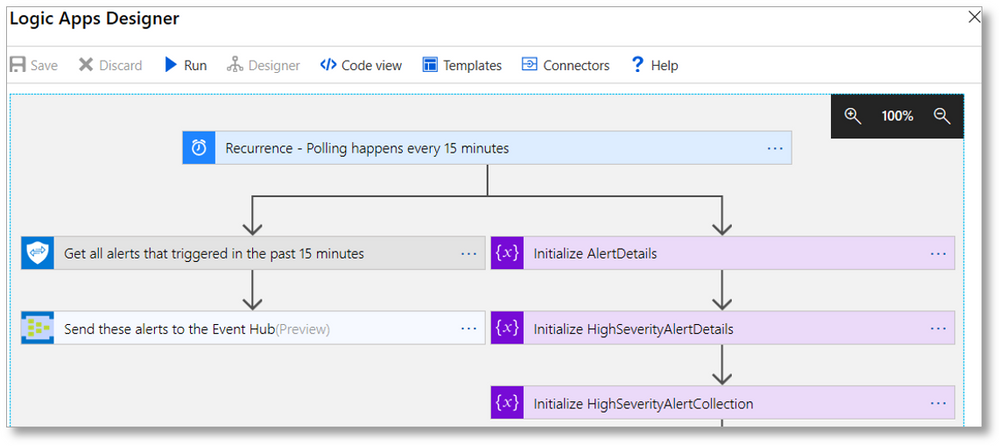
- Leverage Azure Logic Apps, Microsoft Flow, and PowerApps connectors to quickly build automation workflows using insights from the Microsoft Graph Security API. Mash up the Microsoft Graph Security API connector with over 200 other connectors to build workflows that act on security alerts, such as automatically routing high severity alerts to the on-call analyst – creating a ticket assigned to that user, sending an email or SMS notification, and collecting related alerts to speed their investigation See other example workflows.
Security Analytics + Reporting
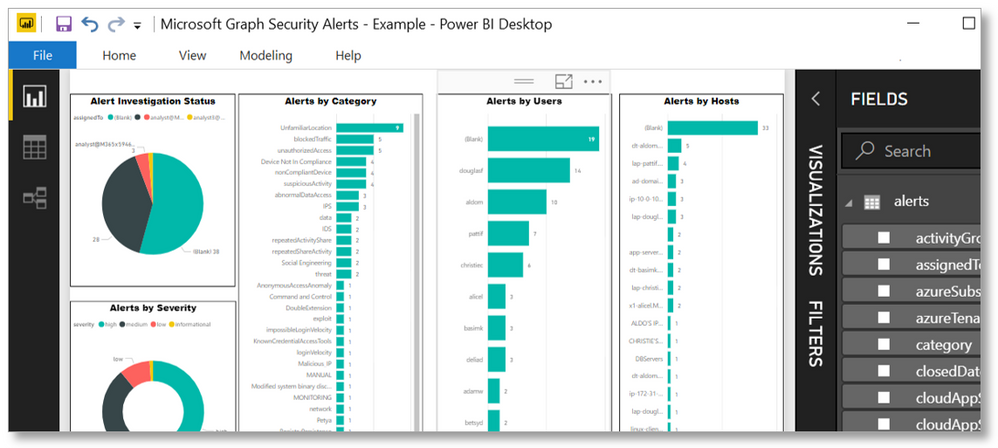
The Microsoft Graph Security API now makes it easier than ever to analyze and visualize data across different security products running in your organization to get deeper security insights. Create reports and dashboards for visibility into active threats and trends. Discover opportunities to learn from the data and train your security models. The Microsoft Graph Security API schema provides multiple properties to pivot on to build rich reports and exploratory datasets using your security data.
- Use the PowerBI connector to create enterprise-wide security dashboards and reports. Get a complete picture of security alerts and secure score across your organization. Mash up security data with data from the other Power BI connectors, like Excel workbooks or other databases, for richer context. Use Power BI and Microsoft Flow to trigger an automated security workflow based on metrics, such as a percent decrease in your secure score. A sample dashboard and template help you get started. Learn more.
- Get deep insights to train security solutions by leveraging the power of Jupyter Notebooks for Microsoft Graph Security API. Use these Notebooks to build your visualizations and training data models with alert properties for users, files, hosts, processes, etc. across multiple security products. Learn more.
Integrated Partner Solutions
The Microsoft Graph Security API offers a wide range of possibilities for partners to build and enhance security solutions. We’ve been building an ecosystem of technology partners and are excited to announce the following new integrations:
- Barracuda Cloud Security Guardian accesses alerts and a secure score from the Microsoft Security Graph API and displays this on a single plane of glass.
- Bay Dynamics Risk Fabric integrates with the Microsoft Graph Security API to gain greater visibility into threats, enabling them to better prioritize remediation activities.
- Citrix Analytics leverages the Microsoft Graph Security API to correlate alerts from the Graph with Citrix products and take security actions. See video.
- DF Labs integrates with the Microsoft Graph Security API to enable its IncMan SOAR solution to orchestrate and automate response to threats from Graph Providers.
- FireEye Helix uses the Microsoft Graph Security API to integrate security insights from Microsoft and partners into its security operations platform.
- JASK uses the Microsoft Graph Security API to ingest data and information related to Microsoft users, applications, and events into its ASOC SIEM platform.
- Swimlane’s SOAR platform integrates with Microsoft Graph Security API to orchestrate and automate incident response across multiple solutions for faster threat response.
Find out more about partner integration opportunities here.
In addition to technology partners, we’re also working closely with a number of managed security services providers who are building solutions leveraging the Security API. Most recently, SWC Technology Partners announced new security solutions that help improve organizations’ security posture. In particular, SWC is using the Microsoft Graph Security API in its Managed Defense Service that helps identify suspicious behavior and allows organizations to quickly surface and remediate threats.
We know that our customers struggle with integrating their diverse security tools, workflows, and systems. The cost, time, and resources necessary to integrate systems, enable correlation of alerts, connect to existing workflows, and provide access to contextual data is extremely high. We’re excited about the potential the Microsoft Graph Security API offers to directly address these challenges.
Get started today
Join us at the Microsoft booth, N6059 in the north expo hall, at RSA Conference 2019 in San Francisco. You’ll get the chance to speak to experts and see how our partners are using the API.
To learn more and get started with using the Microsoft Graph Security API, check out the following resources:
Today, we are announcing new capabilities in the Microsoft Graph Security API to help our customers simplify integration, speed up response, and improve the effectiveness of their existing security investments. The latest updates include an expanded list of alert providers, new capabilities that enable threat intelligence sharing, streamline the creation of security automation workflows, and enable rich security analytics and reporting. Finally, we’re announcing several new integration partners.
Security Alerts
The Microsoft Graph Security API provides a unified interface and common schema to simplify integration of security alerts from Microsoft products, services, and partners. In addition to the many Microsoft and partner solutions previously available for the Microsoft Graph Security API, you can now access security alerts from Office 365 and Azure Advanced Threat Protection solutions as well as the new Microsoft Azure Sentinel service.
Developers can integrate alerts via a single endpoint, using one authentication key and one SDK. You can query for all alerts pertaining to specific users, devices, files, or command lines when investigating a specific threat or use webhook subscriptions to get notified when any new alert matching your search criteria is created or updated. Learn more about alerts.
Threat Intelligence (preview)
Threat indicators, also referred to as indicators of compromise or IoCs, represent data about known threats, such as malicious files, URLs, domains, and IP addresses. Microsoft amasses a huge volume of indicators each day using trillions of unique insights into cloud, users, and endpoints, which plays a huge role in how we protect Microsoft and our customers. You may also generate indicators through internal threat intelligence gathering or acquire indicators from threat intelligence communities, licensed feeds, and other sources. In addition to the vast threat intelligence built into Microsoft products and services, you can now also leverage your own indicators to enable custom detections in Microsoft solutions. Learn more.
- Connect your threat intelligence platform and communities to automatically share the latest indicators with Microsoft. Use the Microsoft Graph Security API or leverage integrations with leading threat intelligence platforms, including Palo Alto Networks MineMeld and the open source MISP platform. Use with Azure Sentinel today to correlate threat intelligence with log data to alert on malicious activity. Refer to the tiIndicators schema.
- Take immediate action in response to new threat, such as block file, URL, domain, or IP address from within your security tools and workflows. When a security analyst discovers a new threat, protection can be instantly enabled in your Microsoft security solutions. Try it first with Windows Defender ATP (coming soon) to block malicious activity on your Windows endpoints using the properties seen in alerts or identified during investigations. Refer to the SecurityActions schema.
Security Automation
In a world of fast-moving, disruptive attacks and under-resourced security teams, automation of security workflows is essential. However, development of workflows to expedite alert routing, triage, investigation, and remediation can be challenging to create and maintain. We recently announced a set of Microsoft Graph Security API connectors to simplify development of automated security workflows without writing any code.
- Leverage Azure Logic Apps, Microsoft Flow, and PowerApps connectors to quickly build automation workflows using insights from the Microsoft Graph Security API. Mash up the Microsoft Graph Security API connector with over 200 other connectors to build workflows that act on security alerts, such as automatically routing high severity alerts to the on-call analyst – creating a ticket assigned to that user, sending an email or SMS notification, and collecting related alerts to speed their investigation See other example workflows.
Security Analytics + Reporting
The Microsoft Graph Security API now makes it easier than ever to analyze and visualize data across different security products running in your organization to get deeper security insights. Create reports and dashboards for visibility into active threats and trends. Discover opportunities to learn from the data and train your security models. The Microsoft Graph Security API schema provides multiple properties to pivot on to build rich reports and exploratory datasets using your security data.
- Use the PowerBI connector to create enterprise-wide security dashboards and reports. Get a complete picture of security alerts and secure score across your organization. Mash up security data with data from the other Power BI connectors, like Excel workbooks or other databases, for richer context. Use Power BI and Microsoft Flow to trigger an automated security workflow based on metrics, such as a percent decrease in your secure score. A sample dashboard and template help you get started. Learn more.
- Get deep insights to train security solutions by leveraging the power of Jupyter Notebooks for Microsoft Graph Security API. Use these Notebooks to build your visualizations and training data models with alert properties for users, files, hosts, processes, etc. across multiple security products. Learn more.
Integrated Partner Solutions
The Microsoft Graph Security API offers a wide range of possibilities for partners to build and enhance security solutions. We’ve been building an ecosystem of technology partners and are excited to announce the following new integrations:
- Barracuda Cloud Security Guardian accesses alerts and a secure score from the Microsoft Security Graph API and displays this on a single plane of glass.
- Bay Dynamics Risk Fabric integrates with the Microsoft Graph Security API to gain greater visibility into threats, enabling them to better prioritize remediation activities.
- Citrix Analytics leverages the Microsoft Graph Security API to correlate alerts from the Graph with Citrix products and take security actions. See video.
- DF Labs integrates with the Microsoft Graph Security API to enable its IncMan SOAR solution to orchestrate and automate response to threats from Graph Providers.
- FireEye Helix uses the Microsoft Graph Security API to integrate security insights from Microsoft and partners into its security operations platform.
- JASK uses the Microsoft Graph Security API to ingest data and information related to Microsoft users, applications, and events into its ASOC SIEM platform.
- Swimlane’s SOAR platform integrates with Microsoft Graph Security API to orchestrate and automate incident response across multiple solutions for faster threat response.
Find out more about partner integration opportunities here.
In addition to technology partners, we’re also working closely with a number of managed security services providers who are building solutions leveraging the Security API. Most recently, SWC Technology Partners announced new security solutions that help improve organizations’ security posture. In particular, SWC is using the Microsoft Graph Security API in its Managed Defense Service that helps identify suspicious behavior and allows organizations to quickly surface and remediate threats.
We know that our customers struggle with integrating their diverse security tools, workflows, and systems. The cost, time, and resources necessary to integrate systems, enable correlation of alerts, connect to existing workflows, and provide access to contextual data is extremely high. We’re excited about the potential the Microsoft Graph Security API offers to directly address these challenges.
Get started today
Join us at the Microsoft booth, N6059 in the north expo hall, at RSA Conference 2019 in San Francisco. You’ll get the chance to speak to experts and see how our partners are using the API.
To learn more and get started with using the Microsoft Graph Security API, check out the following resources:
Today, we are announcing new capabilities in the Microsoft Graph Security API to help our customers simplify integration, speed up response, and improve the effectiveness of their existing security investments. The latest updates include an expanded list of alert providers, new capabilities that enable threat intelligence sharing, streamline the creation of security automation workflows, and enable rich security analytics and reporting. Finally, we’re announcing several new integration partners.
Security Alerts
The Microsoft Graph Security API provides a unified interface and common schema to simplify integration of security alerts from Microsoft products, services, and partners. In addition to the many Microsoft and partner solutions previously available for the Microsoft Graph Security API, you can now access security alerts from Office 365 and Azure Advanced Threat Protection solutions as well as the new Microsoft Azure Sentinel service.
Developers can integrate alerts via a single endpoint, using one authentication key and one SDK. You can query for all alerts pertaining to specific users, devices, files, or command lines when investigating a specific threat or use webhook subscriptions to get notified when any new alert matching your search criteria is created or updated. Learn more about alerts.
Threat Intelligence (preview)
Threat indicators, also referred to as indicators of compromise or IoCs, represent data about known threats, such as malicious files, URLs, domains, and IP addresses. Microsoft amasses a huge volume of indicators each day using trillions of unique insights into cloud, users, and endpoints, which plays a huge role in how we protect Microsoft and our customers. You may also generate indicators through internal threat intelligence gathering or acquire indicators from threat intelligence communities, licensed feeds, and other sources. In addition to the vast threat intelligence built into Microsoft products and services, you can now also leverage your own indicators to enable custom detections in Microsoft solutions. Learn more.
- Connect your threat intelligence platform and communities to automatically share the latest indicators with Microsoft. Use the Microsoft Graph Security API or leverage integrations with leading threat intelligence platforms, including Palo Alto Networks MineMeld and the open source MISP platform. Use with Azure Sentinel today to correlate threat intelligence with log data to alert on malicious activity. Refer to the tiIndicators schema.
- Take immediate action in response to new threat, such as block file, URL, domain, or IP address from within your security tools and workflows. When a security analyst discovers a new threat, protection can be instantly enabled in your Microsoft security solutions. Try it first with Windows Defender ATP (coming soon) to block malicious activity on your Windows endpoints using the properties seen in alerts or identified during investigations. Refer to the SecurityActions schema.
Security Automation
In a world of fast-moving, disruptive attacks and under-resourced security teams, automation of security workflows is essential. However, development of workflows to expedite alert routing, triage, investigation, and remediation can be challenging to create and maintain. We recently announced a set of Microsoft Graph Security API connectors to simplify development of automated security workflows without writing any code.
- Leverage Azure Logic Apps, Microsoft Flow, and PowerApps connectors to quickly build automation workflows using insights from the Microsoft Graph Security API. Mash up the Microsoft Graph Security API connector with over 200 other connectors to build workflows that act on security alerts, such as automatically routing high severity alerts to the on-call analyst – creating a ticket assigned to that user, sending an email or SMS notification, and collecting related alerts to speed their investigation See other example workflows.
Security Analytics + Reporting
The Microsoft Graph Security API now makes it easier than ever to analyze and visualize data across different security products running in your organization to get deeper security insights. Create reports and dashboards for visibility into active threats and trends. Discover opportunities to learn from the data and train your security models. The Microsoft Graph Security API schema provides multiple properties to pivot on to build rich reports and exploratory datasets using your security data.
- Use the PowerBI connector to create enterprise-wide security dashboards and reports. Get a complete picture of security alerts and secure score across your organization. Mash up security data with data from the other Power BI connectors, like Excel workbooks or other databases, for richer context. Use Power BI and Microsoft Flow to trigger an automated security workflow based on metrics, such as a percent decrease in your secure score. A sample dashboard and template help you get started. Learn more.
- Get deep insights to train security solutions by leveraging the power of Jupyter Notebooks for Microsoft Graph Security API. Use these Notebooks to build your visualizations and training data models with alert properties for users, files, hosts, processes, etc. across multiple security products. Learn more.
Integrated Partner Solutions
The Microsoft Graph Security API offers a wide range of possibilities for partners to build and enhance security solutions. We’ve been building an ecosystem of technology partners and are excited to announce the following new integrations:
- Barracuda Cloud Security Guardian accesses alerts and a secure score from the Microsoft Security Graph API and displays this on a single plane of glass.
- Bay Dynamics Risk Fabric integrates with the Microsoft Graph Security API to gain greater visibility into threats, enabling them to better prioritize remediation activities.
- Citrix Analytics leverages the Microsoft Graph Security API to correlate alerts from the Graph with Citrix products and take security actions. See video.
- DF Labs integrates with the Microsoft Graph Security API to enable its IncMan SOAR solution to orchestrate and automate response to threats from Graph Providers.
- FireEye Helix uses the Microsoft Graph Security API to integrate security insights from Microsoft and partners into its security operations platform.
- JASK uses the Microsoft Graph Security API to ingest data and information related to Microsoft users, applications, and events into its ASOC SIEM platform.
- Swimlane’s SOAR platform integrates with Microsoft Graph Security API to orchestrate and automate incident response across multiple solutions for faster threat response.
Find out more about partner integration opportunities here.
In addition to technology partners, we’re also working closely with a number of managed security services providers who are building solutions leveraging the Security API. Most recently, SWC Technology Partners announced new security solutions that help improve organizations’ security posture. In particular, SWC is using the Microsoft Graph Security API in its Managed Defense Service that helps identify suspicious behavior and allows organizations to quickly surface and remediate threats.
We know that our customers struggle with integrating their diverse security tools, workflows, and systems. The cost, time, and resources necessary to integrate systems, enable correlation of alerts, connect to existing workflows, and provide access to contextual data is extremely high. We’re excited about the potential the Microsoft Graph Security API offers to directly address these challenges.
Get started today
Join us at the Microsoft booth, N6059 in the north expo hall, at RSA Conference 2019 in San Francisco. You’ll get the chance to speak to experts and see how our partners are using the API.
To learn more and get started with using the Microsoft Graph Security API, check out the following resources:







