It has been a busy few weeks since we previewed the new Secure Score API. While the team was working on this, they also were working on another common request, support for additional controls. In particular we heard that you wanted controls from the Enterprise Mobility + Security (EMS) suite. As you might have seen in the Microsoft Secure Blog we are expanding Secure Score to support additional EMS solutions and are happy to share that we have new controls for Microsoft Cloud App Security and additional controls for Azure Active Directory (Azure AD).
Azure AD Controls
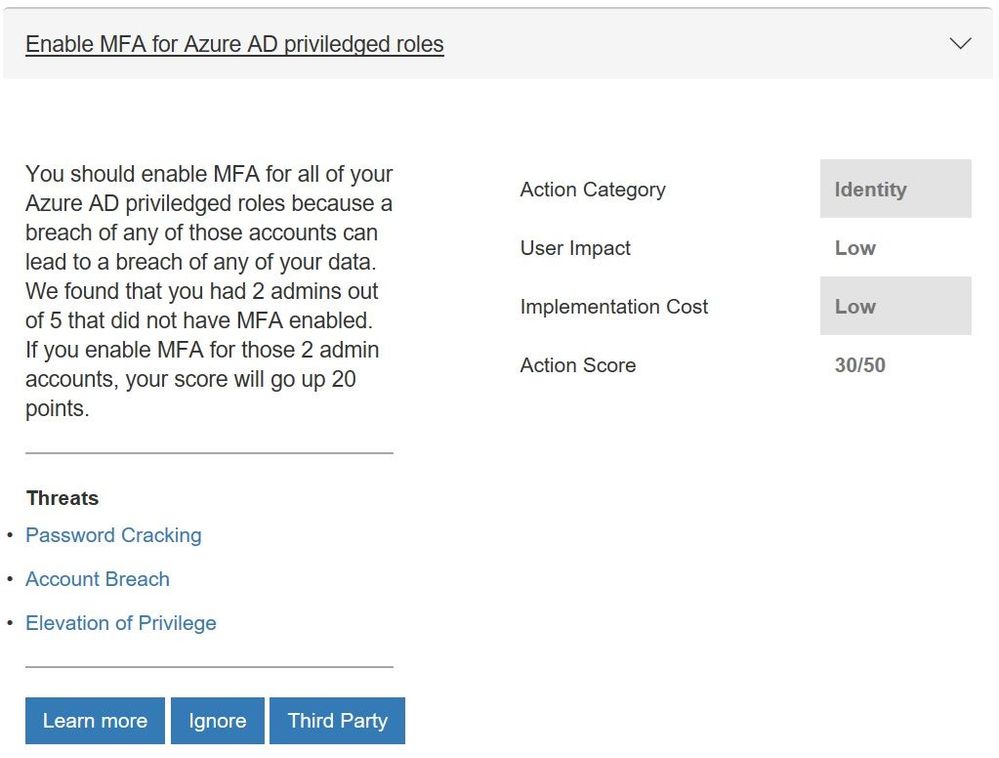
We have seen the feedback from many of you that you wanted support for additional Azure Active Directory (Azure AD) controls to help you manage user identities and create intelligence-driven access policies to secure your resources. In particular you wanted the multifactor authentication (MFA) controls to support conditional access. Working with the Azure AD team this is now available and 8 more controls which include:
- Enabling self-service password reset that helps empower users and reduce help desk costs
- Require just in time access for global administrators using Privileged Identity Management
- Turning on password hash sync which helps you leverage the same password you use to sign in to your on-premises Active Directory for Azure AD services
- Enable user risk policies that can block access or require a user to use MFA to login in when there is a likelihood that a user’s identity has been compromised
Updated control for Azure AD multi-factor authentication
Microsoft Cloud App Security Controls
More and more organizations are adopting SaaS apps, not only to reduce costs but also to unlock competitive advantages such as faster time to market and improved collaboration. Even if your company hasn’t embraced cloud applications, your employees are probably using them. Microsoft Cloud App Security is our cloud access security broker that gives you visibility into your cloud apps and services, provides sophisticated analytics to identify and combat cyberthreats and enables you to control how your data travels. If you are taking advantage of the solution, you will now get points for actions like:
- Reviewing permissions and blocking risky OAuth applications that your users have installed and have access to Office 365 data
- Reviewing anomaly detection policies that help you understand if users are logging in from locations that they normally don’t log in from, using anonymous IP addresses, and have multiple failed login attempts
- Discover risky and non-compliant Shadow IT applications used in your organization through the Cloud Discovery Dashboard and automatic uploading of your firewall/proxy logs
- Creating custom activity policies to discover risky behavior in cloud apps like a mass downloads of data.
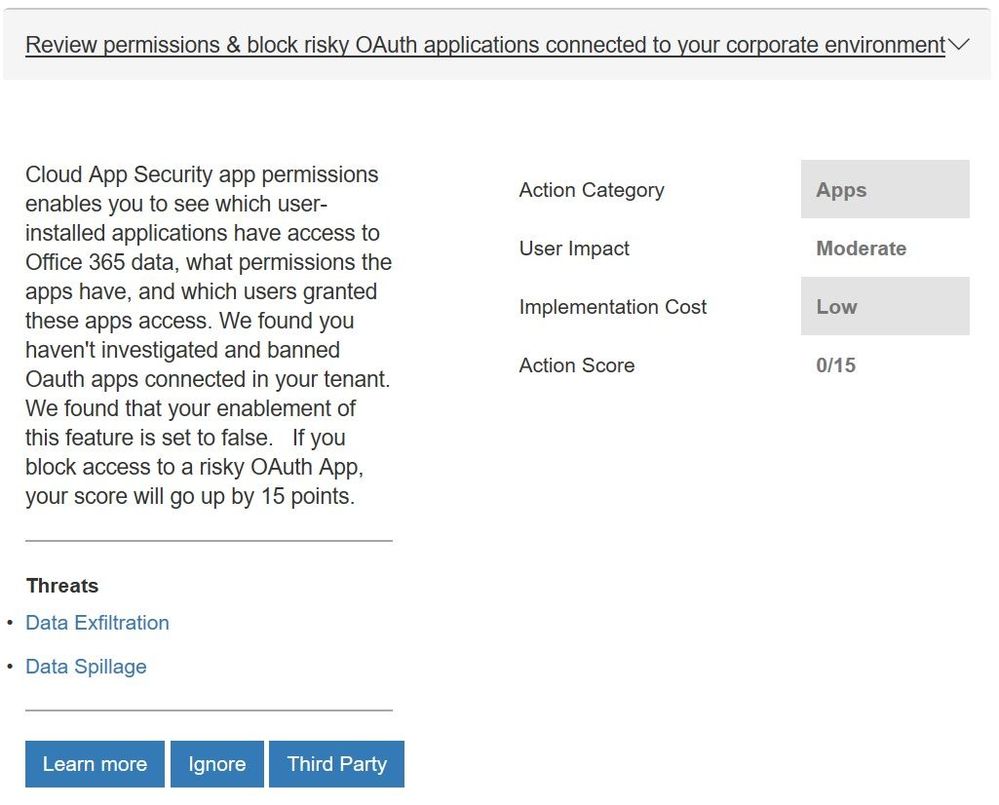 New control from Microsoft Cloud App Security
We will be looking to add more controls in the future. For example, we will look to add controls from Azure Security Center as they have launched a public preview of their own score.
With all the new controls we are rethinking how we show the points you have obtained. Today we display the overall Microsoft Secure Score and the points by solution (Office 365 and Windows). With the addition of controls from EMS and eventually Azure Security Center, along with the fact that organizations have told us that they think about their environment more broadly then just solutions, this approach will be less effective in helping you understand your security posture. To help solve this, in the future we will move to a category view that will show a score for controls that focus on identity, apps, data, devices, and infrastructure. You can see the beginnings of this change in the filter box within the “Take Action, Improve Your Microsoft Secure Score” section of Secure Score.
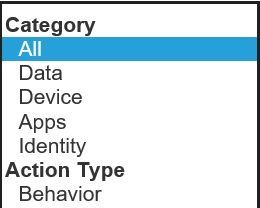 Category options to filter on in the “Take Action, Improve Your Microsoft Secure Score” section
To see what your score looks like with the new controls, login with administrative credentials at https://securescore.microsoft.com and start thinking about which ones you will enable. We hope that these changes help you get even greater visibility into your security posture and the guidance to help you find the right level of security for your organization.
As always, feel free to leave your questions, thoughts, and comments below.
It has been a busy few weeks since we previewed the new Secure Score API. While the team was working on this, they also were working on another common request, support for additional controls. In particular we heard that you wanted controls from the Enterprise Mobility + Security (EMS) suite. As you might have seen in the Microsoft Secure Blog we are expanding Secure Score to support additional EMS solutions and are happy to share that we have new controls for Microsoft Cloud App Security and additional controls for Azure Active Directory (Azure AD).
Azure AD Controls
We have seen the feedback from many of you that you wanted support for additional Azure Active Directory (Azure AD) controls to help you manage user identities and create intelligence-driven access policies to secure your resources. In particular you wanted the multifactor authentication (MFA) controls to support conditional access. Working with the Azure AD team this is now available and 8 more controls which include:
- Enabling self-service password reset that helps empower users and reduce help desk costs
- Require just in time access for global administrators using Privileged Identity Management
- Turning on password hash sync which helps you leverage the same password you use to sign in to your on-premises Active Directory for Azure AD services
- Enable user risk policies that can block access or require a user to use MFA to login in when there is a likelihood that a user’s identity has been compromised
Updated control for Azure AD multi-factor authentication
Microsoft Cloud App Security Controls
More and more organizations are adopting SaaS apps, not only to reduce costs but also to unlock competitive advantages such as faster time to market and improved collaboration. Even if your company hasn’t embraced cloud applications, your employees are probably using them. Microsoft Cloud App Security is our cloud access security broker that gives you visibility into your cloud apps and services, provides sophisticated analytics to identify and combat cyberthreats and enables you to control how your data travels. If you are taking advantage of the solution, you will now get points for actions like:
- Reviewing permissions and blocking risky OAuth applications that your users have installed and have access to Office 365 data
- Reviewing anomaly detection policies that help you understand if users are logging in from locations that they normally don’t log in from, using anonymous IP addresses, and have multiple failed login attempts
- Discover risky and non-compliant Shadow IT applications used in your organization through the Cloud Discovery Dashboard and automatic uploading of your firewall/proxy logs
- Creating custom activity policies to discover risky behavior in cloud apps like a mass downloads of data.
New control from Microsoft Cloud App Security
We will be looking to add more controls in the future. For example, we will look to add controls from Azure Security Center as they have launched a public preview of their own score.
With all the new controls we are rethinking how we show the points you have obtained. Today we display the overall Microsoft Secure Score and the points by solution (Office 365 and Windows). With the addition of controls from EMS and eventually Azure Security Center, along with the fact that organizations have told us that they think about their environment more broadly then just solutions, this approach will be less effective in helping you understand your security posture. To help solve this, in the future we will move to a category view that will show a score for controls that focus on identity, apps, data, devices, and infrastructure. You can see the beginnings of this change in the filter box within the “Take Action, Improve Your Microsoft Secure Score” section of Secure Score.
Category options to filter on in the “Take Action, Improve Your Microsoft Secure Score” section
To see what your score looks like with the new controls, login with administrative credentials at https://securescore.microsoft.com and start thinking about which ones you will enable. We hope that these changes help you get even greater visibility into your security posture and the guidance to help you find the right level of security for your organization.
As always, feel free to leave your questions, thoughts, and comments below.

We’re facing a data explosion – changes in the way we do business have resulted in a rapid increase in the amount of data and information being collected throughout your business. As this data grows, so do the problems of managing it all. Where, or what, can you turn to for help?
Our modern business techniques require a modern approach to managing the increased data in our systems. For many, the chosen system is Office 365 – but, no matter what the system, the data still needs to be managed, governed, and supervised to provide value.
More details from the event page:
“In this webinar, AIIM’s chief evangelist John Mancini and Nishan DeSilva from Microsoft will discuss the latest ways Office 365 is providing the tools to develop and implement a modern records management strategy to take charge of the data explosion, including:
- Improved Findability: How to find and retain important data while eliminating ROT (redundant, outdated and trivial information) – with classification, archiving, retention, disposition, supervision, and more
- New Approaches to Governance: Where the Office 365 governance capabilities are today and what’s in store for the future, highlighted by the newest features and scenarios available
- Increased Business Intelligence: How machine learning algorithms can automatically or manually detect, classify sensitive data mapping to enterprise taxonomies
In addition, Nishan DeSilva will share customer use case stories that illustrate these modern approaches to the latest functionality found in Office 365. Hear how information professionals are succeeding with governing their data in Office 365. And envision how you can succeed, too.”
We’re facing a data explosion – changes in the way we do business have resulted in a rapid increase in the amount of data and information being collected throughout your business. As this data grows, so do the problems of managing it all. Where, or what, can you turn to for help?
Our modern business techniques require a modern approach to managing the increased data in our systems. For many, the chosen system is Office 365 – but, no matter what the system, the data still needs to be managed, governed, and supervised to provide value.
More details from the event page:
“In this webinar, AIIM’s chief evangelist John Mancini and Nishan DeSilva from Microsoft will discuss the latest ways Office 365 is providing the tools to develop and implement a modern records management strategy to take charge of the data explosion, including:
- Improved Findability: How to find and retain important data while eliminating ROT (redundant, outdated and trivial information) – with classification, archiving, retention, disposition, supervision, and more
- New Approaches to Governance: Where the Office 365 governance capabilities are today and what’s in store for the future, highlighted by the newest features and scenarios available
- Increased Business Intelligence: How machine learning algorithms can automatically or manually detect, classify sensitive data mapping to enterprise taxonomies
In addition, Nishan DeSilva will share customer use case stories that illustrate these modern approaches to the latest functionality found in Office 365. Hear how information professionals are succeeding with governing their data in Office 365. And envision how you can succeed, too.”
We’re facing a data explosion – changes in the way we do business have resulted in a rapid increase in the amount of data and information being collected throughout your business. As this data grows, so do the problems of managing it all. Where, or what, can you turn to for help?
Our modern business techniques require a modern approach to managing the increased data in our systems. For many, the chosen system is Office 365 – but, no matter what the system, the data still needs to be managed, governed, and supervised to provide value.
More details from the event page:
“In this webinar, AIIM’s chief evangelist John Mancini and Nishan DeSilva from Microsoft will discuss the latest ways Office 365 is providing the tools to develop and implement a modern records management strategy to take charge of the data explosion, including:
- Improved Findability: How to find and retain important data while eliminating ROT (redundant, outdated and trivial information) – with classification, archiving, retention, disposition, supervision, and more
- New Approaches to Governance: Where the Office 365 governance capabilities are today and what’s in store for the future, highlighted by the newest features and scenarios available
- Increased Business Intelligence: How machine learning algorithms can automatically or manually detect, classify sensitive data mapping to enterprise taxonomies
In addition, Nishan DeSilva will share customer use case stories that illustrate these modern approaches to the latest functionality found in Office 365. Hear how information professionals are succeeding with governing their data in Office 365. And envision how you can succeed, too.”







