Cybersecurity remains a critical management issue in the era of digital transforming. In April, Brad Smith, President and Chief Legal Officer of Microsoft, published a blog post to discuss a Cybersecurity Tech Accord, and to reinforce the importance of supporting an open, free, and secure Internet. As Brad mentions in his post, one of the core principles of the proposed Tech Accord is to empower users, customers, and developers to strengthen cybersecurity protection.
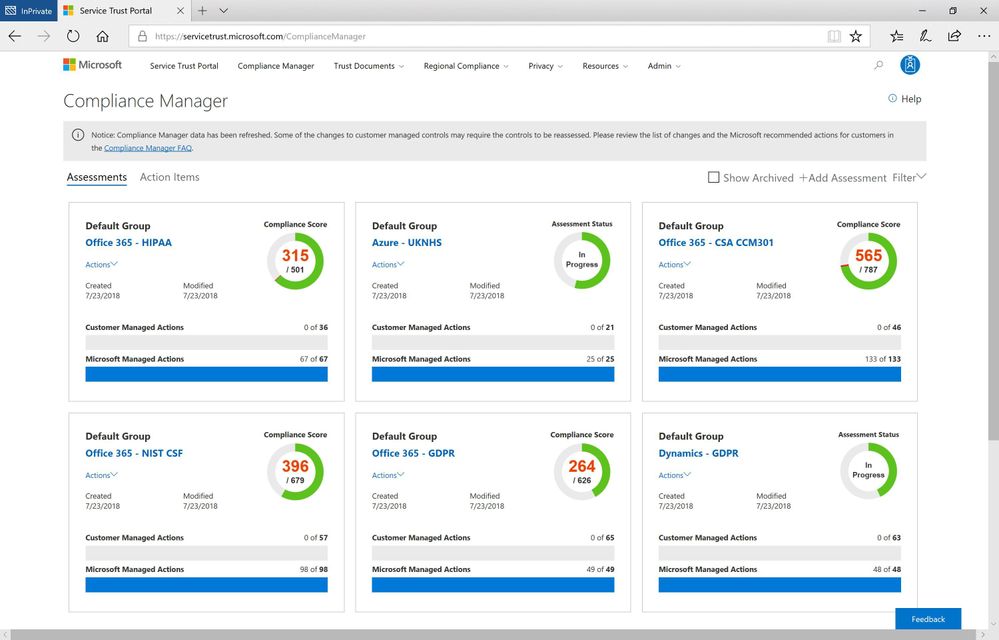
As part of our work on this principle, we are continuing to build and enhance the Assessments available in Compliance Manager to help organizations implement and verify security controls for their Microsoft cloud tenant.
New available Assessments in Compliance Manager
With the July release of Compliance Manager, we are announcing the availability of new and updated Assessments for Office 365 and Azure:
- National Institute of Standards and Technology’s Cybersecurity Framework (NIST CSF) for Office 365: NIST CSF is a set of standards, best practices, and recommendations that can help organizations enhance their cybersecurity at the organizational level. Organizations can follow the customer actions provided in the NIST CSF Assessment to configure and assess their Office 365 environment.
- Cloud Security Alliance Cloud Controls Matrix (CSA CCM) for Office 365: CSA has defined the Cloud Control Matrix, which provides best practices to help ensure a more secure cloud computing environment. Potential cloud customers can use this Assessment to make informed decisions when transitioning their IT operations to the cloud. Office 365 customers can leverage the recommended customer actions to strengthen their cloud security controls.
- UK National Health Service (NHS) for Azure: NHS in England provided a single standard that governs the collection, storage, and processing of patient data. Organizations can evaluate Microsoft’s internal controls and see how they adhere to the requirements and review their responsibilities for controls.
- Health Insurance Portability and Accountability Act (HIPAA)/ Health Information Technology for Economic and Clinical Health (HITECH) Act for Office 365: We also added HITECH controls into the HIPAA Assessment.
You can create these new Assessments in Compliance Manager today. To learn about how to add new Assessments, please see the support documentation.
Since we released Compliance Manager in February, many companies have begun using it as part of their overall compliance process. We’d like to share one such story with you. Watch this video and see how the biggest stadium in France uses Compliance Manager to protect confidential data with Microsoft 365:
If you are not familiar with Compliance Manager, you can download this white paper to learn more. We will continue to add Assessments for Microsoft Cloud services, so keep watching the Security, Privacy, and Compliance blog.
After listening to customer feedback and suggestions, Exchange Online is making some key changes to the mailbox auditing feature for Office 365 commercial users.
- Mailbox audits will be stored for all user mailboxes within the commercial service by default.
- The default audit configuration will change and include more audit events.
Why is this change happening?
These enhancements and modifications are a part of Microsoft’s commitments to improve the security tooling available to our customers and to ensure that our customers have access to critical audit data to investigate security incidents in their environment when required.
Enabling mailbox auditing by default addresses a specific pain-point with mailbox audit administration today, as Exchange administrators must configure the AuditEnabled setting on each mailbox to be audited after it is provisioned. In support of Microsoft’s commitment to providing our customers with an easy-to-use set of security features, Customers will no longer be required to configure mailbox auditing on a per-mailbox basis, and instead will be able rely on a tenant-wide configuration to enable or disable mailbox audit event collection. Mailbox events will be stored on the all user mailboxes automatically without required action.
In addition, we plan to expand the default set of audit actions to include more of the currently available Owner and Delegate events. If your mailbox configurations rely on the default settings for AuditOwner, AuditDelegate and AuditAdmin actions, your mailboxes will begin to audit according to the updated defaults. If your Exchange administrator has in the past configured mailboxes with a different set of distinct events, those mailboxes will still follow the configuration that was elected and will not be overridden. We are frequently adding to the available mailbox audit actions, and as we continue to add audit capabilities, these audit actions will be added to the default as well. A recent example was the introduction of the audit action for the creation of new Inbox Rules and Calendar delegation settings. We believe that auditing these actions can help our customers trace activity on the mailboxes within their service to a more complete degree.
When will this happen, and what do I need to do?
Over the next several months, we will enable the default-auditing configuration on all tenants with a steady ramp-up with all commercial customers to be covered by the end of the calendar year. At that time, there is nothing you need to do for the service to begin storing your user’s audit events. And if you have already enabled mailbox auditing in Exchange on your user’s mailboxes and are doing so for all new mailboxes – great! Mailboxes that are configured to audit today will continue to do so.
If the Exchange mailbox audit feature is new to you, please take some time to familiarize yourself with the options for mailbox auditing and learn how to leverage these events for your security investigation scenarios. Mailboxes generating audit records can be found in the Security & Compliance Center’s Audit Log interface, or in the mailbox audit log through the Search-MailboxAuditLog cmdlet. Additionally, explore the options available to you for audit actions including the newly-available ones. If you do not intend on relying on the default configuration, consider adding the new audit actions to your configured set.
How can I opt-out of default mailbox auditing?
As we begin rolling out the default-on configuration to tenants worldwide, a tenant administrator has the capability to pre-emptively override and disable all mailbox audits within their tenancy with the Set-OrganizationConfig cmdlet. You may choose to proactively prevent your tenancy’s mailboxes from being audited as part of this feature introduction with this setting. If the tenant-wide AuditDisabled setting is true, all settings for mailbox audit will be overridden to ignore audits. We don’t recommend you use this – but is available should your business require it.
What actions are recordable with Mailbox Auditing?
Mailbox auditing for Owner actions includes high-value scenarios to investigating a business email compromise, such as:
- MailboxLogin events – these events are recorded with client access to user mailboxes including protocol access with POP and IMAP
- Mail actions to Create, Update (edit) a message in any folder, delete actions to include moving a message to the Deleted Items folder or permanently removing messages, and the Copy or Move of a message.
- Actions commonly used in attack scenarios: creation of a mailbox’s Inbox Rule, adding Delegates, or delegating Calendar access to another user.
These Owner events will be added to the service’s default mailbox configuration for auditing. Additional events auditable for the mailbox’s Delegation capabilities include further valuable scenarios that will also be added as default:
- Mails sent on behalf of an individual, in addition to the SendAs action that is currently default
- A Delegate’s action to delete messages in a user’s mailbox or move them around folders.
How do I….?
Make Modifications to the Audit Actions
If you choose not to rely on the default settings for audit actions, you may add or drop actions from your configuration with the Set-Mailbox cmdlet for individual mailboxes. Once you elect a set of audit events this way, your mailboxes will no longer automatically follow the default service configuration and will need to be updated via PowerShell when Exchange releases new auditable actions.
Disable Mailbox Auditing for All Mailboxes
When your organization begins auditing all mailboxes by default, you may disable all mailbox auditing with this command:
Set-OrganizationConfig -AuditDisabled $true
To re-enable all mailbox audits, run:
Set-OrganizationConfig -AuditDisabled $false
In the default setting, the -AuditDisabled value will be False.
Disable Mailbox Auditing on Some Mailboxes
When your tenancy begins auditing all mailboxes by default, the per-mailbox AuditEnabled setting will be overridden. However, you may still choose to disable audits for a subset of your users if there is a business need. You can elect this option by configuring audit bypass associations on the identities you intend to ignore with the Set-MailboxAuditBypassAssociation cmdlet.
Find more information:
After listening to customer feedback and suggestions, Exchange Online is making some key changes to the mailbox auditing feature for Office 365 commercial users.
- Mailbox audits will be stored for all user mailboxes within the commercial service by default.
- The default audit configuration will change and include more audit events.
Why is this change happening?
These enhancements and modifications are a part of Microsoft’s commitments to improve the security tooling available to our customers and to ensure that our customers have access to critical audit data to investigate security incidents in their environment when required.
Enabling mailbox auditing by default addresses a specific pain-point with mailbox audit administration today, as Exchange administrators must configure the AuditEnabled setting on each mailbox to be audited after it is provisioned. In support of Microsoft’s commitment to providing our customers with an easy-to-use set of security features, Customers will no longer be required to configure mailbox auditing on a per-mailbox basis, and instead will be able rely on a tenant-wide configuration to enable or disable mailbox audit event collection. Mailbox events will be stored on the all user mailboxes automatically without required action.
In addition, we plan to expand the default set of audit actions to include more of the currently available Owner and Delegate events. If your mailbox configurations rely on the default settings for AuditOwner, AuditDelegate and AuditAdmin actions, your mailboxes will begin to audit according to the updated defaults. If your Exchange administrator has in the past configured mailboxes with a different set of distinct events, those mailboxes will still follow the configuration that was elected and will not be overridden. We are frequently adding to the available mailbox audit actions, and as we continue to add audit capabilities, these audit actions will be added to the default as well. A recent example was the introduction of the audit action for the creation of new Inbox Rules and Calendar delegation settings. We believe that auditing these actions can help our customers trace activity on the mailboxes within their service to a more complete degree.
When will this happen, and what do I need to do?
Over the next several months, we will enable the default-auditing configuration on all tenants with a steady ramp-up with all commercial customers to be covered by the end of the calendar year. At that time, there is nothing you need to do for the service to begin storing your user’s audit events. And if you have already enabled mailbox auditing in Exchange on your user’s mailboxes and are doing so for all new mailboxes – great! Mailboxes that are configured to audit today will continue to do so.
If the Exchange mailbox audit feature is new to you, please take some time to familiarize yourself with the options for mailbox auditing and learn how to leverage these events for your security investigation scenarios. Mailboxes generating audit records can be found in the Security & Compliance Center’s Audit Log interface, or in the mailbox audit log through the Search-MailboxAuditLog cmdlet. Additionally, explore the options available to you for audit actions including the newly-available ones. If you do not intend on relying on the default configuration, consider adding the new audit actions to your configured set.
How can I opt-out of default mailbox auditing?
As we begin rolling out the default-on configuration to tenants worldwide, a tenant administrator has the capability to pre-emptively override and disable all mailbox audits within their tenancy with the Set-OrganizationConfig cmdlet. You may choose to proactively prevent your tenancy’s mailboxes from being audited as part of this feature introduction with this setting. If the tenant-wide AuditDisabled setting is true, all settings for mailbox audit will be overridden to ignore audits. We don’t recommend you use this – but is available should your business require it.
What actions are recordable with Mailbox Auditing?
Mailbox auditing for Owner actions includes high-value scenarios to investigating a business email compromise, such as:
- MailboxLogin events – these events are recorded with client access to user mailboxes including protocol access with POP and IMAP
- Mail actions to Create, Update (edit) a message in any folder, delete actions to include moving a message to the Deleted Items folder or permanently removing messages, and the Copy or Move of a message.
- Actions commonly used in attack scenarios: creation of a mailbox’s Inbox Rule, adding Delegates, or delegating Calendar access to another user.
These Owner events will be added to the service’s default mailbox configuration for auditing. Additional events auditable for the mailbox’s Delegation capabilities include further valuable scenarios that will also be added as default:
- Mails sent on behalf of an individual, in addition to the SendAs action that is currently default
- A Delegate’s action to delete messages in a user’s mailbox or move them around folders.
How do I….?
Make Modifications to the Audit Actions
If you choose not to rely on the default settings for audit actions, you may add or drop actions from your configuration with the Set-Mailbox cmdlet for individual mailboxes. Once you elect a set of audit events this way, your mailboxes will no longer automatically follow the default service configuration and will need to be updated via PowerShell when Exchange releases new auditable actions.
Disable Mailbox Auditing for All Mailboxes
When your organization begins auditing all mailboxes by default, you may disable all mailbox auditing with this command:
Set-OrganizationConfig -AuditDisabled $true
To re-enable all mailbox audits, run:
Set-OrganizationConfig -AuditDisabled $false
In the default setting, the -AuditDisabled value will be False.
Disable Mailbox Auditing on Some Mailboxes
When your tenancy begins auditing all mailboxes by default, the per-mailbox AuditEnabled setting will be overridden. However, you may still choose to disable audits for a subset of your users if there is a business need. You can elect this option by configuring audit bypass associations on the identities you intend to ignore with the Set-MailboxAuditBypassAssociation cmdlet.
Find more information:
After listening to customer feedback and suggestions, Exchange Online is making some key changes to the mailbox auditing feature for Office 365 commercial users.
- Mailbox audits will be stored for all user mailboxes within the commercial service by default.
- The default audit configuration will change and include more audit events.
Why is this change happening?
These enhancements and modifications are a part of Microsoft’s commitments to improve the security tooling available to our customers and to ensure that our customers have access to critical audit data to investigate security incidents in their environment when required.
Enabling mailbox auditing by default addresses a specific pain-point with mailbox audit administration today, as Exchange administrators must configure the AuditEnabled setting on each mailbox to be audited after it is provisioned. In support of Microsoft’s commitment to providing our customers with an easy-to-use set of security features, Customers will no longer be required to configure mailbox auditing on a per-mailbox basis, and instead will be able rely on a tenant-wide configuration to enable or disable mailbox audit event collection. Mailbox events will be stored on the all user mailboxes automatically without required action.
In addition, we plan to expand the default set of audit actions to include more of the currently available Owner and Delegate events. If your mailbox configurations rely on the default settings for AuditOwner, AuditDelegate and AuditAdmin actions, your mailboxes will begin to audit according to the updated defaults. If your Exchange administrator has in the past configured mailboxes with a different set of distinct events, those mailboxes will still follow the configuration that was elected and will not be overridden. We are frequently adding to the available mailbox audit actions, and as we continue to add audit capabilities, these audit actions will be added to the default as well. A recent example was the introduction of the audit action for the creation of new Inbox Rules and Calendar delegation settings. We believe that auditing these actions can help our customers trace activity on the mailboxes within their service to a more complete degree.
When will this happen, and what do I need to do?
Over the next several months, we will enable the default-auditing configuration on all tenants with a steady ramp-up with all commercial customers to be covered by the end of the calendar year. At that time, there is nothing you need to do for the service to begin storing your user’s audit events. And if you have already enabled mailbox auditing in Exchange on your user’s mailboxes and are doing so for all new mailboxes – great! Mailboxes that are configured to audit today will continue to do so.
If the Exchange mailbox audit feature is new to you, please take some time to familiarize yourself with the options for mailbox auditing and learn how to leverage these events for your security investigation scenarios. Mailboxes generating audit records can be found in the Security & Compliance Center’s Audit Log interface, or in the mailbox audit log through the Search-MailboxAuditLog cmdlet. Additionally, explore the options available to you for audit actions including the newly-available ones. If you do not intend on relying on the default configuration, consider adding the new audit actions to your configured set.
How can I opt-out of default mailbox auditing?
As we begin rolling out the default-on configuration to tenants worldwide, a tenant administrator has the capability to pre-emptively override and disable all mailbox audits within their tenancy with the Set-OrganizationConfig cmdlet. You may choose to proactively prevent your tenancy’s mailboxes from being audited as part of this feature introduction with this setting. If the tenant-wide AuditDisabled setting is true, all settings for mailbox audit will be overridden to ignore audits. We don’t recommend you use this – but is available should your business require it.
What actions are recordable with Mailbox Auditing?
Mailbox auditing for Owner actions includes high-value scenarios to investigating a business email compromise, such as:
- MailboxLogin events – these events are recorded with client access to user mailboxes including protocol access with POP and IMAP
- Mail actions to Create, Update (edit) a message in any folder, delete actions to include moving a message to the Deleted Items folder or permanently removing messages, and the Copy or Move of a message.
- Actions commonly used in attack scenarios: creation of a mailbox’s Inbox Rule, adding Delegates, or delegating Calendar access to another user.
These Owner events will be added to the service’s default mailbox configuration for auditing. Additional events auditable for the mailbox’s Delegation capabilities include further valuable scenarios that will also be added as default:
- Mails sent on behalf of an individual, in addition to the SendAs action that is currently default
- A Delegate’s action to delete messages in a user’s mailbox or move them around folders.
How do I….?
Make Modifications to the Audit Actions
If you choose not to rely on the default settings for audit actions, you may add or drop actions from your configuration with the Set-Mailbox cmdlet for individual mailboxes. Once you elect a set of audit events this way, your mailboxes will no longer automatically follow the default service configuration and will need to be updated via PowerShell when Exchange releases new auditable actions.
Disable Mailbox Auditing for All Mailboxes
When your organization begins auditing all mailboxes by default, you may disable all mailbox auditing with this command:
Set-OrganizationConfig -AuditDisabled $true
To re-enable all mailbox audits, run:
Set-OrganizationConfig -AuditDisabled $false
In the default setting, the -AuditDisabled value will be False.
Disable Mailbox Auditing on Some Mailboxes
When your tenancy begins auditing all mailboxes by default, the per-mailbox AuditEnabled setting will be overridden. However, you may still choose to disable audits for a subset of your users if there is a business need. You can elect this option by configuring audit bypass associations on the identities you intend to ignore with the Set-MailboxAuditBypassAssociation cmdlet.
Find more information:
After listening to customer feedback and suggestions, Exchange Online is making some key changes to the mailbox auditing feature for Office 365 commercial users.
- Mailbox audits will be stored for all user mailboxes within the commercial service by default.
- The default audit configuration will change and include more audit events.
Why is this change happening?
These enhancements and modifications are a part of Microsoft’s commitments to improve the security tooling available to our customers and to ensure that our customers have access to critical audit data to investigate security incidents in their environment when required.
Enabling mailbox auditing by default addresses a specific pain-point with mailbox audit administration today, as Exchange administrators must configure the AuditEnabled setting on each mailbox to be audited after it is provisioned. In support of Microsoft’s commitment to providing our customers with an easy-to-use set of security features, Customers will no longer be required to configure mailbox auditing on a per-mailbox basis, and instead will be able rely on a tenant-wide configuration to enable or disable mailbox audit event collection. Mailbox events will be stored on the all user mailboxes automatically without required action.
In addition, we plan to expand the default set of audit actions to include more of the currently available Owner and Delegate events. If your mailbox configurations rely on the default settings for AuditOwner, AuditDelegate and AuditAdmin actions, your mailboxes will begin to audit according to the updated defaults. If your Exchange administrator has in the past configured mailboxes with a different set of distinct events, those mailboxes will still follow the configuration that was elected and will not be overridden. We are frequently adding to the available mailbox audit actions, and as we continue to add audit capabilities, these audit actions will be added to the default as well. A recent example was the introduction of the audit action for the creation of new Inbox Rules and Calendar delegation settings. We believe that auditing these actions can help our customers trace activity on the mailboxes within their service to a more complete degree.
When will this happen, and what do I need to do?
Over the next several months, we will enable the default-auditing configuration on all tenants with a steady ramp-up with all commercial customers to be covered by the end of the calendar year. At that time, there is nothing you need to do for the service to begin storing your user’s audit events. And if you have already enabled mailbox auditing in Exchange on your user’s mailboxes and are doing so for all new mailboxes – great! Mailboxes that are configured to audit today will continue to do so.
If the Exchange mailbox audit feature is new to you, please take some time to familiarize yourself with the options for mailbox auditing and learn how to leverage these events for your security investigation scenarios. Mailboxes generating audit records can be found in the Security & Compliance Center’s Audit Log interface, or in the mailbox audit log through the Search-MailboxAuditLog cmdlet. Additionally, explore the options available to you for audit actions including the newly-available ones. If you do not intend on relying on the default configuration, consider adding the new audit actions to your configured set.
How can I opt-out of default mailbox auditing?
As we begin rolling out the default-on configuration to tenants worldwide, a tenant administrator has the capability to pre-emptively override and disable all mailbox audits within their tenancy with the Set-OrganizationConfig cmdlet. You may choose to proactively prevent your tenancy’s mailboxes from being audited as part of this feature introduction with this setting. If the tenant-wide AuditDisabled setting is true, all settings for mailbox audit will be overridden to ignore audits. We don’t recommend you use this – but is available should your business require it.
What actions are recordable with Mailbox Auditing?
Mailbox auditing for Owner actions includes high-value scenarios to investigating a business email compromise, such as:
- MailboxLogin events – these events are recorded with client access to user mailboxes including protocol access with POP and IMAP
- Mail actions to Create, Update (edit) a message in any folder, delete actions to include moving a message to the Deleted Items folder or permanently removing messages, and the Copy or Move of a message.
- Actions commonly used in attack scenarios: creation of a mailbox’s Inbox Rule, adding Delegates, or delegating Calendar access to another user.
These Owner events will be added to the service’s default mailbox configuration for auditing. Additional events auditable for the mailbox’s Delegation capabilities include further valuable scenarios that will also be added as default:
- Mails sent on behalf of an individual, in addition to the SendAs action that is currently default
- A Delegate’s action to delete messages in a user’s mailbox or move them around folders.
How do I….?
Make Modifications to the Audit Actions
If you choose not to rely on the default settings for audit actions, you may add or drop actions from your configuration with the Set-Mailbox cmdlet for individual mailboxes. Once you elect a set of audit events this way, your mailboxes will no longer automatically follow the default service configuration and will need to be updated via PowerShell when Exchange releases new auditable actions.
Disable Mailbox Auditing for All Mailboxes
When your organization begins auditing all mailboxes by default, you may disable all mailbox auditing with this command:
Set-OrganizationConfig -AuditDisabled $true
To re-enable all mailbox audits, run:
Set-OrganizationConfig -AuditDisabled $false
In the default setting, the -AuditDisabled value will be False.
Disable Mailbox Auditing on Some Mailboxes
When your tenancy begins auditing all mailboxes by default, the per-mailbox AuditEnabled setting will be overridden. However, you may still choose to disable audits for a subset of your users if there is a business need. You can elect this option by configuring audit bypass associations on the identities you intend to ignore with the Set-MailboxAuditBypassAssociation cmdlet.
Find more information:







