Today is the enforcement date of the EU’s General Data Protection Regulation (GDPR), which establishes an important milestone for individual privacy rights. Microsoft has been a strong supporter of the GDPR since it was first proposed in 2012. The GDPR sets a strong standard for privacy because it puts people in control of their own data.
In this post, we summarize the resources on the Service Trust Portal that can help you with GDPR readiness when using Microsoft Cloud services.
Service Trust Portal – Get in-depth information to help you meet GDPR obligations
The Privacy area on Service Trust Portal provides GDPR resources across Microsoft Cloud services, including Office 365, Azure, Dynamics 365, Windows, and Professional Services. You can find 3 primary topics under the Privacy tab:
- Data Subject Requests (DSRs): get information about how specific Microsoft Cloud services enable you to discover, access, rectify, restrict, delete, and export personal data; connect you to the DSRs tools Microsoft builds to help you respond to DSRs (e.g. Data Log Export for responding to telemetry log DSRs).
- Data breach notification: find information about how Microsoft detects and responds to personal data breaches, and how you can set up your privacy contact to receive breach notifications from Microsoft in the event of personal data breach.
- Data Protection Impact Assessments (DPIAs): learn about Microsoft’s and your responsibilities for DPIA compliance, and get information provided by Microsoft that can support you to create your own DPIAs.
Visit it today at https://aka.ms/GDPRGetStarted and learn more about how to use Service Trust Portal to plan and implement GDPR controls in this video:
Compliance Manager – Assess and improve your GDPR compliance posture
Compliance Manager is a cross-Microsoft-Cloud solution that helps organizations understand and manage the complex compliance landscape with 3 key capabilities:
- Ongoing risk assessment: gain visibility into Microsoft’s internal controls as well as your compliance performance and make better plans with Compliance Score.[1]
- Actionable insights: get guidance on implementing controls to increase your Compliance Score and enhance data protection capabilities.
- Simplified compliance: use the built-in dashboard, control management, and audit-ready reporting functions to assign, track, and record your compliance activities
GDPR assessments are now available in Compliance Manager for Azure, Dynamics 365, Office 365, and Microsoft Professional Services.[2] Check out Compliance Manager today at https://aka.ms/compliancemanager.
Watch this 2-min video, which summarizes the capabilities of Compliance Manager:
More Resources
You can find more resources about Service Trust Portal and Compliance Manager below:
[1] Compliance Manager is a dashboard that provides the Compliance Score and a summary of your data protection and compliance stature as well as recommendations to improve data protection and compliance. This is a recommendation, it is up to you to evaluate and validate the effectiveness of customer controls as per your regulatory environment. Recommendations from Compliance Manager and Compliance Score should not be interpreted as a guarantee of compliance.
[2] Note that Office 365 GCC customers can access Compliance Manager; however, users should evaluate whether to use the document upload feature of Compliance Manager, as the storage for document upload is compliant with Office 365 Tier C only. Compliance Manager is not yet available in sovereign clouds including Office 365 U.S. Government Community High (GCC High), Office 365 Department of Defense (DoD), Office 365 Operated by 21 Vianet, and Office 365 Germany.
Today is the enforcement date of the EU’s General Data Protection Regulation (GDPR), which establishes an important milestone for individual privacy rights. Microsoft has been a strong supporter of the GDPR since it was first proposed in 2012. The GDPR sets a strong standard for privacy because it puts people in control of their own data.
In this post, we summarize the resources on the Service Trust Portal that can help you with GDPR readiness when using Microsoft Cloud services.
Service Trust Portal – Get in-depth information to help you meet GDPR obligations
The Privacy area on Service Trust Portal provides GDPR resources across Microsoft Cloud services, including Office 365, Azure, Dynamics 365, Windows, and Professional Services. You can find 3 primary topics under the Privacy tab:
- Data Subject Requests (DSRs): get information about how specific Microsoft Cloud services enable you to discover, access, rectify, restrict, delete, and export personal data; connect you to the DSRs tools Microsoft builds to help you respond to DSRs (e.g. Data Log Export for responding to telemetry log DSRs).
- Data breach notification: find information about how Microsoft detects and responds to personal data breaches, and how you can set up your privacy contact to receive breach notifications from Microsoft in the event of personal data breach.
- Data Protection Impact Assessments (DPIAs): learn about Microsoft’s and your responsibilities for DPIA compliance, and get information provided by Microsoft that can support you to create your own DPIAs.
Visit it today at https://aka.ms/GDPRGetStarted and learn more about how to use Service Trust Portal to plan and implement GDPR controls in this video:
Compliance Manager – Assess and improve your GDPR compliance posture
Compliance Manager is a cross-Microsoft-Cloud solution that helps organizations understand and manage the complex compliance landscape with 3 key capabilities:
- Ongoing risk assessment: gain visibility into Microsoft’s internal controls as well as your compliance performance and make better plans with Compliance Score.[1]
- Actionable insights: get guidance on implementing controls to increase your Compliance Score and enhance data protection capabilities.
- Simplified compliance: use the built-in dashboard, control management, and audit-ready reporting functions to assign, track, and record your compliance activities
GDPR assessments are now available in Compliance Manager for Azure, Dynamics 365, Office 365, and Microsoft Professional Services.[2] Check out Compliance Manager today at https://aka.ms/compliancemanager.
Watch this 2-min video, which summarizes the capabilities of Compliance Manager:
More Resources
You can find more resources about Service Trust Portal and Compliance Manager below:
[1] Compliance Manager is a dashboard that provides the Compliance Score and a summary of your data protection and compliance stature as well as recommendations to improve data protection and compliance. This is a recommendation, it is up to you to evaluate and validate the effectiveness of customer controls as per your regulatory environment. Recommendations from Compliance Manager and Compliance Score should not be interpreted as a guarantee of compliance.
[2] Note that Office 365 GCC customers can access Compliance Manager; however, users should evaluate whether to use the document upload feature of Compliance Manager, as the storage for document upload is compliant with Office 365 Tier C only. Compliance Manager is not yet available in sovereign clouds including Office 365 U.S. Government Community High (GCC High), Office 365 Department of Defense (DoD), Office 365 Operated by 21 Vianet, and Office 365 Germany.
Today is the enforcement date of the EU’s General Data Protection Regulation (GDPR), which establishes an important milestone for individual privacy rights. Microsoft has been a strong supporter of the GDPR since it was first proposed in 2012. The GDPR sets a strong standard for privacy because it puts people in control of their own data.
In this post, we summarize the resources on the Service Trust Portal that can help you with GDPR readiness when using Microsoft Cloud services.
Service Trust Portal – Get in-depth information to help you meet GDPR obligations
The Privacy area on Service Trust Portal provides GDPR resources across Microsoft Cloud services, including Office 365, Azure, Dynamics 365, Windows, and Professional Services. You can find 3 primary topics under the Privacy tab:
- Data Subject Requests (DSRs): get information about how specific Microsoft Cloud services enable you to discover, access, rectify, restrict, delete, and export personal data; connect you to the DSRs tools Microsoft builds to help you respond to DSRs (e.g. Data Log Export for responding to telemetry log DSRs).
- Data breach notification: find information about how Microsoft detects and responds to personal data breaches, and how you can set up your privacy contact to receive breach notifications from Microsoft in the event of personal data breach.
- Data Protection Impact Assessments (DPIAs): learn about Microsoft’s and your responsibilities for DPIA compliance, and get information provided by Microsoft that can support you to create your own DPIAs.
Visit it today at https://aka.ms/GDPRGetStarted and learn more about how to use Service Trust Portal to plan and implement GDPR controls in this video:
Compliance Manager – Assess and improve your GDPR compliance posture
Compliance Manager is a cross-Microsoft-Cloud solution that helps organizations understand and manage the complex compliance landscape with 3 key capabilities:
- Ongoing risk assessment: gain visibility into Microsoft’s internal controls as well as your compliance performance and make better plans with Compliance Score.[1]
- Actionable insights: get guidance on implementing controls to increase your Compliance Score and enhance data protection capabilities.
- Simplified compliance: use the built-in dashboard, control management, and audit-ready reporting functions to assign, track, and record your compliance activities
GDPR assessments are now available in Compliance Manager for Azure, Dynamics 365, Office 365, and Microsoft Professional Services.[2] Check out Compliance Manager today at https://aka.ms/compliancemanager.
Watch this 2-min video, which summarizes the capabilities of Compliance Manager:
More Resources
You can find more resources about Service Trust Portal and Compliance Manager below:
[1] Compliance Manager is a dashboard that provides the Compliance Score and a summary of your data protection and compliance stature as well as recommendations to improve data protection and compliance. This is a recommendation, it is up to you to evaluate and validate the effectiveness of customer controls as per your regulatory environment. Recommendations from Compliance Manager and Compliance Score should not be interpreted as a guarantee of compliance.
[2] Note that Office 365 GCC customers can access Compliance Manager; however, users should evaluate whether to use the document upload feature of Compliance Manager, as the storage for document upload is compliant with Office 365 Tier C only. Compliance Manager is not yet available in sovereign clouds including Office 365 U.S. Government Community High (GCC High), Office 365 Department of Defense (DoD), Office 365 Operated by 21 Vianet, and Office 365 Germany.
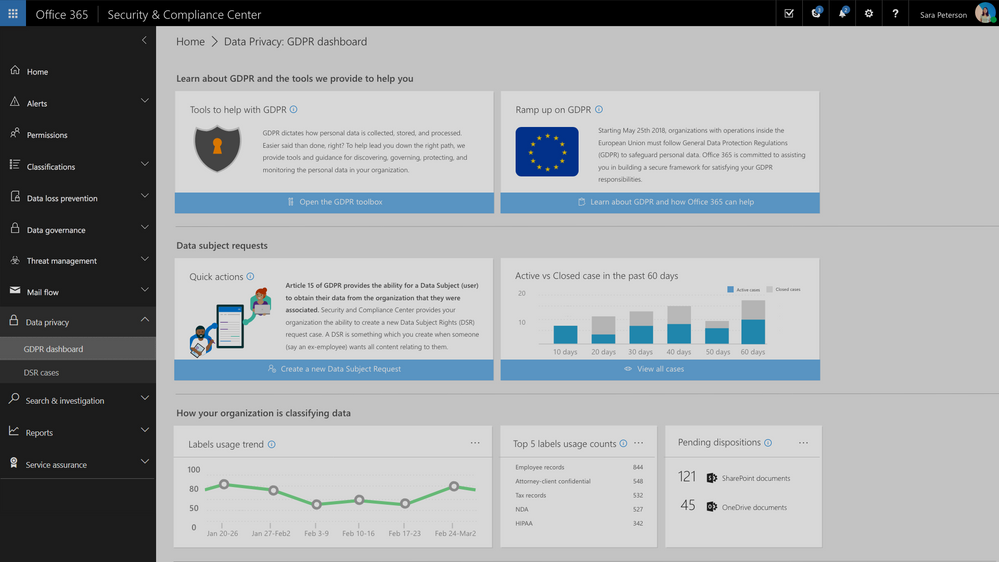
Update: The Data Privacy tab, GDPR dashboard and Data Subject Requests for Office 365 content are now generally available to Office 365 commercial customers in the Security and Compliance center.
One of the core requirements of the GDPR is that organizations have a process to respond to Data Subject Requests from individuals in the EU for access to their data. As part of Microsoft’s commitment to helping customers on their journey to GDPR, today we are announcing preview of the new Data Subject Requests experience is enabled within the Microsoft 365 Security & Compliance Center.
To handle GDPR related tasks for your Office 365 data and content, access to the Data Privacy tab within the Security & Compliance Center is now available in preview. This new Data Privacy tab will provide information to help you on your GDPR journey, and provide the ability to create, manage and complete data subject requests for content in Office 365.
This new experience will help to manage the process and execution of data subject requests for data within the Office 365 core apps and services including Exchange, SharePoint and OneDrive, Office 365 Groups, Skype for Business, and now Teams.
Request creation for each Data Subject Request is completed via a simple module that allows you to identify the request name or unique identifier, identify the related data subject e.g. the person submitting the request, and add that new request to the queue or requests that you may be managing.
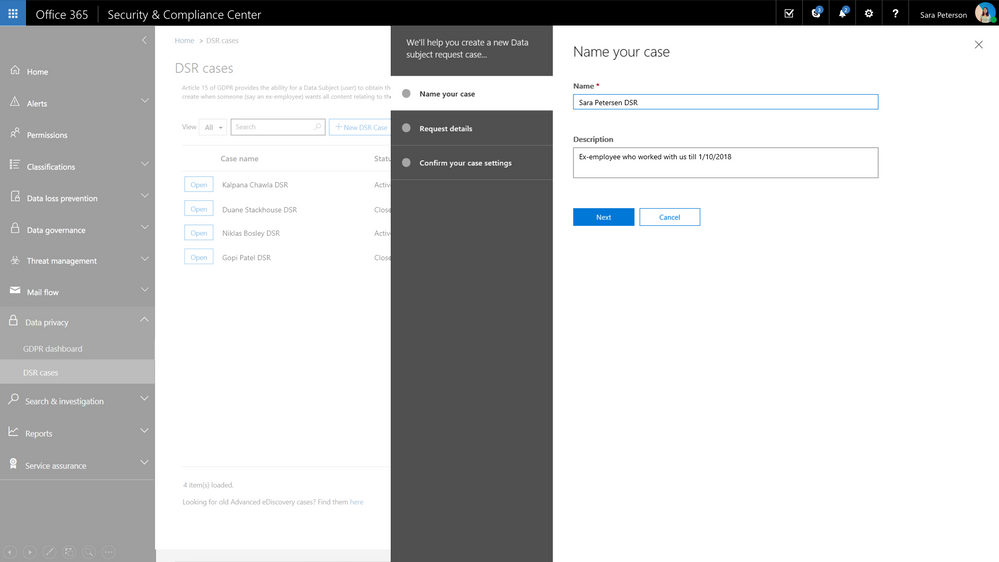
Once the request has been created, search for relevant content within your Office 365 environment. Select locations, specific content types and additional filters to refine your search to return only the content related to your specific request. In many cases, an employee will want to know what personally identifiable information their employer has on them and with content search you can refine your search to just look for PII rather than all data related to the requestor. Once search is complete, you now have option to export the related content for further review, processing or transport to the requestor. We provide several options for export to enable your work flow and processes. Once export is complete, the request status is updated.
Check out the video to see how this will work.
Update: The Data Privacy tab, GDPR dashboard and Data Subject Requests for Office 365 content are now generally available to Office 365 commercial customers in the Security and Compliance center.
One of the core requirements of the GDPR is that organizations have a process to respond to Data Subject Requests from individuals in the EU for access to their data. As part of Microsoft’s commitment to helping customers on their journey to GDPR, today we are announcing preview of the new Data Subject Requests experience is enabled within the Microsoft 365 Security & Compliance Center.
To handle GDPR related tasks for your Office 365 data and content, access to the Data Privacy tab within the Security & Compliance Center is now available in preview. This new Data Privacy tab will provide information to help you on your GDPR journey, and provide the ability to create, manage and complete data subject requests for content in Office 365.
This new experience will help to manage the process and execution of data subject requests for data within the Office 365 core apps and services including Exchange, SharePoint and OneDrive, Office 365 Groups, Skype for Business, and now Teams.
Request creation for each Data Subject Request is completed via a simple module that allows you to identify the request name or unique identifier, identify the related data subject e.g. the person submitting the request, and add that new request to the queue or requests that you may be managing.
Once the request has been created, search for relevant content within your Office 365 environment. Select locations, specific content types and additional filters to refine your search to return only the content related to your specific request. In many cases, an employee will want to know what personally identifiable information their employer has on them and with content search you can refine your search to just look for PII rather than all data related to the requestor. Once search is complete, you now have option to export the related content for further review, processing or transport to the requestor. We provide several options for export to enable your work flow and processes. Once export is complete, the request status is updated.
Check out the video to see how this will work.







