
Create M365 Group with Sensitivity Label programmatically
Creating the M365 group with Sensitivity Label starts the modern Team site with desired protection. This can be done with SPO Rest API or Microsoft Graph API, both require delegated permissions.
The following sample scripts use AAD App ROPC authentication flow (Resource Owner Password Credentials), which is documented in https://docs.microsoft.com/en-us/azure/active-directory-b2c/add-ropc-policy?tabs=app-reg-ga&pivots=b2c-user-flow to get access token before making the API calls, other delegated authentication flows should work as well.
- Microsoft Graph API sample powershell script:
$tenant = “********”
$AdminUser = “********@$tenant.onmicrosoft.com”
$Password = “********” | ConvertTo-SecureString -AsPlainText -Force
$tenantId = “********-****-****-****-************”
$ClientId = “********-****-****-****-************”
$SensitivityLabelId = [GUID](” ********-****-****-****-************”)
#EndofParameters
<#
if($creds -eq $null){
$creds = Get-Credential -Message “Enter username (UPN format) and password”
}#>
$creds = new-object -TypeName System.Management.Automation.PSCredential -argumentlist $AdminUser,$Password
$redirectUri = “https://login.microsoftonline.com/common/oauth2/nativeclient”
$base = “https://login.microsoftonline.com”
$scope = “https://graph.microsoft.com/.default”
function GetToken([PSCredential]$ROPCreds){
$headers = @{“Content-Type”=”application/x-www-form-urlencoded”}
$body= “client_id={0}&scope={1}&username={2}&password={3}&grant_type=password” -f $clientId, [uri]::EscapeDataString($scope), $ROPCreds.UserName, $ROPCreds.GetNetworkCredential().Password
$resp = Invoke-WebRequest -Method Post -Uri “$base/$tenantId/oauth2/v2.0/token” -Headers $headers -Body $body
return $resp
}
#get token with credentials
$bearerToken = GetToken -ROPCreds $creds
#convert to JSON object
$jsonresp = $bearerToken.Content|ConvertFrom-Json
$tokenType = $jsonresp.token_type
$tokenValue = $jsonresp.access_token
#Write-Host $tokenType $tokenValue
$headers = @{
‘Authorization’=”$tokenType $tokenValue”
}
<#Create M365 Group with Graph API #>
$createGroupUri = “https://graph.microsoft.com/v1.0/groups”
$groupBody = @{
“displayName” = “Team from Graph API”
“mailNickname”= “teamfromgraphapi”
“description” = “Demo making a group from Graph API”
“owners@odata.bind” = @(
“https://graph.microsoft.com/v1.0/me”
)
“groupTypes” = @(
“Unified”
)
“mailEnabled” = “true”
“securityEnabled” = “true”
“visibility” = “Private”
“assignedLabels” = @(
@{“LabelId”=$SensitivityLabelId}
)
}
$newGroup = Invoke-RestMethod -Uri $createGroupUri -Method POST -Headers $headers -Body ($groupBody |ConvertTo-Json -Depth 3) -ContentType ‘application/json’
$newGroup
- SPO Rest API sample powershell script:
$tenant = “********” #contoso
$AdminUser = “********”@$tenant.onmicrosoft.com”
$Password = “********” | ConvertTo-SecureString -AsPlainText -Force
$tenantId = “********-****-****-****-************”
$ClientId = ********-****-****-****-************”
$SensitivityLabelId = [GUID](” ********-****-****-****-************”)
#this is one of the SensitivityLabelIds you want to set for your new site
#EndofParameters
$tenantHost = “https://$tenant.sharepoint.com”
$scope = “$tenantHost/.default”
$base = “https://login.microsoftonline.com”
$redirectUri = “https://login.microsoftonline.com/common/oauth2/nativeclient”
$creds = new-object -TypeName System.Management.Automation.PSCredential -argumentlist $AdminUser,$Password
function GetToken([PSCredential]$ROPCreds){
$headers = @{“Content-Type”=”application/x-www-form-urlencoded”}
$body= “client_id={0}&scope={1}&username={2}&password={3}&grant_type=password” -f $clientId, [uri]::EscapeDataString($scope), $creds.UserName, $creds.GetNetworkCredential().Password
$resp = Invoke-WebRequest -Method Post -Uri “$base/$tenantId/oauth2/v2.0/token” -Headers $headers -Body $body
return $resp
}
if($creds -eq $null){
$creds = Get-Credential -Message “Enter username (UPN format) and password”
}
#get token with credentials
$bearerToken = GetToken -ROPCreds $creds
#convert to JSON object
$jsonresp = $bearerToken.Content|ConvertFrom-Json
$tokenType = $jsonresp.token_type
$tokenValue = $jsonresp.access_token
#Creat Group & associated Team Site with /_api/GroupSiteManager/CreateGroupEx
$header = @{
‘Authorization’=”$($tokenType) $($tokenValue)”
“accept”=”application/json;odata=verbose”
}
$createGroupEndPoint = “$tenantHost/_api/GroupSiteManager/CreateGroupEx”
$groupbody=@{
“displayName”= ‘RestApiGroup1’
“alias”= ‘RestApiGroup1’
“isPublic”= ‘false’
“optionalParams”= @{
“Owners”= @(“$AdminUser”)
“CreationOptions” = @(
“SPSiteLanguage:1033”,
“SensitivityLabel:$SensitivityLabelId”
)
}
}
$response = Invoke-WebRequest -Uri $createGroupEndPoint -Method POST -Headers $header -Body ($groupbody|ConvertTo-Json) -ContentType “application/json”
if($response.StatusCode -eq 200){
Write-Host “Group and its associated team Site CREATED SUCCESSFULLY!!”
}
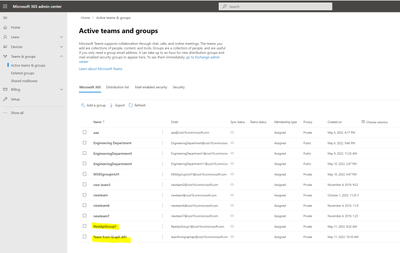
Generated Group and associated modern Team site in SPO Admin portal:
M365 Groups:
M365 Group associated Modern Team Sites with Sensitivity Label set:







