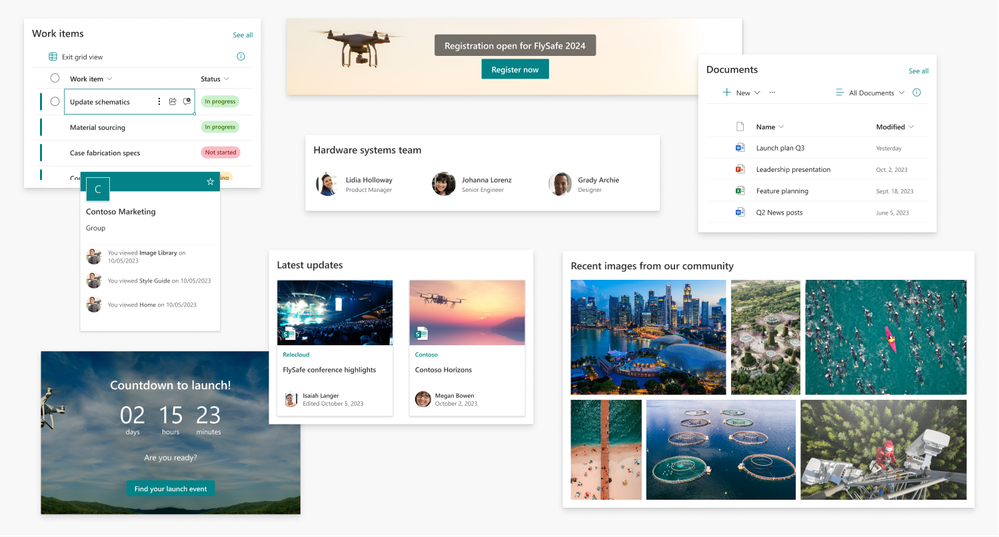
We’re excited to announce that our SharePoint Web UI kit has been updated with some great new additions! This update includes more web parts so you have more options when designing your SharePoint sites and pages. The new update includes:
- Call to action
- Countdown timer
- Highlighted content
- Image gallery
- List
- People
- Sites
SharePoint web parts you can now design with the Web UI kit
To get started with our updated UI kit, simply download the latest version from the Figma Microsoft Community website: SharePoint Web UI Kit – Figma.
Why use the Figma SharePoint Web UI kit?
Figma is a subscription-based application that is the industry standard tool for web design. It provides an alternative to designing sites and pages outside of SharePoint. Figma does not build the pages in SharePoint, so once you finalize a design in Figma, you will need to build it in SharePoint. You should evaluate if Figma is the right solution for mocking up sites and pages for SharePoint.
Design without organizational limitations
This UI kit provides SharePoint users with another tool in their toolbox. While building a page in SharePoint is easy, we wanted to provide the ability to mockup sites and pages. It allows you to explore different design options for your site without the limitation of admin privileges and tenant restrictions, and doesn’t expose organization data.
Figma mockups provide a quick snapshot of SharePoint updates which business stakeholders can use to plan and make decisions. They can provide appropriate requirements and use this UI kit in collaboration with their design team to iterate in the life cycle of your organization’s intranet.
Share designs with ease
This UI kit provides you with page layouts and a selection of web parts to allow you to mockup and share new ideas across organizations and companies. Figma gives you the flexibility of reviewing and sharing your designs without having to spend time and resources creating it in SharePoint. Figma also allows you to download your designs into easy-to-use formats that can be used in documentation and presentations.
Learn more at https://www.figma.com/
Community feedback
Please tell us what’s missing, what doesn’t work for you, and where your biggest challenges are by leaving a comment on the Figma SharePoint Web UI kit page or by visiting the SharePoint Community.
We hope you enjoy our latest update and look forward to seeing what you create with it!
Now you can more easily manage automations by storing them automatically in Dataverse by default. Developers and admins can now easily migrate their non-solution cloud flows into Dataverse as well.
We’re excited to announce the public preview of a much-anticipated update to the Microsoft Dataverse connector in Power Automate. With the new ‘Environment’ parameter, you can use the Dataverse connector to seamlessly connect apps, data, and processes in different Power Platform environments.
Power Automate for desktop comes with new additions in 2023 October’s release, including the introduction of four new cloud connectors, the simulation of some UI automation actions in the background, and the ability to edit the values of additional variable types during debugging.
HTTP request trigger is a frequently used functionality that helps customers integrate Power Automate with other systems. This allows a flow to be started based on an HTTP call. Today, we are introducing OAuth support for HTTP request triggers for deeper control on what applications and users can invoke such automations.
SharePoint has a long history of helping users work with external data inside the SharePoint user experience, starting with the Business Data Catalog feature in SharePoint Server 2007. As SharePoint has evolved into a cloud-first service, so too have the options for customers that wish to integrate with external data sources. To simplify these options and provide the best experience for these scenarios going forward, Microsoft is announcing its plan to retire Business Connectivity Services (BCS) in Microsoft 365 and focus on Microsoft Power Apps as its replacement technology.
Impacted features and scenarios
All Business Connectivity Services features will be retired in SharePoint in Microsoft 365. This includes features that such as:
- External lists
- External columns
- External content types
- Business Connectivity Services hybrid solutions
Recommended replacement technology: Microsoft Power Apps
Microsoft encourages customers to explore using Power Apps to replace their Business Connectivity Services solutions in SharePoint in Microsoft 365. Although there’s no direct migration from Business Connectivity Services to Power Apps, it supports a modern, cloud-first external data connectivity experience. Power Apps can integrate with a variety of Microsoft 365 services and external data sources through its extensible connector technology, including SharePoint, Dynamics 365, SQL Server, and others. It also supports integrating with on-premises data sources through the on-premises data gateway.
To learn more about Power Apps, see the links in the “More information” section.
Retirement schedule
- October 2, 2023: Retirement announcement and customers can proactively set a property to block Business Connectivity Services features within their tenant.
- October 30, 2023: Microsoft will begin blocking Business Connectivity Services features based on the tenant property set by the customer.
- January 8, 2024: Microsoft will block Business Connectivity Services features in new Microsoft 365 tenants by default, as well as in tenants who haven’t used the feature since October 30, 2023.
- September 30, 2024: Business Connectivity Services is fully retired in Microsoft 365.
Block Business Connectivity Services features within your tenant
Starting today, customers can prepare for the Business Connectivity Services retirement by setting a property that will block this feature in their tenant. This will ensure that users within your tenant won’t start using this feature if it isn’t already in use.
Customers should only set this property once they’ve confirmed there’s no business need to use the Business Connectivity Services features. Customers can confirm Business Connectivity Services usage by following these instructions:
- Go to More features in the SharePoint admin center, and sign in with an account that has admin permissions for your organization.
Note: If you have Office 365 operated by 21Vianet (China), sign in to the Microsoft 365 admin center, then browse to the SharePoint admin center and open the More features page.
- Under BCS, select Open.
- On the BCS Home Page, select Manage BDC Models and External Content Types.
- In the View dropdown selector, select each of views including BDC Models, External Systems, and External Content Types. Confirm that no BDC models, external systems, or external content types have been added.
- Return to the BCS Home Page and select Manage connections to online services.
- Confirm that no connections have been added.
- Return to the BCS Home Page and select Manage connections to on-premises services.
- Confirm that no connections have been added.
To proceed with setting the property that will block this feature, tenant administrators can download and launch SharePoint Online Management Shell version 16.0.24120.12000 or higher and then run the following commands:
Connect-SPOService -Url https://<tenant>-admin.sharepoint.com
Set-SPOTenant -BusinessConnectivityServiceDisabled $true
SharePoint in Microsoft 365 will begin blocking features based on this tenant property on October 30, 2023.
Blocking Business Connectivity Services in new tenants by default
Starting January 8, 2024, Microsoft will block Business Connectivity Services in new tenants by default by automatically setting this property to true in those new tenants. In addition, Microsoft will also set this property to true on existing tenants who haven’t used the Business Connectivity Services feature since October 30, 2023.
Customers who wish to re-enable Business Connectivity Services within their tenant may do so by setting this property to false as follows:
Connect-SPOService -Url https://<tenant>-admin.sharepoint.com
Set-SPOTenant -BusinessConnectivityServiceDisabled $false
Note that re-enabling Business Connectivity Services in your tenant isn’t recommended unless you have a specific need.
Business Connectivity Services is retired in Microsoft 365
Starting September 30, 2024, Business Connectivity Services will be retired in Microsoft 365. Its features will no longer be available and cannot be re-enabled through the Set-SPOTenant PowerShell cmdlet. This applies to all environments including Government Clouds and Department of Defense.
Impact to SharePoint Server
This announcement has no impact on Business Connectivity Services in SharePoint Server.
This feature will remain supported in SharePoint Server 2016 and SharePoint Server 2019 until those products reach their end of support date of July 14, 2026.
Microsoft has no plans to retire Business Connectivity Services in SharePoint Server Subscription Edition at this time. Deprecation and removal announcements for SharePoint Server Subscription Edition are announced in the What’s deprecated or removed from SharePoint Server Subscription Edition article.
Summary
Microsoft remains committed to our customers’ digital transformation by providing modern approaches to integrate with external data. By leveraging Power Apps as the platform for these scenarios, customers will gain modern capabilities not only in SharePoint, but in other Microsoft 365 services as well.
More information
For more information about Power Apps and its integration capabilities with external data sources, see:
What is Power Apps?
What is an on-premises data gateway?
Scenarios for integrating SharePoint with Power Apps
Overview of connectors for canvas apps
Link to this announcement: https://aka.ms/sp-bcs-retirement
Power Automate for desktop comes with new additions in 2023 September’s release, including the introduction of new SharePoint actions, a new action on work queues, as well as three brand new connectors.







