
16 New Independent Publisher Connectors in October 2022
We are excited to announce that we have 16 new Independent Publisher connectors that were published in October 2022. Read about the connectors, learn about the talented publishers, and take a look at the connector files!
Power Automate for desktop – Mozilla Firefox web extension installation update
The browser extensions for Power Automate for desktop enable automating the browser in conjunction with your desktop automation. Today, we provide extensions for Microsoft Edge, Google Chrome, and Firefox. You may download the Firefox extension from this link to get started automating Firefox.
Power Automate for desktop – October 2022 update
Power Automate for desktop comes with new additions in October 2022 release, including the introduction of multiple flows selection in the console.
10 New Independent Publisher Connectors in September 2022
We are excited to announce that we have 10 new Independent Publisher connectors that were published in September 2022. Read about the connectors, learn about the talented publishers, and take a look at the connector files!
Automate Document Processing end-to-end with AI Builder
Today at Microsoft Ignite we’re thrilled to announce advances in Intelligent Document Processing as well as new AI capabilities that will allow you to automate more scenarios with better performance, using Power Automate and AI Builder.
Begin your Robotic Process Automation modernization journey
This article helps Automation leads within any organization learn how they can efficiently migrate their existing RPA solutions to Microsoft Power Automate. It provides a set of guidance, tools, and services (delivered by Microsoft partners) that makes this process predictable and scalable.

What’s new in Security and Management in SharePoint, OneDrive, and Teams – Microsoft Ignite 2022
Zero Trust is the new security norm. Nowadays, cybersecurity is top of mind in every board room. As organizations realize their individual digital transformation, they will see exponential growth of their digital estate. With that growth comes the responsibility of managing and governing all aspects of people, content, and context — diligently.
We are here to empower every administrator worldwide safeguard and govern their digital content. We continue to innovate in security and management at cloud speed. And today is a big moment of disclosure. Today at Microsoft Ignite 2022, we are excited to announce the following new security and management capabilities across SharePoint, OneDrive, and Teams:
- Advanced access policies for secure collaboration
- Security controls to safeguard content
- Comprehensive compliance
- Migration Enhancement
- Advanced sites lifecycle management
- Organization lifecycle management
To see these new capabilities in action, check out our on-demand session:
Advanced access policies for secure collaboration
Restricted access control (RAC) policy for SharePoint sites – Private Preview
Oversharing of content is a common problem in many organizations. Despite the right intent, users mistakenly share content with a broader audience that often results in unauthorized access to content. Especially as hybrid work and external collaboration becomes business existential themes, oversharing problem expands to a new level.
Look no further, administrators can now restrict access to SharePoint sites such that no matter how widespread the content was shared, or inheritance was broken at the content level the access is instantly confined to a set of users only.
Today we are excited to announce restricted access control (RAC) policy v1 (Private preview). With this advanced policy, you can now restrict a Microsoft 355 Groups-connected site to having the same membership as the parent Microsoft 365 Group despite if the site or content was shared outside of that group membership. In future, we plan to extend this policy to all SharePoint site templates by configuring RAC policy with a security group.
To learn more about this premium feature, check out the article here: RAC Policy for SharePoint Sites.
To participate in the preview, sign-up here: Preview RAC Policy for sites.
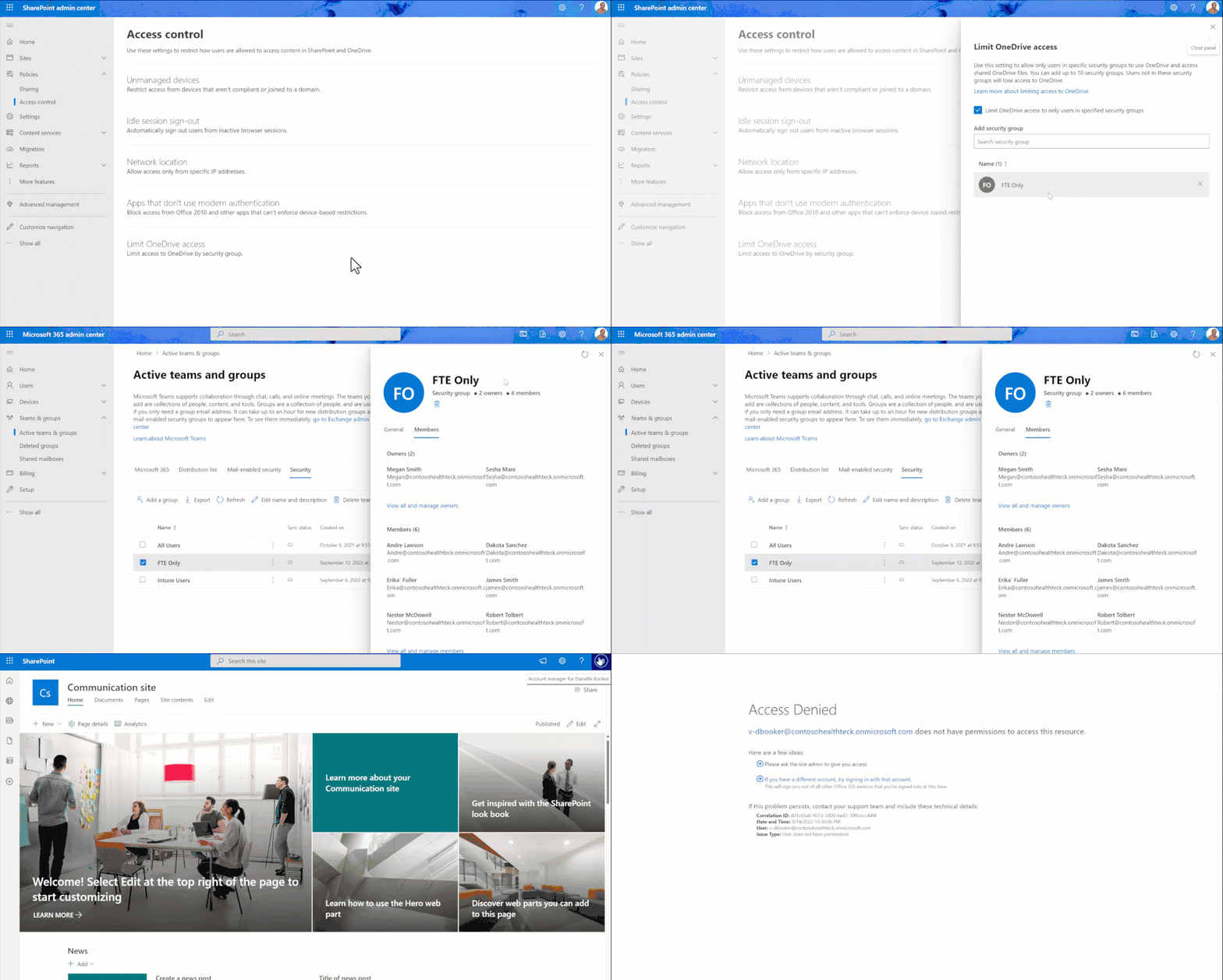
Restricted access control (RAC) policy for OneDrive in your organization – General Availability
Much like oversharing SharePoint sites, users overshare their OneDrive content too especially with external users.
Today we are excited to announce that restricted access control (RAC) policy for OneDrives is generally available. With this policy, you can now restrict access to all OneDrives in your organization to a set of users, say all your employees only and no one else. You simply create security groups in Azure Active Directory that contains all your employees, then in SharePoint admin center configure the Limit OneDrive Access to those groups. It is that simple!
To learn more about this feature, check out the article here: Limit OneDrive Access in your organization
Conditional access policies for SharePoint sites, OneDrives, and Teams – General availability
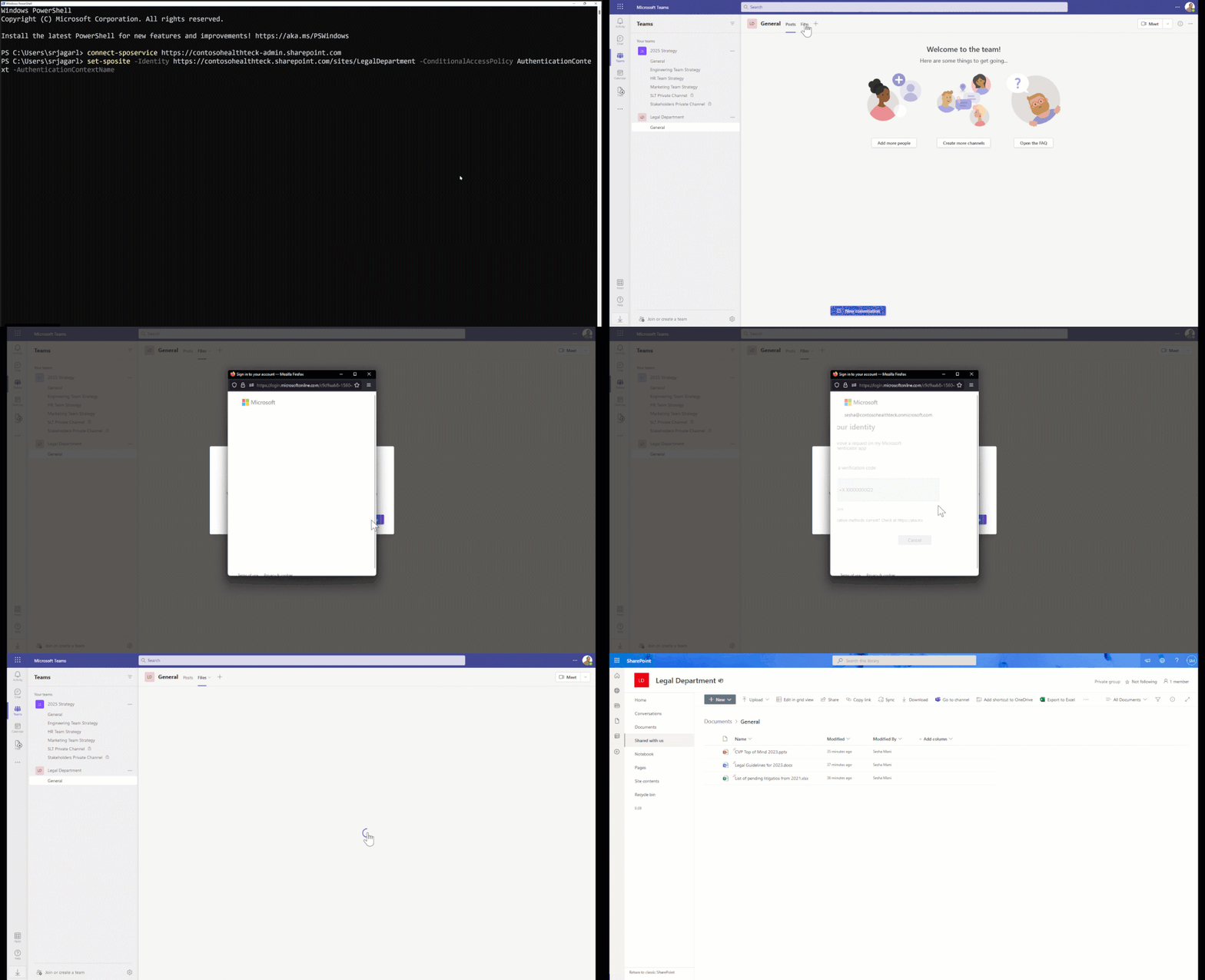
Security posture of content varies based on whether its business criticality. General training content should be easily accessible wherein classified strategy content should be accessible only when certain conditions are met. The conditional access requirements should match the sites’ security posture.
Today we are thrilled to announce the general availability of conditional access policies for SharePoint sites, OneDrives, and Teams. Simply use the SharePoint Online PowerShell to set appropriate access policy for a site, which dictates the conditions required for accessing that site. For example, for your 2025 Strategy site that is expected to have business critical content you can configure the policy to require MFA (multi-factor-authentication) for all users.
The key benefit of this capability is that users need to go through additional credential gates only when they try accessing sites or teams that contain business critical information. If your organization already has sensitivity labels deployed, then you can also associate this policy with the sensitivity labels and simply label the sites or teams appropriately.
To learn more about this feature, check out the product article here: Conditional access policy for sites.
Security controls to safeguard content
User defined permissions (UDP) support for Office files in SharePoint, OneDrive, and Teams – Private Preview
We have been in the journey of MIP (Microsoft Purview Information Protection) Sensitivity Labels for the past three years and have come a long way continually expanding policies that can be associated with labels. For example, you can have a Confidential label associated with admin-defined-permission of only full-time employees. Office files with that label are now accessible only by full-time employees.
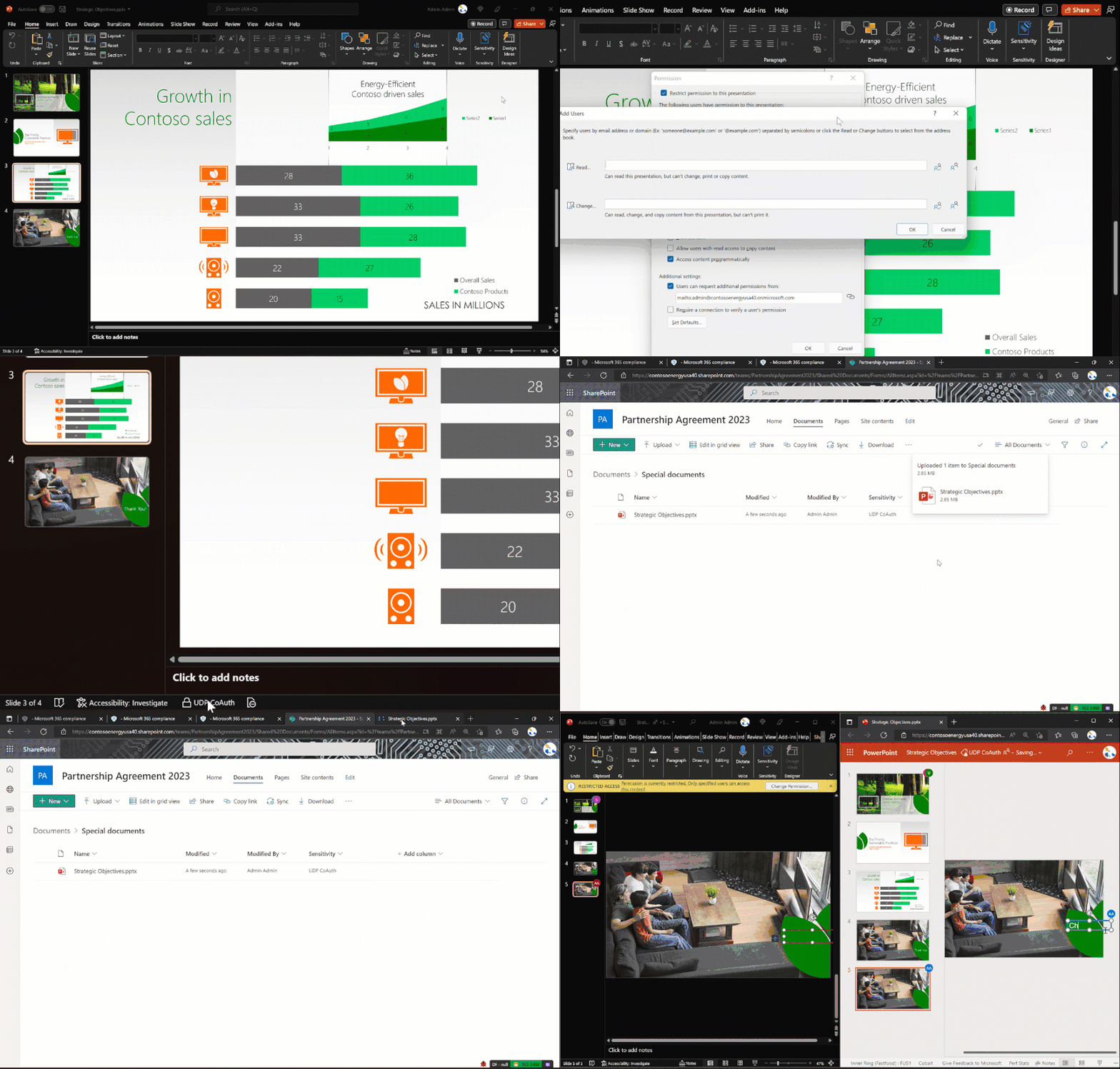
We are continuing to innovate in this labels-based policies journey and aim to provide comprehensive coverage for all use cases of sensitive content. Today, we are excited to announce support for user-defined permissions (UDP) for Office files in SharePoint, OneDrive, and Teams, starting private preview soon.
With this capability we bring in first-class experience to Office files that are protected with labels containing user-defined-permissions i.e., ability to view and co-author those files in SharePoint, OneDrive, and Teams. You can already create a label that allows users to define the permissions at the time of labeling a file.
We are taking nominations for private preview, sign-up here: Preview form for UDP support.
Protected PDFs support in SharePoint, OneDrive, and Teams – Private Preview
We are bringing the security controls that power Office files to protected PDF files. Specifically, your users can open and/or search for content in protected PDF files while you can now govern them with your DLP (data loss prevention) and eDiscovery policies!
We are excited to announce protected PDFs support in SharePoint, OneDrive, and Teams, starting private preview soon. With this capability, when you upload labelled and encrypted PDF files to SharePoint, OneDrive, and Teams you can now view their sensitivity labels in the Document Library’s sensitivity column. Also, you can simply search for content in these protected PDF files.
Security and compliance admins, on the other hand, can now govern these protected PDFs with their established DLP or eDiscovery policies, which already secure their Office files.
We are taking nominations for private preview, sign-up here: Preview form for Protected PDFs support.

Default sensitivity label for SharePoint Document Libraries – Public Preview
We have rich sensitivity labels experience for Office files and SharePoint sites, Teams, and Microsoft 365 groups. We are now bringing the labeling concept to the SharePoint document libraries.
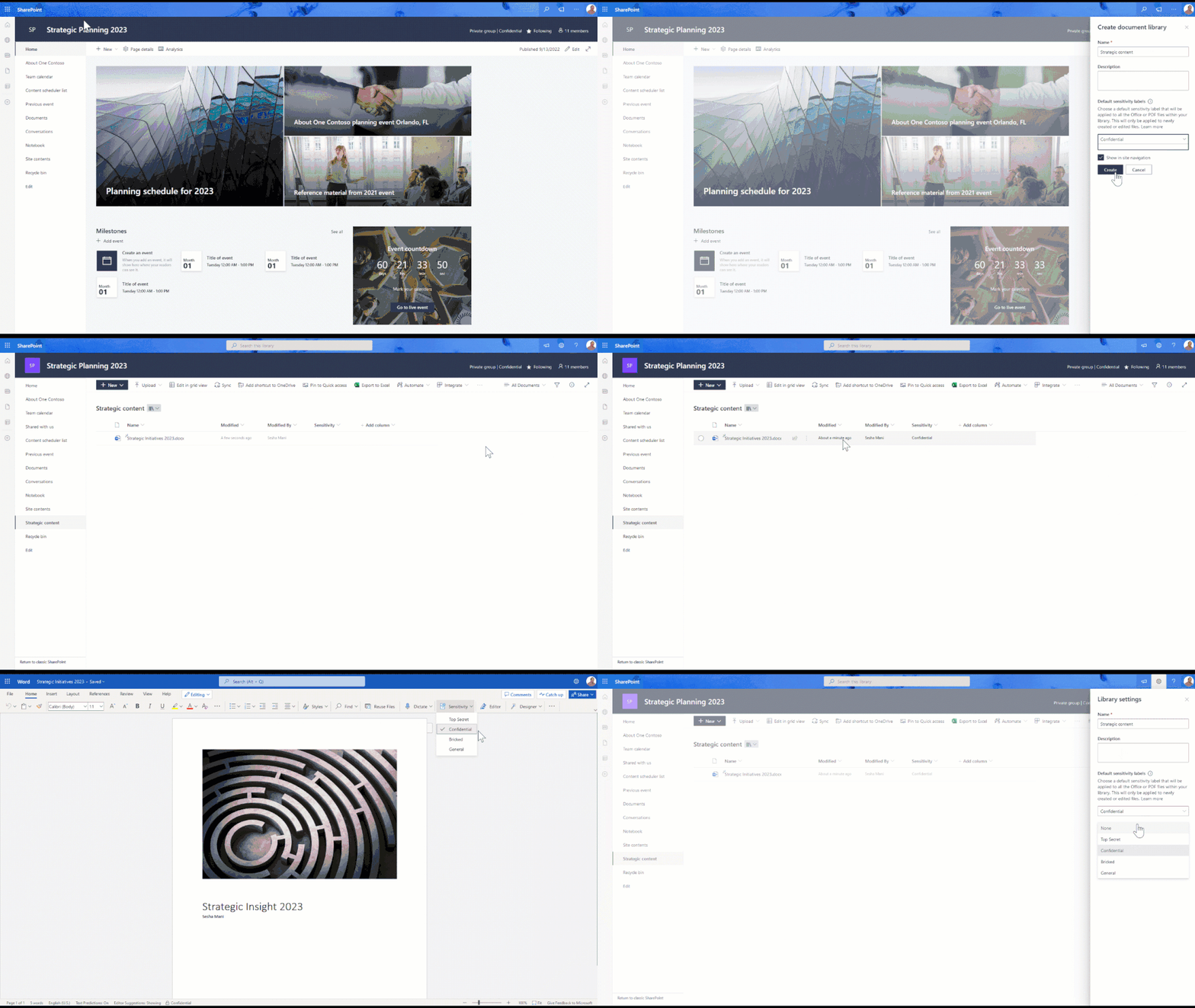
Today, we are thrilled to announce default sensitivity label for SharePoint Document Libraries comes to public preview. With this new capability you can now protect your Office documents from the day they are created or uploaded to SharePoint document libraries.
Simply set the appropriate sensitivity label for your document libraries using the Library Settings in the information panel. From that point onwards all documents, newly created or modified, in that library will be automatically labelled. Most importantly they are secured from the get-go with policies that are associated with that label.
Learn more about this capability here: Default label for SharePoint Document Libraries. Try out the preview and let us know your feedback.
Programmatic way to assign sensitivity label to a file in SharePoint, OneDrive, and Teams – Private Preview
Further expanding your ability to classify and label files specifically for developers, today we are delighted to introduce the capability to programmatically assign and extract MIP (Microsoft Purview Information Protection) sensitivity label for Office files.
As part of this capability, we have elevated the labelling experience with a programmatic endpoint in the Microsoft Graph Beta that allows the labelling of files by users and applications. This premium capability allows you to label at scale and is currently under private preview, and we are eager for your feedback!
To learn more about this API, check out this article: Assign Label to files in SharePoint, OneDrive, and Teams.
To participate in the private preview, nominate in this form: Preview form for SharePoint Label API.
Anti-malware scan on file download – General availability
We continue to improve the security posture of files in SharePoint and OneDrive. In addition to our asynchronous antimalware scanning, we have added another layer of protection to perform anti-malware scanning when a file is being downloaded. This ensures the spread of malware is minimized.
Today we are excited to share with you that scan on file download is generally available. All files regardless of file types will be scanned for malware infection during browser or Teams download, if the file is not already scanned.
To learn more, check out this article: Anti-malware scan on file download
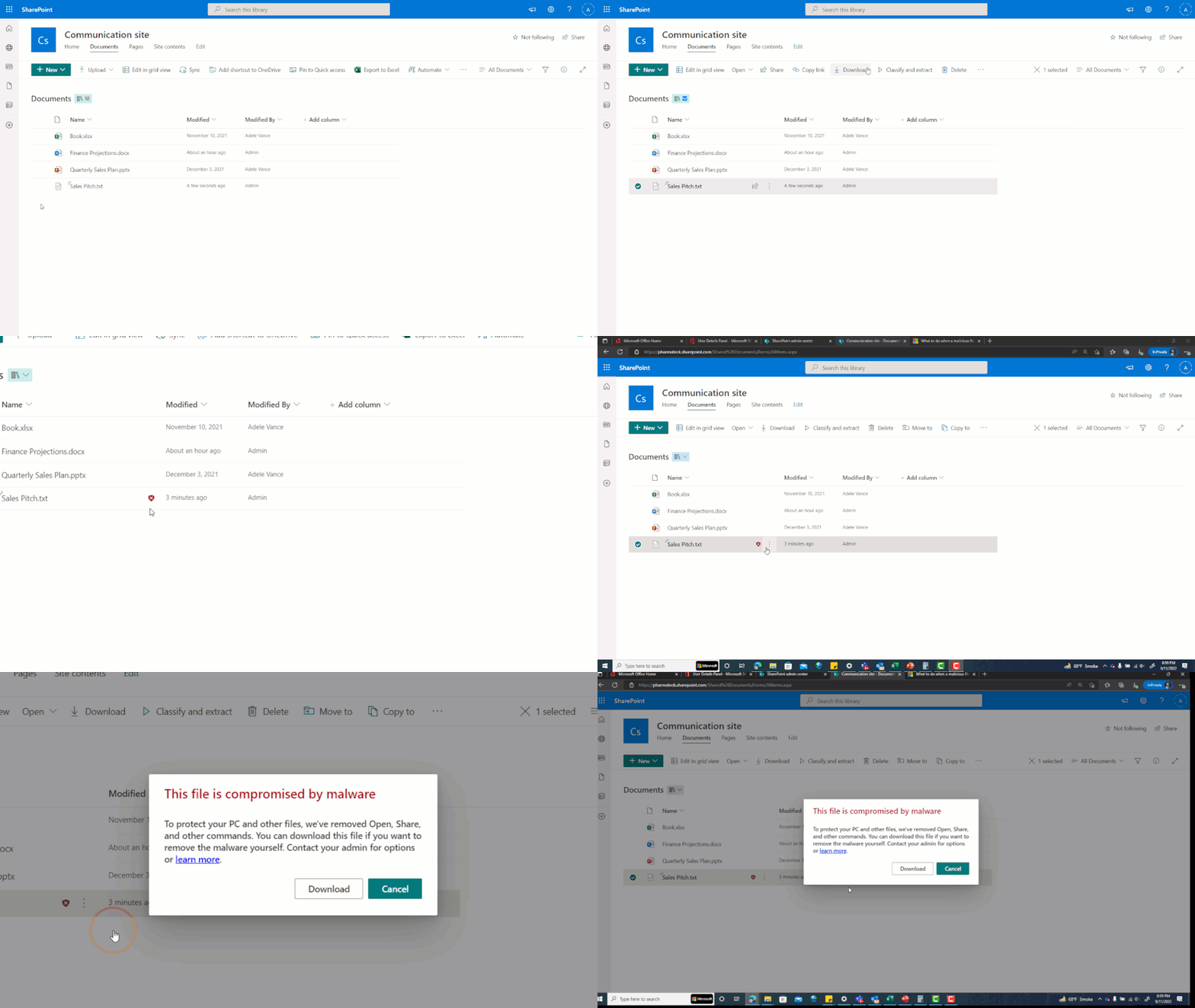
Forensic malware identification and extraction – General availability
Forensic analysis plays a key role in understanding how malware enters the system and what kinds of malware the enterprise has been exposed to. One of the challenges faced by analysts is how to retrieve malware infected files without needing to gain access to all files in the source site.
Today we are thrilled to announce the general availability of malware identification and extraction capability. With this capability, using simple SharePoint PowerShell cmdlet administrators can find out what type of malware is present in a file that was marked as infected and extract that file from the site to perform further analysis. All this is possible without needing to elevate their access to the SharePoint or OneDrive site where the content is present.
To learn more, check out this article: Malware identification and extraction
Comprehensive compliance
Information Barriers (IB) 2.0: IB modes and multi-segment support – General availability
The compliance landscape is evolving, and we continue to enhance the compliance controls in SharePoint, OneDrive, and Teams to meet those needs. With Microsoft 365 Multi-Geo capabilities you can address data residency compliance needs, while Microsoft 365 Information Barriers helps you to achieve the collaboration and communication isolations among your internal users to meet mandatory regulatory needs like FINRA compliance.
Today we are thrilled to announce information barriers 2.0 that brings IB modes and multi-segment support capabilities, coming to general availability at the end of this calendar year CY22.
With information barriers (IB) modes capability, you can tailor the needs of your users while maintaining the corporate information barriers policies. There are five IB modes, namely: Open, Owner-moderated, Implicit, Explicit, and Mixed. For example, if you want to allow over the wall collaboration but with site/team owners’ discretion then set the IB mode of site/team as Owner-moderated. This allows site/team owners to bring in incompatible segment users to the site/team when needed.
Multi-segment support allows you to associate a user with multiple information barriers (IB) segments so that you can achieve the business need of allowing a user to participate in multiple regulatory projects.
To learn more about IB 2.0, check out here: Microsoft 365 Information Barriers 2.0.

Migration enhancements
Migration manager was made generally available in 2019 and evolved to a new level over the years. It now enables you to migrate content from file shares, Google Drive, Box, Dropbox, and Egnyte. At Ignite, we are delighted to announce three features to further simplify your migrations in the Google Drive scenario. They are: Bulk download reports, Migration filters, and Estimated time to migrate.
These features will be enabled to other scenarios in the early next calendar year. Stay tuned to the what’s new page for the recently released and upcoming features.
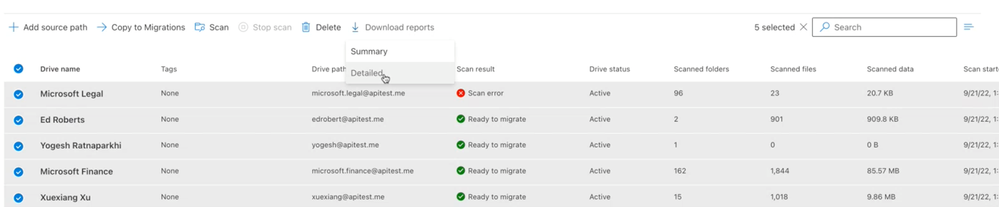
Bulk-download detailed reports
For cloud migrations, you will be able to download detailed reports for the selected tasks in the scans and migrations tab with a single click. That way you don’t have to go through each item one by one to download reports. Plus, we are introducing a recent actions panel where you can access your previously requested reports.
Migration filters
Once you scan your environment, you are ready to migrate. And you often want to filter what files and folders you want to migrate. Soon, you can filter the files and folders containing invalid characters, with an option to replace them with a valid character, exclude by file extensions, and folder names, and filter by creation and modification date. That way, you curate the content you want to migrate onto M365.

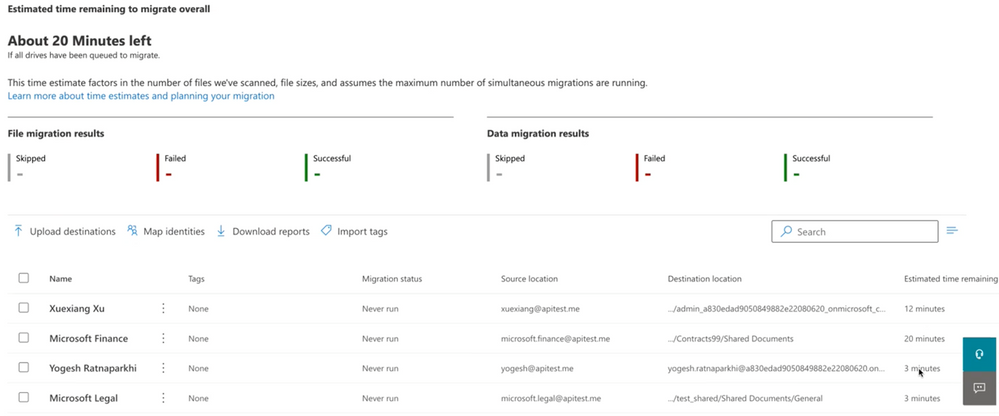
Estimated time to migrate
Now that you initiated your migration, you would like to understand how long it would take to finish. Based on your scans, file sizes, and other factors, you will get an estimated time of completion at the project and the task level.
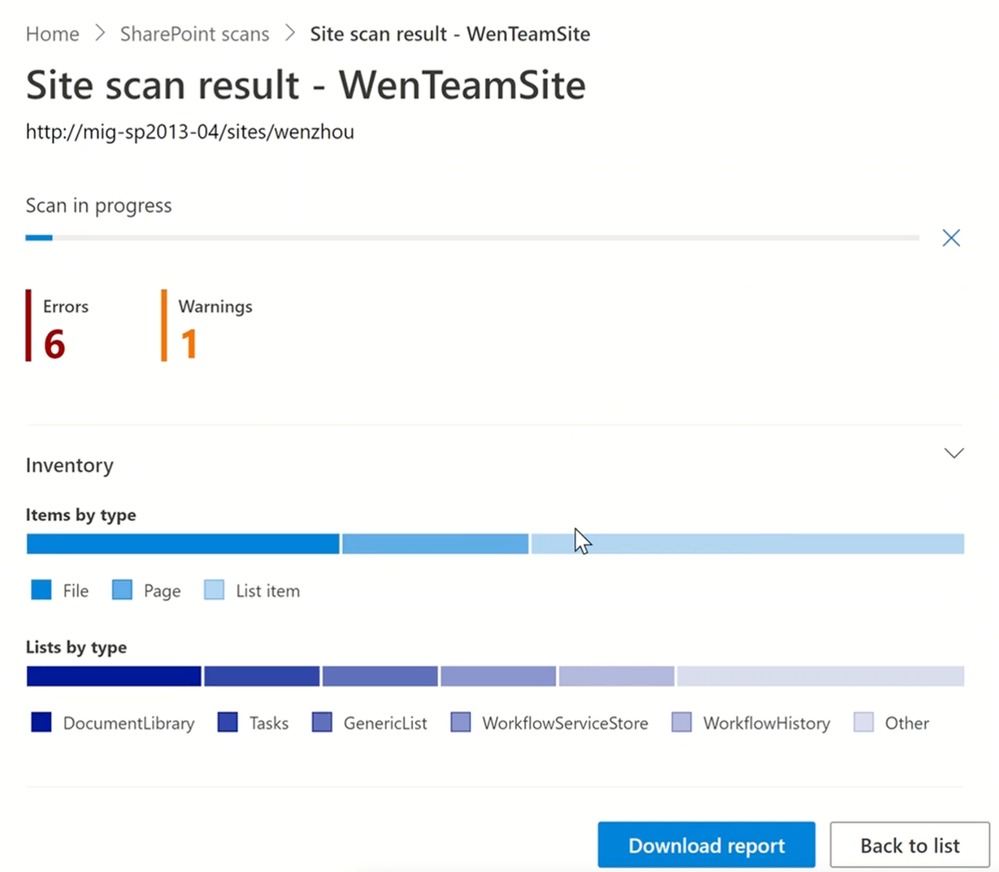
SharePoint Migration Tool (SPMT) improvements
SPMT continues to be a tool of choice when it comes to migrating from On-prem Server sources including 2010, 2013, and 2016. Now you can streamline scan and migration jobs within one tool. Secondly, the page navigation flow is revamped to make it intuitive for you to manage your migration jobs and create migration-by scenarios.
Stay tuned to what’s new page for the released and upcoming features.
Advanced sites lifecycle management
SharePoint data access governance (DAG) insights V1 – General Availability
As the sprawl of Teams and SharePoint sites happen in your organization, the digital estate of your organization is growing exponentially. It is important to know the top sites that require close attention.
A site’s lifecycle starts at creation time and evolves to the active state when users add content and collaborate in the site. During this active state you may wonder how to detect/avoid oversharing or accidental sharing. The help is here, admins can now use data access governance insights dashboard in SharePoint admin center to address these needs.
At last year’s Ignite we announced the public preview of the data access governance insights feature. Today, we are happy to announce that V1 of data access governance (DAG) insights feature is generally available. DAG insights empower you to discover top-100 and top-10,000 sites that matter the most among millions of sites you may have and monitor/validate/tailor sharing and access policies for those sites.
In future, we also look to the end-to-end capability like Site Access Review. This allows an admin to request site owners of the top-most sites to review and attest the access pattern seen is expected.
Interested in learning more? Check out the product article here: SharePoint Data access governance (DAG) insights.

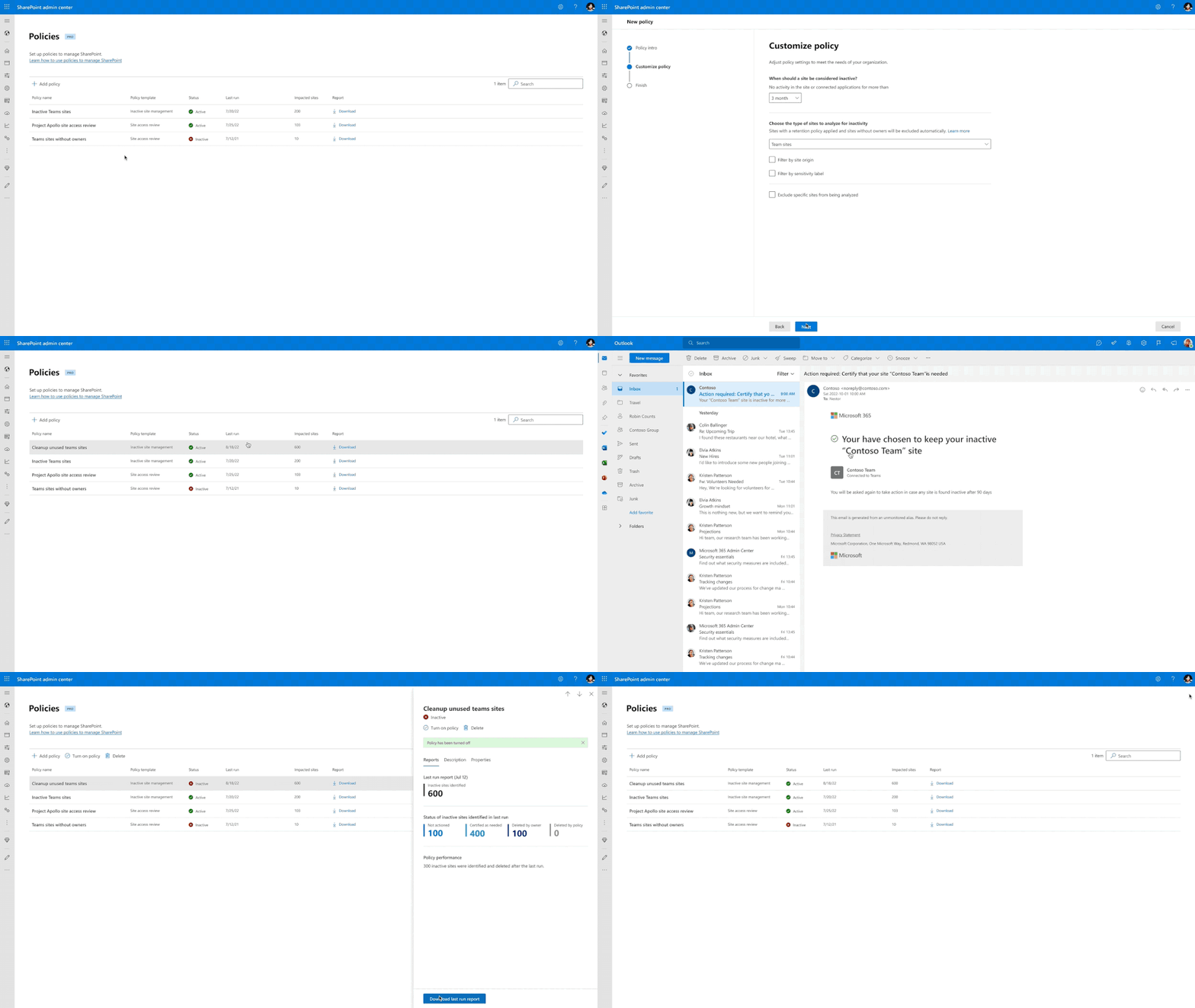
Sites lifecycle policies – Inactive sites – Preview later this calendar year CY22
From the active state a site may enter to the inactive state perhaps after a few years. With the sprawl of sites, how would you discover the sites that moved to the inactive state and then take some actions on them.
Today we are excited to announce the SharePoint inactive sites policy, coming to private preview later this calendar year CY22. With this capability admins can now create a tailored inactive site policy targeting specific SharePoint sites, perhaps Teams created sites or sites labelled as Public or sites with information segment of Research, and trigger alerts to respective site owners. Site owners of these inactive sites can then decide to either keep or delete or take other actions on these sites.
Stay tuned for more updates later this calendar year. Interested to participate in the private preview, add your nomination here: Preview form for Inactive Site Policy.
Site history and recent admin actions – Preview later this calendar year CY22
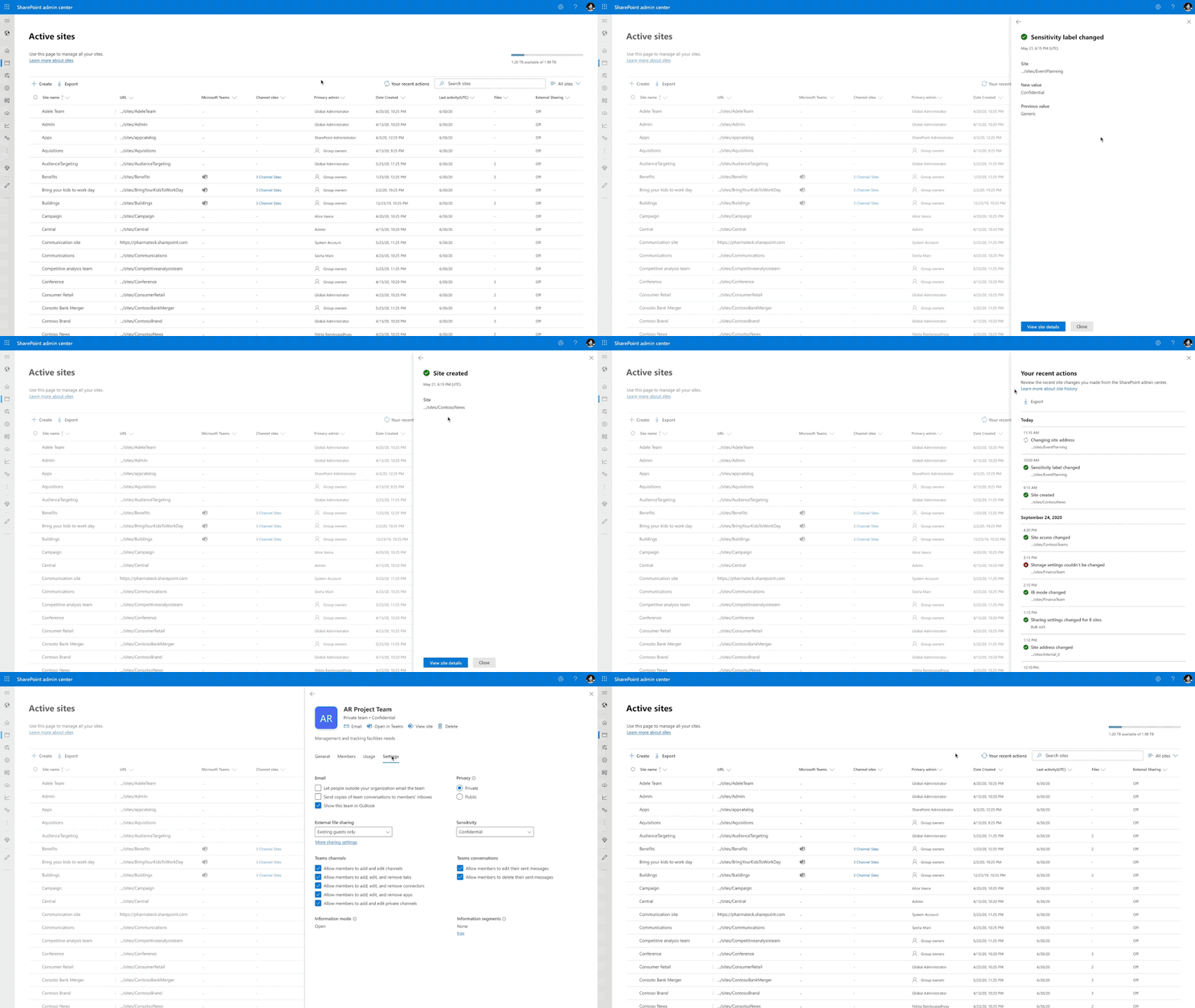
As SharePoint admins often you are tasked to troubleshoot inaccessible team sites. Also, to know the lifecycle state of a site and to manage its lifecycle it is imperative to know all the activities carried out by site owners. The new Site History capability in SharePoint admin center aims to address these needs.
Similarly, having a panoramic view of all the recent changes you made in SharePoint admin center will come in handy when some of your changes are accidental and disrupts your users. The new recent admin actions panel shows the latest changes you made to site properties such as site name, site URL, sharing settings, storage limit etc., It allows you to export 30 days’ worth of changes.
Today we are thrilled to announce Site History and Recent Admin Actions preview, coming at the end of this calendar year CY22. Site History capability shows all changes made to site properties by all site owners and admins. This historical view can help you to investigate and resolve helpdesk tickets in a matter of hours instead of days. Recent admin actions capability shows the actions taken by you as the SharePoint admin for that given session.
Stay tuned for more updates later this calendar year CY22. Interested to participate in the private preview, add your nomination here: Preview form for Site History and Recent Admin Actions.
Organization lifecycle management
SharePoint Tenant Rename – General Availability
Organizations evolve throughout their life span, rebranding or expanding through acquisitions or reaching the global market by adding satellite locations. Specific to rebranding, you may want to rebrand your organization’s name, say from Contoso to Fabrikam, or you might have started off with a test name for your tenancy like ContosoQA.sharepoint.com and you wanted to rename to your tenancy’s name.
At last year’s Ignite we announced the public preview of SharePoint Tenant Rename capability. Today, we are excited to announce the general availability of SharePoint Tenant Rename, for tenants with less than 10K sites. This allows you to rename your tenant’s SharePoint URL let’s say from contoso.sharepoint.com to fabrikam.sharepoint.com. In future, we are looking to expand this support to large tenants that have more than 10K sites.
To learn more about this capability, check out here: SharePoint Tenant Rename.

OneDrive Cross-tenant User Data Migration – General Availability
Mergers, Acquisitions, and Divestitures (M&A) scenarios are a critical part of an organization’s lifecycle. In fact, many organizations expand their business through M&A.
Imagine Contoso Energy acquires Fabrikam’s Wind Energy unit in Asia to expand their global footprint in the energy industry. Both Contoso Energy and Fabrikam have a presence in Microsoft 365. As part of this M&A transaction, there is a need to move Fabrikam’s Wind Energy unit employees’ OneDrives and Mailboxes to Contoso Energy’s tenancy. We are addressing this need now.
Today we are thrilled to announce the general availability of OneDrive cross-tenant user data migration. With this capability you can now move users’ OneDrives across two tenants using a simple set of SharePoint PowerShell cmdlets. You can also move users’ mailboxes across tenants.
One another notable capability is, upon OneDrive move although the URL of the OneDrive has changed the sharing links to old URLs will continue to work! This is made possible by the cross-tenant redirect capability that ensures any hit to old URLs is redirected to new URL.
To learn more about this capability, check out here: Cross-tenant user data migration for OneDrives.

For licensing information for these new capabilities, check out the respective feature’s product article documentation.
Interested in participating in the private previews of our upcoming new features? Check out available features and sign up here: Preview Form for Ignite 2022 Private Previews.
There are many Teams innovations announced at Ignite’22, for full list check out Teams Announcement blog.
For full list of new SharePoint, OneDrive, Teams capabilities announced at Ignite’22, check out this blog.
We have a beautiful security and compliance cookbook for SharePoint, OneDrive, and Microsoft 365 administrators, you can download SharePoint and OneDrive Security Cookbook for FREE.
Get started!
To learn more about the above features in detail, check out the product documentation articles below:
- Restricted access control (RAC) policy for SharePoint Sites
- Limit OneDrive Access at Tenant level
- Conditional policy for sites and teams
- Default label for SharePoint Document Libraries
- Microsoft 365 Information Barriers – Overview
- Microsoft 365 Multi-Geo
- Microsoft 365 Information Barriers 2.0 Enhancements
- Migration manager
- SharePoint Data access governance (DAG) insights
- What’s new in SharePoint Admin Center
- SharePoint Tenant Rename
- Cross-tenant user data migration for OneDrives
- SharePoint and OneDrive Security Cookbook
- Labels-based default sharing link types
- Co-authoring and autosave in encrypted Office documents
- Auto labeling enhancements for Office documents in SharePoint and OneDrive
- Continuous Access Evaluation (CAE) support in SharePoint and OneDrive
Interested in participating in the private previews of our upcoming new features? Check out available features and sign up here: Preview Form for Ignite 2022 Private Previews.
If you are new to Microsoft 365, learn how to try or buy a Microsoft 365 subscription.
Hybrid work is here to stay. We have additional resources that highlight hybrid best practices and how we are responding together to COVID-19, visit our Remote Work site. We’re here to help in any way we can.
Thank you! Sesha Mani, Principal group product manager – OneDrive and SharePoint

Microsoft Lists announcements at Ignite 2022
Microsoft Lists is a Microsoft 365 app that helps you track information and organize work. Lists are simple, smart, and flexible, so you can stay on top of what matters most to your team.
Today, we are pleased to share the next round of Lists innovation, as announced at this year’s Microsoft Ignite event (Oct.12-14, 2022) – including new integrations with Power Platform, mobile updates, new features in the Lists – MSA Preview, and more. Our team is constantly addressing feedback and requests, as you’ll see in all the announcements below (and anytime you make your voice heard in the Lists Feedback Portal).
To start, join Lists PM, Steven Jia, below as he shares and demonstrates the latest Microsoft Lists value and innovation announced during Ignite – and then continue to scroll below for more details about each announcement:
Also, catch the on-demand session, “Embrace a new way of work with Microsoft 365” (OD23 – published Oct.12.2022). This session includes Lists innovation, alongside OneDrive and Project/Planner announcements – with Steven co-presenting with his peers Mukul Kumar (Project/Planner) and Irfan Shahdad (OneDrive). It’s a wonderful audio-visual summary of all collaborative work management disclosures across Microsoft 365.
Note: Click on the roadmap ID link per announcements to best track Targeted Release dates and additional information on the public Microsoft 365 roadmap; all will be active as of 9:30am PDT, October 12th, 2022.
Microsoft Lists mobile app updates
Announcing Lists MSA on iOS preview, available in TestFlight
You can now use your Microsoft account (MSA) to create and share Lists on your iOS device via the TestFlight app. Our team has been using Lists for iOS here at Microsoft to plan morale events, gifts, roadmap items, travel expenses, and more – and we love it! We hope you enjoy it, too. And invite your friends and family to join in. Microsoft Lists awaits the taps of your fingertips – a fully functional information tracker while on the go.
Learn more about the Lists – MSA Preview for iOS, sign up and sign in to the Lists – MSA Preview: lists.live.com.
Lists supports Android tablet devices
You asked, we delivered. Microsoft Lists for Android now fully supports a variety of tablet form factors. Rotate your device to your heart’s content to see content optimized for portrait or landscape orientations. And get an optimized experience to see more as your screen real estate grows.
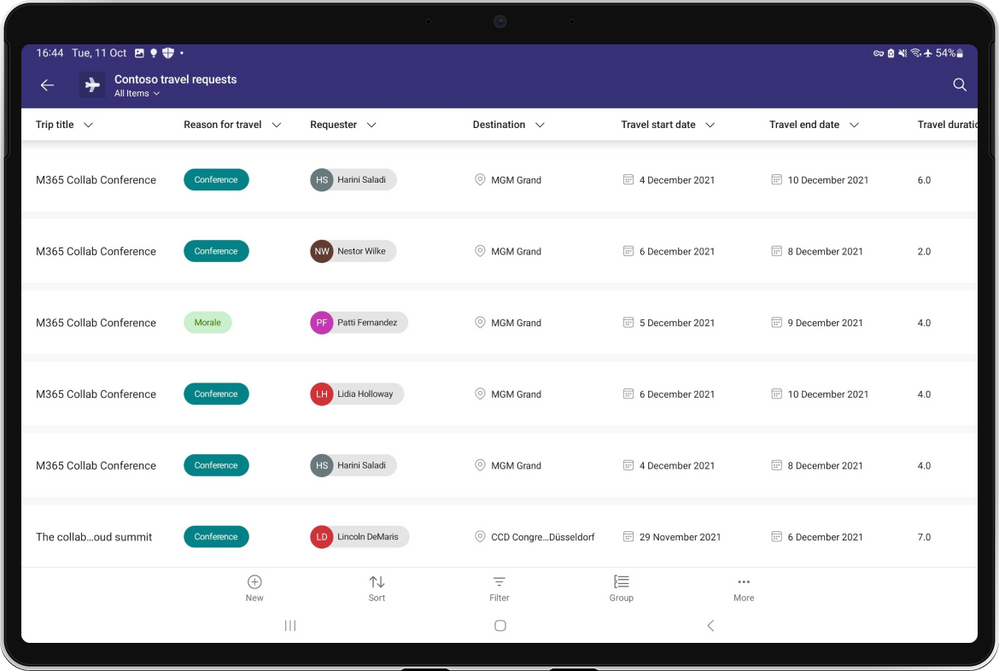
Roadmap ID: 98196.
Learn how to use Lists for Android and get the app today.
Lookup column supports yes/no, choice, and multi choice + formatting
Lookup columns allow one list to refer to and pull in data from another list. We are pleased to expand the column types that are now supported when pulling data into a list via a lookup column: Boolean (Yes/No), choice, and multi choice. Formatting from the original list also now comes along for the ride, which allows you to keep data and presentation consistent across your lists.

Roadmap ID: 100503.
Learn more about creating relationships from list to list with Lookup columns.
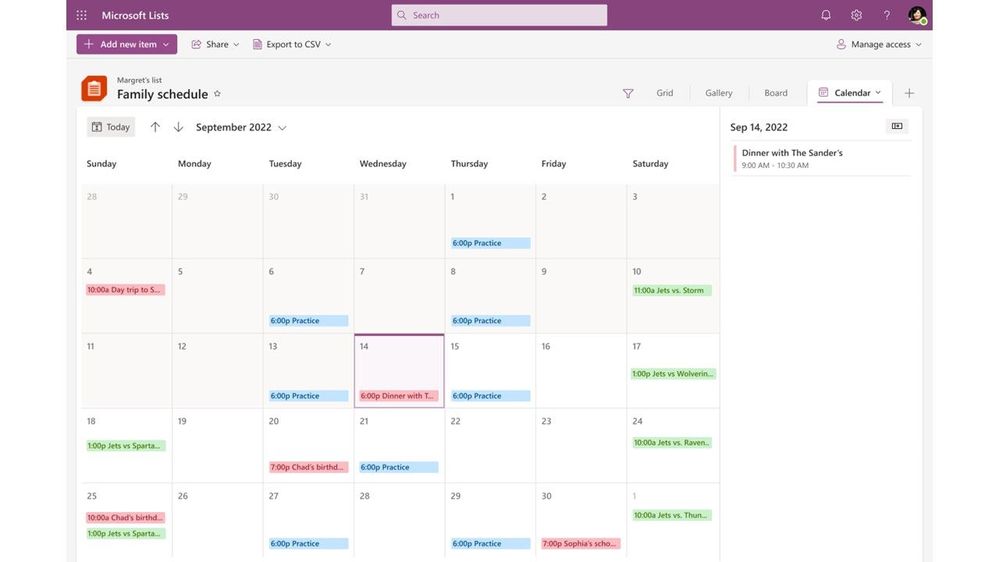
Calendar view – week layout
Calendar views now support viewing your information one month at a time or one week at a time. You can also now reschedule items by dragging and dropping them from the Unscheduled pane right to the date on the calendar view – the Date column automatically gets updated. Now you and your peers can best visualize how campaigns, new hire orientation activities, and social outreach spread across the weeks and months.

Roadmap ID: 100504.
Learn more about creating a calendar view for your list.
Packaging | Microsoft Lists + Power Automate + templates
Lists ready-made templates are getting several new capabilities. To help improve automation of information, approvals, and more – you now have the option to install pre-created Power Automate flows whenever you create a list from select list templates. You’ll be prompted to install the included Power Automate reminder flow after the list has been created. This, too, will apply to Lists rules when your needs are more simple notifications out to specific named individuals.
And to sweeten the deal, you’ll soon be able to do all of the above within your own custom list templates – more design surface to create and publish powerful business solutions in the form of easy to create lists from a powerful template.
Flows packaged into out-of-the-box List templates
Some list templates now include pre-created Power Automate flows that help you keep information up to date and accurate. The following list templates will have reminder flows available to install as you create your list: Work progress tracker, Content scheduler, and Recruitment tracker.

Roadmap ID: 88906.
Learn more about using Lists with Power Automate flows, including how to manage a flow that was created from a list template.
Approvals integration
Some list templates will begin to leverage integration with the official Approvals in Microsoft Teams app. This will allow you to assign an approver for each list item. When you are assigned as an approver for a list item, the request will appear in your Approvals app in Teams – or can be approved directly within the list.
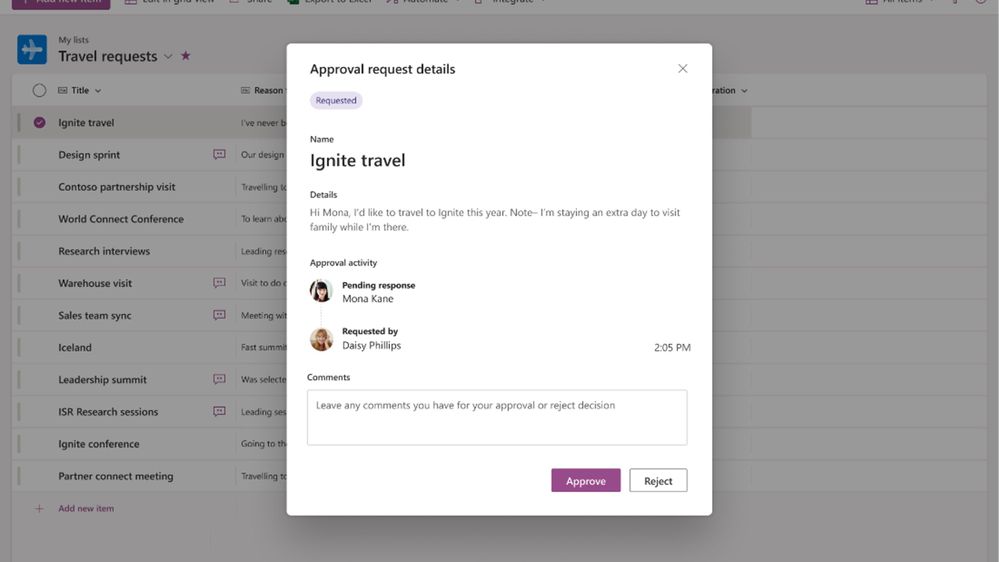
Roadmap ID: 100502.
Rules packaged into out-of-the-box List templates
You can create rules to automate tasks such as sending someone a notification when data changes in the list or a new file is created in the library. You’ll choose a condition that triggers the rule and the action that the rule will take.
Some list templates will soon come with rules pre-packaged into them to help you keep you and your team members notified of changes to data in the list. This is just another way to help keep data in Lists complete, accurate, and up to date.
Roadmap ID: 100499.
Rules packaged into custom List templates
Just like the last feature above, you can expand your custom organizational templates by packaging rules right into them – alongside the ability to pre-program the list schema (columns), formatting, and more.
Roadmap ID: 100500.
Create a list from Comma-separated Values (CSV) files
Lists enable organizations and teams to store and visualize rows of data to share and collaborate on scenarios like inventory management, status reporting, deal milestones and more. They are easy to use, secure, with a high capacity of up to 30 million items in a single list. And often contain data plus means to describe and visualize the data.
You can now create new lists from data inside CSV files –often used for exchanging complex data between different applications. In Lists, select the “From CSV” option when creating a new list. When you use the Export to CSV command in a list, you get a special CSV file that includes information about the list you exported. That means if you import that same CSV into another site, you get a list that has the same column types, formatting, and data as your original list.

This is a great way to improve portability and save time when using or reusing richly formatted lists and their data.
Roadmap ID: 100501. And learn more about importing and exporting list data from and to Excel.
Microsoft Lists – MSA Preview update
We already mentioned that the Lists – MSA Preview now supports iOS devices using TestFlight. But wait, there’s more.
The Microsoft Lists – MSA Preview is a lightweight version of the Microsoft Lists app designed for small business and individual use in conjunction with your Microsoft account (MSA). Put your business and individual productivity into hyperdrive. Test out the Lists – MSA Preview to store all your information related to events, clubs, gifts, applications, vacation planning, and more. Keep track of it all in one place.
What’s new for the Microsoft Lists – MSA Preview
We hope you’ve been enjoying the preview. Whether you’re a new tester or have been using it since we began the preview, we wanted to highlight some of the recent innovations added to the Lists – MSA Preview:
- Introducing Board view
- New ready-made templates (Recipes, Gifts, and more)
- Co-authoring within individual lists
- Undo and Redo to correct any mistakes
- More easily delete an individual list
- Access Lists – MSA Preview on your iOS device; planned for Android as well

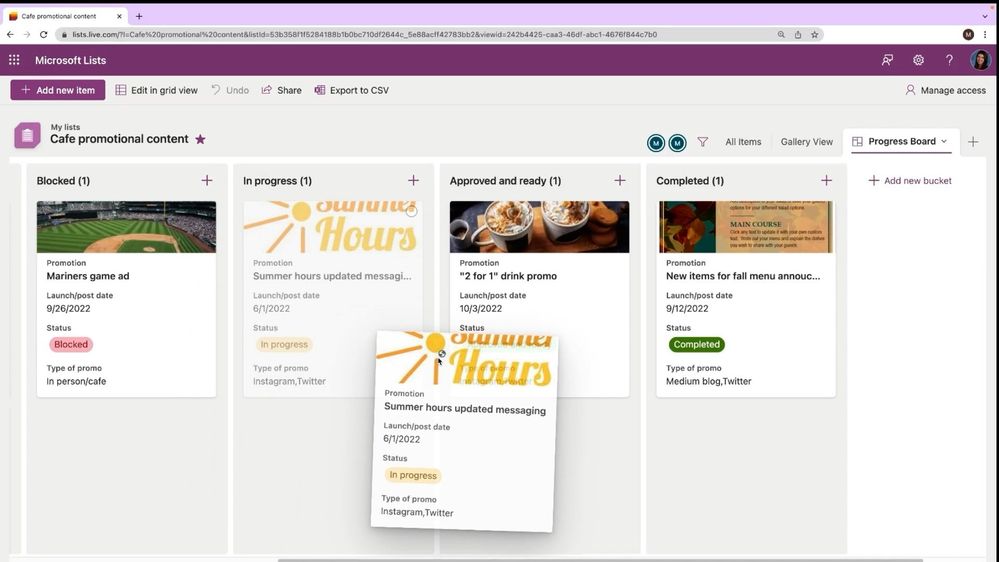
Try it out and let us know what you think. Don’t be shy. There’s in-product Feedback to let us know what you like, where things could improve, and any feature suggestions you have for Microsoft. We review all.
Sign up, sign in and try the Microsoft Lists – MSA Preview today – on Web and iOS device: lists.live.com.
Additional resources
- Microsoft Lists resource center (blogs, demos, videos, podcasts, and more)
- Microsoft Lists adoption center including Lists Day-in-the-life guides
- Microsoft Lists help and ‘how to’ pages
- Microsoft Lists look book
- Microsoft Lists workshop (now on-demand)
- Microsoft Lists on the Feedback Portal – let us know what you want next.
In closing…
Microsoft Lists builds on the trusted SharePoint information platform – bringing new user experiences and capabilities to the existing foundation, for work and life. The value of existing integrations with the Power Platform continues and expand when you need to further customize list forms with Power Apps, design robust workflows with Power Automate, and analyze your data in Excel or Power BI.
And for developers, the power and value of the Lists API extends custom solutions to connect the list data as a source via Microsoft Graph. It’s all a part of Microsoft 365, within a service level agreement you can rely on for enterprise-ready security and compliance while designing lists as core content within your governance plans.
Track what matters most. And we hope you have a great Microsoft Ignite.
Thanks, Lincoln DeMaris – Principal Group Product Manager – Microsoft
New ways to innovate with AI and Microsoft Power Automate
At Microsoft Ignite 2022, we were pleased to share some exciting innovations for Power Automate, empowering makers and pro-coders with new ways to automate and scale enterprise-wide with AI.







