Coming soon to makers everywhere: make.powerautomate.com
We will soon be supporting a new URL for Power Automate: make.powerautomate.com. Read to learn about the change and troubleshoot access issues if you may encounter.

We will soon be supporting a new URL for Power Automate: make.powerautomate.com. Read to learn about the change and troubleshoot access issues if you may encounter.
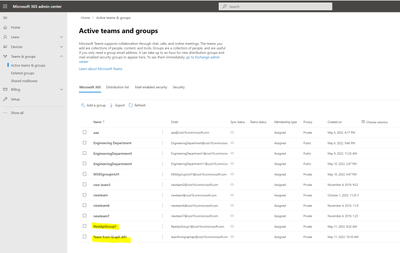
Creating the M365 group with Sensitivity Label starts the modern Team site with desired protection. This can be done with SPO Rest API or Microsoft Graph API, both require delegated permissions.
The following sample scripts use AAD App ROPC authentication flow (Resource Owner Password Credentials), which is documented in https://docs.microsoft.com/en-us/azure/active-directory-b2c/add-ropc-policy?tabs=app-reg-ga&pivots=b2c-user-flow to get access token before making the API calls, other delegated authentication flows should work as well.
function GetToken([PSCredential]$ROPCreds){
$headers = @{“Content-Type”=”application/x-www-form-urlencoded”}
$body= “client_id={0}&scope={1}&username={2}&password={3}&grant_type=password” -f $clientId, [uri]::EscapeDataString($scope), $ROPCreds.UserName, $ROPCreds.GetNetworkCredential().Password
$resp = Invoke-WebRequest -Method Post -Uri “$base/$tenantId/oauth2/v2.0/token” -Headers $headers -Body $body
return $resp
}
#get token with credentials
$bearerToken = GetToken -ROPCreds $creds
#convert to JSON object
$jsonresp = $bearerToken.Content|ConvertFrom-Json
$tokenType = $jsonresp.token_type
$tokenValue = $jsonresp.access_token
#Write-Host $tokenType $tokenValue
$headers = @{
‘Authorization’=”$tokenType $tokenValue”
}
<#Create M365 Group with Graph API #>
$createGroupUri = “https://graph.microsoft.com/v1.0/groups”
$groupBody = @{
“displayName” = “Team from Graph API”
“mailNickname”= “teamfromgraphapi”
“description” = “Demo making a group from Graph API”
“owners@odata.bind” = @(
“https://graph.microsoft.com/v1.0/me”
)
“groupTypes” = @(
“Unified”
)
“mailEnabled” = “true”
“securityEnabled” = “true”
“visibility” = “Private”
“assignedLabels” = @(
@{“LabelId”=$SensitivityLabelId}
)
}
$newGroup = Invoke-RestMethod -Uri $createGroupUri -Method POST -Headers $headers -Body ($groupBody |ConvertTo-Json -Depth 3) -ContentType ‘application/json’
$newGroup
$tenantHost = “https://$tenant.sharepoint.com”
$scope = “$tenantHost/.default”
$base = “https://login.microsoftonline.com”
$redirectUri = “https://login.microsoftonline.com/common/oauth2/nativeclient”
$creds = new-object -TypeName System.Management.Automation.PSCredential -argumentlist $AdminUser,$Password
function GetToken([PSCredential]$ROPCreds){
$headers = @{“Content-Type”=”application/x-www-form-urlencoded”}
$body= “client_id={0}&scope={1}&username={2}&password={3}&grant_type=password” -f $clientId, [uri]::EscapeDataString($scope), $creds.UserName, $creds.GetNetworkCredential().Password
$resp = Invoke-WebRequest -Method Post -Uri “$base/$tenantId/oauth2/v2.0/token” -Headers $headers -Body $body
return $resp
}
if($creds -eq $null){
$creds = Get-Credential -Message “Enter username (UPN format) and password”
}
#get token with credentials
$bearerToken = GetToken -ROPCreds $creds
#convert to JSON object
$jsonresp = $bearerToken.Content|ConvertFrom-Json
$tokenType = $jsonresp.token_type
$tokenValue = $jsonresp.access_token
#Creat Group & associated Team Site with /_api/GroupSiteManager/CreateGroupEx
$header = @{
‘Authorization’=”$($tokenType) $($tokenValue)”
“accept”=”application/json;odata=verbose”
}
$createGroupEndPoint = “$tenantHost/_api/GroupSiteManager/CreateGroupEx”
$groupbody=@{
“displayName”= ‘RestApiGroup1’
“alias”= ‘RestApiGroup1’
“isPublic”= ‘false’
“optionalParams”= @{
“Owners”= @(“$AdminUser”)
“CreationOptions” = @(
“SPSiteLanguage:1033”,
“SensitivityLabel:$SensitivityLabelId”
)
}
}
$response = Invoke-WebRequest -Uri $createGroupEndPoint -Method POST -Headers $header -Body ($groupbody|ConvertTo-Json) -ContentType “application/json”
if($response.StatusCode -eq 200){
Write-Host “Group and its associated team Site CREATED SUCCESSFULLY!!”
}
Generated Group and associated modern Team site in SPO Admin portal:
M365 Groups:
M365 Group associated Modern Team Sites with Sensitivity Label set:
SharePoint 2013 Workflows was introduced 10 years ago. Since the release of SharePoint workflows, Microsoft has evolved orchestration to not only encompass SharePoint, but all the productivity services you use within Microsoft 365 and extend to 3rd party apps, through Power Automate.
Power Automate for workflow orchestration connects to all Microsoft 365 services and over 220 other services to let an enterprise build custom workflows. There are also many 3rd party solutions that can directly orchestrate SharePoint data via SharePoint’s open API platform.
SharePoint 2010 Workflows was retired as of November 1st, 2020 with the notice that we would also retire SharePoint Workflow 2013 in the future. Although we currently do not have a timeline to announce for SharePoint 2013 Workflow retirement, it is strongly recommended to move 2013 workflows to the Power Automate platform or some other modern workflow orchestration solution.
To help, a new, open-source Microsoft 365 Assessment tool is available to help you identify and evaluate the usage of SharePoint 2013 workflows in your tenant.
To understand if your organization is using any SharePoint 2013 Workflows or begin planning migration to Power Automate, we recommend that customers run the Microsoft 365 Assessment tool to scan your tenants for active 2013 workflows.
Using the Power BI report generated by the scanner tool, you can:
The workflow report along with site information enables tenant administrators to plan the migration of 2013 workflows with minimal impact to the users.
We hope this tool and its ongoing evolution will help your business process modernization in Microsoft 365. We will continue to share updates through our support articles at https://aka.ms/modernize-workflows.
Thank You.

Across the globe we see the celebration of wonderful cultural moments. In living up to our mission statement – “to empower every person and every organization on the planet to achieve more”, we here at Microsoft provide solutions to empower organizations to celebrate these cultural moments with their employees throughout the year.
We are introducing Diversity and Inclusion (D&I) cultural site templates. Our first cultural template we are delivering celebrates Pride Month (June 2022). There is a lot of content and structure that appears by default – to save you time – and all can be further customized to meet the unique needs of your organization.
This leverages modern experience built on SharePoint in Microsoft 365 and is available on the SharePoint look book – LGBTQ+ Employee Resource Group (microsoft.com) site.
The LGBTQ+ Employee Resource Group site features:
You will be able to quickly create communication to uplift employee resource groups, support career growth of people in your organization, and to help advance equality and allyship for all.
Coming Soon
Other cultural D&I site templates we are working on:
With Power Automate and AI Builder you can now easily automate extracting information from unstructured documents such as contracts, statement of works, contracts, statement of work, financial or medical reports, publications, and many others.
Application Lifecycle Management (ALM) is the lifecycle management of applications and automations, including considerations like governance, development, and maintenance. Power Automate has recently released a number of improvements that make ALM easier.