With electronic data growing exponentially across the digital estate and the increased number of new privacy regulations emerging, consumers are more aware of their privacy rights now more than ever. Compliance and privacy professionals need more tools to help them safeguard sensitive information and reduce compliance risks. To empower organizations to more effectively and efficiently take control of their data privacy, we introduced the new Microsoft 365 compliance center in January and are excited to announce its general availability today!
The new Microsoft 365 compliance center enables you to assess compliance risks and posture, protect and govern your data, and respond to data discovery requests in a timely manner. Here, we highlight several key compliance capabilities in the three scenarios below.
Simplify assessment of compliance risks and posture with actionable insights
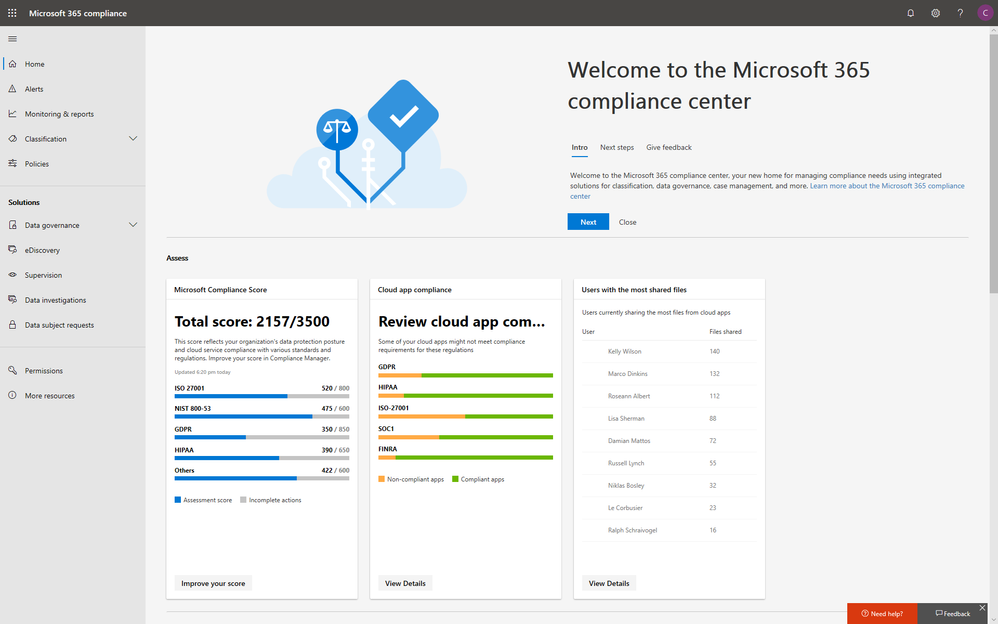
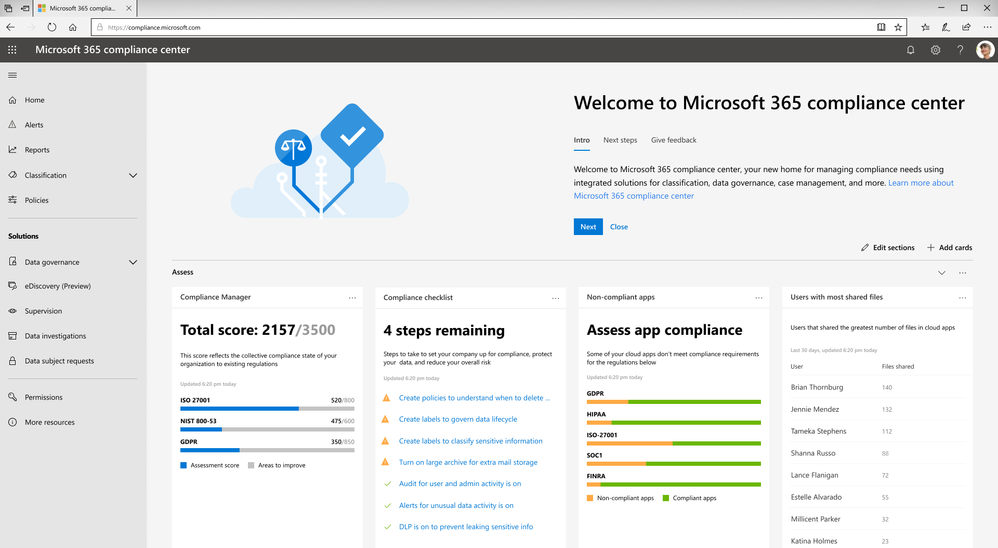
On the Microsoft 365 compliance center homepage, you can easily find actionable insights in the Assess, Protect, and Respond sections with signals across the Microsoft 365 feature set. The homepage is the go-to dashboard for compliance and privacy teams to examine their organization’s data compliance posture.
To help with your regulatory compliance, we’ve brought in score insights from Compliance Manager, a cloud-based tool that helps you perform on-going risk assessments, and provides step-by-step guidance on implementing compliance controls. It also tracks and records your compliance activities to help you prepare for internal and external audits. On the Compliance Manager card, you can find a quick summary of your current compliance posture for regulations and standards including: GDPR, ISO 27001, and NIST 800-53. From here, you can visit Compliance Manager to improve your Microsoft Compliance Score.
In addition to the score, you can also find insights from Microsoft Cloud App Security (MCAS) including: third-party application usage, application compliance statuses, both the users and files shared most from cloud applications, and shadow IT applications as well. Additionally, with signals from Data Loss Prevention, you can quickly examine your DLP policy matches and create new policies to protect your sensitive data.
Integrated protection and governance of sensitive data across devices, apps, and cloud services
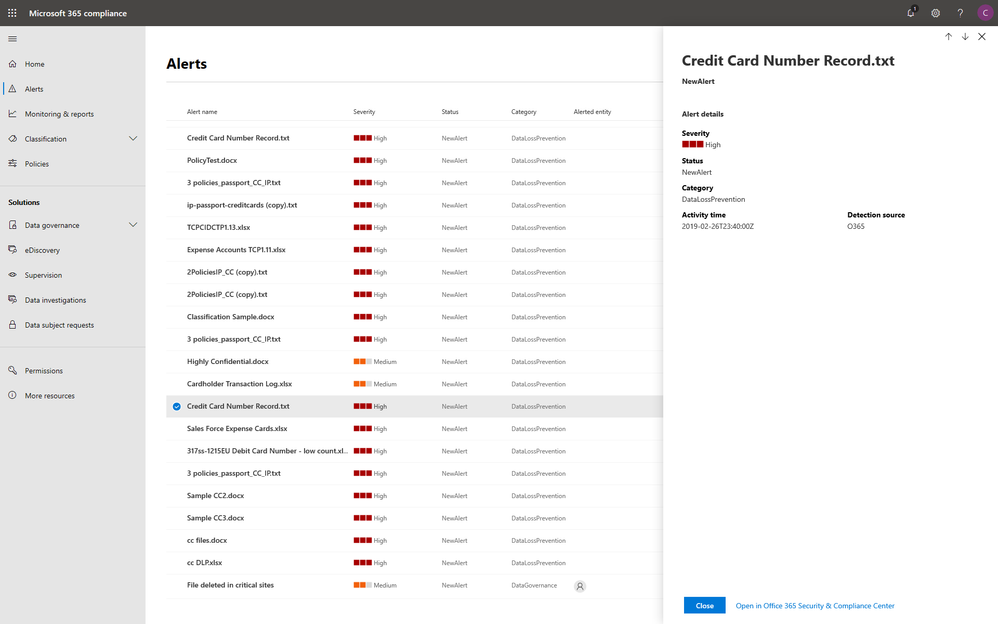
To help you better protect your digital estate across devices, apps, and cloud services, we aggregated the signals for risky compliance activities in your organization’s environment, and helped you highlight the high severity ones with details so that you take the appropriate actions to remediate risks.
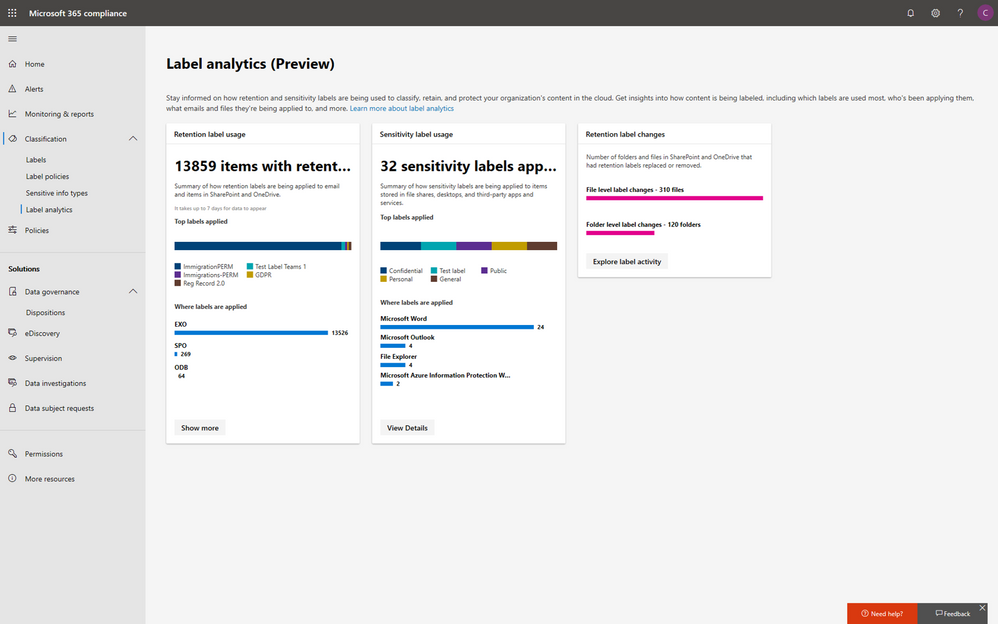
Within the new compliance center, you can also classify your most important data with sensitivity and retention labels, and configure protection and governance policies with a unified experience. Additionally, the Label analytics functionality in public preview gives you label insights across your Office 365 and non-Office 365 workloads, helping you analyze and validate your label usage.
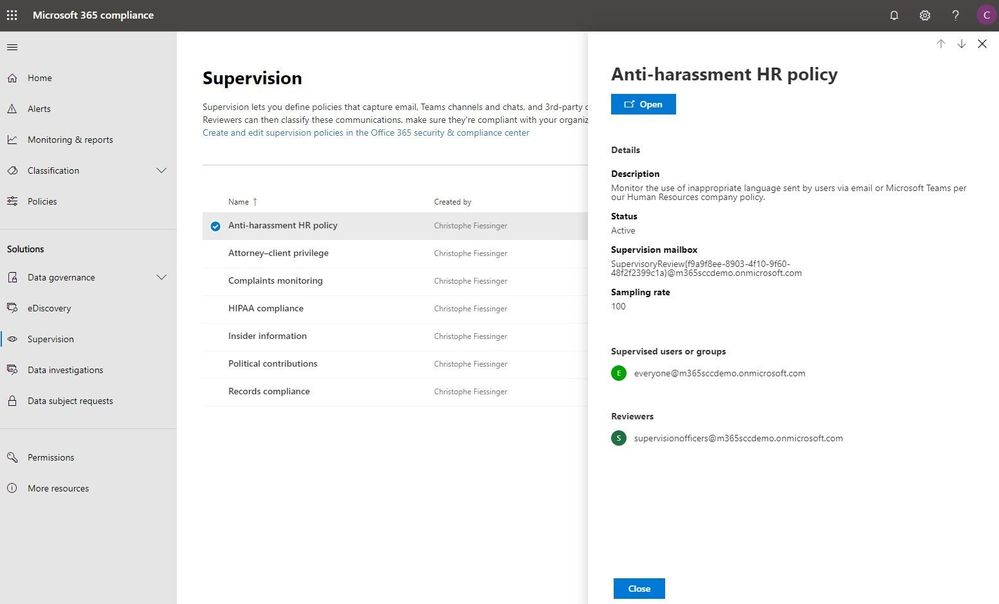
Under the solutions area, you can easily access compliance features that help you better govern your data. The disposition review under Data governance helps you review the content when it reaches the end of its retention period, for you to make a final decision about keeping or deleting the data. Additionally, Supervision helps organization meet communication-monitoring requirements to address internal policies or regulatory compliance. You can establish policies with intelligent conditions and identify Teams or users and the related channels or chat messages to be included in the supervision policy. Supervisors can then review content with the new built-in review experience to tag, escalate, and bulk resolve.
Intelligently respond to data discovery requests by leveraging AI to find the most relevant data
The cost of compliance has continuously increased in the past few years due to new regulations like GDPR, and the growing amount of electronic data. Organizations need assistance to discover the most relevant data to respond to regulatory requests like the Data Subject Access Requests (DSARs).
In the new Microsoft 365 compliance center, you can access the Data Subject Requests tool to create DSR cases and identify your employees’ personal data with built-in content search capabilities. With Advanced eDiscovery, you can reduce the cost and risk of common eDiscovery processes with custodian management, hold notifications, working sets and review and redact functionality built into Microsoft 365 directly.
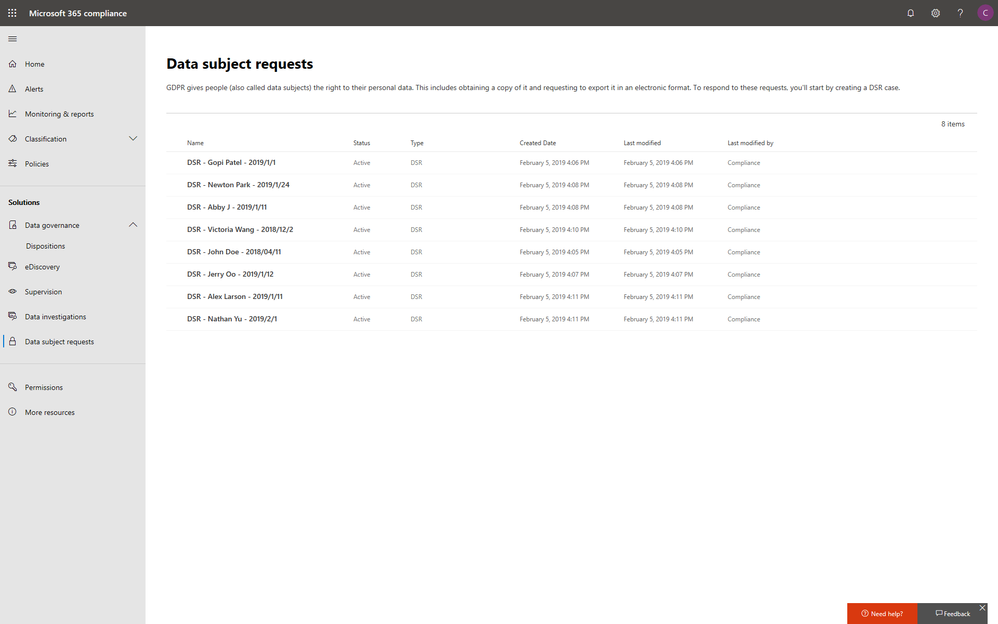
In addition to data discovery, Microsoft 365 compliance center also provides you with access to data investigations solution in preview, which helps organizations to search for leaked or unprotected sensitive data and take actions like deleting emails or documents to remediate risks.
We will keep adding more compliance solutions like audit log search, content search, retention policies, archiving and more in the Microsoft 365 compliance center soon to reach parity with the solutions we provide in Office 365 Security & Compliance Center. Please don’t hesitate to give us feedback from the feedback button in the new center.
Get started today
To get the new Microsoft 365 security center and Microsoft 365 compliance center, your organization must have a subscription to Microsoft 365 E3 or E5, or a Volume Licensing equivalent (which consists of Office 365 Enterprise E3 or E5, Enterprise Mobility + Security E3 or E5, and Windows 10 Enterprise E3/E5). We plan to expand access to additional subscriptions and license types later in the year. Users must be assigned the Global Administrator, Compliance Administrator, or Compliance Data Administrator role in Azure Active Directory to access the new Microsoft 365 compliance center.
You can start using the Microsoft 365 compliance center today by visiting compliance.microsoft.com or through the Microsoft 365 admin center. Learn more about the new experience in our technical supporting document.
With electronic data growing exponentially across the digital estate and the increased number of new privacy regulations emerging, consumers are more aware of their privacy rights now more than ever. Compliance and privacy professionals need more tools to help them safeguard sensitive information and reduce compliance risks. To empower organizations to more effectively and efficiently take control of their data privacy, we introduced the new Microsoft 365 compliance center in January and are excited to announce its general availability today!
The new Microsoft 365 compliance center enables you to assess compliance risks and posture, protect and govern your data, and respond to data discovery requests in a timely manner. Here, we highlight several key compliance capabilities in the three scenarios below.
Simplify assessment of compliance risks and posture with actionable insights
On the Microsoft 365 compliance center homepage, you can easily find actionable insights in the Assess, Protect, and Respond sections with signals across the Microsoft 365 feature set. The homepage is the go-to dashboard for compliance and privacy teams to examine their organization’s data compliance posture.
To help with your regulatory compliance, we’ve brought in score insights from Compliance Manager, a cloud-based tool that helps you perform on-going risk assessments, and provides step-by-step guidance on implementing compliance controls. It also tracks and records your compliance activities to help you prepare for internal and external audits. On the Compliance Manager card, you can find a quick summary of your current compliance posture for regulations and standards including: GDPR, ISO 27001, and NIST 800-53. From here, you can visit Compliance Manager to improve your Microsoft Compliance Score.
In addition to the score, you can also find insights from Microsoft Cloud App Security (MCAS) including: third-party application usage, application compliance statuses, both the users and files shared most from cloud applications, and shadow IT applications as well. Additionally, with signals from Data Loss Prevention, you can quickly examine your DLP policy matches and create new policies to protect your sensitive data.
Integrated protection and governance of sensitive data across devices, apps, and cloud services
To help you better protect your digital estate across devices, apps, and cloud services, we aggregated the signals for risky compliance activities in your organization’s environment, and helped you highlight the high severity ones with details so that you take the appropriate actions to remediate risks.
Within the new compliance center, you can also classify your most important data with sensitivity and retention labels, and configure protection and governance policies with a unified experience. Additionally, the Label analytics functionality in public preview gives you label insights across your Office 365 and non-Office 365 workloads, helping you analyze and validate your label usage.
Under the solutions area, you can easily access compliance features that help you better govern your data. The disposition review under Data governance helps you review the content when it reaches the end of its retention period, for you to make a final decision about keeping or deleting the data. Additionally, Supervision helps organization meet communication-monitoring requirements to address internal policies or regulatory compliance. You can establish policies with intelligent conditions and identify Teams or users and the related channels or chat messages to be included in the supervision policy. Supervisors can then review content with the new built-in review experience to tag, escalate, and bulk resolve.
Intelligently respond to data discovery requests by leveraging AI to find the most relevant data
The cost of compliance has continuously increased in the past few years due to new regulations like GDPR, and the growing amount of electronic data. Organizations need assistance to discover the most relevant data to respond to regulatory requests like the Data Subject Access Requests (DSARs).
In the new Microsoft 365 compliance center, you can access the Data Subject Requests tool to create DSR cases and identify your employees’ personal data with built-in content search capabilities. With Advanced eDiscovery, you can reduce the cost and risk of common eDiscovery processes with custodian management, hold notifications, working sets and review and redact functionality built into Microsoft 365 directly.
In addition to data discovery, Microsoft 365 compliance center also provides you with access to data investigations solution in preview, which helps organizations to search for leaked or unprotected sensitive data and take actions like deleting emails or documents to remediate risks.
We will keep adding more compliance solutions like audit log search, content search, retention policies, archiving and more in the Microsoft 365 compliance center soon to reach parity with the solutions we provide in Office 365 Security & Compliance Center. Please don’t hesitate to give us feedback from the feedback button in the new center.
Get started today
To get the new Microsoft 365 security center and Microsoft 365 compliance center, your organization must have a subscription to Microsoft 365 E3 or E5, or a Volume Licensing equivalent (which consists of Office 365 Enterprise E3 or E5, Enterprise Mobility + Security E3 or E5, and Windows 10 Enterprise E3/E5). We plan to expand access to additional subscriptions and license types later in the year. Users must be assigned the Global Administrator, Compliance Administrator, or Compliance Data Administrator role in Azure Active Directory to access the new Microsoft 365 compliance center.
You can start using the Microsoft 365 compliance center today by visiting compliance.microsoft.com or through the Microsoft 365 admin center. Learn more about the new experience in our technical supporting document.
With electronic data growing exponentially across the digital estate and the increased number of new privacy regulations emerging, consumers are more aware of their privacy rights now more than ever. Compliance and privacy professionals need more tools to help them safeguard sensitive information and reduce compliance risks. To empower organizations to more effectively and efficiently take control of their data privacy, we introduced the new Microsoft 365 compliance center in January and are excited to announce its general availability today!
The new Microsoft 365 compliance center enables you to assess compliance risks and posture, protect and govern your data, and respond to data discovery requests in a timely manner. Here, we highlight several key compliance capabilities in the three scenarios below.
Simplify assessment of compliance risks and posture with actionable insights
On the Microsoft 365 compliance center homepage, you can easily find actionable insights in the Assess, Protect, and Respond sections with signals across the Microsoft 365 feature set. The homepage is the go-to dashboard for compliance and privacy teams to examine their organization’s data compliance posture.
To help with your regulatory compliance, we’ve brought in score insights from Compliance Manager, a cloud-based tool that helps you perform on-going risk assessments, and provides step-by-step guidance on implementing compliance controls. It also tracks and records your compliance activities to help you prepare for internal and external audits. On the Compliance Manager card, you can find a quick summary of your current compliance posture for regulations and standards including: GDPR, ISO 27001, and NIST 800-53. From here, you can visit Compliance Manager to improve your Microsoft Compliance Score.
In addition to the score, you can also find insights from Microsoft Cloud App Security (MCAS) including: third-party application usage, application compliance statuses, both the users and files shared most from cloud applications, and shadow IT applications as well. Additionally, with signals from Data Loss Prevention, you can quickly examine your DLP policy matches and create new policies to protect your sensitive data.
Integrated protection and governance of sensitive data across devices, apps, and cloud services
To help you better protect your digital estate across devices, apps, and cloud services, we aggregated the signals for risky compliance activities in your organization’s environment, and helped you highlight the high severity ones with details so that you take the appropriate actions to remediate risks.
Within the new compliance center, you can also classify your most important data with sensitivity and retention labels, and configure protection and governance policies with a unified experience. Additionally, the Label analytics functionality in public preview gives you label insights across your Office 365 and non-Office 365 workloads, helping you analyze and validate your label usage.
Under the solutions area, you can easily access compliance features that help you better govern your data. The disposition review under Data governance helps you review the content when it reaches the end of its retention period, for you to make a final decision about keeping or deleting the data. Additionally, Supervision helps organization meet communication-monitoring requirements to address internal policies or regulatory compliance. You can establish policies with intelligent conditions and identify Teams or users and the related channels or chat messages to be included in the supervision policy. Supervisors can then review content with the new built-in review experience to tag, escalate, and bulk resolve.
Intelligently respond to data discovery requests by leveraging AI to find the most relevant data
The cost of compliance has continuously increased in the past few years due to new regulations like GDPR, and the growing amount of electronic data. Organizations need assistance to discover the most relevant data to respond to regulatory requests like the Data Subject Access Requests (DSARs).
In the new Microsoft 365 compliance center, you can access the Data Subject Requests tool to create DSR cases and identify your employees’ personal data with built-in content search capabilities. With Advanced eDiscovery, you can reduce the cost and risk of common eDiscovery processes with custodian management, hold notifications, working sets and review and redact functionality built into Microsoft 365 directly.
In addition to data discovery, Microsoft 365 compliance center also provides you with access to data investigations solution in preview, which helps organizations to search for leaked or unprotected sensitive data and take actions like deleting emails or documents to remediate risks.
We will keep adding more compliance solutions like audit log search, content search, retention policies, archiving and more in the Microsoft 365 compliance center soon to reach parity with the solutions we provide in Office 365 Security & Compliance Center. Please don’t hesitate to give us feedback from the feedback button in the new center.
Get started today
To get the new Microsoft 365 security center and Microsoft 365 compliance center, your organization must have a subscription to Microsoft 365 E3 or E5, or a Volume Licensing equivalent (which consists of Office 365 Enterprise E3 or E5, Enterprise Mobility + Security E3 or E5, and Windows 10 Enterprise E3/E5). We plan to expand access to additional subscriptions and license types later in the year. Users must be assigned the Global Administrator, Compliance Administrator, or Compliance Data Administrator role in Azure Active Directory to access the new Microsoft 365 compliance center.
You can start using the Microsoft 365 compliance center today by visiting compliance.microsoft.com or through the Microsoft 365 admin center. Learn more about the new experience in our technical supporting document.
Data privacy continues to be top-of-mind for businesses. For example, nearly one-third of global enterprises view compliance with new privacy laws, like the EU General Data Protection Regulation (GDPR), as one of the biggest IT hurdles that their organizations face1.
The arrival of the California Consumer Privacy Act (CCPA) will impact many large businesses with customers who reside in California. With more than 39 million individuals residing in California2 and transacting with businesses worldwide, the scope of the CCPA is significant. Businesses around the world need to start formulating a compliance strategy now so they are well prepared when enforcement begins in January 2020.
Today, we want to share five tips that can help your organization to get ready for new privacy regulations such as CCPA with Microsoft 365:
Tip 1: Leverage the GDPR assessment in Compliance Manager
With many commonalities between GDPR and CCPA, such as data subject rights of access, erasure, and portability, organizations can leverage their GDPR program to start tackling CCPA compliance now.
To help businesses assess Microsoft cloud services and find applicable technology solutions to implement GDPR controls, we released Compliance Manager in 2018. Compliance Manager is a cloud-based tool that gives you step-by-step guidance to help you implement, track and record your data-protection controls. You can get started by using the GDPR assessment in Compliance Manager today.
Tip 2: Establish a process to efficiently respond to Data Subject Requests
According to a blog post by Julie Brill, U.S consumers are highly aware of their privacy rights with the highest engagement of approximately 2 million users signing into the Microsoft privacy dashboard to manage their information in 4 months since GDPR came into effect. With that in mind, we encourage you to start building out your data subject access requests process today, because CCPA requires a 12-month look-back period.
To get ready to respond to this high demand of data access requests, we encourage you to start using the Data Subject Requests (DSRs) tool in the new Microsoft 365 compliance center, which allows your privacy and compliance teams to respond more efficiently to DSRs in a timely manner.
Tip 3: Discover, classify & label, and protect sensitive data
The CCPA will impose penalties for data breaches of consumers’ personal information. As organizations live in a world with a tsunami of data across their digital estate, understanding where their most sensitive data is and how to protect it is critical to reduce compliance risks.
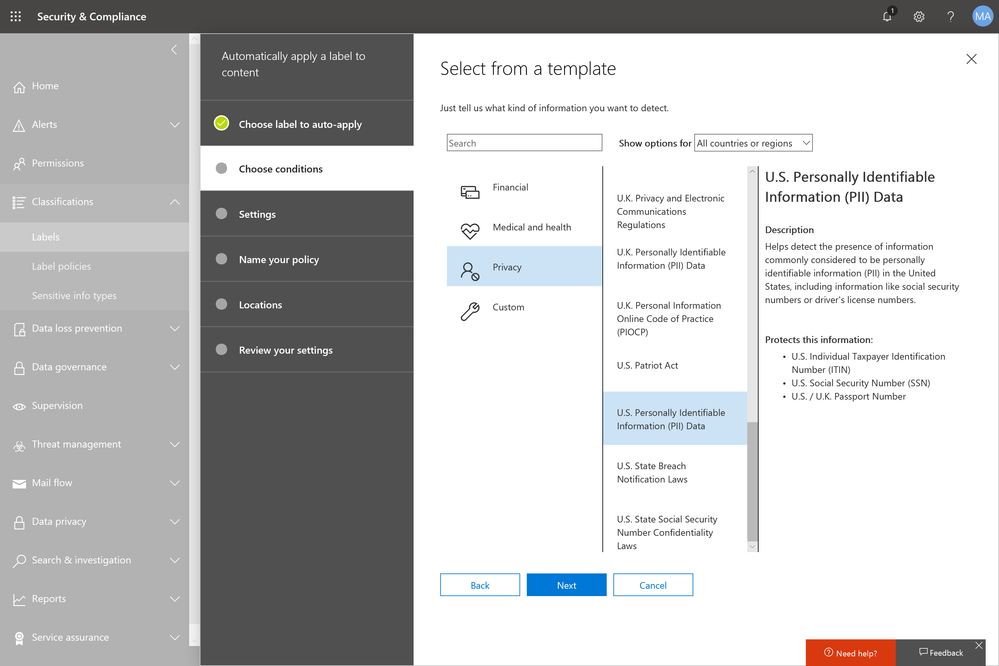
Microsoft Information Protection harnesses an integrated and intelligent approach to target the 80 percent of corporate data that is estimated to be “dark” or un-classified and unprotected3. You can start to make use of the U.S. PII sensitive data types to automatically discover, classify, and protect personal data to help you with CCPA compliance.
Tip 4: Use encryption to protect and control your sensitive emails
Regulations like GDPR and CCPA see encryption as an effective method to protect personal information from unauthorized parties in the event of a data breach.
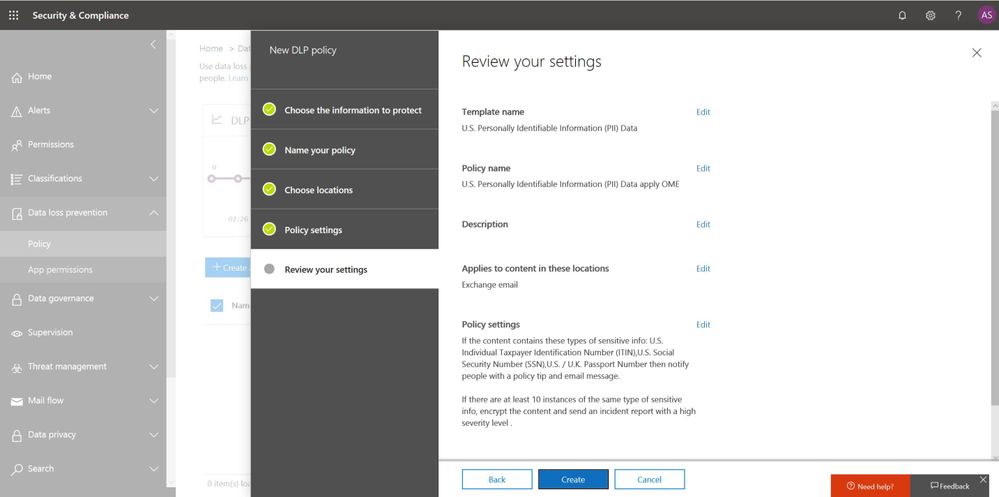
Office 365 Message Encryption enables users to protect sensitive emails shared with anyone inside and outside of your organization. If your tenant is eligible, Office 365 Message Encryption will be on by default. You can get started by setting up a Data Loss Prevention policy that applies Office 365 Message Encryption to U.S. PII sensitive data types.
Also start educating your end users to apply protection such as “do not forward” or “encrypt-only” directly from Outlook (either desktop or web version). Watch this video to learn more.
Tip 5: Champion consumer privacy rights to build a sustainable business
While the CCPA brings prominent challenges to many businesses who were not subject to GDPR, we encourage those organizations to view CCPA and other privacy laws as an opportunity to enhance their privacy programs and embrace privacy as a corporate value to build trust with customers.
Check out the “Championing privacy rights to drive differentiation” webcast with Microsoft CIO Kurt DelBene, CISO Bret Arsenault, and a featured speaker, Enza Iannopollo of Forrester, who discuss the new era of privacy expectations and how to invest in privacy as a business driver.
Learn more about the Microsoft cloud
At Microsoft, we are committed to partnering with you to keep advancing our solutions to help you protect your digital estate in a more compliant manner. Here are some additional resources to help you in your ongoing compliance journey:
- Download our e-book to learn more about how to protect digital privacy.
- Experience first-hand how Microsoft solutions can help solve your business challenges by registering for an upcoming hands-on online experience (US only). Click here for free Microsoft 365 Compliance product training outside the US.
- Learn more about the new Information Protection and Compliance offering in Microsoft 365
1 Forrester. “Global Business Technographics Security Survey, 2018.” August 2018. www.forrester.com/Global+Business+Technographics+Security+Survey+2018/-/E-sus4551.
2 Public Policy Institute of California. “Just the Facts: California’s Population.” www.ppic.org/publication/californias-population/.
3 Andrew Trice. “The Future of Cognitive Computing.” IBM blog. November 2015. www.ibm.com/blogs/bluemix/2015/11/future-of-cognitive-computing/.
Data privacy continues to be top-of-mind for businesses. For example, nearly one-third of global enterprises view compliance with new privacy laws, like the EU General Data Protection Regulation (GDPR), as one of the biggest IT hurdles that their organizations face1.
The arrival of the California Consumer Privacy Act (CCPA) will impact many large businesses with customers who reside in California. With more than 39 million individuals residing in California2 and transacting with businesses worldwide, the scope of the CCPA is significant. Businesses around the world need to start formulating a compliance strategy now so they are well prepared when enforcement begins in January 2020.
Today, we want to share five tips that can help your organization to get ready for new privacy regulations such as CCPA with Microsoft 365:
Tip 1: Leverage the GDPR assessment in Compliance Manager
With many commonalities between GDPR and CCPA, such as data subject rights of access, erasure, and portability, organizations can leverage their GDPR program to start tackling CCPA compliance now.
To help businesses assess Microsoft cloud services and find applicable technology solutions to implement GDPR controls, we released Compliance Manager in 2018. Compliance Manager is a cloud-based tool that gives you step-by-step guidance to help you implement, track and record your data-protection controls. You can get started by using the GDPR assessment in Compliance Manager today.
Tip 2: Establish a process to efficiently respond to Data Subject Requests
According to a blog post by Julie Brill, U.S consumers are highly aware of their privacy rights with the highest engagement of approximately 2 million users signing into the Microsoft privacy dashboard to manage their information in 4 months since GDPR came into effect. With that in mind, we encourage you to start building out your data subject access requests process today, because CCPA requires a 12-month look-back period.
To get ready to respond to this high demand of data access requests, we encourage you to start using the Data Subject Requests (DSRs) tool in the new Microsoft 365 compliance center, which allows your privacy and compliance teams to respond more efficiently to DSRs in a timely manner.
Tip 3: Discover, classify & label, and protect sensitive data
The CCPA will impose penalties for data breaches of consumers’ personal information. As organizations live in a world with a tsunami of data across their digital estate, understanding where their most sensitive data is and how to protect it is critical to reduce compliance risks.
Microsoft Information Protection harnesses an integrated and intelligent approach to target the 80 percent of corporate data that is estimated to be “dark” or un-classified and unprotected3. You can start to make use of the U.S. PII sensitive data types to automatically discover, classify, and protect personal data to help you with CCPA compliance.
Tip 4: Use encryption to protect and control your sensitive emails
Regulations like GDPR and CCPA see encryption as an effective method to protect personal information from unauthorized parties in the event of a data breach.
Office 365 Message Encryption enables users to protect sensitive emails shared with anyone inside and outside of your organization. If your tenant is eligible, Office 365 Message Encryption will be on by default. You can get started by setting up a Data Loss Prevention policy that applies Office 365 Message Encryption to U.S. PII sensitive data types.
Also start educating your end users to apply protection such as “do not forward” or “encrypt-only” directly from Outlook (either desktop or web version). Watch this video to learn more.
Tip 5: Champion consumer privacy rights to build a sustainable business
While the CCPA brings prominent challenges to many businesses who were not subject to GDPR, we encourage those organizations to view CCPA and other privacy laws as an opportunity to enhance their privacy programs and embrace privacy as a corporate value to build trust with customers.
Check out the “Championing privacy rights to drive differentiation” webcast with Microsoft CIO Kurt DelBene, CISO Bret Arsenault, and a featured speaker, Enza Iannopollo of Forrester, who discuss the new era of privacy expectations and how to invest in privacy as a business driver.
Learn more about the Microsoft cloud
At Microsoft, we are committed to partnering with you to keep advancing our solutions to help you protect your digital estate in a more compliant manner. Here are some additional resources to help you in your ongoing compliance journey:
- Download our e-book to learn more about how to protect digital privacy.
- Experience first-hand how Microsoft solutions can help solve your business challenges by registering for an upcoming hands-on online experience (US only). Click here for free Microsoft 365 Compliance product training outside the US.
- Learn more about the new Information Protection and Compliance offering in Microsoft 365
1 Forrester. “Global Business Technographics Security Survey, 2018.” August 2018. www.forrester.com/Global+Business+Technographics+Security+Survey+2018/-/E-sus4551.
2 Public Policy Institute of California. “Just the Facts: California’s Population.” www.ppic.org/publication/californias-population/.
3 Andrew Trice. “The Future of Cognitive Computing.” IBM blog. November 2015. www.ibm.com/blogs/bluemix/2015/11/future-of-cognitive-computing/.







