We’re excited to announce new improvements to the SharePoint Migration Tool for the month of February.
Designed to be used for migrations ranging from the smallest set of files to a large scale enterprise migration, the SharePoint Migration Tool will let you bring your information to the cloud and take advantage of the latest collaboration, intelligence, and security solutions with Office 365.
Over the past several months we’ve been continually working to add features to the SharePoint Migration Tool to help you accelerate your journey to Microsoft 365, from support for full site migrations, to incremental improvements to the user experience – the SharePoint Migration Tool is designed to support migrations of all sizes. This month we’re adding some exciting new improvements to help you on your journey to the cloud.
Improvements this month include:
Managed Metadata Service support
If you have an existing taxonomy in SharePoint Server 2013, the SharePoint Migration Tool can now migrate your content types and term stores to Office 365. Global term store migration requires global tenant admin permissions.
Web Parts Support, Site Navigation, and more…
The SharePoint Migration Tool has continuously improved to support more complex migration requirements. From a humble beginning of accelerating files migration to incremental improvements leading up to complete SharePoint 2013 site migrations. Now using the SharePoint Migration Tool you can migrate just about every element of SharePoint sites that you care most about including Web Parts, Pages, and site navigation!
For a detailed list of improvements in this release, refer to the release notes at https://docs.microsoft.com/en-us/sharepointmigration/new-and-improved-features-in-the-sharepoint-migration-tool.
If you’re new to the SharePoint Migration Tool, keep reading below to learn more about how you can transform your business by bringing it to the cloud.
About the SharePoint Migration Tool
The SharePoint Migration Tool is designed to simplify your journey to the cloud through a free, simple, and fast solution to migrate content from on-premises SharePoint sites and file shares to SharePoint or OneDrive in Office 365. The SharePoint Migration Tool allows you to accelerate your journey to Office 365 overcoming obstacles typically associated with migration projects. With the SharePoint Migration Tool you can evaluate and address the information that matters the most to your organization, the Libraries, and now Lists that form the foundation of the SharePoint experience. Using the SharePoint Migration Tool you can start your migration today and take advantage of the full suite of features and security capabilities that Office 365 offers.
Keep reading to learn more about the SharePoint Migration Tool or download the latest version now at https://aka.ms/SPMT.
Getting Started
You can download the SharePoint Migration Tool at http://aka.ms/SPMT. Through v3 of the SharePoint Migration Tool you’ll have available to you the innovation we’re delivering to help you bring your information to the cloud and take advantage of the latest collaboration, intelligence, and security solutions with Office 365.
What’s next…
Through continued innovation across migration scenarios we’ll be adding more capabilities over time to the SharePoint Migration Tool, including support for more SharePoint versions, site structure migrations, and more. Subscribe here to stay up to date on future announcements for SharePoint and Office 365.
Wrapping Up…
Whether you’re looking to migrate from file shares on-premises to SharePoint or OneDrive or from on-premises versions of SharePoint, the SharePoint Migration Tool is designed to support the smallest of migrations to large scale migrations with support for bulk scenarios.
Learn more about migrating to Office 365 at https://resources.techcommunity.microsoft.com/cloud-migration/.
Learn more about the SharePoint Migration Tool at https://support.office.com/en-us/article/Introducing-the-SharePoint-Migration-Tool-9c38f5df-300b-4adc-8fac-648d0215b5f7.
Prepare your environment for migration using the SharePoint Migration Assessment Tool by learning more at https://www.microsoft.com/en-us/download/details.aspx?id=53598.
Today, we are excited to announce new capabilities in Advanced eDiscovery that directly respond to customer feedback on how they need to be able to do more with the built-in discovery tools in Microsoft 365. We have heard that organizations require expanded capabilities to complete more of common investigation and discovery workflows right within Microsoft 365.
Now we are starting to rollout a new version of Advanced eDiscovery that includes a new look and feel, additional functionality such as hold notifications and acknowledgment tracking, and a concept of a static set of content for performant searches as well as an integrated review and redact experience.
With these new updates we hope to more directly meet customer requirements for an efficient and effective way to preserve, collect and review content related to investigations or litigation.
Microsoft’s director of discovery, EJ Bastien has stated that even as “data from the average custodian has increased 20x over the last ten years, our team has reduced the cost per custodian of completing this eDiscovery work by 85%. While also maintaining high security standards of keeping data in place within the Microsoft cloud.” The capabilities integrated into Microsoft 365 have enabled Microsoft discovery to change the playing field on meeting legal and investigation requirements.
Read on below for more on the new features and check out the Mechanics video where we show and tell a bit about how the capabilities work.
Manage custodians and notifications
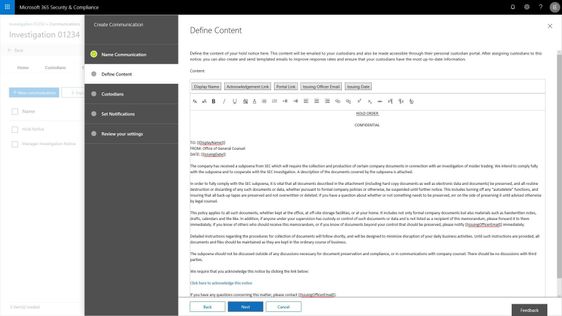
Customers have told us they need to be able to manage custodians, or employees in their organization related to a particular case or investigation, from both the perspective of the content the custodian controls and manages in their email inbox and cloud storage, but also from the perspective of the shared locations that those employees interact with as part of their daily job such as team sites, groups, and channels. In addition to retention and discovery, we have also heard that organizations require a way to communicate to those custodians that are legal hold within their organization. Not only communicate with custodians, but track the fact that the custodians have been notified. Now you can manage complete that entire process right within your Advanced eDiscovery experience.
Search to add custodians and their custodial content locations, add sites and teams that they are members of from the shared locations picker, and place their content on hold for retention and discovery purposes. With the new custodial picker experience, you have a quick look up from Azure Active Directory in your organization to quickly find and identify individuals by name or organization identification alias.
Use templates to build out commonly used communications, escalate with reminders and or manager notifications. And the end user gets a clean experience showing them all of their active legal holds or other case related notifications.
Manage case content with consistency and performance using working sets
We have also heard that search and content processing needs to be higher performing, more predictable and transparent. Customers have told us that any variability in search results erodes confidence and ability to effectively complete the requirements of some eDiscovery processes. In addition, defensibility of the results is weakened, and it is just harder to get things done quickly and efficiently.
In order to help address this challenge and others, now you can isolate the set of results from a search and add it to a working set for further analysis, processing and refinement. Once this content is included in a working set you have a number of ways that you can interact with that content, all of which help you define and address the most responsive and relevant content in your case or investigation.
Customers are continuing to derive value form the advanced analytics capabilities already included in Advanced eDiscovery as the core vehicle to reduce and refine content. This reduction helps to drive down redundant, duplicative or highly related content and reduce the costs of eDiscovery.
Integrated review and redact experience
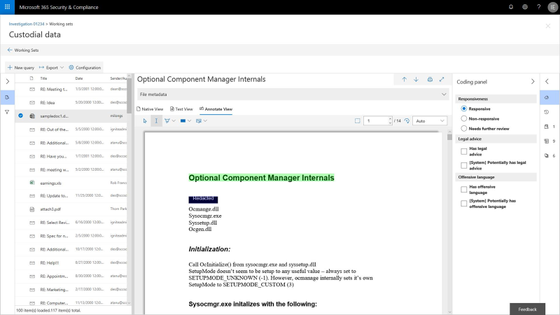
Now organizations can review and take action on the content within their case right within Microsoft 365. A new integrated review experience offers the ability to view a wide variety of file types, including jpgs, all office files, mp4s and more, and to take action on that content. Either tag and further refine content based on its responsiveness, or annotate, mark-up and redact content that might be sensitive and should not be shared with outside parties.
The new review experience includes a native, text and annotate view to provide options to support the various ways your team assess content. In addition, a customizable coding panel helps make sure that you are able to effectively tag and triage and organize the content under review. Further insights such as document history, other contributors to the document and views like difference detection in near duplicates will help speed the process to identify and curate the most responsive content.
Watch the short video and read more about this new review and redact experience here.
Data Investigations preview
Also today, we are announcing a new preview for a Data Investigations capability that helps IT and security operations search and take action on specific data in their organizations. Many organizations need to address scenarios like leaked confidential information, or investigating data breaches with this type of data remediation workflow. These scenarios are important as the risk to data security and privacy expectations continue to evolve. IT and privacy officers now have the tools to respond to any kinds of risk to personal, sensitive or business confidential information effectively and efficiently with this new solution.
The new capability, starting to roll out to preview today, includes the ability to execute targeted searches for specific content based on a variety of conditions, then investigate user activity around relevant content, and contain and ultimately remediate the leaked content at the source. Read more about the early look at this new capability here.
Ready to get started?
Make sure you have Office 365 E5, Advanced Compliance, or Microsoft 365 Information Protection and Compliance to get started today with these new features.
Read more about Advanced eDiscovery in Microsoft 365, see our broader updates and webcast on privacy and compliance in the modern era of privacy expectations and engage with us in our Tech Community .
- Iram Arras, Sr Program Manager, Advanced eDiscovery Microsoft 365
Today, we are excited to announce new capabilities in Advanced eDiscovery that directly respond to customer feedback on how they need to be able to do more with the built-in discovery tools in Microsoft 365. We have heard that organizations require expanded capabilities to complete more of common investigation and discovery workflows right within Microsoft 365.
Now we are starting to rollout a new version of Advanced eDiscovery that includes a new look and feel, additional functionality such as hold notifications and acknowledgment tracking, and a concept of a static set of content for performant searches as well as an integrated review and redact experience.
With these new updates we hope to more directly meet customer requirements for an efficient and effective way to preserve, collect and review content related to investigations or litigation.
Microsoft’s director of discovery, EJ Bastien has stated that even as “data from the average custodian has increased 20x over the last ten years, our team has reduced the cost per custodian of completing this eDiscovery work by 85%. While also maintaining high security standards of keeping data in place within the Microsoft cloud.” The capabilities integrated into Microsoft 365 have enabled Microsoft discovery to change the playing field on meeting legal and investigation requirements.
Read on below for more on the new features and check out the Mechanics video where we show and tell a bit about how the capabilities work.
Manage custodians and notifications
Customers have told us they need to be able to manage custodians, or employees in their organization related to a particular case or investigation, from both the perspective of the content the custodian controls and manages in their email inbox and cloud storage, but also from the perspective of the shared locations that those employees interact with as part of their daily job such as team sites, groups, and channels. In addition to retention and discovery, we have also heard that organizations require a way to communicate to those custodians that are legal hold within their organization. Not only communicate with custodians, but track the fact that the custodians have been notified. Now you can manage complete that entire process right within your Advanced eDiscovery experience.
Search to add custodians and their custodial content locations, add sites and teams that they are members of from the shared locations picker, and place their content on hold for retention and discovery purposes. With the new custodial picker experience, you have a quick look up from Azure Active Directory in your organization to quickly find and identify individuals by name or organization identification alias.
Use templates to build out commonly used communications, escalate with reminders and or manager notifications. And the end user gets a clean experience showing them all of their active legal holds or other case related notifications.
Manage case content with consistency and performance using working sets
We have also heard that search and content processing needs to be higher performing, more predictable and transparent. Customers have told us that any variability in search results erodes confidence and ability to effectively complete the requirements of some eDiscovery processes. In addition, defensibility of the results is weakened, and it is just harder to get things done quickly and efficiently.
In order to help address this challenge and others, now you can isolate the set of results from a search and add it to a working set for further analysis, processing and refinement. Once this content is included in a working set you have a number of ways that you can interact with that content, all of which help you define and address the most responsive and relevant content in your case or investigation.
Customers are continuing to derive value form the advanced analytics capabilities already included in Advanced eDiscovery as the core vehicle to reduce and refine content. This reduction helps to drive down redundant, duplicative or highly related content and reduce the costs of eDiscovery.
Integrated review and redact experience
Now organizations can review and take action on the content within their case right within Microsoft 365. A new integrated review experience offers the ability to view a wide variety of file types, including jpgs, all office files, mp4s and more, and to take action on that content. Either tag and further refine content based on its responsiveness, or annotate, mark-up and redact content that might be sensitive and should not be shared with outside parties.
The new review experience includes a native, text and annotate view to provide options to support the various ways your team assess content. In addition, a customizable coding panel helps make sure that you are able to effectively tag and triage and organize the content under review. Further insights such as document history, other contributors to the document and views like difference detection in near duplicates will help speed the process to identify and curate the most responsive content.
Watch the short video and read more about this new review and redact experience here.
Data Investigations preview
Also today, we are announcing a new preview for a Data Investigations capability that helps IT and security operations search and take action on specific data in their organizations. Many organizations need to address scenarios like leaked confidential information, or investigating data breaches with this type of data remediation workflow. These scenarios are important as the risk to data security and privacy expectations continue to evolve. IT and privacy officers now have the tools to respond to any kinds of risk to personal, sensitive or business confidential information effectively and efficiently with this new solution.
The new capability, starting to roll out to preview today, includes the ability to execute targeted searches for specific content based on a variety of conditions, then investigate user activity around relevant content, and contain and ultimately remediate the leaked content at the source. Read more about the early look at this new capability here.
Ready to get started?
Make sure you have Office 365 E5, Advanced Compliance, or Microsoft 365 Information Protection and Compliance to get started today with these new features.
Read more about Advanced eDiscovery in Microsoft 365, see our broader updates and webcast on privacy and compliance in the modern era of privacy expectations and engage with us in our Tech Community .
- Iram Arras, Sr Program Manager, Advanced eDiscovery Microsoft 365
Today, we are excited to announce new capabilities in Advanced eDiscovery that directly respond to customer feedback on how they need to be able to do more with the built-in discovery tools in Microsoft 365. We have heard that organizations require expanded capabilities to complete more of common investigation and discovery workflows right within Microsoft 365.
Now we are starting to rollout a new version of Advanced eDiscovery that includes a new look and feel, additional functionality such as hold notifications and acknowledgment tracking, and a concept of a static set of content for performant searches as well as an integrated review and redact experience.
With these new updates we hope to more directly meet customer requirements for an efficient and effective way to preserve, collect and review content related to investigations or litigation.
Microsoft’s director of discovery, EJ Bastien has stated that even as “data from the average custodian has increased 20x over the last ten years, our team has reduced the cost per custodian of completing this eDiscovery work by 85%. While also maintaining high security standards of keeping data in place within the Microsoft cloud.” The capabilities integrated into Microsoft 365 have enabled Microsoft discovery to change the playing field on meeting legal and investigation requirements.
Read on below for more on the new features and check out the Mechanics video where we show and tell a bit about how the capabilities work.
Manage custodians and notifications
Customers have told us they need to be able to manage custodians, or employees in their organization related to a particular case or investigation, from both the perspective of the content the custodian controls and manages in their email inbox and cloud storage, but also from the perspective of the shared locations that those employees interact with as part of their daily job such as team sites, groups, and channels. In addition to retention and discovery, we have also heard that organizations require a way to communicate to those custodians that are legal hold within their organization. Not only communicate with custodians, but track the fact that the custodians have been notified. Now you can manage complete that entire process right within your Advanced eDiscovery experience.
Search to add custodians and their custodial content locations, add sites and teams that they are members of from the shared locations picker, and place their content on hold for retention and discovery purposes. With the new custodial picker experience, you have a quick look up from Azure Active Directory in your organization to quickly find and identify individuals by name or organization identification alias.
Use templates to build out commonly used communications, escalate with reminders and or manager notifications. And the end user gets a clean experience showing them all of their active legal holds or other case related notifications.
Manage case content with consistency and performance using working sets
We have also heard that search and content processing needs to be higher performing, more predictable and transparent. Customers have told us that any variability in search results erodes confidence and ability to effectively complete the requirements of some eDiscovery processes. In addition, defensibility of the results is weakened, and it is just harder to get things done quickly and efficiently.
In order to help address this challenge and others, now you can isolate the set of results from a search and add it to a working set for further analysis, processing and refinement. Once this content is included in a working set you have a number of ways that you can interact with that content, all of which help you define and address the most responsive and relevant content in your case or investigation.
Customers are continuing to derive value form the advanced analytics capabilities already included in Advanced eDiscovery as the core vehicle to reduce and refine content. This reduction helps to drive down redundant, duplicative or highly related content and reduce the costs of eDiscovery.
Integrated review and redact experience
Now organizations can review and take action on the content within their case right within Microsoft 365. A new integrated review experience offers the ability to view a wide variety of file types, including jpgs, all office files, mp4s and more, and to take action on that content. Either tag and further refine content based on its responsiveness, or annotate, mark-up and redact content that might be sensitive and should not be shared with outside parties.
The new review experience includes a native, text and annotate view to provide options to support the various ways your team assess content. In addition, a customizable coding panel helps make sure that you are able to effectively tag and triage and organize the content under review. Further insights such as document history, other contributors to the document and views like difference detection in near duplicates will help speed the process to identify and curate the most responsive content.
Watch the short video and read more about this new review and redact experience here.
Data Investigations preview
Also today, we are announcing a new preview for a Data Investigations capability that helps IT and security operations search and take action on specific data in their organizations. Many organizations need to address scenarios like leaked confidential information, or investigating data breaches with this type of data remediation workflow. These scenarios are important as the risk to data security and privacy expectations continue to evolve. IT and privacy officers now have the tools to respond to any kinds of risk to personal, sensitive or business confidential information effectively and efficiently with this new solution.
The new capability, starting to roll out to preview today, includes the ability to execute targeted searches for specific content based on a variety of conditions, then investigate user activity around relevant content, and contain and ultimately remediate the leaked content at the source. Read more about the early look at this new capability here.
Ready to get started?
Make sure you have Office 365 E5, Advanced Compliance, or Microsoft 365 Information Protection and Compliance to get started today with these new features.
Read more about Advanced eDiscovery in Microsoft 365, see our broader updates and webcast on privacy and compliance in the modern era of privacy expectations and engage with us in our Tech Community .
- Iram Arras, Sr Program Manager, Advanced eDiscovery Microsoft 365
Today, we are excited to announce new capabilities in Advanced eDiscovery that directly respond to customer feedback on how they need to be able to do more with the built-in discovery tools in Microsoft 365. We have heard that organizations require expanded capabilities to complete more of common investigation and discovery workflows right within Microsoft 365.
Now we are starting to rollout a new version of Advanced eDiscovery that includes a new look and feel, additional functionality such as hold notifications and acknowledgment tracking, and a concept of a static set of content for performant searches as well as an integrated review and redact experience.
With these new updates we hope to more directly meet customer requirements for an efficient and effective way to preserve, collect and review content related to investigations or litigation.
Microsoft’s director of discovery, EJ Bastien has stated that even as “data from the average custodian has increased 20x over the last ten years, our team has reduced the cost per custodian of completing this eDiscovery work by 85%. While also maintaining high security standards of keeping data in place within the Microsoft cloud.” The capabilities integrated into Microsoft 365 have enabled Microsoft discovery to change the playing field on meeting legal and investigation requirements.
Read on below for more on the new features and check out the Mechanics video where we show and tell a bit about how the capabilities work.
Manage custodians and notifications
Customers have told us they need to be able to manage custodians, or employees in their organization related to a particular case or investigation, from both the perspective of the content the custodian controls and manages in their email inbox and cloud storage, but also from the perspective of the shared locations that those employees interact with as part of their daily job such as team sites, groups, and channels. In addition to retention and discovery, we have also heard that organizations require a way to communicate to those custodians that are legal hold within their organization. Not only communicate with custodians, but track the fact that the custodians have been notified. Now you can manage complete that entire process right within your Advanced eDiscovery experience.
Search to add custodians and their custodial content locations, add sites and teams that they are members of from the shared locations picker, and place their content on hold for retention and discovery purposes. With the new custodial picker experience, you have a quick look up from Azure Active Directory in your organization to quickly find and identify individuals by name or organization identification alias.
Use templates to build out commonly used communications, escalate with reminders and or manager notifications. And the end user gets a clean experience showing them all of their active legal holds or other case related notifications.
Manage case content with consistency and performance using working sets
We have also heard that search and content processing needs to be higher performing, more predictable and transparent. Customers have told us that any variability in search results erodes confidence and ability to effectively complete the requirements of some eDiscovery processes. In addition, defensibility of the results is weakened, and it is just harder to get things done quickly and efficiently.
In order to help address this challenge and others, now you can isolate the set of results from a search and add it to a working set for further analysis, processing and refinement. Once this content is included in a working set you have a number of ways that you can interact with that content, all of which help you define and address the most responsive and relevant content in your case or investigation.
Customers are continuing to derive value form the advanced analytics capabilities already included in Advanced eDiscovery as the core vehicle to reduce and refine content. This reduction helps to drive down redundant, duplicative or highly related content and reduce the costs of eDiscovery.
Integrated review and redact experience
Now organizations can review and take action on the content within their case right within Microsoft 365. A new integrated review experience offers the ability to view a wide variety of file types, including jpgs, all office files, mp4s and more, and to take action on that content. Either tag and further refine content based on its responsiveness, or annotate, mark-up and redact content that might be sensitive and should not be shared with outside parties.
The new review experience includes a native, text and annotate view to provide options to support the various ways your team assess content. In addition, a customizable coding panel helps make sure that you are able to effectively tag and triage and organize the content under review. Further insights such as document history, other contributors to the document and views like difference detection in near duplicates will help speed the process to identify and curate the most responsive content.
Watch the short video and read more about this new review and redact experience here.
Data Investigations preview
Also today, we are announcing a new preview for a Data Investigations capability that helps IT and security operations search and take action on specific data in their organizations. Many organizations need to address scenarios like leaked confidential information, or investigating data breaches with this type of data remediation workflow. These scenarios are important as the risk to data security and privacy expectations continue to evolve. IT and privacy officers now have the tools to respond to any kinds of risk to personal, sensitive or business confidential information effectively and efficiently with this new solution.
The new capability, starting to roll out to preview today, includes the ability to execute targeted searches for specific content based on a variety of conditions, then investigate user activity around relevant content, and contain and ultimately remediate the leaked content at the source. Read more about the early look at this new capability here.
Ready to get started?
Make sure you have Office 365 E5, Advanced Compliance, or Microsoft 365 Information Protection and Compliance to get started today with these new features.
Read more about Advanced eDiscovery in Microsoft 365, see our broader updates and webcast on privacy and compliance in the modern era of privacy expectations and engage with us in our Tech Community .
- Iram Arras, Sr Program Manager, Advanced eDiscovery Microsoft 365







