With the kickoff of InfoSec Europe, we shared an update of our recent enhancements to Office 365 threat protection services. Today, we discuss the significant enrichment to the end user experience in Office 365. By empowering end users to make better decisions which help drive proactive protection, we offer an unique, powerful, and potentially best in class solution. The features we showcase today provide end users greater information, enabling better decision making and ultimately greater security.
Introducing Native Link Rendering
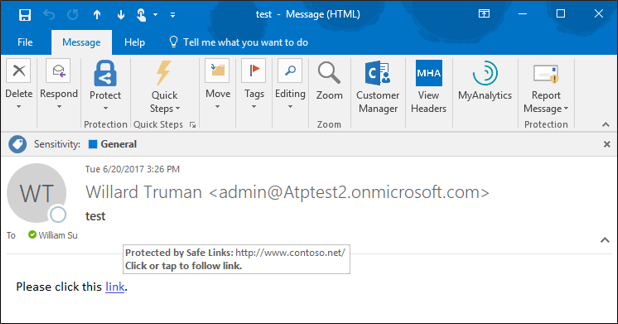
‘Native Link Rendering’ is now available for customers using Office Web Application (OWA). Soon the feature will also be available for the Outlook client. ‘Native Link Rendering’ exposes the native link for a user to view, though we still wrap the link in the back end for analysis. Importantly, no other advanced security solution can provide this powerful and crucial feature. Native Link Rendering has been a top request from customers because it supports end user education by providing visibility to the original view of an URL. Office 365 ATP’s Safe Links ‘time-of-click-protection’ protects users from clicking through to a malicious site. To do so, Safe Links wraps the link at the time of click, obfuscating the native URL which reduces users’ ability to learn what a potentially malicious URL may look like. Customers educating end users on indicators of a malicious link, require the display of native links since wrapped links prevent the ability to train users. ‘Native Link Rendering’ lets users see the original link. It is an unique and critical feature serving to empower our customer’s users to become more aware, sophisticated, and proactive at preventing themselves from being compromised by malicious links. Microsoft believes education and awareness is a foundational element for holistic security and Native Link Rendering serves to both educate and raise user awareness on cyberthreats.
Figure 1. Native Link Rendering Feature showing the original URL in the hover window
Enhanced Safe Links Warning Pages
The end user experience is further enhanced with new Safe Links warning pages. The new warning pages provide granular details on why a warning is generated. The pages range from notifying the user that a link is still being scanned, to a generic error warning.
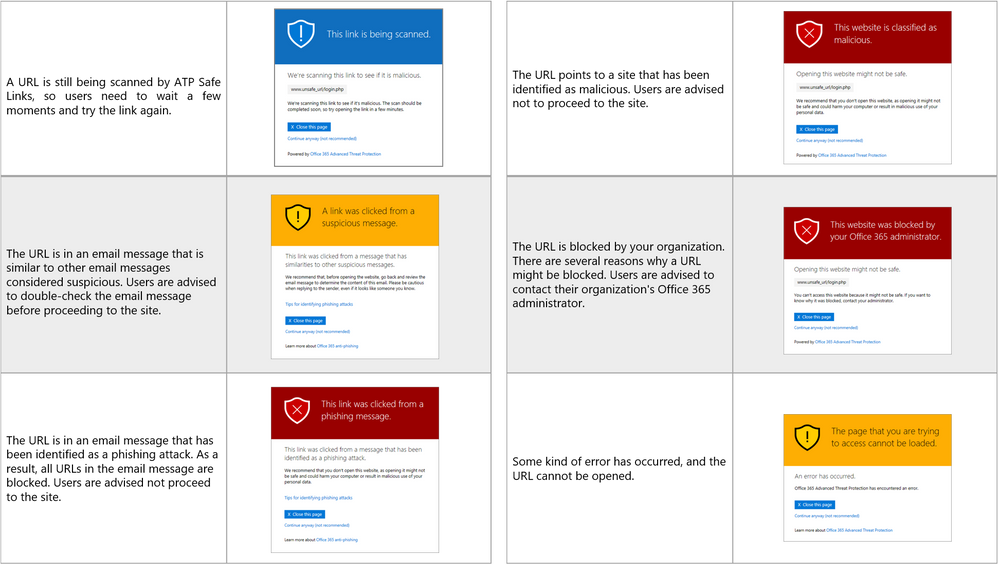 Figure 2. Summary of New Safe Links Warning Pages
With this greater detail, users have better information on why a link was flagged, facilitating user understanding of when and why threats are blocked. Ultimately, a more informed user base can make better decisions and can better protect themselves from threats. We are excited to help your end users heighten their awareness and improve on their knowledge of potential threats.
Send Us Your Feedback
Your valuable feedback enables us to continue improving and adding features that support the goal of making Office 365 more secure. We encourage you to begin a free Office 365 E5 trial today and begin further enhancing your security for Office 365 today.
With the kickoff of InfoSec Europe, we shared an update of our recent enhancements to Office 365 threat protection services. Today, we discuss the significant enrichment to the end user experience in Office 365. By empowering end users to make better decisions which help drive proactive protection, we offer an unique, powerful, and potentially best in class solution. The features we showcase today provide end users greater information, enabling better decision making and ultimately greater security.
Introducing Native Link Rendering
‘Native Link Rendering’ is now available for customers using Office Web Application (OWA). Soon the feature will also be available for the Outlook client. ‘Native Link Rendering’ exposes the native link for a user to view, though we still wrap the link in the back end for analysis. Importantly, no other advanced security solution can provide this powerful and crucial feature. Native Link Rendering has been a top request from customers because it supports end user education by providing visibility to the original view of an URL. Office 365 ATP’s Safe Links ‘time-of-click-protection’ protects users from clicking through to a malicious site. To do so, Safe Links wraps the link at the time of click, obfuscating the native URL which reduces users’ ability to learn what a potentially malicious URL may look like. Customers educating end users on indicators of a malicious link, require the display of native links since wrapped links prevent the ability to train users. ‘Native Link Rendering’ lets users see the original link. It is an unique and critical feature serving to empower our customer’s users to become more aware, sophisticated, and proactive at preventing themselves from being compromised by malicious links. Microsoft believes education and awareness is a foundational element for holistic security and Native Link Rendering serves to both educate and raise user awareness on cyberthreats.
Figure 1. Native Link Rendering Feature showing the original URL in the hover window
Enhanced Safe Links Warning Pages
The end user experience is further enhanced with new Safe Links warning pages. The new warning pages provide granular details on why a warning is generated. The pages range from notifying the user that a link is still being scanned, to a generic error warning.
Figure 2. Summary of New Safe Links Warning Pages
With this greater detail, users have better information on why a link was flagged, facilitating user understanding of when and why threats are blocked. Ultimately, a more informed user base can make better decisions and can better protect themselves from threats. We are excited to help your end users heighten their awareness and improve on their knowledge of potential threats.
Send Us Your Feedback
Your valuable feedback enables us to continue improving and adding features that support the goal of making Office 365 more secure. We encourage you to begin a free Office 365 E5 trial today and begin further enhancing your security for Office 365 today.
With the kickoff of InfoSec Europe, we shared an update of our recent enhancements to Office 365 threat protection services. Today, we discuss the significant enrichment to the end user experience in Office 365. By empowering end users to make better decisions which help drive proactive protection, we offer an unique, powerful, and potentially best in class solution. The features we showcase today provide end users greater information, enabling better decision making and ultimately greater security.
Introducing Native Link Rendering
‘Native Link Rendering’ is now available for customers using Office Web Application (OWA). Soon the feature will also be available for the Outlook client. ‘Native Link Rendering’ exposes the native link for a user to view, though we still wrap the link in the back end for analysis. Importantly, no other advanced security solution can provide this powerful and crucial feature. Native Link Rendering has been a top request from customers because it supports end user education by providing visibility to the original view of an URL. Office 365 ATP’s Safe Links ‘time-of-click-protection’ protects users from clicking through to a malicious site. To do so, Safe Links wraps the link at the time of click, obfuscating the native URL which reduces users’ ability to learn what a potentially malicious URL may look like. Customers educating end users on indicators of a malicious link, require the display of native links since wrapped links prevent the ability to train users. ‘Native Link Rendering’ lets users see the original link. It is an unique and critical feature serving to empower our customer’s users to become more aware, sophisticated, and proactive at preventing themselves from being compromised by malicious links. Microsoft believes education and awareness is a foundational element for holistic security and Native Link Rendering serves to both educate and raise user awareness on cyberthreats.
Figure 1. Native Link Rendering Feature showing the original URL in the hover window
Enhanced Safe Links Warning Pages
The end user experience is further enhanced with new Safe Links warning pages. The new warning pages provide granular details on why a warning is generated. The pages range from notifying the user that a link is still being scanned, to a generic error warning.
Figure 2. Summary of New Safe Links Warning Pages
With this greater detail, users have better information on why a link was flagged, facilitating user understanding of when and why threats are blocked. Ultimately, a more informed user base can make better decisions and can better protect themselves from threats. We are excited to help your end users heighten their awareness and improve on their knowledge of potential threats.
Send Us Your Feedback
Your valuable feedback enables us to continue improving and adding features that support the goal of making Office 365 more secure. We encourage you to begin a free Office 365 E5 trial today and begin further enhancing your security for Office 365 today.
With the kickoff of InfoSec Europe, we shared an update of our recent enhancements to Office 365 threat protection services. Today, we discuss the significant enrichment to the end user experience in Office 365. By empowering end users to make better decisions which help drive proactive protection, we offer an unique, powerful, and potentially best in class solution. The features we showcase today provide end users greater information, enabling better decision making and ultimately greater security.
Introducing Native Link Rendering
‘Native Link Rendering’ is now available for customers using Office Web Application (OWA). Soon the feature will also be available for the Outlook client. ‘Native Link Rendering’ exposes the native link for a user to view, though we still wrap the link in the back end for analysis. Importantly, no other advanced security solution can provide this powerful and crucial feature. Native Link Rendering has been a top request from customers because it supports end user education by providing visibility to the original view of an URL. Office 365 ATP’s Safe Links ‘time-of-click-protection’ protects users from clicking through to a malicious site. To do so, Safe Links wraps the link at the time of click, obfuscating the native URL which reduces users’ ability to learn what a potentially malicious URL may look like. Customers educating end users on indicators of a malicious link, require the display of native links since wrapped links prevent the ability to train users. ‘Native Link Rendering’ lets users see the original link. It is an unique and critical feature serving to empower our customer’s users to become more aware, sophisticated, and proactive at preventing themselves from being compromised by malicious links. Microsoft believes education and awareness is a foundational element for holistic security and Native Link Rendering serves to both educate and raise user awareness on cyberthreats.
Figure 1. Native Link Rendering Feature showing the original URL in the hover window
Enhanced Safe Links Warning Pages
The end user experience is further enhanced with new Safe Links warning pages. The new warning pages provide granular details on why a warning is generated. The pages range from notifying the user that a link is still being scanned, to a generic error warning.
Figure 2. Summary of New Safe Links Warning Pages
With this greater detail, users have better information on why a link was flagged, facilitating user understanding of when and why threats are blocked. Ultimately, a more informed user base can make better decisions and can better protect themselves from threats. We are excited to help your end users heighten their awareness and improve on their knowledge of potential threats.
Send Us Your Feedback
Your valuable feedback enables us to continue improving and adding features that support the goal of making Office 365 more secure. We encourage you to begin a free Office 365 E5 trial today and begin further enhancing your security for Office 365 today.
![Admins- welcome to the Microsoft 365 admin center]()
We built Microsoft 365- a complete IT solution including Office 365, Windows 10, and Enterprise Mobility + Security- to enable organizations to create and work together securely. In that same spirit, our goal is to offer a unified toolset to manage and protect those organizations. In March, we announced the Microsoft 365 admin center as your central location for managing and monitoring applications, services, data, devices, and users across your Microsoft 365 deployment.
Today, we are expanding this integrated and intuitive admin experience to users of Office 365. Users of both Office 365 and Microsoft 365 will now have access to the new Microsoft 365 admin center. For Office 365 admins, this means a simpler experience that easily integrates with you other Microsoft services – all without giving up capabilities or control.
What to expect
If you’ve used the Office 365 admin center before, the experience will feel very similar. The navigation is the same, and you’ll have the same granularity of control over your environment. There will be no change to your Office 365 subscription or billing. As you add new apps and services like device management, those will light up in your left navigation pane. Most importantly, you’ll receive all the latest admin center updates and features as they become available.
New URL, same great experience
To access your new admin center experience, point your web browser to admin.microsoft.com. This is your new front door for managing and monitoring all your Office 365 and Microsoft 365 services. Your new admin center still includes links to all your specialty admin tools for services like OneDrive and SharePoint conveniently linked in the left navigation pane. If you’ve previously created bookmarks for the Office 365 admin center or any of the specialty admin centers, those will continue to work.
Over the next few weeks, we will be updating the admin center links across Office 365 to use the new admin.microsoft.com address.

More to come
In the coming months, we’ll continue to evolve the Microsoft 365 admin center to provide a consistent and intuitive experience across all your Microsoft 365 products. As more information becomes available, we’ll post it here on Microsoft Tech Communities. In the meantime, join the conversation on the Microsoft 365 Tech Communities forums and Twitter.







