![New: Office 365 and Microsoft 365 training for your business]()
We released new Office 365 training last year. Since then we’ve heard positive feedback and requests for more!
So now we’ve made it easy to find the latest training direct from the Office 365 or Microsoft 365 admin center – choose the training option that interests you.

New training way-finder
Choose “Train yourself” to get training for business owners, admins, or IT Pros. You’ll also find new training for Teams and Yammer plus Microsoft 365.
Visit the Admin center or: aka.ms/OfficeAdminTraining.

Office 365 training for small businesses
For small business owners or admins, learn how to set up Office 365 for your business, use communications tools for email and meetings, store and share files in the cloud, and manage your employees and the service in the Admin center.
Visit: aka.ms/365smallbiz
 Short videos help you get started with Office 365.
For routine admin tasks like reassigning licenses, you’ll find a series of short videos under Management tasks.
Visit: aka.ms/OfficeAdminTraining and choose Management tasks.
 Training options
Office 365 training for IT pros
For enterprise admins or IT pros, ramp up on critical skills for Office 365 deployment, administration, and internal help desk support. Choose the LinkedIn Learning option in the admin center to view over 7 hours of premium video training for free in partnership with LinkedIn Learning. There you will find the option to get a LinkedIn Learning trial or paid subscription if you like.
Choose Advanced training in the Admin center, or visit: aka.ms/365enterprise
 Video training brought to you by LinkedIn Learning
Office 365 training for end users
For everyone else, including employees and end users, get the most out of Office 365 with training, Quick Start guides, templates, infographics, cheat sheets, and more. Choose Train your people in the Admin center or visit: aka.ms/learn365
 Office 365 Training Center
Let us know what you or your customers think. What did we miss? What could be better?
Thank you! Susan Potter & Tom Werner, Office 365 Content
![New: Office 365 and Microsoft 365 training for your business]()
Today we are announcing a preview update to the Office Customization Tool for Click-to-Run, which provides desktop admins with a simple user interface to customize their deployment of Office.
With this update, you can now customize Office application settings as part of your configuration file, which means you can build a single configuration file that installs Office and configures preferences for Office applications. You can search for Office application settings based on Office application, category, and title to quickly find the settings you’re interested in:

For this preview release, we’ve provided a limited set of Office application settings to choose from. We plan to include the full set of application settings later this summer.
In addition to application settings, we have been listening to your feedback and since we introduced the Office Customization Tool for Click-to-Run we have made a few changes to the preview experience; adding Organization Name as a setting that is included as part of the deployment configuration, an update to the language selection experience, and an update to the Automatically accept the EULA option.
In our next update we plan to add many additional enhancements including; an update to the product selection experience to allow you to have more control over the products you can select from and the apps that you exclude, an update to the language selection experience including support for MatchOS, AllowCdnFallback, Proofing Tools and more.
Please try out the new application settings feature as well as the new enhancements and let us know what you think using the Send-a-Smile feature (button in the upper right-hand corner or this web page) — your feedback helps us plan future updates.
As always, make sure you download the latest version of the Office Deployment Tool (ODT) to enable this new feature during deployment.
Chris Hopkins
Senior Program Manager – Office Engineering
A few weeks ago, we released a public preview for Attack Simulator for Office 365 Threat Intelligence. Today, we’re excited to announce that Attack Simulator is now generally available. Attack Simulator for Office 365 Threat Intelligence is available to all Office 365 E5 or Office 365 Threat Intelligence customers.
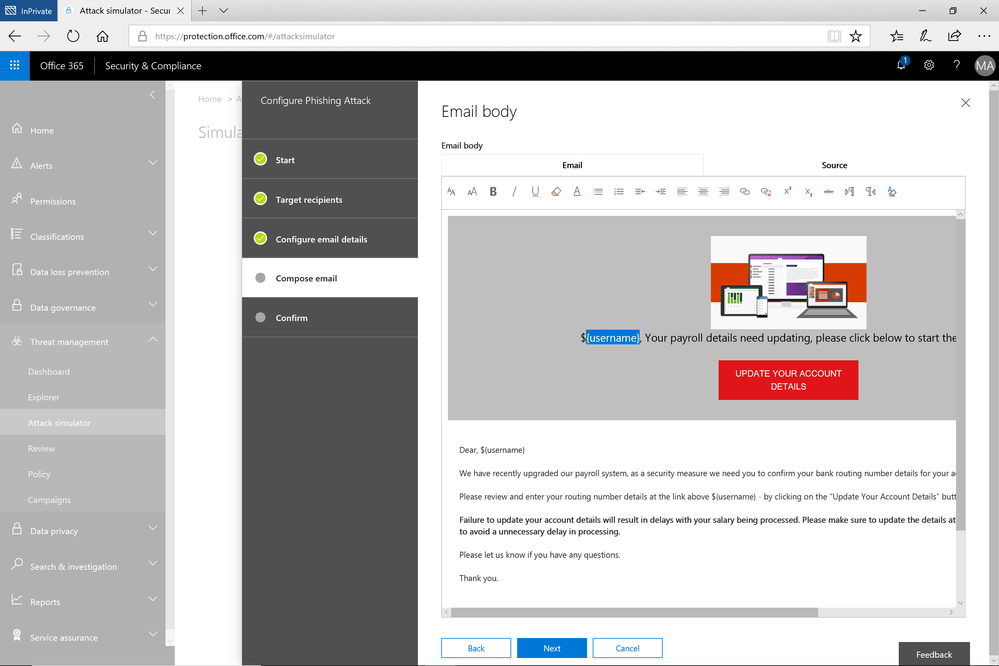
With Attack Simulator, customers can launch simulated attacks on their end users, determine how end users behave in the event of an attack, and update policies and ensure that appropriate security tools are in place to protect the organization from threats. The GA of Attack Simulator adds a new HTML editor so realistic looking HTML emails can be sent in simulations of spear-phishing. Also, two spear-phishing templates are available for immediate use in the spear phishing simulation.
Figure 1. Email template for spear phish simulation using a fake email from an organization’s payroll department.
Attack Simulator includes the three attack scenarios from our public preview.
- Display Name Spear Phishing Attack: Phishing is the generic term for socially engineered attacks designed to harvest credentials or personally identifiable information (PII). Spear phishing is a subset of this phishing and is more targeted, often aimed at a specific group, individual, or organization. These attacks are customized and tend to leverage a sender name that generates trust with the recipient.
- Password Spray Attack: To prevent bad actors from constantly guessing the passwords of user accounts, often there are account lockout policies. For example, an account will lockout after a certain number of bad passwords are guessed for a user. However, if you were to take a single password and try it against every single account in an organization, it would not trigger any lockouts. The password spray attack leverages commonly used passwords and targets many accounts in an organization with the hope that one of the account holder uses a common password that allows a hacker to enter the account and take control of it. From this compromised account, a hacker can launch more attacks by assuming the identity of account holder.
- Brute Force Password Attack: This type of attack consists of a hacker trying many passwords or passphrases with the hope of eventually guessing correctly. The attacker systematically checks all possible passwords and passphrases until the correct one is found.
This video demonstrates how Attack Simulator can help organizations educate users to become more secure from cyber threats. With Attack Simulator, admins can train all their end users, and especially those who are attacked most often. This proactive training is a powerful way to ensure that your organization can prevent the impact from advanced threats. Over the coming months, more threat simulations will be added to Attack Simulator so organizations can simulate the most prevalent threat types from the modern threat landscape.
Begin Educating your End Users Today
Experience the benefits of Attack Simulator for Office 365 Threat Intelligence by beginning an Office 365 E5 trial or Office 365 Threat Intelligence Trial today. Also, learn more about how Microsoft leverages threat intelligence and the value of threat intelligence. Your feedback is one of the most important drivers of our innovation, so please let us know what you think.
A few weeks ago, we released a public preview for Attack Simulator for Office 365 Threat Intelligence. Today, we’re excited to announce that Attack Simulator is now generally available. Attack Simulator for Office 365 Threat Intelligence is available to all Office 365 E5 or Office 365 Threat Intelligence customers.
With Attack Simulator, customers can launch simulated attacks on their end users, determine how end users behave in the event of an attack, and update policies and ensure that appropriate security tools are in place to protect the organization from threats. The GA of Attack Simulator adds a new HTML editor so realistic looking HTML emails can be sent in simulations of spear-phishing. Also, two spear-phishing templates are available for immediate use in the spear phishing simulation.
Figure 1. Email template for spear phish simulation using a fake email from an organization’s payroll department.
Attack Simulator includes the three attack scenarios from our public preview.
- Display Name Spear Phishing Attack: Phishing is the generic term for socially engineered attacks designed to harvest credentials or personally identifiable information (PII). Spear phishing is a subset of this phishing and is more targeted, often aimed at a specific group, individual, or organization. These attacks are customized and tend to leverage a sender name that generates trust with the recipient.
- Password Spray Attack: To prevent bad actors from constantly guessing the passwords of user accounts, often there are account lockout policies. For example, an account will lockout after a certain number of bad passwords are guessed for a user. However, if you were to take a single password and try it against every single account in an organization, it would not trigger any lockouts. The password spray attack leverages commonly used passwords and targets many accounts in an organization with the hope that one of the account holder uses a common password that allows a hacker to enter the account and take control of it. From this compromised account, a hacker can launch more attacks by assuming the identity of account holder.
- Brute Force Password Attack: This type of attack consists of a hacker trying many passwords or passphrases with the hope of eventually guessing correctly. The attacker systematically checks all possible passwords and passphrases until the correct one is found.
This video demonstrates how Attack Simulator can help organizations educate users to become more secure from cyber threats. With Attack Simulator, admins can train all their end users, and especially those who are attacked most often. This proactive training is a powerful way to ensure that your organization can prevent the impact from advanced threats. Over the coming months, more threat simulations will be added to Attack Simulator so organizations can simulate the most prevalent threat types from the modern threat landscape.
Begin Educating your End Users Today
Experience the benefits of Attack Simulator for Office 365 Threat Intelligence by beginning an Office 365 E5 trial or Office 365 Threat Intelligence Trial today. Also, learn more about how Microsoft leverages threat intelligence and the value of threat intelligence. Your feedback is one of the most important drivers of our innovation, so please let us know what you think.
A few weeks ago, we released a public preview for Attack Simulator for Office 365 Threat Intelligence. Today, we’re excited to announce that Attack Simulator is now generally available. Attack Simulator for Office 365 Threat Intelligence is available to all Office 365 E5 or Office 365 Threat Intelligence customers.
With Attack Simulator, customers can launch simulated attacks on their end users, determine how end users behave in the event of an attack, and update policies and ensure that appropriate security tools are in place to protect the organization from threats. The GA of Attack Simulator adds a new HTML editor so realistic looking HTML emails can be sent in simulations of spear-phishing. Also, two spear-phishing templates are available for immediate use in the spear phishing simulation.
Figure 1. Email template for spear phish simulation using a fake email from an organization’s payroll department.
Attack Simulator includes the three attack scenarios from our public preview.
- Display Name Spear Phishing Attack: Phishing is the generic term for socially engineered attacks designed to harvest credentials or personally identifiable information (PII). Spear phishing is a subset of this phishing and is more targeted, often aimed at a specific group, individual, or organization. These attacks are customized and tend to leverage a sender name that generates trust with the recipient.
- Password Spray Attack: To prevent bad actors from constantly guessing the passwords of user accounts, often there are account lockout policies. For example, an account will lockout after a certain number of bad passwords are guessed for a user. However, if you were to take a single password and try it against every single account in an organization, it would not trigger any lockouts. The password spray attack leverages commonly used passwords and targets many accounts in an organization with the hope that one of the account holder uses a common password that allows a hacker to enter the account and take control of it. From this compromised account, a hacker can launch more attacks by assuming the identity of account holder.
- Brute Force Password Attack: This type of attack consists of a hacker trying many passwords or passphrases with the hope of eventually guessing correctly. The attacker systematically checks all possible passwords and passphrases until the correct one is found.
This video demonstrates how Attack Simulator can help organizations educate users to become more secure from cyber threats. With Attack Simulator, admins can train all their end users, and especially those who are attacked most often. This proactive training is a powerful way to ensure that your organization can prevent the impact from advanced threats. Over the coming months, more threat simulations will be added to Attack Simulator so organizations can simulate the most prevalent threat types from the modern threat landscape.
Begin Educating your End Users Today
Experience the benefits of Attack Simulator for Office 365 Threat Intelligence by beginning an Office 365 E5 trial or Office 365 Threat Intelligence Trial today. Also, learn more about how Microsoft leverages threat intelligence and the value of threat intelligence. Your feedback is one of the most important drivers of our innovation, so please let us know what you think.







