Agentic Secret Finder (ASF) is an AI-powered capability in Microsoft Security Copilot that detects leaked credentials in unstructured content, such as emails, chat logs, documents, and screenshots, where traditional pattern-matching tools struggle. Agentic Secret Finder (ASF) is “agentic” because it relies on a multi‑step, multi‑agent reasoning workflow rather than a single pass detector. Detection, verification, and contextual analysis are handled by distinct reasoning stages, allowing ASF to find real credentials without flooding users with false positives. Unlike regex-based scanners, ASF uses reasoning to identify not just credentials, but the systems they unlock, helping security teams understand exposure and respond faster. In benchmark testing on synthetic datasets, ASF achieved 98.33% true credential detection with zero false alarms on realistic emails, chats, notes, and documents—while traditional regex scanners detected only about 40% of the same credentials. ASF is now generally available in Security Copilot, supporting 20+ credential types with high precision and actionable context.
The Problem: Credentials Hide Where Traditional Tools Can’t See
When security incidents happen, leaked credentials don’t always appear in clean, predictable formats. They show up buried in email threads, pasted into Teams messages, embedded in Word documents, or captured in screenshots of logs and terminals. These are exactly the places where security teams spend the most time and where traditional credential scanning tools fail.
Most existing tools rely on regular expressions or simple pattern matching. This works reasonably well for structured environments like source code repositories, where credentials follow predictable formats. But in real-world incidents, credentials look different. A storage key might be split across multiple messages in an email thread. A credential could be reformatted, partially redacted, or embedded alongside explanatory text.
In these situations, pattern matching produces two painful outcomes: it misses real credentials because the format doesn’t match a known rule, or it floods analysts with false positives that waste time. Security teams are left manually reviewing content, guessing which findings are real, and piecing together what systems might actually be at risk. In practice, this failure mode has a real human cost that security analysts end up reviewing thousands of alerts, manually inspecting email threads and chat logs, and trying to determine whether a suspicious string actually unlocks a storage account, API, or production service. Teams can spend days reconstructing context across messages and documents just to understand what a credential grants access to, slowing containment and increasing risk during active incidents.
This is the gap Agentic Secret Finder was built to close.
The Solution: ASF Brings Reasoning to Credential Detection
Agentic Secret Finder approaches credential detection as a reasoning problem, not a string-matching exercise. Instead of asking “does this text match a pattern?” ASF asks human-like questions: Is this text describing a credential or access mechanism? Does the value look real and usable? What system or resource could this access?
This shift is subtle but powerful. ASF doesn’t just detect credentials, it connects them to doors: the specific targets those credentials unlock, such as API endpoints, storage accounts, applications, or services. This is critical for triage. Instead of stopping at “this looks like a credential,” ASF tells analysts what that credential actually opens. Without context, a credential triggers manual follow‑up. When it’s linked to a specific target, analysts can immediately assess impact and act.
By understanding messy, real-world content the way a human investigator would, ASF delivers findings that security teams can trust and act on immediately. It’s designed specifically for the unstructured, noisy environments where incidents actually unfold.
Why ASF Outperforms Traditional Pattern Matching
Traditional credential scanners are built for clean data. ASF is built for reality.
Traditional tools struggle when:
Credentials appear in natural language descriptions rather than code
Context determines whether a string is sensitive or benign
Credentials are incomplete, malformed, or partially redacted
ASF excels because it:
Reasons through context, understanding surrounding text to identify what’s truly sensitive
Detects credentials and their associated resources together, providing the “what” and the “where” in a single pass
Handles noisy, unstructured inputs like emails, chat logs, documents
Assigns confidence scores to help teams prioritize findings and reduce alert fatigue
What ASF Can Do Today
ASF is now generally available in Microsoft Security Copilot, with capabilities shaped directly by real security workflows across incident response, red teaming, and SOC operations.
ASF detects over 20 major credential categories, spanning cloud provider credentials like Azure Storage Keys and AWS Access Keys, authentication credentials including Microsoft Entra passwords and OAuth tokens, database connection strings, SSH private keys, API keys, and generic credentials that don’t fit predefined patterns. This broad coverage means analysts can scan investigation artifacts without worrying whether the credential type is supported.
What makes ASF particularly effective is where it works. Email threads where credentials are discussed across multiple messages. Teams chats where credentials are pasted quickly during troubleshooting. Word documents and internal wikis where credentials are documented for operational handoffs. Incident reports and post-mortem notes written under pressure. These are the environments where traditional pattern-matching tools fail, and where ASF delivers the most value.
In benchmark evaluations, ASF achieved 100% recall with 0% false positives on synthetic datasets containing embedded Azure Storage credentials, compared to 40% recall from traditional regex‑based tools such as CredScan. In more complex scenarios involving multiple credential types and noisy email content, ASF maintained 98.33% recall with 0% false positives. These results were observed on synthetically generated evaluation datasets spanning emails, chats, notes, and documents, designed to reflect how engineers communicate and how credentials may be inadvertently shared in real‑world workflows.
Scenario
Precision
Recall
Single credential type
100%
100%
Complex, multiple credential types
100%
98.33%
ASF is currently integrated into Security Copilot, actively supporting incident response workflows, and working toward deeper integrations with developer platforms such as GitHub to bring contextual credential detection to source code analysis at scale.
Using ASF in Security Copilot
ASF is available as a skill in Microsoft Security Copilot, making credential detection a seamless part of analyst workflows.
How to use ASF:
Enable the ASF skill in Security Copilot via “Manage Sources” → “Manage Plugins” (Figure 1)
Select “FindSecretInText” from Promptbook (Figure 2)
Submit unstructured content directly in the Copilot prompt: paste the text blob that might contain credentials (Figure 3)
ASF analyzes the content using its multi-agent workflow, detecting credentials and associated doors (Figure 4)
Review actionable findings with contextual details
Figure 1. Enabling the Agentic Secret Finder (ASF) skill in Microsoft Security Copilot
Figure 2. Selecting the FindSecretInText prompt, which invokes ASF’s multi‑step credential detection and verification workflow
Figure 3. Submitting a text blob containing embedded credentials for analysis (example is synthetic)
Figure 4. ASF output with detected credentials and associated doors (example credentials and associated doors are synthetic)
What’s Next for ASF
ASF is a living capability. Over the next six months, we are working towards coverage and deepening integrations:
Exploring integrations with GitHub to reduce false positives in credential scanning for code repositories
Optimizing for large-scale analysis to handle enterprise-wide scans efficiently with reduced latency
Exploring graph-based risk modeling to map relationships between credentials, services, and attack paths
Our long-term vision goes beyond detection: we want to help security teams understand how credentials are used, what risks exist if they’re exposed, and what the impact of rotation or revocation would be. By moving from “what’s leaked” to “what does it mean,” ASF will enable smarter prioritization, faster response, and more confident decision-making.
A Unified Control Center for Queue Monitoring and SLA Tracking
Work queues in Power Automate are structured lists that let you assign, track, and manage work items across users or automations in an organized, scalable way.
We’re excited to announce powerful new enhancements to work queues in the automation center that will transform how your teams manage and monitor automated workflows. With the introduction of work queue alerts and the new aggregated operator view, we’re giving businesses unprecedented visibility and control over their automation operations.
What’s New
Work Queue Alerts for Admin in Monitoring Hub
With monitoring in the Power Platform Admin Center (PPAC), you can track the health and the performance of your automation queues. View real-time metrics on items pending action, exceptions requiring resolution, and queue status to maintain visibility across your automation operations.
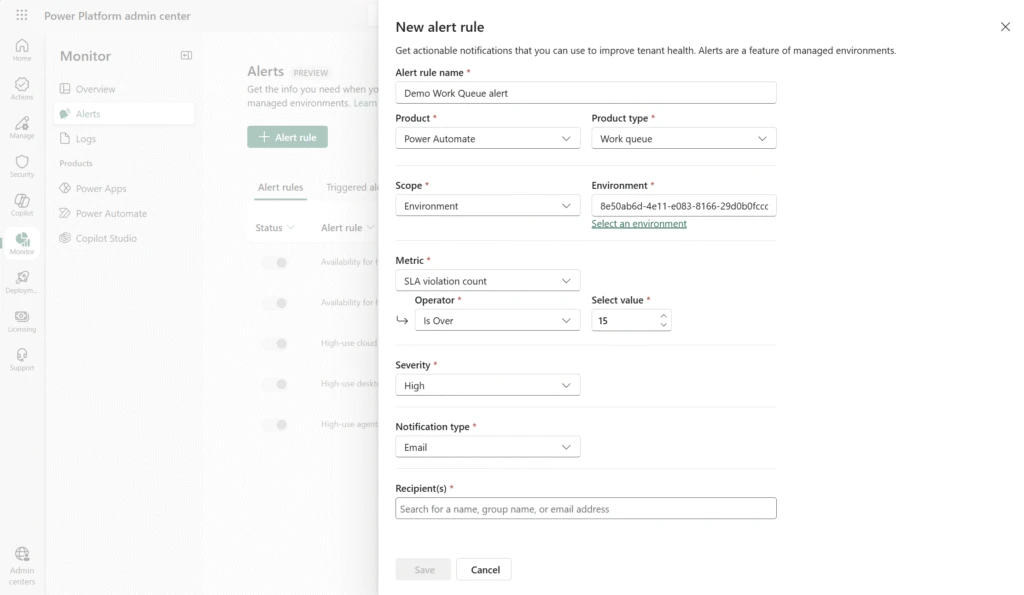
Now, you can also configure proactive alerts to notify you when SLA violation counts exceed thresholds defined by your organization’s administrator. Receive timely notifications when queues require attention, ensuring you can respond before service level agreements are compromised.
With SLA violation alerts, you can stay informed and responsive with notifications about your automation queues. No more manual monitoring; the system comes to you.
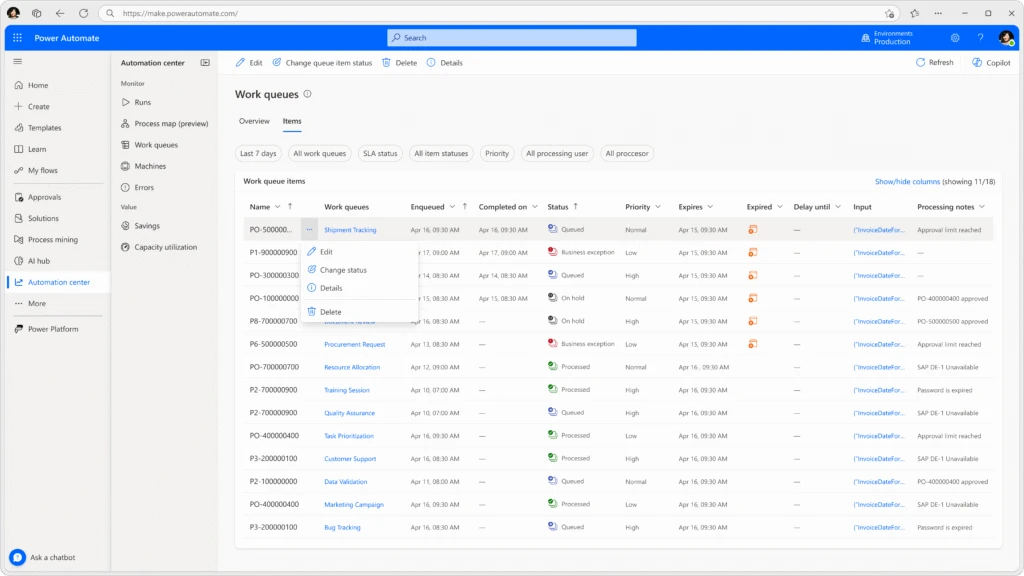
Aggregated View for Operators in Automation Center
Operators now have a unified, comprehensive dashboard in the automation center that aggregates work queue data across your entire automation estate.
This consolidated view enables operators to monitor multiple queues simultaneously, prioritize work effectively, and respond to issues faster than ever before.
Top 5 benefits of using Work Queues in Power Automate
Increased efficiency & scalability – Work queues allow you to decouple complex processes, enabling different parts of an automation to run asynchronously and independently.
Better resource utilization – Because work items are stored centrally, you can optimize robot usage, balance load, and reduce the number of machines required.
Consistent prioritization of work – Work queues natively support priority-based execution, making sure the most important items are processed first.
Centralized monitoring & exception handling – Work queues provide a human‑in‑the‑loop monitoring experience, helping fusion teams track the status of items, manage exceptions, and take corrective actions.
Improved resiliency & fault tolerance – By decoupling work and allowing multiple robots to process items in parallel, work queues offer better fault isolation.
Transform Your Automation Operations Today
These enhancements represent our commitment to making automation not just powerful, but manageable at enterprise scale. Work queues with alerts and aggregated operator views give your teams the tools they need to run automation operations with confidence, efficiency, and complete control.
Ready to experience these capabilities? navigate to the automation center in Power Automate and discover how work queues can elevate your automation program from task execution to strategic business operations.
Today, organizations are being measured by how quickly they can innovate. Whether it’s launching new digital experiences, streamlining operations, or responding to customer needs in real time, the ability to move fast has always been a competitive differentiator. And it only grew on importance in the agentic era. But speed alone isn’t enough. Innovation must be scalable, secure, and sustainable.
Microsoft Power Platform is designed to meet that challenge. It empowers teams to build solutions faster, automate more processes, and scale across the business within a framework that puts security and governance first. With tools that are AI-ready and built for enterprise-grade environments from Copilot-assisted development to intelligent threat detection and posture management, the platform helps organizations move with both agility and control.
Let’s break down the facts about building secure, modern applications.
Fact: Low code does not mean low security
Despite the ever-growing usage and strong ROI, there are still people who think that low-code tools are not built for enterprise grade applications. Power Platform proves otherwise by delivering a comprehensive, layered security model designed to meet the demands of large organizations. As part of a managed security approach, the platform integrates governance and security controls directly into the development lifecycle ensuring that policies are consistently applied across environments.
From identity and access management to data protection and network security, Power Platform provides native capabilities that reduce risk without slowing innovation. Features like role-based access control, conditional access for individual apps, and data loss prevention policies are all included. Azure Virtual Network (VNet) helps keep apps and data private by creating a secure connection that blocks public internet access and limits traffic to only trusted sources.
Visibility and access control are central to this approach. Power Platform includes tenant-level analytics and inventory tracking that allow IT teams to monitor what’s being built, which connectors are in use, and whether apps are operating within approved environments. Advanced connector policies complement these tools by helping enforce data boundaries and prevent unauthorized connections, rather than providing direct visibility or access control. With tools like IP filtering, cookie binding, and role-based permissions, IT can ensure that only the right users have access to sensitive data. This helps prevent shadow IT before it starts giving teams a secure space to innovate while ensuring IT retains oversight.
The platform’s approach to security also extends to AIand agents. Security is enforced across all components of the platform, including apps and AI agents. As organizations adopt tools like M365 Copilot and Copilot Studio, Power Platform provides a secure foundation for building and deploying AI agents. These agents follow existing data loss prevention policies, access controls, and network protections, ensuring AI adoption does not create new exposure.
Power Platform also provides the flexibility to extend Copilot Studio agent protection beyond default safeguards with additional runtime protection. Organizations can choose to integrate additional monitoring systems such as Microsoft Defender, custom tools, or other security platforms for a defense-in-depth approach to agent runtime security.
Centrica, the UK’s largest retailer of zero-carbon electricity, is a good example of secure low-code innovation. With over 800 Power Platform solutions and 15,000 users, Centrica maintains enterprise-grade governance by embedding security, oversight, and controls into every stage of development.
Accenture also demonstrates how Power Platform helps reduce risk at scale. By giving more than 50,000 employees the ability to build within defined guardrails, the company reduced demand for short-term IT projects by 30%. Their approach to low-code governance helped them gain visibility into platform activity while supporting global collaboration. As one Accenture executive put it, “For us, we define shadow IT as things we cannot see or control when we need to. By standing up the platform and inviting our people to create and build—at its very core we have gained visibility into what people are doing and how they are connecting, which starts governance at the platform level.”
Fact: You do not have to outsource to be compliant
There is a perception that distributed development models increase compliance risk. Power Platform addresses this with centralized administration and clear visibility into who is building, what they are building, and how data is being used.
From the Power Platform admin center, IT teams can configure environments, enforce policies, and monitor usage across the entire organization. Tools like Dataverse audit logging, Microsoft Purview integration, and Lockbox support provide deep visibility into sensitive operations and data access.
Purview enhances compliance by enabling data classification, sensitivity labeling, and activity tracking across Power Platform environments. It also helps organizations enforce retention policies and ensure data governance requirements are met supporting alignment with global regulations like GDPR and HIPAA.
AI capabilities introduce new governance needs, which Power Platform meets with built-in support for risk assessment and proactive recommendations. Copilot capabilities also assist admins in identifying misconfigurations and streamlining compliance reporting.
Power Platform also integrates with Microsoft Sentinel and solution checkers to detect anomalies, surface vulnerabilities, and alert administrators to unusual behavior. Security posture management tools help teams assess and adjust configurations over time, helping organizations scale AI responsibly while maintaining strong governance.
PG&E is a case in point. With more than 4,300 developers and 300 Power Platform solutions, the company has embedded governance and risk management into its development lifecycle. This approach has helped PG&E achieve more than $75 million in annual savings, while ensuring that compliance and oversight remain strong.
Fact: You are not alone in your administering. You have guidance and support.
Another misconception is that managing low-code platforms at scale requires external tools or consultants. Power Platform includes everything needed to govern, secure, and scale app development from within your organization.
IT admins can use Power Platform admin center and advisor to receive AI-driven, real-time recommendations tailored to their environment. These insights help assess environment health, refine governance policies, and proactively manage security posture. Advisor also provides a security score, giving teams a clear view of how well they are securing their environments and a concrete way to demonstrate progress and accountability to leadership.
The platform is designed to adapt to each organization’s structure and needs. Recommendations can be dismissed when covered by other controls, and environmental groups allow governance to be tailored to specific business units or departments. This flexibility ensures that security doesn’t get in the way of progress but works alongside it.
Advanced features like test automation, environment isolation, and integrated observability help maintain consistent performance. VNet integration allows organizations to connect securely to on-premises systems without exposing resources to the public internet.
An example of one of leading automotive manufacturers highlights these capabilities. The company used VNet support in Power Platform to securely connect AI agents to internal systems without relying on an on-premises data gateway. The result was faster deployment, better compliance with internal security policies, and more than 3,000 hours saved through improved data access.
Start building secure, scalable solutions
Foster innovation while still maintaining security and governance principles. Microsoft Power Platform gives IT leaders and developers the ability to move quickly while maintaining the control their organizations require. With built-in governance, privacy protections, and AI-powered insights, teams can confidently scale low-code development without introducing risk. You no longer have to choose between innovation and security. With Power Platform, you can deliver both.
Explore real-world success stories and best practices. Visit the Power Platform site and follow this blog for the next article in the series breaking down the facts of the modern development.
At Microsoft, we believe that security is a team sport. That’s why we are committed to meeting customers where they are, integrating with the solutions they already use to ensure that everyone can take advantage of the agentic capabilities of Security Copilot.
And it’s not just an idea—it’s a reality. We’re excited to share why partners such as BlueVoyant, OneTrust, and Tanium chose to build agents with Security Copilot—and the value this brings to their customers.
By watching the videos featuring BlueVoyant, OneTrust, and Tanium, you’ll see firsthand how collaboration drives innovation and empowers security teams to tackle today’s threats with agility and confidence. Together, these partner-built agents show how organizations and partners can transform Security Copilot into an integrated force multiplier—proving that security is a team sport.
Partner-built agents power smarter protection
BlueVoyant – Specializing in comprehensive cyber risk management, BlueVoyant provides a suite of services to protect organizations from cyberattacks. In this video, we learn about BlueVoyant Watchtower and how their agents help customers get the most out of their Sentinel and Defender products by using an agent to always review the environment and recommend updated rules, configurations, and policies that catch bad actors Security Copilot gives us the advantage of moving more quickly.” – Micah Heaton, Executive Director, Microsoft Product & Innovation Strategy at BlueVoyant
OneTrust – OneTrust, a privacy and consent management platform, specializes in helping customers responsibly use data and AI. By partnering with Microsoft—specifically Microsoft’s Sentinel platform—OneTrust is able to provide their customers with a full view of their data estate. The Privacy Breach Response Agent by OneTrust combines the deep privacy and regulatory expertise of OneTrust with the robust generative AI capabilities of Microsoft Security Copilot, automating privacy risk assessments improving their accuracy.
Tanium – Specializing in endpoint management and security, Tanium gives IT teams visibility and control over every device in their environment. Tanium’s partnership with Microsoft provides Tanium with seamless integration into Microsoft’s Security products via Copilot, which combined with Tanium’s real-time environment insights, power powerful end to end workflows across Defender, Entra, Tanium, and Intune. The Security Triage Agent by Tanium accelerates alert triage, providing security teams with the context they need to make informed decisions on Tanium Threat Response alerts swiftly.
The work of partners like BlueVoyant, OneTrust, and Tanium is shaping a new security ecosystem—one where the Microsoft Security Store is a launchpad for partner innovation to drive real-world customer impact. The Store turns partner-built agents into enterprise-ready solutions by providing Microsoft-validated certification, high‑quality metadata, consistent deployment flows, secure authentication and transactions, and in‑product visibility inside Defender, Entra, and Security Copilot. These deployed agents run securely in your Security Copilot zero-trust environment.
The power of the Security Store is that it doesn’t just distribute agents—it amplifiesthem. It gives partners a unified, trusted surface where their solutions are discoverable directly within Microsoft Security products; where customers can compare capabilities through standardized metadata; where installation is guided and repeatable; and where Microsoft’s AI foundation elevates the value of every partner-built capability. For customers, this means direct access to the best of partner-driven security innovation. Partner-built agents deliver value at every stage of the security journey: proactively monitoring sensor health, surfacing actionable insights, accelerating investigations, and automating incident response. These capabilities help organizations strengthen their security posture, respond faster to threats, and stay ahead of attackers.
For partners, success begins with identifying the unique value their agent brings to customers and designing real security outcomes—such as improved detection, automated investigations, and measurable risk reduction. As more partners publish agents, the ecosystem expands- unlocking advanced scenarios like phishing and identity alert triage, incident enrichment, policy optimization, and automated remediation. By combining Microsoft’s AI foundation with specialized partner expertise, Security Copilot agents deliver differentiated solutions that address a wide range of security challenges—from privacy and compliance workflows to vulnerability management and forensics—helping customers strengthen their security posture and respond faster to threats.
A major wave of updates has landed: integration with the new Sentinel data lake and graph, new ready-made and custom agents, and the debut of the Microsoft Security Store.
Let’s take a look at what’s new.
Microsoft Sentinel and Security Copilot integration delivers deeper context and smarter AI
Sentinel data lake is now generally available, and new capabilities like Sentinel graph and the Model Context Protocol (MCP) server are in public preview, bringing in a new level of integration with Security Copilot. Agents can now access richer, more connected data from across Sentinel, combining graph, structured, and semantic context to reason and act with greater precision. This enhanced foundation transforms AI-driven detection and response, helping teams resolve incidents faster and uncover deeper insights across their environments.
Build your own Security Copilot agents, no coding required
Now anyone on your team can create custom Security Copilot agents. Use a no-code portal or developer tools to design, test, and deploy agents that automate the workflows you need most. Your team controls how they work and what they do.
New Microsoft and partner ready-made agents for real challenges
These new agents help teams address common security and IT challenges faster and smarter:
Access Review Agent in Microsoft Entra: Streamline access reviews, flag unusual patterns, and reduce fatigue for security and compliance teams. It helps maintain governance and compliance by automatically analyzing ongoing access reviews and highlighting potential risks.
Phishing Triage Agent in Microsoft Defender saves nearly 200 hours a month: In this new customer spotlight, St. Luke’s is seeing the impact of integrating Security Copilot agents into their daily workflows. ACISO Krista Arndt says, “The Phishing Triage Agent is a game changer. It’s saving us nearly 200 hours monthly by autonomously handling and closing thousands of false positive alerts.” With routine triage automated, security teams can shift from reactive response to proactive threat hunting, freeing up time for higher-value work and faster threat mitigation.
The launch of 30 new partner-built agents that can be found on the Microsoft Security Store with solutions like:
Forensic Agent by glueckkanja AG: Delivers deep-dive analysis of Defender XDR incidents to accelerate investigations and uncover root causes faster.
Privileged Admin Watchdog Agent by glueckkanja AG: Helps enforce zero standing privilege principles by removing persistent admin identities, reducing risk, and strengthening administrative security.
Ransomware Kill Chain Investigator Agent by adaQuest: Automates ransomware triage to quickly detect and respond to threats, enabling security teams to focus on high-priority incidents.
Entity Guard Investigator Agent by adaQuest: Investigates Defender incidents and provides actionable insights to accelerate incident resolution and strengthen security posture.
Admin Guard Insight Agent by adaQuest: Analyzes administrative activity, detects anomalies, evaluates risk exposure and compliance, and delivers actionable guidance to improve administrative security.
Identity Workload ID Agent by Invoke: Empowers identity administrators and security teams to manage and secure Workload Identities in Microsoft Entra, reducing risk, strengthening compliance, and controlling identity sprawl.
Microsoft Security Store – one, centralized place to find agents and SaaS solutions
The Microsoft Security Store makes it simple to discover, deploy, and buy Security Copilot agents and partner solutions. Start using any of the 30 new agents or 50 SaaS solutions to power your SOC, IT, privacy, and compliance workflows.
Security Copilot is transforming how security and IT teams operate – bringing AI-powered insights, automation, and decision support into everyday workflows. With new capabilities landing every month, the pace of innovation is accelerating.
We’ll be back in November with more updates. Until then, explore these resources to get hands-on, deepen your understanding, and see what’s possible: