Summary Welcome to the Power Platform monthly feature update! We will use this blog to share news in Power Platform from the last month, so you can find a summary of product, community, and learning updates from Power Platform in one easy place. Now, let’s dive into what’s new in Power Platform:
Get started with the latest updates today!
Jump into Power Apps, Power Automate, and Power Pages to try the latest updates, you can use an existing environment or get started for free using the Developer plan.
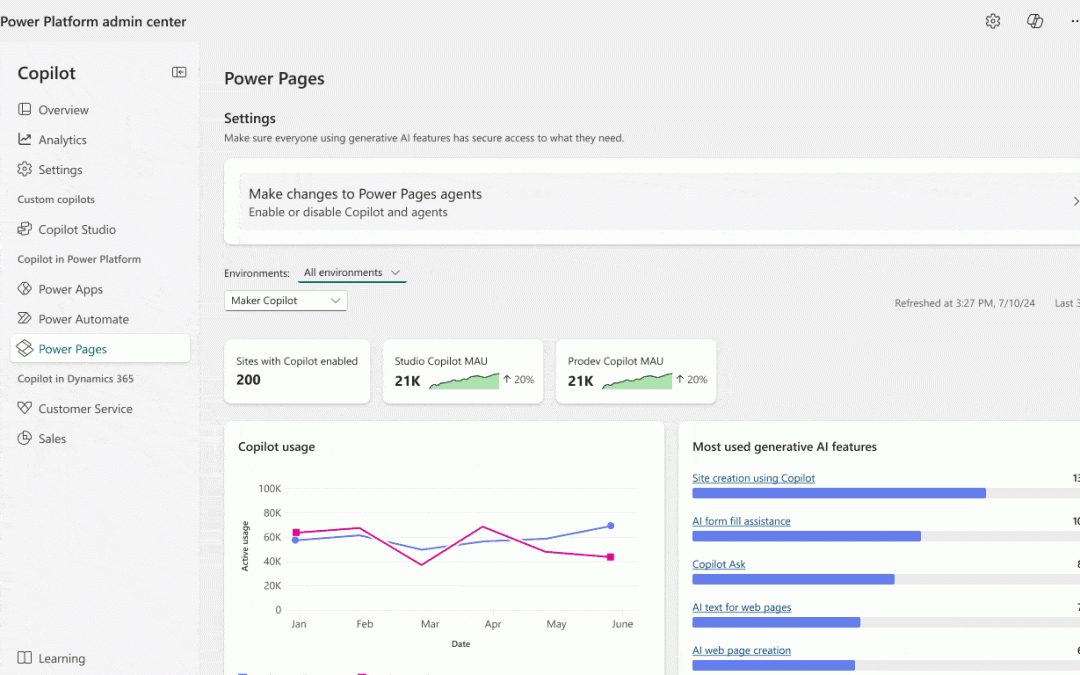
Licensing capacity reporting is now fully available in the Power Platform admin center (Licensing → Power Automate → Usage), giving admins a single place to see which users are over capacity and which flows are driving that usage. Export options, a consolidated licensing page, and additional improvements are on the way.
Power Platform inventory
Power Platform inventory is now generally available, giving tenant administrators a unified view of cloud flows, Copilot Studio agent flows, and Workflows agent workflows across every environment. Expansion with connectors, actions, and key usage data is on the way — making it even easier to spot your most active automations, enforce compliance, and prevent orphaned resources.
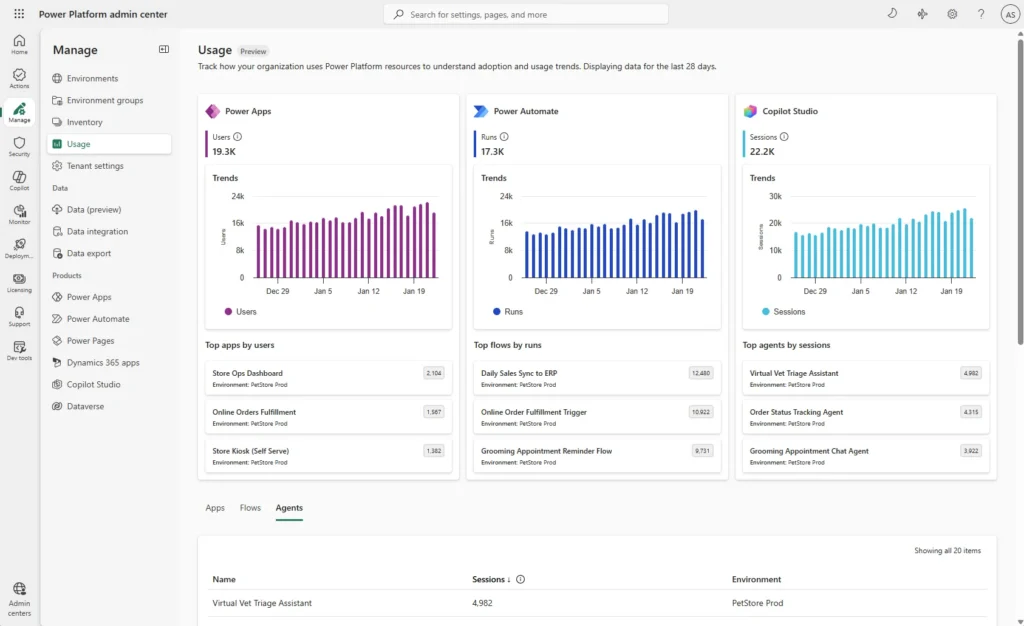
The new usage page is now in public preview with modern dashboards showing adoption trends and resource-level analytics for Power Apps, Power Automate, and Copilot Studio. For Power Automate, the page already shows flow run data so you can track execution patterns across your tenant.
Bringing Microsoft 365 Copilot into model-driven apps
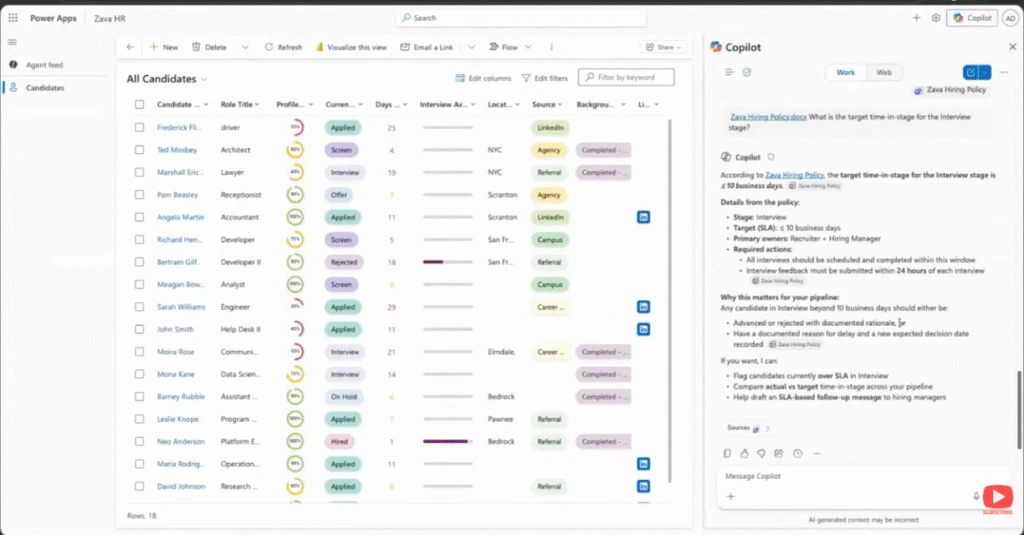
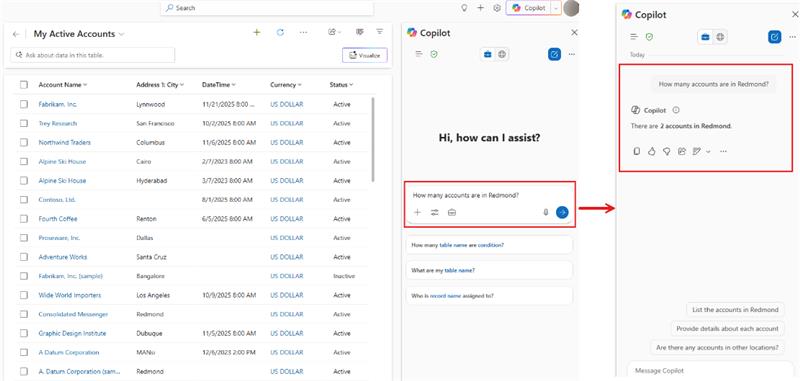
In this demo from the Microsoft 365 & Power Platform Community call, you see how Microsoft 365 Copilot integrates with model-driven Power Apps to answer questions about your app data, generate visualizations using code interpreter, and take action across Microsoft 365. You’ll see how Copilot uses app and data context to generate documents, create presentations, and even schedule meetings—all directly from your app
Turn app data into action with Microsoft 365 Copilot
Previously, we walked through how to enable Microsoft 365 Copilot in model-driven apps. Now it’s time to put it to work where your business processes actually run. In the Copilot side pane, you can ask Copilot to summarize table data, visualize what’s active, see what’s pending, recap the history of a specific record, and reference related content surfaced through Work IQ. The result is a more natural transition from “what’s going on?” to “what should I do next?” without ever leaving the app.
Because this experience is powered by Microsoft 365 Copilot, you can also bring in the right agent at the right moment. You can @mention first‑party agents like Researcher and Analyst, or involve a custom agent your organization has made available. That agent collaboration helps turn insights into action, whether that means drafting a document, creating a PowerPoint, or taking next steps like scheduling a meeting. All of this stays grounded in your app context and chat history. Ready to get started? Begin with the admin and maker setup guidance, then explore how end users work in the pane, and finally learn how to tailor the experience with agents.
New quality updates for modern controls in canvas apps
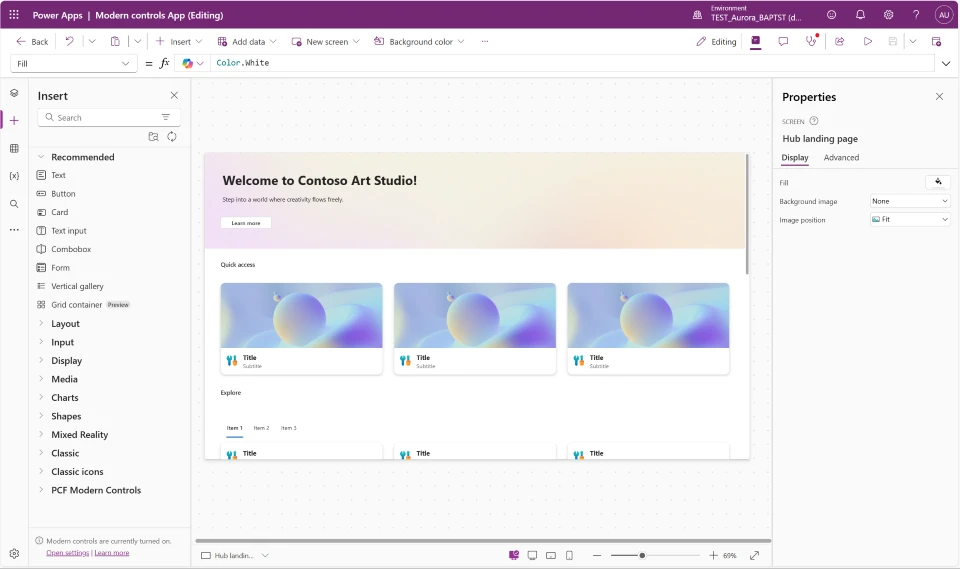
We’ve shipped quality updates across all nine modern controls in Power Apps canvas apps—Text, Number Input, Date Picker, Text Input, Tab List, Combo Box, Radio, Link, and Info Button. This is one of the most comprehensive control refreshes to date, addressing top maker feedback around consistency, reliability, and flexibility. Whether you’re building new apps or maintaining existing ones, these updates make modern controls noticeably better to work with.
The biggest improvements are in consistency, performance, and developer experience. Controls now share a unified property model with standardized names and typed enum values predefined value sets, which means better IntelliSense, fewer formula errors, and less guesswork. The OnChange behavior has been refined across controls to fire at the right moments—reducing unnecessary recalculations and making apps feel faster and more responsive. Mobile-optimized defaults are also now applied automatically when you add controls to a mobile layout.
Migration is guided every step of the way. When you open an app using a previous version of a modern control, you’ll see an in-product notification with a “learn more” link and an “update” button coming soon on all controls. Dedicated per-control migration guides walk you through every property rename and formula change needed—so you stay in control of when and how you upgrade.
This video explores the new vibe.powerapps.com preview, which enables developers to build full code Power Apps from a prompt using AI-driven plan, data, and app generation. You’ll see how the unified experience simplifies app creation, editing, and publishing without requiring VS Code or manual code authoring.
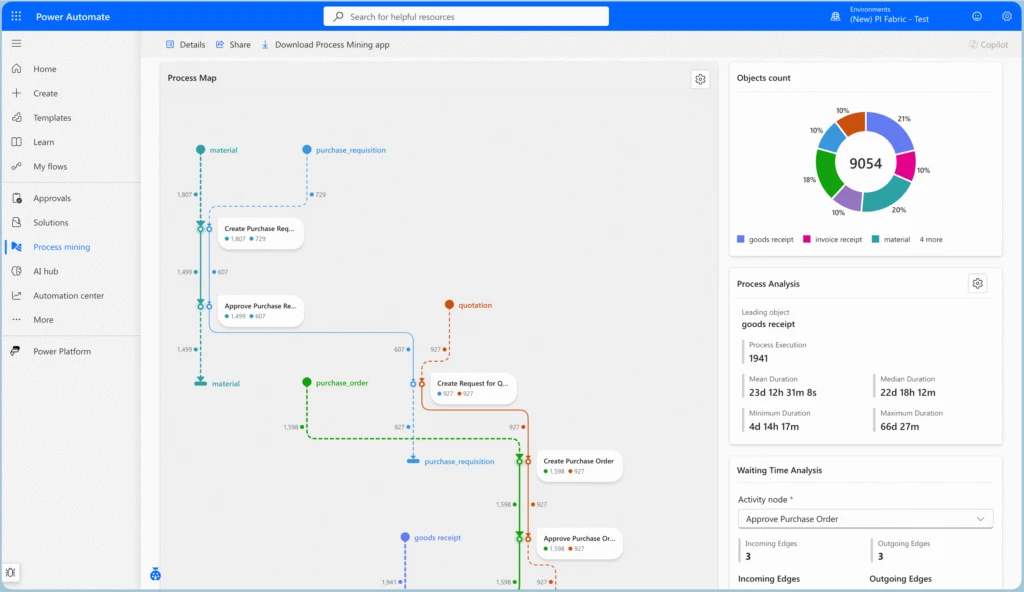
Object-centric process mining analyzes processes by following real interacting business objects
Object-Centric Process Mining (OCPM) is a new approach to process analysis in Power Automate Process Mining that models processes as they occur in real business environments. Unlike traditional case-centric process mining, which groups events under a single case notion (e.g., Order ID), OCPM allows a single event to belong to multiple objects and object types — such as orders, invoices, deliveries, and payments — preserving the full web of interactions and dependencies end-to-end.
This capability solves a fundamental limitation of case-centric mining: when events routinely touch several objects of different types simultaneously, forcing them into a single case can hide cross-object relationships, duplicate events, or distort metrics. OCPM keeps these relationships explicit, rendering object-centric process maps that show object lifecycles, activity nodes spanning multiple object types, and color-coded object-flow edges. This makes it straightforward to identify multi-object bottlenecks, verify compliance policies that span entities (e.g., “ship only after payment”), and analyze how different process flows converge and interact.
OCPM is ideal for scenarios where dependencies across object types drive outcomes — such as order-to-cash, procure-to-pay, or supply chain processes — while case-centric mining remains the right choice for tightly scoped, single-instance workflows.
Process intelligence experience: a customizable interface for process analysis
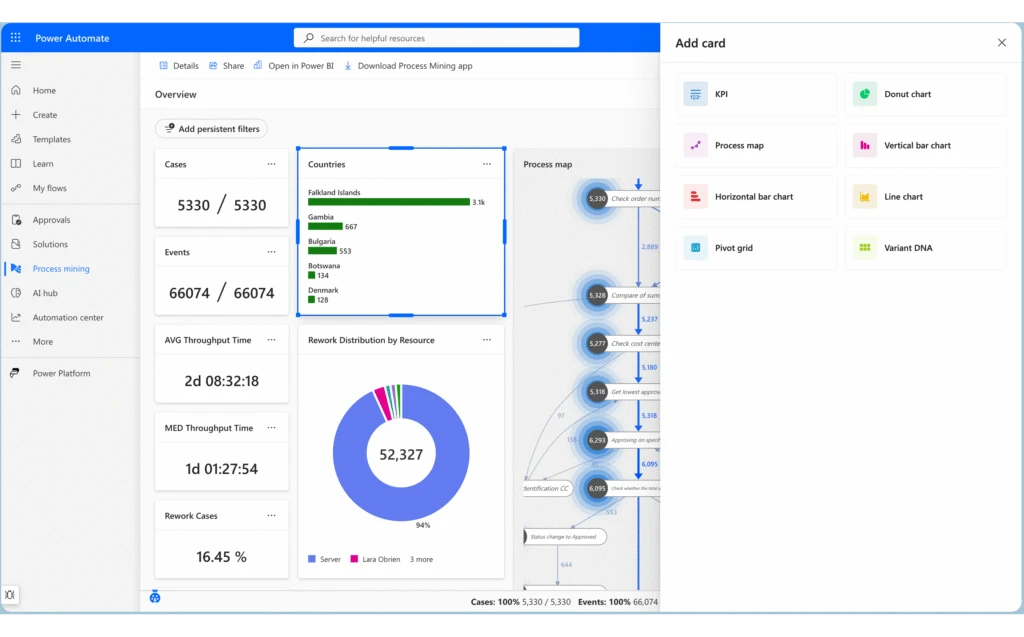
The process intelligence experience is the next-generation interface for process analysis in Power Automate Process Mining. It replaces the previous fixed process overview with a flexible, card-based dashboard system that adapts to your analysis needs. Users can create multiple tabs to organize different analytical perspectives, apply dynamic filters across all visualizations, and arrange, resize, and configure cards to build personalized analytical workspaces.
Key enhancements include the ability to group related metrics and visualizations together logically, switch between preconfigured analytical perspectives instantly, and share dashboard configurations with team members. Continuous data refresh ensures you’re always working with current information, while the customizable layouts give you complete control over what you see and how you see it — enabling tailored views for different stakeholders and use cases.
Infuse intelligent experiences into Power Pages sites with the new Agent API
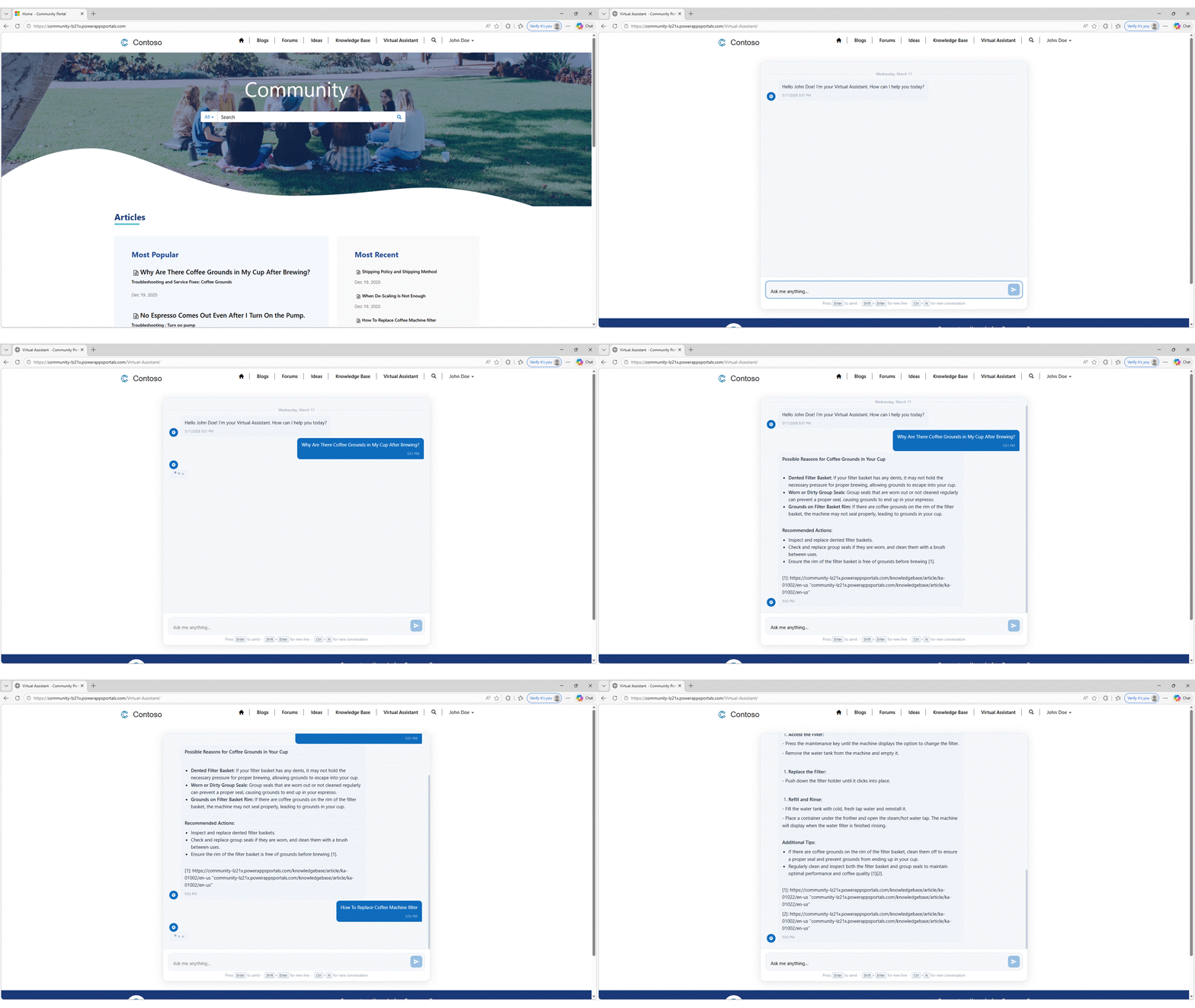
Agent API for Power Pages enables site creators to build custom chat and other user experiences and integrate these seamlessly with their custom-built Microsoft Copilot Studio agents. This enhancement gives organizations more flexibility for integrating intelligence into their web experiences.
Public preview: Build Power Pages sites with AI using agentic coding tools
We’re announcing the public preview of the Power Pages plugin for GitHub Copilot CLI and Claude Code. Describe the site you want in natural language and the plugin handles the rest — from project scaffolding and setup to Web API integrations, permissions, and site deployment.
The plugin is purpose-built for Power Pages. It understands table permissions, web roles, site settings, authentication configuration, and Web API patterns. Because it generates platform-aware code, you spend less time on manual configuration and more time building your site.
Secret Finder is an AI-powered capability in Microsoft Security Copilot that detects leaked credentials in unstructured content, such as emails, chat logs, documents, and screenshots, where traditional pattern-matching tools struggle. It relies on a multi‑step, multi‑agent reasoning workflow rather than a single pass detector. Detection, verification, and contextual analysis are handled by distinct reasoning stages, allowing Secret Finder to find real credentials without flooding users with false positives. Unlike regex-based scanners, Secret Finder uses reasoning to identify not just credentials, but the systems they unlock, helping security teams understand exposure and respond faster. In benchmark testing on synthetic datasets, Secret Finder achieved 98.33% true credential detection with zero false alarms on realistic emails, chats, notes, and documents—while traditional regex scanners detected only about 40% of the same credentials. Secret Finder is now generally available in Security Copilot, supporting 20+ credential types with high precision and actionable context.
The Problem: Credentials Hide Where Traditional Tools Can’t See
When security incidents happen, leaked credentials don’t always appear in clean, predictable formats. They show up buried in email threads, pasted into Teams messages, embedded in Word documents, or captured in screenshots of logs and terminals. These are exactly the places where security teams spend the most time and where traditional secret scanning tools fail.
Most existing tools rely on regular expressions or simple pattern matching. This works reasonably well for structured environments like source code repositories, where credentials follow predictable formats. But in real-world incidents, secrets look different. A storage key might be split across multiple messages in an email thread. A credential could be reformatted, partially redacted, or embedded alongside explanatory text.
In these situations, pattern matching produces two painful outcomes: it misses real credentials because the format doesn’t match a known rule, or it floods analysts with false positives that waste time. Security teams are left manually reviewing content, guessing which findings are real, and piecing together what systems might actually be at risk. In practice, this failure mode has a real human cost that security analysts end up reviewing thousands of alerts, manually inspecting email threads and chat logs, and trying to determine whether a suspicious string actually unlocks a storage account, API, or production service. Teams can spend days reconstructing context across messages and documents just to understand what a credential grants access to, slowing containment and increasing risk during active incidents.
This is the gap Secret Finder was built to close.
The Solution: Secret Finder Brings Reasoning to Secret Detection
Secret Finder approaches secret detection as a reasoning problem, not a string-matching exercise. Instead of asking “does this text match a pattern?” It asks human-like questions: Is this text describing a credential or access mechanism? Does the value look real and usable? What system or resource could this access?
This shift is subtle but powerful. Secret Finder doesn’t just detect credentials, it connects them to doors: the specific targets those credentials unlock, such as API endpoints, storage accounts, applications, or services. This is critical for triage. Instead of stopping at “this looks like a credential,” Secret Finder tells analysts what that credential actually opens. Without context, a credential triggers manual follow‑up. When it’s linked to a specific target, analysts can immediately assess impact and act.
By understanding messy, real-world content the way a human investigator would, Secret Finder delivers findings that security teams can trust and act on immediately. It’s designed specifically for the unstructured, noisy environments where incidents actually unfold.
Why Secret Finder Outperforms Traditional Pattern Matching
Traditional secret scanners are built for clean data. Secret Finder is built for reality.
Traditional tools struggle when:
Credentials appear in natural language descriptions rather than code
Context determines whether a string is sensitive or benign
Credentials are incomplete, malformed, or partially redacted
Secret Finder excels because it:
Reasons through context, understanding surrounding text to identify what’s truly sensitive
Detects credentials and their associated resources together, providing the “what” and the “where” in a single pass
Handles noisy, unstructured inputs like emails, chat logs, documents
Assigns confidence scores to help teams prioritize findings and reduce alert fatigue
What Secret Finder Can Do Today
Secret Finder is now generally available in Microsoft Security Copilot, with capabilities shaped directly by real security workflows across incident response, red teaming, and SOC operations.
It detects over 20 major credential categories, spanning cloud provider credentials like Azure Storage Keys and AWS Access Keys, authentication credentials including Microsoft Entra passwords and OAuth tokens, database connection strings, SSH private keys, API keys, and generic secrets that don’t fit predefined patterns. This broad coverage means analysts can scan investigation artifacts without worrying whether the secret type is supported.
What makes Secret Finder particularly effective is where it works. Email threads where credentials are discussed across multiple messages. Teams chats where credentials are pasted quickly during troubleshooting. Word documents and internal wikis where credentials are documented for operational handoffs. Incident reports and post-mortem notes written under pressure. These are the environments where traditional pattern-matching tools fail, and where Secret Finder delivers the most value.
In benchmark evaluations, Secret Finder achieved 100% recall with 0% false positives on synthetic datasets containing embedded Azure Storage credentials, compared to 40% recall from traditional regex‑based tools such as CredScan. In more complex scenarios involving multiple credential types and noisy email content, Secret Finder maintained 98.33% recall with 0% false positives. These results were observed on synthetically generated evaluation datasets spanning emails, chats, notes, and documents, designed to reflect how engineers communicate and how credentials may be inadvertently shared in real‑world workflows.
Scenario
Precision
Recall
Single credential type
100%
100%
Complex, multiple credential types
100%
98.33%
Secret Finder is currently integrated into Security Copilot, actively supporting incident response workflows, and working toward deeper integrations with developer platforms such as GitHub to bring contextual secret detection to source code analysis at scale.
Using Secret Finder in Security Copilot
Secret Finder is available as a skill in Microsoft Security Copilot, making credential detection a seamless part of analyst workflows.
How to use Secret Finder:
Enable the Secret Finder skill in Security Copilot via “Manage Sources” → “Manage Plugins” (Figure 1)
Select “FindSecretInText” from Promptbook (Figure 2)
Submit unstructured content directly in the Copilot prompt: paste the text blob that might contain credentials
Secret Finder analyzes the content using its multi-agent workflow, detecting credentials and associated doors
Review actionable findings with contextual details
Figure 1. Enabling the Secret Finder skill in Microsoft Security Copilot (Due to recent naming changes, users might see “Agentic secret finder” in Security copilot. Naming changes will reflect in a few weeks)
Figure 2. Selecting the FindSecretInText prompt, which invokes Secret Finder’s multi‑step credential detection and verification workflow
Figure 3. Submitting a text blob containing embedded credentials for analysis (example is synthetic)
Figure 4. Secret Finder output with detected credentials and associated doors (example credentials and associated doors are synthetic)
What’s Next for Secret Finder
Secret Finder is a living capability. Over the next six months, we are working towards coverage and deepening integrations:
Exploring integrations with GitHub to reduce false positives in secret scanning for code repositories
Optimizing for large-scale analysis to handle enterprise-wide scans efficiently with reduced latency
Exploring graph-based risk modeling to map relationships between credentials, services, and attack paths
Our long-term vision goes beyond detection: we want to help security teams understand how credentials are used, what risks exist if they’re exposed, and what the impact of rotation or revocation would be. By moving from “what’s leaked” to “what does it mean,” Secret Finder will enable smarter prioritization, faster response, and more confident decision-making.
Acknowledgments
Secret Finder has been a cross-team effort over the past year, evolving from early research and prototyping through private preview, public preview, and now general availability.
This milestone reflects contributions across many phases from initial system design and technical direction, to evaluation, product integration, and deployment at scale.
Contributors include Mariko Wakabayashi leading the early research through production and to the team including Zixiao Chen and Avy Challa for GA improvements and bringing Secret Finder to production readiness.
We also appreciate Tony Twum-Barimah, Malachi Jones, and the Security Copilot team, including Austin Trapp and Vinod Jagannathan for their technical and product support throughout the process, as well as Christian Rudnick and Helen Chang for guiding us through the responsible AI reviews before launch.
Finally, a huge thanks to the incident responders and security researchers who shared valuable insights along the way. Secret Finder wouldn’t have been possible without their work and feedback.
We’re entering a new era of AI-powered business applications, and today we’re excited to publish the 2026 release wave 1 plans for Microsoft Dynamics 365, Microsoft Power Platform, and role-based agents in Microsoft 365 Copilot, outlining a broad set of capabilities slated for release between April 2026 and September 2026. These updates reflect our ongoing commitment to making AI an essential partner in how organizations operate, innovate, and grow.
Dynamics 365 leads this wave with AI-powered, agentic innovations across sales, service, finance, supply chain, human resources (HR), and commerce—helping organizations unify data, automate processes, and elevate customer and employee experiences. Microsoft Power Platform continues to expand modern app development, intelligent automation, and enterprise-grade governance to empower makers and developers to innovate with confidence. Role-based agents in Microsoft 365 Copilot further evolve into intelligent daily command centers, helping to deliver richer, data-grounded insights and extensibility that help teams work smarter across every role.
To help you stay current on the most important and innovative capabilities, we’re moving beyond bi-annual launch events to lighter, more frequent business applications updates, featuring expert insights and demonstrations from Microsoft product leaders and engineers.
Watch the Dynamics 365 Business Applications Update March 18 at 9 AM PDT
Register for the Power Platform and Copilot Studio update April 15at 9 AM PDT
Be sure to stay updated on the latest features and create your personalized release plan using the release planner.
Highlights from Dynamics 365
2026 release wave 1 updates for Dynamics 365 deliver AI-powered, agentic experiences across sales, service, finance, supply chain, commerce, HR, projects, sustainability, and enterprise resource planning (ERP)—bringing deeper Copilot integration, intelligent automation, unified customer and operational data, and enhanced cross-app capabilities to help organizations drive efficiency, elevate customer and employee experiences, and operate with greater agility and confidence.
Dynamics 365 Sales
Dynamics 365 Sales brings the power of AI to help sellers build their pipeline, enrich opportunities, and accelerate deal closure, while helping sellers easily access accurate, up-to-date information and recommending high-impact actions that sellers can take. Copilot experiences in Dynamics 365 Sales can draw on data spanning customer relationship management (CRM) and Microsoft 365 signals, like email and meeting recaps, to deliver actionable insights across Dynamics 365 and Microsoft 365 experiences.
Dynamics 365 Customer Service
Dynamics 365 Customer Service will continue to enhance agentic capabilities across case management, email, customer intent, quality evaluation, and knowledge management. AI-infused admin and supervisor help to provide more transparency and quicker time-to-value. These investments strengthen end-to-end service orchestration, from helping identify customer intent to driving autonomous workflows that elevate service quality and responsiveness.
Dynamics 365 Contact Center
Dynamics 365 Contact Center advances the agentic contact center in 2026 release wave 1 with new AI-powered capabilities that improve self-service, support accelerate assisted service, and help organizations run contact center operations more intelligently in 2026 release wave 1. It expands to include emerging channels, supervisor insights, and extensibility, giving organizations a unified, AI-powered system to elevate the customer experience.
Dynamics 365 Field Service
Dynamics 365 Field Service strengthens service execution across technician productivity, resource scheduling, and work order management. Investments focus on mobile usability and reliability, intelligent scheduling through the Scheduling Operations Agent, and end‑to‑end execution across assets, projects, and financial operations in this release wave. Together, these updates help organizations manage service complexity and deliver consistent service outcomes.
Dynamics 365 Sustainability
Dynamics 365 Sustainability introduces more intuitive reporting navigation, advanced calculation versioning, and granular data‑locking to reinforce governance and regulatory confidence in this wave. Expanded finance integration, streamlined workflows, and updated templates and factor libraries will further empower organizations to make informed decisions and support progress toward their sustainability goals.
Dynamics 365 Finance
Dynamics 365 Finance delivers continued global scale enhancements that drive greater financial automation, strengthen global regulatory compliance posture, and enhance financial planning and analytics—helping organizations operate more efficiently and achieve their financial and operational goals with confidence.
Dynamics 365 Supply Chain Management
Dynamics 365 Supply Chain Management’s 2026 wave 1 enhances supply and demand planning with price-demand correlation and capacity-to-promise (CTP) date protection. Supplier communication and engagement are streamlined, while warehousing gains AI-powered picking, inventory rebalancing, and hands-free scanning—driving supply chain efficiency.
Dynamics 365 Project Operations
Dynamics 365 Project Operations brings rich capabilities in 2026 release wave 1—from change order support and smarter project planning to smoother quoting, budgeting, and contract workflows. New enhancements streamline item consumption, mobile expense management, subscription billing, and modern-architecture migration—delivering connected project experience.
Dynamics 365 Commerce
Dynamics 365 Commerce strengthens business-to-business (B2B) with multi-outlet ordering, unified sign-in, outlet-specific catalogs, and built-in credit management to help reduce friction and protect cash flow. It modernizes order management and assisted-selling workflows in retail stores, helping to improve associate productivity, and customer experiences across channels. It also enables cross-legal-entity inventory lookup and flexible, attribute-based pricing to help accelerate mass updates and help drive higher sales.
Dynamics 365 Human Resources
Dynamics 365 Human Resources continues to advance in areas such as recruitment, onboarding, reporting, and integrated workforce management. By merging enhanced user experiences with broader ecosystem integration and expanding regional payroll collaborations, the platform enables organizations to optimize employee engagement, support operational accuracy, and confidently achieve their workforce objectives.
Finance and operations cross-app capabilities
Finance and operations cross-app capabilities will introduce new enhancements that strengthen the foundation for AI experiences across Dynamics 365. These updates include improvements to Model Context Protocol (MCP) servers, as well as the general availability of immersive home, which is an AI-powered workspace designed to help users stay focused and prioritize what matters most.
Dynamics 365 Customer Insights – Data
Dynamics 365 Customer Insights – Data acts as the grounding layer for CRM copilots and AI agents, delivering real‑time, unified customer profiles that help power accurate decisions. With enriched data, teams can act on insights directly in their workflow to deliver timely, personalized experiences that deepen engagement and drive better outcomes. The result is an AI-ready data core that elevates agents and helps deliver more connected, intelligent CRM experiences.
Dynamics 365 Customer Insights – Journeys
Dynamics 365 Customer Insights – Journeysempowers end-to-end, agentic customer engagements across sales, marketing, and service, allowing businesses to proactively react to customer behavior using Copilot and AI agents. With smarter orchestration tools, teams can deliver impactful campaigns at scale to drive stronger relationships, higher efficiency, and revenue growth. Part of Dynamics 365, every interaction within your organization benefits from shared data and consistent intelligence across Microsoft CRM applications.
Dynamics 365 Business Central
Dynamics 365 Business Central accelerates the move to agentic ERP with enhancements to our AI‑powered agents that automate sales and purchase scenarios in 2026 release wave 1. Alongside new business capabilities, we invest heavily in developer productivity to support extensibility—improving advanced language (AL) testing, debugging, Copilot extensibility, and agent design.
Highlights from Microsoft Power Platform and Microsoft Copilot Studio
2026 release wave 1 updates for Microsoft Power Platform deliver modernized app experiences across Power Apps and Power Pages, AI-powered automation and agent innovation in Power Automate and Copilot Studio, enhanced Dataverse intelligence and programmability, and strengthened governance, security, and cost management capabilities to help organizations build, scale, and manage intelligent solutions with confidence.
Power Apps
Power Apps continues to modernize app experiences with a refreshed model-driven user interface (UI), improved mobile and offline capabilities, streamlined search, and expanded AI features. This release brings standardized modern theming to everyone, real-time Dataverse access for offline-first canvas apps, enhanced search in grids and lookups, and broader availability and extensibility of generative pages to help teams build and scale intelligent apps faster.
Power Pages
Power Pages will further empower pro-developers and low-code makers to build intelligent business portals for your employees, customers, citizens, and partners through better integration with market leading AI tools. Additionally, enhanced security agent features will further support low-code makers, pro-developers, and admins with actionable insights and abilities for securing their websites.
Power Automate
Power Automateis Microsoft’s comprehensive automation platform for cloud flows, desktop flows, and process mining. This release introduces AI agent authoring, optimization, and self-healing capabilities for desktop flows, Copilot Studio-powered actions in cloud flows, enhanced maker and collaboration tools across both, general availability of object-centric process mining, and consolidated governance reporting.
Microsoft Copilot Studio
Microsoft Copilot Studiocontinues its journey to make agent and agentic workflows even easier to build and more powerful. Now you can further customize agents built with Agent Builder in Microsoft 365 Copilot, and power your automation with high value AI actions. Deeper governance, multi-agent orchestration, and evaluations enable further scaling. With connections to Microsoft Foundry and Work IQ, your agents can use the latest AI technology in coordination with your organizational data.
Microsoft Dataverse
Microsoft Dataversecontinues to invest in enterprise-ready agentic and low-code data platform capabilities. The spotlight is on Work IQ and Copilot integration, delivering organization-specific decisions with adaptive learning and full auditability. We’re also enhancing agent programmability with Dataverse APIs, MCP servers, and Python SDK, plus new storage management tools for enterprise-grade compliance at scale.
Microsoft Power Platform governance and administration
Microsoft Power Platform governance and administrationintroduces admin controls for agent security, real-time risk assessment in Copilot Studio, and AI-powered governance agents that automate tenant monitoring and remediation in this release. Enhanced visibility into usage patterns, granular Copilot credit consumption with pay-as-you-go (PAYG) caps, and connector dependencies help you optimize costs, demonstrate return on investment (ROI), and enforce compliance with organizational policies using features within the Power Platform Admin Center. GitHub integration and deploy from Git mature your application lifecycle management (ALM) practices with full audit trails.
Updates to role-based agents in Microsoft 365 Copilot
2026 release wave 1 updates for Microsoft role-based agents transform Sales Agent and Finance Agent in Microsoft 365 Copilot into intelligent daily command centers, helping to deliver richer, data-grounded insights, enhanced chat and mobile experiences, contextual support across Outlook and Teams, and strengthened governance and extensibility to help organizations drive productivity and scale AI responsibly.
Sales Agent
Sales Agentbecomes the seller’s daily command center with richer Sales Chat and Sales Home experiences across desktop and mobile in 2026 release wave 1. Sellers will gain streamlined access to deal and account insights through configurable record summaries, contextual support in Outlook and Teams, and improved email and meeting intelligence. New governance and extensibility controls will also help organizations scale AI responsibly.
Finance Agent
Finance Agenthelps finance professionals and their stakeholders interact with financial information from their ERP within the flow of work. In 2026 release wave 1, we continue expanding how this financial assistant supports common finance tasks such as reconciliation, variance analysis, and data preparation in Excel, as well as customer communications in Outlook. By bringing financial insights and assistance directly into familiar productivity tools, the Finance Agent helps teams investigate issues faster, respond to stakeholders more efficiently, and spend less time manually preparing or reconciling data so they can focus more on financial analysis and decision support.
For a complete list of new capabilities, please refer to the Dynamics 365 2026 release wave 1 plan, the Microsoft Power Platform 2026 release wave 1 plan, and role-based agents 2026 release wave 1. We also encourage you to share your feedback in the community forums for Dynamics 365 and Microsoft Power Platform.
Business Applications Update
The Business Applications Update offers an early preview of new capabilities coming in the months ahead. This refreshed structure is designed to reflect the reality of our time: innovation does not happen twice a year; it is constant. Whether you are a strategic leader or a hands-on practitioner, this new cadence is built to get you quickly up to speed.
Watch the Dynamics 365 Business Applications Update March 18 at 9 AM PDT
Register for the Power Platform and Copilot Studio update April 15 at 9 AM PDT
Agentic Secret Finder (ASF) is an AI-powered capability in Microsoft Security Copilot that detects leaked credentials in unstructured content, such as emails, chat logs, documents, and screenshots, where traditional pattern-matching tools struggle. Agentic Secret Finder (ASF) is “agentic” because it relies on a multi‑step, multi‑agent reasoning workflow rather than a single pass detector. Detection, verification, and contextual analysis are handled by distinct reasoning stages, allowing ASF to find real credentials without flooding users with false positives. Unlike regex-based scanners, ASF uses reasoning to identify not just credentials, but the systems they unlock, helping security teams understand exposure and respond faster. In benchmark testing on synthetic datasets, ASF achieved 98.33% true credential detection with zero false alarms on realistic emails, chats, notes, and documents—while traditional regex scanners detected only about 40% of the same credentials. ASF is now generally available in Security Copilot, supporting 20+ credential types with high precision and actionable context.
The Problem: Credentials Hide Where Traditional Tools Can’t See
When security incidents happen, leaked credentials don’t always appear in clean, predictable formats. They show up buried in email threads, pasted into Teams messages, embedded in Word documents, or captured in screenshots of logs and terminals. These are exactly the places where security teams spend the most time and where traditional credential scanning tools fail.
Most existing tools rely on regular expressions or simple pattern matching. This works reasonably well for structured environments like source code repositories, where credentials follow predictable formats. But in real-world incidents, credentials look different. A storage key might be split across multiple messages in an email thread. A credential could be reformatted, partially redacted, or embedded alongside explanatory text.
In these situations, pattern matching produces two painful outcomes: it misses real credentials because the format doesn’t match a known rule, or it floods analysts with false positives that waste time. Security teams are left manually reviewing content, guessing which findings are real, and piecing together what systems might actually be at risk. In practice, this failure mode has a real human cost that security analysts end up reviewing thousands of alerts, manually inspecting email threads and chat logs, and trying to determine whether a suspicious string actually unlocks a storage account, API, or production service. Teams can spend days reconstructing context across messages and documents just to understand what a credential grants access to, slowing containment and increasing risk during active incidents.
This is the gap Agentic Secret Finder was built to close.
The Solution: ASF Brings Reasoning to Credential Detection
Agentic Secret Finder approaches credential detection as a reasoning problem, not a string-matching exercise. Instead of asking “does this text match a pattern?” ASF asks human-like questions: Is this text describing a credential or access mechanism? Does the value look real and usable? What system or resource could this access?
This shift is subtle but powerful. ASF doesn’t just detect credentials, it connects them to doors: the specific targets those credentials unlock, such as API endpoints, storage accounts, applications, or services. This is critical for triage. Instead of stopping at “this looks like a credential,” ASF tells analysts what that credential actually opens. Without context, a credential triggers manual follow‑up. When it’s linked to a specific target, analysts can immediately assess impact and act.
By understanding messy, real-world content the way a human investigator would, ASF delivers findings that security teams can trust and act on immediately. It’s designed specifically for the unstructured, noisy environments where incidents actually unfold.
Why ASF Outperforms Traditional Pattern Matching
Traditional credential scanners are built for clean data. ASF is built for reality.
Traditional tools struggle when:
Credentials appear in natural language descriptions rather than code
Context determines whether a string is sensitive or benign
Credentials are incomplete, malformed, or partially redacted
ASF excels because it:
Reasons through context, understanding surrounding text to identify what’s truly sensitive
Detects credentials and their associated resources together, providing the “what” and the “where” in a single pass
Handles noisy, unstructured inputs like emails, chat logs, documents
Assigns confidence scores to help teams prioritize findings and reduce alert fatigue
What ASF Can Do Today
ASF is now generally available in Microsoft Security Copilot, with capabilities shaped directly by real security workflows across incident response, red teaming, and SOC operations.
ASF detects over 20 major credential categories, spanning cloud provider credentials like Azure Storage Keys and AWS Access Keys, authentication credentials including Microsoft Entra passwords and OAuth tokens, database connection strings, SSH private keys, API keys, and generic credentials that don’t fit predefined patterns. This broad coverage means analysts can scan investigation artifacts without worrying whether the credential type is supported.
What makes ASF particularly effective is where it works. Email threads where credentials are discussed across multiple messages. Teams chats where credentials are pasted quickly during troubleshooting. Word documents and internal wikis where credentials are documented for operational handoffs. Incident reports and post-mortem notes written under pressure. These are the environments where traditional pattern-matching tools fail, and where ASF delivers the most value.
In benchmark evaluations, ASF achieved 100% recall with 0% false positives on synthetic datasets containing embedded Azure Storage credentials, compared to 40% recall from traditional regex‑based tools such as CredScan. In more complex scenarios involving multiple credential types and noisy email content, ASF maintained 98.33% recall with 0% false positives. These results were observed on synthetically generated evaluation datasets spanning emails, chats, notes, and documents, designed to reflect how engineers communicate and how credentials may be inadvertently shared in real‑world workflows.
Scenario
Precision
Recall
Single credential type
100%
100%
Complex, multiple credential types
100%
98.33%
ASF is currently integrated into Security Copilot, actively supporting incident response workflows, and working toward deeper integrations with developer platforms such as GitHub to bring contextual credential detection to source code analysis at scale.
Using ASF in Security Copilot
ASF is available as a skill in Microsoft Security Copilot, making credential detection a seamless part of analyst workflows.
How to use ASF:
Enable the ASF skill in Security Copilot via “Manage Sources” → “Manage Plugins” (Figure 1)
Select “FindSecretInText” from Promptbook (Figure 2)
Submit unstructured content directly in the Copilot prompt: paste the text blob that might contain credentials (Figure 3)
ASF analyzes the content using its multi-agent workflow, detecting credentials and associated doors (Figure 4)
Review actionable findings with contextual details
Figure 1. Enabling the Agentic Secret Finder (ASF) skill in Microsoft Security Copilot
Figure 2. Selecting the FindSecretInText prompt, which invokes ASF’s multi‑step credential detection and verification workflow
Figure 3. Submitting a text blob containing embedded credentials for analysis (example is synthetic)
Figure 4. ASF output with detected credentials and associated doors (example credentials and associated doors are synthetic)
What’s Next for ASF
ASF is a living capability. Over the next six months, we are working towards coverage and deepening integrations:
Exploring integrations with GitHub to reduce false positives in credential scanning for code repositories
Optimizing for large-scale analysis to handle enterprise-wide scans efficiently with reduced latency
Exploring graph-based risk modeling to map relationships between credentials, services, and attack paths
Our long-term vision goes beyond detection: we want to help security teams understand how credentials are used, what risks exist if they’re exposed, and what the impact of rotation or revocation would be. By moving from “what’s leaked” to “what does it mean,” ASF will enable smarter prioritization, faster response, and more confident decision-making.
A Unified Control Center for Queue Monitoring and SLA Tracking
Work queues in Power Automate are structured lists that let you assign, track, and manage work items across users or automations in an organized, scalable way.
We’re excited to announce powerful new enhancements to work queues in the automation center that will transform how your teams manage and monitor automated workflows. With the introduction of work queue alerts and the new aggregated operator view, we’re giving businesses unprecedented visibility and control over their automation operations.
What’s New
Work Queue Alerts for Admin in Monitoring Hub
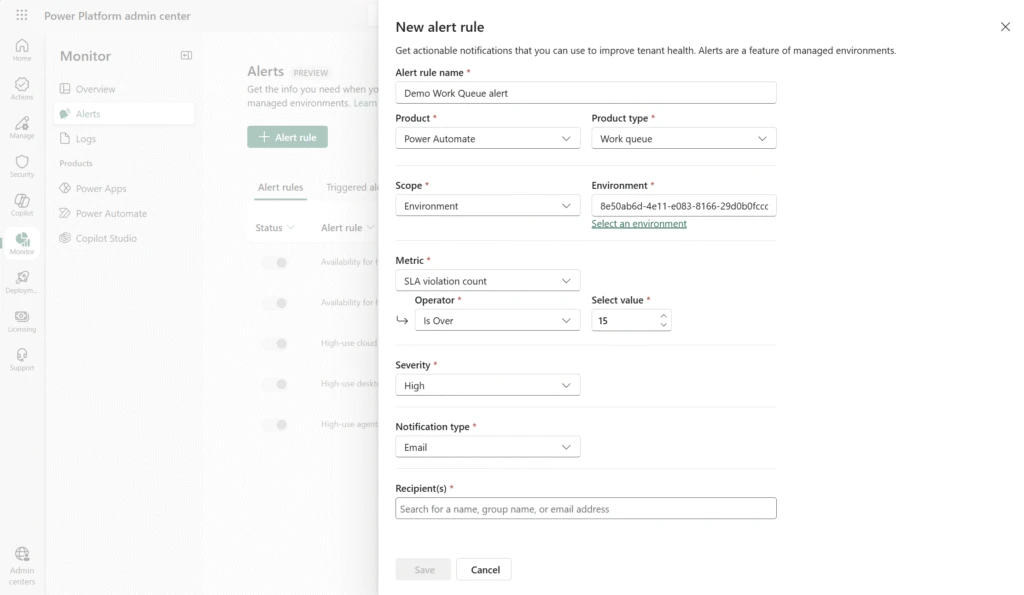
With monitoring in the Power Platform Admin Center (PPAC), you can track the health and the performance of your automation queues. View real-time metrics on items pending action, exceptions requiring resolution, and queue status to maintain visibility across your automation operations.
Now, you can also configure proactive alerts to notify you when SLA violation counts exceed thresholds defined by your organization’s administrator. Receive timely notifications when queues require attention, ensuring you can respond before service level agreements are compromised.
With SLA violation alerts, you can stay informed and responsive with notifications about your automation queues. No more manual monitoring; the system comes to you.
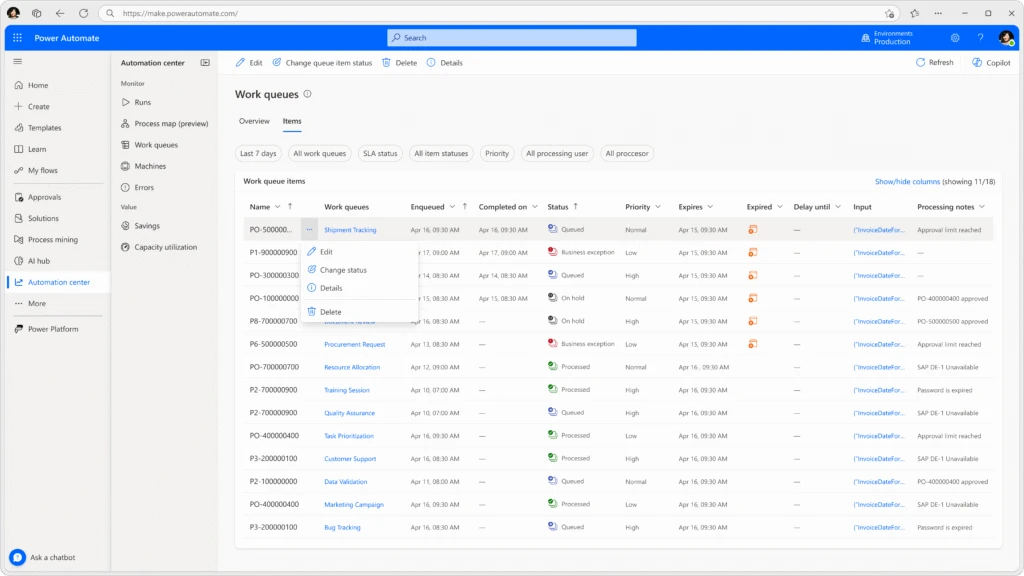
Aggregated View for Operators in Automation Center
Operators now have a unified, comprehensive dashboard in the automation center that aggregates work queue data across your entire automation estate.
This consolidated view enables operators to monitor multiple queues simultaneously, prioritize work effectively, and respond to issues faster than ever before.
Top 5 benefits of using Work Queues in Power Automate
Increased efficiency & scalability – Work queues allow you to decouple complex processes, enabling different parts of an automation to run asynchronously and independently.
Better resource utilization – Because work items are stored centrally, you can optimize robot usage, balance load, and reduce the number of machines required.
Consistent prioritization of work – Work queues natively support priority-based execution, making sure the most important items are processed first.
Centralized monitoring & exception handling – Work queues provide a human‑in‑the‑loop monitoring experience, helping fusion teams track the status of items, manage exceptions, and take corrective actions.
Improved resiliency & fault tolerance – By decoupling work and allowing multiple robots to process items in parallel, work queues offer better fault isolation.
Transform Your Automation Operations Today
These enhancements represent our commitment to making automation not just powerful, but manageable at enterprise scale. Work queues with alerts and aggregated operator views give your teams the tools they need to run automation operations with confidence, efficiency, and complete control.
Ready to experience these capabilities? navigate to the automation center in Power Automate and discover how work queues can elevate your automation program from task execution to strategic business operations.