The volume and variety of today’s electronic communications are causing many organizations to struggle to meet their communications monitoring and compliance obligations and we’ve heard your concerns about the need to simplify and streamline compliance tools in the modern workplace. Today, we’re rolling out a new supervision solution to support your organization’s compliance needs and journey.
For a quick overview of Supervision policies, see the Supervision policy video on the Microsoft Mechanics channel.
Scenarios for Supervision
Monitoring digital communications is critical to mitigating conduct, reputational, and financial risks. Organizations require a supervision system that meets both business control needs and regulatory compliance requirements. Our supervision solutions help you address the following concerns:
- Corporate policies: employees must comply with acceptable use, ethical standards, and other corporate policies in all business-related communications. Supervision can detect policy violations and help you take corrective actions to help mitigate these types of incidents. For example, you could monitor your organization for potential human resources violations such as harassment or the use of inappropriate or offensive language in employee communications.
- Risk management: organizations are responsible for communications distributed through corporate systems. Implementing a supervision program helps identify and manage legal exposure and other risks before they damage corporate reputation and operations. For example, you could monitor your organization for unauthorized communications for confidential projects such as upcoming acquisitions, mergers, earnings disclosures, reorganizations, or leadership team changes.
- Regulatory compliance: most organizations must comply with some type of regulatory compliance standards as part of their normal operating procedures. These regulations often require organizations to implement some type of supervisory or oversight process for messaging that is appropriate for their industry. The Financial Industry Regulatory Authority (FINRA) Rule 3110 is a good example of a requirement for organizations to have supervisory procedures in place to monitor the activities of its employees and the types of businesses in which it engages. Another example may be a need to monitor broker-dealers in your organization to safeguard against potential money-laundering, insider trading, collusion, or bribery activities. Supervision policies can help your organization meet these requirements by providing a process to both monitor and report on corporate communications.
New in Supervision
With Supervision policies, you can monitor internal or external Exchange email, Microsoft Teams chats and channels, or 3rd-party communication in your organization. Listed below are key new features in our integrated Supervision solution that reduce the need to export Microsoft 365 data for compliance management or review.
Intelligent policies
- Intelligent filters (in private preview): the offensive language data model helps identify inappropriate language by leveraging machine learning and artificial intelligence to identify communication patterns over time.
- Sensitive information types: you can now leverage either the 100 sensitive information types (financial, medical and health or privacy) such as credit card or social security number or custom data types such as your own custom dictionary/lexicon to flag content for review, or a combination of both.
- Advanced message filters: with domain and retention labels conditions you can now include or exclude emails based on domains and include or exclude emails based on their retention labels.
Policy creation
Efficient reviews
- Integrated review: you can now easily review, tag, comments and resolve items flagged for review within the Security & Compliance Center using your favorite browser. If needed, you can also continue to manage flagged items using Microsoft Outlook and Outlook on the web.
- Bulk resolve: within the new built-in review feature in the Security & Compliance Center, you can easily tag, comment or resolve multiple items with just one click.
Supervision review
Defensible insights
- Productivity reporting: Compliance officers can monitor and ensure items are being reviewed directly in the Security & Compliance Center.
- Stay ready for audits: All review activities are now fully audited and policy tracking allows you to document the complete history of supervised employees, reviewers, and policy rules at any point in time.
These new supervision innovations, based on customer feedback and pain points with existing solutions, will help your organization more effectively manage compliance risk and the efficiently manage the ever-increasing volume of communications data. Going forward, we’ll continue to invest in intelligent policies to handle the growing volume communications data and to make compliance reviews more efficient to help save time & money.
“With Microsoft’s Supervision solution we can get a 360 view of our risk management portfolio to understand how employees in the firm are complying to policies and procedures. For example, with domain exclusions, we now create various policies to understand how our attorneys are communicating with internal and external parties. We also set various supervision filters to capture data on engagement letter terms and SOWs to make sure employees are complying to the policies and levels of risks the partners have agreed to at the firm.“
— Chad Ergun, DGS Law’s CIO
Ready to get started?
Regardless of where you are in your compliance journey, there’s plenty of compliance solutions to explore and implement in Microsoft 365. Learn more about Supervision with Supervision policies in Office 365 and start implementing supervision policies with Configure supervision policies for your organization.
You can also engage with us in our Tech Community and provide additional feedback on UserVoice.
Frequently Asked Questions
Q: What licenses are required to use Supervision?
A: All users monitored by supervision policies must have either a Microsoft 365 E5 Compliance license, Office 365 Enterprise E3 license with the Advanced Compliance add-on or be included in an Office 365 Enterprise E5 subscription. If you don’t have an existing Enterprise E5 plan and want to try supervision, you can sign up for a trial of Office 365 Enterprise E5.
Q: When will these updates be available for my organization?
A: We have started rolling out the new Supervision updates to Office 365 today and most customers should have access to the new features over the next several weeks.
Q: How can I join the Offensive Language private preview?
A: Please email us at: supervisionolpreview@service.microsoft.com with a description of the use case you are trying to address and your tenant information (tenant ID or domain).We’ll review submissions and let you know if your tenant has been accepted in the program.
—Christophe Fiessinger, principal program manager Microsoft 365 Security & Compliance
The volume and variety of today’s electronic communications are causing many organizations to struggle to meet their communications monitoring and compliance obligations and we’ve heard your concerns about the need to simplify and streamline compliance tools in the modern workplace. Today, we’re rolling out a new supervision solution to support your organization’s compliance needs and journey.
For a quick overview of Supervision policies, see the Supervision policy video on the Microsoft Mechanics channel.
Scenarios for Supervision
Monitoring digital communications is critical to mitigating conduct, reputational, and financial risks. Organizations require a supervision system that meets both business control needs and regulatory compliance requirements. Our supervision solutions help you address the following concerns:
- Corporate policies: employees must comply with acceptable use, ethical standards, and other corporate policies in all business-related communications. Supervision can detect policy violations and help you take corrective actions to help mitigate these types of incidents. For example, you could monitor your organization for potential human resources violations such as harassment or the use of inappropriate or offensive language in employee communications.
- Risk management: organizations are responsible for communications distributed through corporate systems. Implementing a supervision program helps identify and manage legal exposure and other risks before they damage corporate reputation and operations. For example, you could monitor your organization for unauthorized communications for confidential projects such as upcoming acquisitions, mergers, earnings disclosures, reorganizations, or leadership team changes.
- Regulatory compliance: most organizations must comply with some type of regulatory compliance standards as part of their normal operating procedures. These regulations often require organizations to implement some type of supervisory or oversight process for messaging that is appropriate for their industry. The Financial Industry Regulatory Authority (FINRA) Rule 3110 is a good example of a requirement for organizations to have supervisory procedures in place to monitor the activities of its employees and the types of businesses in which it engages. Another example may be a need to monitor broker-dealers in your organization to safeguard against potential money-laundering, insider trading, collusion, or bribery activities. Supervision policies can help your organization meet these requirements by providing a process to both monitor and report on corporate communications.
New in Supervision
With Supervision policies, you can monitor internal or external Exchange email, Microsoft Teams chats and channels, or 3rd-party communication in your organization. Listed below are key new features in our integrated Supervision solution that reduce the need to export Microsoft 365 data for compliance management or review.
Intelligent policies
- Intelligent filters (in private preview): the offensive language data model helps identify inappropriate language by leveraging machine learning and artificial intelligence to identify communication patterns over time.
- Sensitive information types: you can now leverage either the 100 sensitive information types (financial, medical and health or privacy) such as credit card or social security number or custom data types such as your own custom dictionary/lexicon to flag content for review, or a combination of both.
- Advanced message filters: with domain and retention labels conditions you can now include or exclude emails based on domains and include or exclude emails based on their retention labels.
Policy creation
Efficient reviews
- Integrated review: you can now easily review, tag, comments and resolve items flagged for review within the Security & Compliance Center using your favorite browser. If needed, you can also continue to manage flagged items using Microsoft Outlook and Outlook on the web.
- Bulk resolve: within the new built-in review feature in the Security & Compliance Center, you can easily tag, comment or resolve multiple items with just one click.
Supervision review
Defensible insights
- Productivity reporting: Compliance officers can monitor and ensure items are being reviewed directly in the Security & Compliance Center.
- Stay ready for audits: All review activities are now fully audited and policy tracking allows you to document the complete history of supervised employees, reviewers, and policy rules at any point in time.
These new supervision innovations, based on customer feedback and pain points with existing solutions, will help your organization more effectively manage compliance risk and the efficiently manage the ever-increasing volume of communications data. Going forward, we’ll continue to invest in intelligent policies to handle the growing volume communications data and to make compliance reviews more efficient to help save time & money.
“With Microsoft’s Supervision solution we can get a 360 view of our risk management portfolio to understand how employees in the firm are complying to policies and procedures. For example, with domain exclusions, we now create various policies to understand how our attorneys are communicating with internal and external parties. We also set various supervision filters to capture data on engagement letter terms and SOWs to make sure employees are complying to the policies and levels of risks the partners have agreed to at the firm.“
— Chad Ergun, DGS Law’s CIO
Ready to get started?
Regardless of where you are in your compliance journey, there’s plenty of compliance solutions to explore and implement in Microsoft 365. Learn more about Supervision with Supervision policies in Office 365 and start implementing supervision policies with Configure supervision policies for your organization.
You can also engage with us in our Tech Community and provide additional feedback on UserVoice.
Frequently Asked Questions
Q: What licenses are required to use Supervision?
A: All users monitored by supervision policies must have either a Microsoft 365 E5 Compliance license, Office 365 Enterprise E3 license with the Advanced Compliance add-on or be included in an Office 365 Enterprise E5 subscription. If you don’t have an existing Enterprise E5 plan and want to try supervision, you can sign up for a trial of Office 365 Enterprise E5.
Q: When will these updates be available for my organization?
A: We have started rolling out the new Supervision updates to Office 365 today and most customers should have access to the new features over the next several weeks.
Q: How can I join the Offensive Language private preview?
A: Please email us at: supervisionolpreview@service.microsoft.com with a description of the use case you are trying to address and your tenant information (tenant ID or domain).We’ll review submissions and let you know if your tenant has been accepted in the program.
—Christophe Fiessinger, principal program manager Microsoft 365 Security & Compliance
The volume and variety of today’s electronic communications are causing many organizations to struggle to meet their communications monitoring and compliance obligations and we’ve heard your concerns about the need to simplify and streamline compliance tools in the modern workplace. Today, we’re rolling out a new supervision solution to support your organization’s compliance needs and journey.
For a quick overview of Supervision policies, see the Supervision policy video on the Microsoft Mechanics channel.
Scenarios for Supervision
Monitoring digital communications is critical to mitigating conduct, reputational, and financial risks. Organizations require a supervision system that meets both business control needs and regulatory compliance requirements. Our supervision solutions help you address the following concerns:
- Corporate policies: employees must comply with acceptable use, ethical standards, and other corporate policies in all business-related communications. Supervision can detect policy violations and help you take corrective actions to help mitigate these types of incidents. For example, you could monitor your organization for potential human resources violations such as harassment or the use of inappropriate or offensive language in employee communications.
- Risk management: organizations are responsible for communications distributed through corporate systems. Implementing a supervision program helps identify and manage legal exposure and other risks before they damage corporate reputation and operations. For example, you could monitor your organization for unauthorized communications for confidential projects such as upcoming acquisitions, mergers, earnings disclosures, reorganizations, or leadership team changes.
- Regulatory compliance: most organizations must comply with some type of regulatory compliance standards as part of their normal operating procedures. These regulations often require organizations to implement some type of supervisory or oversight process for messaging that is appropriate for their industry. The Financial Industry Regulatory Authority (FINRA) Rule 3110 is a good example of a requirement for organizations to have supervisory procedures in place to monitor the activities of its employees and the types of businesses in which it engages. Another example may be a need to monitor broker-dealers in your organization to safeguard against potential money-laundering, insider trading, collusion, or bribery activities. Supervision policies can help your organization meet these requirements by providing a process to both monitor and report on corporate communications.
New in Supervision
With Supervision policies, you can monitor internal or external Exchange email, Microsoft Teams chats and channels, or 3rd-party communication in your organization. Listed below are key new features in our integrated Supervision solution that reduce the need to export Microsoft 365 data for compliance management or review.
Intelligent policies
- Intelligent filters (in private preview): the offensive language data model helps identify inappropriate language by leveraging machine learning and artificial intelligence to identify communication patterns over time.
- Sensitive information types: you can now leverage either the 100 sensitive information types (financial, medical and health or privacy) such as credit card or social security number or custom data types such as your own custom dictionary/lexicon to flag content for review, or a combination of both.
- Advanced message filters: with domain and retention labels conditions you can now include or exclude emails based on domains and include or exclude emails based on their retention labels.
Policy creation
Efficient reviews
- Integrated review: you can now easily review, tag, comments and resolve items flagged for review within the Security & Compliance Center using your favorite browser. If needed, you can also continue to manage flagged items using Microsoft Outlook and Outlook on the web.
- Bulk resolve: within the new built-in review feature in the Security & Compliance Center, you can easily tag, comment or resolve multiple items with just one click.
Supervision review
Defensible insights
- Productivity reporting: Compliance officers can monitor and ensure items are being reviewed directly in the Security & Compliance Center.
- Stay ready for audits: All review activities are now fully audited and policy tracking allows you to document the complete history of supervised employees, reviewers, and policy rules at any point in time.
These new supervision innovations, based on customer feedback and pain points with existing solutions, will help your organization more effectively manage compliance risk and the efficiently manage the ever-increasing volume of communications data. Going forward, we’ll continue to invest in intelligent policies to handle the growing volume communications data and to make compliance reviews more efficient to help save time & money.
“With Microsoft’s Supervision solution we can get a 360 view of our risk management portfolio to understand how employees in the firm are complying to policies and procedures. For example, with domain exclusions, we now create various policies to understand how our attorneys are communicating with internal and external parties. We also set various supervision filters to capture data on engagement letter terms and SOWs to make sure employees are complying to the policies and levels of risks the partners have agreed to at the firm.“
— Chad Ergun, DGS Law’s CIO
Ready to get started?
Regardless of where you are in your compliance journey, there’s plenty of compliance solutions to explore and implement in Microsoft 365. Learn more about Supervision with Supervision policies in Office 365 and start implementing supervision policies with Configure supervision policies for your organization.
You can also engage with us in our Tech Community and provide additional feedback on UserVoice.
Frequently Asked Questions
Q: What licenses are required to use Supervision?
A: All users monitored by supervision policies must have either a Microsoft 365 E5 Compliance license, Office 365 Enterprise E3 license with the Advanced Compliance add-on or be included in an Office 365 Enterprise E5 subscription. If you don’t have an existing Enterprise E5 plan and want to try supervision, you can sign up for a trial of Office 365 Enterprise E5.
Q: When will these updates be available for my organization?
A: We have started rolling out the new Supervision updates to Office 365 today and most customers should have access to the new features over the next several weeks.
Q: How can I join the Offensive Language private preview?
A: Please email us at: supervisionolpreview@service.microsoft.com with a description of the use case you are trying to address and your tenant information (tenant ID or domain).We’ll review submissions and let you know if your tenant has been accepted in the program.
—Christophe Fiessinger, principal program manager Microsoft 365 Security & Compliance
The volume and variety of today’s electronic communications are causing many organizations to struggle to meet their communications monitoring and compliance obligations and we’ve heard your concerns about the need to simplify and streamline compliance tools in the modern workplace. Today, we’re rolling out a new supervision solution to support your organization’s compliance needs and journey.
For a quick overview of Supervision policies, see the Supervision policy video on the Microsoft Mechanics channel.
Scenarios for Supervision
Monitoring digital communications is critical to mitigating conduct, reputational, and financial risks. Organizations require a supervision system that meets both business control needs and regulatory compliance requirements. Our supervision solutions help you address the following concerns:
- Corporate policies: employees must comply with acceptable use, ethical standards, and other corporate policies in all business-related communications. Supervision can detect policy violations and help you take corrective actions to help mitigate these types of incidents. For example, you could monitor your organization for potential human resources violations such as harassment or the use of inappropriate or offensive language in employee communications.
- Risk management: organizations are responsible for communications distributed through corporate systems. Implementing a supervision program helps identify and manage legal exposure and other risks before they damage corporate reputation and operations. For example, you could monitor your organization for unauthorized communications for confidential projects such as upcoming acquisitions, mergers, earnings disclosures, reorganizations, or leadership team changes.
- Regulatory compliance: most organizations must comply with some type of regulatory compliance standards as part of their normal operating procedures. These regulations often require organizations to implement some type of supervisory or oversight process for messaging that is appropriate for their industry. The Financial Industry Regulatory Authority (FINRA) Rule 3110 is a good example of a requirement for organizations to have supervisory procedures in place to monitor the activities of its employees and the types of businesses in which it engages. Another example may be a need to monitor broker-dealers in your organization to safeguard against potential money-laundering, insider trading, collusion, or bribery activities. Supervision policies can help your organization meet these requirements by providing a process to both monitor and report on corporate communications.
New in Supervision
With Supervision policies, you can monitor internal or external Exchange email, Microsoft Teams chats and channels, or 3rd-party communication in your organization. Listed below are key new features in our integrated Supervision solution that reduce the need to export Microsoft 365 data for compliance management or review.
Intelligent policies
- Intelligent filters (in private preview): the offensive language data model helps identify inappropriate language by leveraging machine learning and artificial intelligence to identify communication patterns over time.
- Sensitive information types: you can now leverage either the 100 sensitive information types (financial, medical and health or privacy) such as credit card or social security number or custom data types such as your own custom dictionary/lexicon to flag content for review, or a combination of both.
- Advanced message filters: with domain and retention labels conditions you can now include or exclude emails based on domains and include or exclude emails based on their retention labels.
Policy creation
Efficient reviews
- Integrated review: you can now easily review, tag, comments and resolve items flagged for review within the Security & Compliance Center using your favorite browser. If needed, you can also continue to manage flagged items using Microsoft Outlook and Outlook on the web.
- Bulk resolve: within the new built-in review feature in the Security & Compliance Center, you can easily tag, comment or resolve multiple items with just one click.
Supervision review
Defensible insights
- Productivity reporting: Compliance officers can monitor and ensure items are being reviewed directly in the Security & Compliance Center.
- Stay ready for audits: All review activities are now fully audited and policy tracking allows you to document the complete history of supervised employees, reviewers, and policy rules at any point in time.
These new supervision innovations, based on customer feedback and pain points with existing solutions, will help your organization more effectively manage compliance risk and the efficiently manage the ever-increasing volume of communications data. Going forward, we’ll continue to invest in intelligent policies to handle the growing volume communications data and to make compliance reviews more efficient to help save time & money.
“With Microsoft’s Supervision solution we can get a 360 view of our risk management portfolio to understand how employees in the firm are complying to policies and procedures. For example, with domain exclusions, we now create various policies to understand how our attorneys are communicating with internal and external parties. We also set various supervision filters to capture data on engagement letter terms and SOWs to make sure employees are complying to the policies and levels of risks the partners have agreed to at the firm.“
— Chad Ergun, DGS Law’s CIO
Ready to get started?
Regardless of where you are in your compliance journey, there’s plenty of compliance solutions to explore and implement in Microsoft 365. Learn more about Supervision with Supervision policies in Office 365 and start implementing supervision policies with Configure supervision policies for your organization.
You can also engage with us in our Tech Community and provide additional feedback on UserVoice.
Frequently Asked Questions
Q: What licenses are required to use Supervision?
A: All users monitored by supervision policies must have either a Microsoft 365 E5 Compliance license, Office 365 Enterprise E3 license with the Advanced Compliance add-on or be included in an Office 365 Enterprise E5 subscription. If you don’t have an existing Enterprise E5 plan and want to try supervision, you can sign up for a trial of Office 365 Enterprise E5.
Q: When will these updates be available for my organization?
A: We have started rolling out the new Supervision updates to Office 365 today and most customers should have access to the new features over the next several weeks.
Q: How can I join the Offensive Language private preview?
A: Please email us at: supervisionolpreview@service.microsoft.com with a description of the use case you are trying to address and your tenant information (tenant ID or domain).We’ll review submissions and let you know if your tenant has been accepted in the program.
—Christophe Fiessinger, principal program manager Microsoft 365 Security & Compliance
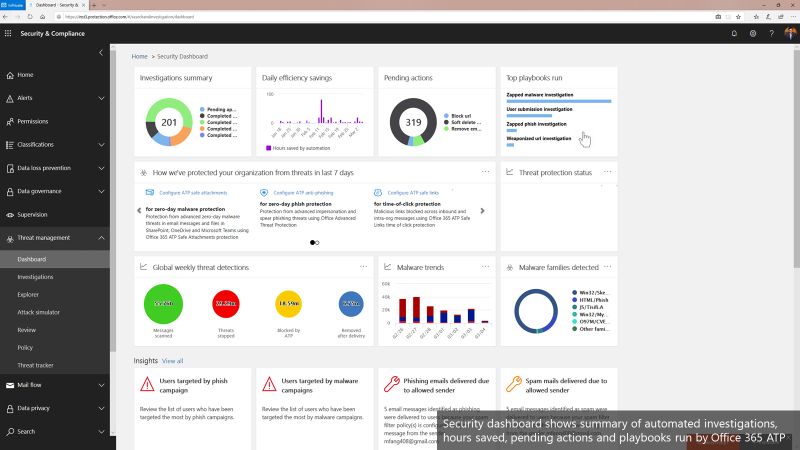
Office 365 ATP offers unparalleled protection from targeted and zero-day attacks over email and other collaboration vectors. Building over the massive threat intelligence signal available in the Microsoft Intelligent Security Graph and pairing it with sophisticated Machine Learning algorithms, Office 365 ATP offers security teams best-in-class prevention, detection and response capabilities to keep their organizations secure with stellar effectiveness and efficiency. And today we’re extremely excited to announce new Automation capabilities in Office 365 ATP that further amplify the efficiency of security teams as they investigate and respond to threats within their organization.
The broad intelligence of the Microsoft Security Graph that supports all of the Advanced Threat Protection products from Microsoft and the deep integration between them forms the backbone of Microsoft Threat Protection that offers security teams amazing capabilities to protect their organizations across their users, devices, email, applications, data and infrastructure. And the automation capabilities we’re announcing today further strengthen the overall automation story of Microsoft Threat Protection.
Security Dashboard showing summary of automated investigations
Challenges faced by SecOps today
To set some context, we continue to hear from customers that dealing with incident response quickly and effectively is a big challenge facing their SecOps teams. One key issue is the lack of available resources and expertise needed to analyze signals and respond to incidents in an efficient way. There are just too many alerts to investigate and signals to correlate. And SecOps teams are constantly struggling with budget and time.
A typical Security team member goes through the following cycle of investigation day in and day out.
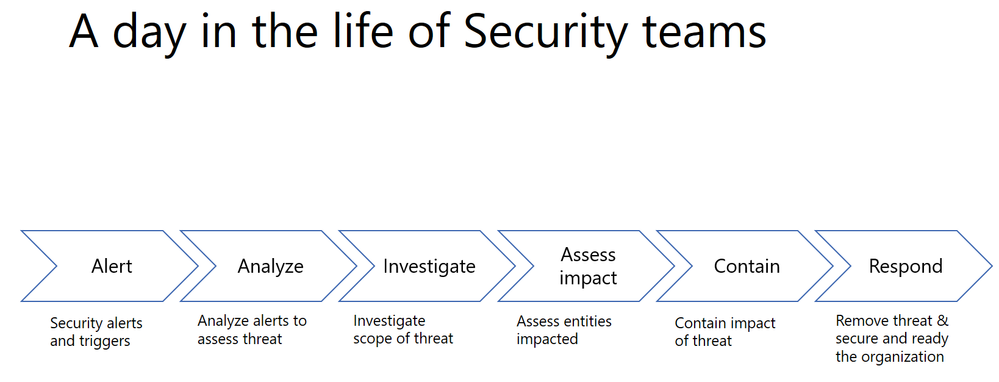
Every single security alert goes through the above process and with the huge volume of alerts that need to be looked at, it can quickly become challenging for security teams to scale. Intelligent correlation of signals and automatic investigation of alerts can significantly reduce the manual effort and time for incident response.
Automation can significantly reduce the time, effort and resources needed for incident response
Last year, we shared how Office 365 ATP can help security teams become more effective and efficient in the threat investigation and response process. This research from Forrester also revealed huge cost savings when using our Office 365 Threat Intelligence service.

The new automation capabilities in Office 365 ATP goes even further in being able to bring more effectiveness and efficiency into SecOps flows.
Introducing new security playbooks within Office 365 ATP
Security playbooks are the foundation of automated incident response. They are the back-end policies that admins can select to trigger automatic investigation. The playbooks are built off our experience with real-world security scenarios. Based on our visibility and experience into the threat landscape we’ve designed these playbooks which tackle the most frequent threats.
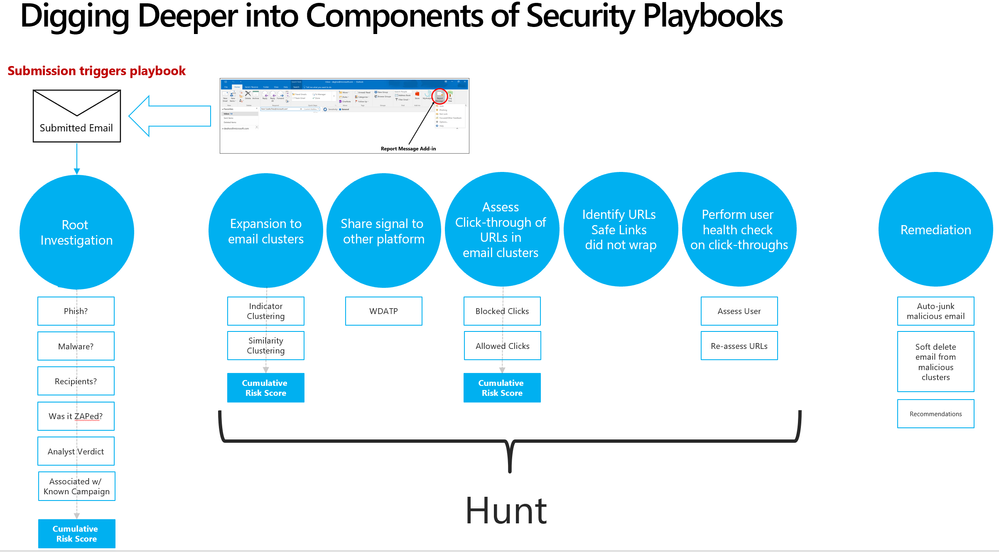 Security playbooks are the foundation of AIR
We’re delighted to announce the public preview of two playbooks that help investigate key threats and alerts within Office 365 with recommended actions for containment and mitigation.
- User reports a phishing email— This alert will trigger an automatic investigation using the User Reported Messages Playbook when users use the “Report Message” button to report a phishing email.
- User clicks on a malicious link— This alert will trigger an automatic investigation using the Weaponized URL playbook when an Office 365 ATP Safe Links protected URL clicked by a user is determined to be malicious through detonation (change in verdict) or if the user overrides (clicks through) the Office 365 ATP Safe Links warning pages.
Over the new few weeks and months we’ll continue to add even more playbooks.
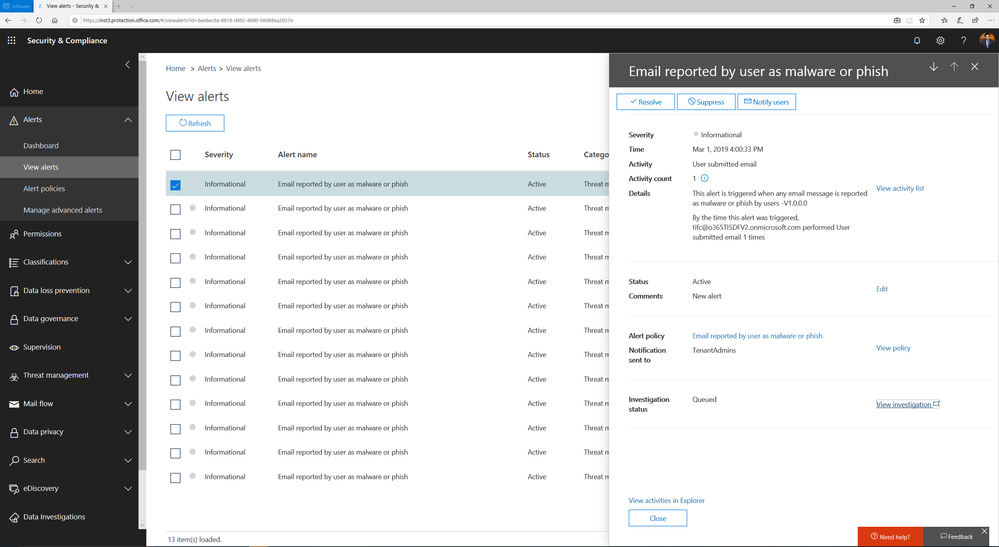 Alert automatically triggers investigation when a user reports an email as phish
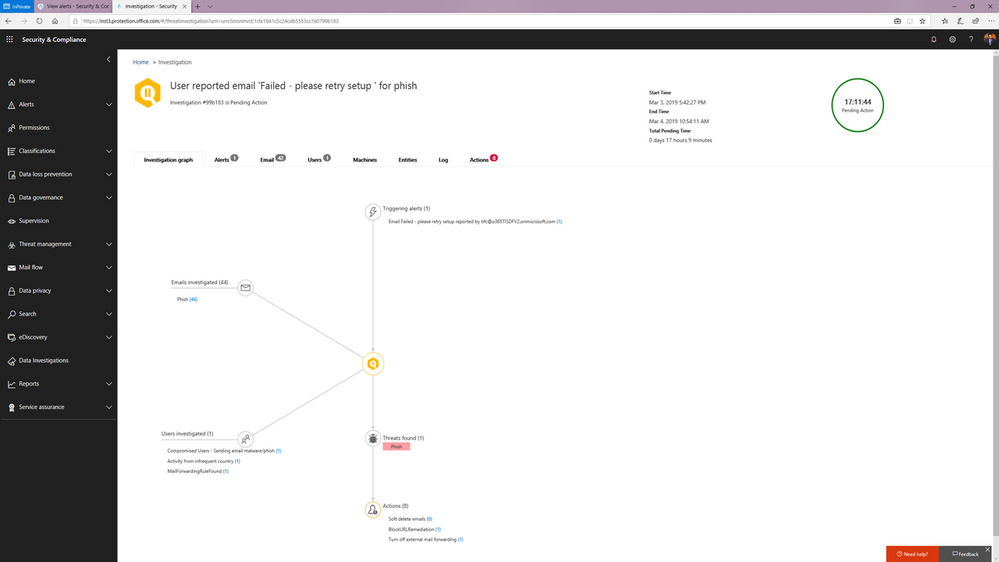 Investigation graph showing a summary of relevant emails and users with threats and recommended actions.
You can learn more about how the SecOps teams can use these playbooks in this article.
Watch below:
to see the playbooks in action.
Triggering an automated investigation from the Threat Explorer
In addition to these playbooks, we’re also adding the ability to manually trigger automated investigations from the Threat Explorer. The Threat Explorer has become an invaluable tool for many security teams to hunt for and investigate threats within the O365 productivity suite as security teams use it to search for bad actors or IOCs. With the new ability to trigger an automatic investigation from within the Threat Explorer, security teams can leverage the efficiency and effectiveness gains that come with automation as part their hunting/investigation flow. This allows them to gain visibility into any potential threat instantly with relevant recommendations.
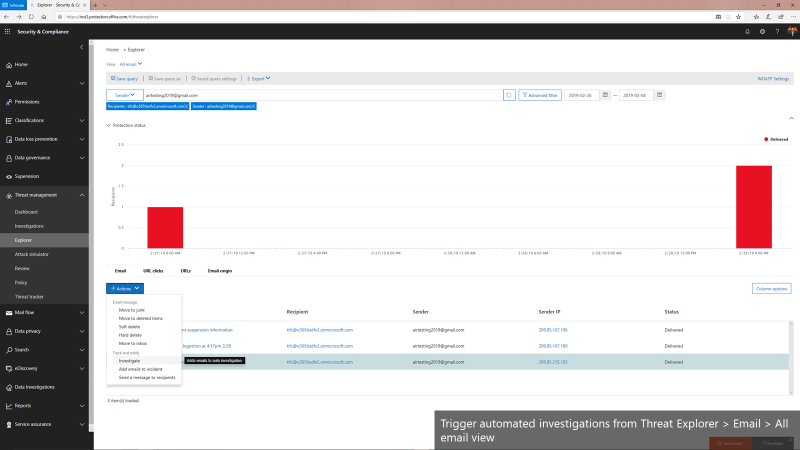 Triggering automated investigations from the Threat Explorer for All email view
We’re only getting started
Automation for incident response will become a much more important part of an enterprise-grade security solution. It can help mitigate more threats in real-time, reduce the time for detection and recovery, and ultimately, improve the efficiency, accuracy, and overall security for any organization. Just as important, it frees up time for the organization’s key security expertise to focus on more complicated problems – getting more out of their most trained experts.
The automation capabilities announced today paired with the automation within the Microsoft Defender Advanced Threat Protection offering form the backbone of the powerful integrated automated protection that comes as part of the Microsoft Threat Protection stack to enable better
detection, more insightful investigations, and more rapid remediation across multiple vectors such as emails, users and devices.
This is just the beginning. We’ll be rolling out more playbooks to address the most common threat scenarios. We invite you to try these playbooks out and provide feedback.
Office 365 ATP offers unparalleled protection from targeted and zero-day attacks over email and other collaboration vectors. Building over the massive threat intelligence signal available in the Microsoft Intelligent Security Graph and pairing it with sophisticated Machine Learning algorithms, Office 365 ATP offers security teams best-in-class prevention, detection and response capabilities to keep their organizations secure with stellar effectiveness and efficiency. And today we’re extremely excited to announce new Automation capabilities in Office 365 ATP that further amplify the efficiency of security teams as they investigate and respond to threats within their organization.
The broad intelligence of the Microsoft Security Graph that supports all of the Advanced Threat Protection products from Microsoft and the deep integration between them forms the backbone of Microsoft Threat Protection that offers security teams amazing capabilities to protect their organizations across their users, devices, email, applications, data and infrastructure. And the automation capabilities we’re announcing today further strengthen the overall automation story of Microsoft Threat Protection.
Security Dashboard showing summary of automated investigations
Challenges faced by SecOps today
To set some context, we continue to hear from customers that dealing with incident response quickly and effectively is a big challenge facing their SecOps teams. One key issue is the lack of available resources and expertise needed to analyze signals and respond to incidents in an efficient way. There are just too many alerts to investigate and signals to correlate. And SecOps teams are constantly struggling with budget and time.
A typical Security team member goes through the following cycle of investigation day in and day out.
Every single security alert goes through the above process and with the huge volume of alerts that need to be looked at, it can quickly become challenging for security teams to scale. Intelligent correlation of signals and automatic investigation of alerts can significantly reduce the manual effort and time for incident response.
Automation can significantly reduce the time, effort and resources needed for incident response
Last year, we shared how Office 365 ATP can help security teams become more effective and efficient in the threat investigation and response process. This research from Forrester also revealed huge cost savings when using our Office 365 Threat Intelligence service.
The new automation capabilities in Office 365 ATP goes even further in being able to bring more effectiveness and efficiency into SecOps flows.
Introducing new security playbooks within Office 365 ATP
Security playbooks are the foundation of automated incident response. They are the back-end policies that admins can select to trigger automatic investigation. The playbooks are built off our experience with real-world security scenarios. Based on our visibility and experience into the threat landscape we’ve designed these playbooks which tackle the most frequent threats.
Security playbooks are the foundation of AIR
We’re delighted to announce the public preview of two playbooks that help investigate key threats and alerts within Office 365 with recommended actions for containment and mitigation.
- User reports a phishing email— This alert will trigger an automatic investigation using the User Reported Messages Playbook when users use the “Report Message” button to report a phishing email.
- User clicks on a malicious link— This alert will trigger an automatic investigation using the Weaponized URL playbook when an Office 365 ATP Safe Links protected URL clicked by a user is determined to be malicious through detonation (change in verdict) or if the user overrides (clicks through) the Office 365 ATP Safe Links warning pages.
Over the new few weeks and months we’ll continue to add even more playbooks.
Alert automatically triggers investigation when a user reports an email as phish
Investigation graph showing a summary of relevant emails and users with threats and recommended actions.
You can learn more about how the SecOps teams can use these playbooks in this article.
Watch below:
to see the playbooks in action.
Triggering an automated investigation from the Threat Explorer
In addition to these playbooks, we’re also adding the ability to manually trigger automated investigations from the Threat Explorer. The Threat Explorer has become an invaluable tool for many security teams to hunt for and investigate threats within the O365 productivity suite as security teams use it to search for bad actors or IOCs. With the new ability to trigger an automatic investigation from within the Threat Explorer, security teams can leverage the efficiency and effectiveness gains that come with automation as part their hunting/investigation flow. This allows them to gain visibility into any potential threat instantly with relevant recommendations.
Triggering automated investigations from the Threat Explorer for All email view
We’re only getting started
Automation for incident response will become a much more important part of an enterprise-grade security solution. It can help mitigate more threats in real-time, reduce the time for detection and recovery, and ultimately, improve the efficiency, accuracy, and overall security for any organization. Just as important, it frees up time for the organization’s key security expertise to focus on more complicated problems – getting more out of their most trained experts.
The automation capabilities announced today paired with the automation within the Microsoft Defender Advanced Threat Protection offering form the backbone of the powerful integrated automated protection that comes as part of the Microsoft Threat Protection stack to enable better
detection, more insightful investigations, and more rapid remediation across multiple vectors such as emails, users and devices.
This is just the beginning. We’ll be rolling out more playbooks to address the most common threat scenarios. We invite you to try these playbooks out and provide feedback.
Office 365 ATP offers unparalleled protection from targeted and zero-day attacks over email and other collaboration vectors. Building over the massive threat intelligence signal available in the Microsoft Intelligent Security Graph and pairing it with sophisticated Machine Learning algorithms, Office 365 ATP offers security teams best-in-class prevention, detection and response capabilities to keep their organizations secure with stellar effectiveness and efficiency. And today we’re extremely excited to announce new Automation capabilities in Office 365 ATP that further amplify the efficiency of security teams as they investigate and respond to threats within their organization.
The broad intelligence of the Microsoft Security Graph that supports all of the Advanced Threat Protection products from Microsoft and the deep integration between them forms the backbone of Microsoft Threat Protection that offers security teams amazing capabilities to protect their organizations across their users, devices, email, applications, data and infrastructure. And the automation capabilities we’re announcing today further strengthen the overall automation story of Microsoft Threat Protection.
Security Dashboard showing summary of automated investigations
Challenges faced by SecOps today
To set some context, we continue to hear from customers that dealing with incident response quickly and effectively is a big challenge facing their SecOps teams. One key issue is the lack of available resources and expertise needed to analyze signals and respond to incidents in an efficient way. There are just too many alerts to investigate and signals to correlate. And SecOps teams are constantly struggling with budget and time.
A typical Security team member goes through the following cycle of investigation day in and day out.
Every single security alert goes through the above process and with the huge volume of alerts that need to be looked at, it can quickly become challenging for security teams to scale. Intelligent correlation of signals and automatic investigation of alerts can significantly reduce the manual effort and time for incident response.
Automation can significantly reduce the time, effort and resources needed for incident response
Last year, we shared how Office 365 ATP can help security teams become more effective and efficient in the threat investigation and response process. This research from Forrester also revealed huge cost savings when using our Office 365 Threat Intelligence service.
The new automation capabilities in Office 365 ATP goes even further in being able to bring more effectiveness and efficiency into SecOps flows.
Introducing new security playbooks within Office 365 ATP
Security playbooks are the foundation of automated incident response. They are the back-end policies that admins can select to trigger automatic investigation. The playbooks are built off our experience with real-world security scenarios. Based on our visibility and experience into the threat landscape we’ve designed these playbooks which tackle the most frequent threats.
Security playbooks are the foundation of AIR
We’re delighted to announce the public preview of two playbooks that help investigate key threats and alerts within Office 365 with recommended actions for containment and mitigation.
- User reports a phishing email— This alert will trigger an automatic investigation using the User Reported Messages Playbook when users use the “Report Message” button to report a phishing email.
- User clicks on a malicious link— This alert will trigger an automatic investigation using the Weaponized URL playbook when an Office 365 ATP Safe Links protected URL clicked by a user is determined to be malicious through detonation (change in verdict) or if the user overrides (clicks through) the Office 365 ATP Safe Links warning pages.
Over the new few weeks and months we’ll continue to add even more playbooks.
Alert automatically triggers investigation when a user reports an email as phish
Investigation graph showing a summary of relevant emails and users with threats and recommended actions.
You can learn more about how the SecOps teams can use these playbooks in this article.
Watch below:
to see the playbooks in action.
Triggering an automated investigation from the Threat Explorer
In addition to these playbooks, we’re also adding the ability to manually trigger automated investigations from the Threat Explorer. The Threat Explorer has become an invaluable tool for many security teams to hunt for and investigate threats within the O365 productivity suite as security teams use it to search for bad actors or IOCs. With the new ability to trigger an automatic investigation from within the Threat Explorer, security teams can leverage the efficiency and effectiveness gains that come with automation as part their hunting/investigation flow. This allows them to gain visibility into any potential threat instantly with relevant recommendations.
Triggering automated investigations from the Threat Explorer for All email view
We’re only getting started
Automation for incident response will become a much more important part of an enterprise-grade security solution. It can help mitigate more threats in real-time, reduce the time for detection and recovery, and ultimately, improve the efficiency, accuracy, and overall security for any organization. Just as important, it frees up time for the organization’s key security expertise to focus on more complicated problems – getting more out of their most trained experts.
The automation capabilities announced today paired with the automation within the Microsoft Defender Advanced Threat Protection offering form the backbone of the powerful integrated automated protection that comes as part of the Microsoft Threat Protection stack to enable better
detection, more insightful investigations, and more rapid remediation across multiple vectors such as emails, users and devices.
This is just the beginning. We’ll be rolling out more playbooks to address the most common threat scenarios. We invite you to try these playbooks out and provide feedback.
Office 365 ATP offers unparalleled protection from targeted and zero-day attacks over email and other collaboration vectors. Building over the massive threat intelligence signal available in the Microsoft Intelligent Security Graph and pairing it with sophisticated Machine Learning algorithms, Office 365 ATP offers security teams best-in-class prevention, detection and response capabilities to keep their organizations secure with stellar effectiveness and efficiency. And today we’re extremely excited to announce new Automation capabilities in Office 365 ATP that further amplify the efficiency of security teams as they investigate and respond to threats within their organization.
The broad intelligence of the Microsoft Security Graph that supports all of the Advanced Threat Protection products from Microsoft and the deep integration between them forms the backbone of Microsoft Threat Protection that offers security teams amazing capabilities to protect their organizations across their users, devices, email, applications, data and infrastructure. And the automation capabilities we’re announcing today further strengthen the overall automation story of Microsoft Threat Protection.
Security Dashboard showing summary of automated investigations
Challenges faced by SecOps today
To set some context, we continue to hear from customers that dealing with incident response quickly and effectively is a big challenge facing their SecOps teams. One key issue is the lack of available resources and expertise needed to analyze signals and respond to incidents in an efficient way. There are just too many alerts to investigate and signals to correlate. And SecOps teams are constantly struggling with budget and time.
A typical Security team member goes through the following cycle of investigation day in and day out.
Every single security alert goes through the above process and with the huge volume of alerts that need to be looked at, it can quickly become challenging for security teams to scale. Intelligent correlation of signals and automatic investigation of alerts can significantly reduce the manual effort and time for incident response.
Automation can significantly reduce the time, effort and resources needed for incident response
Last year, we shared how Office 365 ATP can help security teams become more effective and efficient in the threat investigation and response process. This research from Forrester also revealed huge cost savings when using our Office 365 Threat Intelligence service.
The new automation capabilities in Office 365 ATP goes even further in being able to bring more effectiveness and efficiency into SecOps flows.
Introducing new security playbooks within Office 365 ATP
Security playbooks are the foundation of automated incident response. They are the back-end policies that admins can select to trigger automatic investigation. The playbooks are built off our experience with real-world security scenarios. Based on our visibility and experience into the threat landscape we’ve designed these playbooks which tackle the most frequent threats.
Security playbooks are the foundation of AIR
We’re delighted to announce the public preview of two playbooks that help investigate key threats and alerts within Office 365 with recommended actions for containment and mitigation.
- User reports a phishing email— This alert will trigger an automatic investigation using the User Reported Messages Playbook when users use the “Report Message” button to report a phishing email.
- User clicks on a malicious link— This alert will trigger an automatic investigation using the Weaponized URL playbook when an Office 365 ATP Safe Links protected URL clicked by a user is determined to be malicious through detonation (change in verdict) or if the user overrides (clicks through) the Office 365 ATP Safe Links warning pages.
Over the new few weeks and months we’ll continue to add even more playbooks.
Alert automatically triggers investigation when a user reports an email as phish
Investigation graph showing a summary of relevant emails and users with threats and recommended actions.
You can learn more about how the SecOps teams can use these playbooks in this article.
Watch below:
to see the playbooks in action.
Triggering an automated investigation from the Threat Explorer
In addition to these playbooks, we’re also adding the ability to manually trigger automated investigations from the Threat Explorer. The Threat Explorer has become an invaluable tool for many security teams to hunt for and investigate threats within the O365 productivity suite as security teams use it to search for bad actors or IOCs. With the new ability to trigger an automatic investigation from within the Threat Explorer, security teams can leverage the efficiency and effectiveness gains that come with automation as part their hunting/investigation flow. This allows them to gain visibility into any potential threat instantly with relevant recommendations.
Triggering automated investigations from the Threat Explorer for All email view
We’re only getting started
Automation for incident response will become a much more important part of an enterprise-grade security solution. It can help mitigate more threats in real-time, reduce the time for detection and recovery, and ultimately, improve the efficiency, accuracy, and overall security for any organization. Just as important, it frees up time for the organization’s key security expertise to focus on more complicated problems – getting more out of their most trained experts.
The automation capabilities announced today paired with the automation within the Microsoft Defender Advanced Threat Protection offering form the backbone of the powerful integrated automated protection that comes as part of the Microsoft Threat Protection stack to enable better
detection, more insightful investigations, and more rapid remediation across multiple vectors such as emails, users and devices.
This is just the beginning. We’ll be rolling out more playbooks to address the most common threat scenarios. We invite you to try these playbooks out and provide feedback.
Exchange Mailbox Auditing has now been enabled by default and rolled out worldwide, with the rollout to Unified Audit Log in Security and Compliance Center still in progress. If you are an Office 365 Customer, you should be able to search and retrieve your audit data with Search-MailboxAuditLog.
As part of this change, we are also introducing the DefaultAuditSet parameter which would help you get back to the default set of verbs. DefaultAuditSet can be used to set the different action sets (Owner, Admin, Delegate) back to the service default audit events on a per-mailbox basis.
As an example, If you want to bring Owner action sets back to default for a mailbox which was on custom events for all action sets, you perform the following operations:
Set-Mailbox [username] -DefaultAuditSet Owner
Now if you verify this through Get-Mailbox, you will be able to see that AuditOwner is set to the default set of actions:
Get-Mailbox [username] | fl AuditOwner, AuditAdmin, AuditDelegate
Output:
AuditOwner : {Update, MoveToDeletedItems, SoftDelete, HardDelete, UpdateFolderPermissions, UpdateInboxRules, UpdateCalendarDelegation}
AuditAdmin : {Update, MoveToDeletedItems, SoftDelete, HardDelete, SendAs, SendOnBehalf,
UpdateCalendarDelegation}
AuditDelegate : {Move}
To remove a mailbox from the default audit set event, you can go ahead, and add custom actions to the mailbox. This would remove it from the default set of actions. However, this would also mean, that any future audit events added to the default set would not be available automatically by default, and would need to be added manually.
Find more information:
Exchange Mailbox Auditing has now been enabled by default and rolled out worldwide, with the rollout to Unified Audit Log in Security and Compliance Center still in progress. If you are an Office 365 Customer, you should be able to search and retrieve your audit data with Search-MailboxAuditLog.
As part of this change, we are also introducing the DefaultAuditSet parameter which would help you get back to the default set of verbs. DefaultAuditSet can be used to set the different action sets (Owner, Admin, Delegate) back to the service default audit events on a per-mailbox basis.
As an example, If you want to bring Owner action sets back to default for a mailbox which was on custom events for all action sets, you perform the following operations:
Set-Mailbox [username] -DefaultAuditSet Owner
Now if you verify this through Get-Mailbox, you will be able to see that AuditOwner is set to the default set of actions:
Get-Mailbox [username] | fl AuditOwner, AuditAdmin, AuditDelegate
Output:
AuditOwner : {Update, MoveToDeletedItems, SoftDelete, HardDelete, UpdateFolderPermissions, UpdateInboxRules, UpdateCalendarDelegation}
AuditAdmin : {Update, MoveToDeletedItems, SoftDelete, HardDelete, SendAs, SendOnBehalf,
UpdateCalendarDelegation}
AuditDelegate : {Move}
To remove a mailbox from the default audit set event, you can go ahead, and add custom actions to the mailbox. This would remove it from the default set of actions. However, this would also mean, that any future audit events added to the default set would not be available automatically by default, and would need to be added manually.
Find more information:
Exchange Mailbox Auditing has now been enabled by default and rolled out worldwide, with the rollout to Unified Audit Log in Security and Compliance Center still in progress. If you are an Office 365 Customer, you should be able to search and retrieve your audit data with Search-MailboxAuditLog.
As part of this change, we are also introducing the DefaultAuditSet parameter which would help you get back to the default set of verbs. DefaultAuditSet can be used to set the different action sets (Owner, Admin, Delegate) back to the service default audit events on a per-mailbox basis.
As an example, If you want to bring Owner action sets back to default for a mailbox which was on custom events for all action sets, you perform the following operations:
Set-Mailbox [username] -DefaultAuditSet Owner
Now if you verify this through Get-Mailbox, you will be able to see that AuditOwner is set to the default set of actions:
Get-Mailbox [username] | fl AuditOwner, AuditAdmin, AuditDelegate
Output:
AuditOwner : {Update, MoveToDeletedItems, SoftDelete, HardDelete, UpdateFolderPermissions, UpdateInboxRules, UpdateCalendarDelegation}
AuditAdmin : {Update, MoveToDeletedItems, SoftDelete, HardDelete, SendAs, SendOnBehalf,
UpdateCalendarDelegation}
AuditDelegate : {Move}
To remove a mailbox from the default audit set event, you can go ahead, and add custom actions to the mailbox. This would remove it from the default set of actions. However, this would also mean, that any future audit events added to the default set would not be available automatically by default, and would need to be added manually.
Find more information:
Exchange Mailbox Auditing has now been enabled by default and rolled out worldwide, with the rollout to Unified Audit Log in Security and Compliance Center still in progress. If you are an Office 365 Customer, you should be able to search and retrieve your audit data with Search-MailboxAuditLog.
As part of this change, we are also introducing the DefaultAuditSet parameter which would help you get back to the default set of verbs. DefaultAuditSet can be used to set the different action sets (Owner, Admin, Delegate) back to the service default audit events on a per-mailbox basis.
As an example, If you want to bring Owner action sets back to default for a mailbox which was on custom events for all action sets, you perform the following operations:
Set-Mailbox [username] -DefaultAuditSet Owner
Now if you verify this through Get-Mailbox, you will be able to see that AuditOwner is set to the default set of actions:
Get-Mailbox [username] | fl AuditOwner, AuditAdmin, AuditDelegate
Output:
AuditOwner : {Update, MoveToDeletedItems, SoftDelete, HardDelete, UpdateFolderPermissions, UpdateInboxRules, UpdateCalendarDelegation}
AuditAdmin : {Update, MoveToDeletedItems, SoftDelete, HardDelete, SendAs, SendOnBehalf,
UpdateCalendarDelegation}
AuditDelegate : {Move}
To remove a mailbox from the default audit set event, you can go ahead, and add custom actions to the mailbox. This would remove it from the default set of actions. However, this would also mean, that any future audit events added to the default set would not be available automatically by default, and would need to be added manually.
Find more information:
With electronic data growing exponentially across the digital estate and the increased number of new privacy regulations emerging, consumers are more aware of their privacy rights now more than ever. Compliance and privacy professionals need more tools to help them safeguard sensitive information and reduce compliance risks. To empower organizations to more effectively and efficiently take control of their data privacy, we introduced the new Microsoft 365 compliance center in January and are excited to announce its general availability today!
The new Microsoft 365 compliance center enables you to assess compliance risks and posture, protect and govern your data, and respond to data discovery requests in a timely manner. Here, we highlight several key compliance capabilities in the three scenarios below.
Simplify assessment of compliance risks and posture with actionable insights
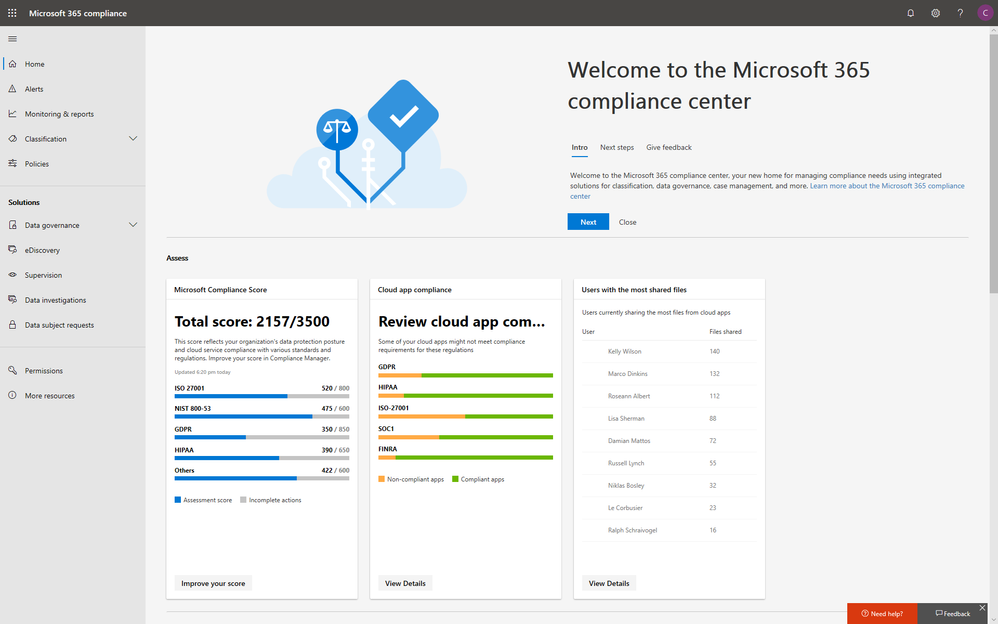
On the Microsoft 365 compliance center homepage, you can easily find actionable insights in the Assess, Protect, and Respond sections with signals across the Microsoft 365 feature set. The homepage is the go-to dashboard for compliance and privacy teams to examine their organization’s data compliance posture.
To help with your regulatory compliance, we’ve brought in score insights from Compliance Manager, a cloud-based tool that helps you perform on-going risk assessments, and provides step-by-step guidance on implementing compliance controls. It also tracks and records your compliance activities to help you prepare for internal and external audits. On the Compliance Manager card, you can find a quick summary of your current compliance posture for regulations and standards including: GDPR, ISO 27001, and NIST 800-53. From here, you can visit Compliance Manager to improve your Microsoft Compliance Score.
In addition to the score, you can also find insights from Microsoft Cloud App Security (MCAS) including: third-party application usage, application compliance statuses, both the users and files shared most from cloud applications, and shadow IT applications as well. Additionally, with signals from Data Loss Prevention, you can quickly examine your DLP policy matches and create new policies to protect your sensitive data.
Integrated protection and governance of sensitive data across devices, apps, and cloud services
To help you better protect your digital estate across devices, apps, and cloud services, we aggregated the signals for risky compliance activities in your organization’s environment, and helped you highlight the high severity ones with details so that you take the appropriate actions to remediate risks.
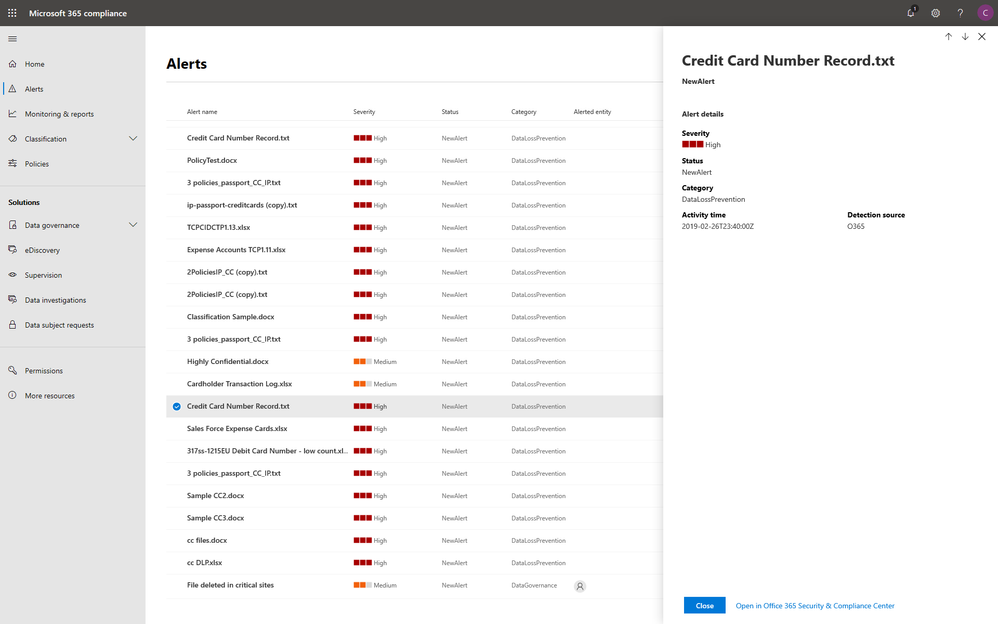
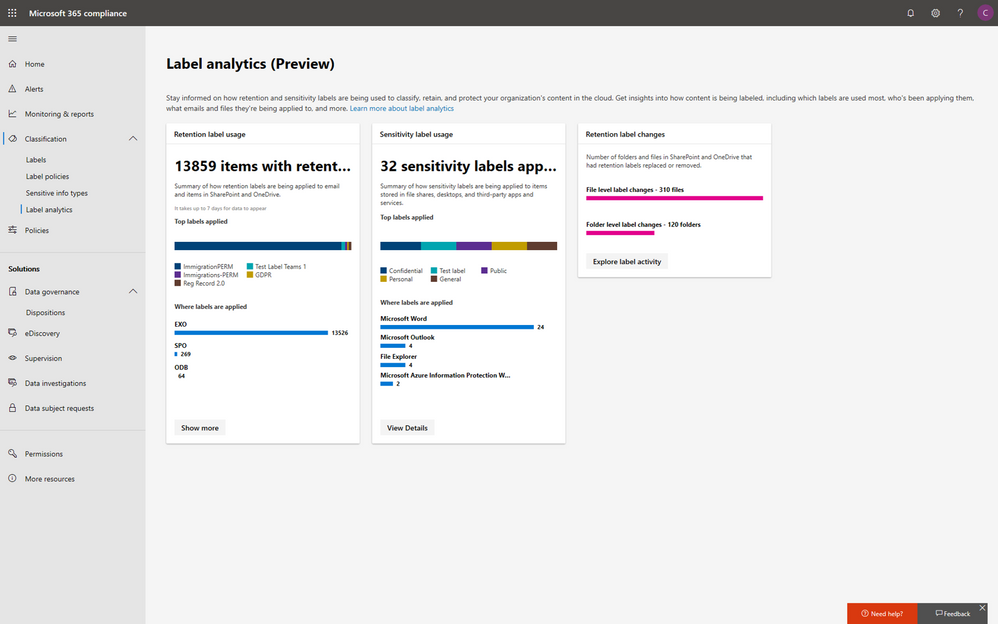
Within the new compliance center, you can also classify your most important data with sensitivity and retention labels, and configure protection and governance policies with a unified experience. Additionally, the Label analytics functionality in public preview gives you label insights across your Office 365 and non-Office 365 workloads, helping you analyze and validate your label usage.
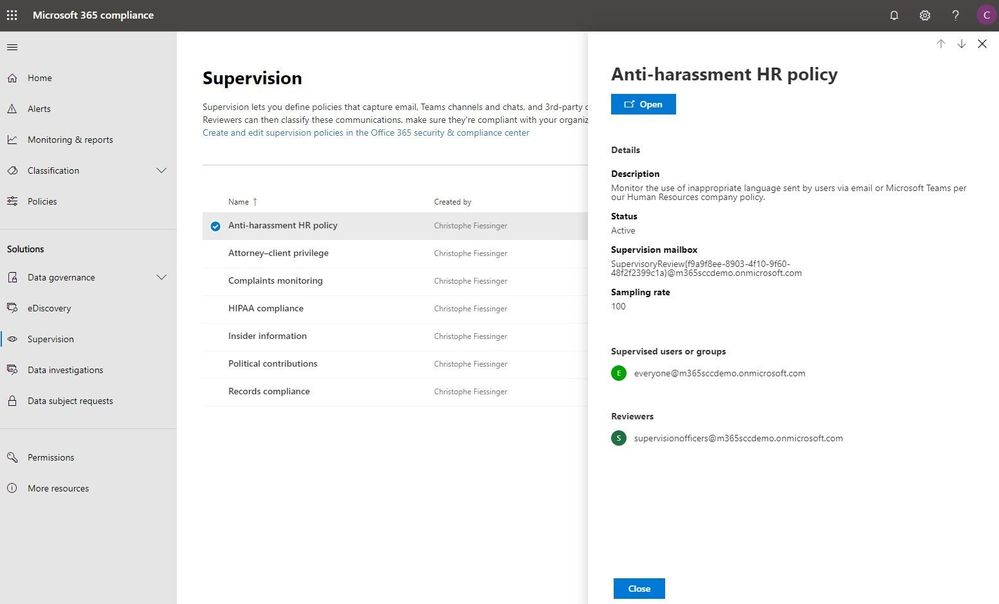
Under the solutions area, you can easily access compliance features that help you better govern your data. The disposition review under Data governance helps you review the content when it reaches the end of its retention period, for you to make a final decision about keeping or deleting the data. Additionally, Supervision helps organization meet communication-monitoring requirements to address internal policies or regulatory compliance. You can establish policies with intelligent conditions and identify Teams or users and the related channels or chat messages to be included in the supervision policy. Supervisors can then review content with the new built-in review experience to tag, escalate, and bulk resolve.
Intelligently respond to data discovery requests by leveraging AI to find the most relevant data
The cost of compliance has continuously increased in the past few years due to new regulations like GDPR, and the growing amount of electronic data. Organizations need assistance to discover the most relevant data to respond to regulatory requests like the Data Subject Access Requests (DSARs).
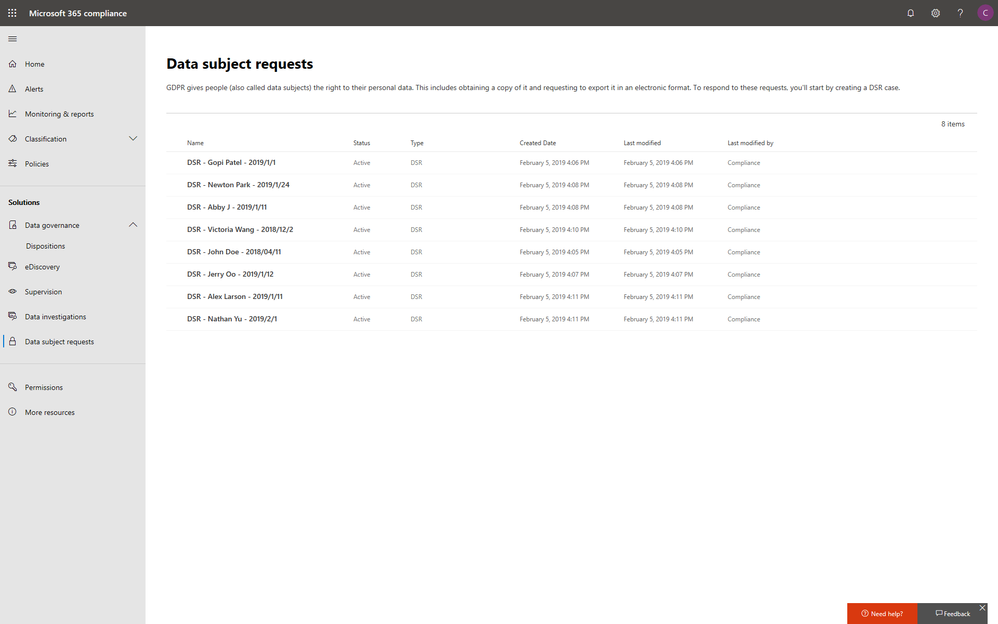
In the new Microsoft 365 compliance center, you can access the Data Subject Requests tool to create DSR cases and identify your employees’ personal data with built-in content search capabilities. With Advanced eDiscovery, you can reduce the cost and risk of common eDiscovery processes with custodian management, hold notifications, working sets and review and redact functionality built into Microsoft 365 directly.
In addition to data discovery, Microsoft 365 compliance center also provides you with access to data investigations solution in preview, which helps organizations to search for leaked or unprotected sensitive data and take actions like deleting emails or documents to remediate risks.
We will keep adding more compliance solutions like audit log search, content search, retention policies, archiving and more in the Microsoft 365 compliance center soon to reach parity with the solutions we provide in Office 365 Security & Compliance Center. Please don’t hesitate to give us feedback from the feedback button in the new center.
Get started today
To get the new Microsoft 365 security center and Microsoft 365 compliance center, your organization must have a subscription to Microsoft 365 E3 or E5, or a Volume Licensing equivalent (which consists of Office 365 Enterprise E3 or E5, Enterprise Mobility + Security E3 or E5, and Windows 10 Enterprise E3/E5). We plan to expand access to additional subscriptions and license types later in the year. Users must be assigned the Global Administrator, Compliance Administrator, or Compliance Data Administrator role in Azure Active Directory to access the new Microsoft 365 compliance center.
You can start using the Microsoft 365 compliance center today by visiting compliance.microsoft.com or through the Microsoft 365 admin center. Learn more about the new experience in our technical supporting document.
With electronic data growing exponentially across the digital estate and the increased number of new privacy regulations emerging, consumers are more aware of their privacy rights now more than ever. Compliance and privacy professionals need more tools to help them safeguard sensitive information and reduce compliance risks. To empower organizations to more effectively and efficiently take control of their data privacy, we introduced the new Microsoft 365 compliance center in January and are excited to announce its general availability today!
The new Microsoft 365 compliance center enables you to assess compliance risks and posture, protect and govern your data, and respond to data discovery requests in a timely manner. Here, we highlight several key compliance capabilities in the three scenarios below.
Simplify assessment of compliance risks and posture with actionable insights
On the Microsoft 365 compliance center homepage, you can easily find actionable insights in the Assess, Protect, and Respond sections with signals across the Microsoft 365 feature set. The homepage is the go-to dashboard for compliance and privacy teams to examine their organization’s data compliance posture.
To help with your regulatory compliance, we’ve brought in score insights from Compliance Manager, a cloud-based tool that helps you perform on-going risk assessments, and provides step-by-step guidance on implementing compliance controls. It also tracks and records your compliance activities to help you prepare for internal and external audits. On the Compliance Manager card, you can find a quick summary of your current compliance posture for regulations and standards including: GDPR, ISO 27001, and NIST 800-53. From here, you can visit Compliance Manager to improve your Microsoft Compliance Score.
In addition to the score, you can also find insights from Microsoft Cloud App Security (MCAS) including: third-party application usage, application compliance statuses, both the users and files shared most from cloud applications, and shadow IT applications as well. Additionally, with signals from Data Loss Prevention, you can quickly examine your DLP policy matches and create new policies to protect your sensitive data.
Integrated protection and governance of sensitive data across devices, apps, and cloud services
To help you better protect your digital estate across devices, apps, and cloud services, we aggregated the signals for risky compliance activities in your organization’s environment, and helped you highlight the high severity ones with details so that you take the appropriate actions to remediate risks.
Within the new compliance center, you can also classify your most important data with sensitivity and retention labels, and configure protection and governance policies with a unified experience. Additionally, the Label analytics functionality in public preview gives you label insights across your Office 365 and non-Office 365 workloads, helping you analyze and validate your label usage.
Under the solutions area, you can easily access compliance features that help you better govern your data. The disposition review under Data governance helps you review the content when it reaches the end of its retention period, for you to make a final decision about keeping or deleting the data. Additionally, Supervision helps organization meet communication-monitoring requirements to address internal policies or regulatory compliance. You can establish policies with intelligent conditions and identify Teams or users and the related channels or chat messages to be included in the supervision policy. Supervisors can then review content with the new built-in review experience to tag, escalate, and bulk resolve.
Intelligently respond to data discovery requests by leveraging AI to find the most relevant data
The cost of compliance has continuously increased in the past few years due to new regulations like GDPR, and the growing amount of electronic data. Organizations need assistance to discover the most relevant data to respond to regulatory requests like the Data Subject Access Requests (DSARs).
In the new Microsoft 365 compliance center, you can access the Data Subject Requests tool to create DSR cases and identify your employees’ personal data with built-in content search capabilities. With Advanced eDiscovery, you can reduce the cost and risk of common eDiscovery processes with custodian management, hold notifications, working sets and review and redact functionality built into Microsoft 365 directly.
In addition to data discovery, Microsoft 365 compliance center also provides you with access to data investigations solution in preview, which helps organizations to search for leaked or unprotected sensitive data and take actions like deleting emails or documents to remediate risks.
We will keep adding more compliance solutions like audit log search, content search, retention policies, archiving and more in the Microsoft 365 compliance center soon to reach parity with the solutions we provide in Office 365 Security & Compliance Center. Please don’t hesitate to give us feedback from the feedback button in the new center.
Get started today
To get the new Microsoft 365 security center and Microsoft 365 compliance center, your organization must have a subscription to Microsoft 365 E3 or E5, or a Volume Licensing equivalent (which consists of Office 365 Enterprise E3 or E5, Enterprise Mobility + Security E3 or E5, and Windows 10 Enterprise E3/E5). We plan to expand access to additional subscriptions and license types later in the year. Users must be assigned the Global Administrator, Compliance Administrator, or Compliance Data Administrator role in Azure Active Directory to access the new Microsoft 365 compliance center.
You can start using the Microsoft 365 compliance center today by visiting compliance.microsoft.com or through the Microsoft 365 admin center. Learn more about the new experience in our technical supporting document.
With electronic data growing exponentially across the digital estate and the increased number of new privacy regulations emerging, consumers are more aware of their privacy rights now more than ever. Compliance and privacy professionals need more tools to help them safeguard sensitive information and reduce compliance risks. To empower organizations to more effectively and efficiently take control of their data privacy, we introduced the new Microsoft 365 compliance center in January and are excited to announce its general availability today!
The new Microsoft 365 compliance center enables you to assess compliance risks and posture, protect and govern your data, and respond to data discovery requests in a timely manner. Here, we highlight several key compliance capabilities in the three scenarios below.
Simplify assessment of compliance risks and posture with actionable insights
On the Microsoft 365 compliance center homepage, you can easily find actionable insights in the Assess, Protect, and Respond sections with signals across the Microsoft 365 feature set. The homepage is the go-to dashboard for compliance and privacy teams to examine their organization’s data compliance posture.
To help with your regulatory compliance, we’ve brought in score insights from Compliance Manager, a cloud-based tool that helps you perform on-going risk assessments, and provides step-by-step guidance on implementing compliance controls. It also tracks and records your compliance activities to help you prepare for internal and external audits. On the Compliance Manager card, you can find a quick summary of your current compliance posture for regulations and standards including: GDPR, ISO 27001, and NIST 800-53. From here, you can visit Compliance Manager to improve your Microsoft Compliance Score.
In addition to the score, you can also find insights from Microsoft Cloud App Security (MCAS) including: third-party application usage, application compliance statuses, both the users and files shared most from cloud applications, and shadow IT applications as well. Additionally, with signals from Data Loss Prevention, you can quickly examine your DLP policy matches and create new policies to protect your sensitive data.
Integrated protection and governance of sensitive data across devices, apps, and cloud services
To help you better protect your digital estate across devices, apps, and cloud services, we aggregated the signals for risky compliance activities in your organization’s environment, and helped you highlight the high severity ones with details so that you take the appropriate actions to remediate risks.
Within the new compliance center, you can also classify your most important data with sensitivity and retention labels, and configure protection and governance policies with a unified experience. Additionally, the Label analytics functionality in public preview gives you label insights across your Office 365 and non-Office 365 workloads, helping you analyze and validate your label usage.
Under the solutions area, you can easily access compliance features that help you better govern your data. The disposition review under Data governance helps you review the content when it reaches the end of its retention period, for you to make a final decision about keeping or deleting the data. Additionally, Supervision helps organization meet communication-monitoring requirements to address internal policies or regulatory compliance. You can establish policies with intelligent conditions and identify Teams or users and the related channels or chat messages to be included in the supervision policy. Supervisors can then review content with the new built-in review experience to tag, escalate, and bulk resolve.
Intelligently respond to data discovery requests by leveraging AI to find the most relevant data
The cost of compliance has continuously increased in the past few years due to new regulations like GDPR, and the growing amount of electronic data. Organizations need assistance to discover the most relevant data to respond to regulatory requests like the Data Subject Access Requests (DSARs).
In the new Microsoft 365 compliance center, you can access the Data Subject Requests tool to create DSR cases and identify your employees’ personal data with built-in content search capabilities. With Advanced eDiscovery, you can reduce the cost and risk of common eDiscovery processes with custodian management, hold notifications, working sets and review and redact functionality built into Microsoft 365 directly.
In addition to data discovery, Microsoft 365 compliance center also provides you with access to data investigations solution in preview, which helps organizations to search for leaked or unprotected sensitive data and take actions like deleting emails or documents to remediate risks.
We will keep adding more compliance solutions like audit log search, content search, retention policies, archiving and more in the Microsoft 365 compliance center soon to reach parity with the solutions we provide in Office 365 Security & Compliance Center. Please don’t hesitate to give us feedback from the feedback button in the new center.
Get started today
To get the new Microsoft 365 security center and Microsoft 365 compliance center, your organization must have a subscription to Microsoft 365 E3 or E5, or a Volume Licensing equivalent (which consists of Office 365 Enterprise E3 or E5, Enterprise Mobility + Security E3 or E5, and Windows 10 Enterprise E3/E5). We plan to expand access to additional subscriptions and license types later in the year. Users must be assigned the Global Administrator, Compliance Administrator, or Compliance Data Administrator role in Azure Active Directory to access the new Microsoft 365 compliance center.
You can start using the Microsoft 365 compliance center today by visiting compliance.microsoft.com or through the Microsoft 365 admin center. Learn more about the new experience in our technical supporting document.
With electronic data growing exponentially across the digital estate and the increased number of new privacy regulations emerging, consumers are more aware of their privacy rights now more than ever. Compliance and privacy professionals need more tools to help them safeguard sensitive information and reduce compliance risks. To empower organizations to more effectively and efficiently take control of their data privacy, we introduced the new Microsoft 365 compliance center in January and are excited to announce its general availability today!
The new Microsoft 365 compliance center enables you to assess compliance risks and posture, protect and govern your data, and respond to data discovery requests in a timely manner. Here, we highlight several key compliance capabilities in the three scenarios below.
Simplify assessment of compliance risks and posture with actionable insights
On the Microsoft 365 compliance center homepage, you can easily find actionable insights in the Assess, Protect, and Respond sections with signals across the Microsoft 365 feature set. The homepage is the go-to dashboard for compliance and privacy teams to examine their organization’s data compliance posture.
To help with your regulatory compliance, we’ve brought in score insights from Compliance Manager, a cloud-based tool that helps you perform on-going risk assessments, and provides step-by-step guidance on implementing compliance controls. It also tracks and records your compliance activities to help you prepare for internal and external audits. On the Compliance Manager card, you can find a quick summary of your current compliance posture for regulations and standards including: GDPR, ISO 27001, and NIST 800-53. From here, you can visit Compliance Manager to improve your Microsoft Compliance Score.
In addition to the score, you can also find insights from Microsoft Cloud App Security (MCAS) including: third-party application usage, application compliance statuses, both the users and files shared most from cloud applications, and shadow IT applications as well. Additionally, with signals from Data Loss Prevention, you can quickly examine your DLP policy matches and create new policies to protect your sensitive data.
Integrated protection and governance of sensitive data across devices, apps, and cloud services
To help you better protect your digital estate across devices, apps, and cloud services, we aggregated the signals for risky compliance activities in your organization’s environment, and helped you highlight the high severity ones with details so that you take the appropriate actions to remediate risks.
Within the new compliance center, you can also classify your most important data with sensitivity and retention labels, and configure protection and governance policies with a unified experience. Additionally, the Label analytics functionality in public preview gives you label insights across your Office 365 and non-Office 365 workloads, helping you analyze and validate your label usage.
Under the solutions area, you can easily access compliance features that help you better govern your data. The disposition review under Data governance helps you review the content when it reaches the end of its retention period, for you to make a final decision about keeping or deleting the data. Additionally, Supervision helps organization meet communication-monitoring requirements to address internal policies or regulatory compliance. You can establish policies with intelligent conditions and identify Teams or users and the related channels or chat messages to be included in the supervision policy. Supervisors can then review content with the new built-in review experience to tag, escalate, and bulk resolve.
Intelligently respond to data discovery requests by leveraging AI to find the most relevant data
The cost of compliance has continuously increased in the past few years due to new regulations like GDPR, and the growing amount of electronic data. Organizations need assistance to discover the most relevant data to respond to regulatory requests like the Data Subject Access Requests (DSARs).
In the new Microsoft 365 compliance center, you can access the Data Subject Requests tool to create DSR cases and identify your employees’ personal data with built-in content search capabilities. With Advanced eDiscovery, you can reduce the cost and risk of common eDiscovery processes with custodian management, hold notifications, working sets and review and redact functionality built into Microsoft 365 directly.
In addition to data discovery, Microsoft 365 compliance center also provides you with access to data investigations solution in preview, which helps organizations to search for leaked or unprotected sensitive data and take actions like deleting emails or documents to remediate risks.
We will keep adding more compliance solutions like audit log search, content search, retention policies, archiving and more in the Microsoft 365 compliance center soon to reach parity with the solutions we provide in Office 365 Security & Compliance Center. Please don’t hesitate to give us feedback from the feedback button in the new center.
Get started today
To get the new Microsoft 365 security center and Microsoft 365 compliance center, your organization must have a subscription to Microsoft 365 E3 or E5, or a Volume Licensing equivalent (which consists of Office 365 Enterprise E3 or E5, Enterprise Mobility + Security E3 or E5, and Windows 10 Enterprise E3/E5). We plan to expand access to additional subscriptions and license types later in the year. Users must be assigned the Global Administrator, Compliance Administrator, or Compliance Data Administrator role in Azure Active Directory to access the new Microsoft 365 compliance center.
You can start using the Microsoft 365 compliance center today by visiting compliance.microsoft.com or through the Microsoft 365 admin center. Learn more about the new experience in our technical supporting document.
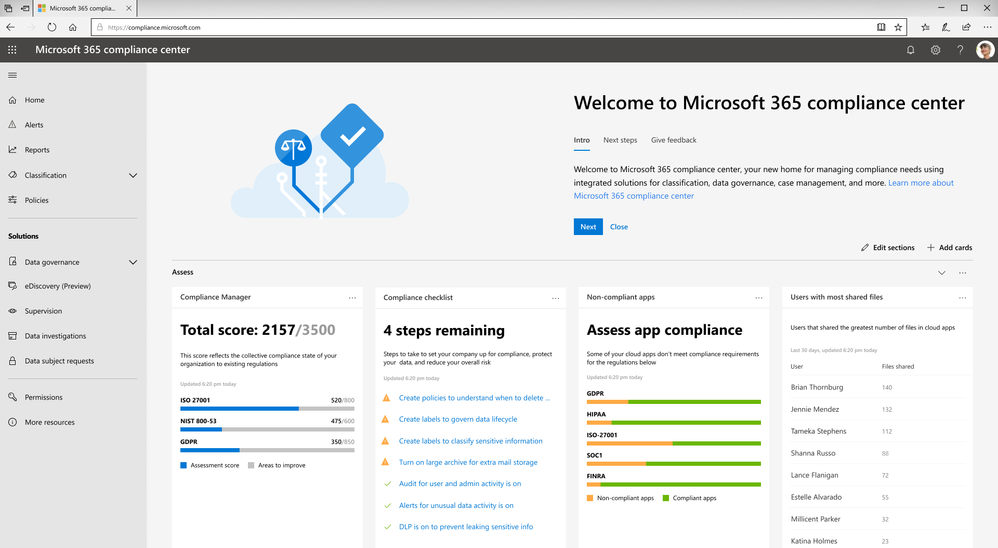
Data privacy continues to be top-of-mind for businesses. For example, nearly one-third of global enterprises view compliance with new privacy laws, like the EU General Data Protection Regulation (GDPR), as one of the biggest IT hurdles that their organizations face1.
The arrival of the California Consumer Privacy Act (CCPA) will impact many large businesses with customers who reside in California. With more than 39 million individuals residing in California2 and transacting with businesses worldwide, the scope of the CCPA is significant. Businesses around the world need to start formulating a compliance strategy now so they are well prepared when enforcement begins in January 2020.
Today, we want to share five tips that can help your organization to get ready for new privacy regulations such as CCPA with Microsoft 365:
Tip 1: Leverage the GDPR assessment in Compliance Manager
With many commonalities between GDPR and CCPA, such as data subject rights of access, erasure, and portability, organizations can leverage their GDPR program to start tackling CCPA compliance now.
To help businesses assess Microsoft cloud services and find applicable technology solutions to implement GDPR controls, we released Compliance Manager in 2018. Compliance Manager is a cloud-based tool that gives you step-by-step guidance to help you implement, track and record your data-protection controls. You can get started by using the GDPR assessment in Compliance Manager today.
Tip 2: Establish a process to efficiently respond to Data Subject Requests
According to a blog post by Julie Brill, U.S consumers are highly aware of their privacy rights with the highest engagement of approximately 2 million users signing into the Microsoft privacy dashboard to manage their information in 4 months since GDPR came into effect. With that in mind, we encourage you to start building out your data subject access requests process today, because CCPA requires a 12-month look-back period.
To get ready to respond to this high demand of data access requests, we encourage you to start using the Data Subject Requests (DSRs) tool in the new Microsoft 365 compliance center, which allows your privacy and compliance teams to respond more efficiently to DSRs in a timely manner.
Tip 3: Discover, classify & label, and protect sensitive data
The CCPA will impose penalties for data breaches of consumers’ personal information. As organizations live in a world with a tsunami of data across their digital estate, understanding where their most sensitive data is and how to protect it is critical to reduce compliance risks.
Microsoft Information Protection harnesses an integrated and intelligent approach to target the 80 percent of corporate data that is estimated to be “dark” or un-classified and unprotected3. You can start to make use of the U.S. PII sensitive data types to automatically discover, classify, and protect personal data to help you with CCPA compliance.
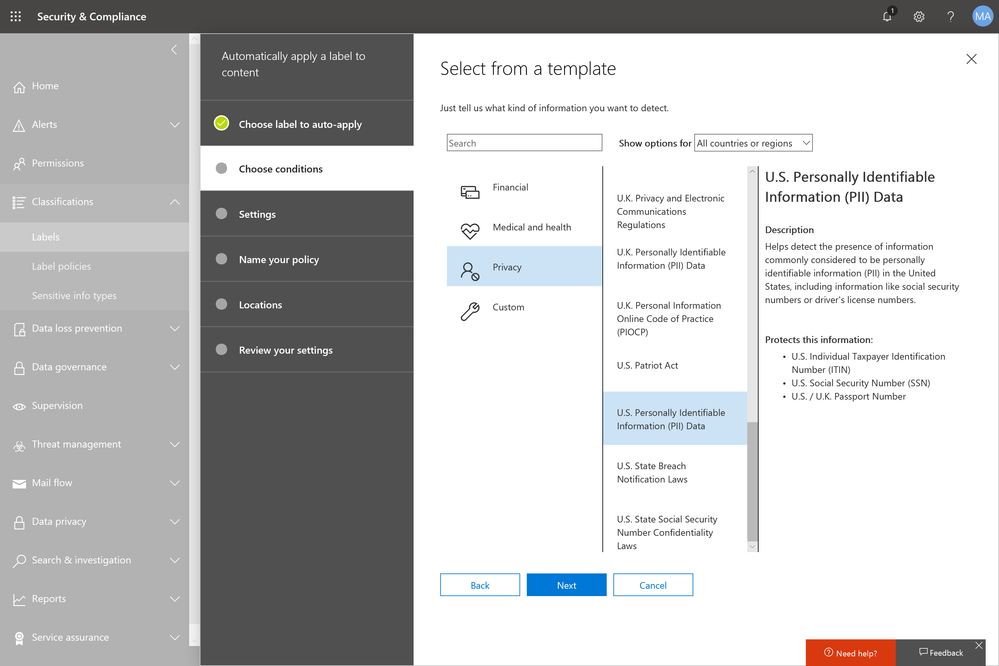
Tip 4: Use encryption to protect and control your sensitive emails
Regulations like GDPR and CCPA see encryption as an effective method to protect personal information from unauthorized parties in the event of a data breach.
Office 365 Message Encryption enables users to protect sensitive emails shared with anyone inside and outside of your organization. If your tenant is eligible, Office 365 Message Encryption will be on by default. You can get started by setting up a Data Loss Prevention policy that applies Office 365 Message Encryption to U.S. PII sensitive data types.
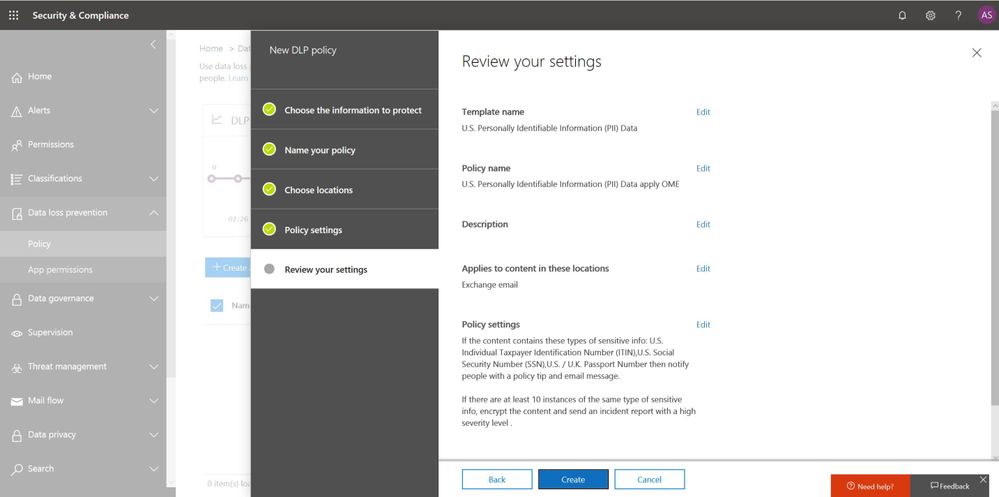
Also start educating your end users to apply protection such as “do not forward” or “encrypt-only” directly from Outlook (either desktop or web version). Watch this video to learn more.
Tip 5: Champion consumer privacy rights to build a sustainable business
While the CCPA brings prominent challenges to many businesses who were not subject to GDPR, we encourage those organizations to view CCPA and other privacy laws as an opportunity to enhance their privacy programs and embrace privacy as a corporate value to build trust with customers.
Check out the “Championing privacy rights to drive differentiation” webcast with Microsoft CIO Kurt DelBene, CISO Bret Arsenault, and a featured speaker, Enza Iannopollo of Forrester, who discuss the new era of privacy expectations and how to invest in privacy as a business driver.
Learn more about the Microsoft cloud
At Microsoft, we are committed to partnering with you to keep advancing our solutions to help you protect your digital estate in a more compliant manner. Here are some additional resources to help you in your ongoing compliance journey:
- Download our e-book to learn more about how to protect digital privacy.
- Experience first-hand how Microsoft solutions can help solve your business challenges by registering for an upcoming hands-on online experience (US only). Click here for free Microsoft 365 Compliance product training outside the US.
- Learn more about the new Information Protection and Compliance offering in Microsoft 365
1 Forrester. “Global Business Technographics Security Survey, 2018.” August 2018. www.forrester.com/Global+Business+Technographics+Security+Survey+2018/-/E-sus4551.
2 Public Policy Institute of California. “Just the Facts: California’s Population.” www.ppic.org/publication/californias-population/.
3 Andrew Trice. “The Future of Cognitive Computing.” IBM blog. November 2015. www.ibm.com/blogs/bluemix/2015/11/future-of-cognitive-computing/.
Data privacy continues to be top-of-mind for businesses. For example, nearly one-third of global enterprises view compliance with new privacy laws, like the EU General Data Protection Regulation (GDPR), as one of the biggest IT hurdles that their organizations face1.
The arrival of the California Consumer Privacy Act (CCPA) will impact many large businesses with customers who reside in California. With more than 39 million individuals residing in California2 and transacting with businesses worldwide, the scope of the CCPA is significant. Businesses around the world need to start formulating a compliance strategy now so they are well prepared when enforcement begins in January 2020.
Today, we want to share five tips that can help your organization to get ready for new privacy regulations such as CCPA with Microsoft 365:
Tip 1: Leverage the GDPR assessment in Compliance Manager
With many commonalities between GDPR and CCPA, such as data subject rights of access, erasure, and portability, organizations can leverage their GDPR program to start tackling CCPA compliance now.
To help businesses assess Microsoft cloud services and find applicable technology solutions to implement GDPR controls, we released Compliance Manager in 2018. Compliance Manager is a cloud-based tool that gives you step-by-step guidance to help you implement, track and record your data-protection controls. You can get started by using the GDPR assessment in Compliance Manager today.
Tip 2: Establish a process to efficiently respond to Data Subject Requests
According to a blog post by Julie Brill, U.S consumers are highly aware of their privacy rights with the highest engagement of approximately 2 million users signing into the Microsoft privacy dashboard to manage their information in 4 months since GDPR came into effect. With that in mind, we encourage you to start building out your data subject access requests process today, because CCPA requires a 12-month look-back period.
To get ready to respond to this high demand of data access requests, we encourage you to start using the Data Subject Requests (DSRs) tool in the new Microsoft 365 compliance center, which allows your privacy and compliance teams to respond more efficiently to DSRs in a timely manner.
Tip 3: Discover, classify & label, and protect sensitive data
The CCPA will impose penalties for data breaches of consumers’ personal information. As organizations live in a world with a tsunami of data across their digital estate, understanding where their most sensitive data is and how to protect it is critical to reduce compliance risks.
Microsoft Information Protection harnesses an integrated and intelligent approach to target the 80 percent of corporate data that is estimated to be “dark” or un-classified and unprotected3. You can start to make use of the U.S. PII sensitive data types to automatically discover, classify, and protect personal data to help you with CCPA compliance.
Tip 4: Use encryption to protect and control your sensitive emails
Regulations like GDPR and CCPA see encryption as an effective method to protect personal information from unauthorized parties in the event of a data breach.
Office 365 Message Encryption enables users to protect sensitive emails shared with anyone inside and outside of your organization. If your tenant is eligible, Office 365 Message Encryption will be on by default. You can get started by setting up a Data Loss Prevention policy that applies Office 365 Message Encryption to U.S. PII sensitive data types.
Also start educating your end users to apply protection such as “do not forward” or “encrypt-only” directly from Outlook (either desktop or web version). Watch this video to learn more.
Tip 5: Champion consumer privacy rights to build a sustainable business
While the CCPA brings prominent challenges to many businesses who were not subject to GDPR, we encourage those organizations to view CCPA and other privacy laws as an opportunity to enhance their privacy programs and embrace privacy as a corporate value to build trust with customers.
Check out the “Championing privacy rights to drive differentiation” webcast with Microsoft CIO Kurt DelBene, CISO Bret Arsenault, and a featured speaker, Enza Iannopollo of Forrester, who discuss the new era of privacy expectations and how to invest in privacy as a business driver.
Learn more about the Microsoft cloud
At Microsoft, we are committed to partnering with you to keep advancing our solutions to help you protect your digital estate in a more compliant manner. Here are some additional resources to help you in your ongoing compliance journey:
- Download our e-book to learn more about how to protect digital privacy.
- Experience first-hand how Microsoft solutions can help solve your business challenges by registering for an upcoming hands-on online experience (US only). Click here for free Microsoft 365 Compliance product training outside the US.
- Learn more about the new Information Protection and Compliance offering in Microsoft 365
1 Forrester. “Global Business Technographics Security Survey, 2018.” August 2018. www.forrester.com/Global+Business+Technographics+Security+Survey+2018/-/E-sus4551.
2 Public Policy Institute of California. “Just the Facts: California’s Population.” www.ppic.org/publication/californias-population/.
3 Andrew Trice. “The Future of Cognitive Computing.” IBM blog. November 2015. www.ibm.com/blogs/bluemix/2015/11/future-of-cognitive-computing/.
Data privacy continues to be top-of-mind for businesses. For example, nearly one-third of global enterprises view compliance with new privacy laws, like the EU General Data Protection Regulation (GDPR), as one of the biggest IT hurdles that their organizations face1.
The arrival of the California Consumer Privacy Act (CCPA) will impact many large businesses with customers who reside in California. With more than 39 million individuals residing in California2 and transacting with businesses worldwide, the scope of the CCPA is significant. Businesses around the world need to start formulating a compliance strategy now so they are well prepared when enforcement begins in January 2020.
Today, we want to share five tips that can help your organization to get ready for new privacy regulations such as CCPA with Microsoft 365:
Tip 1: Leverage the GDPR assessment in Compliance Manager
With many commonalities between GDPR and CCPA, such as data subject rights of access, erasure, and portability, organizations can leverage their GDPR program to start tackling CCPA compliance now.
To help businesses assess Microsoft cloud services and find applicable technology solutions to implement GDPR controls, we released Compliance Manager in 2018. Compliance Manager is a cloud-based tool that gives you step-by-step guidance to help you implement, track and record your data-protection controls. You can get started by using the GDPR assessment in Compliance Manager today.
Tip 2: Establish a process to efficiently respond to Data Subject Requests
According to a blog post by Julie Brill, U.S consumers are highly aware of their privacy rights with the highest engagement of approximately 2 million users signing into the Microsoft privacy dashboard to manage their information in 4 months since GDPR came into effect. With that in mind, we encourage you to start building out your data subject access requests process today, because CCPA requires a 12-month look-back period.
To get ready to respond to this high demand of data access requests, we encourage you to start using the Data Subject Requests (DSRs) tool in the new Microsoft 365 compliance center, which allows your privacy and compliance teams to respond more efficiently to DSRs in a timely manner.
Tip 3: Discover, classify & label, and protect sensitive data
The CCPA will impose penalties for data breaches of consumers’ personal information. As organizations live in a world with a tsunami of data across their digital estate, understanding where their most sensitive data is and how to protect it is critical to reduce compliance risks.
Microsoft Information Protection harnesses an integrated and intelligent approach to target the 80 percent of corporate data that is estimated to be “dark” or un-classified and unprotected3. You can start to make use of the U.S. PII sensitive data types to automatically discover, classify, and protect personal data to help you with CCPA compliance.
Tip 4: Use encryption to protect and control your sensitive emails
Regulations like GDPR and CCPA see encryption as an effective method to protect personal information from unauthorized parties in the event of a data breach.
Office 365 Message Encryption enables users to protect sensitive emails shared with anyone inside and outside of your organization. If your tenant is eligible, Office 365 Message Encryption will be on by default. You can get started by setting up a Data Loss Prevention policy that applies Office 365 Message Encryption to U.S. PII sensitive data types.
Also start educating your end users to apply protection such as “do not forward” or “encrypt-only” directly from Outlook (either desktop or web version). Watch this video to learn more.
Tip 5: Champion consumer privacy rights to build a sustainable business
While the CCPA brings prominent challenges to many businesses who were not subject to GDPR, we encourage those organizations to view CCPA and other privacy laws as an opportunity to enhance their privacy programs and embrace privacy as a corporate value to build trust with customers.
Check out the “Championing privacy rights to drive differentiation” webcast with Microsoft CIO Kurt DelBene, CISO Bret Arsenault, and a featured speaker, Enza Iannopollo of Forrester, who discuss the new era of privacy expectations and how to invest in privacy as a business driver.
Learn more about the Microsoft cloud
At Microsoft, we are committed to partnering with you to keep advancing our solutions to help you protect your digital estate in a more compliant manner. Here are some additional resources to help you in your ongoing compliance journey:
- Download our e-book to learn more about how to protect digital privacy.
- Experience first-hand how Microsoft solutions can help solve your business challenges by registering for an upcoming hands-on online experience (US only). Click here for free Microsoft 365 Compliance product training outside the US.
- Learn more about the new Information Protection and Compliance offering in Microsoft 365
1 Forrester. “Global Business Technographics Security Survey, 2018.” August 2018. www.forrester.com/Global+Business+Technographics+Security+Survey+2018/-/E-sus4551.
2 Public Policy Institute of California. “Just the Facts: California’s Population.” www.ppic.org/publication/californias-population/.
3 Andrew Trice. “The Future of Cognitive Computing.” IBM blog. November 2015. www.ibm.com/blogs/bluemix/2015/11/future-of-cognitive-computing/.
Data privacy continues to be top-of-mind for businesses. For example, nearly one-third of global enterprises view compliance with new privacy laws, like the EU General Data Protection Regulation (GDPR), as one of the biggest IT hurdles that their organizations face1.
The arrival of the California Consumer Privacy Act (CCPA) will impact many large businesses with customers who reside in California. With more than 39 million individuals residing in California2 and transacting with businesses worldwide, the scope of the CCPA is significant. Businesses around the world need to start formulating a compliance strategy now so they are well prepared when enforcement begins in January 2020.
Today, we want to share five tips that can help your organization to get ready for new privacy regulations such as CCPA with Microsoft 365:
Tip 1: Leverage the GDPR assessment in Compliance Manager
With many commonalities between GDPR and CCPA, such as data subject rights of access, erasure, and portability, organizations can leverage their GDPR program to start tackling CCPA compliance now.
To help businesses assess Microsoft cloud services and find applicable technology solutions to implement GDPR controls, we released Compliance Manager in 2018. Compliance Manager is a cloud-based tool that gives you step-by-step guidance to help you implement, track and record your data-protection controls. You can get started by using the GDPR assessment in Compliance Manager today.
Tip 2: Establish a process to efficiently respond to Data Subject Requests
According to a blog post by Julie Brill, U.S consumers are highly aware of their privacy rights with the highest engagement of approximately 2 million users signing into the Microsoft privacy dashboard to manage their information in 4 months since GDPR came into effect. With that in mind, we encourage you to start building out your data subject access requests process today, because CCPA requires a 12-month look-back period.
To get ready to respond to this high demand of data access requests, we encourage you to start using the Data Subject Requests (DSRs) tool in the new Microsoft 365 compliance center, which allows your privacy and compliance teams to respond more efficiently to DSRs in a timely manner.
Tip 3: Discover, classify & label, and protect sensitive data
The CCPA will impose penalties for data breaches of consumers’ personal information. As organizations live in a world with a tsunami of data across their digital estate, understanding where their most sensitive data is and how to protect it is critical to reduce compliance risks.
Microsoft Information Protection harnesses an integrated and intelligent approach to target the 80 percent of corporate data that is estimated to be “dark” or un-classified and unprotected3. You can start to make use of the U.S. PII sensitive data types to automatically discover, classify, and protect personal data to help you with CCPA compliance.
Tip 4: Use encryption to protect and control your sensitive emails
Regulations like GDPR and CCPA see encryption as an effective method to protect personal information from unauthorized parties in the event of a data breach.
Office 365 Message Encryption enables users to protect sensitive emails shared with anyone inside and outside of your organization. If your tenant is eligible, Office 365 Message Encryption will be on by default. You can get started by setting up a Data Loss Prevention policy that applies Office 365 Message Encryption to U.S. PII sensitive data types.
Also start educating your end users to apply protection such as “do not forward” or “encrypt-only” directly from Outlook (either desktop or web version). Watch this video to learn more.
Tip 5: Champion consumer privacy rights to build a sustainable business
While the CCPA brings prominent challenges to many businesses who were not subject to GDPR, we encourage those organizations to view CCPA and other privacy laws as an opportunity to enhance their privacy programs and embrace privacy as a corporate value to build trust with customers.
Check out the “Championing privacy rights to drive differentiation” webcast with Microsoft CIO Kurt DelBene, CISO Bret Arsenault, and a featured speaker, Enza Iannopollo of Forrester, who discuss the new era of privacy expectations and how to invest in privacy as a business driver.
Learn more about the Microsoft cloud
At Microsoft, we are committed to partnering with you to keep advancing our solutions to help you protect your digital estate in a more compliant manner. Here are some additional resources to help you in your ongoing compliance journey:
- Download our e-book to learn more about how to protect digital privacy.
- Experience first-hand how Microsoft solutions can help solve your business challenges by registering for an upcoming hands-on online experience (US only). Click here for free Microsoft 365 Compliance product training outside the US.
- Learn more about the new Information Protection and Compliance offering in Microsoft 365
1 Forrester. “Global Business Technographics Security Survey, 2018.” August 2018. www.forrester.com/Global+Business+Technographics+Security+Survey+2018/-/E-sus4551.
2 Public Policy Institute of California. “Just the Facts: California’s Population.” www.ppic.org/publication/californias-population/.
3 Andrew Trice. “The Future of Cognitive Computing.” IBM blog. November 2015. www.ibm.com/blogs/bluemix/2015/11/future-of-cognitive-computing/.







