Publishers note: I am posting this on behalf my colleague Jon Nordstrom who is part of the Office 365 customer experience team. Myself and few other engineers thought you would all benefit from his knowledge of the Office 365 management activity API.
Once you have the data you need for your investigation, it can be helpful to use graphs to analyze activity data to identify relationships and outliers during an investigation. On TechNet we shared how the Office 365 team uses graphs to analyze incident data but in this last post of our two-part series we will focus on using Power BI to visualize the data for the following scenarios:
A. What changes have been made to my environment by Exchange administrators?
B. Is there excessive sign in failures from specific IP addresses?
C. Who has accessed sensitive content?
To help you understand how you can get the data necessary to perform a security analysis of it check out the previous post here.
The sample graphs generated in this post were created with the free version of the ZoomCharts add-in for Power BI Desktop. The data was transferred to Azure Cosmos DB using these sample scripts.
Use Cases
A. What changes were made to my environment by Exchange administrators?
What operations can I expect of my Exchange Online administrators and what operations do they have in common? Has an account run any commands that allow for access to user data? Are there any connections between these operations?
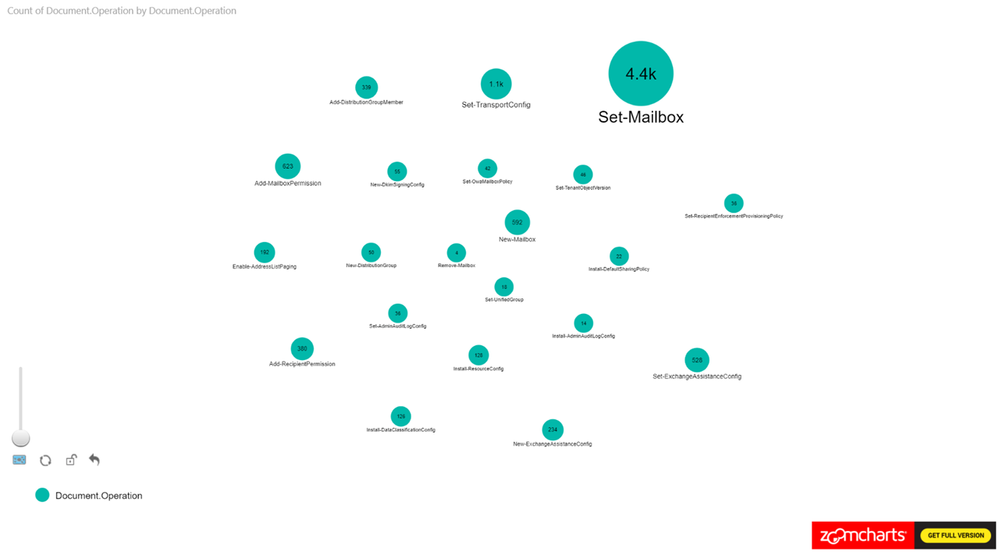
Figure 1 is a sample where we are only looking at the Exchange Operations. Looking at the pure count of operations may be good for alerts but how is it all connected?
To filter on Exchange Online events from Power BI, search the Fields pane for “workloads”, drag the workloads field to Page level filters and select the workload to filter on. When working with large sets of data either filter the information on import to Power BI or add a page level filter for Exchange operations.
Figure 1
Let’s expand this scenario to understand the actors, since the operations in isolation doesn’t provide us with the data needed for an investigation.
In this example, we set the Nodes to Operations and UserId. The Measure is set to Operations see Figure 2 for the configuration.
This is a new tenant with many new accounts, so it is expected to see operations performed by the service itself as identified by “NT AUTHORITYSYSTEM” within the logs. You can identify cmdlets that are shared between actors and cmdlets that are unique to specific actors.
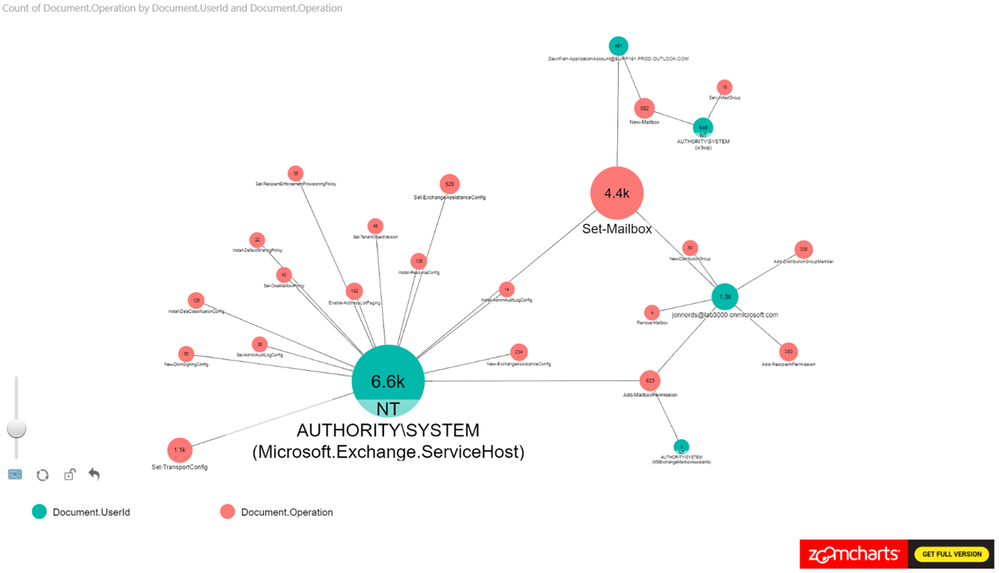 Figure 2
As a next step add the ObjectID to the Power BI view. The number of operations that have been carried out is shown along with any user objects that have been modified. We can see a cluster forming around one of the administrator accounts. As a next step we are zooming in to that cluster.
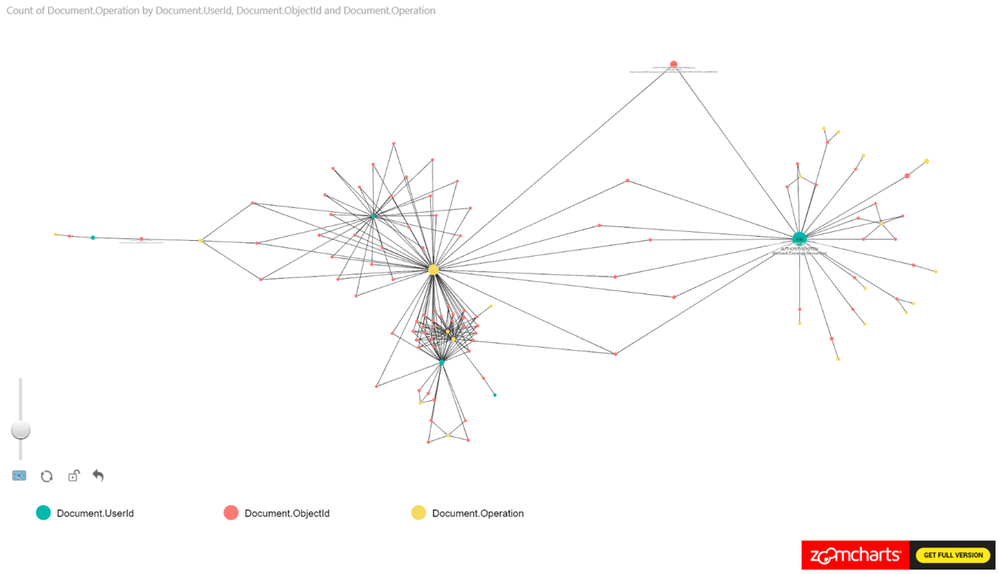 Figure 3
When zooming in on the cluster we can see Add-MailboxPermissions being run on several mailboxes. If this was to occur in a production tenant it should raise some flags.
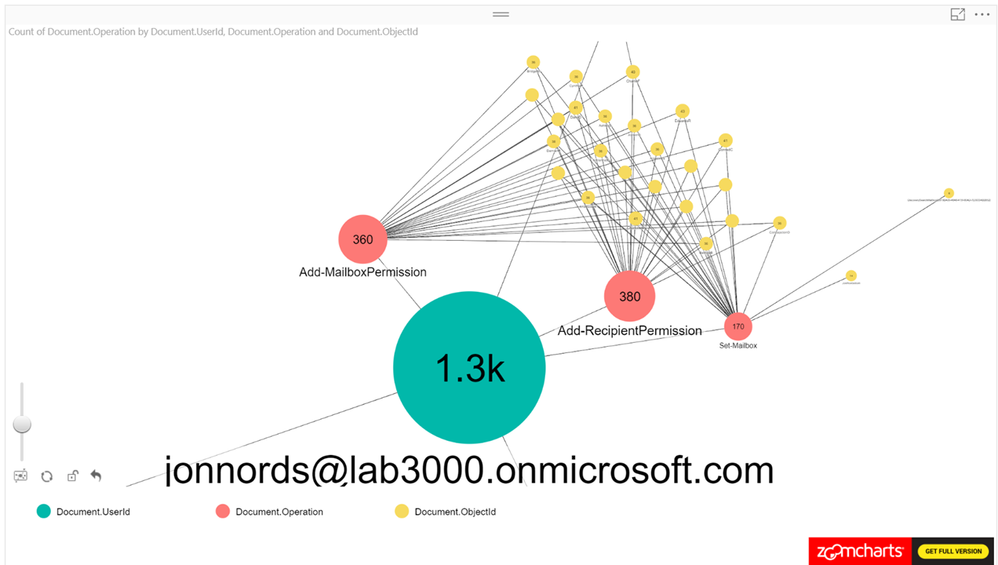 Figure 4
The next step is to filter and understand permissions that have been provisioned. You can add a table that is filtered based on the graphs. In this example, the Administrator has granted FullAccess to these mailboxes. Not a best practice… This information can be used to reverse the change by exporting the data to a csv file and loop through the modified mailboxes using Remove-MailboxPermissions.
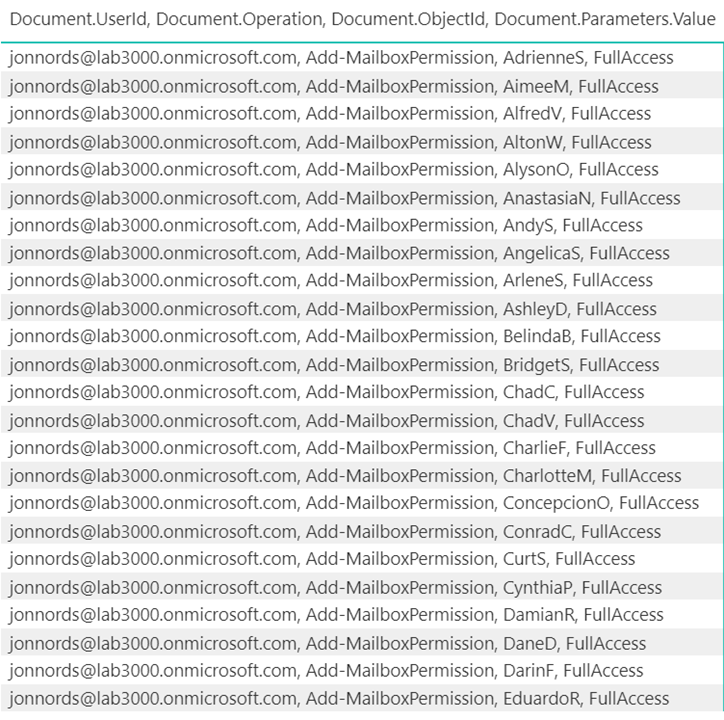 Figure 5
B. Is there excessive sign in failures from specific IP addresses?
This example was derived from a test of the Password Spray attack simulation from the Attack Simulator feature in Office 365 Threat Intelligence. One key element of creating this view is to remember to exclude internal proxies, etc., from filtering to get a representative view. IP addresses with a high ratio of failures will beacon clearly in the report even when the report contains a lot of data. Look for how data is clustered together.
As can be seen in Figure 6., we have loaded UserId, ActorIpAddress, Operation as nodes and we are using the count of UserID as the measure.
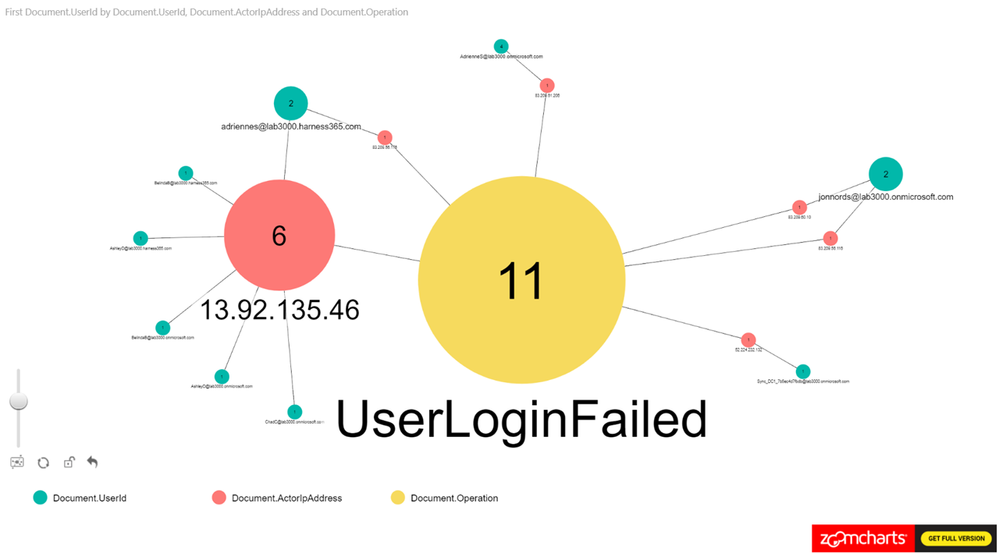 Figure 6
C. Who has accessed sensitive content?
This example is based on filtering SharePoint Online and OneDrive for Business activity to identify users who have accessed information that has the “Acquisition documentation policy enforcement” label policy applied. This view can be used to understand if new sensitive content is accessed. The policy creates an account that is used to update the sensitive content and we can use the account to link to the usage.
From Figure 7., you can see that we have been using Operation, UserID, ObjectID for the nodes and loaded count of operations as the measure.
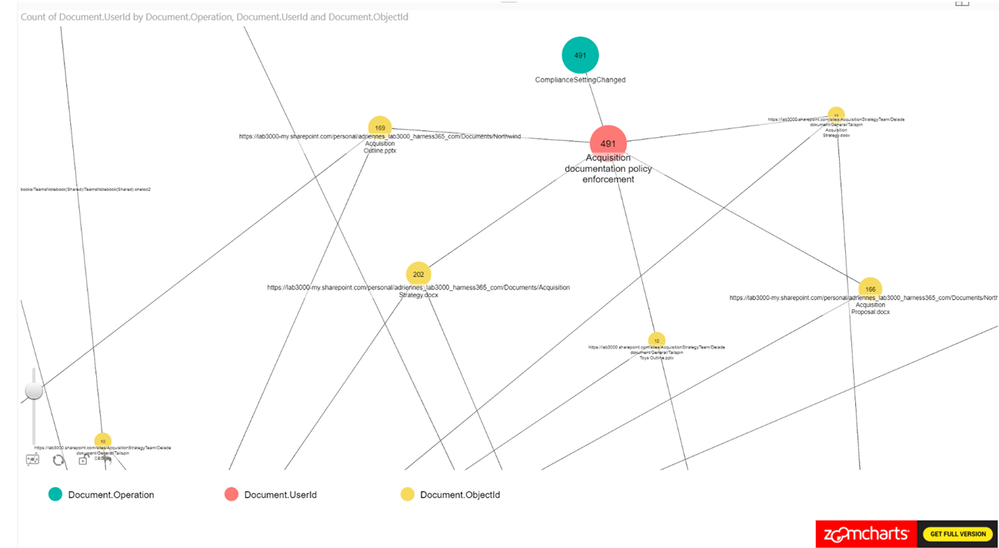 Figure 7
Summary
This post hopefully peak your interest in Graph based security analysis. If you think that analyzing data in Graphs seems like something that your organization may benefit from we hope that we have helped you get started.
We have only scratched the surface though. There are many scenarios where this may be a useful approach to get a deeper understanding. Go ahead and use the steps from the first post in the series to setup your own environment and work on your own model for Graph based analysis.
If you have any feedback please provide it at the GitHub project page or by emailing it to cxprad@microsoft.com.
We look forward to hearing from you!
—Jon Nordstrom, senior program manager, Office 365 customer experience
Publishers note: I am posting this on behalf my colleague Jon Nordstrom who is part of the Office 365 customer experience team. Myself and few other engineers thought you would all benefit from his knowledge of the Office 365 management activity API.
Once you have the data you need for your investigation, it can be helpful to use graphs to analyze activity data to identify relationships and outliers during an investigation. On TechNet we shared how the Office 365 team uses graphs to analyze incident data but in this last post of our two-part series we will focus on using Power BI to visualize the data for the following scenarios:
A. What changes have been made to my environment by Exchange administrators?
B. Is there excessive sign in failures from specific IP addresses?
C. Who has accessed sensitive content?
To help you understand how you can get the data necessary to perform a security analysis of it check out the previous post here.
The sample graphs generated in this post were created with the free version of the ZoomCharts add-in for Power BI Desktop. The data was transferred to Azure Cosmos DB using these sample scripts.
Use Cases
A. What changes were made to my environment by Exchange administrators?
What operations can I expect of my Exchange Online administrators and what operations do they have in common? Has an account run any commands that allow for access to user data? Are there any connections between these operations?
Figure 1 is a sample where we are only looking at the Exchange Operations. Looking at the pure count of operations may be good for alerts but how is it all connected?
To filter on Exchange Online events from Power BI, search the Fields pane for “workloads”, drag the workloads field to Page level filters and select the workload to filter on. When working with large sets of data either filter the information on import to Power BI or add a page level filter for Exchange operations.
Figure 1
Let’s expand this scenario to understand the actors, since the operations in isolation doesn’t provide us with the data needed for an investigation.
In this example, we set the Nodes to Operations and UserId. The Measure is set to Operations see Figure 2 for the configuration.
This is a new tenant with many new accounts, so it is expected to see operations performed by the service itself as identified by “NT AUTHORITYSYSTEM” within the logs. You can identify cmdlets that are shared between actors and cmdlets that are unique to specific actors.
Figure 2
As a next step add the ObjectID to the Power BI view. The number of operations that have been carried out is shown along with any user objects that have been modified. We can see a cluster forming around one of the administrator accounts. As a next step we are zooming in to that cluster.
Figure 3
When zooming in on the cluster we can see Add-MailboxPermissions being run on several mailboxes. If this was to occur in a production tenant it should raise some flags.
Figure 4
The next step is to filter and understand permissions that have been provisioned. You can add a table that is filtered based on the graphs. In this example, the Administrator has granted FullAccess to these mailboxes. Not a best practice… This information can be used to reverse the change by exporting the data to a csv file and loop through the modified mailboxes using Remove-MailboxPermissions.
Figure 5
B. Is there excessive sign in failures from specific IP addresses?
This example was derived from a test of the Password Spray attack simulation from the Attack Simulator feature in Office 365 Threat Intelligence. One key element of creating this view is to remember to exclude internal proxies, etc., from filtering to get a representative view. IP addresses with a high ratio of failures will beacon clearly in the report even when the report contains a lot of data. Look for how data is clustered together.
As can be seen in Figure 6., we have loaded UserId, ActorIpAddress, Operation as nodes and we are using the count of UserID as the measure.
Figure 6
C. Who has accessed sensitive content?
This example is based on filtering SharePoint Online and OneDrive for Business activity to identify users who have accessed information that has the “Acquisition documentation policy enforcement” label policy applied. This view can be used to understand if new sensitive content is accessed. The policy creates an account that is used to update the sensitive content and we can use the account to link to the usage.
From Figure 7., you can see that we have been using Operation, UserID, ObjectID for the nodes and loaded count of operations as the measure.
Figure 7
Summary
This post hopefully peak your interest in Graph based security analysis. If you think that analyzing data in Graphs seems like something that your organization may benefit from we hope that we have helped you get started.
We have only scratched the surface though. There are many scenarios where this may be a useful approach to get a deeper understanding. Go ahead and use the steps from the first post in the series to setup your own environment and work on your own model for Graph based analysis.
If you have any feedback please provide it at the GitHub project page or by emailing it to cxprad@microsoft.com.
We look forward to hearing from you!
—Jon Nordstrom, senior program manager, Office 365 customer experience
A few weeks ago, we released a public preview for Attack Simulator for Office 365 Threat Intelligence. Today, we’re excited to announce that Attack Simulator is now generally available. Attack Simulator for Office 365 Threat Intelligence is available to all Office 365 E5 or Office 365 Threat Intelligence customers.
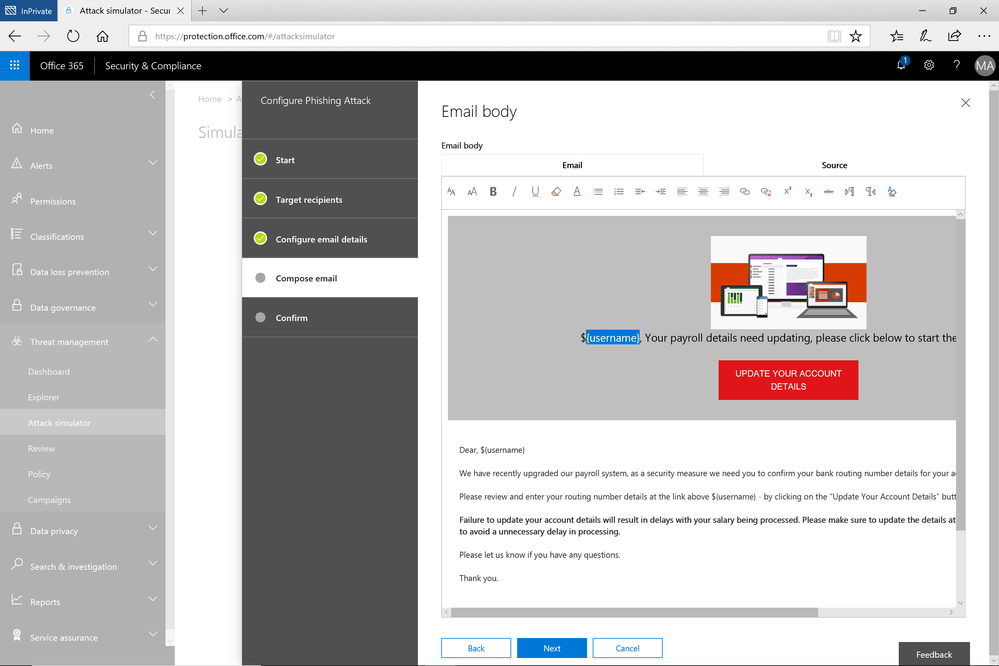
With Attack Simulator, customers can launch simulated attacks on their end users, determine how end users behave in the event of an attack, and update policies and ensure that appropriate security tools are in place to protect the organization from threats. The GA of Attack Simulator adds a new HTML editor so realistic looking HTML emails can be sent in simulations of spear-phishing. Also, two spear-phishing templates are available for immediate use in the spear phishing simulation.
Figure 1. Email template for spear phish simulation using a fake email from an organization’s payroll department.
Attack Simulator includes the three attack scenarios from our public preview.
- Display Name Spear Phishing Attack: Phishing is the generic term for socially engineered attacks designed to harvest credentials or personally identifiable information (PII). Spear phishing is a subset of this phishing and is more targeted, often aimed at a specific group, individual, or organization. These attacks are customized and tend to leverage a sender name that generates trust with the recipient.
- Password Spray Attack: To prevent bad actors from constantly guessing the passwords of user accounts, often there are account lockout policies. For example, an account will lockout after a certain number of bad passwords are guessed for a user. However, if you were to take a single password and try it against every single account in an organization, it would not trigger any lockouts. The password spray attack leverages commonly used passwords and targets many accounts in an organization with the hope that one of the account holder uses a common password that allows a hacker to enter the account and take control of it. From this compromised account, a hacker can launch more attacks by assuming the identity of account holder.
- Brute Force Password Attack: This type of attack consists of a hacker trying many passwords or passphrases with the hope of eventually guessing correctly. The attacker systematically checks all possible passwords and passphrases until the correct one is found.
This video demonstrates how Attack Simulator can help organizations educate users to become more secure from cyber threats. With Attack Simulator, admins can train all their end users, and especially those who are attacked most often. This proactive training is a powerful way to ensure that your organization can prevent the impact from advanced threats. Over the coming months, more threat simulations will be added to Attack Simulator so organizations can simulate the most prevalent threat types from the modern threat landscape.
Begin Educating your End Users Today
Experience the benefits of Attack Simulator for Office 365 Threat Intelligence by beginning an Office 365 E5 trial or Office 365 Threat Intelligence Trial today. Also, learn more about how Microsoft leverages threat intelligence and the value of threat intelligence. Your feedback is one of the most important drivers of our innovation, so please let us know what you think.
A few weeks ago, we released a public preview for Attack Simulator for Office 365 Threat Intelligence. Today, we’re excited to announce that Attack Simulator is now generally available. Attack Simulator for Office 365 Threat Intelligence is available to all Office 365 E5 or Office 365 Threat Intelligence customers.
With Attack Simulator, customers can launch simulated attacks on their end users, determine how end users behave in the event of an attack, and update policies and ensure that appropriate security tools are in place to protect the organization from threats. The GA of Attack Simulator adds a new HTML editor so realistic looking HTML emails can be sent in simulations of spear-phishing. Also, two spear-phishing templates are available for immediate use in the spear phishing simulation.
Figure 1. Email template for spear phish simulation using a fake email from an organization’s payroll department.
Attack Simulator includes the three attack scenarios from our public preview.
- Display Name Spear Phishing Attack: Phishing is the generic term for socially engineered attacks designed to harvest credentials or personally identifiable information (PII). Spear phishing is a subset of this phishing and is more targeted, often aimed at a specific group, individual, or organization. These attacks are customized and tend to leverage a sender name that generates trust with the recipient.
- Password Spray Attack: To prevent bad actors from constantly guessing the passwords of user accounts, often there are account lockout policies. For example, an account will lockout after a certain number of bad passwords are guessed for a user. However, if you were to take a single password and try it against every single account in an organization, it would not trigger any lockouts. The password spray attack leverages commonly used passwords and targets many accounts in an organization with the hope that one of the account holder uses a common password that allows a hacker to enter the account and take control of it. From this compromised account, a hacker can launch more attacks by assuming the identity of account holder.
- Brute Force Password Attack: This type of attack consists of a hacker trying many passwords or passphrases with the hope of eventually guessing correctly. The attacker systematically checks all possible passwords and passphrases until the correct one is found.
This video demonstrates how Attack Simulator can help organizations educate users to become more secure from cyber threats. With Attack Simulator, admins can train all their end users, and especially those who are attacked most often. This proactive training is a powerful way to ensure that your organization can prevent the impact from advanced threats. Over the coming months, more threat simulations will be added to Attack Simulator so organizations can simulate the most prevalent threat types from the modern threat landscape.
Begin Educating your End Users Today
Experience the benefits of Attack Simulator for Office 365 Threat Intelligence by beginning an Office 365 E5 trial or Office 365 Threat Intelligence Trial today. Also, learn more about how Microsoft leverages threat intelligence and the value of threat intelligence. Your feedback is one of the most important drivers of our innovation, so please let us know what you think.
A few weeks ago, we released a public preview for Attack Simulator for Office 365 Threat Intelligence. Today, we’re excited to announce that Attack Simulator is now generally available. Attack Simulator for Office 365 Threat Intelligence is available to all Office 365 E5 or Office 365 Threat Intelligence customers.
With Attack Simulator, customers can launch simulated attacks on their end users, determine how end users behave in the event of an attack, and update policies and ensure that appropriate security tools are in place to protect the organization from threats. The GA of Attack Simulator adds a new HTML editor so realistic looking HTML emails can be sent in simulations of spear-phishing. Also, two spear-phishing templates are available for immediate use in the spear phishing simulation.
Figure 1. Email template for spear phish simulation using a fake email from an organization’s payroll department.
Attack Simulator includes the three attack scenarios from our public preview.
- Display Name Spear Phishing Attack: Phishing is the generic term for socially engineered attacks designed to harvest credentials or personally identifiable information (PII). Spear phishing is a subset of this phishing and is more targeted, often aimed at a specific group, individual, or organization. These attacks are customized and tend to leverage a sender name that generates trust with the recipient.
- Password Spray Attack: To prevent bad actors from constantly guessing the passwords of user accounts, often there are account lockout policies. For example, an account will lockout after a certain number of bad passwords are guessed for a user. However, if you were to take a single password and try it against every single account in an organization, it would not trigger any lockouts. The password spray attack leverages commonly used passwords and targets many accounts in an organization with the hope that one of the account holder uses a common password that allows a hacker to enter the account and take control of it. From this compromised account, a hacker can launch more attacks by assuming the identity of account holder.
- Brute Force Password Attack: This type of attack consists of a hacker trying many passwords or passphrases with the hope of eventually guessing correctly. The attacker systematically checks all possible passwords and passphrases until the correct one is found.
This video demonstrates how Attack Simulator can help organizations educate users to become more secure from cyber threats. With Attack Simulator, admins can train all their end users, and especially those who are attacked most often. This proactive training is a powerful way to ensure that your organization can prevent the impact from advanced threats. Over the coming months, more threat simulations will be added to Attack Simulator so organizations can simulate the most prevalent threat types from the modern threat landscape.
Begin Educating your End Users Today
Experience the benefits of Attack Simulator for Office 365 Threat Intelligence by beginning an Office 365 E5 trial or Office 365 Threat Intelligence Trial today. Also, learn more about how Microsoft leverages threat intelligence and the value of threat intelligence. Your feedback is one of the most important drivers of our innovation, so please let us know what you think.
A few weeks ago, we released a public preview for Attack Simulator for Office 365 Threat Intelligence. Today, we’re excited to announce that Attack Simulator is now generally available. Attack Simulator for Office 365 Threat Intelligence is available to all Office 365 E5 or Office 365 Threat Intelligence customers.
With Attack Simulator, customers can launch simulated attacks on their end users, determine how end users behave in the event of an attack, and update policies and ensure that appropriate security tools are in place to protect the organization from threats. The GA of Attack Simulator adds a new HTML editor so realistic looking HTML emails can be sent in simulations of spear-phishing. Also, two spear-phishing templates are available for immediate use in the spear phishing simulation.
Figure 1. Email template for spear phish simulation using a fake email from an organization’s payroll department.
Attack Simulator includes the three attack scenarios from our public preview.
- Display Name Spear Phishing Attack: Phishing is the generic term for socially engineered attacks designed to harvest credentials or personally identifiable information (PII). Spear phishing is a subset of this phishing and is more targeted, often aimed at a specific group, individual, or organization. These attacks are customized and tend to leverage a sender name that generates trust with the recipient.
- Password Spray Attack: To prevent bad actors from constantly guessing the passwords of user accounts, often there are account lockout policies. For example, an account will lockout after a certain number of bad passwords are guessed for a user. However, if you were to take a single password and try it against every single account in an organization, it would not trigger any lockouts. The password spray attack leverages commonly used passwords and targets many accounts in an organization with the hope that one of the account holder uses a common password that allows a hacker to enter the account and take control of it. From this compromised account, a hacker can launch more attacks by assuming the identity of account holder.
- Brute Force Password Attack: This type of attack consists of a hacker trying many passwords or passphrases with the hope of eventually guessing correctly. The attacker systematically checks all possible passwords and passphrases until the correct one is found.
This video demonstrates how Attack Simulator can help organizations educate users to become more secure from cyber threats. With Attack Simulator, admins can train all their end users, and especially those who are attacked most often. This proactive training is a powerful way to ensure that your organization can prevent the impact from advanced threats. Over the coming months, more threat simulations will be added to Attack Simulator so organizations can simulate the most prevalent threat types from the modern threat landscape.
Begin Educating your End Users Today
Experience the benefits of Attack Simulator for Office 365 Threat Intelligence by beginning an Office 365 E5 trial or Office 365 Threat Intelligence Trial today. Also, learn more about how Microsoft leverages threat intelligence and the value of threat intelligence. Your feedback is one of the most important drivers of our innovation, so please let us know what you think.
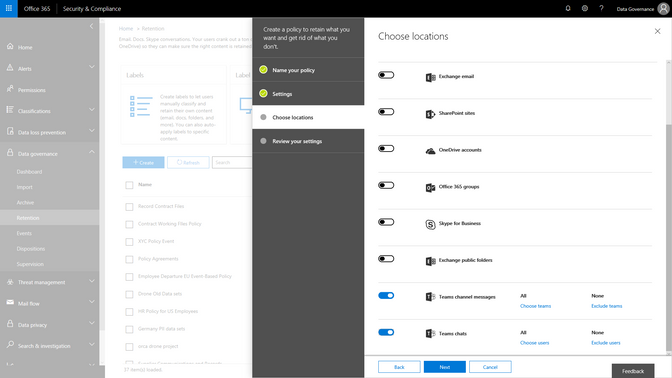
Event based retention is now generally available to help organizations manage retention of content based on a certain event trigger. Whether an employee departure, or the close of a project, you can now establish certain event triggers and create retention or deletion policies associated to those events.
Watch the Mechanics video to learn more about how this will work and learn more about this capability here.
As organizations adopt modern ways of working, like the chat based workspace Microsoft Teams, we are excited to announce that Microsoft Teams chats and team channels are now rolling out to be included in the Data Governance features of the Security & Compliance center. Set retention policies to Teams content, similar to the way that you have the option to choose locations across Exchange, SharePoint, OneDrive and Groups today. This addition will expand your ability to meet retention and regulatory requirements with confidence across Office 365 applications.
A core component of protecting content is deleting it when it has reached the end of its useful life. As email ends its useful life, enabling the ability to manually dispose of that email enables peace of mind and smoother processing. You will be able to start to test manual email disposition features in preview starting later this month. Learn more about this update here.
Finally, we are also announcing that our new Labels Explorer dashboard is now available in preview. You will be able to harness the labels widgets and dashboard to gain insight into labels usage in your organization.
![]()
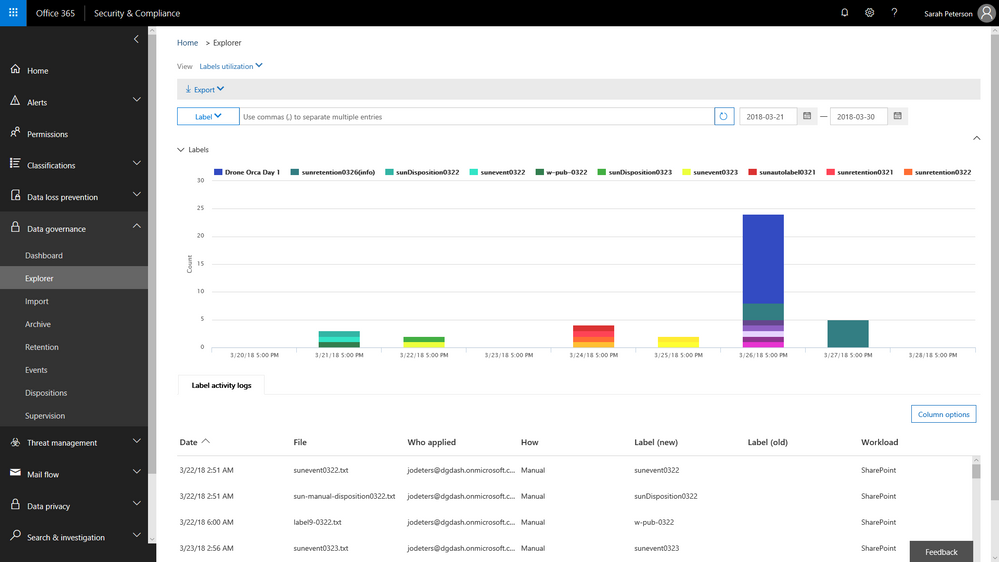 Labels Explorer dashboard is now available in preview
 Ben Robbins, eDiscovery, Forensics & Information Governance lead from LinkedIn
As Ben Robbins says: “The Advanced Data Governance and Advanced Ediscovery features in the Microsoft 0365 Security and Compliance Center contains all the components necessary to establish and improve enterprise content controls, investigative analytics, and unstructured data management. LinkedIn has been able to take advantage of these products which help improve business process and accelerate productivity to help us in our mission to connect the world’s professionals.“
Event based retention is now generally available to help organizations manage retention of content based on a certain event trigger. Whether an employee departure, or the close of a project, you can now establish certain event triggers and create retention or deletion policies associated to those events.
Watch the Mechanics video to learn more about how this will work and learn more about this capability here.
As organizations adopt modern ways of working, like the chat based workspace Microsoft Teams, we are excited to announce that Microsoft Teams chats and team channels are now rolling out to be included in the Data Governance features of the Security & Compliance center. Set retention policies to Teams content, similar to the way that you have the option to choose locations across Exchange, SharePoint, OneDrive and Groups today. This addition will expand your ability to meet retention and regulatory requirements with confidence across Office 365 applications.
A core component of protecting content is deleting it when it has reached the end of its useful life. As email ends its useful life, enabling the ability to manually dispose of that email enables peace of mind and smoother processing. You will be able to start to test manual email disposition features in preview starting later this month. Learn more about this update here.
Finally, we are also announcing that our new Labels Explorer dashboard is now available in preview. You will be able to harness the labels widgets and dashboard to gain insight into labels usage in your organization.
![]()
Labels Explorer dashboard is now available in preview
Ben Robbins, eDiscovery, Forensics & Information Governance lead from LinkedIn
As Ben Robbins says: “The Advanced Data Governance and Advanced Ediscovery features in the Microsoft 0365 Security and Compliance Center contains all the components necessary to establish and improve enterprise content controls, investigative analytics, and unstructured data management. LinkedIn has been able to take advantage of these products which help improve business process and accelerate productivity to help us in our mission to connect the world’s professionals.“
Event based retention is now generally available to help organizations manage retention of content based on a certain event trigger. Whether an employee departure, or the close of a project, you can now establish certain event triggers and create retention or deletion policies associated to those events.
Watch the Mechanics video to learn more about how this will work and learn more about this capability here.
As organizations adopt modern ways of working, like the chat based workspace Microsoft Teams, we are excited to announce that Microsoft Teams chats and team channels are now rolling out to be included in the Data Governance features of the Security & Compliance center. Set retention policies to Teams content, similar to the way that you have the option to choose locations across Exchange, SharePoint, OneDrive and Groups today. This addition will expand your ability to meet retention and regulatory requirements with confidence across Office 365 applications.
A core component of protecting content is deleting it when it has reached the end of its useful life. As email ends its useful life, enabling the ability to manually dispose of that email enables peace of mind and smoother processing. You will be able to start to test manual email disposition features in preview starting later this month. Learn more about this update here.
Finally, we are also announcing that our new Labels Explorer dashboard is now available in preview. You will be able to harness the labels widgets and dashboard to gain insight into labels usage in your organization.
![]()
Labels Explorer dashboard is now available in preview
Ben Robbins, eDiscovery, Forensics & Information Governance lead from LinkedIn
As Ben Robbins says: “The Advanced Data Governance and Advanced Ediscovery features in the Microsoft 0365 Security and Compliance Center contains all the components necessary to establish and improve enterprise content controls, investigative analytics, and unstructured data management. LinkedIn has been able to take advantage of these products which help improve business process and accelerate productivity to help us in our mission to connect the world’s professionals.“
Event based retention is now generally available to help organizations manage retention of content based on a certain event trigger. Whether an employee departure, or the close of a project, you can now establish certain event triggers and create retention or deletion policies associated to those events.
Watch the Mechanics video to learn more about how this will work and learn more about this capability here.
As organizations adopt modern ways of working, like the chat based workspace Microsoft Teams, we are excited to announce that Microsoft Teams chats and team channels are now rolling out to be included in the Data Governance features of the Security & Compliance center. Set retention policies to Teams content, similar to the way that you have the option to choose locations across Exchange, SharePoint, OneDrive and Groups today. This addition will expand your ability to meet retention and regulatory requirements with confidence across Office 365 applications.
A core component of protecting content is deleting it when it has reached the end of its useful life. As email ends its useful life, enabling the ability to manually dispose of that email enables peace of mind and smoother processing. You will be able to start to test manual email disposition features in preview starting later this month. Learn more about this update here.
Finally, we are also announcing that our new Labels Explorer dashboard is now available in preview. You will be able to harness the labels widgets and dashboard to gain insight into labels usage in your organization.
![]()
Labels Explorer dashboard is now available in preview
Ben Robbins, eDiscovery, Forensics & Information Governance lead from LinkedIn
As Ben Robbins says: “The Advanced Data Governance and Advanced Ediscovery features in the Microsoft 0365 Security and Compliance Center contains all the components necessary to establish and improve enterprise content controls, investigative analytics, and unstructured data management. LinkedIn has been able to take advantage of these products which help improve business process and accelerate productivity to help us in our mission to connect the world’s professionals.“
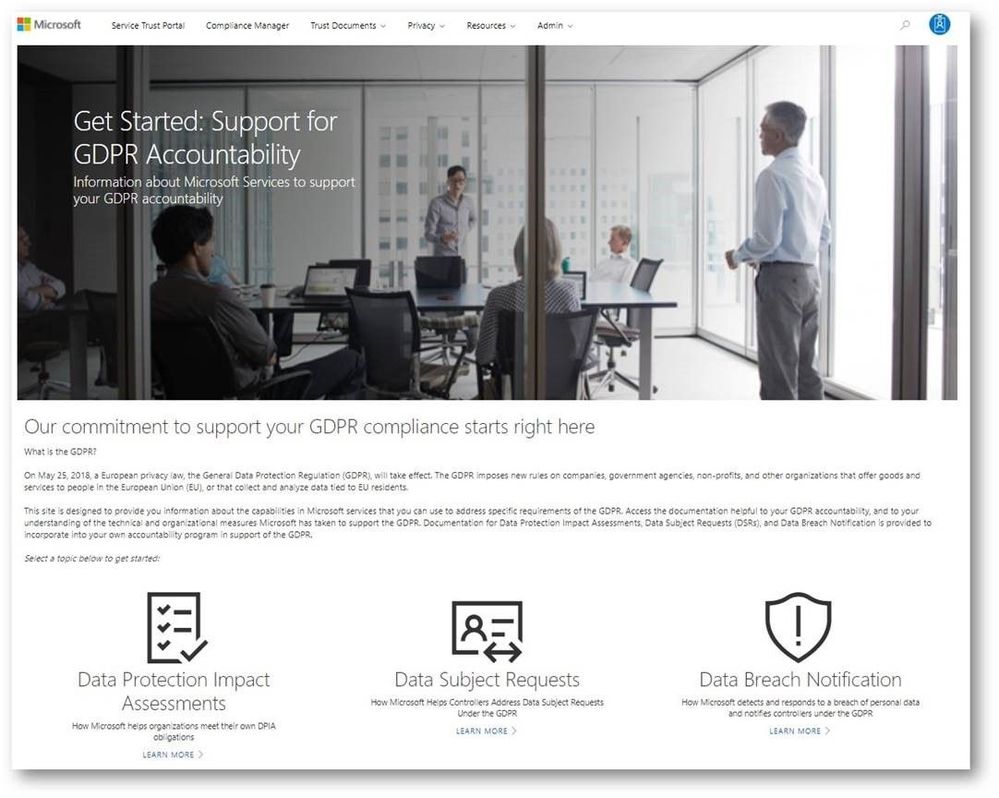
While the GDPR poses new challenges for organizations working to support the privacy rights of individuals, it also encourages companies to become more accountable for developing and leveraging innovative technology to protect personal and sensitive information. Given the sheer volume of available resources across Microsoft’s many platforms and services, it can be challenging to find the right resources to support GDPR. To address these challenges, we’ve enhanced the Service Trust Portal (STP), to centralize resources to help you with your needs around data protection, compliance, and privacy, and of course, the GDPR.
The STP continues to include independent third-party audit reports, such as FedRAMP, ISO, and SOC reports, in-depth information such as whitepapers, security assessment reports, and data protection guides. In February this year, we released a new tool on the STP called Compliance Manager, which helps organizations to manage compliance activities and perform risk assessments on Microsoft Cloud services.
To help you navigate the collection of GDPR resources, we’re publicly previewing a new Privacy area on the STP which provides you with guidance on how Microsoft services will support you in the event of a personal data breach, and with tools and technical documents to help you respond to data subject requests. You can find more details about each scenario below:
Data subject requests resources
The GPDR provides data subjects with increased rights to control their personal data, including the ability to obtain a copy of their personal data and to have their personal data erased from data systems used by a data controller.
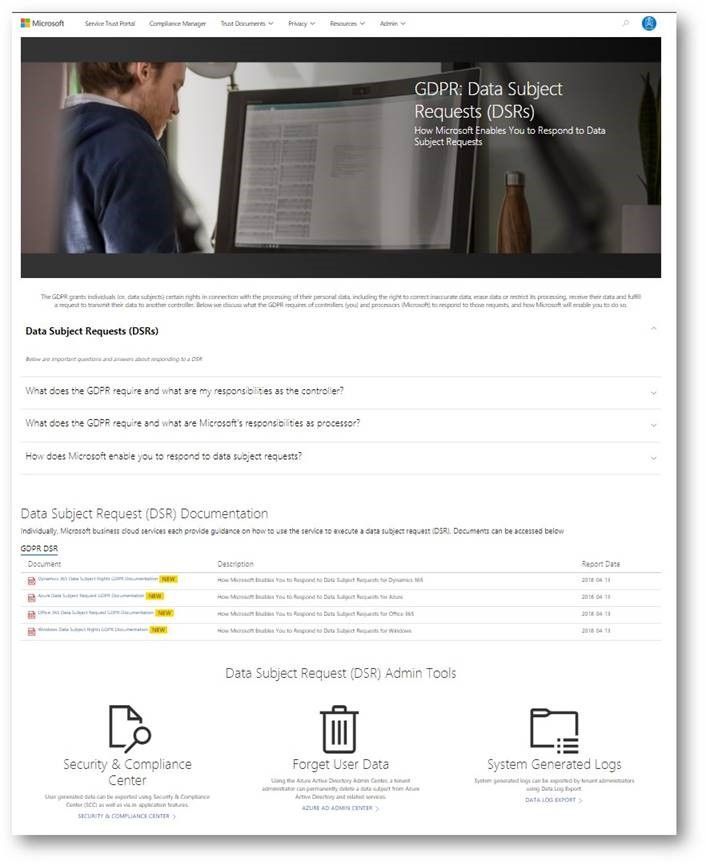
The new data subject requests (DSR) section in STP centralizes all the DSRs resources, and provides you with tools and guidance that you can leverage to locate, export, and erase data across Microsoft’s Cloud services.
Breach notification resources
The GDPR imposes specific requirements around breach notification. After becoming aware of a breach of personal data that puts individuals at risk, data controllers must notify the supervisory authority and data subjects without undue delay. These requirements are similar to other regulations, such as the Health Insurance Portability and Accountability Act (HIPAA).
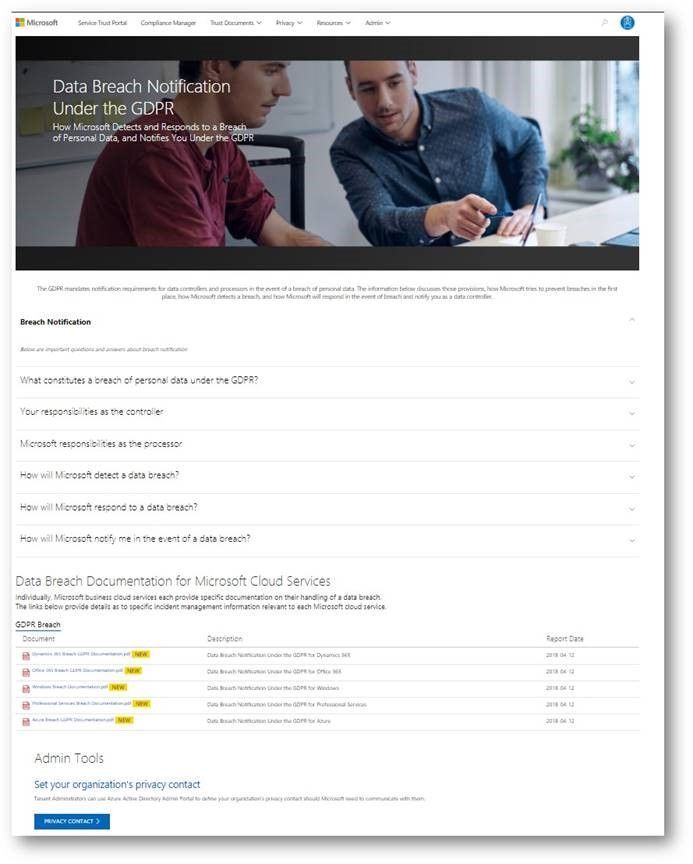
The data breach notification section of the new Privacy area describes how Microsoft services support your personal data breach obligations, and which tools to use to make sure Microsoft can reach to appropriate people in your organization without delay.
Data Protection Impact Assessments documents
A critical part of GDPR preparedness involves creating Data Protection Impact Assessments (DPIAs) of data processing activities that are likely to result in high risk to the rights and freedoms of individuals.
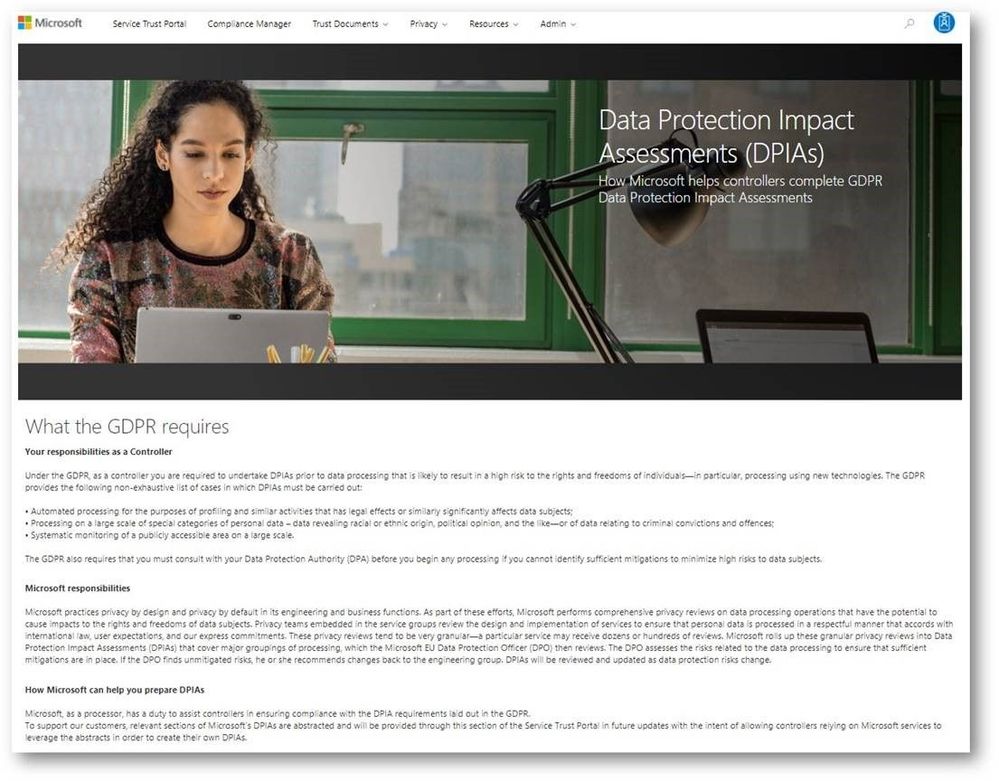
Coming soon, the data protection impact assessments (DPIAs) section will provide organizations with information you need to create your own DPIAs as a data controller. We will share DPIA-related information for specific Microsoft Cloud services in the next few weeks.
Compliance Manager updates
In addition to the new sections we introduced above, we highly recommend that organizations manage their GDPR compliance activities using Compliance Manager, which provides you with a holistic assessment and built-in tools for end-to-end GDPR compliance management, mapping the GDPR obligations to operational and technical controls used by Microsoft services to support GDPR compliance. You can use Compliance Manager and the information it provides to enhance your accountability and compliance programs.
In addition, we just released the updated version of the GDPR Detailed Assessment, a question-driven assessment tool for preparing for the GDPR. It now integrates with Compliance Manager, directing organizations to specific controls in Compliance Manager and providing guidance for every GDPR scenario in the assessment questionnaire. The updated GDPR Detailed Assessment toolkit can be downloaded here.
Check out the new GDPR and privacy-related resources we’ve introduced today on Service Trust Portal, which is available publicly but requires you to log in using your Microsoft subscription accounts (Azure, Dynamics 365, or Office 365 account, etc.) to access restricted documents like audit reports and tools like Compliance Manager.
While the GDPR poses new challenges for organizations working to support the privacy rights of individuals, it also encourages companies to become more accountable for developing and leveraging innovative technology to protect personal and sensitive information. Given the sheer volume of available resources across Microsoft’s many platforms and services, it can be challenging to find the right resources to support GDPR. To address these challenges, we’ve enhanced the Service Trust Portal (STP), to centralize resources to help you with your needs around data protection, compliance, and privacy, and of course, the GDPR.
The STP continues to include independent third-party audit reports, such as FedRAMP, ISO, and SOC reports, in-depth information such as whitepapers, security assessment reports, and data protection guides. In February this year, we released a new tool on the STP called Compliance Manager, which helps organizations to manage compliance activities and perform risk assessments on Microsoft Cloud services.
To help you navigate the collection of GDPR resources, we’re publicly previewing a new Privacy area on the STP which provides you with guidance on how Microsoft services will support you in the event of a personal data breach, and with tools and technical documents to help you respond to data subject requests. You can find more details about each scenario below:
Data subject requests resources
The GPDR provides data subjects with increased rights to control their personal data, including the ability to obtain a copy of their personal data and to have their personal data erased from data systems used by a data controller.
The new data subject requests (DSR) section in STP centralizes all the DSRs resources, and provides you with tools and guidance that you can leverage to locate, export, and erase data across Microsoft’s Cloud services.
Breach notification resources
The GDPR imposes specific requirements around breach notification. After becoming aware of a breach of personal data that puts individuals at risk, data controllers must notify the supervisory authority and data subjects without undue delay. These requirements are similar to other regulations, such as the Health Insurance Portability and Accountability Act (HIPAA).
The data breach notification section of the new Privacy area describes how Microsoft services support your personal data breach obligations, and which tools to use to make sure Microsoft can reach to appropriate people in your organization without delay.
Data Protection Impact Assessments documents
A critical part of GDPR preparedness involves creating Data Protection Impact Assessments (DPIAs) of data processing activities that are likely to result in high risk to the rights and freedoms of individuals.
Coming soon, the data protection impact assessments (DPIAs) section will provide organizations with information you need to create your own DPIAs as a data controller. We will share DPIA-related information for specific Microsoft Cloud services in the next few weeks.
Compliance Manager updates
In addition to the new sections we introduced above, we highly recommend that organizations manage their GDPR compliance activities using Compliance Manager, which provides you with a holistic assessment and built-in tools for end-to-end GDPR compliance management, mapping the GDPR obligations to operational and technical controls used by Microsoft services to support GDPR compliance. You can use Compliance Manager and the information it provides to enhance your accountability and compliance programs.
In addition, we just released the updated version of the GDPR Detailed Assessment, a question-driven assessment tool for preparing for the GDPR. It now integrates with Compliance Manager, directing organizations to specific controls in Compliance Manager and providing guidance for every GDPR scenario in the assessment questionnaire. The updated GDPR Detailed Assessment toolkit can be downloaded here.
Check out the new GDPR and privacy-related resources we’ve introduced today on Service Trust Portal, which is available publicly but requires you to log in using your Microsoft subscription accounts (Azure, Dynamics 365, or Office 365 account, etc.) to access restricted documents like audit reports and tools like Compliance Manager.
While the GDPR poses new challenges for organizations working to support the privacy rights of individuals, it also encourages companies to become more accountable for developing and leveraging innovative technology to protect personal and sensitive information. Given the sheer volume of available resources across Microsoft’s many platforms and services, it can be challenging to find the right resources to support GDPR. To address these challenges, we’ve enhanced the Service Trust Portal (STP), to centralize resources to help you with your needs around data protection, compliance, and privacy, and of course, the GDPR.
The STP continues to include independent third-party audit reports, such as FedRAMP, ISO, and SOC reports, in-depth information such as whitepapers, security assessment reports, and data protection guides. In February this year, we released a new tool on the STP called Compliance Manager, which helps organizations to manage compliance activities and perform risk assessments on Microsoft Cloud services.
To help you navigate the collection of GDPR resources, we’re publicly previewing a new Privacy area on the STP which provides you with guidance on how Microsoft services will support you in the event of a personal data breach, and with tools and technical documents to help you respond to data subject requests. You can find more details about each scenario below:
Data subject requests resources
The GPDR provides data subjects with increased rights to control their personal data, including the ability to obtain a copy of their personal data and to have their personal data erased from data systems used by a data controller.
The new data subject requests (DSR) section in STP centralizes all the DSRs resources, and provides you with tools and guidance that you can leverage to locate, export, and erase data across Microsoft’s Cloud services.
Breach notification resources
The GDPR imposes specific requirements around breach notification. After becoming aware of a breach of personal data that puts individuals at risk, data controllers must notify the supervisory authority and data subjects without undue delay. These requirements are similar to other regulations, such as the Health Insurance Portability and Accountability Act (HIPAA).
The data breach notification section of the new Privacy area describes how Microsoft services support your personal data breach obligations, and which tools to use to make sure Microsoft can reach to appropriate people in your organization without delay.
Data Protection Impact Assessments documents
A critical part of GDPR preparedness involves creating Data Protection Impact Assessments (DPIAs) of data processing activities that are likely to result in high risk to the rights and freedoms of individuals.
Coming soon, the data protection impact assessments (DPIAs) section will provide organizations with information you need to create your own DPIAs as a data controller. We will share DPIA-related information for specific Microsoft Cloud services in the next few weeks.
Compliance Manager updates
In addition to the new sections we introduced above, we highly recommend that organizations manage their GDPR compliance activities using Compliance Manager, which provides you with a holistic assessment and built-in tools for end-to-end GDPR compliance management, mapping the GDPR obligations to operational and technical controls used by Microsoft services to support GDPR compliance. You can use Compliance Manager and the information it provides to enhance your accountability and compliance programs.
In addition, we just released the updated version of the GDPR Detailed Assessment, a question-driven assessment tool for preparing for the GDPR. It now integrates with Compliance Manager, directing organizations to specific controls in Compliance Manager and providing guidance for every GDPR scenario in the assessment questionnaire. The updated GDPR Detailed Assessment toolkit can be downloaded here.
Check out the new GDPR and privacy-related resources we’ve introduced today on Service Trust Portal, which is available publicly but requires you to log in using your Microsoft subscription accounts (Azure, Dynamics 365, or Office 365 account, etc.) to access restricted documents like audit reports and tools like Compliance Manager.
While the GDPR poses new challenges for organizations working to support the privacy rights of individuals, it also encourages companies to become more accountable for developing and leveraging innovative technology to protect personal and sensitive information. Given the sheer volume of available resources across Microsoft’s many platforms and services, it can be challenging to find the right resources to support GDPR. To address these challenges, we’ve enhanced the Service Trust Portal (STP), to centralize resources to help you with your needs around data protection, compliance, and privacy, and of course, the GDPR.
The STP continues to include independent third-party audit reports, such as FedRAMP, ISO, and SOC reports, in-depth information such as whitepapers, security assessment reports, and data protection guides. In February this year, we released a new tool on the STP called Compliance Manager, which helps organizations to manage compliance activities and perform risk assessments on Microsoft Cloud services.
To help you navigate the collection of GDPR resources, we’re publicly previewing a new Privacy area on the STP which provides you with guidance on how Microsoft services will support you in the event of a personal data breach, and with tools and technical documents to help you respond to data subject requests. You can find more details about each scenario below:
Data subject requests resources
The GPDR provides data subjects with increased rights to control their personal data, including the ability to obtain a copy of their personal data and to have their personal data erased from data systems used by a data controller.
The new data subject requests (DSR) section in STP centralizes all the DSRs resources, and provides you with tools and guidance that you can leverage to locate, export, and erase data across Microsoft’s Cloud services.
Breach notification resources
The GDPR imposes specific requirements around breach notification. After becoming aware of a breach of personal data that puts individuals at risk, data controllers must notify the supervisory authority and data subjects without undue delay. These requirements are similar to other regulations, such as the Health Insurance Portability and Accountability Act (HIPAA).
The data breach notification section of the new Privacy area describes how Microsoft services support your personal data breach obligations, and which tools to use to make sure Microsoft can reach to appropriate people in your organization without delay.
Data Protection Impact Assessments documents
A critical part of GDPR preparedness involves creating Data Protection Impact Assessments (DPIAs) of data processing activities that are likely to result in high risk to the rights and freedoms of individuals.
Coming soon, the data protection impact assessments (DPIAs) section will provide organizations with information you need to create your own DPIAs as a data controller. We will share DPIA-related information for specific Microsoft Cloud services in the next few weeks.
Compliance Manager updates
In addition to the new sections we introduced above, we highly recommend that organizations manage their GDPR compliance activities using Compliance Manager, which provides you with a holistic assessment and built-in tools for end-to-end GDPR compliance management, mapping the GDPR obligations to operational and technical controls used by Microsoft services to support GDPR compliance. You can use Compliance Manager and the information it provides to enhance your accountability and compliance programs.
In addition, we just released the updated version of the GDPR Detailed Assessment, a question-driven assessment tool for preparing for the GDPR. It now integrates with Compliance Manager, directing organizations to specific controls in Compliance Manager and providing guidance for every GDPR scenario in the assessment questionnaire. The updated GDPR Detailed Assessment toolkit can be downloaded here.
Check out the new GDPR and privacy-related resources we’ve introduced today on Service Trust Portal, which is available publicly but requires you to log in using your Microsoft subscription accounts (Azure, Dynamics 365, or Office 365 account, etc.) to access restricted documents like audit reports and tools like Compliance Manager.
The threat landscape is continually evolving and in talking with organizations we hear about the many challenges you face in managing your security position to protect against these threats. From having too many security solutions with various places to configure lots of controls, a lack of knowledge around which controls are the most effective, and being unable to benchmark yourself against other organizations, we can understand why security teams are having trouble finding the right balance of security and productivity while staying on top of everything.
With Office 365 Secure Score we made this easier by helping you understand your security position, giving you advice on what controls you should consider enabling, and helping you understand how your score compared to other organizations. We saw a lot of interest around Secure Score and a common piece of feedback we heard was that it was great that we were doing this for Office 365 but what about the other Microsoft solutions? Over the past few months we have been working on this and today Office 365 Secure Score is now Microsoft Secure Score. Microsoft Secure Score builds on top of what was in Office 365 Secure Score and adds even more.
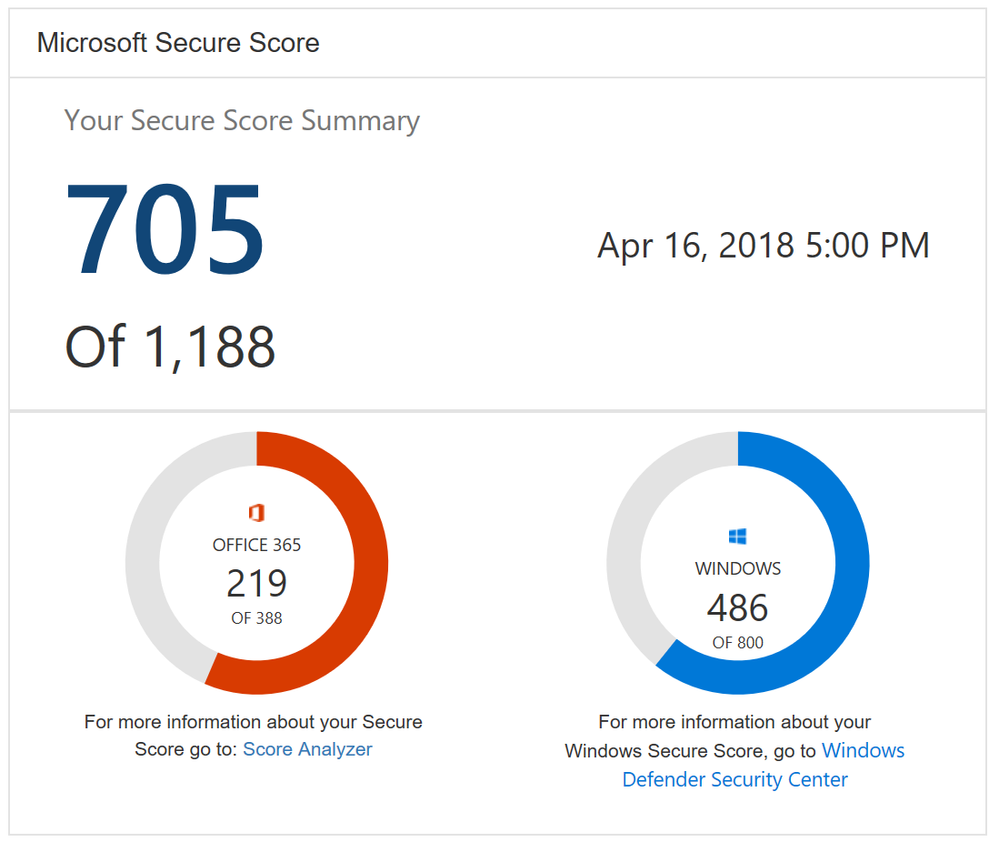
One new feature you will notice as soon as you log in is the new Microsoft score which is made up of your Office 365 Secure Score and your Windows Secure Score. The Windows score come from Windows Defender Advanced Threat Protection (ATP) which provides information about the status of your antivirus, OS security updates, firewall, and other controls. To get the details of your Windows score, you can click on the “Windows Defender Security Center” link below your Windows score to go directly to the dashboard in Windows Defender ATP.
Microsoft Secure Score Summary
Beyond adding Windows to Secure Score, we also now support Microsoft Intune. This surfaces though the existing mobile device management (MDM) controls. Previously we used the telemetry from the Office 365 MDM solution. However, we know that some of you are using Intune and were clicking on the Third Party button to give yourself points as you were meeting the spirit of these controls. This will no longer be necessary. If you are using Intune, we recommend that you remove the third party tag from these controls so they can be scored based on your Intune data.
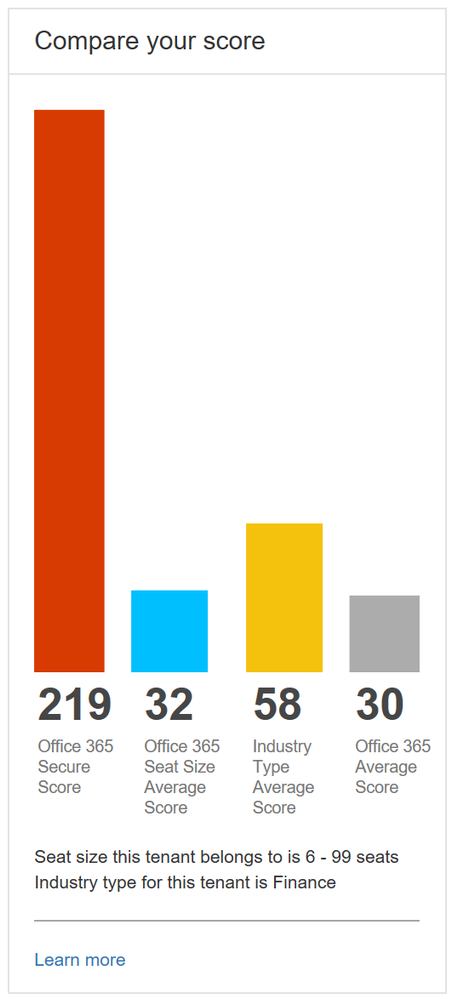
Lastly, we heard from many organizations that they loved the compare your score section where we show how you benchmark against the Office 365 average score and the recently added Office 365 seat size average score. What they also wanted to see was a score based on organizations in the same industry. This new industry average is now rolling out and should be available to everyone by April 20th. Based on what industry you designate in the Service Assurance section of the Office 365 Security and Compliance Center we will show you the average score for that industry. Note that if you change your industry designation, the new average will not appear until your score is recalculated.
Industry average score to help you better benchmark your organization
This is just the first step in building out Microsoft Secure Score. Over the coming months we will continue to add new functionality and add additional solutions to provide you an even better experience.
To try out Microsoft Secure Score now you can go to https://securescore.microsoft.com and log in with your administrative credentials or click on the Secure Score widget on the Office 365 Security and Compliance Center home page. We also created a new Microsoft Mechanics video that can give you a quick overview of the solution if you have not used Secure Score before.
As always, the team loves the feedback and comments so feel free to leave them below. If you happen to be at the RSA conference in San Francisco this week swing by the Microsoft booth to say hi and check out the sessions we are running.
The threat landscape is continually evolving and in talking with organizations we hear about the many challenges you face in managing your security position to protect against these threats. From having too many security solutions with various places to configure lots of controls, a lack of knowledge around which controls are the most effective, and being unable to benchmark yourself against other organizations, we can understand why security teams are having trouble finding the right balance of security and productivity while staying on top of everything.
With Office 365 Secure Score we made this easier by helping you understand your security position, giving you advice on what controls you should consider enabling, and helping you understand how your score compared to other organizations. We saw a lot of interest around Secure Score and a common piece of feedback we heard was that it was great that we were doing this for Office 365 but what about the other Microsoft solutions? Over the past few months we have been working on this and today Office 365 Secure Score is now Microsoft Secure Score. Microsoft Secure Score builds on top of what was in Office 365 Secure Score and adds even more.
One new feature you will notice as soon as you log in is the new Microsoft score which is made up of your Office 365 Secure Score and your Windows Secure Score. The Windows score come from Windows Defender Advanced Threat Protection (ATP) which provides information about the status of your antivirus, OS security updates, firewall, and other controls. To get the details of your Windows score, you can click on the “Windows Defender Security Center” link below your Windows score to go directly to the dashboard in Windows Defender ATP.
Microsoft Secure Score Summary
Beyond adding Windows to Secure Score, we also now support Microsoft Intune. This surfaces though the existing mobile device management (MDM) controls. Previously we used the telemetry from the Office 365 MDM solution. However, we know that some of you are using Intune and were clicking on the Third Party button to give yourself points as you were meeting the spirit of these controls. This will no longer be necessary. If you are using Intune, we recommend that you remove the third party tag from these controls so they can be scored based on your Intune data.
Lastly, we heard from many organizations that they loved the compare your score section where we show how you benchmark against the Office 365 average score and the recently added Office 365 seat size average score. What they also wanted to see was a score based on organizations in the same industry. This new industry average is now rolling out and should be available to everyone by April 20th. Based on what industry you designate in the Service Assurance section of the Office 365 Security and Compliance Center we will show you the average score for that industry. Note that if you change your industry designation, the new average will not appear until your score is recalculated.
Industry average score to help you better benchmark your organization
This is just the first step in building out Microsoft Secure Score. Over the coming months we will continue to add new functionality and add additional solutions to provide you an even better experience.
To try out Microsoft Secure Score now you can go to https://securescore.microsoft.com and log in with your administrative credentials or click on the Secure Score widget on the Office 365 Security and Compliance Center home page. We also created a new Microsoft Mechanics video that can give you a quick overview of the solution if you have not used Secure Score before.
As always, the team loves the feedback and comments so feel free to leave them below. If you happen to be at the RSA conference in San Francisco this week swing by the Microsoft booth to say hi and check out the sessions we are running.
The threat landscape is continually evolving and in talking with organizations we hear about the many challenges you face in managing your security position to protect against these threats. From having too many security solutions with various places to configure lots of controls, a lack of knowledge around which controls are the most effective, and being unable to benchmark yourself against other organizations, we can understand why security teams are having trouble finding the right balance of security and productivity while staying on top of everything.
With Office 365 Secure Score we made this easier by helping you understand your security position, giving you advice on what controls you should consider enabling, and helping you understand how your score compared to other organizations. We saw a lot of interest around Secure Score and a common piece of feedback we heard was that it was great that we were doing this for Office 365 but what about the other Microsoft solutions? Over the past few months we have been working on this and today Office 365 Secure Score is now Microsoft Secure Score. Microsoft Secure Score builds on top of what was in Office 365 Secure Score and adds even more.
One new feature you will notice as soon as you log in is the new Microsoft score which is made up of your Office 365 Secure Score and your Windows Secure Score. The Windows score come from Windows Defender Advanced Threat Protection (ATP) which provides information about the status of your antivirus, OS security updates, firewall, and other controls. To get the details of your Windows score, you can click on the “Windows Defender Security Center” link below your Windows score to go directly to the dashboard in Windows Defender ATP.
Microsoft Secure Score Summary
Beyond adding Windows to Secure Score, we also now support Microsoft Intune. This surfaces though the existing mobile device management (MDM) controls. Previously we used the telemetry from the Office 365 MDM solution. However, we know that some of you are using Intune and were clicking on the Third Party button to give yourself points as you were meeting the spirit of these controls. This will no longer be necessary. If you are using Intune, we recommend that you remove the third party tag from these controls so they can be scored based on your Intune data.
Lastly, we heard from many organizations that they loved the compare your score section where we show how you benchmark against the Office 365 average score and the recently added Office 365 seat size average score. What they also wanted to see was a score based on organizations in the same industry. This new industry average is now rolling out and should be available to everyone by April 20th. Based on what industry you designate in the Service Assurance section of the Office 365 Security and Compliance Center we will show you the average score for that industry. Note that if you change your industry designation, the new average will not appear until your score is recalculated.
Industry average score to help you better benchmark your organization
This is just the first step in building out Microsoft Secure Score. Over the coming months we will continue to add new functionality and add additional solutions to provide you an even better experience.
To try out Microsoft Secure Score now you can go to https://securescore.microsoft.com and log in with your administrative credentials or click on the Secure Score widget on the Office 365 Security and Compliance Center home page. We also created a new Microsoft Mechanics video that can give you a quick overview of the solution if you have not used Secure Score before.
As always, the team loves the feedback and comments so feel free to leave them below. If you happen to be at the RSA conference in San Francisco this week swing by the Microsoft booth to say hi and check out the sessions we are running.
The threat landscape is continually evolving and in talking with organizations we hear about the many challenges you face in managing your security position to protect against these threats. From having too many security solutions with various places to configure lots of controls, a lack of knowledge around which controls are the most effective, and being unable to benchmark yourself against other organizations, we can understand why security teams are having trouble finding the right balance of security and productivity while staying on top of everything.
With Office 365 Secure Score we made this easier by helping you understand your security position, giving you advice on what controls you should consider enabling, and helping you understand how your score compared to other organizations. We saw a lot of interest around Secure Score and a common piece of feedback we heard was that it was great that we were doing this for Office 365 but what about the other Microsoft solutions? Over the past few months we have been working on this and today Office 365 Secure Score is now Microsoft Secure Score. Microsoft Secure Score builds on top of what was in Office 365 Secure Score and adds even more.
One new feature you will notice as soon as you log in is the new Microsoft score which is made up of your Office 365 Secure Score and your Windows Secure Score. The Windows score come from Windows Defender Advanced Threat Protection (ATP) which provides information about the status of your antivirus, OS security updates, firewall, and other controls. To get the details of your Windows score, you can click on the “Windows Defender Security Center” link below your Windows score to go directly to the dashboard in Windows Defender ATP.
Microsoft Secure Score Summary
Beyond adding Windows to Secure Score, we also now support Microsoft Intune. This surfaces though the existing mobile device management (MDM) controls. Previously we used the telemetry from the Office 365 MDM solution. However, we know that some of you are using Intune and were clicking on the Third Party button to give yourself points as you were meeting the spirit of these controls. This will no longer be necessary. If you are using Intune, we recommend that you remove the third party tag from these controls so they can be scored based on your Intune data.
Lastly, we heard from many organizations that they loved the compare your score section where we show how you benchmark against the Office 365 average score and the recently added Office 365 seat size average score. What they also wanted to see was a score based on organizations in the same industry. This new industry average is now rolling out and should be available to everyone by April 20th. Based on what industry you designate in the Service Assurance section of the Office 365 Security and Compliance Center we will show you the average score for that industry. Note that if you change your industry designation, the new average will not appear until your score is recalculated.
Industry average score to help you better benchmark your organization
This is just the first step in building out Microsoft Secure Score. Over the coming months we will continue to add new functionality and add additional solutions to provide you an even better experience.
To try out Microsoft Secure Score now you can go to https://securescore.microsoft.com and log in with your administrative credentials or click on the Secure Score widget on the Office 365 Security and Compliance Center home page. We also created a new Microsoft Mechanics video that can give you a quick overview of the solution if you have not used Secure Score before.
As always, the team loves the feedback and comments so feel free to leave them below. If you happen to be at the RSA conference in San Francisco this week swing by the Microsoft booth to say hi and check out the sessions we are running.
We conclude our phish blog series by announcing some exciting capabilities that further enhance the anti-phish stack in Office 365. In our previous blogs, we announced enhanced anti-impersonation capabilities and anti-spoofing capabilities which help stop sophisticated spear phishing and email spoofing campaigns. Today, we’re excited to announce new capabilities augmenting our protection against content based phish lures. Additionally, today we’re announcing roll out of “Internal Safe Links’ which protects users from the industry wide concern of phishing occurring when hackers gain access to an internal enterprise account and leverage the internal account to launch a phishing campaign on internal users. Users are far more likely to trust, open, and execute actions in an email sent from another user in their organization than from an external source. Phishing with compromised internal accounts is a powerful technique used by hackers to move laterally across an organization and gain a stronger foothold into the enterprise. Hackers can penetrate deeper into an organization, harvesting more user credentials, personally identifiable information (PII), and perhaps enterprise intellectual property. Our customers often ask for a solution to help mitigate intra-org phishing campaigns so we are especially excited to deliver this new feature.
GA of ‘Internal Safe Links’
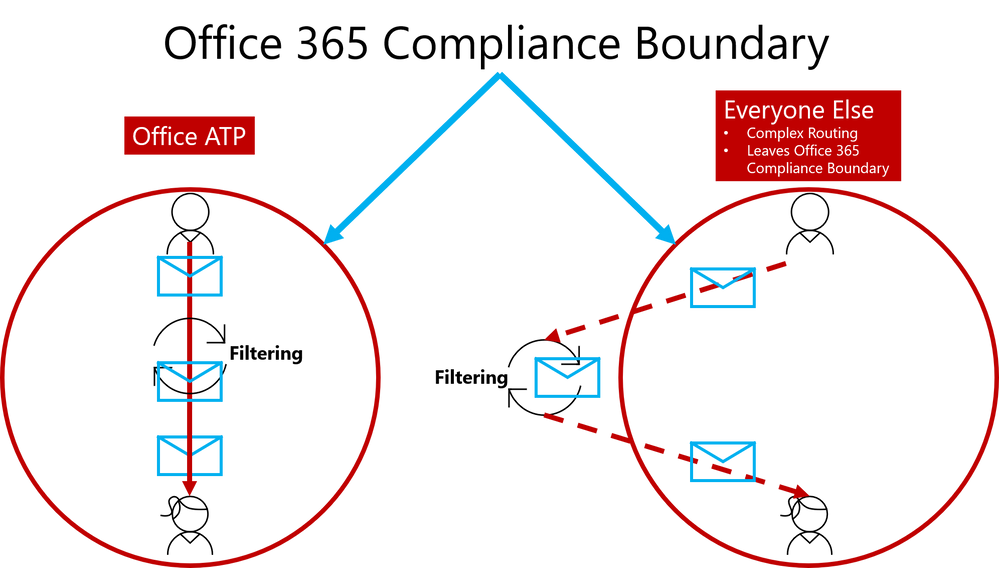
To help customers eliminate impact from phishing campaigns launched via compromised accounts, we’re excited to launch ‘Internal Safe Links’, which enables the Office 365 Advanced Threat Protection (ATP) Safe Links policy to protect intra-org emails. With Safe Links now protecting intra-org emails, Office 365 ATP helps greatly reduce if not eliminate this lethal and widespread phishing technique. Also, Office 365 ATP is the only threat protection service that can provide intra-org email scanning without routing emails outside the compliance boundary of Office 365.
Figure 1. Internal Safe Links is unique to Office ATP by enabling direct routing and ensuring emails remain within the compliance boundaries of Office 365
This provides Office 365 ATP customers a critical advantage since their emails will always remain within the Office 365 Compliance Boundary which is especially important as compliance requirements are increasingly scrutinized with the launch of the General Data Protection Regulation (GDPR). Other solutions offering intra-org email link scanning must route emails outside the Office 365 Compliance Boundary. Solutions using this approach create a gap in maintaining the compliance standards guaranteed by Office 365. Office 365 ATP’s Internal Safe Links will protect users from internal phishing campaigns and is the only solution that ensures emails always meet the necessary compliance standards set in Office 365. Other solutions also add unnecessary complexity to email routing since they must leave the Office 365 boundary to scan links for intra-org emails. Complex email routing can lead to unforeseen impact on enterprise mail flow, potentially causing email delivery delays, incorrect setup of mail flow, and even undelivered email. Internal Safe Links follows the Office ATP ethos of making setup as easy as possible. The feature can be turned on or off by pushing the corresponding radio button in the Safe Links policy. The feature will be ‘off’ by default.
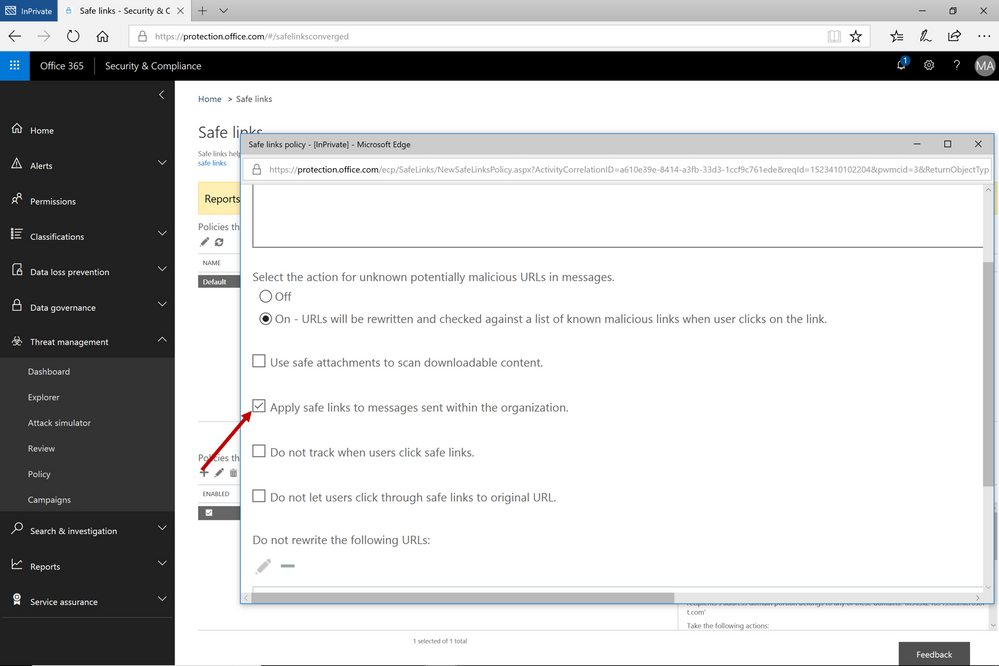 Figure 2. Easy setup with a on/off button to execute the feature capability
Continued Enhancements in Link Content Detonation of Phish Lures
As we alluded to in the first blog of this series, emails contain many types of phish lures which can lead to malicious websites. These lures can come in various forms but are usually associated with a link to a malicious website.
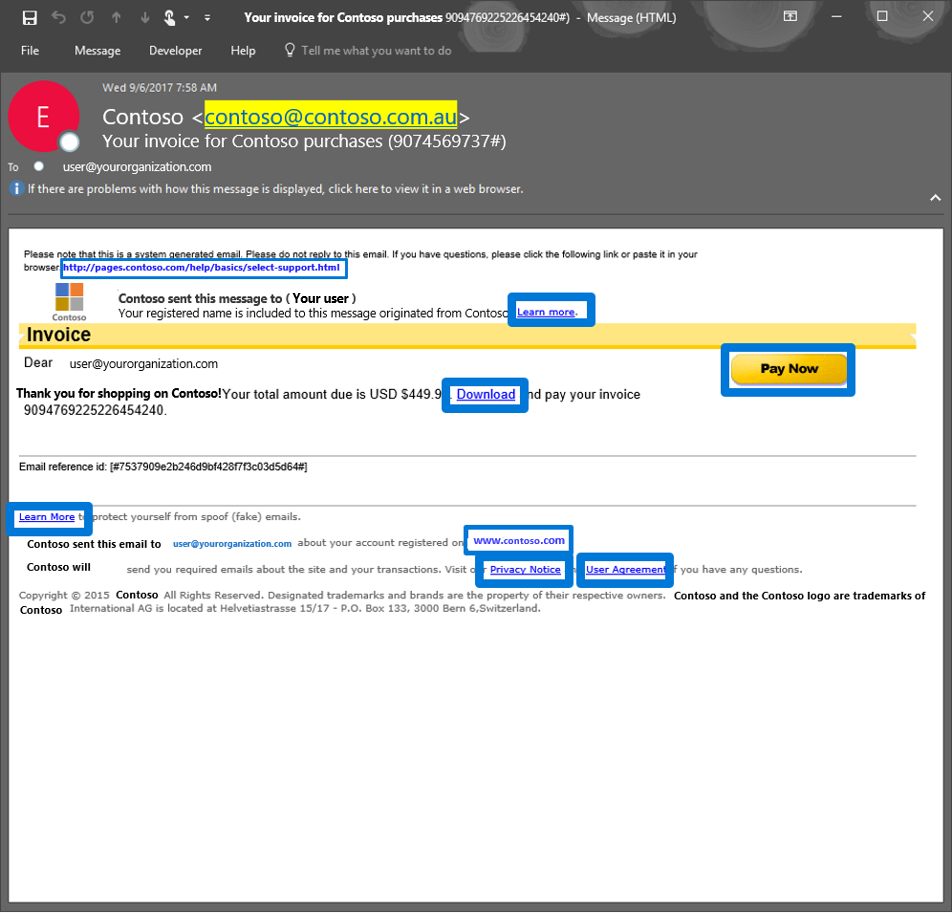 Figure 3. Generic email with several phish lures in the email
Office 365 applies several algorithms and heuristics to determine when a link should be detonated during mail flow to detect various attacks such as:
- Pages that automatically download malware
- Phishing pages
These techniques are not limited to the email body. Office 365 ATP also detonates phish lures within email attachments, helping ensure protection across all components of an email.
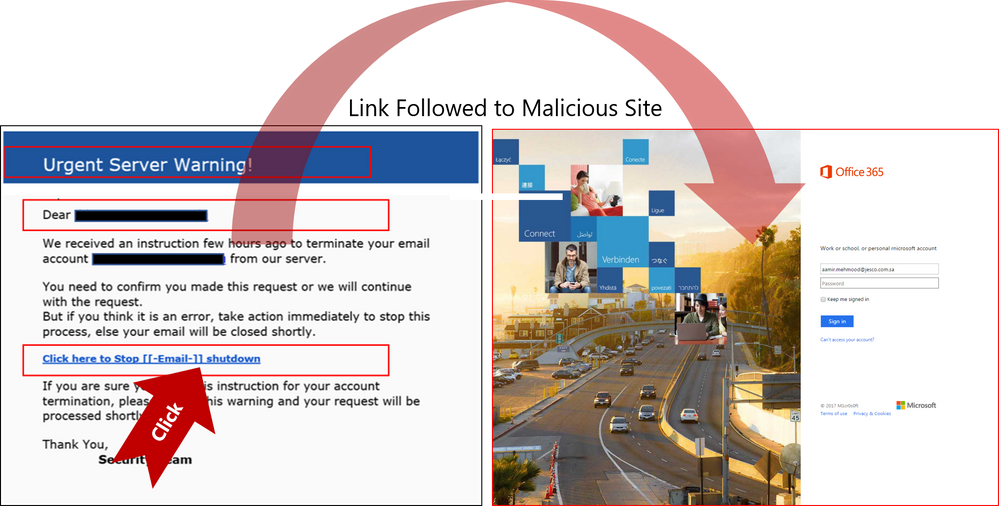 Figure 4. Real Example of Office 365 ATP following suspicious link to the destination a URL points to and scanning that page for potential malware or phish
Send Us Your Feedback
Below are some other helpful articles on Office 365 and Office 365 ATP anti-phish, anti-spoof, and holistic phish protection capabilities:
Once you experience the new Internal Safe Links and phish lure detonation capabilities for Office 365 Advanced Threat Protection, provide us your feedback so we can continue improving and adding features that will allow Office ATP to be the premiere advanced security service for Office 365. If you have not tried Office 365 ATP for your organization yet, you should begin a free Office 365 E5 trial today and start securing your organization from the modern threat landscape.
We conclude our phish blog series by announcing some exciting capabilities that further enhance the anti-phish stack in Office 365. In our previous blogs, we announced enhanced anti-impersonation capabilities and anti-spoofing capabilities which help stop sophisticated spear phishing and email spoofing campaigns. Today, we’re excited to announce new capabilities augmenting our protection against content based phish lures. Additionally, today we’re announcing roll out of “Internal Safe Links’ which protects users from the industry wide concern of phishing occurring when hackers gain access to an internal enterprise account and leverage the internal account to launch a phishing campaign on internal users. Users are far more likely to trust, open, and execute actions in an email sent from another user in their organization than from an external source. Phishing with compromised internal accounts is a powerful technique used by hackers to move laterally across an organization and gain a stronger foothold into the enterprise. Hackers can penetrate deeper into an organization, harvesting more user credentials, personally identifiable information (PII), and perhaps enterprise intellectual property. Our customers often ask for a solution to help mitigate intra-org phishing campaigns so we are especially excited to deliver this new feature.
GA of ‘Internal Safe Links’
To help customers eliminate impact from phishing campaigns launched via compromised accounts, we’re excited to launch ‘Internal Safe Links’, which enables the Office 365 Advanced Threat Protection (ATP) Safe Links policy to protect intra-org emails. With Safe Links now protecting intra-org emails, Office 365 ATP helps greatly reduce if not eliminate this lethal and widespread phishing technique. Also, Office 365 ATP is the only threat protection service that can provide intra-org email scanning without routing emails outside the compliance boundary of Office 365.
Figure 1. Internal Safe Links is unique to Office ATP by enabling direct routing and ensuring emails remain within the compliance boundaries of Office 365
This provides Office 365 ATP customers a critical advantage since their emails will always remain within the Office 365 Compliance Boundary which is especially important as compliance requirements are increasingly scrutinized with the launch of the General Data Protection Regulation (GDPR). Other solutions offering intra-org email link scanning must route emails outside the Office 365 Compliance Boundary. Solutions using this approach create a gap in maintaining the compliance standards guaranteed by Office 365. Office 365 ATP’s Internal Safe Links will protect users from internal phishing campaigns and is the only solution that ensures emails always meet the necessary compliance standards set in Office 365. Other solutions also add unnecessary complexity to email routing since they must leave the Office 365 boundary to scan links for intra-org emails. Complex email routing can lead to unforeseen impact on enterprise mail flow, potentially causing email delivery delays, incorrect setup of mail flow, and even undelivered email. Internal Safe Links follows the Office ATP ethos of making setup as easy as possible. The feature can be turned on or off by pushing the corresponding radio button in the Safe Links policy. The feature will be ‘off’ by default.
Figure 2. Easy setup with a on/off button to execute the feature capability
Continued Enhancements in Link Content Detonation of Phish Lures
As we alluded to in the first blog of this series, emails contain many types of phish lures which can lead to malicious websites. These lures can come in various forms but are usually associated with a link to a malicious website.
Figure 3. Generic email with several phish lures in the email
Office 365 applies several algorithms and heuristics to determine when a link should be detonated during mail flow to detect various attacks such as:
- Pages that automatically download malware
- Phishing pages
These techniques are not limited to the email body. Office 365 ATP also detonates phish lures within email attachments, helping ensure protection across all components of an email.
Figure 4. Real Example of Office 365 ATP following suspicious link to the destination a URL points to and scanning that page for potential malware or phish
Send Us Your Feedback
Below are some other helpful articles on Office 365 and Office 365 ATP anti-phish, anti-spoof, and holistic phish protection capabilities:
Once you experience the new Internal Safe Links and phish lure detonation capabilities for Office 365 Advanced Threat Protection, provide us your feedback so we can continue improving and adding features that will allow Office ATP to be the premiere advanced security service for Office 365. If you have not tried Office 365 ATP for your organization yet, you should begin a free Office 365 E5 trial today and start securing your organization from the modern threat landscape.







