Content Control

Content Control

This article is concerned with how the management of documents and data in a site related to the delivery of a SharePoint solution, thus allowing the control, storage and management of information related to a SharePoint delivery program. (more…)

Avoiding the Failure of SharePoint Implementation Projects

Avoiding the Failure of SharePoint Implementation Projects

 Here’s a little section from my forthcoming book concerning Managing and Implementing SharePoint 2010 Projects.

Large SharePoint implementation and upgrade projects are the nightmare of many corporate boardrooms. Decisions regarding goals for the organization concerning how SharePoint should be used, internal misunderstanding about the need for a business process overhaul and entrenched resistance to change all create friction among the CEO, CFO, CIO, vendors, consultants and users. Costs escalate as scope creep takes over and the capabilities of the new system are modified to accommodate current rather than optimal procedures. The result is that another project runs into red ink and IT gets another black eye. Industries reports show that cost overruns of 1 million, 10 million, even 100 million, are the reality of attempting to change mission critical SharePoint and systems.
It doesn’t have to be this way. Here are some observations that keep a SharePoint implementation project on track.
1: SharePoint acquisition is not about technology, but about business processes.
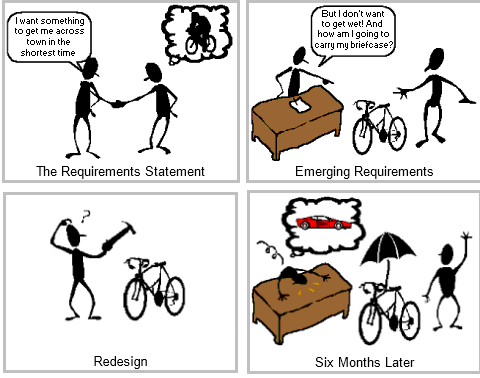
Many people believe that a new shiny SharePoint platform is a “magic potion” that will fix whatever glitches there are in the way people work in the organization. They assume that after installation, profits will be up, down time will be decreased and productivity will have gone through the roof. That is not the case. If the current process for tracking an invoice or managing customer relations is inefficient, then simply putting in SharePoint will merely speed up a bad process. Customers wind up getting duplicate mailings in two days rather than three! The first step in any SharePoint implementation must be to find out how things are really being done in a department and not what the training manual describes as the process. This is called ‘Making sure SharePoint meets User Requirements’. Then, changes can be made to design the optimal process to achieve success using the new technology.
2: SharePoint acquisition is more about people than about technology.
SharePoint adoption requires that users alter the way they have always done it. This means leaving their comfort zone and people don’t like change. They tend to resist, complain and often, leave the company. Unless the users are involved from the beginning, a new acquisition is something done to them and they feel powerless. The people doing the work are invaluable assets in the task of trying to make their job more efficient. Make sure that you define SharePoint Governance, engage with your users both business and technical looking critically at user requirements from both camps.
3: Wisely choose and train a cross-organizational team to set goals and priorities.
The best and the brightest from each department make good working partners with senior management when choosing new systems. That way, no one gets surprised by the costs in terms of money or effort when implementation time comes around. Creating a cooperative atmosphere, of course, is key to making this work. Buy–in doesn’t happen automatically. Often, the attitude of line operators is that their presence is merely window dressing and that the senior managers will make the final decision regardless of their input. A skilled facilitator is necessary to get past this distrust. You need an evangelistic Project (or depending on the scale of the technology release – if SharePoint and other new technologies are involved, a Programme) Manager to enhance client understanding and create a vision using ‘SharePoint Project Mantra’.
4: Establish good protocols for interviewing the client and users.
It’s easy for the user or client to be overwhelmed by slick SharePoint presentations, particularly when the presenter is talking about things that most people don’t completely understand. Showmanship gets in the way of real capabilities. Unless the review team is judging each vendor against the same list of needs, with the same understanding of the significance of each rating, “likeability” can win over capability. Make sure you use people who can get interactive with the users – Business Analysts are very important in making sure that as well as demonstrations being provided that they can illicit responses from the client and users. The purpose of interviewing is learning on both ends – the client / users learn about the platform, the interviewers learn about what the client / users do and what they need from SharePoint.
Generating a list of requirements is hard work. If the team hasn’t bonded before these discussions, a power struggle ensues, with each faction holding out for its own “essential” specifications. An outsider with no ties to any internal group is usually better able to bring about consensus than someone from the inside. The overarching goal is to produce a list of standards that support the mission of the enterprise. The more immediate goal is to create a unity that transcends the narrowness of each participant’s vision of that mission. The team meeting that follows each presentation must reinforce the common purpose while giving everyone a chance to voice their understanding or lack of it as well as their concerns.
5: Obtain “real” agreement on user and client requirements.
Creating SharePoint requirements means multi-solutions to multi–criteria problems. Every business wants high quality, easy–to–use SharePoint that gets implemented instantly and costs next to nothing! Of course, that doesn’t exist. It’s the actual frontline users who will be responsible for making the new system add value to the enterprise. Even if management do not provide their requirements, the project will proceed faster, more efficiently and with a better result if the frontline people have a real voice in the selection. Getting their buy-in at the start seems like a delay, but it results in a shorter, better project in the long run.
6: Identify system requirements without alienating the users.
Getting agreement on system and user requirements is an art as well as a science. It involves communication between people who have many obstacles to clarity of meaning. It is a frustrating process, but when done right, it is the foundation for success. When the people who will be most affected by the change are motivated to have project success and see the value to them as well as the company, then the requirements will be an exciting design adventure, not a boring, confusing chore. The key is training the parties in communication and team effort. With both knowledge and practical exercise, you can build the team that will succeed.
7: Work with the users and client during implementation.
Success means everyone succeeds. The users, company management, implementation partners and the SharePoint / hardware vendors must all achieve common success – or all fail. When the entire company team agrees on vendors and implementation partners, the road is much smoother. When the vendors, implementation partners and company team are adversaries, the road leads to disaster. Everyone must believe that success requires everyone to succeed.
8: Prepare the users to adapt to the changes required by the new system
Change management is a process, not an event. It should occur continuously throughout the course of the procurement and implementation. Management should not assume that everyone is going to accept the new system without a great deal of preparation. The selection and implementation teams have been consumed for significant time with bringing their project to completion. However, it hasn’t even appeared on the mental radar screen of most users unless there is a deliberate effort to raise awareness of the coming change. Because people don’t like change in general, it’s hard to introduce a particular one without having changed their initial attitude about the concept. This is the first and most essential level of change management. After that has been addressed, then people are more apt to be open to the detailed changes that will be required. Use SharePoint Governance and create Training and Education strategies to ensure that users will continually engage with SharePoint – SharePoint grows and becomes more an Enterprise platform the more users feel comfortable, become more productive, and feel that they have a stake in the future of SharePoint in the organization.

The New World of SharePoint Administration 2010

The New World of SharePoint Administration 2010

Joel Olsons description of some of the new features in SharePoint Administration – good for anyone who wants to know what fundamental things have changed in 2010 that impacts on how you administer Sharepoint – reporting, monitoring, throttling etc.

(more…)

Verify and Validate SharePoint solutions

Verify and Validate SharePoint solutions

As SharePoint Delivery Manager, it is your responsibility to ensure that the SharePoint solution being delivered meets SharePoint sponsor technical requirements and fulfil most, if not all the objectives and expectations of service. This means you must Verify and Validate the SharePoint solution, whether that solution is a full-blown deployment of a SharePoint platform, a third party addon, or an internally or externally developed SharePoint app.

(more…)

SharePoint Subcontract Procedures

SharePoint Subcontract Procedures

SharePoint subcontracts can be raised when it is considered that it is more effective to place discrete packages of work outside of the organisation.

This article is referred to in my book, Managing and Implementing SharePoint 2010 Projects. The article describes, from an academic viewpoint and all in ‘my humble opinion’, a procedure that you could adopt under which you could engage the services of a subcontractor, to aid the delivery of SharePoint 2010 or any associated tasks like branding, customising, solutions and feature building.

There’s a good checklist at the end that you could use when thinking of bringing in a SharePoint subcontract to deliver SharePoint or aspects.

(more…)

The Right Way, the Wrong Place

The Right Way, the Wrong Place

SharePoint 2010 as an upgrade and new collaborative technology platform is here; brand new; shining with feature-sets, clean with many new things users can do.
Those considering the push of moving their SharePoint 2007 environment(s) over could of course do this since there is a plethora of articles explaining in detail how to get the MSI, configure this, change that, and following an installation have a new SharePoint environment – job done.
There is the syrup, tasty as it is that draws people into making the jump and this is done simply because – hey there’s a new SharePoint version out, lets install it, and using the blinding the client with features ploy.
Problem is that users those people generally do that in a land of no IT roadmap. SharePoint 2010 sits in a sea of connected technologies, and nothing is more important in this than the desktop tools. In this article, I will only refer to the Office 2010 suite since that is the preferred connected desktop suite. This suite forms the client applications that “glue” SharePoint 2010 services. Typically, people would use these as their “base” of operations. For example, Microsoft Outlook is perceived as the centre of the universe to people and its clear of that connectivity feature set to SharePoint 2010.
If the clients’ IT roadmap does not include these technologies, and there is no work done to identify where they may sit, SharePoint is not considered future-proofed, and the users would not have a full understanding of the true capabilities of SharePoint 2010 and what they may wish to do with the platform.
There is an argument amongst Project Manager and SharePoint Architects, stating there is no real need to investigate or include Office 2010 on any roadmap when it comes to SharePoint 2010, going even as far to say that it would be unlikely that the client would ever move to Office 2010. Arguments include stating that the client is perfectly happy with the desktop tools they have, and SharePoint 2010 should be able to integrate with what they have. In other words, they have perceived the ‘right way’ of marking Office 2010 desktop applications as secondary to the implementation of SharePoint 2010. After all, SharePoint 2010 is king, because users want a website, so lets’ give them a website, right?
So, how did they come to make those decisions? Is it because they have looked at the new desktop version and compared it with the current? Maybe its because its far too costly to consider an upgrade? Or perhaps its because the interface is so different to their current version that it may ‘scare’ their users and pile on too much pressure on them to learn yet another set of tools?
There could be many reasons; they key though is the desire to keep to the term “bleeding edge” technology. I think this presents a right way, wrong place approach to adopting SharePoint 2010.
I’m going to put myself on a limb here, and state that “bleeding edge” means “catching up”. Bleeding edge is a strategy used to ‘prevent’ adopting the latest set of tools; classifying itself as a conservatively “easy” and “safe” place to be when faced with the prospect of adopting new versions of software. In days past the pace of software development made this comfortable since desktop suites “kept themselves to themselves” – there was little interfacing with products outside of those suites, particularly web based products.
Therefore, strategy dictated to stay at a level “comfortable” with the users (and the purse). There were other reasons, for example, the release mechanism of applications and the ease of getting the alpha, beta versions of these suites. In the past, this was restricted to a large degree. Unless you were a member of a special subscriber group you wouldn’t get a look-in to new products. Testers were selected and sometimes made to sign NDAs (Non Disclosure Arrangements) etc.
Nowadays, things appears to be more relaxed, meaning, that its’ easier to get these suites and start using them for testing purposes. Additionally desktop applications are getting closer and ever closer to the website. SharePoint 2010 has the Office 2010 toolbar on top. This is obviously an intentional move to make it look like Office desktop tools version 2010 and 2007. SharePoint 2010 specific collaborative features that connect it seamlessly with Project 2010, Visio 2010 and Access 2010. For example, going back to the wonderful world of forms design in Microsoft Access versions, imagine that now you have the ability to create sites using Access 2010?
The integration does not stop there, just looking at options in Office 2010 you will start to see more and more connectivity options targeted specifically at SharePoint 2010. Just the other day I was asked about SharePoint 2010 Workspace. Now, this is a rather cool application that allows you to take information offline from a SharePoint 2010 site, work on it, then have it syncrhonised back to the site it came from. Wait a Minute – itsn’t that Microsoft Groove? Yes! That’s an application that when it came out wasn’t didn’t get so much of a look-in, because the strategy was not web bourn, it was desktop bourn. Now look where we area.
So, this all adds up to a prospect that rolling out SharePoint is no longer a ‘single’ matter; no longer a ‘single’ project. Requirements from the client is swinging from the “We need a website to put stuff in” to “We need to be more productive when using our tools with SharePoint”. SharePoint 2010 projects are now full fledged programmes, whose objective is the roll out of a full technology refresh in one fell swoop. However, this “one fell swoop” is a highly complicated affair utilizing multiple projects; you need to have an extremely capable programme manager to pull that off.
Hence, all this means an exciting prospect for SharePoint fans. Now the work really beings, mapping SharePoint to a vastly connected and complex client process is a demanding and challenging task. SharePoint Architects now need to be even more proactive; the connection between SharePoint and external technologies is refined and even better structured. SharePoint 2010 allows this to happen, providing a massively open architecture and feature set.
To complete this article, in summary, SharePoint 2010 needs to be seen, understood and prioritised into the client organisation as the most important centralized technology. The right time to do this is at the beginning; right at the proposal stage this needs to be set into the mind of the client. Ensure the client understands what means to collaborate using desktop tools is and how they are used to enhance that.
The wrong place to attempt this is in a organisation where the culture does not wish to consider the Office 2010 desktop as part of a SharePoint 2010 requirement and/or the technology work does not invoke sharing / collaboration and/or the client does not have the vision or desire for technology refresh or review their ‘bleeding edge’ desktop tools.

Migration from 2003 to 2010, Web Parts and Functional Testing

Migration from 2003 to 2010, Web Parts and Functional Testing

Whilst making the march into SharePoint 2010, lets’ not forget those clients still using SharePoint 2003 and wanting to migrate into 2010. This article attempts to list some key things you need to be aware of in migrating from 2003 to 2010, and lists web parts in 2003 that you need to be aware of as part of the migration exercise.

I wrote this article based on real life procedures, trial and error, exasperation, tearing my hair out (of which I have little) and finally jumping up and down with joy when things fell into place.

Of course, I studied like crazy, and trawled the internt for tons of information. The following two links are the best I could find. Now, as you are probably aware if you’ve been using SharePoint  for some time, that SharePoint 2003 is no longer being directly supported by Microsoft. That said, they are providing information concerning migration from 2003 to 2010 at this link:

http://technet.microsoft.com/en-gb/library/ee947141.aspx

In addition to the above, there is a fantastic resource from Joel O sitting here:

http://blogs.msdn.com/b/joelo/archive/2010/01/31/sharepoint-2010-upgrade-key-resources.aspx

In summary, to make the move from 2003 direct to 2010 is pretty much not a great idea, the technical differences are vast, not just at the platform end, but also at the SQL end, so forget inplace upgrade. Options are:

Migrate 2003 to 2007, then from 2007 to 2010 (i.e. follow the guide above and the ones listed on Joels articles – recommended approach) OR

Use third party migration tools (though make sure you select the vendor with great care) – Avepoint, Quest, Metalogix, Tsunami apparently have options available.

Of course, whilst following the migration path, it’s also very important to note the differences in the Webparts from 2003 to 2007, and also what you should do to test Web Parts and possible ‘gotchas’. I did this as a blog sometime back but forgot to attach the table properly, so, let’s bring this a bit more up to date. Below is the 2003 to 2007 Web part comparison. Shortly, I’ll do one for 2007 to 2010.


Web Part Name

File Name

SPS 2003

WSS v2

MOSS 2007

WSS v3

Advanced Search Box AdvancedSearchBox.dwp Yes
Authored List Filter AuthoredListFilter.dwp Yes
Topic Assistant Suggestions Autocat.dwp Yes
BusinessDataActionsWebPart.dwp Yes
BusinessDataAssociationWebPart.webpart Yes
BusinessDataDetailsWebPart.webpart Yes
BusinessDataFilter.dwp Yes
BusinessDataItemBuilder.dwp Yes
BusinessDataListWebPart.webpart Yes
Area Details Catdetail.dwp Yes
Sites in Category (SiteDirectory) CategoryResultsWebPart.webpart Yes
Categories (SiteDirectory) CategoryWebPart.webpart Yes
Colleague Tracker contactlinks.dwp Yes
Contact Details contactwp.dwp Yes
Content By Query ContentQuery.webpart Yes
Date Filter DateFilter.dwp Yes
Filter Actions FilterActions.dwp Yes
Group Listings GroupedListings.dwp Yes
KPI Details IndicatorWebPart.dwp Yes
Views from SAP IViewWebPart.dwp Yes
Key Performance Indicators KpiLisWebPart.dwp Yes
News LatestNews.dwp Yes
Links for You LinksForYou.dwp Yes
Memberships (in other sites) memberships.dwp Yes
Excel Web Access Microsoft.Office.Excel.WebUI.dwp Yes
Content Editor MSContentEditor.dwp Yes Yes Yes Yes
Image Web Part MSImage.dwp Yes Yes Yes Yes
Members MSMembers.dwp Yes Yes Yes
Page Viewer MSPageViewer.dwp Yes Yes Yes Yes
Form Web Part MSSimpleForm.dwp Yes Yes Yes Yes
Relevant Documents MSUserDocs.dwp Yes Yes
User Tasks MSUserTasks.dwp Yes Yes
XML Web Part MSXml.dwp Yes Yes Yes Yes
Your Recent Documents Mydocs.dwp Yes Yes
My Workspace Sites Myworks.dwp Yes Yes
News Areas NewsAreas.dwp Yes
News for You NewsForYou.dwp Yes
SQL Server Analysis Services filter OlapFilter.dwp Yes
My Mail Folder Owa.dwp Yes Yes
My Calendar Owacalendar.dwp Yes Yes
My Inbox Owainbox.dwp Yes Yes
My Tasks Owatasks.dwp Yes Yes
Page Field filter PageContextFilter.dwp Yes
People Search Box PeopleSearchBox.dwp Yes
People Search Core Results PeopleSearchCoreResults.webpart Yes
Query String (URL) filter QueryStringFilter.dwp Yes
My Links Quicklinks.dwp Yes Yes
RSS Viewer RssViewer.webpart Yes
SearchActionLinks.webpart Yes
SearchBestBets.webpart Yes
SearchBox.dwp Yes
SearchCoreResults.webpart Yes
SearchHighConfidence.webpart Yes
searchpaging.dwp Yes
searchstats.dwp Yes
searchsummary.dwp Yes
Site Aggregator siteFramer.dwp Yes
SharePoint List filter SpListFilter.dwp Yes
My Alerts Summary Subscrip.dwp Yes
Summary Links SummaryLink.webpart Yes
Navigation Hierarchy TableOfContents.webpart Yes
I need to… TasksAndTools.webpart Yes
Text Filter TextFilter.dwp Yes
This Week In Pictures ThisWeekInPictures.dwp Yes
Top Sites TopSitesWebPart.webpart Yes
Area Contents Toc.dwp Yes
Current User filter UserContextFilter.dwp Yes
WSRP Consumer WSRPConsumerWebPart. .dwp Yes
List views
Announcements Yes Yes Yes Yes
Contacts Yes Yes Yes Yes
Events Yes Yes Yes Yes
General Discussions Yes Yes Yes Yes
Links Yes Yes Yes Yes
Shared Documents Yes Yes Yes Yes
Tasks Yes Yes Yes Yes
Document Library Yes Yes Yes Yes
Image Library Yes Yes Yes Yes


Whilst on this topic, it’s very important to Test, Validate and Verify all components in 2007 when you’ve completed a migration from 2003

From a Technical Perspective.

Web Parts are standard ASP.NET custom controls, it’s important to identify the version where they were developed. Get the code and ensure they can migrate to Visual Studio 2008 / 2010 – reinstall these on a test platform to ensure they can migrate. Several glaring issues can arise due to the way code has been defined for 2003 which use now depreciated events in 2007 (meaning they will break).

2003 Web parts connect slightly differently to the new versioned web parts; Check all the connected events on the web parts and check the connection interface pairing iCellProvider,iCellConsumer, IRowProvider, IRowConsumer, IListProvider, IListConsumer, IFilterProvider and IFilterConsumer.

Web parts that have been defined as compatible and connected in 2003 must remain compatiible and connected in 2007/2010. An incompatibility between webparts will show the connections option (the hook between connected webparts) as greyed out – so check connections are still enabled looking at the ‘Ievents’ mentioned above.

Additionally, I know that this link is definitely still valid and I would apply most of the functional testing using these steps from Microsoft:

http://msdn.microsoft.com/en-us/library/dd583141(office.11).aspx

From a Non-Technical Perspective.

To those unsure about what ‘Functional Tests’ mean. Functional Tests capture user requirements in a very useful way. Traditional development captures requirements in terms of ‘use’ cases – meaning, the developer ‘guesses’ and ‘assumes’ the user will carry out certain functions. Hence, Functional Tests are written from the user perspective; they confirm the product does what the users are expecting it to. Therefore, it is important that all functional tests be written as a dialog. To do this you will require system analysis skills, not developer skills since these dialogs are written in a way the user will understand and with virtually no technical glossary terms!

So, functional tests are written from the user’s perspective and will focus on the area of SharePoint that users are interested in. You will need to develop a good functional testing framework, and use these functional tests to identify what the user really wants. In this way, the functional tester gains an automated tool and has a starting point for using the tool.

Going back to ensuring things work as they should post migration (of anything in SharePoint). You need to ensure you have a full verification and validation programme backed up by a solid configuration management process. This might sound like a lot of twaddle, but if, for example there was adequate documentation and version history concerning the web parts in 2003 concerning the install, development, configuration on 2003 then it is much easier to confirm what needs to be tested when it gets to 2007 land.

The SharePoint Verification and Validation blog I’ve been writing up goes into this from a basic perspective, but my forthcoming book (plug) covers this area in great detail.

Functional testing includes confirming the reaction to virtually every setting in the web part in 2003 and then comparing that with 2007, and getting sign off from the client.

Hope this helps anyone out there!

In English

In English

A description of Sharepoint video which is very good at describing SharePoint as a collaboration tool but without references to technical capability.

(more…)

Topology Presentation

Topology Presentation

I carried out a presentation the other day on sharepoint topologies and what you need to understand to develop and define those topologies – people asked for the presentation doc to be made available, so here it is!

(more…)

The Right Way, the Wrong Place

20 Design Decisions for SharePoint

A great PDF from Ben Curry at Mindsharp, describes 20 Design Life Cycle concerning Sharepoint and poses questions concerning business, functional, technical, techniques for gathering and much more.

(more…)