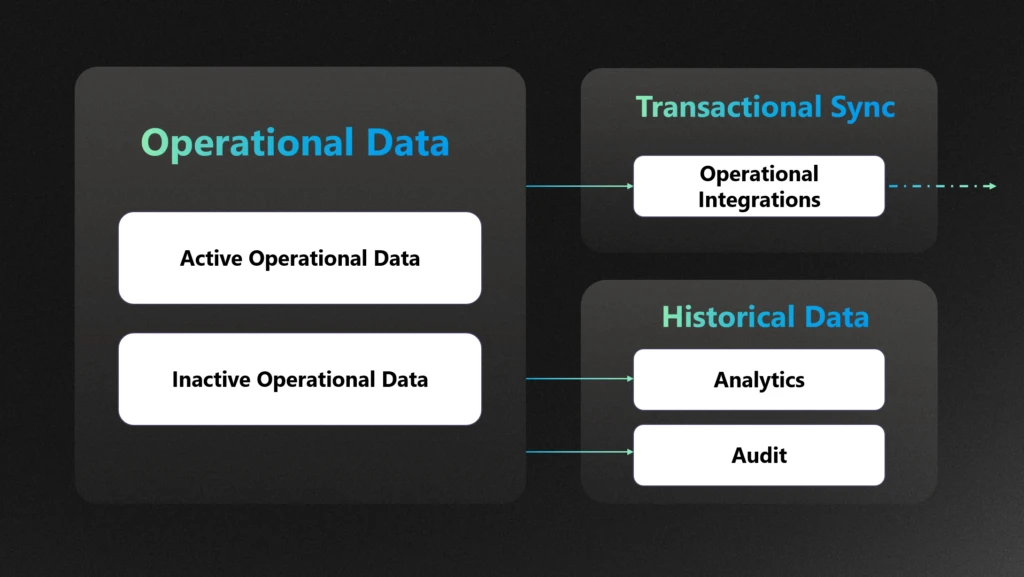
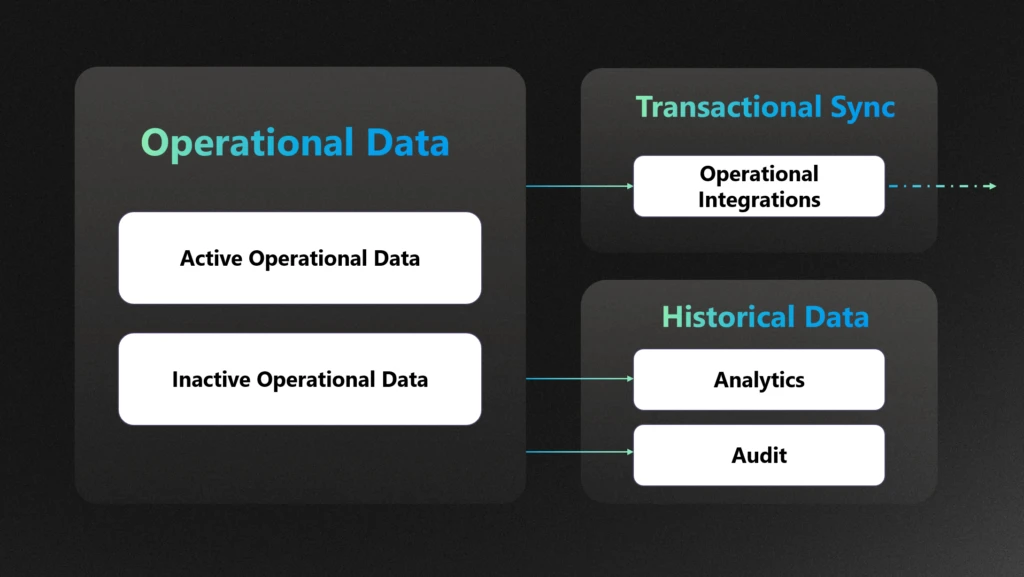
Long-Term Retention (LTR) is one of data management tools that helps enterprises effectively manage their growing data estates while ensuring compliance with regulatory requirements. By archiving less frequently accessed data, LTR optimizes Dataverse storage usage and reduces costs.
Long-Term Retention (LTR) in Dataverse helps organizations retain data that’s no longer actively used but still required for regulatory or business purposes. Whether it’s for archiving operational records or meeting audit requirements like 5-year retention mandates, LTR ensures data remains secure, immutable, and compliant—at a fraction of the storage cost.
But LTR isn’t just about storage—it’s also built for analytics. Retained data is treated as a first-class citizen in Dataverse, seamlessly integrated into the real-time data warehouse. With Microsoft Fabric’s OneLake Shortcuts, you can analyze both live and archived data without copying or duplicating it. For customers preferring their own data lake, Synapse Link offers a flexible alternative for reporting and analytics on business and retained data.
This blog will focus on how implementing LTR can significantly reduce storage costs for enterprises, providing practical insights and strategies for leveraging LTR to achieve cost efficiency. We will also discuss how you can get deep insights from the retained data.
What is LTR and how can you enable
Long-Term Data Retention (LTR) streamlines your data strategy by automatically moving historical records from Microsoft Dataverse and Dynamics 365 Finance & Operations (F&O) into a managed data lake (MDL). This approach ensures efficient, scalable storage—freeing up space in your transactional databases while keeping retained data accessible for analytics and compliance.
Long-Term Retention (LTR) is a powerful tool for managing storage in Dataverse and Dynamics 365 Finance & Operations (F&O), but its value is maximized when applied to the right scenarios. LTR allows organizations to move inactive, compliance-bound, or infrequently accessed data to a cost-optimized, read-only storage tier—freeing up space in the primary database while maintaining access for reporting and audits.
Here’s when LTR is especially relevant:
✅ 1. Compliance-Driven Data Retention
If your organization operates in a regulated industry (e.g., finance, healthcare, public sector), you likely need to retain data for 5–10 years or more. LTR ensures that this data remains immutable and accessible for audits, without bloating your operational database.
Example: Financial records, customer invoices, and customer contracts that must be retained for legal or regulatory reasons.
✅ 2. Analytics on Historical Data
LTR doesn’t mean your data is locked away. Retained data can still be queried for trend analysis, forecasting, and AI workloads—especially when integrated with tools like Azure Synapse Link or OneLake shortcuts. This enables long-term insights without compromising performance.
Example: Analysing 7 years of sales data to forecast seasonal demand patterns.
✅ 3. Data Relevancy and Lifecycle Management
Not all data needs to be live forever. LTR helps you separate high-value, frequently accessed data from historical records that are still important but rarely used. This improves system responsiveness and reduces noise in day-to-day operations.
Example: Archiving closed cases, completed orders, or inactive customer records.
⚠️ What LTR Does Not Do
While LTR reduces your operational storage footprint, it does not reduce the size of your analytics store. If you’re exporting data to Synapse, OneLake, or other analytical platforms, you’ll still need to manage retention and tiering strategies there separately.
Cost savings with LTR
One of the most impactful benefits of implementing Long-Term Retention (LTR) in Dynamics 365 is the significant reduction in storage costs. On average, LTR compresses archived data by up to 80% and in some cases up to 90%, which can translate into substantial savings. For instance, archiving 1,000 GB of database data could reduce storage expenses from $80,000 to $10,000—a game-changer for data-heavy organizations.
Here are a few real-world examples of how customers are reaping the rewards:
🥨 A major American food company leveraged LTR to archive historical data in Finance & Operations (F&O), achieving a 50% reduction in data size and freeing up valuable system resources.
🧥 A global leader in outdoor apparel and equipment adopted LTR as part of a broader data archival strategy. By offloading historical records from core transactional systems, they not only cut storage costs but also improved overall system performance.
🍿 The largest private snack food company in the U.S. reduced their InventTrans table from 1.1 TB to 549 GB using LTR—again, a 50% reduction that directly impacted their bottom line.
A leading enterprise in the finance and operations space, they faced mounting challenges with data volume and storage costs. As part of their digital optimization strategy, they implemented Long-Term Retention (LTR) to offload historical data from their Dynamics 365 Finance & Operations (F&O) environment into a managed data lake—achieving a remarkable storage reduction of over 90%.
Seamless insights with combined data
With Long-Term Retention (LTR), your historical data is securely stored in a Managed Data Lake—keeping storage costs low. But that doesn’t mean you lose visibility.
Thanks to OneLake shortcuts and Synapse Link, you can seamlessly analyze both live and retained data together. This means you get a complete picture of your business—past and present—without sacrificing performance or budget.
Whether you’re running reports, building dashboards, or training models, your insights stay connected, and your costs stay optimized.
We’ll explore further in this blog, how to unlock seamless insights by combining live and retained data using OneLake shortcuts and Synapse Link. These tools allow you to query both retained and real-time data effortlessly—without compromising on performance or cost efficiency.
Strategy to use LTR to manage the storage
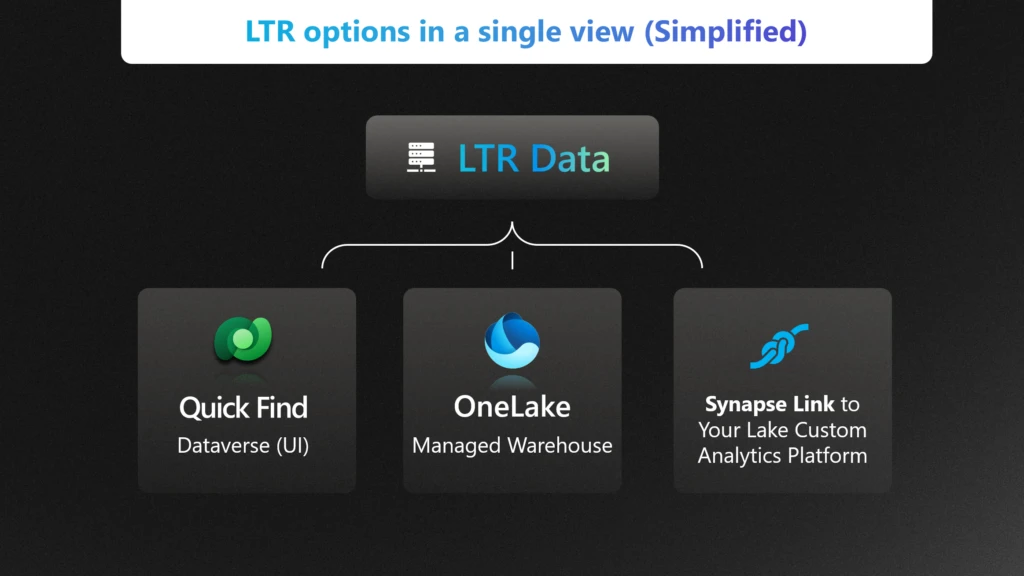
LTR integrates seamlessly with Quick find in the Dataverse, Bring Your Own Lake (BYOL) for Synapse Link and OneLake for both Dataverse and Finance & Operations (F&O) scenarios.
Quick Find: Instantly search archived data directly within Dataverse—no setup required.
OneLake: For integrated analytics using Microsoft Fabric OneLake.
Synapse Link: For syncing retained data to your own data lake for custom analytics and storage.
In this section, we will discuss how each strategy helps manage the storage, cost and meet the compliance requirements.
Quick find
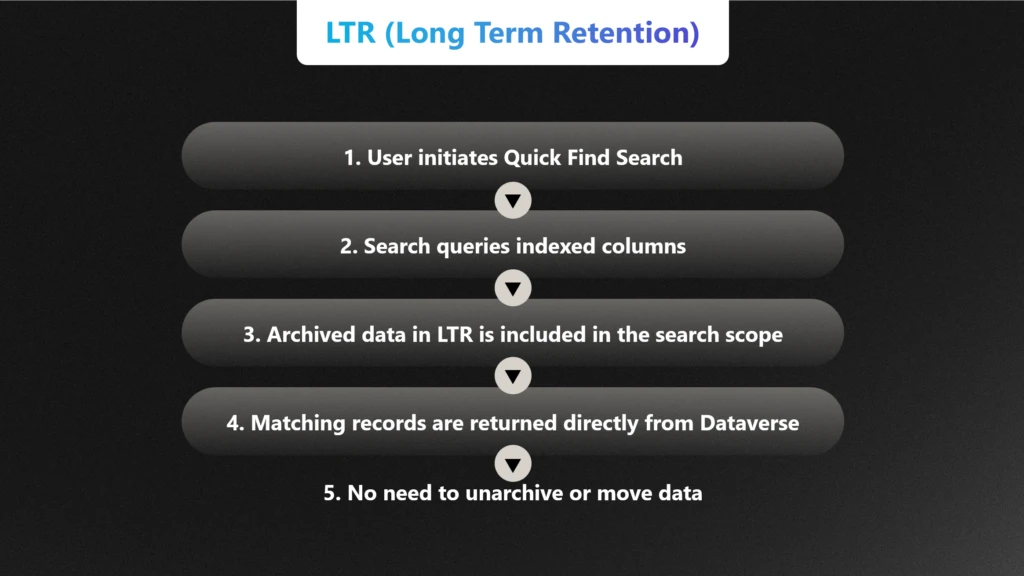
Quick Find allows users to search across Dataverse tables using indexed columns. Even when data is archived via LTR, it remains within the Dataverse boundary and is still queryable through Quick Find—provided the relevant columns are indexed and the data is not purged. This means:
No need to unarchive: Users can locate, and view retained records directly through the familiar Dataverse UI.
No pipeline or duplication required: Unlike analytics scenarios that use OneLake or Synapse Link, Quick Find works natively within Dataverse
Use OneLake shortcut with LTR for Data Warehousing
Enterprises adopting new technologies like OneLake shortcut can continue to use Long-Term Retention (LTR) to manage data storage, costs, and compliance by archiving historical data into Managed Lake storage. Archiving data in Managed Lake preserves cost savings for the scenario that involves accessing historical data while allowing enterprises to perform analytics by moving the data out to reporting and analytical databases.
If your enterprise has already invested in OneLake, you can further optimize your data strategy by leveraging OneLake shortcut. Unlike the full OneLake, which syncs data into OneLake, the Shortcut creates a pointer to your data—allowing Fabric to query it in place without duplicating storage or compromising data security.
This means you can continue to run analytics on both live and retained data while preserving the cost benefits of Long-Term Retention (LTR).
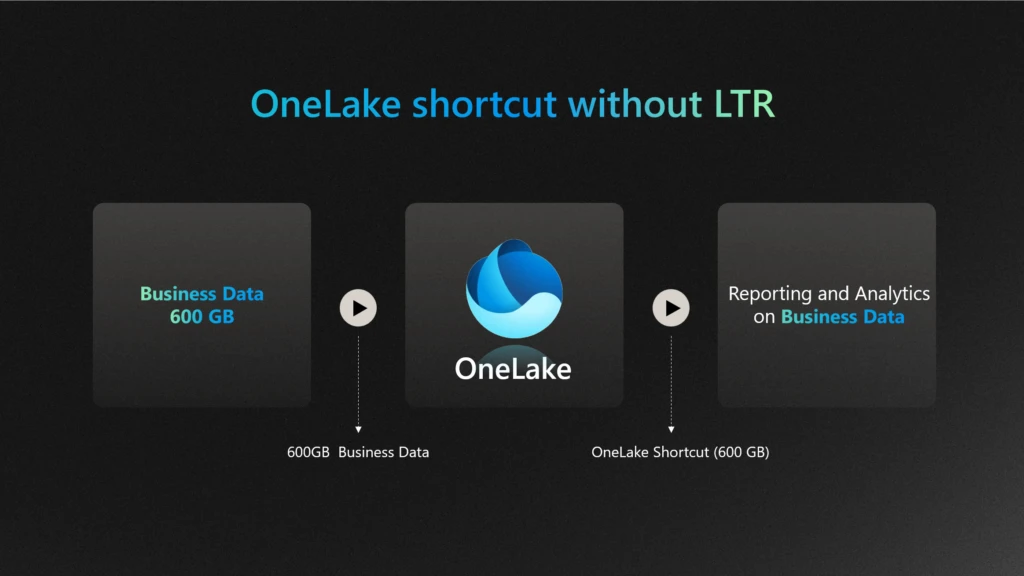
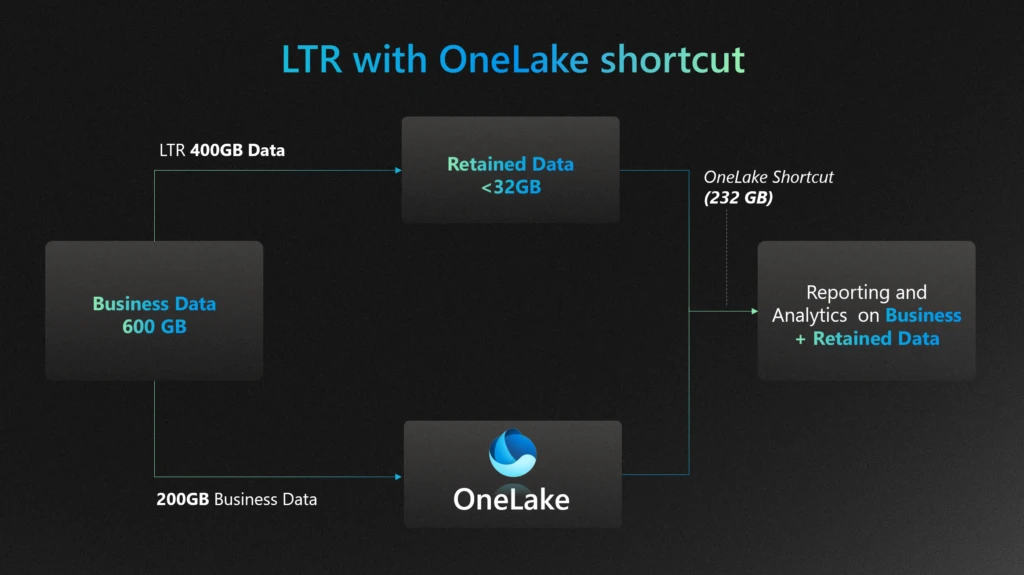
📊 In the diagram below, we illustrate how an enterprise can reduce storage costs by up to 80%—for example, compressing a 400GB business data down to less than 32GB using LTR—while still enabling seamless insights without incurring additional costs or compromising data security.
Since no data is physically moved, it also helps preserve LTR savings by avoiding duplication.
Without LTR:
With LTR:
Synapse link works seamlessly with LTR
Enterprises that have invested in Bring Your Own Lake (BYOL) with Synapse Link can continue to leverage this setup for their data archival scenarios to manage storage, costs, and compliance. However, note that if the Synapse Link is created after the Long-Term Retention (LTR) process has already occurred, it will not include previously retained data. This approach allows enterprises to utilize LTR with their existing Synapse Link investment.
If your enterprise is already invested in Synapse Link, there’s an opportunity to take your data strategy even further. By pairing it with Long-Term Retention (LTR), you can maintain seamless access to both live and retained data—without duplicating storage or compromising security.
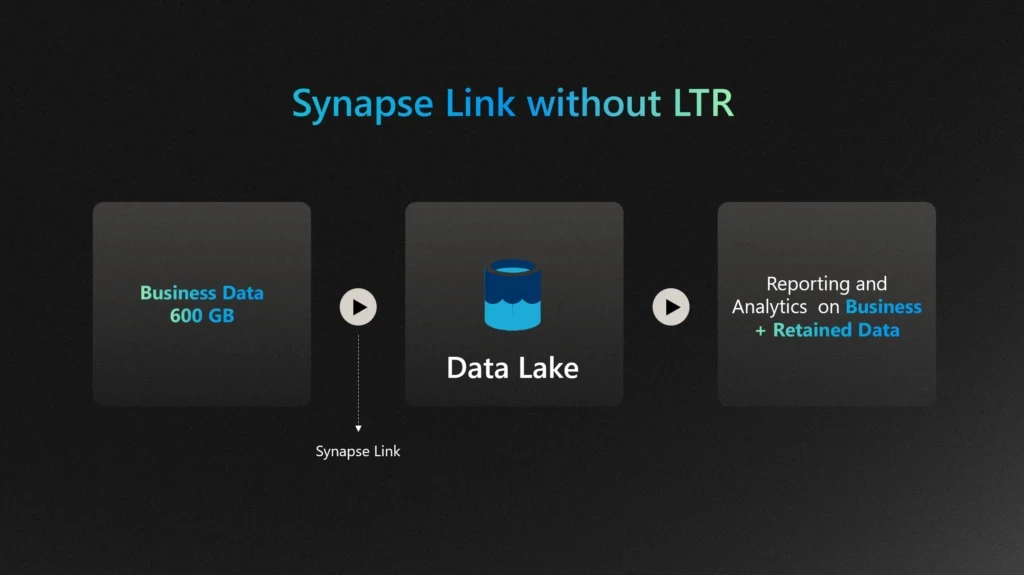
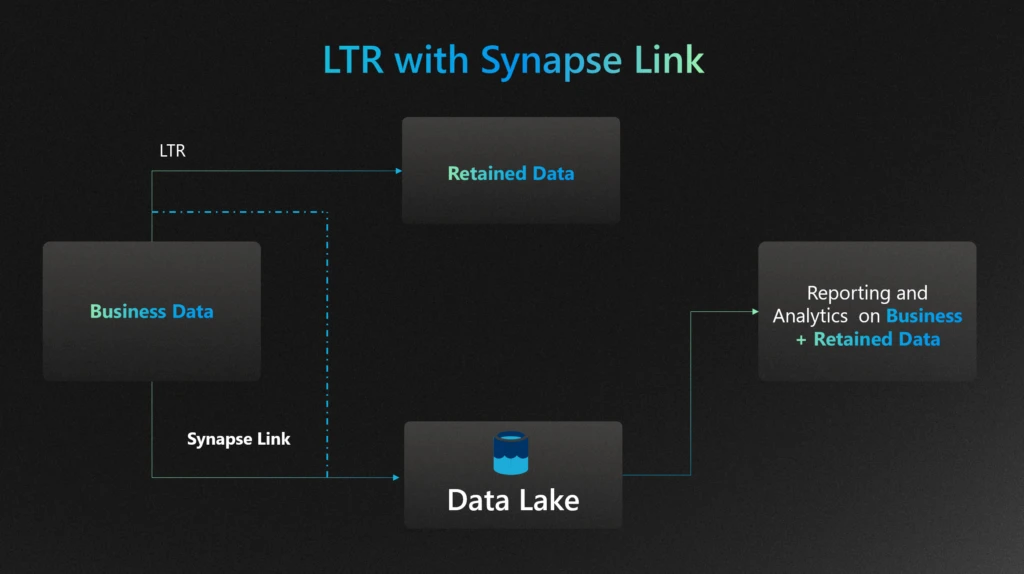
📊 In the diagram below, we illustrate how an enterprise can utilize their existing investment in synapse link while using LTR. For example, business data is retained in Managed Data Lake — while still enabling powerful analytics through Synapse Link, without incurring additional costs. This approach ensures your insights stay rich, your data stays secure, and your budget stays intact.
Without LTR:
With LTR:
Summary of Benefits
Throughout this blog, we have explored how Long-Term Retention (LTR) can significantly reduce storage costs for enterprises. By archiving less frequently accessed data, LTR optimizes storage usage, leading to substantial cost savings. Additionally, LTR ensures compliance with regulatory requirements, making it a crucial strategy for effective data management. Whether using Synapse Link or OneLake, LTR provides a seamless and efficient way to manage data storage and compliance needs.
Call to Action
We encourage you to consider implementing LTR in your organization to take advantage of these benefits. For further assistance or more information on how to get started with LTR, please visit our LTR article. Implementing LTR can help you achieve cost efficiency and compliance, ensuring your data management strategy is both effective and sustainable.
This blog details automating phishing email triage using Azure Logic Apps, Azure Function Apps, and Microsoft Security Copilot. Deployable in under 10 minutes, this solution primarily analyzes email intent without relying on traditional indicators of compromise, accurately classifying benign/junk, suspicious, and phishing emails. Benefits include reducing manual workload, improved threat detection, and (optional) integration seamlessly with Microsoft Sentinel – enabling analysts to see Security Copilot analysis within the incident itself.
Designed for flexibility and control, this Logic App is a customizable solution that can be self-deployed from GitHub. It helps automate phishing response at scale without requiring deep coding expertise, making it ideal for teams that prefer a more configurable approach and want to tailor workflows to their environment. The solution streamlines response and significantly reduces manual effort.
For teams looking for a more sophisticated, fully integrated experience, the Security Copilot Phishing Triage Agent represents the next generation of phishing response. Natively embedded in Microsoft Defender, the agent autonomously triages phishing incidents with minimal setup. It uses advanced LLM-based reasoning to resolve false alarms, enabling analysts to stay focused on real threats. The agent offers step-by-step decision transparency and continuously learns from user feedback. Read the official announcement here.
Introduction: Phishing Challenges Continue to Evolve
Phishing continues to evolve in both scale and sophistication, but a growing challenge for defenders isn’t just stopping phishing, it’s scaling response. Thanks to tools like Outlook’s “Report Phishing” button and increased user awareness, organizations are now flooded with user-reported emails, many of which are ambiguous or benign. This has created a paradox: better detection by users has overwhelmed SOC teams, turning email triage into a manual, rotational task dreaded for its repetitiveness and time cost, often taking over 25 minutes per email to review.
Our solution addresses that problem, by automating the triage of user-reported phishing through AI-driven intent analysis. It’s not built to replace your secure email gateways or Microsoft Defender for Office 365; those tools have already done their job. This system assumes the email:
Slipped past existing filters,
Was suspicious enough for a user to escalate,
Lacks typical IOCs like malicious domains or attachments.
As a former attacker, I spent years crafting high-quality phishing emails to penetrate the defenses of major banks. Effective phishing doesn’t rely on obvious IOCs like malicious domains, URLs, or attachments… the infrastructure often appears clean. The danger lies in the intent. This is where Security Copilot’s LLM-based reasoning is critical, analyzing structure, context, tone, and seasonal pretexts to determine whether an email is phishing, suspicious, spam, or legitimate.
What makes this novel is that it’s the first solution built specifically for the “last mile” of phishing defense, where human suspicion meets automation, and intent is the only signal left to analyze. It transforms noisy inboxes into structured intelligence and empowers analysts to focus only on what truly matters.
Solution Overview: How the Logic App Solution Works (and Why It’s Different)
Core Components:
Azure Logic Apps: Orchestrates the entire workflow, from ingestion to analysis, and 100% customizable.
Azure Function Apps: Parses and normalizes email data for efficient AI consumption.
Microsoft Security Copilot: Performs sophisticated AI-based phishing analysis by understanding email intent and tactics, rather than relying exclusively on predefined malicious indicators.
Key Benefits:
Rapid Analysis: Processes phishing alerts and, in minutes, delivers comprehensive reports that empower analysts to make faster, more informed triage decisions – compared to manual reviews that can take up to 30 minutes. And, unlike analysts, Security Copilot requires zero sleep!
AI-driven Insights: LLM-based analysis is leveraged to generate clear explanations of classifications by assessing behavioral and contextual signals like urgency, seasonal threats, Business Email Compromise (BEC), subtle language clues, and otherwise sophisticated techniques. Most importantly, it identifies benign emails, which are often the bulk of reported emails.
Detailed, Actionable Reports: Generates clear, human-readable HTML reports summarizing threats and recommendations for analyst review.
Robust Attachment Parsing: Automatically examines attachments like PDFs and Excel documents for malicious content or contextual inconsistencies.
Integrated with Microsoft Sentinel: Optional integration with Sentinel ensures central incident tracking and comprehensive threat management. Analysis is attached directly to the incident, saving analysts more time.
Customization: Add, move, or replace any element of the Logic App or prompt to fit your specific workflows.
Deployment Guide: Quick, Secure, and Reliable Setup
The solution provides Azure Resource Manager (ARM) templates for rapid deployment:
Prerequisites:
Azure Subscription with Contributor access to a resource group.
Microsoft Security Copilot enabled.
Dedicated Office 365 shared mailbox (e.g., phishing@yourdomain.com) with Mailbox.Read.Shared permissions.
(Optional) Microsoft Sentinel workspace.
Refer to the up to date deployment instructions on the Security Copilot GitHub page.
Technical Architecture & Workflow:
The automated workflow operates as follows:
Email Ingestion:
Monitors the shared mailbox via Office 365 connector.
Triggers on new email arrivals every 3 minutes.
Assumes that the reported email has arrived as an attachment to a “carrier” email.
Determine if the Email Came from Defender/Sentinel:
If the email came from Defender, it would have a prepended subject of “Phishing”, if not, it takes the “False” branch. Change as necessary.
Initial Email Processing:
Exports raw email content from the shared mailbox.
Determines if .msg or .eml attachments are in binary format and converts if necessary.
Email Parsing via Azure Function App:
Extracts data from email content and attachments (URLs, sender info, email body, etc.) and returns a JSON structure.
Prepares clean JSON data for AI analysis.
This step is required to “prep” the data for LLM analysis due to token limits.
Click on the “Parse Email” block to see the output of the Function App for any troubleshooting. You’ll also notice a number of JSON keys that are not used but provided for flexibility.
Security Copilot Advanced AI Reasoning:
Analyzes email content using a comprehensive prompt that evaluates behavioral and seasonal patterns, BEC indicators, attachment context, and social engineering signals.
Scores cumulative risk based on structured heuristics without relying solely on known malicious indicators.
Returns validated JSON output (some customers are parsing this JSON and performing other action).
This is where you would customize the prompt, should you need to add some of your own organizational situations if the Logic App needs to be tuned:
JSON Normalization & Error Handling:
A “normalization” Azure Function ensures output matches the expected JSON schema.
Sometimes LLMs will stray from a strict output structure, this aims to solve that problem.
If you add or remove anything from the Parse Email code that alters the structure of the JSON, this and the next block will need to be updated to match your new structure.
Detailed HTML Reporting:
Generates a detailed HTML report summarizing AI findings, indicators, and recommended actions.
Reports are emailed directly to SOC team distribution lists or ticketing systems.
Optional Sentinel Integration:
Adds the reasoning & output from Security Copilot directly to the incident comments. This is the ideal location for output since the analyst is already in the security.microsoft.com portal. It waits up to 15 minutes for logs to appear, in situations where the user reports before an incident is created.
The solution works pretty well out of the box but may require some tuning, give it a test. Here are some examples of the type of Security Copilot reasoning.
Benign email detection:
Example of phishing email detection:
More sophisticated phishing with subtle clues:
Enhanced Technical Details & Clarifications
Attachment Processing:
When multiple email attachments are detected, the Logic App processes each binary-format email sequentially.
If PDF or Excel attachments are detected, they are parsed for content and are evaluated appropriately for content and intent.
Security Copilot Reliability:
The Security Copilot Logic App API call uses an extensive retry policy (10 retries at 10-minute intervals) to ensure reliable AI analysis despite intermittent service latency.
If you run out of SCUs in an hour, it will pause until they are refreshed and continue.
Sentinel Integration Reliability:
Acknowledges inherent Sentinel logging delays (up to 15 minutes).
Implements retry logic and explicit manual alerting for unmatched incidents, if the analysis runs before the incident is created.
Security Best Practices:
Compare the Function & Logic App to your company security policies to ensure compliance.
Credentials, API keys, and sensitive details utilize Azure Managed Identities or secure API connections. No secrets are stored in plaintext.
Azure Function Apps perform only safe parsing operations; attachments and content are never executed or opened insecurely.
In this blog, I will walk through how you can build functions based on a Microsoft Sentinel Log Analytics workspace for use in custom KQL-based plugins for Security Copilot. The same approach can be used for Azure Data Explorer and Defender XDR, so long as you follow the specific guidance for either platform. A link to those steps is provided in the Additional Resources section at the end of this blog.
But first, it’s helpful to clarify what parameterized functions are and why they are important in the context of Security Copilot KQL-based plugins. Parameterized functions accept input details (variables) such as lookback periods or entities, allowing you to dynamically alter parts of a query without rewriting the entire logic
Parameterized functions are important in the context of Security Copilot plugins because of:
Dynamic prompt completion: Security Copilot plugins often accept user input (e.g., usernames, time ranges, IPs). Parameterized functions allow these inputs to be consistently injected into KQL queries without rebuilding query logic.
Plugin reusability: By using parameters, a single function can serve multiple investigation scenarios (e.g., checking sign-ins, data access, or alerts for any user or timeframe) instead of hardcoding different versions.
Maintainability and modularity: Parameterized functions centralize query logic, making it easier to update or enhance without modifying every instance across the plugin spec. To modify the logic, just edit the function in Log Analytics, test it then save it- without needing to change the plugin at all or re-upload it into Security Copilot. It also significantly reduces the need to ensure that the query part of the YAML is perfectly indented and tabbed as is required by the Open API specification, you only need to worry about formatting a single line vs several-potentially hundreds.
Validation: Separating query logic from input parameters improves query reliability by avoiding the possibility of malformed queries. No matter what the input is, it’s treated as a value, not as part of the query logic.
Plugin Spec mapping: OpenAPI-based Security Copilot plugins can map user-provided inputs directly to function parameters, making the interaction between user intent and query execution seamless.
Practical example
In this case, we have a 139-line KQL query that we will reduce to exactly one line that goes into the KQL plugin. In other cases, this number could be even higher. Without using functions, this entire query would have to form part of the plugin
Note: The rest of this blog assumes you are familiar with KQL custom plugins-how they work and how to upload them into Security Copilot.
With parameterized functions, follow these steps to simplify the plugin that will be built based on the query above
Define the variable/parameters upfront in the query (BEFORE creating the parameters in the UI). This will put the query in a “temporary” unusable state because the parameters will cause syntax problems in this state. However, since the plan is to run the query as a function this is ok
Fig. 1: Image showing partial query with the parameters to defined highlighted in red i.e. lookback and User_Dept
Create the parameters in the Log Analytics UI
Fig 2. Screenshot showing how the function menu in the Log Analytics UI
Give the function a name and define the parameters exactly as they show up in the query in step 1 above. In this example, we are defining two parameters: lookback – to store the lookback period to be passed to the time filter and User_Dept to the user’s department.
Fig. 3. Function menu showing the two parameters defined in the function creation menu of Log Analytics
3. Test the query. Note the order of parameter definition in the UI. i.e. first the User_Dept THEN the lookback period. You can interchange them if you like but this will determine how you submit the query using the function. If the User_Dept parameter was defined first then it needs to come first when executing the function. See the below screenshot. Switching them will result in the wrong parameter being passed to the query and consequently 0 results will be returned.
Fig. 4: Sample run of the function with the parameters specified in the correct order
Effect of switched parameters:
Fig. 5: Sample function run with the functions switched to show effect of this situation
To edit the function, follow the steps below:
Navigate to the Logs menu for your Log Analytics workspace then select the function icon
Fig. 6: Partial view of the function being edited within the Log Analytics UI
Fig. 7: Image showing how to select the code button in the function menu to edit the function code
Once satisfied with the query and function, build your spec file for the Security Copilot plugin. Note the parameter definition and usage in the sections highlighted in red below
Fig. 8: Partial view of the YAML plugin showing the encapsulation of the 139 lines of KWL into a single one
And that’s it, from 139 unwieldy KQL lines to one very manageable one! You are welcome 😊
Let’s now put it through its paces once uploaded into Security Copilot. We start by executing the plugin using its default settings via the direct skill invocation method. We see indeed that the prompt returns results based on the default values passed as parameters to the function:
Fig. 9: View of Secuity Copilot landing page showing an example of direct skill execution of the created pluginFig. 10: Sample output showing records of users from the Sales department
Next, we still use direct skill invocation, but this time specify our own parameters:
Fig. 11: Direct skill invocation example but with specified parameters-Department, and lookback periodFig 12: Prompt run showing the output corresponding to the selections of the previous direct skill invocation prompt
Lastly, we test it out with a natural language prompt:
Fig 13: Security Copilot prompt bar showing example of natural language prompt seeking events related to users in the Human Resources departmentFig 14: Output from previous natural language prompt focused on users from the HR department
Tip: The function does not execute successfully if the default summarize function is used without creating a variable i.e. If the summarize count() command is used in your query, it results in a system-defined output variable named count_. To bypass this issue, ensure to use a user-defined variable such as Event_Count as shown in line 77 below:
Fig. 15: Highlighting the creation of a variable to store results from the summarize count() command
Conclusion
In conclusion, leveraging parameterized functions within KQL-based custom plugins in Microsoft Security Copilot can significantly streamline your data querying and analysis capabilities. By encapsulating reusable logic, improving query efficiency, and ensuring maintainability, these functions provide an efficient approach for tapping into data stored across Microsoft Sentinel, Defender XDR and Azure Data Explorer clusters. Start integrating parameterized functions into your KQL-based Security Copilot plugins today and let us have your feedback.
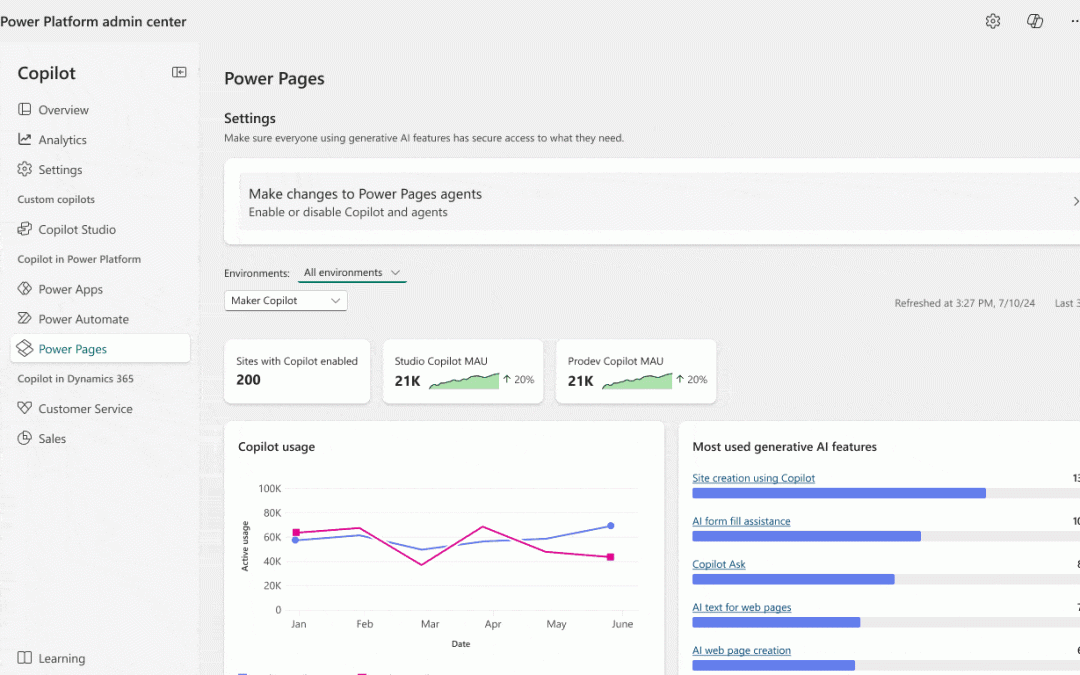
We’re excited to announce that Power Pages AI usage analytics and governance controls are now available in public preview through the Copilot Hub in the Power Platform admin center
With AI capabilities becoming core to digital experiences, organizations need visibility and control over how these features are used. The Copilot Hub in the Power Platform admin center answers this need by offering a centralized dashboard for AI usage analytics and governance across Power Platform products. Power Pages now integrates with the Copilot Hub to help admins:
Track adoption of AI-powered features
Gain actionable insights
Control exposure based on org needs and compliance
Deep Dive into Usage Insights
Admins can switch between Maker Copilot and End User Copilot views to understand how AI features are used by site builders and site visitors.
Maker Copilot Analytics include:
Monthly active makers using Studio Copilot or Pro Dev Copilot
Sites with Copilot enabled
Most-used AI features
Usage trends over time
End User Copilot Analytics provide insights on:
Chat agent (Site Copilot) usage
Search summaries and query volume
Summarization API usage
AI-powered form fill assistance
Generative summaries for list views
AI Governance – In Your Control
The Copilot Hub empowers admins to control AI feature availability at both environment and site levels, with settings to:
Enable/disable features for makers or end users
Allow granular control per feature (e.g., chatbot, summaries etc)
AI features can be enabled across all sites, specific sites, or excluded sites
Visibility into configurations across environments
Warnings and fallbacks when features are blocked due to org policies
Transition to the Copilot Hub
Important: Governance settings for Power Pages AI features are now managed exclusively in the Copilot Hub. Existing settings are retained, but we recommend reviewing and aligning them in the new experience to ensure consistency.
Maker & End User Experience
Makers see clear messages in Design Studio when AI features are disabled by admins. End users experience fallback behaviors (e.g., standard search results instead of AI summary) without disruption or confusion
The Next Generation of Power Platform Adoption Guidance is here
Successfully adopting Microsoft Power Platform is about more than just deploying tools. It’s about building a strategy that empowers people, ensures governance, and delivers lasting business value. And to support you on your successful adoption journey, we’re excited to announce the launch of the newly refreshed Power Platform Adoption Guidance.
This update is the most significant evolution of our adoption content to date. It reflects insights from real-world customer experiences, partner feedback, MVP expertise, and Power CAT programs, all to deliver practical, actionable guidance at every stage of your journey. Whether you’re just getting started or looking to mature your platform strategy, this guidance is designed to help you activate business-led innovation with confidence.
What’s new?
Eight Pillars of Adoption: The guidance is now structured across eight strategic pillars, making it easier to plan, scale, and sustain your adoption journey.
Redesigned Experience: We’ve overhauled the information architecture and user experience so you can find what you need faster and more intuitively.
Expanded Content: The update includes over 200 pages of fresh content, covering everything from defining vision and metrics to managing mission-critical workloads and building thriving maker communities.
Actionable Tools: The updated Adoption Workbook now includes exercises and templates that you can work through with your stakeholders to guide the development of a strategy and action plan, based on real-world customer experiences.
Why it matters
To be sure, this guidance is more than a documentation refresh. It’s a strategic resource for Power Platform product owners, adoption leads, change managers, and Center of Excellence (CoE) teams. The guidance helps you:
The newly refreshed Adoption Guidance site includes other resources as well. Real-world case studies, toolkits documentation, and white papers aim to help you be successful with Power Platform.
Get started
Explore the new guidance at https://aka.ms/PowerPlatformGuidance. Share it with your teams. Use it to shape your strategy. And most importantly, let it guide you as you build what’s next with Power Platform.
Get ready for an incredible experience at Microsoft Build 2025. We’re pumped to showcase the latest advancements in Microsoft Power Pages, a platform that empowers enterprises to rapidly build secure, scalable business portals powered by agentic AI.
This week at Microsoft Build 2025, explore how Power Pages enables global scalability and availability with its robust security, administration, and governance. The native integration with Microsoft Copilot and Microsoft Copilot Studio transforms Power Pages portal design by combining conversational AI, intelligent suggestions, and contextual guidance. With generative user experience (UX) and role-based personalization, portals dynamically adapt to user behavior and context—delivering the right information at the right time to streamline workflows and elevate user engagement.
Now is the moment to see how enterprises can plan, build, and run business portals with dynamically tailored experiences.
Introducing cutting-edge security in Power Pages
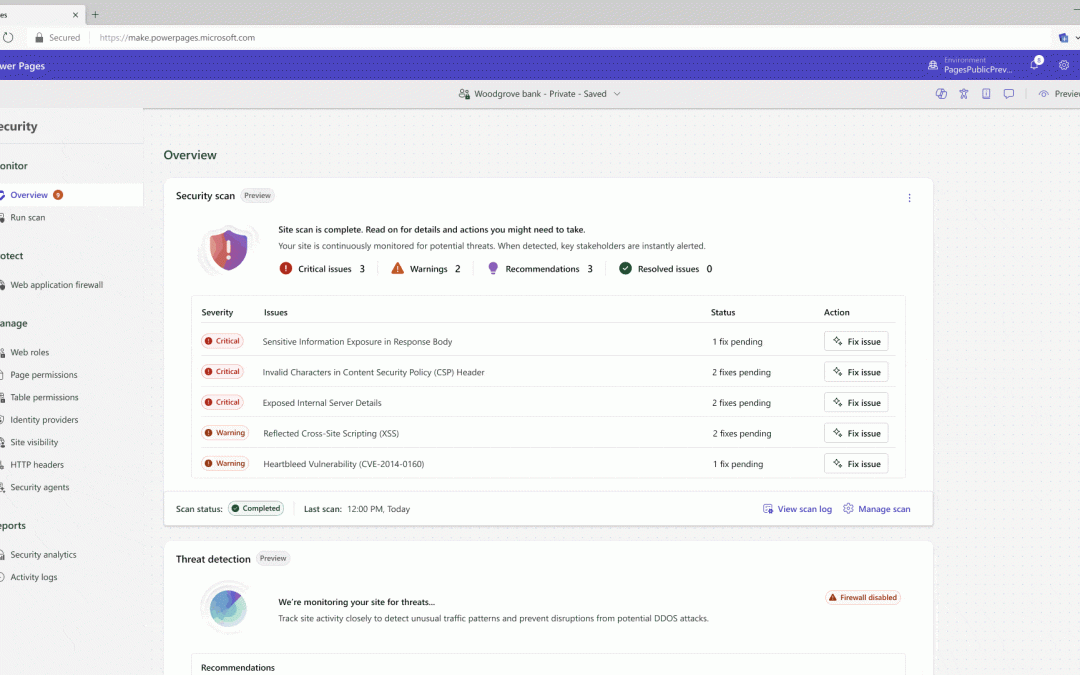
Security isn’t just a feature—it’s a foundation. That’s why we’re thrilled to unveil the new security agent in Power Pages, now available in public preview. This is a game-changer for business users and admins who need to stay ahead of evolving threats without compromising agility.
Powered by Microsoft Sentinel, the security agent continuously monitors for anomalous traffic patterns and proactively detects potential Distributed Denial of Service (DDoS) attacks. But it doesn’t stop at detection—it empowers action. Business users and admins receive real-time alerts and actionable recommendations with Microsoft Outlook and Microsoft Teams, helping them respond swiftly and confidently.
This is more than just protection—it’s intelligent, integrated defense that brings enterprise-grade security directly into your Power Pages experience.
Image represents current UI for a public preview feature. UI is subject to change.
Improving developer productivity and enabling next-generation user experiences
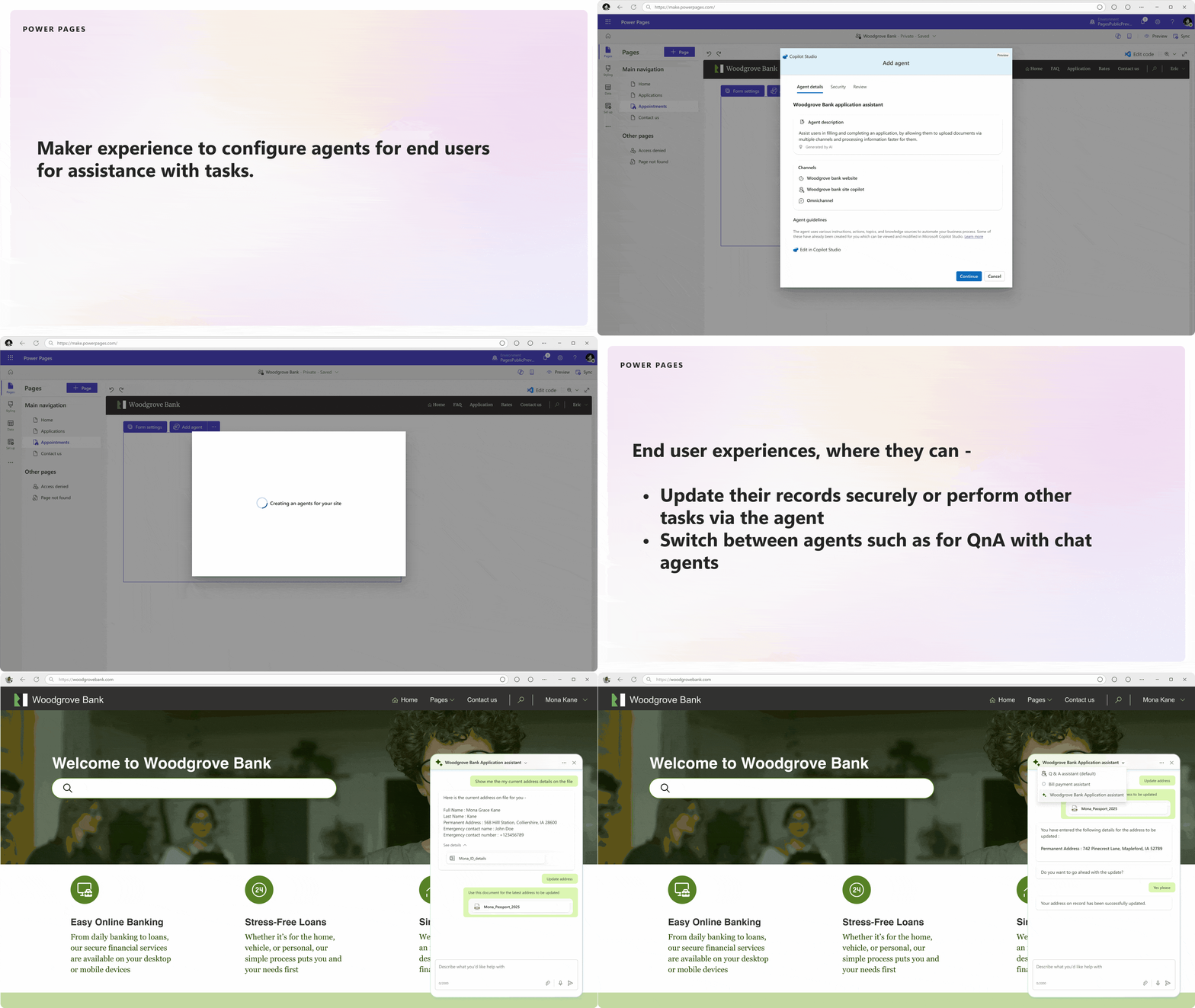
Next, we have exciting new updates for all Power Pages creators. We’re introducing the ability to integrate Copilot Studio agents in Power Pages—enabling creators to embed multiple agents into their site. This capability greatly enhances the conversational chat experience and enables end users to perform, create, and update operations on their business data. Developers also get the ability to use these agents as an API, enabling them to build complex business logic with ease and power next-generation user experiences.
Now in public preview, users can bring their own code to Power Pages using third-party, next-generation code generation tools. This unlocks a new era of “vibe coding”—where natural language becomes the interface, and the user becomes the orchestrator. Instead of writing every line, developers guide, test, and refine AI-generated code, making the process more intuitive, creative, and aligned with enterprise-grade standards.
Power Pages is also expanding its multilingual support, allowing customers to create portals in any number of custom languages. This functionality allows all out-of-the-box components like forms, lists, multistep forms, and card galleries to use content snippets for specifying content translation, allowing customers to build websites in a language of their choice. This feature will be generally available and is set to uplevel the creation process for multilingual portals.
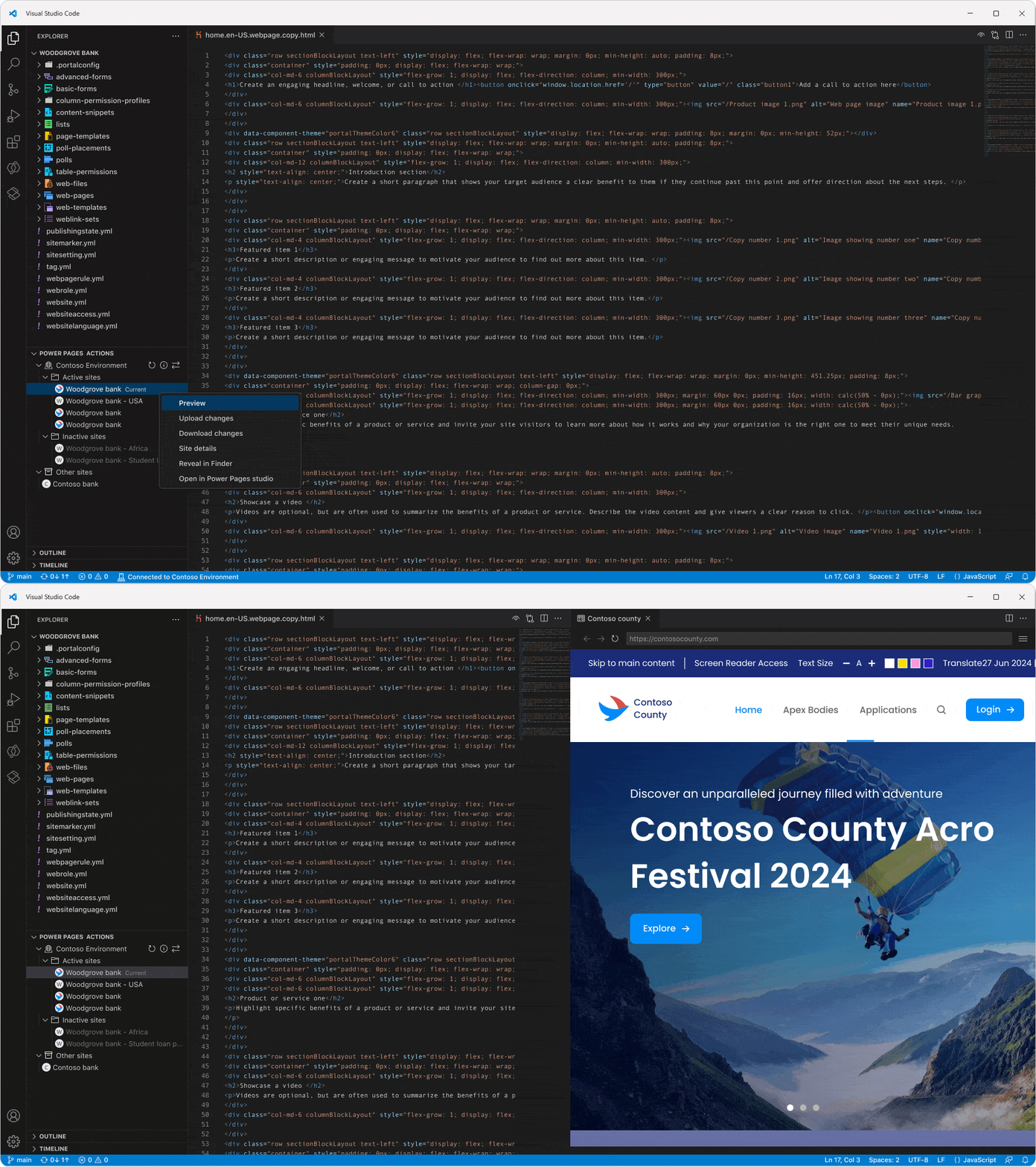
Additionally, the inline portal preview in Visual Studio Code is now in public preview. This feature lets you preview your Power Pages portals without ever leaving your development environment. With built-in user interface (UI) actions to run command-line interface (CLI) commands and switch environments, it streamlines development and testing.
Power Pages now supports Dataverse Git integration in public preview. This integration ensures that your Power Pages content is stored in a easy to read format. The file structure and naming conventions align closely with the experience provided by the Power Pages Visual Studio Code web and desktop. This integration significantly simplifies the process of reviewing, understanding, and managing your Power Pages content, enabling easier collaboration and version control.
Our event management template is also now in public preview. This template, along with custom components, is designed to streamline your development process and enhance portal capabilities, making event management more efficient and effective.
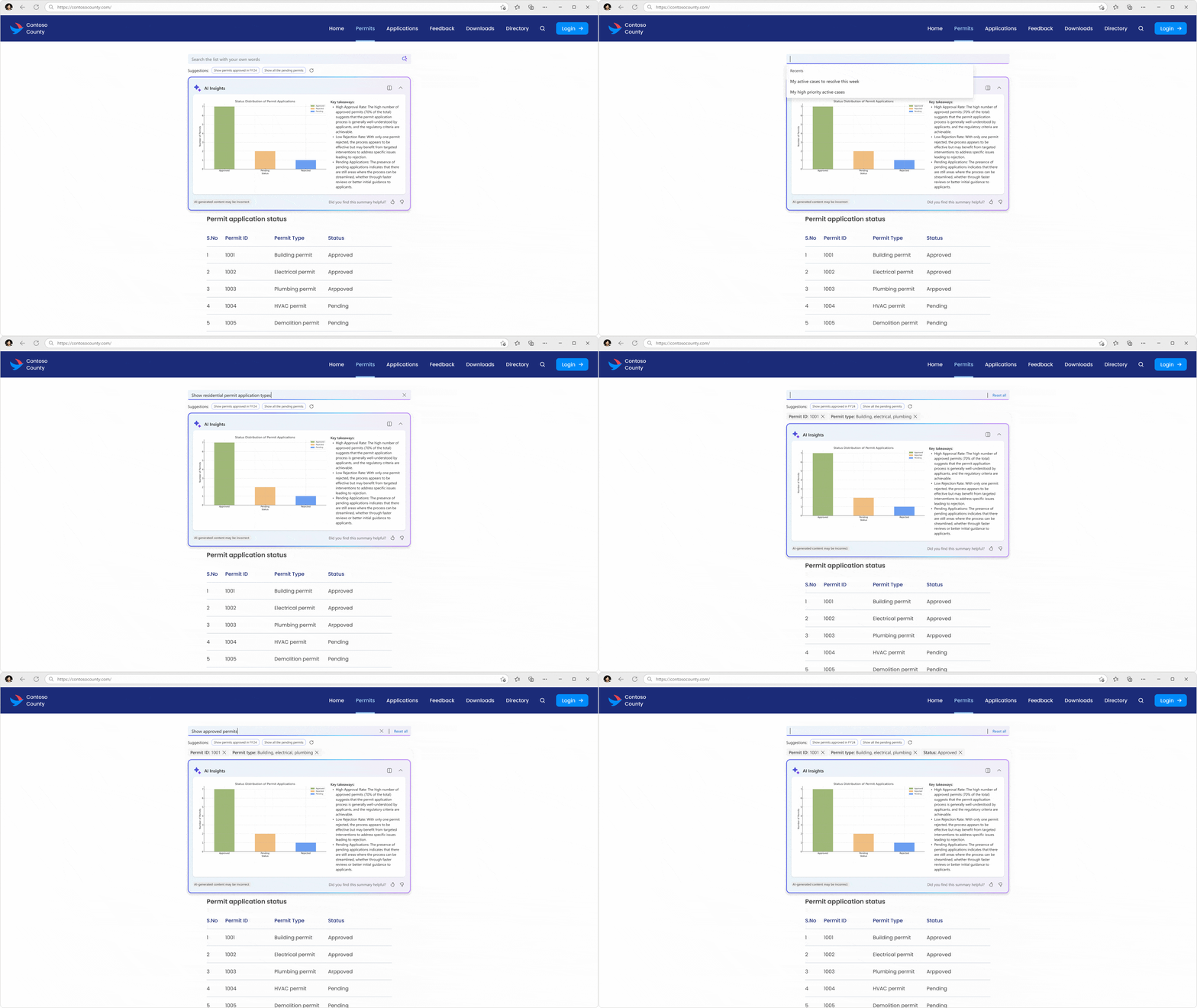
We’re also introducing the new intelligent list search and customization feature in Power Pages. This feature uses natural language to query large datasets and get filtered information. It also allows for customization of the AI insights to make data interaction more intuitive and efficient. This feature is currently in public preview.
Finally, multistep forms with Copilot in Power Pages is now generally available. This AI-assisted experience lets you design and build forms with natural language prompts, making it easier to create more dynamic and interactive forms.
Elevating admin capabilities with advanced governance and compliance tools
Now, let’s dive into some powerful tools designed to transform the administrative experience.
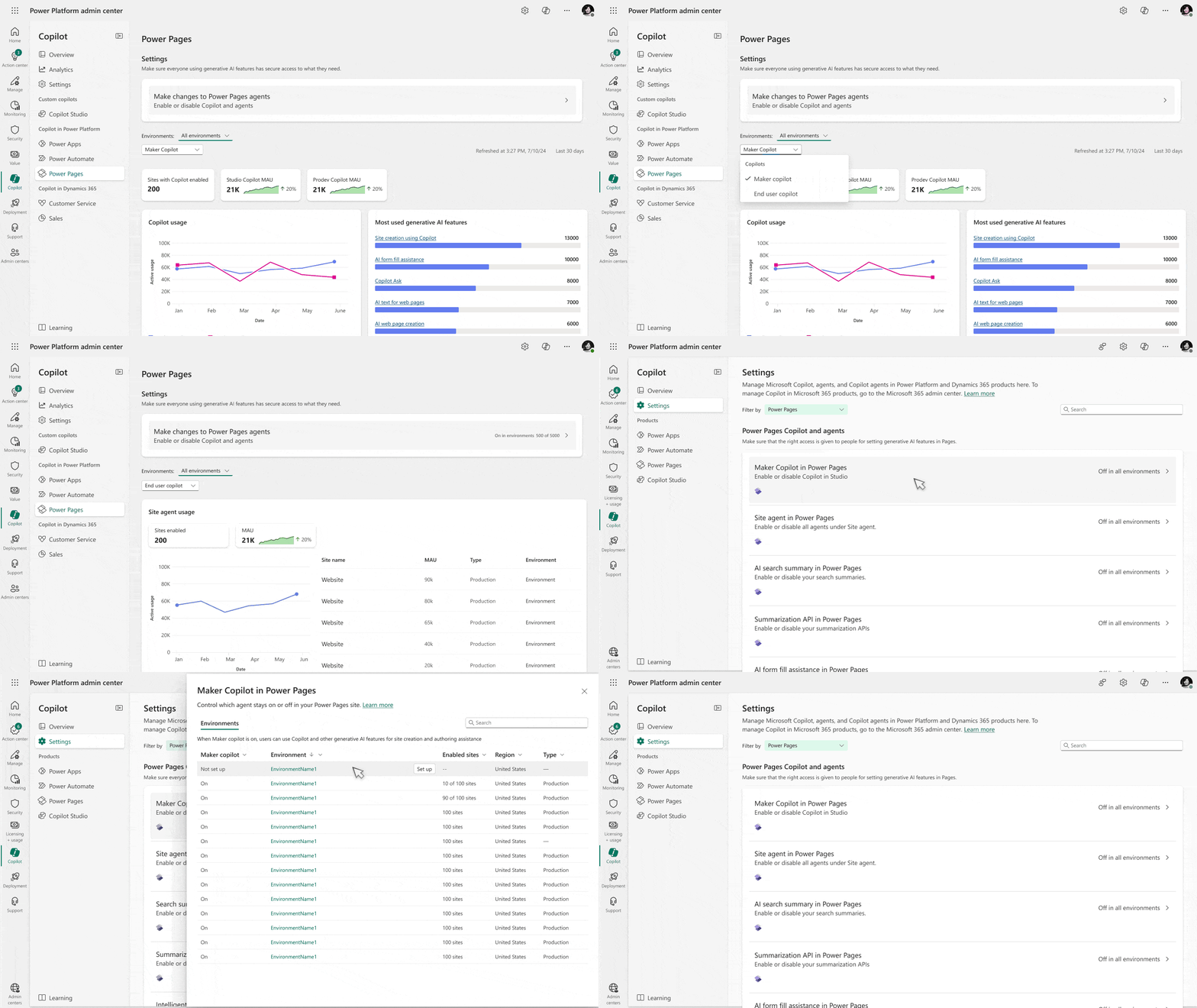
The Copilot hub is a game-changer for admins. It provides visibility into AI usage at the feature level, empowering data-driven decisions and policy enforcement. Admins can control individual AI features, such as turning specific Copilot capabilities on or off at the environment or portal level. Currently in public preview, the Copilot hub is poised to significantly enhance administrative capabilities, fostering trust and compliance.
Image represents current UI for a public preview feature. UI is subject to change.
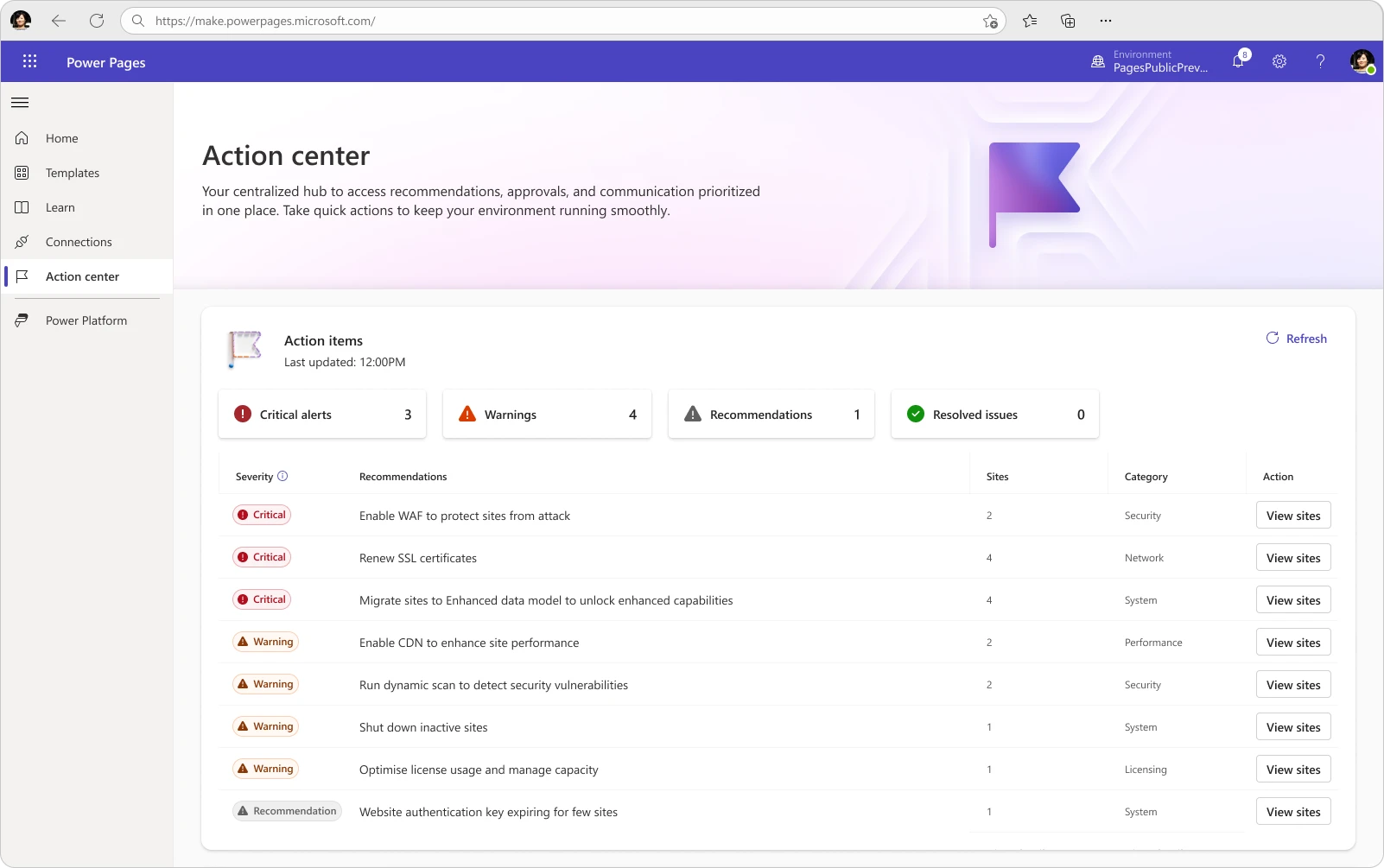
Next, the action center in the Power Pages homepage is another exciting addition to our suite of tools. This centralized hub is designed specifically for users and system admins, surfacing recommendations and actions that are applied within the Power Pages platform environment where applications, data, and resources are managed. Whether it’s enabling Web Application Firewall (WAF), renewing secure sockets layer (SSL) certificates, converting trials to production, or shutting down portals, this feature provides the insights you need to take action. It’s in public preview and ready to streamline your administrative tasks.
Image represents current UI for a public preview feature. UI is subject to change.
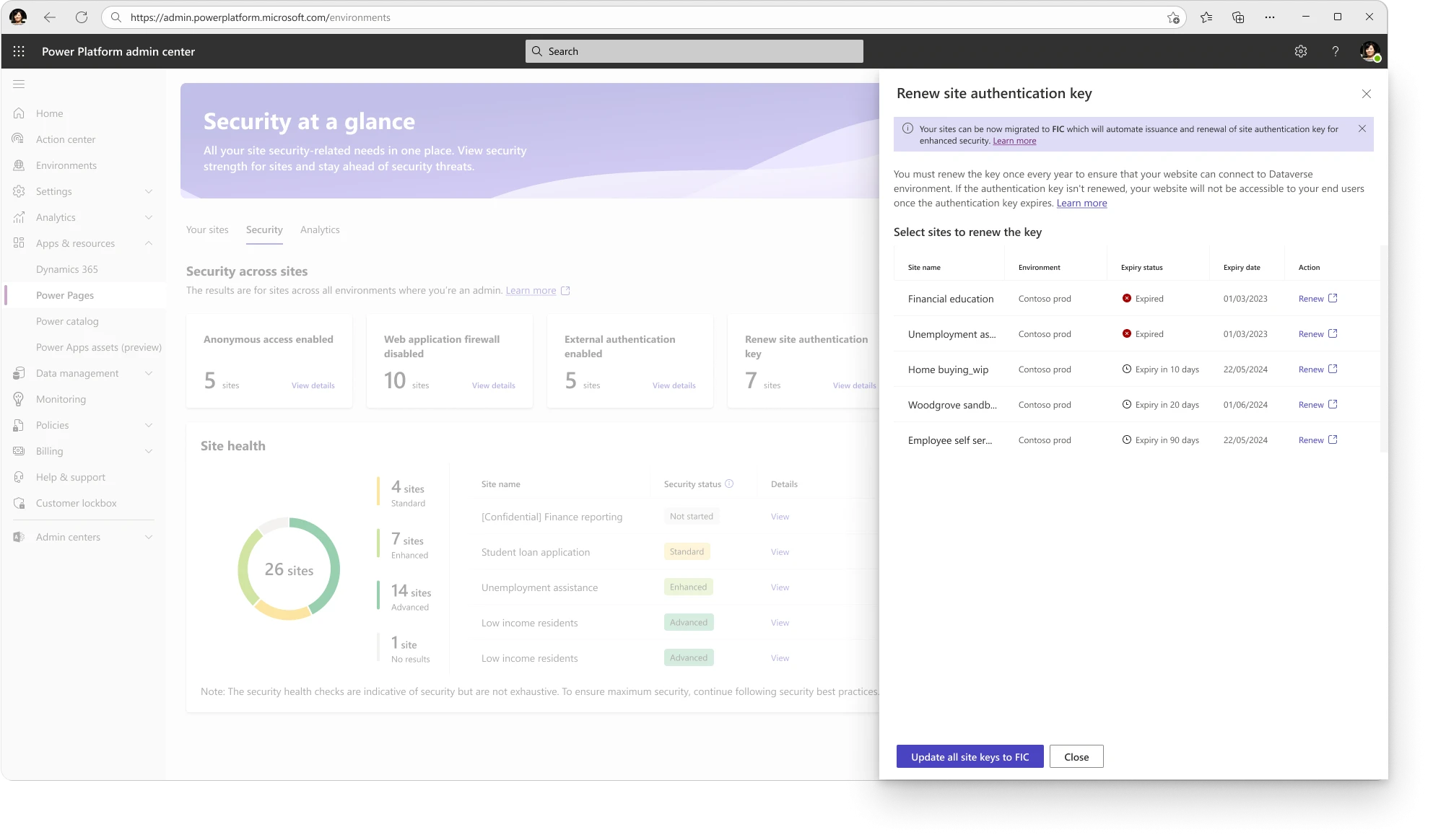
We’re also excited to introduce the self-service identity (SFI)—web authentication key renewal experience in the Power Pages Admin Center (PPAC), transitioning from certificate-based authentication to federated credentials. A one-time activity will be required to update the authentication key in PPAC. This update will be generally available and is designed to simplify and streamline your authentication processes.
Additionally, we can now surface insights and recommendations related to security scans in the PPAC security hub. This feature, currently inpublic preview, is designed to help keep your business portal secure and compliant.
Power Pages is helping organizations around the world build and enhance their online presence with remarkable efficiency
Check out how our customers have been using Power Pages across industries to create transformative business portal experiences:
Fortune Brand Innovations:Discover how Fortune Brands Innovations streamlined their customer experience across multiple brands using Power Pages and Microsoft Dynamics 365 Customer Service, creating a unified digital portal that integrates payment and enterprise resource planning system.
Belgotex:Learn how Belgotex Carpets transformed their operations and enhanced customer engagement by implementing Power Pages, Dynamics 365 Finance, Microsoft Power BI, and Microsoft Fabric, unifying their sales and manufacturing processes.
US Small Business Administration:Explore how the US Small Business Administration saved millions annually and improved disaster using recovery services by Power Pages, Dynamics 365 Customer Service, Power Automate, and Power BI to automate processes and enhance service delivery.
Okuma: Okuma has enhanced their customer and field service operations with Power Pages, unlocking new levels of efficiency and expertise utilization.
All Pro Electrical: All Pro Electrical harnesses Power Pages to streamline operations, driving efficiency and safety, with Power Automate adding seamless end-to-end automation.
Veterans’ Wellbeing Network:Discover how the Veterans’ Wellbeing Network significantly improved support for Australian service members by implementing Power Pages, Power Apps, and Power Automate to create a custom client management system that reduces case processing time by up to 40% and enhances collaboration among advocates.
How to get started with Power Pages
Power Pages offers a comprehensive set of tools designed with security at the forefront for both developers and users. Join us as we reshape the portal-building experience, empowering organizations to create secure, AI-powered business portals that scale.
As we gear up for Microsoft Build 2025, excitement is building around the latest advancements in agent governance, security, and management. This year, we’re bringing you groundbreaking insights and tools to enhance your experience with Microsoft Copilot and ensure robust governance and security for your AI agents. Join us at the booth and discover how our new offerings align with our comprehensive governance strategy for Copilot.
Come Find Us at the Copilot Control System Booth
At Microsoft Build 2025, our booth will be the hub of innovation and learning. Come and find us to explore our latest tools and strategies for agent governance, security, and management. Our experts will be on hand to discuss how these new features integrate in your agent adoption strategy.
Learn from Industry Leaders
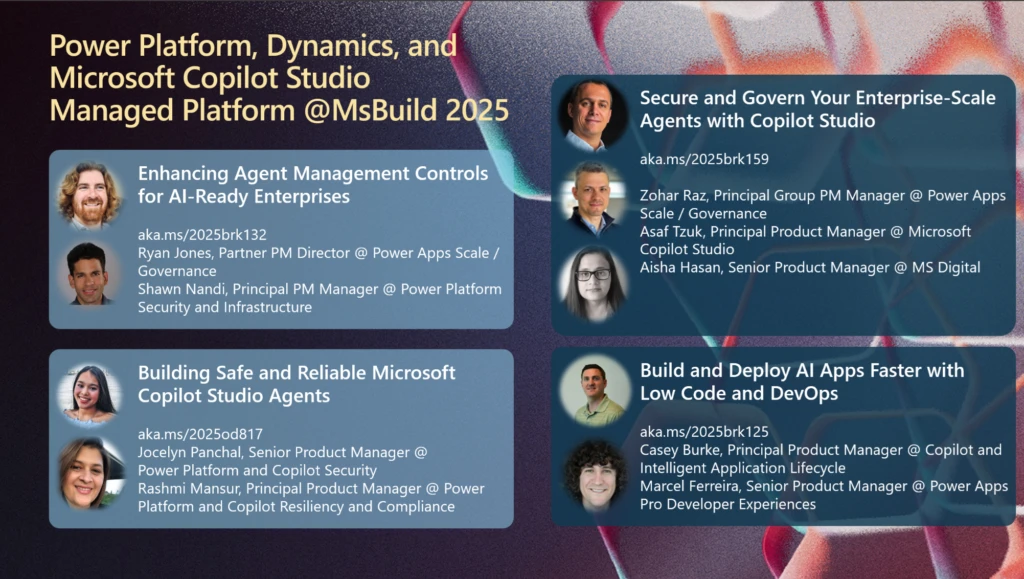
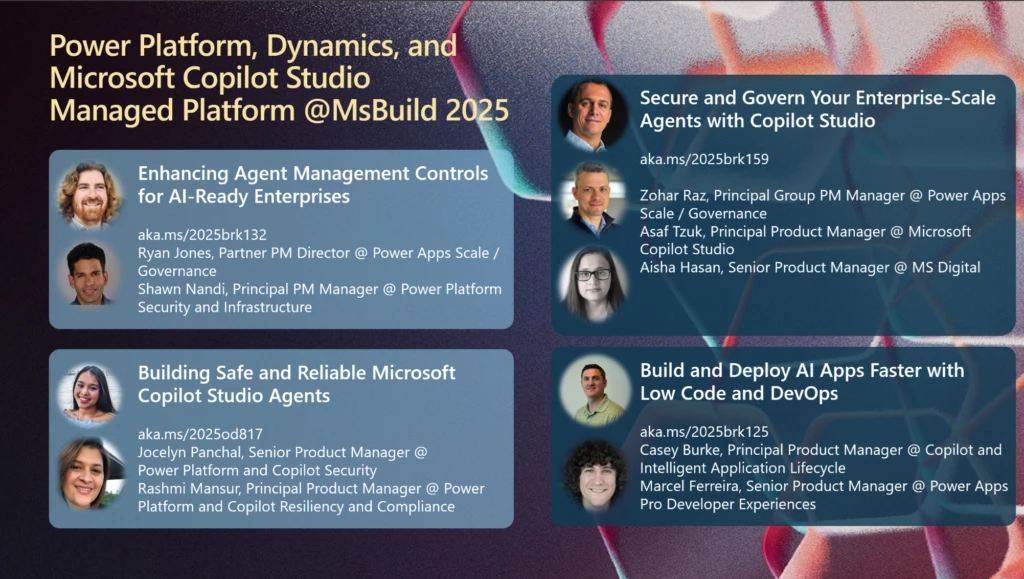
Don’t miss the opportunity to attend sessions led by industry leaders like Zohar Raz, Shawn Nandi, Ryan Jones, Jocelyn Panchal, Casey Burke, Asaf Tzuk, Rashmi Mansur, and Marcel Ferreira. These sessions will provide invaluable insights into building, managing, and governing secure agents. You’ll learn best practices for managing agent lifecycle, implementing security measures, and ensuring compliance with organizational policies. Whether you’re a seasoned developer or new to AI, these sessions will equip you with the knowledge to excel in agent governance.
Discover how to secure Microsoft Copilot Studio agents using Power Platform security and governance capabilities, Microsoft Purview, and Microsoft Admin Center. This session explores best practices for managing data access, compliance, and risk mitigation while ensuring responsible AI use. Learn how to enforce policies, monitor agent activity, and safeguard enterprise data. Gain insights into securing Copilot agents at scale while maintaining agility and innovation.
Join us as we delve into agent management controls. We’ll focus on enterprise-grade security, maintaining healthy and seamless operations, and governing at scale. Attendees will gain insights into best practices, tools, and strategies to ensure their organization is AI-ready. Discover how to leverage a robust management suite to enhance your development processes and secure your enterprise environment.
Learn how your development team can build AI enabled applications faster with Power Platform and DevOps. We’ll show you how the new developer capabilities combined with DevOps best practices can empower your team to build, test, and deploy enterprise-grade apps faster.
With the fully managed suite of capabilities for Power Platform, admins and makers alike are equipped with the necessary tools to ensure that Copilot Studio agents are protected and healthy. Tune in to learn more about the latest enhancements and upcoming plans for a fully managed platform designed for the Era of AI.
Key Topics Covered
Agent Governance Strategy: Learn about the comprehensive governance frameworks and strategies for managing AI agents across Microsoft 365, Power Platform, and Copilot Studio. Discover how existing governance models are being integrated to provide a unified experience for administrators.
Security Measures: Explore robust security measures in place to protect sensitive data and ensure compliance. From encryption and isolation to persistent label inheritance and connector management policies, you’ll see how Microsoft Copilot safeguards your information.
Management Tools: Get hands-on with the latest management tools available in the Microsoft 365 Admin Center and Power Platform Admin Center. These tools streamline the administration of permissions, policies, and compliance settings, making it easier to manage agents at scale.
Upcoming Features: Stay informed about the upcoming features and enhancements for agent governance and security. Learn about the new capabilities for monitoring, reporting, and data security, and how these will impact your agent governance strategies.
Get Ready to Learn and Build
Microsoft Build 2025 is the event of the year for developers, IT professionals, and AI enthusiasts. With a focus on agent governance, security, and management, this year’s conference will provide you with the tools and knowledge to take your AI projects to the next level. Don’t miss out on the opportunity to learn from thought leaders, explore new technologies, and connect with peers. We look forward to seeing you.
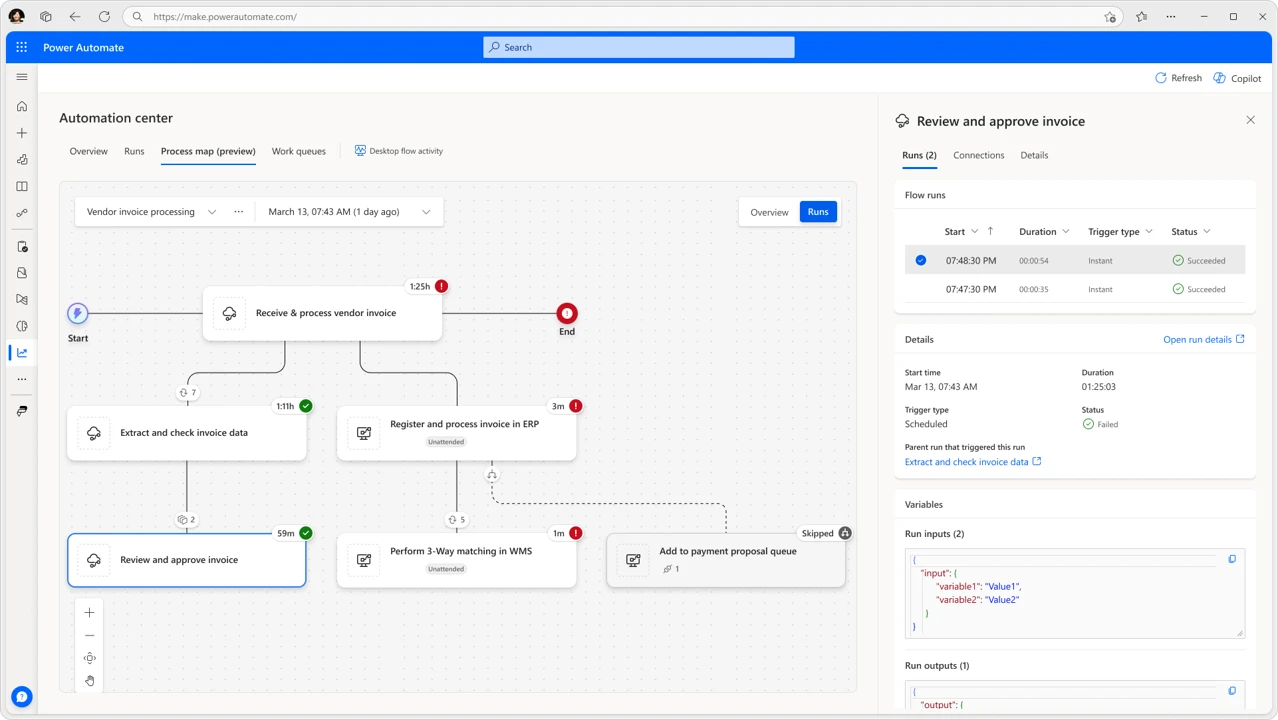
We’re thrilled to announce the public preview of Process Map in Power Automate, a significant advancement for process-centric observability at scale. This feature is seamlessly integrated into the Automation Center, your hub for end-to-end automation monitoring and management in Power Automate.
What is the Process Map?
The Process Map is designed to enhance process-centric troubleshooting and monitoring in Power Automate by providing increased visibility and efficiency. It offers a detailed, end-to-end view of a process that’s managed by a parent orchestrating flow, showing all of the associated child and desktop flows. The map also recognizes structural flow elements, such as conditions, and displays flows that didn’t execute due to specific conditional logic or upstream errors. This is critical for understanding how a problem in one part of the process can affect other parts and assists in taking appropriate countermeasures to address issues.
Key benefits:
Accelerated troubleshooting: Quickly identify and resolve issues with an end-to-end, process-centric view that includes contextual information on runs, connections, and design-time aspects.
Comprehensive visibility: Gain full transparency into your automation processes, including flows that were skipped or missed due to conditional logic or upstream issues.
Enhanced impact analysis: Understand and analyze how issues affect the entire process, facilitating faster recovery and implement effective countermeasures.
Stronger collaboration: End-to-end process visibility enables faster, context-rich communication with impacted teams, accelerating recovery and driving continuous improvement.
Key features
Runsview: Displays the main flow run that orchestrates the process and its child runs, enabling users to track execution, identify issues, and optimize processes.
Overviewview: Provides a design-time process hierarchy view with connected subprocesses, offering quick insights and serving as the future home for aggregated process data and configurations.
Runs tab integration: We’ve enhanced the flow runs page with new run row hover options. New icons let you create or view process maps for the selected process run and its child runs.
How to get started
This feature is being rolled-out now and you can test it today in the US preview region. Further details are available in the Process Map documentation.