Document management is a core capability for SharePoint and Microsoft 365. Today, we’re pleased to announce the following new capabilities which will start rolling out to Targeted Release by late August 2019.
New document management actions for SharePoint in Flow
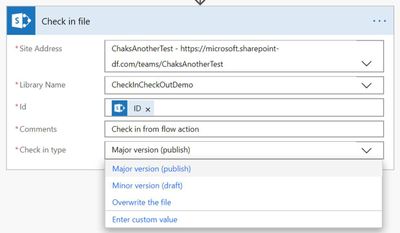
Organizations may require users to check-out documents before they can make any changes. Instead of always requiring user interaction, you can now automate document check in and checkout using Microsoft Flow. The check-out file and check-in file actions will allow Flow authors to check-out, make changes, and then finally check-in the file to the library. These new actions will start being available in the SharePoint connector during August 2019.
Activity Highlights in the File Hover Card
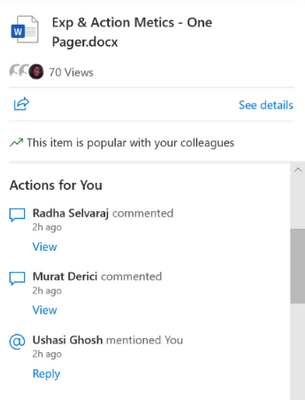
We’re also adding activity highlights to the File Hover Card. This feature shows relevant activities related to the files you’re working on. If someone you work with edits, comments, or @mentions you, this activity will be displayed in the File Hover Card, along with a link to take you directly to the relevant activity. This feature started rollout to Targeted Release in July 2019.
Bulk approvals
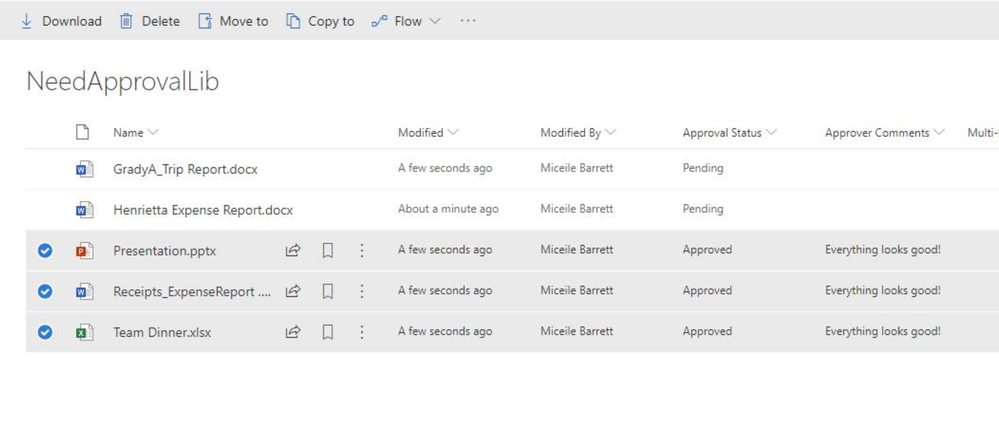
Coming soon, you’ll be able to and select multiple items or documents pending approvals and complete the process with a single action (three easy steps!) Let’s review:
First find and select the items you’d like to approve or reject:
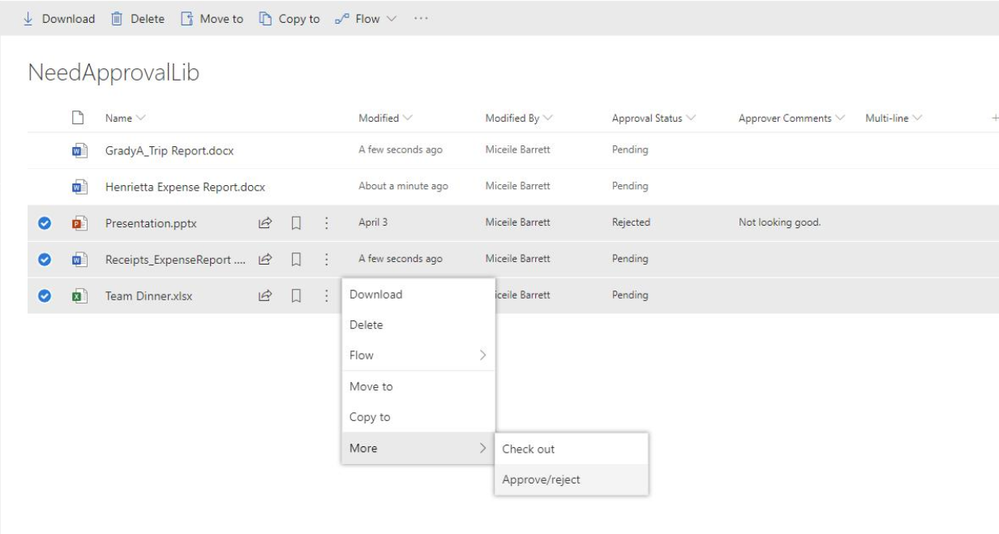
Right-click on the selected items. In the resulting menu, under the “More” option, click “Approve/reject”
And you’re done. Hope you approve. :smiling_face_with_smiling_eyes:
We welcome your feedback as these and other new features roll out this summer. Please share your comments here on the SharePoint blog, or through UserVoice. Thanks.
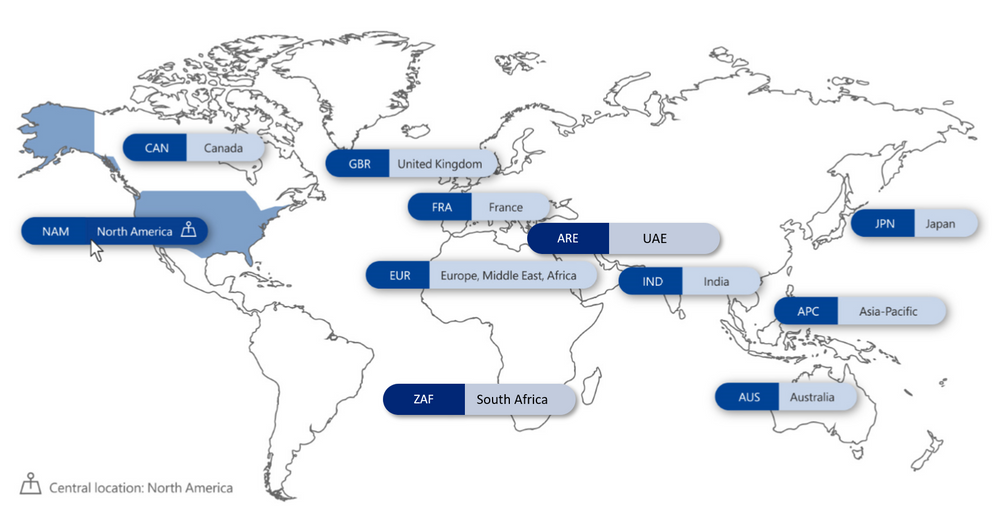
A growing rise in regulatory requirements places more onus on organizations to control the geographic location of where data is stored so that it can be kept within specific regional boundaries.
If you don’t have a solution for this, you may feel less confident in expanding your business into new markets, distributing your workforce or even moving to the Cloud. The traditional way to tackle data residency has been to manage people and resources who reside in different countries or regions within the organization as separate entities, even though you are all part of the same organization.
To solve for this, maybe you’ve opted for a distributed datacenter model on-premises aligned to geographic locations, or perhaps you find yourself maintaining a often complex hybrid architecture to offer Office 365 to users in a limited number of geographies to address data compliance needs.
While this can potentially keep your data in the appropriate location, we know that these approaches can be expensive and worse of all, create data silos, which limit collaboration on your organizations most important currency, information. Data fluidity, or lack of it, constrains your organization’s overall productivity and innovation.
The good news is that there’s now a better and more efficient way to solve for this challenge with Multi-Geo in Office 365. It allows you to operate a single global Office 365 tenant and facilitates control to pin point locations around the world where each user’s content is stored at rest and where future content will be stored.
Office 365 Multi-Geo capabilities enable a single Office 365 tenant to span across multiple Office 365 datacenter geographies (geos), and gives customers the ability to store their Exchange Online and OneDrive, SharePoint Online and Office 365 Groups data, at-rest, on a per-user basis, in their chosen geos and today we’re pleased to announce to expanded Office 365 Multi-Geo capabilities to South Africa and the United Arab Emirates.
Learn more on how Office Multi-Geo works, how to get started, and FaQ’s in the Microsoft Mechanics video below:
Learn more about Office 365 Multi-Geo pricing and how to get started at https://products.office.com/en-us/business/multi-geo-capabilities.
Additional Resources
Office 365 Multi-Geo Resource Center
Office 365 Multi-Geo Community on the Microsoft Tech Community
Office 365 Multi-Geo Capabilities eBook
Addressing data residency needs with Microsoft 365 eBook
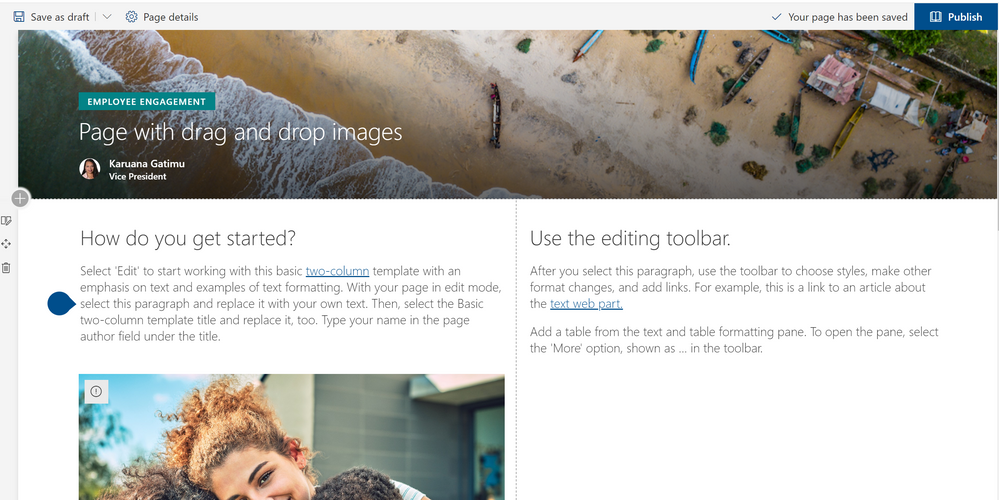
Building informative and attractive pages is an essential step in engaging employees with news, applications, and critical information in SharePoint and Microsoft Teams. Today we’re pleased to announce a series of enhancements to make authoring pages faster and more intuitive.
All of these are scheduled to start rolling out to Targeted Release in August 2019, with general availability following soon after.
Undo/Redo
Office applications such as Word have long offered “undo” actions after a change. Now, we’re bringing this option to SharePoint pages as well, providing the option to undo changes during authoring. Once you save or publish your page, you can no longer undo previous changes.
Drag and drop files to the canvas
Adding files to pages is simpler than ever. You can drag and drop files from desktop views and SharePoint will automatically add the file viewer and upload the file to the SharePoint document library. We’ve also added a rich preview for links pasted into the text editor to embed videos from Stream and YouTube links, or images with title and description from other links.
Click here or on the image below to see how easy it is to drag and drop files into your pages.
New vertical sections
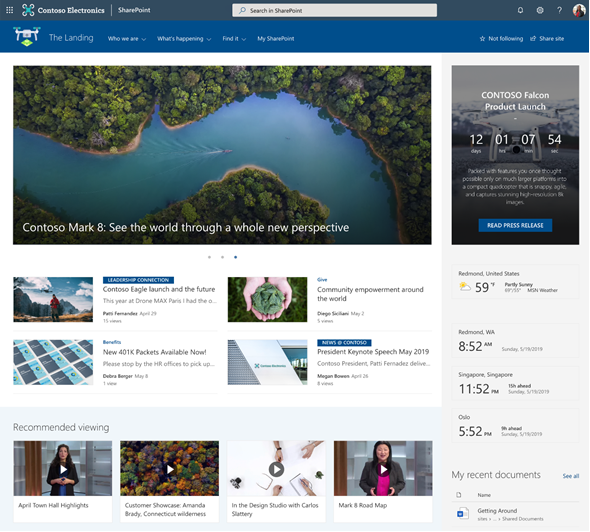
As mentioned on our home site announcement blog, modern pages can now have vertical sections as shown below.
Recommendations
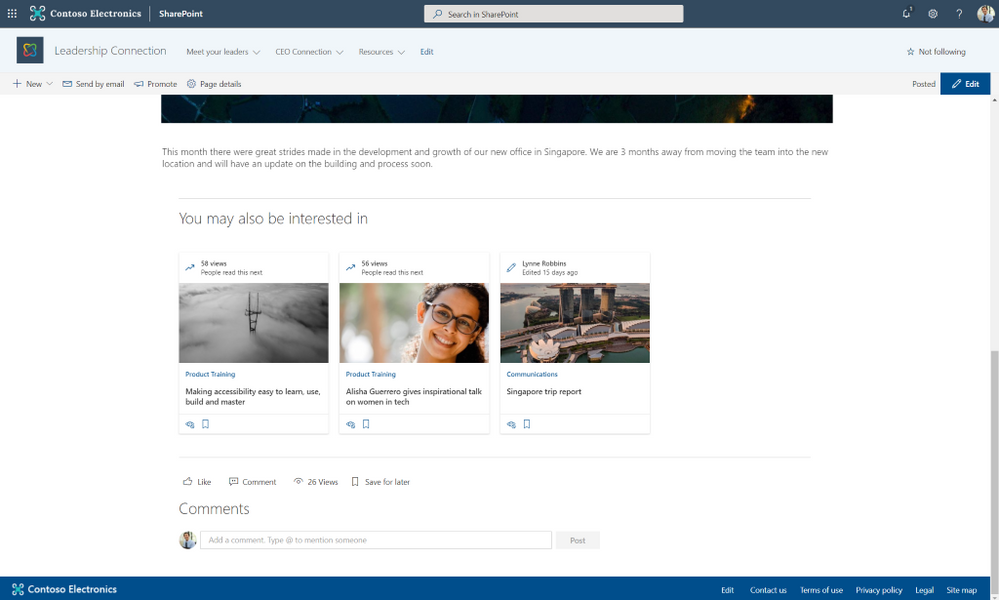
Pages and news can now include a web part showing related and recommended content. Pages are suggested based on trends and personalization derived from the Microsoft Graph.
On page anchors
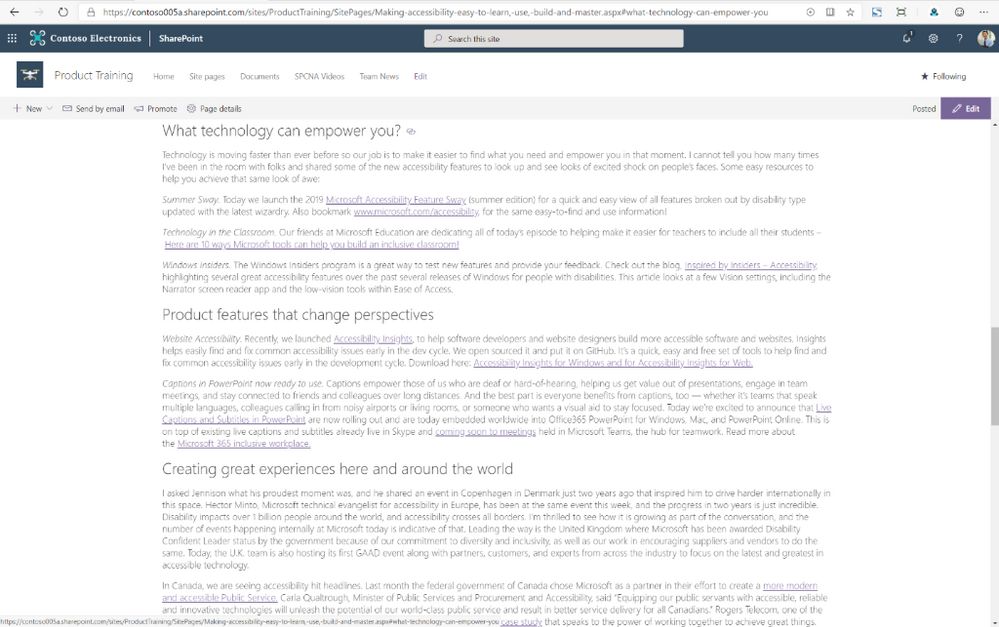
Beautiful long-form content brings expansive information to your pages. Now you can add links to headings within that content to focus readers on the most relevant portions of your content.
SharePoint automatically adds anchor links to all first, second and third level headings in your page. Then simply hover over the headings and you’ll see a link symbol. Clicking it will give you the fully rendered URL, including the anchor. If you click this symbol, the heading will be added to the URL bar, or you can right-click to save it to your copy buffer.
Please continue to stay engaged with us on the TechCommunity and on UserVoice as we continue to update our page and news authoring experiences. Thanks.
If you need to streamline business processes, you need great tools to edit data in lists and libraries. Excel has long been a foundational tool for collecting, editing and analyzing data. People understand and embrace the simplicity of sorting and editing data values in a grid.
As we announced at SPC18, we are pleased to finally release our enhanced Quick Edit, bringing the power and simplicity of “spreadsheet” views to modern SharePoint lists and libraries.
You can preview the new Quick Edit in this self-service walk through. Let’s look in more detail.
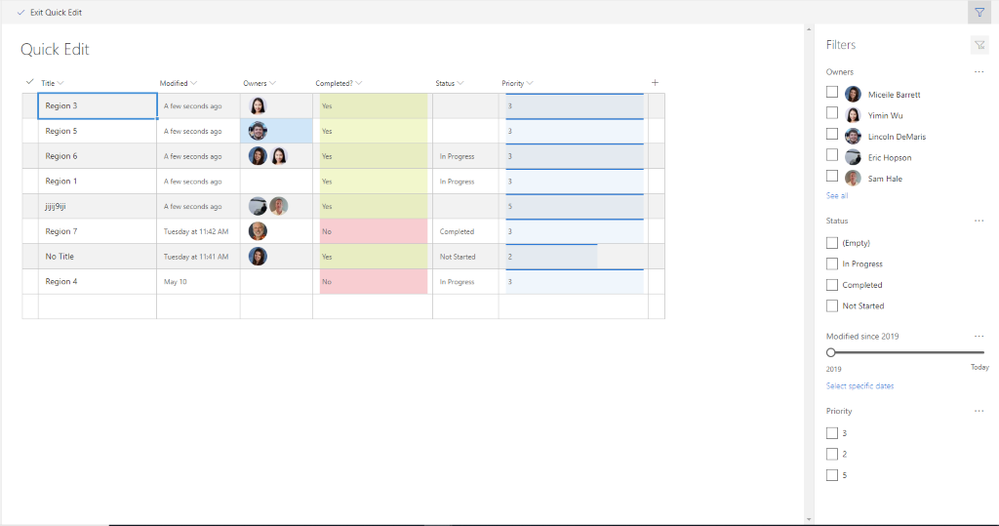
Filters Pane is now available in Quick Edit Mode
Users can filter their content in Quick Edit mode to locate the items for updates. In addition, any filters or sorting applied in Quick Edit will persist as the user navigates back to the normal view.
Filtering in Quick Edit
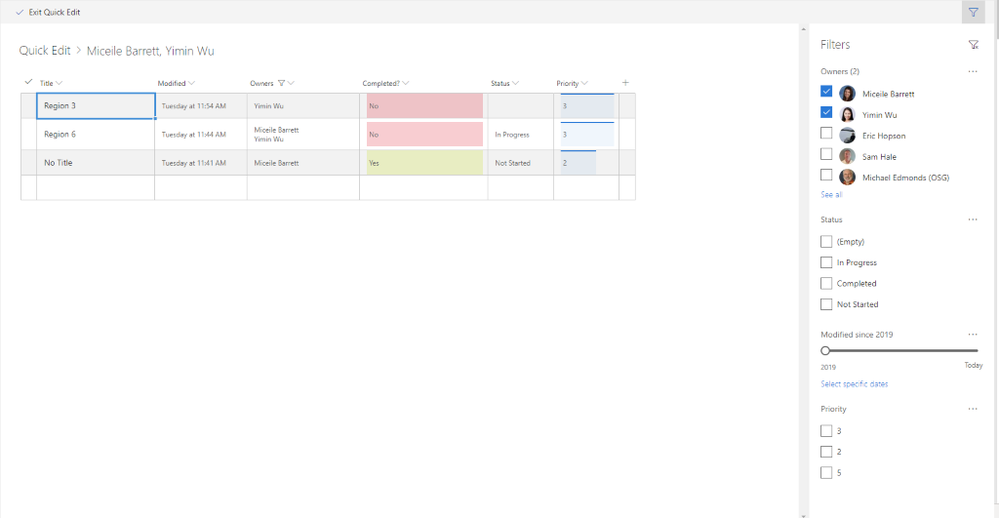
All formatting appears in Quick Edit
Any custom formatting for the list or document library will now also render in Quick Edit. For example, this includes experiences like row formatting, user profile photos, conditional formatting, and data bars.
 Formatting in Quick Edit
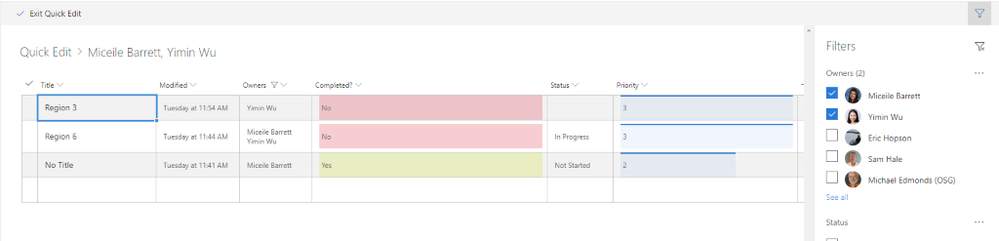
Breadcrumb
Just as in normal list and document library views, the breadcrumb will now appear in Quick Edit. This gives you a visual clue about applied filters and a simple way to navigate “back” to larger data sets.
 Quick Edit breadcrumbs
Adjust and save column widths
Users can now define their preferred column widths by dragging and dropping directly within Quick Edit. In addition, any previously save column widths (either in the view or in local storage) will persist for users when they navigate to Quick Edit.
Drag and drop columns
Easily re-order your columns within Quick Edit by dragging and dropping.
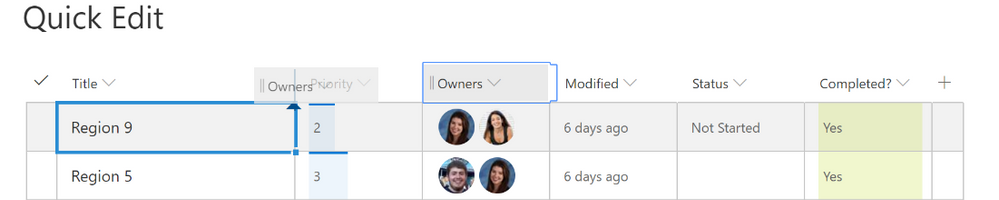 Drag and drop columns
Enhanced people picker
You can now browse and selected users from your organization directory efficiently with our new people picker. You can browse for partial name matches and see user photos and titles in line, as shown below.
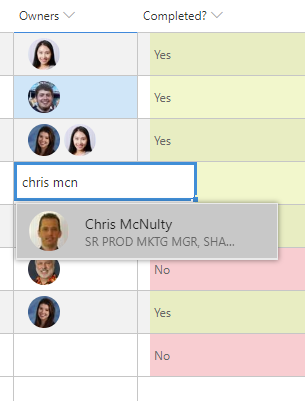 Enhanced people picker
Quick Edit enhancements will start rolling out to Targeted Release in July 2019. We’ll continue to share the latest news here on the TechCommunity. Thanks.
Delivering data insight and intelligence is essential to reinventing your business processes. SharePoint provides a great system to aggregate data and documents, and to integrate Power BI based reports and dashboards across SharePoint employee experiences and Microsoft Teams. That’s why we’re pleased to share these three new white papers to help you learn how to deliver better Power BI reports throughout Microsoft 365 on the Microsoft TechCommunity Resource Center.
Using SharePoint and Teams as a Modern Dashboarding Platform
SharePoint has a long history of providing a first-class platform for business intelligence dashboards based on Power BI, Excel Online, Power BI Report server, and related tools. Adding conversations and other collaborative content brings context to the content and helps to foster a data culture. SharePoint pages, as well as lists, can be integrated into Microsoft Teams, bringing all this richness to the Teams collaborative environment. This paper will outline the various approaches to building dashboards in SharePoint, Microsoft Teams and SharePoint Server.
https://aka.ms/sharepoint/dashboard-wp
Using SharePoint as a data source for Modern Reporting
SharePoint is a great organizational data store. SharePoint lists offer a quick and easy way for users to store and share millions of items, while document libraries have become the industry standard for document management, supplying secure, reliable storage. There are several technologies for working with SharePoint data, such as Power Query, Excel, Power BI, SQL Server Reporting Services and SQL Server Integration Services. This white paper examines the different platforms and approaches that can be used to report on SharePoint data and explains the procedures.
https://aka.ms/sharepoint/reporting-wp
Using Power BI with Complex SharePoint Field Types
SharePoint lists supply a quick and easy way for users to store and share millions of list-based items. Text and number fields are straightforward, but complex field types in SharePoint present several challenges. Power BI provides tools to aid with these challenges, and these tools are the focus of this white paper.
https://aka.ms/sharepoint/datatypes-wp
NEW! Check out our latest white papers to help you learn how to use Microsoft 365 and SharePoint to transform your organizational data, analytics and reporting.
Using SharePoint and Teams as a Modern Dashboarding Platform (https://aka.ms/sharepoint/dashboard-wp )
SharePoint has a long history of providing a first-class platform for business intelligence dashboards based on Power BI, Excel Online, Power BI Report server, and related tools. Adding conversations and other collaborative content brings context to the content and helps to foster a data culture. SharePoint pages, as well as lists, can be integrated into Microsoft Teams, bringing all this richness to the Teams collaborative environment. This paper will outline the various approaches to building dashboards in SharePoint, Microsoft Teams and SharePoint Server.
Using SharePoint as a data source for Modern Reporting (https://aka.ms/sharepoint/reporting-wp)
SharePoint is a great organizational data store. SharePoint lists offer a quick and easy way for users to store and share millions of items, while document libraries have become the industry standard for document management, supplying secure, reliable storage. SharePoint libraries supply the backbone for document storage in all of Office 365. There are several different platforms and technologies for working with SharePoint data, such as Power Query, Excel, Power BI, SQL Server Reporting Services and SQL Server Integration Services. This white paper examines the different platforms and approaches that can be used to report on SharePoint data and explains the procedures.
Using Power BI with Complex SharePoint Field Types (https://aka.ms/sharepoint/datatypes-wp)
SharePoint lists supply a quick and easy way for users to store and share millions of list-based items. Text and number fields are straightforward, but complex field types in SharePoint present several challenges. Power BI provides tools to aid with these challenges, and these tools are the focus of this white paper.

Latest monthly summary of SharePoint Development guidance for SharePoint Online and on-premises is now available from the SharePoint Dev Blog. Check the latest news, samples and other guidance from this summary.
The volume and variety of today’s electronic communications are causing many organizations to struggle to meet their communications monitoring and compliance obligations and we’ve heard your concerns about the need to simplify and streamline compliance tools in the modern workplace. Today, we’re rolling out a new supervision solution to support your organization’s compliance needs and journey.
For a quick overview of Supervision policies, see the Supervision policy video on the Microsoft Mechanics channel.
Scenarios for Supervision
Monitoring digital communications is critical to mitigating conduct, reputational, and financial risks. Organizations require a supervision system that meets both business control needs and regulatory compliance requirements. Our supervision solutions help you address the following concerns:
- Corporate policies: employees must comply with acceptable use, ethical standards, and other corporate policies in all business-related communications. Supervision can detect policy violations and help you take corrective actions to help mitigate these types of incidents. For example, you could monitor your organization for potential human resources violations such as harassment or the use of inappropriate or offensive language in employee communications.
- Risk management: organizations are responsible for communications distributed through corporate systems. Implementing a supervision program helps identify and manage legal exposure and other risks before they damage corporate reputation and operations. For example, you could monitor your organization for unauthorized communications for confidential projects such as upcoming acquisitions, mergers, earnings disclosures, reorganizations, or leadership team changes.
- Regulatory compliance: most organizations must comply with some type of regulatory compliance standards as part of their normal operating procedures. These regulations often require organizations to implement some type of supervisory or oversight process for messaging that is appropriate for their industry. The Financial Industry Regulatory Authority (FINRA) Rule 3110 is a good example of a requirement for organizations to have supervisory procedures in place to monitor the activities of its employees and the types of businesses in which it engages. Another example may be a need to monitor broker-dealers in your organization to safeguard against potential money-laundering, insider trading, collusion, or bribery activities. Supervision policies can help your organization meet these requirements by providing a process to both monitor and report on corporate communications.
New in Supervision
With Supervision policies, you can monitor internal or external Exchange email, Microsoft Teams chats and channels, or 3rd-party communication in your organization. Listed below are key new features in our integrated Supervision solution that reduce the need to export Microsoft 365 data for compliance management or review.
Intelligent policies
- Intelligent filters (in private preview): the offensive language data model helps identify inappropriate language by leveraging machine learning and artificial intelligence to identify communication patterns over time.
- Sensitive information types: you can now leverage either the 100 sensitive information types (financial, medical and health or privacy) such as credit card or social security number or custom data types such as your own custom dictionary/lexicon to flag content for review, or a combination of both.
- Advanced message filters: with domain and retention labels conditions you can now include or exclude emails based on domains and include or exclude emails based on their retention labels.
Policy creation
Efficient reviews
- Integrated review: you can now easily review, tag, comments and resolve items flagged for review within the Security & Compliance Center using your favorite browser. If needed, you can also continue to manage flagged items using Microsoft Outlook and Outlook on the web.
- Bulk resolve: within the new built-in review feature in the Security & Compliance Center, you can easily tag, comment or resolve multiple items with just one click.
Supervision review
Defensible insights
- Productivity reporting: Compliance officers can monitor and ensure items are being reviewed directly in the Security & Compliance Center.
- Stay ready for audits: All review activities are now fully audited and policy tracking allows you to document the complete history of supervised employees, reviewers, and policy rules at any point in time.
These new supervision innovations, based on customer feedback and pain points with existing solutions, will help your organization more effectively manage compliance risk and the efficiently manage the ever-increasing volume of communications data. Going forward, we’ll continue to invest in intelligent policies to handle the growing volume communications data and to make compliance reviews more efficient to help save time & money.
“With Microsoft’s Supervision solution we can get a 360 view of our risk management portfolio to understand how employees in the firm are complying to policies and procedures. For example, with domain exclusions, we now create various policies to understand how our attorneys are communicating with internal and external parties. We also set various supervision filters to capture data on engagement letter terms and SOWs to make sure employees are complying to the policies and levels of risks the partners have agreed to at the firm.“
— Chad Ergun, DGS Law’s CIO
Ready to get started?
Regardless of where you are in your compliance journey, there’s plenty of compliance solutions to explore and implement in Microsoft 365. Learn more about Supervision with Supervision policies in Office 365 and start implementing supervision policies with Configure supervision policies for your organization.
You can also engage with us in our Tech Community and provide additional feedback on UserVoice.
Frequently Asked Questions
Q: What licenses are required to use Supervision?
A: All users monitored by supervision policies must have either a Microsoft 365 E5 Compliance license, Office 365 Enterprise E3 license with the Advanced Compliance add-on or be included in an Office 365 Enterprise E5 subscription. If you don’t have an existing Enterprise E5 plan and want to try supervision, you can sign up for a trial of Office 365 Enterprise E5.
Q: When will these updates be available for my organization?
A: We have started rolling out the new Supervision updates to Office 365 today and most customers should have access to the new features over the next several weeks.
Q: How can I join the Offensive Language private preview?
A: Please email us at: supervisionolpreview@service.microsoft.com with a description of the use case you are trying to address and your tenant information (tenant ID or domain).We’ll review submissions and let you know if your tenant has been accepted in the program.
—Christophe Fiessinger, principal program manager Microsoft 365 Security & Compliance
The volume and variety of today’s electronic communications are causing many organizations to struggle to meet their communications monitoring and compliance obligations and we’ve heard your concerns about the need to simplify and streamline compliance tools in the modern workplace. Today, we’re rolling out a new supervision solution to support your organization’s compliance needs and journey.
For a quick overview of Supervision policies, see the Supervision policy video on the Microsoft Mechanics channel.
Scenarios for Supervision
Monitoring digital communications is critical to mitigating conduct, reputational, and financial risks. Organizations require a supervision system that meets both business control needs and regulatory compliance requirements. Our supervision solutions help you address the following concerns:
- Corporate policies: employees must comply with acceptable use, ethical standards, and other corporate policies in all business-related communications. Supervision can detect policy violations and help you take corrective actions to help mitigate these types of incidents. For example, you could monitor your organization for potential human resources violations such as harassment or the use of inappropriate or offensive language in employee communications.
- Risk management: organizations are responsible for communications distributed through corporate systems. Implementing a supervision program helps identify and manage legal exposure and other risks before they damage corporate reputation and operations. For example, you could monitor your organization for unauthorized communications for confidential projects such as upcoming acquisitions, mergers, earnings disclosures, reorganizations, or leadership team changes.
- Regulatory compliance: most organizations must comply with some type of regulatory compliance standards as part of their normal operating procedures. These regulations often require organizations to implement some type of supervisory or oversight process for messaging that is appropriate for their industry. The Financial Industry Regulatory Authority (FINRA) Rule 3110 is a good example of a requirement for organizations to have supervisory procedures in place to monitor the activities of its employees and the types of businesses in which it engages. Another example may be a need to monitor broker-dealers in your organization to safeguard against potential money-laundering, insider trading, collusion, or bribery activities. Supervision policies can help your organization meet these requirements by providing a process to both monitor and report on corporate communications.
New in Supervision
With Supervision policies, you can monitor internal or external Exchange email, Microsoft Teams chats and channels, or 3rd-party communication in your organization. Listed below are key new features in our integrated Supervision solution that reduce the need to export Microsoft 365 data for compliance management or review.
Intelligent policies
- Intelligent filters (in private preview): the offensive language data model helps identify inappropriate language by leveraging machine learning and artificial intelligence to identify communication patterns over time.
- Sensitive information types: you can now leverage either the 100 sensitive information types (financial, medical and health or privacy) such as credit card or social security number or custom data types such as your own custom dictionary/lexicon to flag content for review, or a combination of both.
- Advanced message filters: with domain and retention labels conditions you can now include or exclude emails based on domains and include or exclude emails based on their retention labels.
Policy creation
Efficient reviews
- Integrated review: you can now easily review, tag, comments and resolve items flagged for review within the Security & Compliance Center using your favorite browser. If needed, you can also continue to manage flagged items using Microsoft Outlook and Outlook on the web.
- Bulk resolve: within the new built-in review feature in the Security & Compliance Center, you can easily tag, comment or resolve multiple items with just one click.
Supervision review
Defensible insights
- Productivity reporting: Compliance officers can monitor and ensure items are being reviewed directly in the Security & Compliance Center.
- Stay ready for audits: All review activities are now fully audited and policy tracking allows you to document the complete history of supervised employees, reviewers, and policy rules at any point in time.
These new supervision innovations, based on customer feedback and pain points with existing solutions, will help your organization more effectively manage compliance risk and the efficiently manage the ever-increasing volume of communications data. Going forward, we’ll continue to invest in intelligent policies to handle the growing volume communications data and to make compliance reviews more efficient to help save time & money.
“With Microsoft’s Supervision solution we can get a 360 view of our risk management portfolio to understand how employees in the firm are complying to policies and procedures. For example, with domain exclusions, we now create various policies to understand how our attorneys are communicating with internal and external parties. We also set various supervision filters to capture data on engagement letter terms and SOWs to make sure employees are complying to the policies and levels of risks the partners have agreed to at the firm.“
— Chad Ergun, DGS Law’s CIO
Ready to get started?
Regardless of where you are in your compliance journey, there’s plenty of compliance solutions to explore and implement in Microsoft 365. Learn more about Supervision with Supervision policies in Office 365 and start implementing supervision policies with Configure supervision policies for your organization.
You can also engage with us in our Tech Community and provide additional feedback on UserVoice.
Frequently Asked Questions
Q: What licenses are required to use Supervision?
A: All users monitored by supervision policies must have either a Microsoft 365 E5 Compliance license, Office 365 Enterprise E3 license with the Advanced Compliance add-on or be included in an Office 365 Enterprise E5 subscription. If you don’t have an existing Enterprise E5 plan and want to try supervision, you can sign up for a trial of Office 365 Enterprise E5.
Q: When will these updates be available for my organization?
A: We have started rolling out the new Supervision updates to Office 365 today and most customers should have access to the new features over the next several weeks.
Q: How can I join the Offensive Language private preview?
A: Please email us at: supervisionolpreview@service.microsoft.com with a description of the use case you are trying to address and your tenant information (tenant ID or domain).We’ll review submissions and let you know if your tenant has been accepted in the program.
—Christophe Fiessinger, principal program manager Microsoft 365 Security & Compliance
The volume and variety of today’s electronic communications are causing many organizations to struggle to meet their communications monitoring and compliance obligations and we’ve heard your concerns about the need to simplify and streamline compliance tools in the modern workplace. Today, we’re rolling out a new supervision solution to support your organization’s compliance needs and journey.
For a quick overview of Supervision policies, see the Supervision policy video on the Microsoft Mechanics channel.
Scenarios for Supervision
Monitoring digital communications is critical to mitigating conduct, reputational, and financial risks. Organizations require a supervision system that meets both business control needs and regulatory compliance requirements. Our supervision solutions help you address the following concerns:
- Corporate policies: employees must comply with acceptable use, ethical standards, and other corporate policies in all business-related communications. Supervision can detect policy violations and help you take corrective actions to help mitigate these types of incidents. For example, you could monitor your organization for potential human resources violations such as harassment or the use of inappropriate or offensive language in employee communications.
- Risk management: organizations are responsible for communications distributed through corporate systems. Implementing a supervision program helps identify and manage legal exposure and other risks before they damage corporate reputation and operations. For example, you could monitor your organization for unauthorized communications for confidential projects such as upcoming acquisitions, mergers, earnings disclosures, reorganizations, or leadership team changes.
- Regulatory compliance: most organizations must comply with some type of regulatory compliance standards as part of their normal operating procedures. These regulations often require organizations to implement some type of supervisory or oversight process for messaging that is appropriate for their industry. The Financial Industry Regulatory Authority (FINRA) Rule 3110 is a good example of a requirement for organizations to have supervisory procedures in place to monitor the activities of its employees and the types of businesses in which it engages. Another example may be a need to monitor broker-dealers in your organization to safeguard against potential money-laundering, insider trading, collusion, or bribery activities. Supervision policies can help your organization meet these requirements by providing a process to both monitor and report on corporate communications.
New in Supervision
With Supervision policies, you can monitor internal or external Exchange email, Microsoft Teams chats and channels, or 3rd-party communication in your organization. Listed below are key new features in our integrated Supervision solution that reduce the need to export Microsoft 365 data for compliance management or review.
Intelligent policies
- Intelligent filters (in private preview): the offensive language data model helps identify inappropriate language by leveraging machine learning and artificial intelligence to identify communication patterns over time.
- Sensitive information types: you can now leverage either the 100 sensitive information types (financial, medical and health or privacy) such as credit card or social security number or custom data types such as your own custom dictionary/lexicon to flag content for review, or a combination of both.
- Advanced message filters: with domain and retention labels conditions you can now include or exclude emails based on domains and include or exclude emails based on their retention labels.
Policy creation
Efficient reviews
- Integrated review: you can now easily review, tag, comments and resolve items flagged for review within the Security & Compliance Center using your favorite browser. If needed, you can also continue to manage flagged items using Microsoft Outlook and Outlook on the web.
- Bulk resolve: within the new built-in review feature in the Security & Compliance Center, you can easily tag, comment or resolve multiple items with just one click.
Supervision review
Defensible insights
- Productivity reporting: Compliance officers can monitor and ensure items are being reviewed directly in the Security & Compliance Center.
- Stay ready for audits: All review activities are now fully audited and policy tracking allows you to document the complete history of supervised employees, reviewers, and policy rules at any point in time.
These new supervision innovations, based on customer feedback and pain points with existing solutions, will help your organization more effectively manage compliance risk and the efficiently manage the ever-increasing volume of communications data. Going forward, we’ll continue to invest in intelligent policies to handle the growing volume communications data and to make compliance reviews more efficient to help save time & money.
“With Microsoft’s Supervision solution we can get a 360 view of our risk management portfolio to understand how employees in the firm are complying to policies and procedures. For example, with domain exclusions, we now create various policies to understand how our attorneys are communicating with internal and external parties. We also set various supervision filters to capture data on engagement letter terms and SOWs to make sure employees are complying to the policies and levels of risks the partners have agreed to at the firm.“
— Chad Ergun, DGS Law’s CIO
Ready to get started?
Regardless of where you are in your compliance journey, there’s plenty of compliance solutions to explore and implement in Microsoft 365. Learn more about Supervision with Supervision policies in Office 365 and start implementing supervision policies with Configure supervision policies for your organization.
You can also engage with us in our Tech Community and provide additional feedback on UserVoice.
Frequently Asked Questions
Q: What licenses are required to use Supervision?
A: All users monitored by supervision policies must have either a Microsoft 365 E5 Compliance license, Office 365 Enterprise E3 license with the Advanced Compliance add-on or be included in an Office 365 Enterprise E5 subscription. If you don’t have an existing Enterprise E5 plan and want to try supervision, you can sign up for a trial of Office 365 Enterprise E5.
Q: When will these updates be available for my organization?
A: We have started rolling out the new Supervision updates to Office 365 today and most customers should have access to the new features over the next several weeks.
Q: How can I join the Offensive Language private preview?
A: Please email us at: supervisionolpreview@service.microsoft.com with a description of the use case you are trying to address and your tenant information (tenant ID or domain).We’ll review submissions and let you know if your tenant has been accepted in the program.
—Christophe Fiessinger, principal program manager Microsoft 365 Security & Compliance







