In February we announced several new capabilities coming soon to help organizations protect their sensitive data – across devices, apps, cloud services and on-premises. Today we’re announcing the general availability of several new sensitive information types and a new template that helps you discover, classify, protect and manage personal information that is relevant to GDPR obligations.
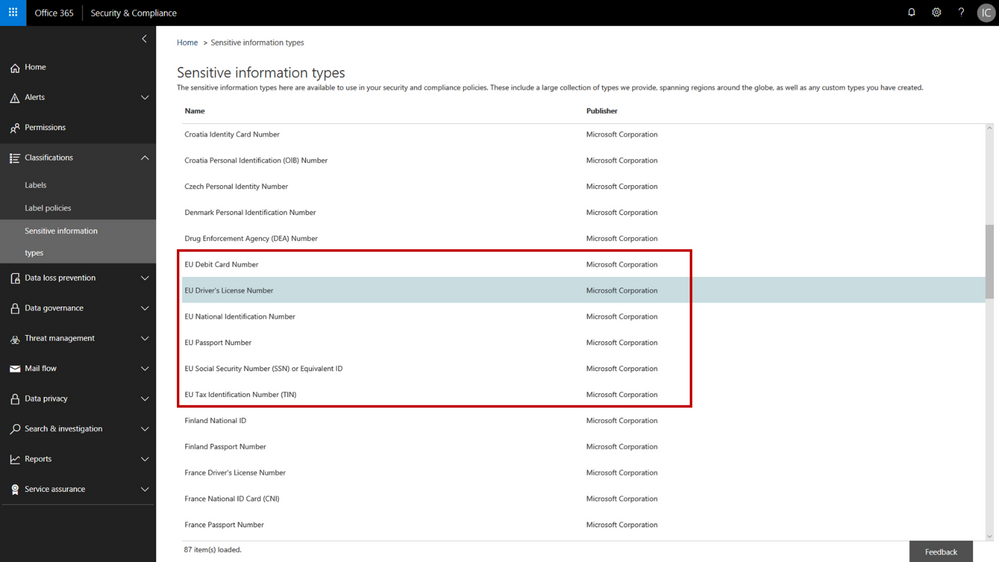
The addition of the new personal information data types adds to the existing built-in sensitive information types that are available in the Office 365 security & compliance center. You can use these sensitive information types in defining your data governance and data protection policies – there are now 87 different data types to choose from. While many of the previous sensitive information types were relevant to GDPR, the new sensitive information types help provide a more complete and consolidated set. The new personal information data types include:
- EU passport number
- EU national identification number
- EU driver’s license number
- EU tax identification number (TIN)
- EU social security number (SSN) or equivalent ID
For each of these information types, the service detects data that matches the specific patterns used by the 28 EU countries. For example, configuring your policy to include “EU driver’s license number” will detect driver’s license numbers used by any of the 28 covered EU countries.
New EU personal information data types in the Office 365 Security & Compliance Center
When configuring data governance or data loss prevention policies, you can now scan Office 365 locations (e.g. Exchange Online, SharePoint Online, OneDrive for Business) for personal information that matches the new EU data types, and then apply the desired data retention or protection actions. You can customize your policies to look for any combination of these new personal data types or use in conjunction with any of the other existing sensitive information types. For example, you can detect EU national identification numbers and EU passport numbers (both of which are new information types), in combination with US passport numbers (a previously available information type). We’ve also made it easy to detect any of the EU personal information data types by providing a GDPR template that consolidates these new information types into a single group that you can use in your policy configuration.
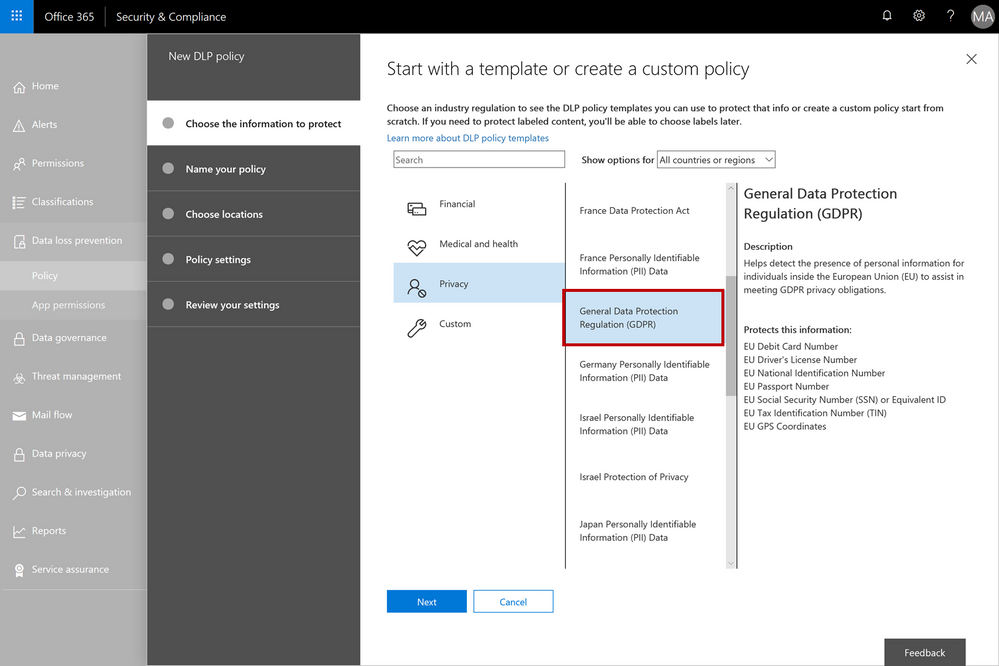 The GDPR template consolidates the new EU personal information data types into a single group – this can be used when configuring your data governance or data loss prevention policies
As with all the other sensitive information types, there is a lot of flexibility to customize and fine-tune the parameters to meet your specific needs. Learn more about the built-in sensitive information types or even create your own custom sensitive information types (such as employee ID numbers that are unique to your company).
We’re excited to release the new EU sensitive information types and GDPR template – this should help make it easier to discover, classify, protect and manage GDPR related personal information. Our support articles have also been updated with details on the specific detection methods and patterns associated with each of the data types. These new sensitive information types are available now in the Office 365 security and compliance center, and we are targeting these to also be available in Azure Information Protection in Q3 CY18. We are also investigating adding more EU personal information data types in the future and will provide more details as plans get formalized.
In February we announced several new capabilities coming soon to help organizations protect their sensitive data – across devices, apps, cloud services and on-premises. Today we’re announcing the general availability of several new sensitive information types and a new template that helps you discover, classify, protect and manage personal information that is relevant to GDPR obligations.
The addition of the new personal information data types adds to the existing built-in sensitive information types that are available in the Office 365 security & compliance center. You can use these sensitive information types in defining your data governance and data protection policies – there are now 87 different data types to choose from. While many of the previous sensitive information types were relevant to GDPR, the new sensitive information types help provide a more complete and consolidated set. The new personal information data types include:
- EU passport number
- EU national identification number
- EU driver’s license number
- EU tax identification number (TIN)
- EU social security number (SSN) or equivalent ID
For each of these information types, the service detects data that matches the specific patterns used by the 28 EU countries. For example, configuring your policy to include “EU driver’s license number” will detect driver’s license numbers used by any of the 28 covered EU countries.
New EU personal information data types in the Office 365 Security & Compliance Center
When configuring data governance or data loss prevention policies, you can now scan Office 365 locations (e.g. Exchange Online, SharePoint Online, OneDrive for Business) for personal information that matches the new EU data types, and then apply the desired data retention or protection actions. You can customize your policies to look for any combination of these new personal data types or use in conjunction with any of the other existing sensitive information types. For example, you can detect EU national identification numbers and EU passport numbers (both of which are new information types), in combination with US passport numbers (a previously available information type). We’ve also made it easy to detect any of the EU personal information data types by providing a GDPR template that consolidates these new information types into a single group that you can use in your policy configuration.
The GDPR template consolidates the new EU personal information data types into a single group – this can be used when configuring your data governance or data loss prevention policies
As with all the other sensitive information types, there is a lot of flexibility to customize and fine-tune the parameters to meet your specific needs. Learn more about the built-in sensitive information types or even create your own custom sensitive information types (such as employee ID numbers that are unique to your company).
We’re excited to release the new EU sensitive information types and GDPR template – this should help make it easier to discover, classify, protect and manage GDPR related personal information. Our support articles have also been updated with details on the specific detection methods and patterns associated with each of the data types. These new sensitive information types are available now in the Office 365 security and compliance center, and we are targeting these to also be available in Azure Information Protection in Q3 CY18. We are also investigating adding more EU personal information data types in the future and will provide more details as plans get formalized.
In February we announced several new capabilities coming soon to help organizations protect their sensitive data – across devices, apps, cloud services and on-premises. Today we’re announcing the general availability of several new sensitive information types and a new template that helps you discover, classify, protect and manage personal information that is relevant to GDPR obligations.
The addition of the new personal information data types adds to the existing built-in sensitive information types that are available in the Office 365 security & compliance center. You can use these sensitive information types in defining your data governance and data protection policies – there are now 87 different data types to choose from. While many of the previous sensitive information types were relevant to GDPR, the new sensitive information types help provide a more complete and consolidated set. The new personal information data types include:
- EU passport number
- EU national identification number
- EU driver’s license number
- EU tax identification number (TIN)
- EU social security number (SSN) or equivalent ID
For each of these information types, the service detects data that matches the specific patterns used by the 28 EU countries. For example, configuring your policy to include “EU driver’s license number” will detect driver’s license numbers used by any of the 28 covered EU countries.
New EU personal information data types in the Office 365 Security & Compliance Center
When configuring data governance or data loss prevention policies, you can now scan Office 365 locations (e.g. Exchange Online, SharePoint Online, OneDrive for Business) for personal information that matches the new EU data types, and then apply the desired data retention or protection actions. You can customize your policies to look for any combination of these new personal data types or use in conjunction with any of the other existing sensitive information types. For example, you can detect EU national identification numbers and EU passport numbers (both of which are new information types), in combination with US passport numbers (a previously available information type). We’ve also made it easy to detect any of the EU personal information data types by providing a GDPR template that consolidates these new information types into a single group that you can use in your policy configuration.
The GDPR template consolidates the new EU personal information data types into a single group – this can be used when configuring your data governance or data loss prevention policies
As with all the other sensitive information types, there is a lot of flexibility to customize and fine-tune the parameters to meet your specific needs. Learn more about the built-in sensitive information types or even create your own custom sensitive information types (such as employee ID numbers that are unique to your company).
We’re excited to release the new EU sensitive information types and GDPR template – this should help make it easier to discover, classify, protect and manage GDPR related personal information. Our support articles have also been updated with details on the specific detection methods and patterns associated with each of the data types. These new sensitive information types are available now in the Office 365 security and compliance center, and we are targeting these to also be available in Azure Information Protection in Q3 CY18. We are also investigating adding more EU personal information data types in the future and will provide more details as plans get formalized.
In February we announced several new capabilities coming soon to help organizations protect their sensitive data – across devices, apps, cloud services and on-premises. Today we’re announcing the general availability of several new sensitive information types and a new template that helps you discover, classify, protect and manage personal information that is relevant to GDPR obligations.
The addition of the new personal information data types adds to the existing built-in sensitive information types that are available in the Office 365 security & compliance center. You can use these sensitive information types in defining your data governance and data protection policies – there are now 87 different data types to choose from. While many of the previous sensitive information types were relevant to GDPR, the new sensitive information types help provide a more complete and consolidated set. The new personal information data types include:
- EU passport number
- EU national identification number
- EU driver’s license number
- EU tax identification number (TIN)
- EU social security number (SSN) or equivalent ID
For each of these information types, the service detects data that matches the specific patterns used by the 28 EU countries. For example, configuring your policy to include “EU driver’s license number” will detect driver’s license numbers used by any of the 28 covered EU countries.
New EU personal information data types in the Office 365 Security & Compliance Center
When configuring data governance or data loss prevention policies, you can now scan Office 365 locations (e.g. Exchange Online, SharePoint Online, OneDrive for Business) for personal information that matches the new EU data types, and then apply the desired data retention or protection actions. You can customize your policies to look for any combination of these new personal data types or use in conjunction with any of the other existing sensitive information types. For example, you can detect EU national identification numbers and EU passport numbers (both of which are new information types), in combination with US passport numbers (a previously available information type). We’ve also made it easy to detect any of the EU personal information data types by providing a GDPR template that consolidates these new information types into a single group that you can use in your policy configuration.
The GDPR template consolidates the new EU personal information data types into a single group – this can be used when configuring your data governance or data loss prevention policies
As with all the other sensitive information types, there is a lot of flexibility to customize and fine-tune the parameters to meet your specific needs. Learn more about the built-in sensitive information types or even create your own custom sensitive information types (such as employee ID numbers that are unique to your company).
We’re excited to release the new EU sensitive information types and GDPR template – this should help make it easier to discover, classify, protect and manage GDPR related personal information. Our support articles have also been updated with details on the specific detection methods and patterns associated with each of the data types. These new sensitive information types are available now in the Office 365 security and compliance center, and we are targeting these to also be available in Azure Information Protection in Q3 CY18. We are also investigating adding more EU personal information data types in the future and will provide more details as plans get formalized.
This week we shared an update on recent enhancements to Office 365 threat protection services and enhancements to the end user experience with Office 365 Advanced Threat Protection (ATP). We conclude our week at InfoSec Europe with an update on the Office 365 admin experience.
Empowering Admins with Insights
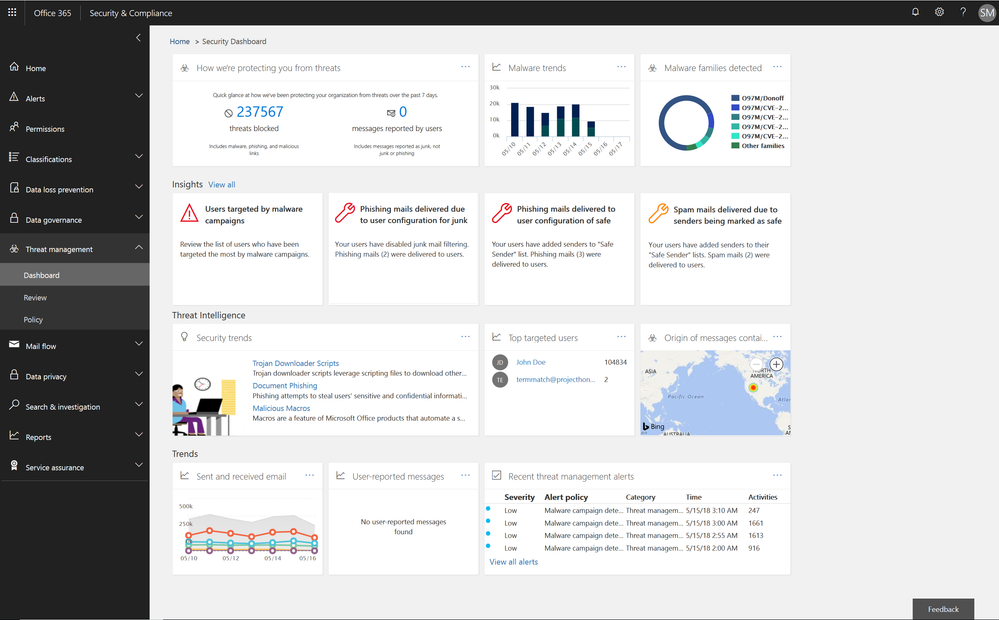
The Office 365 Security and Compliance Center already provides access to malware trends, real-time reports, and granular threat details. We are now adding organizational insights such as anomalous behavior or repeat policy offenders. These insights are presented both in the reports and in the threat dashboard, correlating signals from a broad range of data to help identify, prioritize, and provide recommendations on how to address potential problems. The recommendations are generally remediation actions empowering admins to proactively secure their organization. The insights are holistic and cover both information and threat protection.
Threat Protection Insights include:
- Policy or end user configurations (e.g. transport or mail flow rules, custom policy settings, junk mail folder settings) that can be improved to block delivery of malware, phish, or spam.
- Policies and configurations enhancing protection for users targeted by malware and phishing campaigns in an organization.
Figure 1.. Threat protection insights in the Security dashboard in the Security and Compliance Center
Soon we will release an enhanced Threat Protection status trending report, offering a single view with drill downs into malicious emails identified within the organization, including detection details for malware and phish.
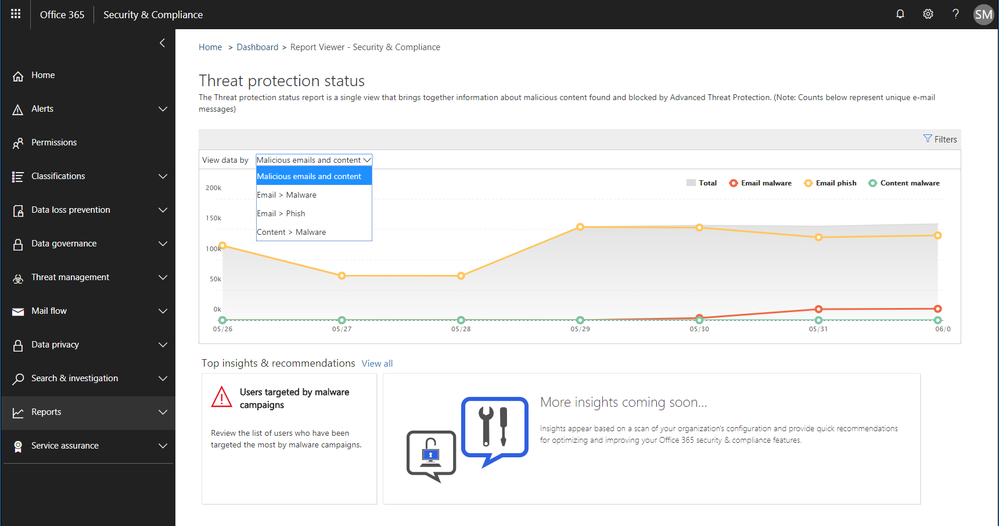 Figure 2. Threat protection status report with email malware and phish detections in the Security and Compliance Center
Information Protection Insights include:
- Views into users who violate large volumes of Office 365 Data Loss Prevention (DLP) policies
- Anomaly insights showing unusual trends in your DLP policy violations
We are also introducing a new report of DLP policy matches on a per item level enabling easier identification of documents or emails which violate policies.
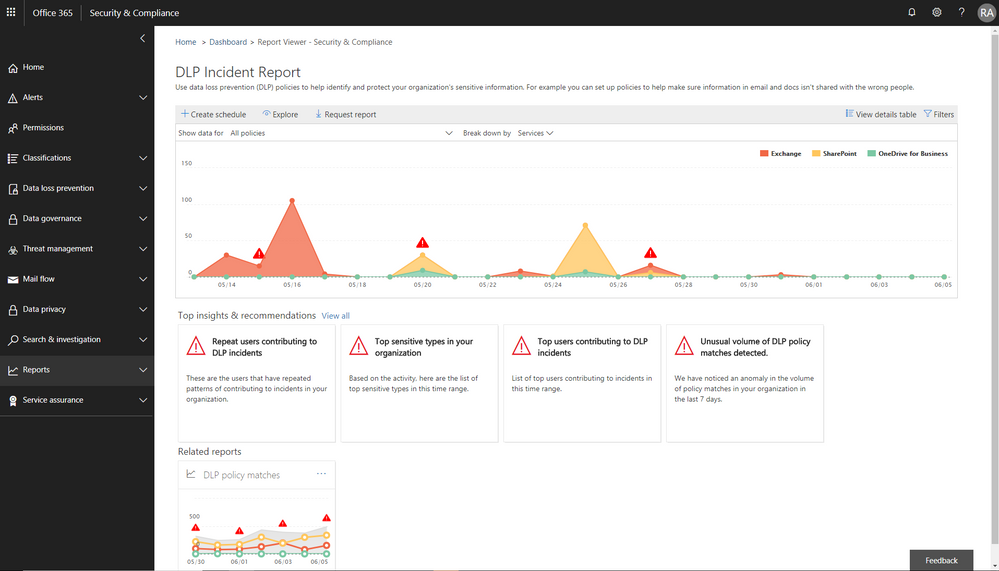 Figure 3. DLP incident report with information protection insights embedded in the Security and Compliance Center
Enhanced Admin Quarantine
Admins can now view, release, delete, and report false positive quarantined messages in Office 365. Quarantine for the Office 365 Security and Compliance Center (SCC) is enriched with a more in-depth investigation and analysis experience including:
- Enhanced search and filtering capabilities for messages in quarantine.
- In line actions for message download and release to any recipient, supporting security investigation and analysis workflows in the organization.
- Restricting the ability to view, download, release, delete, and report phishing messages in quarantine to admins (due to rise in phishing campaigns)
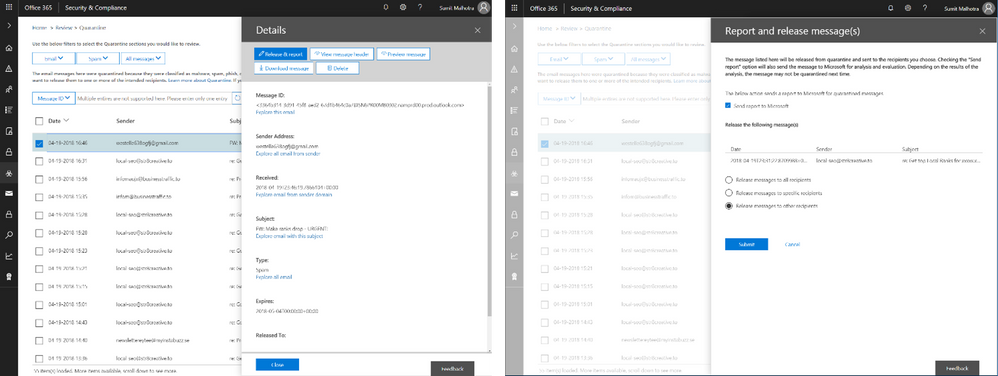 Figure 4. Download quarantined messages (left) and release quarantined messages to recipients (right)
We recently announced the extension of Office 365 Advanced Threat Protection (ATP) to protect files in SharePoint Online, OneDrive for Business and Microsoft Teams and we’re excited to now extend quarantine capabilities to files stored in these applications. This includes download, release, report and delete features in quarantine.
- ‘Release’ removes the end user block on the file
- ‘Delete’ removes the file from quarantine; however, the file is still blocked in SharePoint Online, OneDrive for Business and Microsoft Teams and must be deleted from the respective document libraries in these services to preserve content specific audited activities
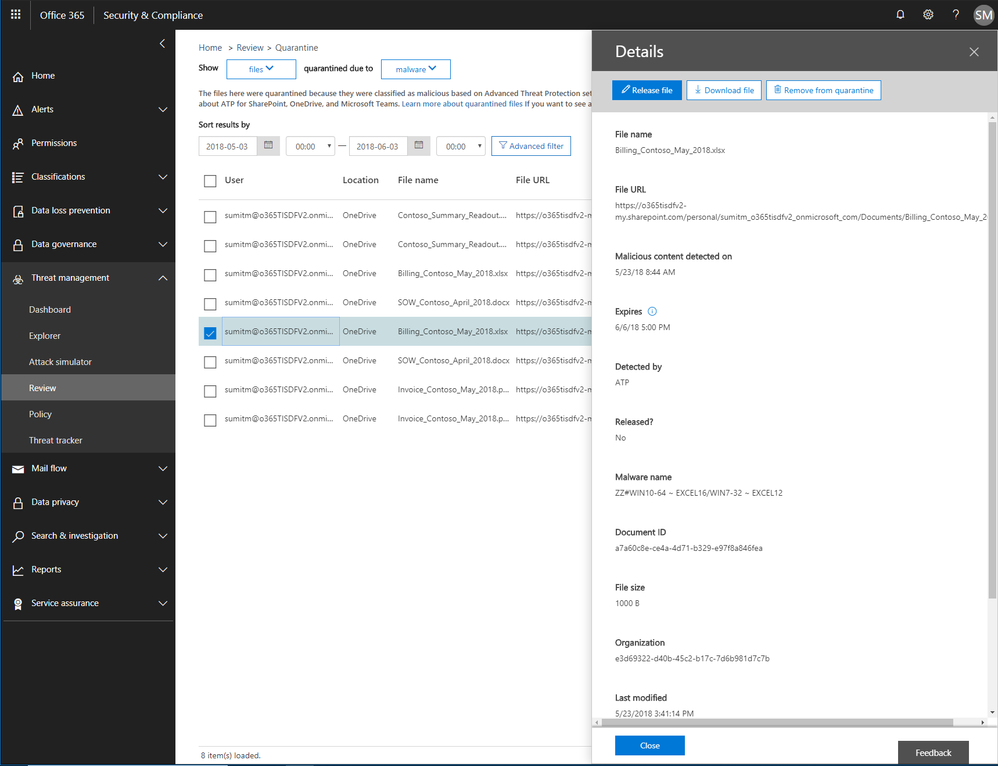 Figure 5. Malicious files detected by Office 365 ATP with actions to release, report, download and delete the files from quarantine
Now admins can create policies to send filtered messages to quarantine when they were identified as spam, bulk, phish, or when they match a mail flow rule. By default, Office 365 sends phishing messages and messages containing malware directly to quarantine. Other filtered messages are sent to users’ Junk Email folder unless the policy specifies sending them to quarantine.
Send Us Your Feedback
Your valuable feedback enables us to continue improving and adding features that support the goal of making Office 365 more secure. We encourage you to begin a free Office 365 E5 trial today and begin further enhancing your security for Office 365 today.
This week we shared an update on recent enhancements to Office 365 threat protection services and enhancements to the end user experience with Office 365 Advanced Threat Protection (ATP). We conclude our week at InfoSec Europe with an update on the Office 365 admin experience.
Empowering Admins with Insights
The Office 365 Security and Compliance Center already provides access to malware trends, real-time reports, and granular threat details. We are now adding organizational insights such as anomalous behavior or repeat policy offenders. These insights are presented both in the reports and in the threat dashboard, correlating signals from a broad range of data to help identify, prioritize, and provide recommendations on how to address potential problems. The recommendations are generally remediation actions empowering admins to proactively secure their organization. The insights are holistic and cover both information and threat protection.
Threat Protection Insights include:
- Policy or end user configurations (e.g. transport or mail flow rules, custom policy settings, junk mail folder settings) that can be improved to block delivery of malware, phish, or spam.
- Policies and configurations enhancing protection for users targeted by malware and phishing campaigns in an organization.
Figure 1.. Threat protection insights in the Security dashboard in the Security and Compliance Center
Soon we will release an enhanced Threat Protection status trending report, offering a single view with drill downs into malicious emails identified within the organization, including detection details for malware and phish.
Figure 2. Threat protection status report with email malware and phish detections in the Security and Compliance Center
Information Protection Insights include:
- Views into users who violate large volumes of Office 365 Data Loss Prevention (DLP) policies
- Anomaly insights showing unusual trends in your DLP policy violations
We are also introducing a new report of DLP policy matches on a per item level enabling easier identification of documents or emails which violate policies.
Figure 3. DLP incident report with information protection insights embedded in the Security and Compliance Center
Enhanced Admin Quarantine
Admins can now view, release, delete, and report false positive quarantined messages in Office 365. Quarantine for the Office 365 Security and Compliance Center (SCC) is enriched with a more in-depth investigation and analysis experience including:
- Enhanced search and filtering capabilities for messages in quarantine.
- In line actions for message download and release to any recipient, supporting security investigation and analysis workflows in the organization.
- Restricting the ability to view, download, release, delete, and report phishing messages in quarantine to admins (due to rise in phishing campaigns)
Figure 4. Download quarantined messages (left) and release quarantined messages to recipients (right)
We recently announced the extension of Office 365 Advanced Threat Protection (ATP) to protect files in SharePoint Online, OneDrive for Business and Microsoft Teams and we’re excited to now extend quarantine capabilities to files stored in these applications. This includes download, release, report and delete features in quarantine.
- ‘Release’ removes the end user block on the file
- ‘Delete’ removes the file from quarantine; however, the file is still blocked in SharePoint Online, OneDrive for Business and Microsoft Teams and must be deleted from the respective document libraries in these services to preserve content specific audited activities
Figure 5. Malicious files detected by Office 365 ATP with actions to release, report, download and delete the files from quarantine
Now admins can create policies to send filtered messages to quarantine when they were identified as spam, bulk, phish, or when they match a mail flow rule. By default, Office 365 sends phishing messages and messages containing malware directly to quarantine. Other filtered messages are sent to users’ Junk Email folder unless the policy specifies sending them to quarantine.
Send Us Your Feedback
Your valuable feedback enables us to continue improving and adding features that support the goal of making Office 365 more secure. We encourage you to begin a free Office 365 E5 trial today and begin further enhancing your security for Office 365 today.
This week we shared an update on recent enhancements to Office 365 threat protection services and enhancements to the end user experience with Office 365 Advanced Threat Protection (ATP). We conclude our week at InfoSec Europe with an update on the Office 365 admin experience.
Empowering Admins with Insights
The Office 365 Security and Compliance Center already provides access to malware trends, real-time reports, and granular threat details. We are now adding organizational insights such as anomalous behavior or repeat policy offenders. These insights are presented both in the reports and in the threat dashboard, correlating signals from a broad range of data to help identify, prioritize, and provide recommendations on how to address potential problems. The recommendations are generally remediation actions empowering admins to proactively secure their organization. The insights are holistic and cover both information and threat protection.
Threat Protection Insights include:
- Policy or end user configurations (e.g. transport or mail flow rules, custom policy settings, junk mail folder settings) that can be improved to block delivery of malware, phish, or spam.
- Policies and configurations enhancing protection for users targeted by malware and phishing campaigns in an organization.
Figure 1.. Threat protection insights in the Security dashboard in the Security and Compliance Center
Soon we will release an enhanced Threat Protection status trending report, offering a single view with drill downs into malicious emails identified within the organization, including detection details for malware and phish.
Figure 2. Threat protection status report with email malware and phish detections in the Security and Compliance Center
Information Protection Insights include:
- Views into users who violate large volumes of Office 365 Data Loss Prevention (DLP) policies
- Anomaly insights showing unusual trends in your DLP policy violations
We are also introducing a new report of DLP policy matches on a per item level enabling easier identification of documents or emails which violate policies.
Figure 3. DLP incident report with information protection insights embedded in the Security and Compliance Center
Enhanced Admin Quarantine
Admins can now view, release, delete, and report false positive quarantined messages in Office 365. Quarantine for the Office 365 Security and Compliance Center (SCC) is enriched with a more in-depth investigation and analysis experience including:
- Enhanced search and filtering capabilities for messages in quarantine.
- In line actions for message download and release to any recipient, supporting security investigation and analysis workflows in the organization.
- Restricting the ability to view, download, release, delete, and report phishing messages in quarantine to admins (due to rise in phishing campaigns)
Figure 4. Download quarantined messages (left) and release quarantined messages to recipients (right)
We recently announced the extension of Office 365 Advanced Threat Protection (ATP) to protect files in SharePoint Online, OneDrive for Business and Microsoft Teams and we’re excited to now extend quarantine capabilities to files stored in these applications. This includes download, release, report and delete features in quarantine.
- ‘Release’ removes the end user block on the file
- ‘Delete’ removes the file from quarantine; however, the file is still blocked in SharePoint Online, OneDrive for Business and Microsoft Teams and must be deleted from the respective document libraries in these services to preserve content specific audited activities
Figure 5. Malicious files detected by Office 365 ATP with actions to release, report, download and delete the files from quarantine
Now admins can create policies to send filtered messages to quarantine when they were identified as spam, bulk, phish, or when they match a mail flow rule. By default, Office 365 sends phishing messages and messages containing malware directly to quarantine. Other filtered messages are sent to users’ Junk Email folder unless the policy specifies sending them to quarantine.
Send Us Your Feedback
Your valuable feedback enables us to continue improving and adding features that support the goal of making Office 365 more secure. We encourage you to begin a free Office 365 E5 trial today and begin further enhancing your security for Office 365 today.
This week we shared an update on recent enhancements to Office 365 threat protection services and enhancements to the end user experience with Office 365 Advanced Threat Protection (ATP). We conclude our week at InfoSec Europe with an update on the Office 365 admin experience.
Empowering Admins with Insights
The Office 365 Security and Compliance Center already provides access to malware trends, real-time reports, and granular threat details. We are now adding organizational insights such as anomalous behavior or repeat policy offenders. These insights are presented both in the reports and in the threat dashboard, correlating signals from a broad range of data to help identify, prioritize, and provide recommendations on how to address potential problems. The recommendations are generally remediation actions empowering admins to proactively secure their organization. The insights are holistic and cover both information and threat protection.
Threat Protection Insights include:
- Policy or end user configurations (e.g. transport or mail flow rules, custom policy settings, junk mail folder settings) that can be improved to block delivery of malware, phish, or spam.
- Policies and configurations enhancing protection for users targeted by malware and phishing campaigns in an organization.
Figure 1.. Threat protection insights in the Security dashboard in the Security and Compliance Center
Soon we will release an enhanced Threat Protection status trending report, offering a single view with drill downs into malicious emails identified within the organization, including detection details for malware and phish.
Figure 2. Threat protection status report with email malware and phish detections in the Security and Compliance Center
Information Protection Insights include:
- Views into users who violate large volumes of Office 365 Data Loss Prevention (DLP) policies
- Anomaly insights showing unusual trends in your DLP policy violations
We are also introducing a new report of DLP policy matches on a per item level enabling easier identification of documents or emails which violate policies.
Figure 3. DLP incident report with information protection insights embedded in the Security and Compliance Center
Enhanced Admin Quarantine
Admins can now view, release, delete, and report false positive quarantined messages in Office 365. Quarantine for the Office 365 Security and Compliance Center (SCC) is enriched with a more in-depth investigation and analysis experience including:
- Enhanced search and filtering capabilities for messages in quarantine.
- In line actions for message download and release to any recipient, supporting security investigation and analysis workflows in the organization.
- Restricting the ability to view, download, release, delete, and report phishing messages in quarantine to admins (due to rise in phishing campaigns)
Figure 4. Download quarantined messages (left) and release quarantined messages to recipients (right)
We recently announced the extension of Office 365 Advanced Threat Protection (ATP) to protect files in SharePoint Online, OneDrive for Business and Microsoft Teams and we’re excited to now extend quarantine capabilities to files stored in these applications. This includes download, release, report and delete features in quarantine.
- ‘Release’ removes the end user block on the file
- ‘Delete’ removes the file from quarantine; however, the file is still blocked in SharePoint Online, OneDrive for Business and Microsoft Teams and must be deleted from the respective document libraries in these services to preserve content specific audited activities
Figure 5. Malicious files detected by Office 365 ATP with actions to release, report, download and delete the files from quarantine
Now admins can create policies to send filtered messages to quarantine when they were identified as spam, bulk, phish, or when they match a mail flow rule. By default, Office 365 sends phishing messages and messages containing malware directly to quarantine. Other filtered messages are sent to users’ Junk Email folder unless the policy specifies sending them to quarantine.
Send Us Your Feedback
Your valuable feedback enables us to continue improving and adding features that support the goal of making Office 365 more secure. We encourage you to begin a free Office 365 E5 trial today and begin further enhancing your security for Office 365 today.
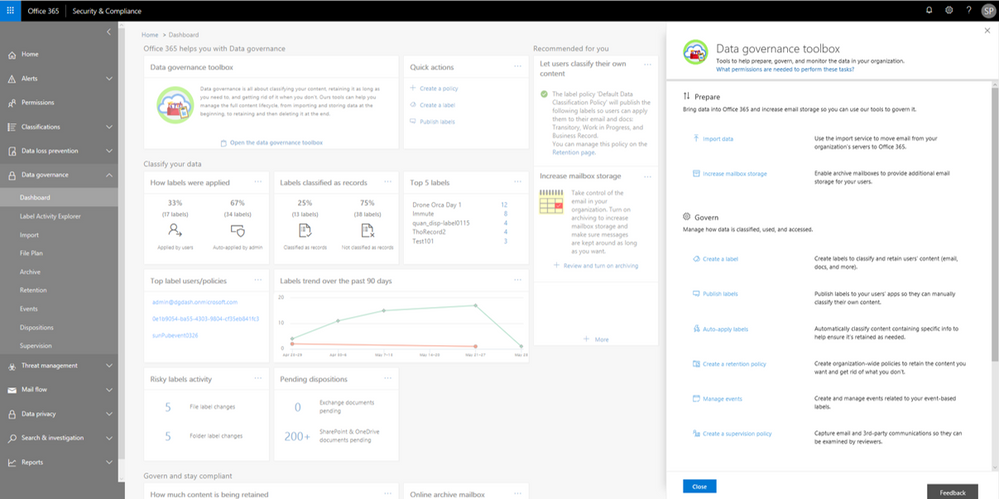
The new Label Activity Explorer helps you easily validate how data has been labeled and investigate risky or abnormal label activity in your organization. As data grows in your organization, so does the need to classify and govern it to ensure business continuity and readiness for regulations such as the GDPR. To help meet these goals, you can create Office 365 labels and either publish them to users’ apps (so they can manually classify their own content) or automatically apply them to content containing sensitive information.
Data Governance dashboard refresh
In addition to the Label Activity Explorer, we have also refreshed the Data Governance dashboard to include new features, such as the Data Governance toolbox and label insights widgets. Let’s take a closer look.
Data Governance toolbox
The new Data Governance toolbox is your one-stop-shop for guidance and links to common data governance tasks. These tools can help you manage the full content lifecycle, including how to:
- Import data into Office 365 and increase email storage so you can use Office 365 features to govern it
- Manage how data is classified, retained, accessed, and disposed of
- Track label usage, monitor alerts, and respond to disposition reviews
Data Governance toolbox provides guidance on getting started with Data Governance in Office 365.
Label insights widgets and supporting reports
Label insights widgets provide you with a quick view into the classification of data in your organization, including how labels were applied, labels that have been classified as records, top labels, top users of labels, label trends, and risky label activities. Click on the label insights widgets to open a more detailed report so you can drill down further.
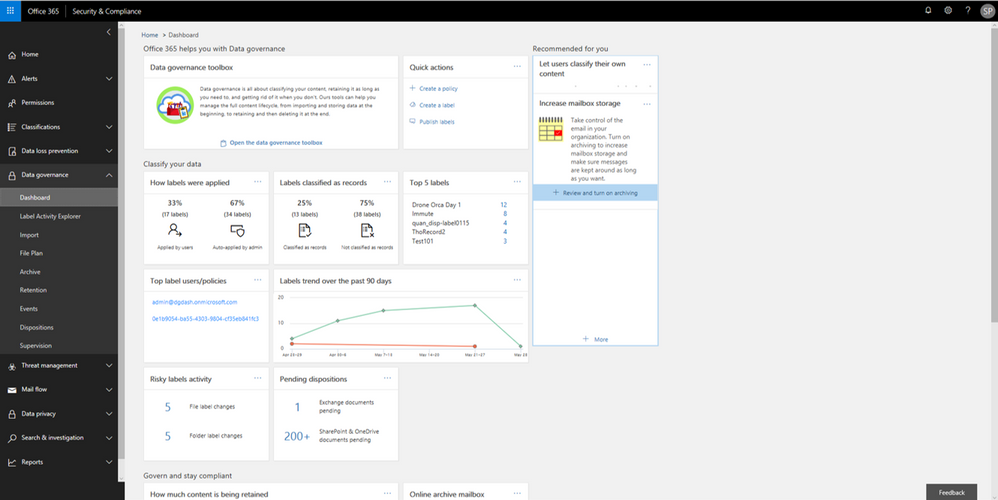 Labels insights widgets provide information about labels usage in your organization.
Label Activity Explorer
The Label Activity Explorer that was previewed in April is now generally available. This new experience provides real-time data that lets you investigate risky label activity and verify that labels are being applied to content as you intended. Use this information to increase confidence that your sensitive data has been detected, classified, and retained according to your organization’s policies.
Filter on labels applied at either the file or folder level to learn more about activities and changes. Once you find the label and file or folder of interest, you can investigate further by reviewing details such as the user who applied the label, file name, and parent site. If you have the right permissions, you can even access the in-place content directly. Learn more about the label activity explorer.
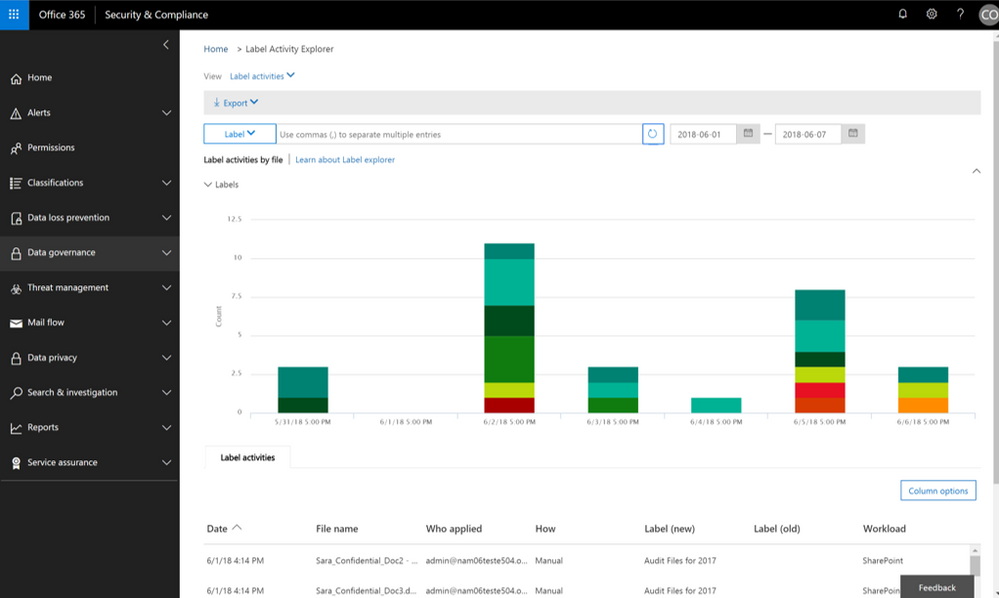 Validate or investigate label activity in your organization.
Auto-label items as Records
The ability to auto-apply labels to content with sensitive data or based on custom keyword or query has been enabling organizations to classify and retain vast amounts of data, and now you can use that same technology to auto-label a document as a record.
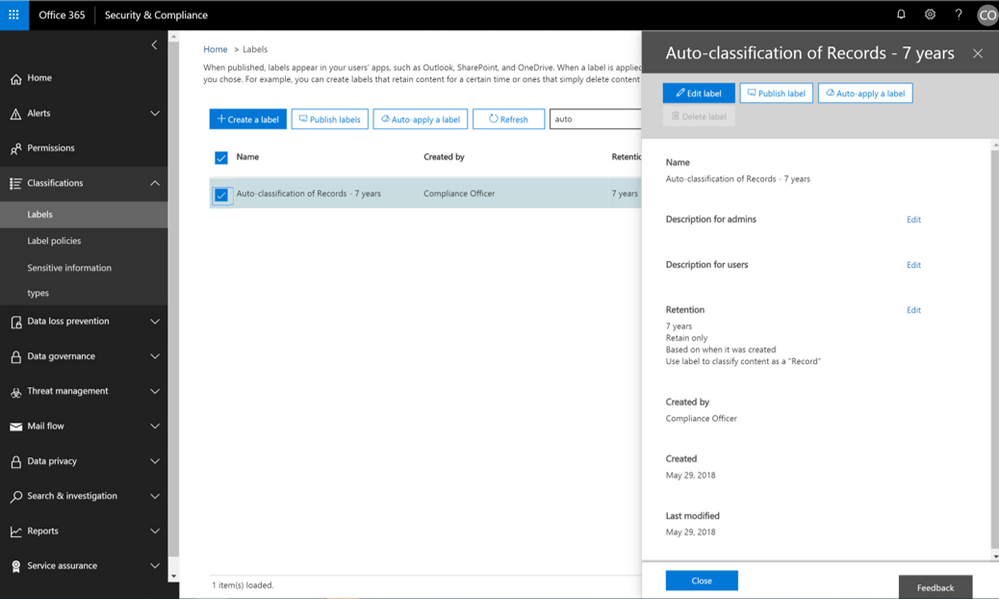 Now auto-apply a label marked as a record.
In addition, we have also recently provided updates to the user experience of items that have been identified as records. Once an item has been tagged as a record, the SharePoint user experience will show a small lock icon to denote that this item has been classified as a record.
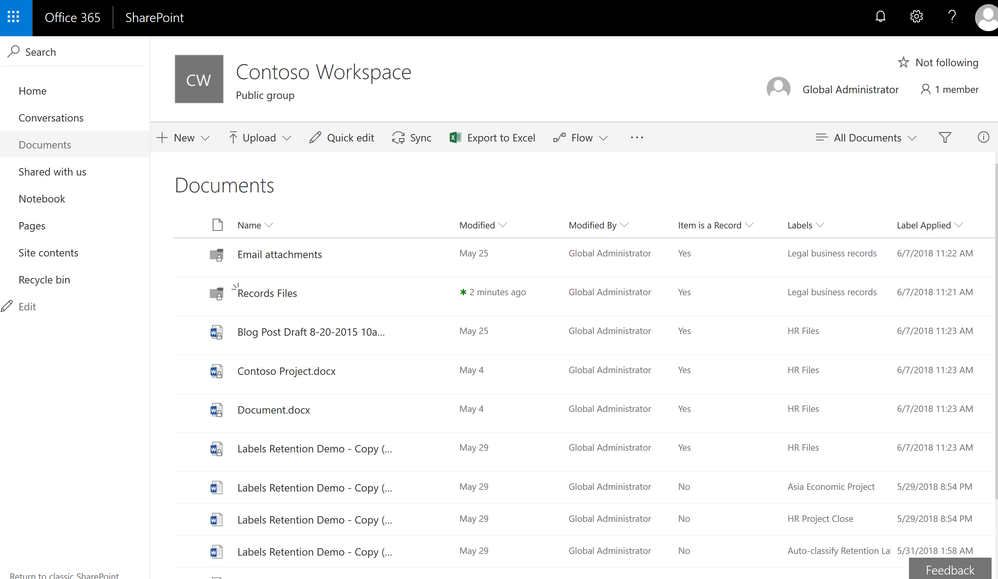 Items labeled as records will now show the small padlock icon to indicate they are records.
Event-based Retention
In case you missed it, Events Based Retention is now generally available in Advanced Data Governance, make sure to read the blog post and watch the video showing how this works. For further information read the supporting documentation here.
To learn more about Data Governance in Office 365 read more here.
The new Label Activity Explorer helps you easily validate how data has been labeled and investigate risky or abnormal label activity in your organization. As data grows in your organization, so does the need to classify and govern it to ensure business continuity and readiness for regulations such as the GDPR. To help meet these goals, you can create Office 365 labels and either publish them to users’ apps (so they can manually classify their own content) or automatically apply them to content containing sensitive information.
Data Governance dashboard refresh
In addition to the Label Activity Explorer, we have also refreshed the Data Governance dashboard to include new features, such as the Data Governance toolbox and label insights widgets. Let’s take a closer look.
Data Governance toolbox
The new Data Governance toolbox is your one-stop-shop for guidance and links to common data governance tasks. These tools can help you manage the full content lifecycle, including how to:
- Import data into Office 365 and increase email storage so you can use Office 365 features to govern it
- Manage how data is classified, retained, accessed, and disposed of
- Track label usage, monitor alerts, and respond to disposition reviews
Data Governance toolbox provides guidance on getting started with Data Governance in Office 365.
Label insights widgets and supporting reports
Label insights widgets provide you with a quick view into the classification of data in your organization, including how labels were applied, labels that have been classified as records, top labels, top users of labels, label trends, and risky label activities. Click on the label insights widgets to open a more detailed report so you can drill down further.
Labels insights widgets provide information about labels usage in your organization.
Label Activity Explorer
The Label Activity Explorer that was previewed in April is now generally available. This new experience provides real-time data that lets you investigate risky label activity and verify that labels are being applied to content as you intended. Use this information to increase confidence that your sensitive data has been detected, classified, and retained according to your organization’s policies.
Filter on labels applied at either the file or folder level to learn more about activities and changes. Once you find the label and file or folder of interest, you can investigate further by reviewing details such as the user who applied the label, file name, and parent site. If you have the right permissions, you can even access the in-place content directly. Learn more about the label activity explorer.
Validate or investigate label activity in your organization.
Auto-label items as Records
The ability to auto-apply labels to content with sensitive data or based on custom keyword or query has been enabling organizations to classify and retain vast amounts of data, and now you can use that same technology to auto-label a document as a record.
Now auto-apply a label marked as a record.
In addition, we have also recently provided updates to the user experience of items that have been identified as records. Once an item has been tagged as a record, the SharePoint user experience will show a small lock icon to denote that this item has been classified as a record.
Items labeled as records will now show the small padlock icon to indicate they are records.
Event-based Retention
In case you missed it, Events Based Retention is now generally available in Advanced Data Governance, make sure to read the blog post and watch the video showing how this works. For further information read the supporting documentation here.
To learn more about Data Governance in Office 365 read more here.







