![The best version of OneNote on Windows]()
We’re incredibly lucky to have millions of passionate OneNote users around the globe, and we love learning how we can help you remember, think, and organize better. In spending time with you, we heard a recurring theme: you want a single version of OneNote on Windows that combines all the benefits of the modern Windows 10 app with the depth and breadth of capabilities in the older OneNote 2016. We took that feedback to heart, and over the last few years we’ve been focused on making OneNote for Windows 10 the best version of OneNote on Windows.
Beginning with the launch of Office 2019 later this year, OneNote for Windows 10 will replace OneNote 2016 as the default OneNote experience for both Office 365 and Office 2019. Why OneNote for Windows 10? The app has improved performance and reliability, and it’s powered by a brand new sync engine (which we’re also bringing to web, Mac, iOS, and Android). You don’t need to worry about being on the latest version since it’s always up-to-date via the Microsoft Store, and it lets us deliver updates faster than ever before. In fact, over the last year and a half we’ve added more than 100 of your favorite OneNote 2016 features based on your feedback (thank you!), with more improvements on the way including tags and better integration with Office documents.
We’d love for you to start using OneNote for Windows 10 today, however we know some of you might not be ready yet. Maybe you rely on a feature we don’t yet support on Windows 10 (please let us know using the Feedback Hub), or you don’t want to store your notebooks in the cloud. If so, you’re more than welcome to continue using OneNote 2016.
What’s happening to OneNote 2016?
While we’re no longer adding new features to OneNote 2016, it’ll still be there if you need it. OneNote 2016 is optionally available for anyone with Office 365 or Office 2019, but it will no longer be installed by default. If you currently use OneNote 2016, you won’t notice any changes when you update to Office 2019. We’ll continue to offer support, bug fixes, and security updates for OneNote 2016 for the duration of the Office 2016 support lifecycle, which runs through October 2020 for mainstream support and October 2025 for extended support. For more details, please refer to this FAQ.
A preview of what’s to come
We’ve been listening to your feedback about what you like—and what you don’t—and working hard to address it in the product. Your opinions, feature requests, and, yes, complaints have been critical in helping us shape the current experience. Today, we’d like to walk you through some of the work we’ve done to bring your favorite features from OneNote 2016 to OneNote for Windows 10, highlight some of the capabilities that are only available in the Windows 10 app, and give you a sneak peek at a few of the improvements coming this year.
Your favorite features, improved
OneNote for Windows 10 was designed to feel natural with any input method, from mouse and keyboard to pen and touch, and it contains numerous improvements under the hood for better performance, reliability, and battery life. It also has a number of new features not available in OneNote 2016, including ink effects* and dramatically improved ink-to-text (check it out—it’ll even preserve your ink color, size, and highlights!), Researcher*, a notification center, deep integration with Windows 10, and much more.
Your browser does not support the video tag.
For many of you, shifting our focus to the Windows 10 app won’t come as a surprise. Aside from a handful of targeted improvements, we haven’t added any new features to OneNote 2016 in some time. Instead we’ve been focusing on consistency, ensuring that nearly all your favorite features in OneNote 2016 are also available in OneNote for Windows 10. We’re almost there, and in the coming months we’ll be adding even more top-requested features.
Top-requested features coming soon to OneNote for Windows 10
Here’s what you can expect later this summer:
-
Insert and search for tags: OneNote 2016’s popular tags feature is coming to OneNote for Windows 10! Soon you’ll be able to insert, create, and search for custom tags, making it easy to mark key information and find it later. Tags you create will now roam with you to across your devices, and OneNote will even show you tags other people have used in a shared notebook so you don’t have to recreate them yourself. The new tags experience was designed based on your feedback, and it will be available later this summer.

-
View and edit files: See live previews of Office files in OneNote, work together on attached documents, and save space in your notebooks with cloud files. You’ll get all the benefits of saving a file on OneDrive with the context and convenience of an attachment or preview on a OneNote page.

These are just a few of the improvements coming soon to OneNote for Windows 10. The app is updated every month with new functionality, and we have a lot of cool stuff in the works—including page templates. Stay tuned for more exciting announcements.
An improved sync experience
We’ve been hard at work making sync faster and more reliable on OneNote for Windows 10, as well as on Mac, iOS, Android, and web. Since a picture is worth a thousand words, here’s a look at the new sync engine in action:
Your browser does not support the video tag.
You can try the first set of improvements today by opening a OneDrive notebook in OneNote for Windows 10, Mac, iOS, or Android. These improvements will be rolled out to OneNote Online in the coming months, as well as notebooks on OneDrive for Business and SharePoint.
Improving the user experience
Last year, we unveiled a new look and feel for OneNote on Windows 10, Mac, iOS, Android, and OneNote Online that aligned the disparate designs into a single, unified interface. In addition to bringing consistency to our apps, the new user experience scales much better for large notebooks and significantly improves accessibility for those who rely on assistive technologies. To learn more about the new design, check out our help article.

This is just a quick look at OneNote for Windows 10, but we’re not done yet. We’ll continue listening to your feedback and incorporating it into our future plans, so leave us a comment below or add your feature request using the Feedback Hub. You can also join the Office Insider program for early access to the latest updates. And before we sign off, we want to say a huge thank you for your support. We really hope you love the new OneNote for Windows!
—OneNote Team
*Requires Office 365 subscription
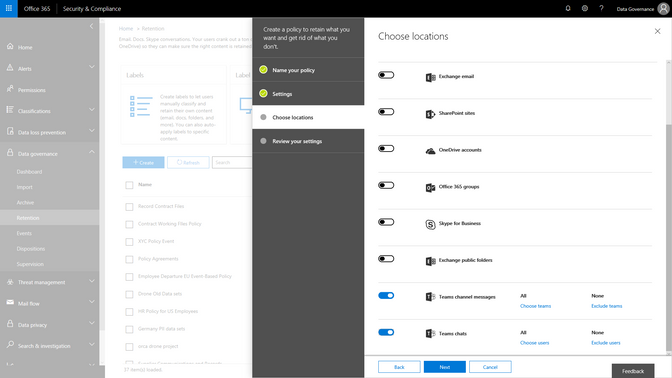
Event based retention is now generally available to help organizations manage retention of content based on a certain event trigger. Whether an employee departure, or the close of a project, you can now establish certain event triggers and create retention or deletion policies associated to those events.
Watch the Mechanics video to learn more about how this will work and learn more about this capability here.
As organizations adopt modern ways of working, like the chat based workspace Microsoft Teams, we are excited to announce that Microsoft Teams chats and team channels are now rolling out to be included in the Data Governance features of the Security & Compliance center. Set retention policies to Teams content, similar to the way that you have the option to choose locations across Exchange, SharePoint, OneDrive and Groups today. This addition will expand your ability to meet retention and regulatory requirements with confidence across Office 365 applications.
A core component of protecting content is deleting it when it has reached the end of its useful life. As email ends its useful life, enabling the ability to manually dispose of that email enables peace of mind and smoother processing. You will be able to start to test manual email disposition features in preview starting later this month. Learn more about this update here.
Finally, we are also announcing that our new Labels Explorer dashboard is now available in preview. You will be able to harness the labels widgets and dashboard to gain insight into labels usage in your organization.
![]()
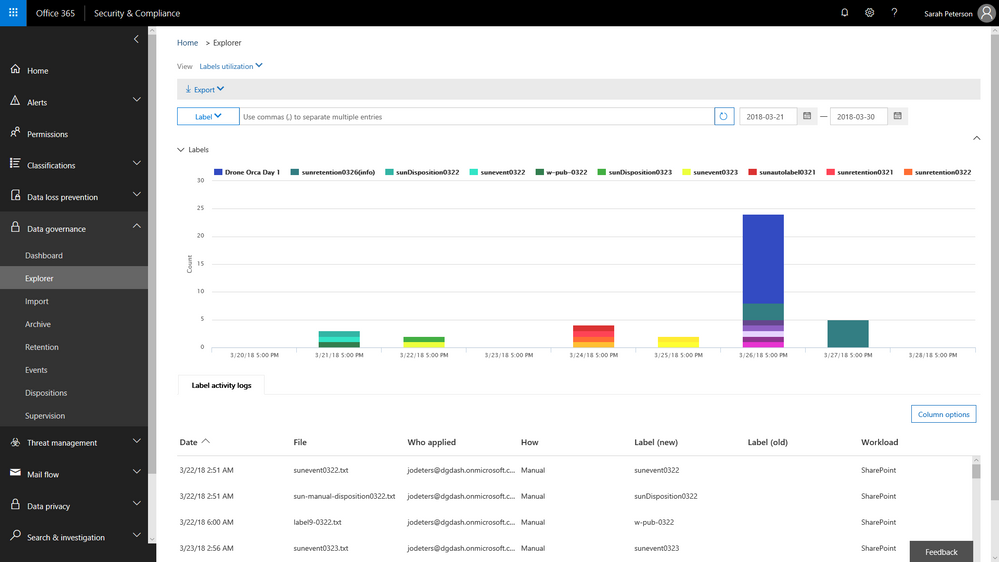 Labels Explorer dashboard is now available in preview
 Ben Robbins, eDiscovery, Forensics & Information Governance lead from LinkedIn
As Ben Robbins says: “The Advanced Data Governance and Advanced Ediscovery features in the Microsoft 0365 Security and Compliance Center contains all the components necessary to establish and improve enterprise content controls, investigative analytics, and unstructured data management. LinkedIn has been able to take advantage of these products which help improve business process and accelerate productivity to help us in our mission to connect the world’s professionals.“
Event based retention is now generally available to help organizations manage retention of content based on a certain event trigger. Whether an employee departure, or the close of a project, you can now establish certain event triggers and create retention or deletion policies associated to those events.
Watch the Mechanics video to learn more about how this will work and learn more about this capability here.
As organizations adopt modern ways of working, like the chat based workspace Microsoft Teams, we are excited to announce that Microsoft Teams chats and team channels are now rolling out to be included in the Data Governance features of the Security & Compliance center. Set retention policies to Teams content, similar to the way that you have the option to choose locations across Exchange, SharePoint, OneDrive and Groups today. This addition will expand your ability to meet retention and regulatory requirements with confidence across Office 365 applications.
A core component of protecting content is deleting it when it has reached the end of its useful life. As email ends its useful life, enabling the ability to manually dispose of that email enables peace of mind and smoother processing. You will be able to start to test manual email disposition features in preview starting later this month. Learn more about this update here.
Finally, we are also announcing that our new Labels Explorer dashboard is now available in preview. You will be able to harness the labels widgets and dashboard to gain insight into labels usage in your organization.
![]()
Labels Explorer dashboard is now available in preview
Ben Robbins, eDiscovery, Forensics & Information Governance lead from LinkedIn
As Ben Robbins says: “The Advanced Data Governance and Advanced Ediscovery features in the Microsoft 0365 Security and Compliance Center contains all the components necessary to establish and improve enterprise content controls, investigative analytics, and unstructured data management. LinkedIn has been able to take advantage of these products which help improve business process and accelerate productivity to help us in our mission to connect the world’s professionals.“
Event based retention is now generally available to help organizations manage retention of content based on a certain event trigger. Whether an employee departure, or the close of a project, you can now establish certain event triggers and create retention or deletion policies associated to those events.
Watch the Mechanics video to learn more about how this will work and learn more about this capability here.
As organizations adopt modern ways of working, like the chat based workspace Microsoft Teams, we are excited to announce that Microsoft Teams chats and team channels are now rolling out to be included in the Data Governance features of the Security & Compliance center. Set retention policies to Teams content, similar to the way that you have the option to choose locations across Exchange, SharePoint, OneDrive and Groups today. This addition will expand your ability to meet retention and regulatory requirements with confidence across Office 365 applications.
A core component of protecting content is deleting it when it has reached the end of its useful life. As email ends its useful life, enabling the ability to manually dispose of that email enables peace of mind and smoother processing. You will be able to start to test manual email disposition features in preview starting later this month. Learn more about this update here.
Finally, we are also announcing that our new Labels Explorer dashboard is now available in preview. You will be able to harness the labels widgets and dashboard to gain insight into labels usage in your organization.
![]()
Labels Explorer dashboard is now available in preview
Ben Robbins, eDiscovery, Forensics & Information Governance lead from LinkedIn
As Ben Robbins says: “The Advanced Data Governance and Advanced Ediscovery features in the Microsoft 0365 Security and Compliance Center contains all the components necessary to establish and improve enterprise content controls, investigative analytics, and unstructured data management. LinkedIn has been able to take advantage of these products which help improve business process and accelerate productivity to help us in our mission to connect the world’s professionals.“
Event based retention is now generally available to help organizations manage retention of content based on a certain event trigger. Whether an employee departure, or the close of a project, you can now establish certain event triggers and create retention or deletion policies associated to those events.
Watch the Mechanics video to learn more about how this will work and learn more about this capability here.
As organizations adopt modern ways of working, like the chat based workspace Microsoft Teams, we are excited to announce that Microsoft Teams chats and team channels are now rolling out to be included in the Data Governance features of the Security & Compliance center. Set retention policies to Teams content, similar to the way that you have the option to choose locations across Exchange, SharePoint, OneDrive and Groups today. This addition will expand your ability to meet retention and regulatory requirements with confidence across Office 365 applications.
A core component of protecting content is deleting it when it has reached the end of its useful life. As email ends its useful life, enabling the ability to manually dispose of that email enables peace of mind and smoother processing. You will be able to start to test manual email disposition features in preview starting later this month. Learn more about this update here.
Finally, we are also announcing that our new Labels Explorer dashboard is now available in preview. You will be able to harness the labels widgets and dashboard to gain insight into labels usage in your organization.
![]()
Labels Explorer dashboard is now available in preview
Ben Robbins, eDiscovery, Forensics & Information Governance lead from LinkedIn
As Ben Robbins says: “The Advanced Data Governance and Advanced Ediscovery features in the Microsoft 0365 Security and Compliance Center contains all the components necessary to establish and improve enterprise content controls, investigative analytics, and unstructured data management. LinkedIn has been able to take advantage of these products which help improve business process and accelerate productivity to help us in our mission to connect the world’s professionals.“
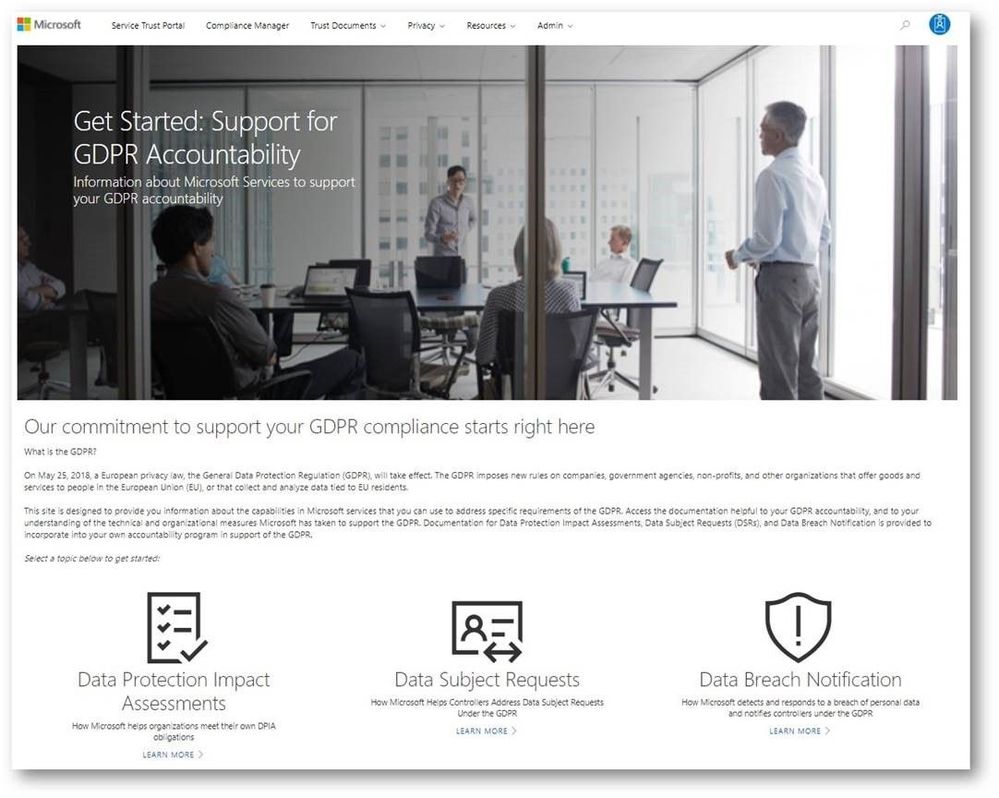
While the GDPR poses new challenges for organizations working to support the privacy rights of individuals, it also encourages companies to become more accountable for developing and leveraging innovative technology to protect personal and sensitive information. Given the sheer volume of available resources across Microsoft’s many platforms and services, it can be challenging to find the right resources to support GDPR. To address these challenges, we’ve enhanced the Service Trust Portal (STP), to centralize resources to help you with your needs around data protection, compliance, and privacy, and of course, the GDPR.
The STP continues to include independent third-party audit reports, such as FedRAMP, ISO, and SOC reports, in-depth information such as whitepapers, security assessment reports, and data protection guides. In February this year, we released a new tool on the STP called Compliance Manager, which helps organizations to manage compliance activities and perform risk assessments on Microsoft Cloud services.
To help you navigate the collection of GDPR resources, we’re publicly previewing a new Privacy area on the STP which provides you with guidance on how Microsoft services will support you in the event of a personal data breach, and with tools and technical documents to help you respond to data subject requests. You can find more details about each scenario below:
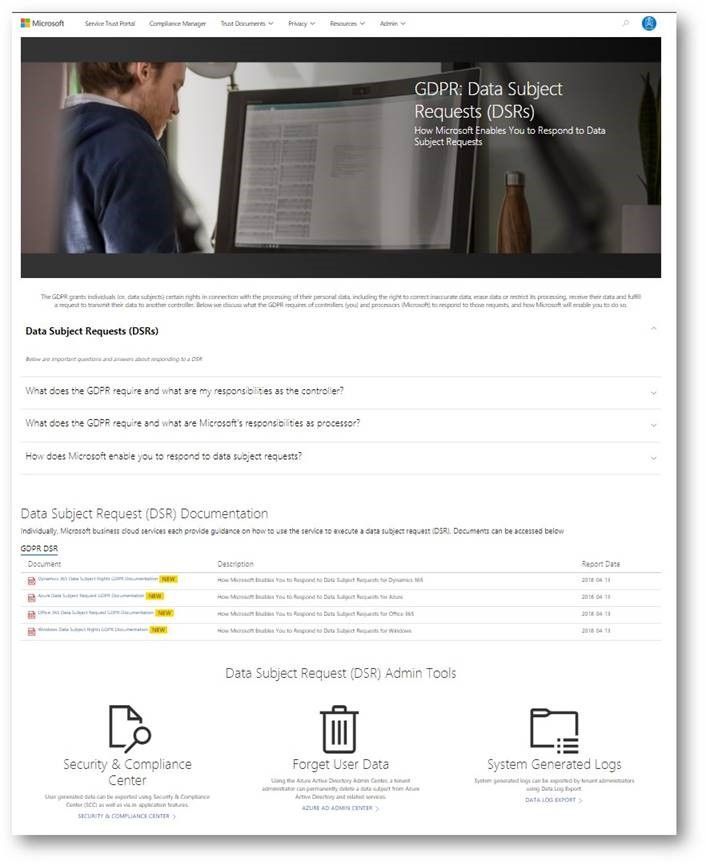
Data subject requests resources
The GPDR provides data subjects with increased rights to control their personal data, including the ability to obtain a copy of their personal data and to have their personal data erased from data systems used by a data controller.
The new data subject requests (DSR) section in STP centralizes all the DSRs resources, and provides you with tools and guidance that you can leverage to locate, export, and erase data across Microsoft’s Cloud services.
Breach notification resources
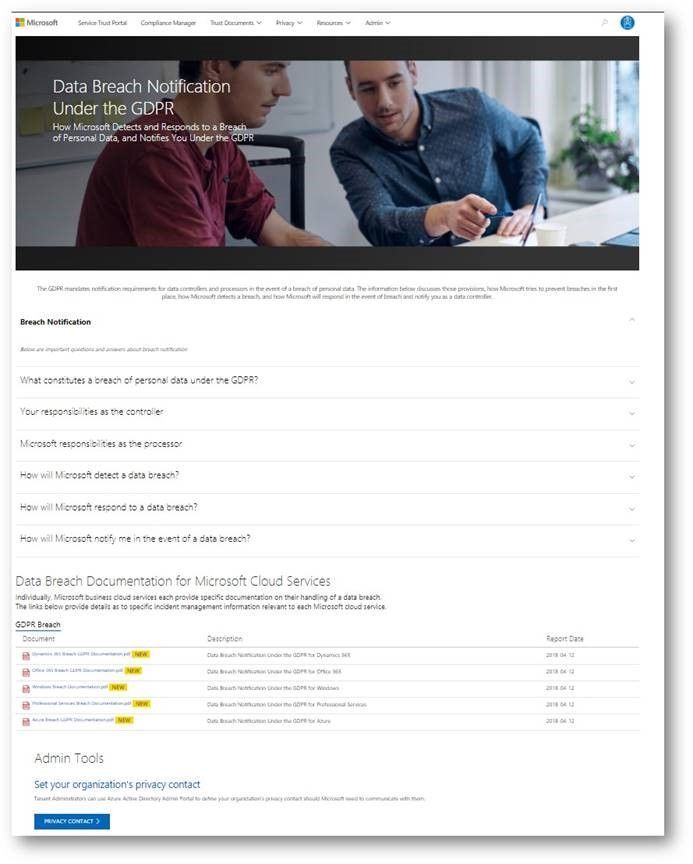
The GDPR imposes specific requirements around breach notification. After becoming aware of a breach of personal data that puts individuals at risk, data controllers must notify the supervisory authority and data subjects without undue delay. These requirements are similar to other regulations, such as the Health Insurance Portability and Accountability Act (HIPAA).
The data breach notification section of the new Privacy area describes how Microsoft services support your personal data breach obligations, and which tools to use to make sure Microsoft can reach to appropriate people in your organization without delay.
Data Protection Impact Assessments documents
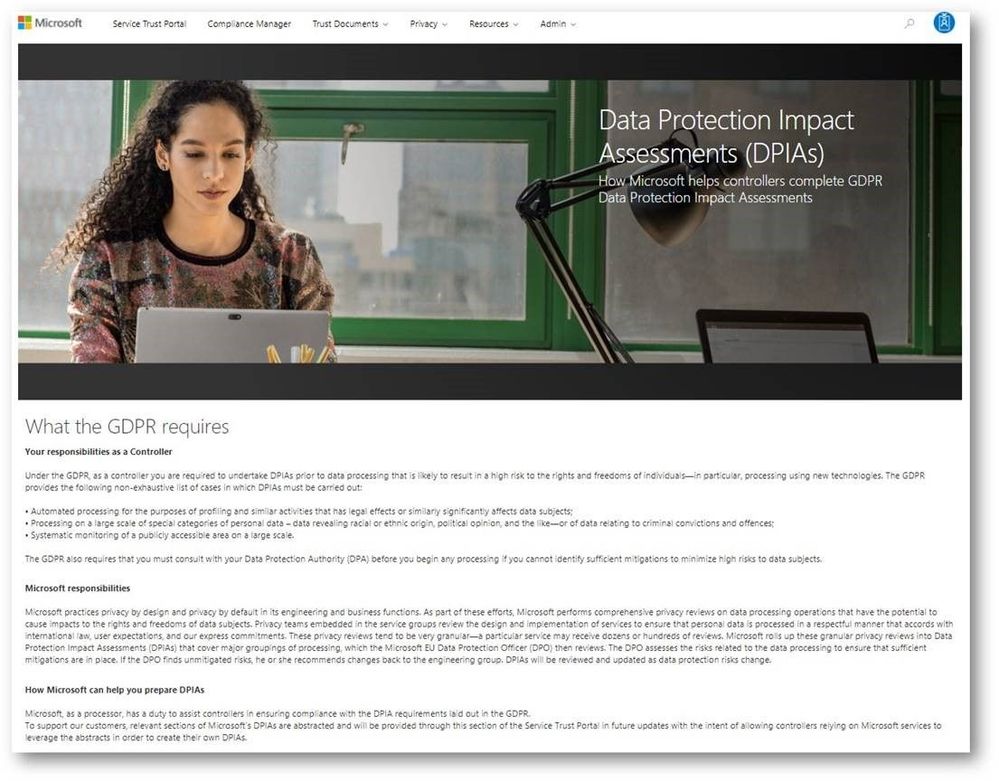
A critical part of GDPR preparedness involves creating Data Protection Impact Assessments (DPIAs) of data processing activities that are likely to result in high risk to the rights and freedoms of individuals.
Coming soon, the data protection impact assessments (DPIAs) section will provide organizations with information you need to create your own DPIAs as a data controller. We will share DPIA-related information for specific Microsoft Cloud services in the next few weeks.
Compliance Manager updates
In addition to the new sections we introduced above, we highly recommend that organizations manage their GDPR compliance activities using Compliance Manager, which provides you with a holistic assessment and built-in tools for end-to-end GDPR compliance management, mapping the GDPR obligations to operational and technical controls used by Microsoft services to support GDPR compliance. You can use Compliance Manager and the information it provides to enhance your accountability and compliance programs.
In addition, we just released the updated version of the GDPR Detailed Assessment, a question-driven assessment tool for preparing for the GDPR. It now integrates with Compliance Manager, directing organizations to specific controls in Compliance Manager and providing guidance for every GDPR scenario in the assessment questionnaire. The updated GDPR Detailed Assessment toolkit can be downloaded here.
Check out the new GDPR and privacy-related resources we’ve introduced today on Service Trust Portal, which is available publicly but requires you to log in using your Microsoft subscription accounts (Azure, Dynamics 365, or Office 365 account, etc.) to access restricted documents like audit reports and tools like Compliance Manager.
While the GDPR poses new challenges for organizations working to support the privacy rights of individuals, it also encourages companies to become more accountable for developing and leveraging innovative technology to protect personal and sensitive information. Given the sheer volume of available resources across Microsoft’s many platforms and services, it can be challenging to find the right resources to support GDPR. To address these challenges, we’ve enhanced the Service Trust Portal (STP), to centralize resources to help you with your needs around data protection, compliance, and privacy, and of course, the GDPR.
The STP continues to include independent third-party audit reports, such as FedRAMP, ISO, and SOC reports, in-depth information such as whitepapers, security assessment reports, and data protection guides. In February this year, we released a new tool on the STP called Compliance Manager, which helps organizations to manage compliance activities and perform risk assessments on Microsoft Cloud services.
To help you navigate the collection of GDPR resources, we’re publicly previewing a new Privacy area on the STP which provides you with guidance on how Microsoft services will support you in the event of a personal data breach, and with tools and technical documents to help you respond to data subject requests. You can find more details about each scenario below:
Data subject requests resources
The GPDR provides data subjects with increased rights to control their personal data, including the ability to obtain a copy of their personal data and to have their personal data erased from data systems used by a data controller.
The new data subject requests (DSR) section in STP centralizes all the DSRs resources, and provides you with tools and guidance that you can leverage to locate, export, and erase data across Microsoft’s Cloud services.
Breach notification resources
The GDPR imposes specific requirements around breach notification. After becoming aware of a breach of personal data that puts individuals at risk, data controllers must notify the supervisory authority and data subjects without undue delay. These requirements are similar to other regulations, such as the Health Insurance Portability and Accountability Act (HIPAA).
The data breach notification section of the new Privacy area describes how Microsoft services support your personal data breach obligations, and which tools to use to make sure Microsoft can reach to appropriate people in your organization without delay.
Data Protection Impact Assessments documents
A critical part of GDPR preparedness involves creating Data Protection Impact Assessments (DPIAs) of data processing activities that are likely to result in high risk to the rights and freedoms of individuals.
Coming soon, the data protection impact assessments (DPIAs) section will provide organizations with information you need to create your own DPIAs as a data controller. We will share DPIA-related information for specific Microsoft Cloud services in the next few weeks.
Compliance Manager updates
In addition to the new sections we introduced above, we highly recommend that organizations manage their GDPR compliance activities using Compliance Manager, which provides you with a holistic assessment and built-in tools for end-to-end GDPR compliance management, mapping the GDPR obligations to operational and technical controls used by Microsoft services to support GDPR compliance. You can use Compliance Manager and the information it provides to enhance your accountability and compliance programs.
In addition, we just released the updated version of the GDPR Detailed Assessment, a question-driven assessment tool for preparing for the GDPR. It now integrates with Compliance Manager, directing organizations to specific controls in Compliance Manager and providing guidance for every GDPR scenario in the assessment questionnaire. The updated GDPR Detailed Assessment toolkit can be downloaded here.
Check out the new GDPR and privacy-related resources we’ve introduced today on Service Trust Portal, which is available publicly but requires you to log in using your Microsoft subscription accounts (Azure, Dynamics 365, or Office 365 account, etc.) to access restricted documents like audit reports and tools like Compliance Manager.
While the GDPR poses new challenges for organizations working to support the privacy rights of individuals, it also encourages companies to become more accountable for developing and leveraging innovative technology to protect personal and sensitive information. Given the sheer volume of available resources across Microsoft’s many platforms and services, it can be challenging to find the right resources to support GDPR. To address these challenges, we’ve enhanced the Service Trust Portal (STP), to centralize resources to help you with your needs around data protection, compliance, and privacy, and of course, the GDPR.
The STP continues to include independent third-party audit reports, such as FedRAMP, ISO, and SOC reports, in-depth information such as whitepapers, security assessment reports, and data protection guides. In February this year, we released a new tool on the STP called Compliance Manager, which helps organizations to manage compliance activities and perform risk assessments on Microsoft Cloud services.
To help you navigate the collection of GDPR resources, we’re publicly previewing a new Privacy area on the STP which provides you with guidance on how Microsoft services will support you in the event of a personal data breach, and with tools and technical documents to help you respond to data subject requests. You can find more details about each scenario below:
Data subject requests resources
The GPDR provides data subjects with increased rights to control their personal data, including the ability to obtain a copy of their personal data and to have their personal data erased from data systems used by a data controller.
The new data subject requests (DSR) section in STP centralizes all the DSRs resources, and provides you with tools and guidance that you can leverage to locate, export, and erase data across Microsoft’s Cloud services.
Breach notification resources
The GDPR imposes specific requirements around breach notification. After becoming aware of a breach of personal data that puts individuals at risk, data controllers must notify the supervisory authority and data subjects without undue delay. These requirements are similar to other regulations, such as the Health Insurance Portability and Accountability Act (HIPAA).
The data breach notification section of the new Privacy area describes how Microsoft services support your personal data breach obligations, and which tools to use to make sure Microsoft can reach to appropriate people in your organization without delay.
Data Protection Impact Assessments documents
A critical part of GDPR preparedness involves creating Data Protection Impact Assessments (DPIAs) of data processing activities that are likely to result in high risk to the rights and freedoms of individuals.
Coming soon, the data protection impact assessments (DPIAs) section will provide organizations with information you need to create your own DPIAs as a data controller. We will share DPIA-related information for specific Microsoft Cloud services in the next few weeks.
Compliance Manager updates
In addition to the new sections we introduced above, we highly recommend that organizations manage their GDPR compliance activities using Compliance Manager, which provides you with a holistic assessment and built-in tools for end-to-end GDPR compliance management, mapping the GDPR obligations to operational and technical controls used by Microsoft services to support GDPR compliance. You can use Compliance Manager and the information it provides to enhance your accountability and compliance programs.
In addition, we just released the updated version of the GDPR Detailed Assessment, a question-driven assessment tool for preparing for the GDPR. It now integrates with Compliance Manager, directing organizations to specific controls in Compliance Manager and providing guidance for every GDPR scenario in the assessment questionnaire. The updated GDPR Detailed Assessment toolkit can be downloaded here.
Check out the new GDPR and privacy-related resources we’ve introduced today on Service Trust Portal, which is available publicly but requires you to log in using your Microsoft subscription accounts (Azure, Dynamics 365, or Office 365 account, etc.) to access restricted documents like audit reports and tools like Compliance Manager.
While the GDPR poses new challenges for organizations working to support the privacy rights of individuals, it also encourages companies to become more accountable for developing and leveraging innovative technology to protect personal and sensitive information. Given the sheer volume of available resources across Microsoft’s many platforms and services, it can be challenging to find the right resources to support GDPR. To address these challenges, we’ve enhanced the Service Trust Portal (STP), to centralize resources to help you with your needs around data protection, compliance, and privacy, and of course, the GDPR.
The STP continues to include independent third-party audit reports, such as FedRAMP, ISO, and SOC reports, in-depth information such as whitepapers, security assessment reports, and data protection guides. In February this year, we released a new tool on the STP called Compliance Manager, which helps organizations to manage compliance activities and perform risk assessments on Microsoft Cloud services.
To help you navigate the collection of GDPR resources, we’re publicly previewing a new Privacy area on the STP which provides you with guidance on how Microsoft services will support you in the event of a personal data breach, and with tools and technical documents to help you respond to data subject requests. You can find more details about each scenario below:
Data subject requests resources
The GPDR provides data subjects with increased rights to control their personal data, including the ability to obtain a copy of their personal data and to have their personal data erased from data systems used by a data controller.
The new data subject requests (DSR) section in STP centralizes all the DSRs resources, and provides you with tools and guidance that you can leverage to locate, export, and erase data across Microsoft’s Cloud services.
Breach notification resources
The GDPR imposes specific requirements around breach notification. After becoming aware of a breach of personal data that puts individuals at risk, data controllers must notify the supervisory authority and data subjects without undue delay. These requirements are similar to other regulations, such as the Health Insurance Portability and Accountability Act (HIPAA).
The data breach notification section of the new Privacy area describes how Microsoft services support your personal data breach obligations, and which tools to use to make sure Microsoft can reach to appropriate people in your organization without delay.
Data Protection Impact Assessments documents
A critical part of GDPR preparedness involves creating Data Protection Impact Assessments (DPIAs) of data processing activities that are likely to result in high risk to the rights and freedoms of individuals.
Coming soon, the data protection impact assessments (DPIAs) section will provide organizations with information you need to create your own DPIAs as a data controller. We will share DPIA-related information for specific Microsoft Cloud services in the next few weeks.
Compliance Manager updates
In addition to the new sections we introduced above, we highly recommend that organizations manage their GDPR compliance activities using Compliance Manager, which provides you with a holistic assessment and built-in tools for end-to-end GDPR compliance management, mapping the GDPR obligations to operational and technical controls used by Microsoft services to support GDPR compliance. You can use Compliance Manager and the information it provides to enhance your accountability and compliance programs.
In addition, we just released the updated version of the GDPR Detailed Assessment, a question-driven assessment tool for preparing for the GDPR. It now integrates with Compliance Manager, directing organizations to specific controls in Compliance Manager and providing guidance for every GDPR scenario in the assessment questionnaire. The updated GDPR Detailed Assessment toolkit can be downloaded here.
Check out the new GDPR and privacy-related resources we’ve introduced today on Service Trust Portal, which is available publicly but requires you to log in using your Microsoft subscription accounts (Azure, Dynamics 365, or Office 365 account, etc.) to access restricted documents like audit reports and tools like Compliance Manager.
The threat landscape is continually evolving and in talking with organizations we hear about the many challenges you face in managing your security position to protect against these threats. From having too many security solutions with various places to configure lots of controls, a lack of knowledge around which controls are the most effective, and being unable to benchmark yourself against other organizations, we can understand why security teams are having trouble finding the right balance of security and productivity while staying on top of everything.
With Office 365 Secure Score we made this easier by helping you understand your security position, giving you advice on what controls you should consider enabling, and helping you understand how your score compared to other organizations. We saw a lot of interest around Secure Score and a common piece of feedback we heard was that it was great that we were doing this for Office 365 but what about the other Microsoft solutions? Over the past few months we have been working on this and today Office 365 Secure Score is now Microsoft Secure Score. Microsoft Secure Score builds on top of what was in Office 365 Secure Score and adds even more.
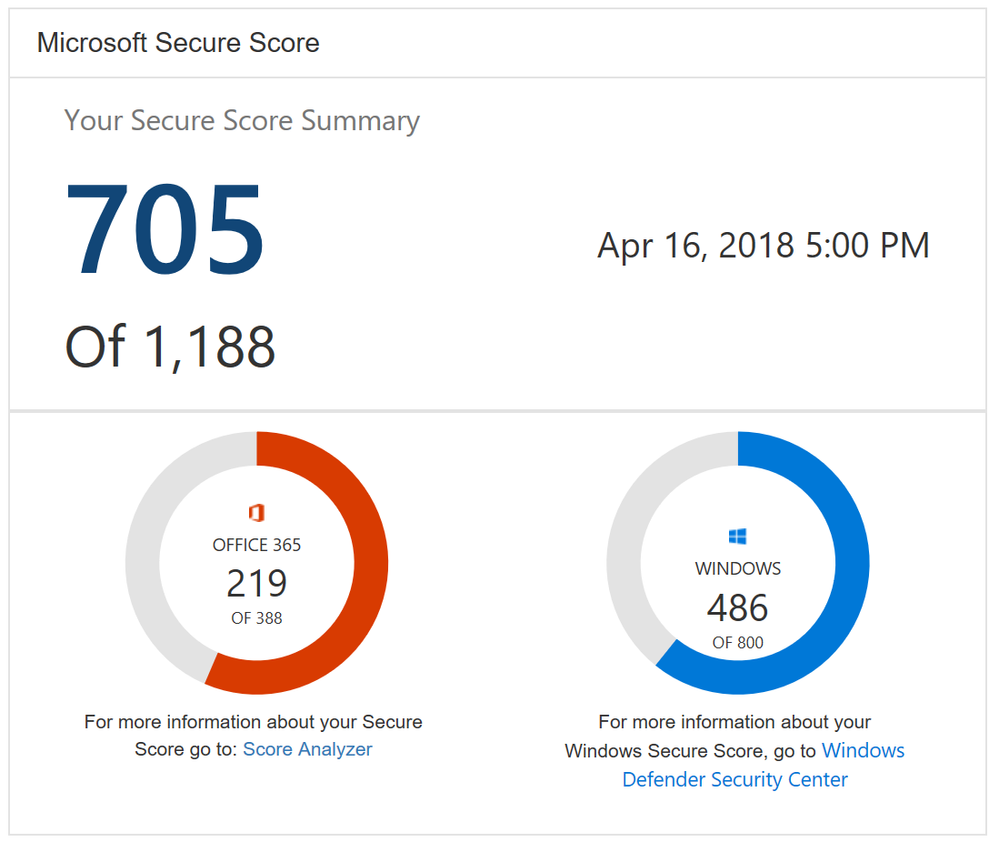
One new feature you will notice as soon as you log in is the new Microsoft score which is made up of your Office 365 Secure Score and your Windows Secure Score. The Windows score come from Windows Defender Advanced Threat Protection (ATP) which provides information about the status of your antivirus, OS security updates, firewall, and other controls. To get the details of your Windows score, you can click on the “Windows Defender Security Center” link below your Windows score to go directly to the dashboard in Windows Defender ATP.
Microsoft Secure Score Summary
Beyond adding Windows to Secure Score, we also now support Microsoft Intune. This surfaces though the existing mobile device management (MDM) controls. Previously we used the telemetry from the Office 365 MDM solution. However, we know that some of you are using Intune and were clicking on the Third Party button to give yourself points as you were meeting the spirit of these controls. This will no longer be necessary. If you are using Intune, we recommend that you remove the third party tag from these controls so they can be scored based on your Intune data.
Lastly, we heard from many organizations that they loved the compare your score section where we show how you benchmark against the Office 365 average score and the recently added Office 365 seat size average score. What they also wanted to see was a score based on organizations in the same industry. This new industry average is now rolling out and should be available to everyone by April 20th. Based on what industry you designate in the Service Assurance section of the Office 365 Security and Compliance Center we will show you the average score for that industry. Note that if you change your industry designation, the new average will not appear until your score is recalculated.
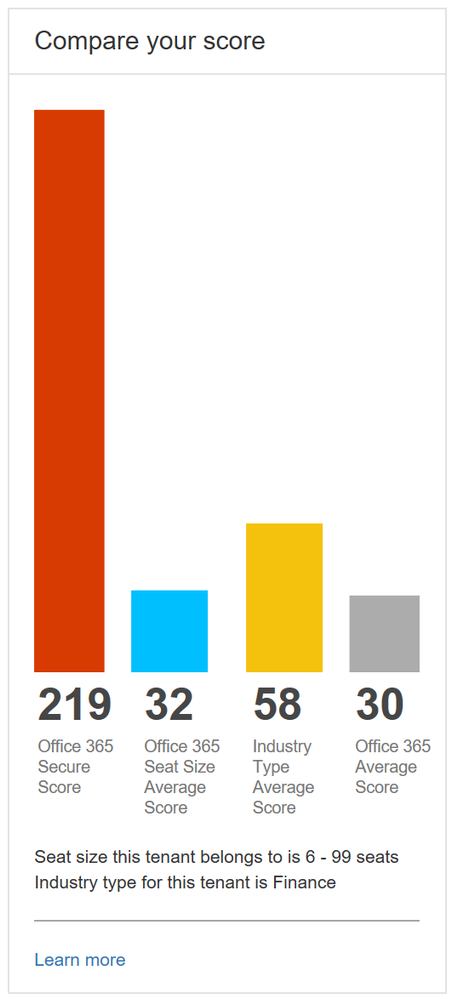
Industry average score to help you better benchmark your organization
This is just the first step in building out Microsoft Secure Score. Over the coming months we will continue to add new functionality and add additional solutions to provide you an even better experience.
To try out Microsoft Secure Score now you can go to https://securescore.microsoft.com and log in with your administrative credentials or click on the Secure Score widget on the Office 365 Security and Compliance Center home page. We also created a new Microsoft Mechanics video that can give you a quick overview of the solution if you have not used Secure Score before.
As always, the team loves the feedback and comments so feel free to leave them below. If you happen to be at the RSA conference in San Francisco this week swing by the Microsoft booth to say hi and check out the sessions we are running.