We conclude our phish blog series by announcing some exciting capabilities that further enhance the anti-phish stack in Office 365. In our previous blogs, we announced enhanced anti-impersonation capabilities and anti-spoofing capabilities which help stop sophisticated spear phishing and email spoofing campaigns. Today, we’re excited to announce new capabilities augmenting our protection against content based phish lures. Additionally, today we’re announcing roll out of “Internal Safe Links’ which protects users from the industry wide concern of phishing occurring when hackers gain access to an internal enterprise account and leverage the internal account to launch a phishing campaign on internal users. Users are far more likely to trust, open, and execute actions in an email sent from another user in their organization than from an external source. Phishing with compromised internal accounts is a powerful technique used by hackers to move laterally across an organization and gain a stronger foothold into the enterprise. Hackers can penetrate deeper into an organization, harvesting more user credentials, personally identifiable information (PII), and perhaps enterprise intellectual property. Our customers often ask for a solution to help mitigate intra-org phishing campaigns so we are especially excited to deliver this new feature.
GA of ‘Internal Safe Links’
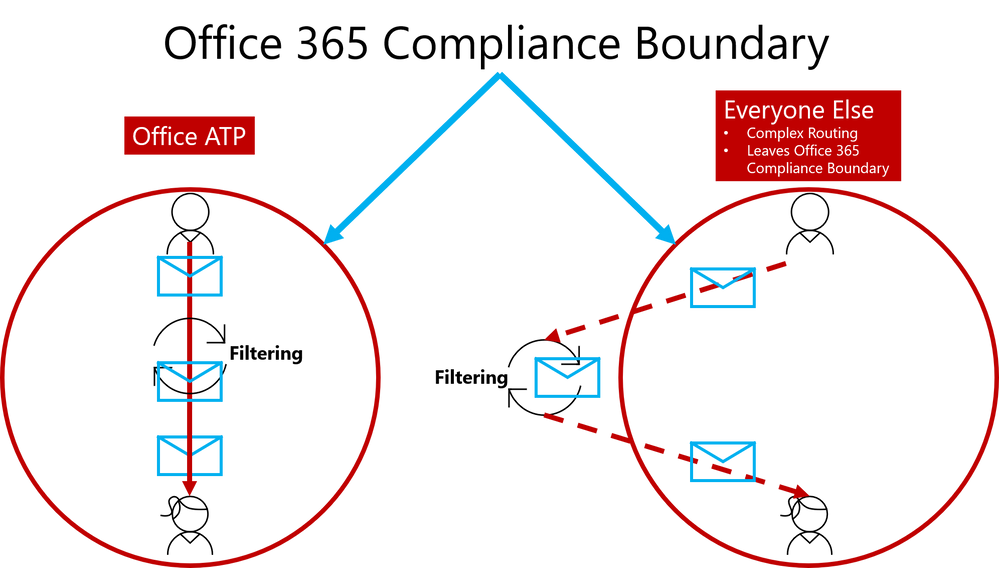
To help customers eliminate impact from phishing campaigns launched via compromised accounts, we’re excited to launch ‘Internal Safe Links’, which enables the Office 365 Advanced Threat Protection (ATP) Safe Links policy to protect intra-org emails. With Safe Links now protecting intra-org emails, Office 365 ATP helps greatly reduce if not eliminate this lethal and widespread phishing technique. Also, Office 365 ATP is the only threat protection service that can provide intra-org email scanning without routing emails outside the compliance boundary of Office 365.
Figure 1. Internal Safe Links is unique to Office ATP by enabling direct routing and ensuring emails remain within the compliance boundaries of Office 365
This provides Office 365 ATP customers a critical advantage since their emails will always remain within the Office 365 Compliance Boundary which is especially important as compliance requirements are increasingly scrutinized with the launch of the General Data Protection Regulation (GDPR). Other solutions offering intra-org email link scanning must route emails outside the Office 365 Compliance Boundary. Solutions using this approach create a gap in maintaining the compliance standards guaranteed by Office 365. Office 365 ATP’s Internal Safe Links will protect users from internal phishing campaigns and is the only solution that ensures emails always meet the necessary compliance standards set in Office 365. Other solutions also add unnecessary complexity to email routing since they must leave the Office 365 boundary to scan links for intra-org emails. Complex email routing can lead to unforeseen impact on enterprise mail flow, potentially causing email delivery delays, incorrect setup of mail flow, and even undelivered email. Internal Safe Links follows the Office ATP ethos of making setup as easy as possible. The feature can be turned on or off by pushing the corresponding radio button in the Safe Links policy. The feature will be ‘off’ by default.
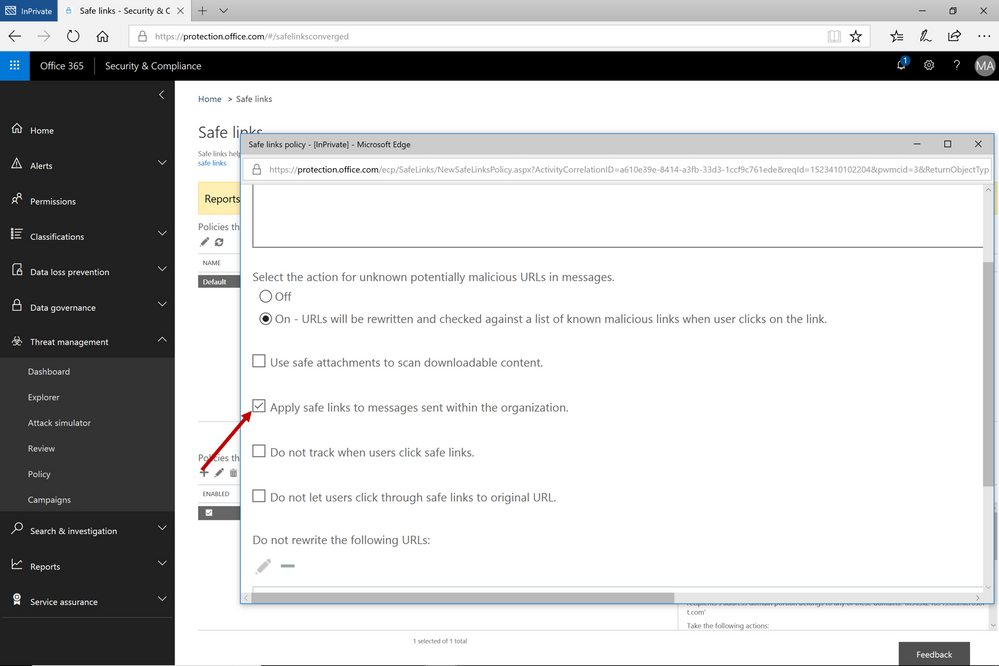 Figure 2. Easy setup with a on/off button to execute the feature capability
Continued Enhancements in Link Content Detonation of Phish Lures
As we alluded to in the first blog of this series, emails contain many types of phish lures which can lead to malicious websites. These lures can come in various forms but are usually associated with a link to a malicious website.
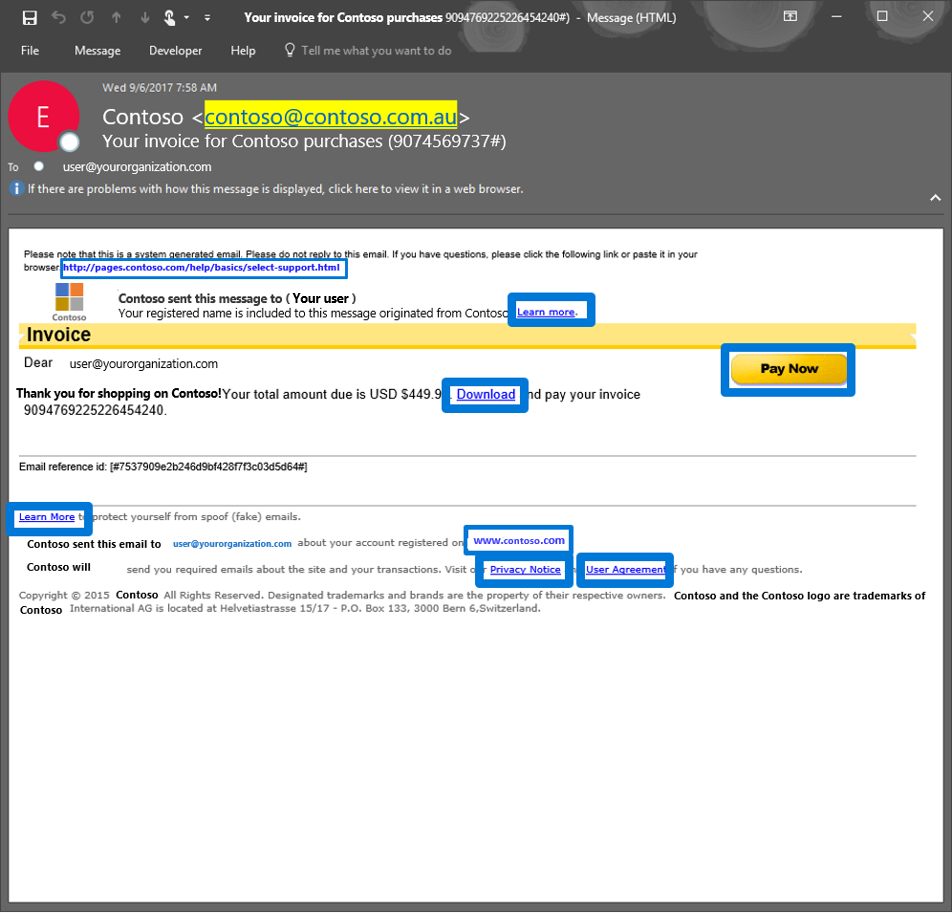 Figure 3. Generic email with several phish lures in the email
Office 365 applies several algorithms and heuristics to determine when a link should be detonated during mail flow to detect various attacks such as:
- Pages that automatically download malware
- Phishing pages
These techniques are not limited to the email body. Office 365 ATP also detonates phish lures within email attachments, helping ensure protection across all components of an email.
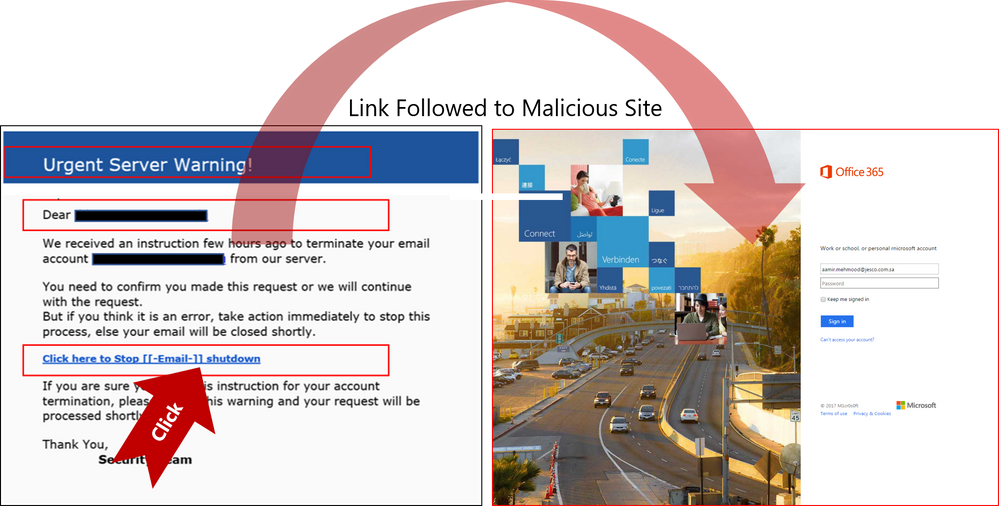 Figure 4. Real Example of Office 365 ATP following suspicious link to the destination a URL points to and scanning that page for potential malware or phish
Send Us Your Feedback
Below are some other helpful articles on Office 365 and Office 365 ATP anti-phish, anti-spoof, and holistic phish protection capabilities:
Once you experience the new Internal Safe Links and phish lure detonation capabilities for Office 365 Advanced Threat Protection, provide us your feedback so we can continue improving and adding features that will allow Office ATP to be the premiere advanced security service for Office 365. If you have not tried Office 365 ATP for your organization yet, you should begin a free Office 365 E5 trial today and start securing your organization from the modern threat landscape.
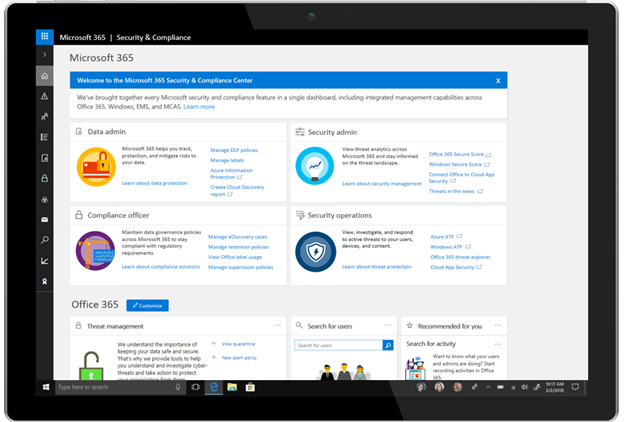
Last year, at Inspire, we announced Microsoft 365, which brings together Office 365, Windows 10, and Enterprise Mobility + Security to deliver a complete, intelligent, and secure solution for the modern workspace. As part of the Microsoft 365 vision and expanding on the unified administration experience we started with the Microsoft 365 admin center, we have created the Microsoft 365 security and compliance center.
The Microsoft 365 security and compliance center maintains the centralized experience, intelligence, and customization that Office 365 security and compliance center offers today. In addition, it also enables data administrators, compliance officers, security administrators, and security operations to discover security and compliance controls across Office 365, Enterprise Mobility + Security, and Windows in a single place. For example, data administrators can easily access features like Azure Information Protection and Microsoft Cloud App Security to help them detect, classify, protect, and report on their data.
The Microsoft 365 Security and Compliance Center
Over the coming months, we will continue integrating and streamlining administration experiences across Microsoft 365. To help organizations optimize their resources we will add new capabilities to help deploy and manage security and compliance solutions. We will also continue to improve the efficiency of the security and compliance administrator’s user experience, so they can complete their tasks quickly to get more done with their day.
The Microsoft 365 security and compliance center is rolling out now. Once deployed, administrators can login as they usually do, or navigate to https://protection.microsoft.com to try out the new security and compliance experiences. In addition, they can also navigate to the Microsoft 365 security and compliance center from the Microsoft 365 admin center . Administrators will still be able to configure and manage their Office 365 security and compliance settings within the new Microsoft 365 security and compliance center.
Last year, at Inspire, we announced Microsoft 365, which brings together Office 365, Windows 10, and Enterprise Mobility + Security to deliver a complete, intelligent, and secure solution for the modern workspace. As part of the Microsoft 365 vision and expanding on the unified administration experience we started with the Microsoft 365 admin center, we have created the Microsoft 365 security and compliance center.
The Microsoft 365 security and compliance center maintains the centralized experience, intelligence, and customization that Office 365 security and compliance center offers today. In addition, it also enables data administrators, compliance officers, security administrators, and security operations to discover security and compliance controls across Office 365, Enterprise Mobility + Security, and Windows in a single place. For example, data administrators can easily access features like Azure Information Protection and Microsoft Cloud App Security to help them detect, classify, protect, and report on their data.
The Microsoft 365 Security and Compliance Center
Over the coming months, we will continue integrating and streamlining administration experiences across Microsoft 365. To help organizations optimize their resources we will add new capabilities to help deploy and manage security and compliance solutions. We will also continue to improve the efficiency of the security and compliance administrator’s user experience, so they can complete their tasks quickly to get more done with their day.
The Microsoft 365 security and compliance center is rolling out now. Once deployed, administrators can login as they usually do, or navigate to https://protection.microsoft.com to try out the new security and compliance experiences. In addition, they can also navigate to the Microsoft 365 security and compliance center from the Microsoft 365 admin center . Administrators will still be able to configure and manage their Office 365 security and compliance settings within the new Microsoft 365 security and compliance center.
Last year, at Inspire, we announced Microsoft 365, which brings together Office 365, Windows 10, and Enterprise Mobility + Security to deliver a complete, intelligent, and secure solution for the modern workspace. As part of the Microsoft 365 vision and expanding on the unified administration experience we started with the Microsoft 365 admin center, we have created the Microsoft 365 security and compliance center.
The Microsoft 365 security and compliance center maintains the centralized experience, intelligence, and customization that Office 365 security and compliance center offers today. In addition, it also enables data administrators, compliance officers, security administrators, and security operations to discover security and compliance controls across Office 365, Enterprise Mobility + Security, and Windows in a single place. For example, data administrators can easily access features like Azure Information Protection and Microsoft Cloud App Security to help them detect, classify, protect, and report on their data.
The Microsoft 365 Security and Compliance Center
Over the coming months, we will continue integrating and streamlining administration experiences across Microsoft 365. To help organizations optimize their resources we will add new capabilities to help deploy and manage security and compliance solutions. We will also continue to improve the efficiency of the security and compliance administrator’s user experience, so they can complete their tasks quickly to get more done with their day.
The Microsoft 365 security and compliance center is rolling out now. Once deployed, administrators can login as they usually do, or navigate to https://protection.microsoft.com to try out the new security and compliance experiences. In addition, they can also navigate to the Microsoft 365 security and compliance center from the Microsoft 365 admin center . Administrators will still be able to configure and manage their Office 365 security and compliance settings within the new Microsoft 365 security and compliance center.
Last year, at Inspire, we announced Microsoft 365, which brings together Office 365, Windows 10, and Enterprise Mobility + Security to deliver a complete, intelligent, and secure solution for the modern workspace. As part of the Microsoft 365 vision and expanding on the unified administration experience we started with the Microsoft 365 admin center, we have created the Microsoft 365 security and compliance center.
The Microsoft 365 security and compliance center maintains the centralized experience, intelligence, and customization that Office 365 security and compliance center offers today. In addition, it also enables data administrators, compliance officers, security administrators, and security operations to discover security and compliance controls across Office 365, Enterprise Mobility + Security, and Windows in a single place. For example, data administrators can easily access features like Azure Information Protection and Microsoft Cloud App Security to help them detect, classify, protect, and report on their data.
The Microsoft 365 Security and Compliance Center
Over the coming months, we will continue integrating and streamlining administration experiences across Microsoft 365. To help organizations optimize their resources we will add new capabilities to help deploy and manage security and compliance solutions. We will also continue to improve the efficiency of the security and compliance administrator’s user experience, so they can complete their tasks quickly to get more done with their day.
The Microsoft 365 security and compliance center is rolling out now. Once deployed, administrators can login as they usually do, or navigate to https://protection.microsoft.com to try out the new security and compliance experiences. In addition, they can also navigate to the Microsoft 365 security and compliance center from the Microsoft 365 admin center . Administrators will still be able to configure and manage their Office 365 security and compliance settings within the new Microsoft 365 security and compliance center.
In this mobile-first and cloud-first world, Microsoft is committed to build and maintain a partnership with you to meet your security, compliance, and privacy needs. When your organization’s data was on-premises, it was 100 percent your responsibility to meet all regulatory requirements. As you move your data to a Microsoft Cloud service, such as Office 365, Azure, or Dynamics 365, we partner with you to help you achieve compliance under the shared responsibility model.
To support your organization’s compliance journey when using Microsoft Cloud services, Microsoft released Compliance Manager Preview last November. Today, we are building upon this partnership by announcing thatis now generally available as an additional value for Azure, Dynamics 365, and Office 365 Business and Enterprise subscribers in public clouds[1].
Compliance Manager empowers your organization to manage your compliance activities from one place with three key capabilities:
- Helps you perform on-going risk assessments, now with Compliance Score
Compliance Manager is a cross-Microsoft Cloud services solution designed to help organizations meet complex compliance obligations, including the EU GDPR, ISO 27001, ISO 27018, NIST 800- 53, NIST 800- 171, and HIPAA[2].
It enables your organization to perform on-going risk assessments for what is identified as Microsoft’s responsibilities by evaluating detailed implementation and test details of our internal controls. We are committed to be transparent about how we process and protect your data so that you can trust Microsoft and leverage the technology we provide.
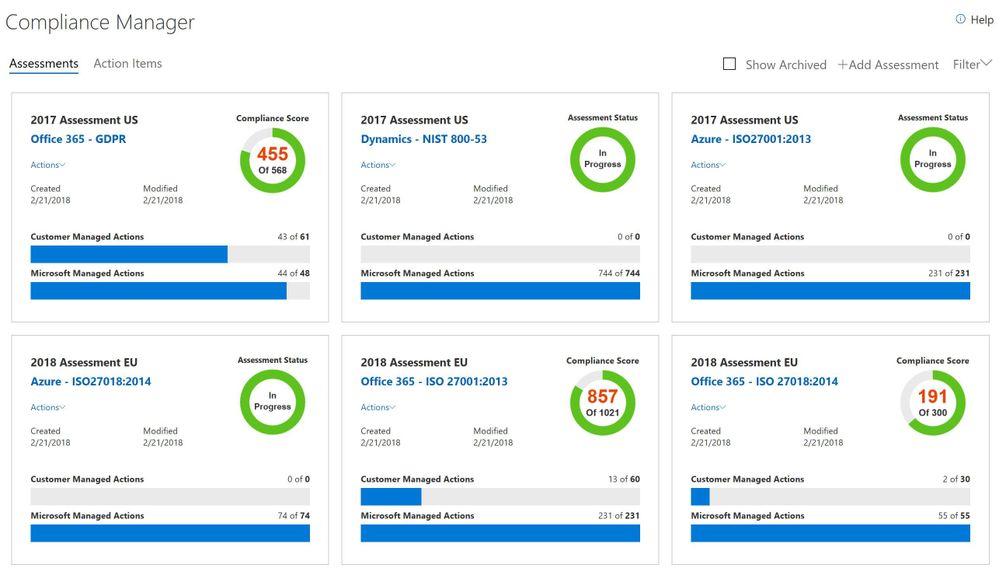
Compliance Manager dashboard with Compliance Score
We also provide you the information and tools to conduct self-assessment for your responsibilities of meeting regulatory requirements. Now with Compliance Score[3] —a new feature for Compliance Manager—you can gain visibility into your organization’s compliance stature with a risk-based score reference.
The Compliance Score is based on the operating effectiveness of internal controls managed by both Microsoft and you. Failure to implement different controls will have different levels of risk. We assign a weight to each control based on the level of risk involved when you do not implement a control or fail to pass the test of a control. From the detailed information page of each assessment, you can find an assigned risk-based score for each control item, and prioritize your tasks and make better implementation plans based on the risk involved.
- Provides you actionable insights, now from a certification/regulation view
One of the biggest pain points we heard from organizations is finding talent with expertise in both industrial compliance and technology solutions. Most of the time, compliance personnel have in-depth knowledge of industrial regulations and standards, while IT professionals have the technology tools that help the company to protect data. Because there is lack of connections between these two areas, meeting data protection and regulatory requirements becomes a very disjointed process.
To help reduce this challenge, Compliance Manager builds the connection between the data protection capabilities and the regulatory requirements, so now you know which technology solutions you can leverage to meet certain compliance obligations.
In response to feedback from customers, this product update re-organizes the control information from the “Microsoft control framework” view (e.g. MS-control AR-0104) to a “certification controls or regulatory article” view (e.g. ISO 27001:2013: C.5.1.a). Before, one Microsoft control corresponded to one or multiple certification controls or regulatory articles, and you needed to take many actions to implement one control. In the newly updated view, you can see customer actions for each certification or regulatory control, and the specific actions recommended for each control[4].
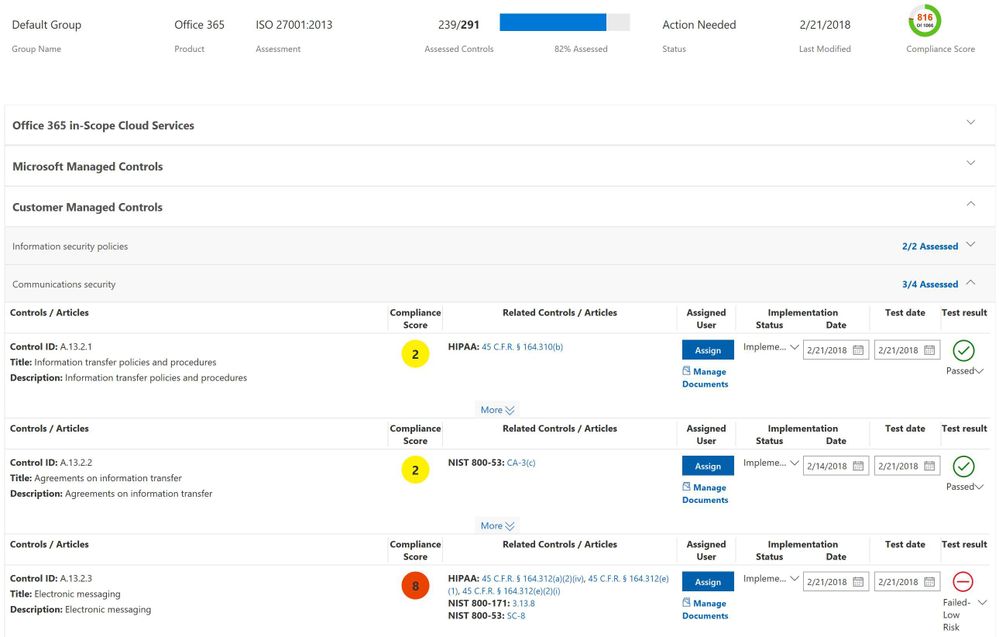 Detailed information page of an assessment
You still have the same experience for each control, i.e., finding customer actions with step-by-step guidance to guide you through implementing internal controls and developing business processes for your organization. We will keep the preview view (MS-control view) till the end of August 2018 for you to migrate the information into the new view.
- Simplifies your journey to manage compliance activities, now with the capability to create multiple assessments for each standard and regulation
According to the report, Cost of Compliance 2017 from Thomson Reuters, 32 percent of companies spend more than 4 hours per week creating and amending audit reports. It’s very time-consuming to collect evidence and demonstrate effective control implementation for auditing activities.
Compliance Manager enables you to assign, track, and record your compliance activities, so you can collaborate across teams and manage your documents for creating audit reports more easily.
By using group functionality, you can now create multiple assessments for any standard or regulation that is available to you in Compliance Manager by time, by teams, or by business units. For example, you can create a GDPR assessment for the 2018 group and another one for the 2019 group. Similarly, you can create an ISO 27001 assessment for your business units located in the U.S. and another one for your business units located in Europe. This functionality gives you a more robust way to manage compliance activities based on your organizational needs for performing risk assessments.
We are excited to launch Compliance Manager with these updates to make it a better experience for you. We’d like to hear your feedback on the product to keep improving functionality, adding new features, and enhancing existing ones. Sign in totoday using your Azure, Dynamics 365, or Office 365 account, and give us feedback via the Feedback button at the bottom right corner of Compliance Manager. You can also learn more about Compliance Manager in this, “Simplify your compliance journey with Service Trust Portal and Compliance Manager”, and on the Compliance Manager support page.
Work with a partner who knows GDPR
Microsoft works with partners globally to address customer needs around GDPR. We have several partners today offering Microsoft-based solutions that include an overall set of controls and capabilities to help customers meet their GDPR requirements. Here’s our list of global partners we currently work with to meet the growing demand for GDPR support.
Product scope[2]
You can find the coverage of regulations and standards for each Microsoft cloud service below as of February 2018:
- Office 365: Detailed information about Microsoft’s internal controls for and recommended customer actions for GDPR, ISO 27001, ISO 27018, NIST 800- 53, NIST 800- 171, and HIPAA
- Azure: Detailed information about Microsoft’s internal controls for ISO 27001 and ISO 27018
- Dynamics 365: Detailed information about Microsoft’s internal controls for NIST 800- 53; recommended customer actions for partial GDPR controls managed by organizations
[1] Note that Office 365 GCC customers can access Compliance Manager; however, users should evaluate whether to use the document upload feature of Compliance Manager, as the storage for document upload is compliant with Office 365 Tier C only. Compliance Manager is not yet available in sovereign clouds including Office 365 U.S. Government Community High (GCC High), Office 365 Department of Defense (DoD), Office 365 Operated by 21 Vianet, and Office 365 Germany.
[2] Coverage of regulations and standards in Compliance Manager varies by product. We will keep adding and updating the information in the future and our goal is to provide a similar experience of using Compliance Manager for all Microsoft Cloud services.
[3] Compliance Score is only available for Office 365 currently. Our goal is to provide Compliance Score for all Microsoft Cloud services in the near future.
[4] Compliance Manager is a dashboard that provides the Compliance Score and a summary of your data protection and compliance stature as well as recommendations to improve data protection and compliance. This is a recommendation; it is up to you to evaluate and validate the effectiveness of customer controls as per your regulatory environment. Recommendations from Compliance Manager and Compliance Score should not be interpreted as a guarantee of compliance.
In this mobile-first and cloud-first world, Microsoft is committed to build and maintain a partnership with you to meet your security, compliance, and privacy needs. When your organization’s data was on-premises, it was 100 percent your responsibility to meet all regulatory requirements. As you move your data to a Microsoft Cloud service, such as Office 365, Azure, or Dynamics 365, we partner with you to help you achieve compliance under the shared responsibility model.
To support your organization’s compliance journey when using Microsoft Cloud services, Microsoft released Compliance Manager Preview last November. Today, we are building upon this partnership by announcing thatis now generally available as an additional value for Azure, Dynamics 365, and Office 365 Business and Enterprise subscribers in public clouds[1].
Compliance Manager empowers your organization to manage your compliance activities from one place with three key capabilities:
- Helps you perform on-going risk assessments, now with Compliance Score
Compliance Manager is a cross-Microsoft Cloud services solution designed to help organizations meet complex compliance obligations, including the EU GDPR, ISO 27001, ISO 27018, NIST 800- 53, NIST 800- 171, and HIPAA[2].
It enables your organization to perform on-going risk assessments for what is identified as Microsoft’s responsibilities by evaluating detailed implementation and test details of our internal controls. We are committed to be transparent about how we process and protect your data so that you can trust Microsoft and leverage the technology we provide.
Compliance Manager dashboard with Compliance Score
We also provide you the information and tools to conduct self-assessment for your responsibilities of meeting regulatory requirements. Now with Compliance Score[3] —a new feature for Compliance Manager—you can gain visibility into your organization’s compliance stature with a risk-based score reference.
The Compliance Score is based on the operating effectiveness of internal controls managed by both Microsoft and you. Failure to implement different controls will have different levels of risk. We assign a weight to each control based on the level of risk involved when you do not implement a control or fail to pass the test of a control. From the detailed information page of each assessment, you can find an assigned risk-based score for each control item, and prioritize your tasks and make better implementation plans based on the risk involved.
- Provides you actionable insights, now from a certification/regulation view
One of the biggest pain points we heard from organizations is finding talent with expertise in both industrial compliance and technology solutions. Most of the time, compliance personnel have in-depth knowledge of industrial regulations and standards, while IT professionals have the technology tools that help the company to protect data. Because there is lack of connections between these two areas, meeting data protection and regulatory requirements becomes a very disjointed process.
To help reduce this challenge, Compliance Manager builds the connection between the data protection capabilities and the regulatory requirements, so now you know which technology solutions you can leverage to meet certain compliance obligations.
In response to feedback from customers, this product update re-organizes the control information from the “Microsoft control framework” view (e.g. MS-control AR-0104) to a “certification controls or regulatory article” view (e.g. ISO 27001:2013: C.5.1.a). Before, one Microsoft control corresponded to one or multiple certification controls or regulatory articles, and you needed to take many actions to implement one control. In the newly updated view, you can see customer actions for each certification or regulatory control, and the specific actions recommended for each control[4].
Detailed information page of an assessment
You still have the same experience for each control, i.e., finding customer actions with step-by-step guidance to guide you through implementing internal controls and developing business processes for your organization. We will keep the preview view (MS-control view) till the end of August 2018 for you to migrate the information into the new view.
- Simplifies your journey to manage compliance activities, now with the capability to create multiple assessments for each standard and regulation
According to the report, Cost of Compliance 2017 from Thomson Reuters, 32 percent of companies spend more than 4 hours per week creating and amending audit reports. It’s very time-consuming to collect evidence and demonstrate effective control implementation for auditing activities.
Compliance Manager enables you to assign, track, and record your compliance activities, so you can collaborate across teams and manage your documents for creating audit reports more easily.
By using group functionality, you can now create multiple assessments for any standard or regulation that is available to you in Compliance Manager by time, by teams, or by business units. For example, you can create a GDPR assessment for the 2018 group and another one for the 2019 group. Similarly, you can create an ISO 27001 assessment for your business units located in the U.S. and another one for your business units located in Europe. This functionality gives you a more robust way to manage compliance activities based on your organizational needs for performing risk assessments.
We are excited to launch Compliance Manager with these updates to make it a better experience for you. We’d like to hear your feedback on the product to keep improving functionality, adding new features, and enhancing existing ones. Sign in totoday using your Azure, Dynamics 365, or Office 365 account, and give us feedback via the Feedback button at the bottom right corner of Compliance Manager. You can also learn more about Compliance Manager in this, “Simplify your compliance journey with Service Trust Portal and Compliance Manager”, and on the Compliance Manager support page.
Work with a partner who knows GDPR
Microsoft works with partners globally to address customer needs around GDPR. We have several partners today offering Microsoft-based solutions that include an overall set of controls and capabilities to help customers meet their GDPR requirements. Here’s our list of global partners we currently work with to meet the growing demand for GDPR support.
Product scope[2]
You can find the coverage of regulations and standards for each Microsoft cloud service below as of February 2018:
- Office 365: Detailed information about Microsoft’s internal controls for and recommended customer actions for GDPR, ISO 27001, ISO 27018, NIST 800- 53, NIST 800- 171, and HIPAA
- Azure: Detailed information about Microsoft’s internal controls for ISO 27001 and ISO 27018
- Dynamics 365: Detailed information about Microsoft’s internal controls for NIST 800- 53; recommended customer actions for partial GDPR controls managed by organizations
[1] Note that Office 365 GCC customers can access Compliance Manager; however, users should evaluate whether to use the document upload feature of Compliance Manager, as the storage for document upload is compliant with Office 365 Tier C only. Compliance Manager is not yet available in sovereign clouds including Office 365 U.S. Government Community High (GCC High), Office 365 Department of Defense (DoD), Office 365 Operated by 21 Vianet, and Office 365 Germany.
[2] Coverage of regulations and standards in Compliance Manager varies by product. We will keep adding and updating the information in the future and our goal is to provide a similar experience of using Compliance Manager for all Microsoft Cloud services.
[3] Compliance Score is only available for Office 365 currently. Our goal is to provide Compliance Score for all Microsoft Cloud services in the near future.
[4] Compliance Manager is a dashboard that provides the Compliance Score and a summary of your data protection and compliance stature as well as recommendations to improve data protection and compliance. This is a recommendation; it is up to you to evaluate and validate the effectiveness of customer controls as per your regulatory environment. Recommendations from Compliance Manager and Compliance Score should not be interpreted as a guarantee of compliance.
In this mobile-first and cloud-first world, Microsoft is committed to build and maintain a partnership with you to meet your security, compliance, and privacy needs. When your organization’s data was on-premises, it was 100 percent your responsibility to meet all regulatory requirements. As you move your data to a Microsoft Cloud service, such as Office 365, Azure, or Dynamics 365, we partner with you to help you achieve compliance under the shared responsibility model.
To support your organization’s compliance journey when using Microsoft Cloud services, Microsoft released Compliance Manager Preview last November. Today, we are building upon this partnership by announcing thatis now generally available as an additional value for Azure, Dynamics 365, and Office 365 Business and Enterprise subscribers in public clouds[1].
Compliance Manager empowers your organization to manage your compliance activities from one place with three key capabilities:
- Helps you perform on-going risk assessments, now with Compliance Score
Compliance Manager is a cross-Microsoft Cloud services solution designed to help organizations meet complex compliance obligations, including the EU GDPR, ISO 27001, ISO 27018, NIST 800- 53, NIST 800- 171, and HIPAA[2].
It enables your organization to perform on-going risk assessments for what is identified as Microsoft’s responsibilities by evaluating detailed implementation and test details of our internal controls. We are committed to be transparent about how we process and protect your data so that you can trust Microsoft and leverage the technology we provide.
Compliance Manager dashboard with Compliance Score
We also provide you the information and tools to conduct self-assessment for your responsibilities of meeting regulatory requirements. Now with Compliance Score[3] —a new feature for Compliance Manager—you can gain visibility into your organization’s compliance stature with a risk-based score reference.
The Compliance Score is based on the operating effectiveness of internal controls managed by both Microsoft and you. Failure to implement different controls will have different levels of risk. We assign a weight to each control based on the level of risk involved when you do not implement a control or fail to pass the test of a control. From the detailed information page of each assessment, you can find an assigned risk-based score for each control item, and prioritize your tasks and make better implementation plans based on the risk involved.
- Provides you actionable insights, now from a certification/regulation view
One of the biggest pain points we heard from organizations is finding talent with expertise in both industrial compliance and technology solutions. Most of the time, compliance personnel have in-depth knowledge of industrial regulations and standards, while IT professionals have the technology tools that help the company to protect data. Because there is lack of connections between these two areas, meeting data protection and regulatory requirements becomes a very disjointed process.
To help reduce this challenge, Compliance Manager builds the connection between the data protection capabilities and the regulatory requirements, so now you know which technology solutions you can leverage to meet certain compliance obligations.
In response to feedback from customers, this product update re-organizes the control information from the “Microsoft control framework” view (e.g. MS-control AR-0104) to a “certification controls or regulatory article” view (e.g. ISO 27001:2013: C.5.1.a). Before, one Microsoft control corresponded to one or multiple certification controls or regulatory articles, and you needed to take many actions to implement one control. In the newly updated view, you can see customer actions for each certification or regulatory control, and the specific actions recommended for each control[4].
Detailed information page of an assessment
You still have the same experience for each control, i.e., finding customer actions with step-by-step guidance to guide you through implementing internal controls and developing business processes for your organization. We will keep the preview view (MS-control view) till the end of August 2018 for you to migrate the information into the new view.
- Simplifies your journey to manage compliance activities, now with the capability to create multiple assessments for each standard and regulation
According to the report, Cost of Compliance 2017 from Thomson Reuters, 32 percent of companies spend more than 4 hours per week creating and amending audit reports. It’s very time-consuming to collect evidence and demonstrate effective control implementation for auditing activities.
Compliance Manager enables you to assign, track, and record your compliance activities, so you can collaborate across teams and manage your documents for creating audit reports more easily.
By using group functionality, you can now create multiple assessments for any standard or regulation that is available to you in Compliance Manager by time, by teams, or by business units. For example, you can create a GDPR assessment for the 2018 group and another one for the 2019 group. Similarly, you can create an ISO 27001 assessment for your business units located in the U.S. and another one for your business units located in Europe. This functionality gives you a more robust way to manage compliance activities based on your organizational needs for performing risk assessments.
We are excited to launch Compliance Manager with these updates to make it a better experience for you. We’d like to hear your feedback on the product to keep improving functionality, adding new features, and enhancing existing ones. Sign in totoday using your Azure, Dynamics 365, or Office 365 account, and give us feedback via the Feedback button at the bottom right corner of Compliance Manager. You can also learn more about Compliance Manager in this, “Simplify your compliance journey with Service Trust Portal and Compliance Manager”, and on the Compliance Manager support page.
Work with a partner who knows GDPR
Microsoft works with partners globally to address customer needs around GDPR. We have several partners today offering Microsoft-based solutions that include an overall set of controls and capabilities to help customers meet their GDPR requirements. Here’s our list of global partners we currently work with to meet the growing demand for GDPR support.
Product scope[2]
You can find the coverage of regulations and standards for each Microsoft cloud service below as of February 2018:
- Office 365: Detailed information about Microsoft’s internal controls for and recommended customer actions for GDPR, ISO 27001, ISO 27018, NIST 800- 53, NIST 800- 171, and HIPAA
- Azure: Detailed information about Microsoft’s internal controls for ISO 27001 and ISO 27018
- Dynamics 365: Detailed information about Microsoft’s internal controls for NIST 800- 53; recommended customer actions for partial GDPR controls managed by organizations
[1] Note that Office 365 GCC customers can access Compliance Manager; however, users should evaluate whether to use the document upload feature of Compliance Manager, as the storage for document upload is compliant with Office 365 Tier C only. Compliance Manager is not yet available in sovereign clouds including Office 365 U.S. Government Community High (GCC High), Office 365 Department of Defense (DoD), Office 365 Operated by 21 Vianet, and Office 365 Germany.
[2] Coverage of regulations and standards in Compliance Manager varies by product. We will keep adding and updating the information in the future and our goal is to provide a similar experience of using Compliance Manager for all Microsoft Cloud services.
[3] Compliance Score is only available for Office 365 currently. Our goal is to provide Compliance Score for all Microsoft Cloud services in the near future.
[4] Compliance Manager is a dashboard that provides the Compliance Score and a summary of your data protection and compliance stature as well as recommendations to improve data protection and compliance. This is a recommendation; it is up to you to evaluate and validate the effectiveness of customer controls as per your regulatory environment. Recommendations from Compliance Manager and Compliance Score should not be interpreted as a guarantee of compliance.
In this mobile-first and cloud-first world, Microsoft is committed to build and maintain a partnership with you to meet your security, compliance, and privacy needs. When your organization’s data was on-premises, it was 100 percent your responsibility to meet all regulatory requirements. As you move your data to a Microsoft Cloud service, such as Office 365, Azure, or Dynamics 365, we partner with you to help you achieve compliance under the shared responsibility model.
To support your organization’s compliance journey when using Microsoft Cloud services, Microsoft released Compliance Manager Preview last November. Today, we are building upon this partnership by announcing thatis now generally available as an additional value for Azure, Dynamics 365, and Office 365 Business and Enterprise subscribers in public clouds[1].
Compliance Manager empowers your organization to manage your compliance activities from one place with three key capabilities:
- Helps you perform on-going risk assessments, now with Compliance Score
Compliance Manager is a cross-Microsoft Cloud services solution designed to help organizations meet complex compliance obligations, including the EU GDPR, ISO 27001, ISO 27018, NIST 800- 53, NIST 800- 171, and HIPAA[2].
It enables your organization to perform on-going risk assessments for what is identified as Microsoft’s responsibilities by evaluating detailed implementation and test details of our internal controls. We are committed to be transparent about how we process and protect your data so that you can trust Microsoft and leverage the technology we provide.
Compliance Manager dashboard with Compliance Score
We also provide you the information and tools to conduct self-assessment for your responsibilities of meeting regulatory requirements. Now with Compliance Score[3] —a new feature for Compliance Manager—you can gain visibility into your organization’s compliance stature with a risk-based score reference.
The Compliance Score is based on the operating effectiveness of internal controls managed by both Microsoft and you. Failure to implement different controls will have different levels of risk. We assign a weight to each control based on the level of risk involved when you do not implement a control or fail to pass the test of a control. From the detailed information page of each assessment, you can find an assigned risk-based score for each control item, and prioritize your tasks and make better implementation plans based on the risk involved.
- Provides you actionable insights, now from a certification/regulation view
One of the biggest pain points we heard from organizations is finding talent with expertise in both industrial compliance and technology solutions. Most of the time, compliance personnel have in-depth knowledge of industrial regulations and standards, while IT professionals have the technology tools that help the company to protect data. Because there is lack of connections between these two areas, meeting data protection and regulatory requirements becomes a very disjointed process.
To help reduce this challenge, Compliance Manager builds the connection between the data protection capabilities and the regulatory requirements, so now you know which technology solutions you can leverage to meet certain compliance obligations.
In response to feedback from customers, this product update re-organizes the control information from the “Microsoft control framework” view (e.g. MS-control AR-0104) to a “certification controls or regulatory article” view (e.g. ISO 27001:2013: C.5.1.a). Before, one Microsoft control corresponded to one or multiple certification controls or regulatory articles, and you needed to take many actions to implement one control. In the newly updated view, you can see customer actions for each certification or regulatory control, and the specific actions recommended for each control[4].
Detailed information page of an assessment
You still have the same experience for each control, i.e., finding customer actions with step-by-step guidance to guide you through implementing internal controls and developing business processes for your organization. We will keep the preview view (MS-control view) till the end of August 2018 for you to migrate the information into the new view.
- Simplifies your journey to manage compliance activities, now with the capability to create multiple assessments for each standard and regulation
According to the report, Cost of Compliance 2017 from Thomson Reuters, 32 percent of companies spend more than 4 hours per week creating and amending audit reports. It’s very time-consuming to collect evidence and demonstrate effective control implementation for auditing activities.
Compliance Manager enables you to assign, track, and record your compliance activities, so you can collaborate across teams and manage your documents for creating audit reports more easily.
By using group functionality, you can now create multiple assessments for any standard or regulation that is available to you in Compliance Manager by time, by teams, or by business units. For example, you can create a GDPR assessment for the 2018 group and another one for the 2019 group. Similarly, you can create an ISO 27001 assessment for your business units located in the U.S. and another one for your business units located in Europe. This functionality gives you a more robust way to manage compliance activities based on your organizational needs for performing risk assessments.
We are excited to launch Compliance Manager with these updates to make it a better experience for you. We’d like to hear your feedback on the product to keep improving functionality, adding new features, and enhancing existing ones. Sign in totoday using your Azure, Dynamics 365, or Office 365 account, and give us feedback via the Feedback button at the bottom right corner of Compliance Manager. You can also learn more about Compliance Manager in this, “Simplify your compliance journey with Service Trust Portal and Compliance Manager”, and on the Compliance Manager support page.
Work with a partner who knows GDPR
Microsoft works with partners globally to address customer needs around GDPR. We have several partners today offering Microsoft-based solutions that include an overall set of controls and capabilities to help customers meet their GDPR requirements. Here’s our list of global partners we currently work with to meet the growing demand for GDPR support.
Product scope[2]
You can find the coverage of regulations and standards for each Microsoft cloud service below as of February 2018:
- Office 365: Detailed information about Microsoft’s internal controls for and recommended customer actions for GDPR, ISO 27001, ISO 27018, NIST 800- 53, NIST 800- 171, and HIPAA
- Azure: Detailed information about Microsoft’s internal controls for ISO 27001 and ISO 27018
- Dynamics 365: Detailed information about Microsoft’s internal controls for NIST 800- 53; recommended customer actions for partial GDPR controls managed by organizations
[1] Note that Office 365 GCC customers can access Compliance Manager; however, users should evaluate whether to use the document upload feature of Compliance Manager, as the storage for document upload is compliant with Office 365 Tier C only. Compliance Manager is not yet available in sovereign clouds including Office 365 U.S. Government Community High (GCC High), Office 365 Department of Defense (DoD), Office 365 Operated by 21 Vianet, and Office 365 Germany.
[2] Coverage of regulations and standards in Compliance Manager varies by product. We will keep adding and updating the information in the future and our goal is to provide a similar experience of using Compliance Manager for all Microsoft Cloud services.
[3] Compliance Score is only available for Office 365 currently. Our goal is to provide Compliance Score for all Microsoft Cloud services in the near future.
[4] Compliance Manager is a dashboard that provides the Compliance Score and a summary of your data protection and compliance stature as well as recommendations to improve data protection and compliance. This is a recommendation; it is up to you to evaluate and validate the effectiveness of customer controls as per your regulatory environment. Recommendations from Compliance Manager and Compliance Score should not be interpreted as a guarantee of compliance.

We understand that shadow IT is a problem for many organizations. This is why we built Productivity App Discovery in Office 365 Cloud App Security. For those of you not familiar with this, it gives you the ability to understand what cloud services are being used in your organization that have similar functionality to Office 365. Today we are excited to announce enhancements to this feature based on feedback to help you do a more thorough investigation of the discovered apps.
The biggest changes to Productivity App Discovery revolve around providing user and IP address information. After you create a new report, the dashboard will show you a count of users as part of the summary and a new widget that shows you the top users and top addresses to help identify the most dominant users of cloud apps in your organization.
New look to Productivity App Discovery dashboard
You will also notice that the dashboard has three new tabs. Discovered apps, IP addresses, and Users. The Discovered apps tab shows you additional details for the discovered applications like the amount of traffic, the number of users and when the application was as seen. By clicking on one of the apps you can see additional details specific to that application like which users and IP addresses are accessing it, along with trend data. The discovered app tab also includes a way to create a query for specific apps that match your criteria. For example, you can create a query that shows you apps that were last seen after a specific date with more than 30 people using the app. By hovering over an app, you may see a subdomains popup. This will provide visibility into different instances of the app in use in the organization. For example, personal instance of Dropbox vs corporate.
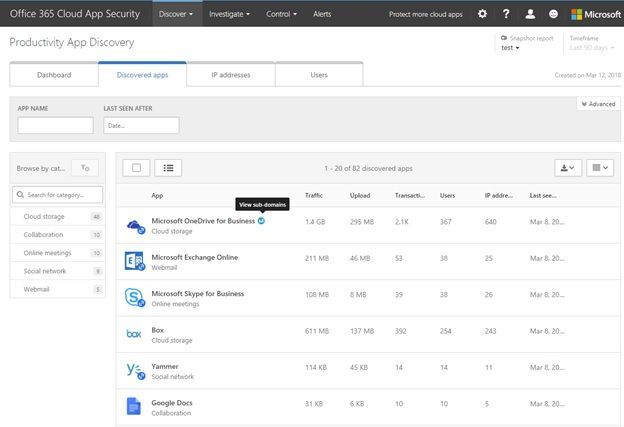 Discovered apps tab in Productivity App Discovery
In the IP Addresses tab, you see the top 100 IPs accessing discovered cloud services. If you want more details on an IP, you can click on it to get a summary of the transactions and traffic along with the details of which apps that IP was accessing, and which users were using the IP.
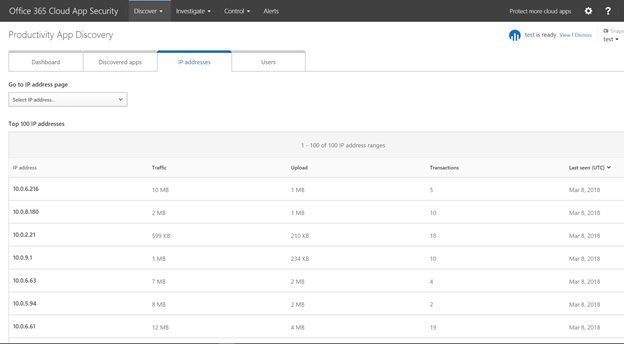 IP addresses tab in Productivity App Discovery
Lastly the Users tab shows you the top 100 users with same details as the IP Addresses tab. Here you can search for a specific user or click their name in the list and pivot the report to see a summary of their cloud services usage along with the specific apps they were using and the IP addresses.
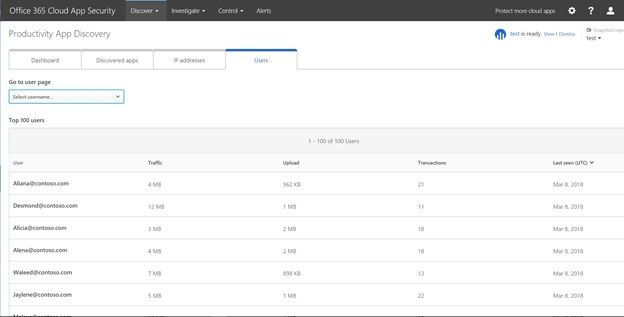 Users tab in Productivity App Discovery
These enhancements are going to make investigating shadow IT and educating users on which cloud services are approved by the organization easier. If you own Office 365 E5 or the standalone SKU for Office 365 Cloud App Security you can check out the new features by logging in at https://portal.cloudappsecurity.com. To learn more about the new features check out the support article here. As always please reach out in the comments if you have questions, comments, or visit the uservoice site to suggest a feature made available in Office 365 Cloud App Security.







