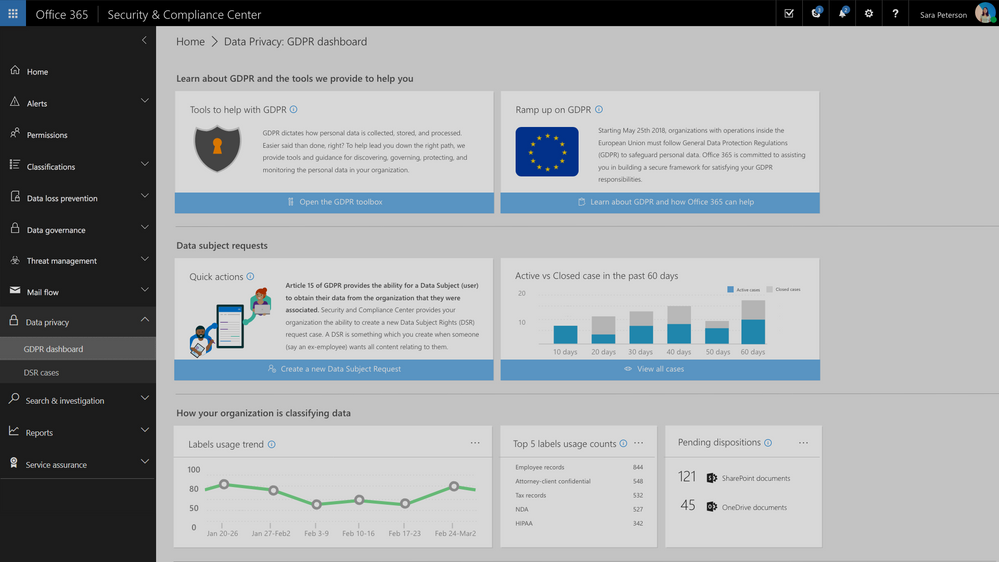
Update: The Data Privacy tab, GDPR dashboard and Data Subject Requests for Office 365 content are now generally available to Office 365 commercial customers in the Security and Compliance center.
One of the core requirements of the GDPR is that organizations have a process to respond to Data Subject Requests from individuals in the EU for access to their data. As part of Microsoft’s commitment to helping customers on their journey to GDPR, today we are announcing preview of the new Data Subject Requests experience is enabled within the Microsoft 365 Security & Compliance Center.
To handle GDPR related tasks for your Office 365 data and content, access to the Data Privacy tab within the Security & Compliance Center is now available in preview. This new Data Privacy tab will provide information to help you on your GDPR journey, and provide the ability to create, manage and complete data subject requests for content in Office 365.
This new experience will help to manage the process and execution of data subject requests for data within the Office 365 core apps and services including Exchange, SharePoint and OneDrive, Office 365 Groups, Skype for Business, and now Teams.
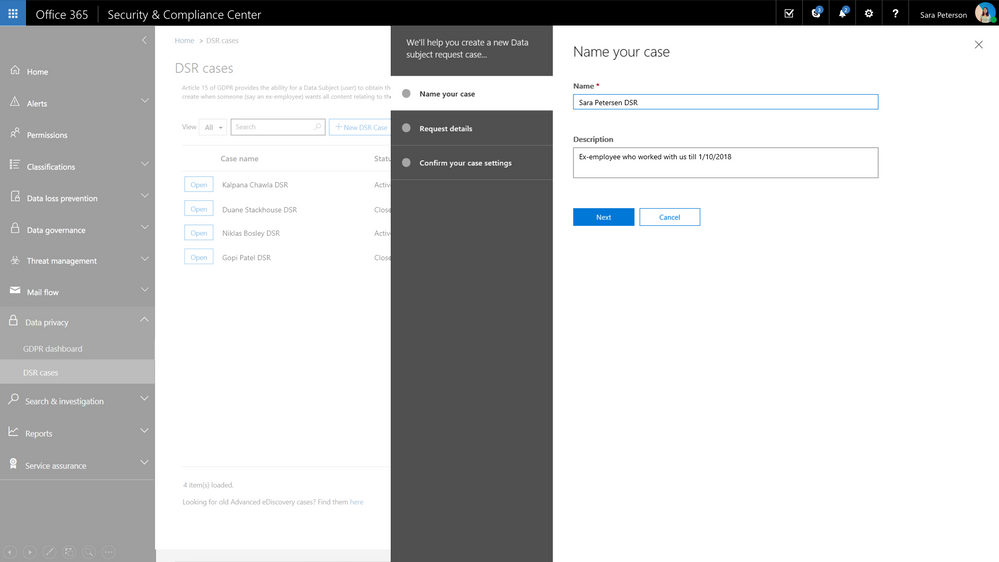
Request creation for each Data Subject Request is completed via a simple module that allows you to identify the request name or unique identifier, identify the related data subject e.g. the person submitting the request, and add that new request to the queue or requests that you may be managing.
Once the request has been created, search for relevant content within your Office 365 environment. Select locations, specific content types and additional filters to refine your search to return only the content related to your specific request. In many cases, an employee will want to know what personally identifiable information their employer has on them and with content search you can refine your search to just look for PII rather than all data related to the requestor. Once search is complete, you now have option to export the related content for further review, processing or transport to the requestor. We provide several options for export to enable your work flow and processes. Once export is complete, the request status is updated.
Check out the video to see how this will work.
Update: The Data Privacy tab, GDPR dashboard and Data Subject Requests for Office 365 content are now generally available to Office 365 commercial customers in the Security and Compliance center.
One of the core requirements of the GDPR is that organizations have a process to respond to Data Subject Requests from individuals in the EU for access to their data. As part of Microsoft’s commitment to helping customers on their journey to GDPR, today we are announcing preview of the new Data Subject Requests experience is enabled within the Microsoft 365 Security & Compliance Center.
To handle GDPR related tasks for your Office 365 data and content, access to the Data Privacy tab within the Security & Compliance Center is now available in preview. This new Data Privacy tab will provide information to help you on your GDPR journey, and provide the ability to create, manage and complete data subject requests for content in Office 365.
This new experience will help to manage the process and execution of data subject requests for data within the Office 365 core apps and services including Exchange, SharePoint and OneDrive, Office 365 Groups, Skype for Business, and now Teams.
Request creation for each Data Subject Request is completed via a simple module that allows you to identify the request name or unique identifier, identify the related data subject e.g. the person submitting the request, and add that new request to the queue or requests that you may be managing.
Once the request has been created, search for relevant content within your Office 365 environment. Select locations, specific content types and additional filters to refine your search to return only the content related to your specific request. In many cases, an employee will want to know what personally identifiable information their employer has on them and with content search you can refine your search to just look for PII rather than all data related to the requestor. Once search is complete, you now have option to export the related content for further review, processing or transport to the requestor. We provide several options for export to enable your work flow and processes. Once export is complete, the request status is updated.
Check out the video to see how this will work.
Microsoft 365 partnered with the American Association of Inside Sales to bring sales end-users content focused on key priorities for sales professionals.
Getting Organized with Outlook
Spend less time drowning in administrative tasks and focus on what’s important: building relationships with your customers, garnering insights, and delivering superior client services. Learn how you can spend more time on selling using Outlook effectively.
Enable Seamless Collaboration with SharePoint
The partnership between marketing and sales is essential. Learn how you can ensure you always have the most up to date content from marketing using SharePoint.
Draw Insights Across Your Organization with Yammer
Learn how to leverage the power of your co-workers: they have worked in similar industries, have similar customers and comparable challenges. Reach across your organization, to find best practices and experts using Yammer.
Strengthen Customer Relationships with Microsoft Teams
Don’t just become an email address for your customer. Create a connection using video calls in Microsoft Teams.
Optimize Sales Performance with PowerBI
Learn how to leverage data visualization to uncover industry and customer insights. You will make smarter business decisions using powerful analytical capabilities within PowerBI.
Discover content to empower effortless sales achievements in the Sales Innovation Hub: https://www.aa-isp.org/sales-innovation-hub
Today we are announcing an upcoming change to Office that blocks activation of Flash, Shockwave and Silverlight controls within Office.
We are taking this step based on the following factors:
- Use of some these controls in exploit campaigns to target end users of Office.
- Low observed use of these controls within Office.
- Upcoming end of support for some these components
- On July 2017, Adobe announced that Flash will no longer be supported after 2020. Major browsers including Edge, Chrome, Safari and Firefox have announced their respective roadmaps for ending support for Flash.
- Silverlight is expected to reach end of support in 2021 with support for several browsers and OS platforms already ended in 2016.
Note: This change only applies to Office 365 subscription clients. It will not apply to Office 2016, Office 2013 or Office 2010.
Customers who wish to enforce this behavior now in Office 365 subscription clients or in Office 2016 perpetual and down level versions can use the guidance published here to block controls targeted by this change.
Furthermore, customers can also take advantage of the recently published Security Baseline for Office 2016 that includes a custom Group Policy that blocks Flash.
What does this update block?
This change blocks the activation of the following controls within the Office process.
|
Control
|
CLSID
|
|
Flash
|
D27CDB6E-AE6D-11CF-96B8-444553540000
D27CDB70-AE6D-11CF-96B8-444553540000
|
|
Shockwave
|
233C1507-6A77-46A4-9443-F871F945D258
|
|
Silverlight
|
DFEAF541-F3E1-4c24-ACAC-99C30715084A
|
Some examples of scenarios that would be impacted by this change are:
- Controls directly embedded in an Office document, for example, Flash video directly embedded within a PowerPoint document using the Insert Object functionality
- Controls invoked by extensibility components within the Office process, for example, Power View add-in that uses Silverlight
Note: this change does not cover scenarios where these controls are activated outside the Office process, for example, a Flash video inserted into a document via the Insert Online Video functionality.
When would this block take effect?
This change only applies to Office 365 subscription clients and is targeted to take effect in the following order
- Controls are blocked in Office 365 Monthly Channel starting in June 2018.
- Controls are blocked in Office 365 Semi Annual Targeted (SAT) Channel starting in September 2018.
- Controls are blocked in Office 365 Semi Annual (SA) Channel starting in January 2019.
Can I unblock these controls if I need to?
Yes. While we are confident that this will not impact most Office users, we do understand there is potential to impact some of our users and we apologize for the inconvenience caused as a result.
Please refer to support guidance published here if you need to unblock controls critical to your workflow.
In closing, we believe this is another step forward in elevating the security of Office. One that protects our users from malicious attacks without disrupting day to day productivity for most of them.
Today we are announcing an upcoming change to Office that blocks activation of Flash, Shockwave and Silverlight controls within Office.
We are taking this step based on the following factors:
- Use of some these controls in exploit campaigns to target end users of Office.
- Low observed use of these controls within Office.
- Upcoming end of support for some these components
- On July 2017, Adobe announced that Flash will no longer be supported after 2020. Major browsers including Edge, Chrome, Safari and Firefox have announced their respective roadmaps for ending support for Flash.
- Silverlight is expected to reach end of support in 2021 with support for several browsers and OS platforms already ended in 2016.
Note: This change only applies to Office 365 subscription clients. It will not apply to Office 2016, Office 2013 or Office 2010.
Customers who wish to enforce this behavior now in Office 365 subscription clients or in Office 2016 perpetual and down level versions can use the guidance published here to block controls targeted by this change.
Furthermore, customers can also take advantage of the recently published Security Baseline for Office 2016 that includes a custom Group Policy that blocks Flash.
What does this update block?
This change blocks the activation of the following controls within the Office process.
|
Control
|
CLSID
|
|
Flash
|
D27CDB6E-AE6D-11CF-96B8-444553540000
D27CDB70-AE6D-11CF-96B8-444553540000
|
|
Shockwave
|
233C1507-6A77-46A4-9443-F871F945D258
|
|
Silverlight
|
DFEAF541-F3E1-4c24-ACAC-99C30715084A
|
Some examples of scenarios that would be impacted by this change are:
- Controls directly embedded in an Office document, for example, Flash video directly embedded within a PowerPoint document using the Insert Object functionality
- Controls invoked by extensibility components within the Office process, for example, Power View add-in that uses Silverlight
Note: this change does not cover scenarios where these controls are activated outside the Office process, for example, a Flash video inserted into a document via the Insert Online Video functionality.
When would this block take effect?
This change only applies to Office 365 subscription clients and is targeted to take effect in the following order
- Controls are blocked in Office 365 Monthly Channel starting in June 2018.
- Controls are blocked in Office 365 Semi Annual Targeted (SAT) Channel starting in September 2018.
- Controls are blocked in Office 365 Semi Annual (SA) Channel starting in January 2019.
Can I unblock these controls if I need to?
Yes. While we are confident that this will not impact most Office users, we do understand there is potential to impact some of our users and we apologize for the inconvenience caused as a result.
Please refer to support guidance published here if you need to unblock controls critical to your workflow.
In closing, we believe this is another step forward in elevating the security of Office. One that protects our users from malicious attacks without disrupting day to day productivity for most of them.







