Announcing Partner Center to certify and publish Power Platform Copilot connectors and plugins
Announcing Partner Center to certify and publish Power Platform Copilot connectors and plugins

Announcing Partner Center to certify and publish Power Platform Copilot connectors and plugins
Power Automate for desktop comes with new great additions in 2024 April’s release, including UI elements collections, Copilot for flow descriptions, multiple new actions in several modules, and more!
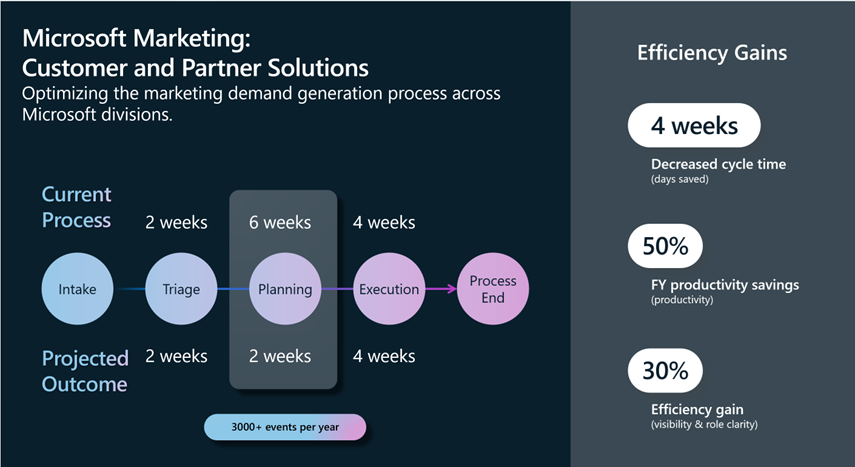
In the fast-paced world of marketing and sales, efficiency and agility are key. That’s why the Microsoft Customer and Partner Solutions (MCAPS) organization has embarked on an exciting journey to better understand internal processes by monitoring them, uncovering inefficiencies, and optimizing them to excellence. The threefold approach using combined capabilities of Power Automate, Process Mining and Copilot have become a staple, internally.
The Power Automate Process Mining solution helps the organization get the full lifecycle visibility into their processes, understand the inefficiencies and targeted improvements to drive via process alignments and automation. Microsoft’s Process Mining offering is easy to use with powerful features including rework detectors, root cause analysis, custom reporting, and seamless integration and automation. The power of Copilot and general ease of use of the platform allow the team to not only scale across all of its processes quickly, but also augments the products owner toolkit to drive process optimization as a critical lever for accelerating digital transformation.
Given the large coverage of the customer base, Marketing execution is inherently complex, involving multiple roles and activities. By focusing on the demand generation process step, the MCAPS team was able to delve into the nested processes and uncover areas for improvement.
By utilizing Power Automate Process Mining, the team gathered event log data, transformed it using Power Query, and completed data attribution. The resulting process map was then analyzed with the help of Copilot, which provided insights and identified bottlenecks that could be addressed through automation.
The analysis revealed that the average duration of this process component was ~60 days, with five different variants spanning across 33 activities. Notably, 20% of the cases required rework activities, indicating a significant area for potential optimization. Roles such as event lead marketing Operations and Integrated Marketing Manager were found to be the most involved in the process, contributing to 80% of the executional activities. By zooming in on individual activities, the team discovered that the intake for content creation averaged 8 days to complete, accounting for about 10% of the total time spent in the process.
With the insights provided by Copilot, the team identified the review loop as the longest-running activity and a major bottleneck. But Copilot didn’t stop there; it went a step further by leveraging Power Automate to automate the process steps, providing improvement suggestions along the way.
The team chose to create digital process flows, and Copilot seamlessly handed it off to Power Automate with a prompt to build the automation. As the flows were built out, Power Automate Copilot continued to refine then until they were ready to be published.
Through iterative process mining and the acceleration provided by Copilot’s automation recommendations, the team projects an outcome of reducing the timeline from 12 weeks to 8 weeks.
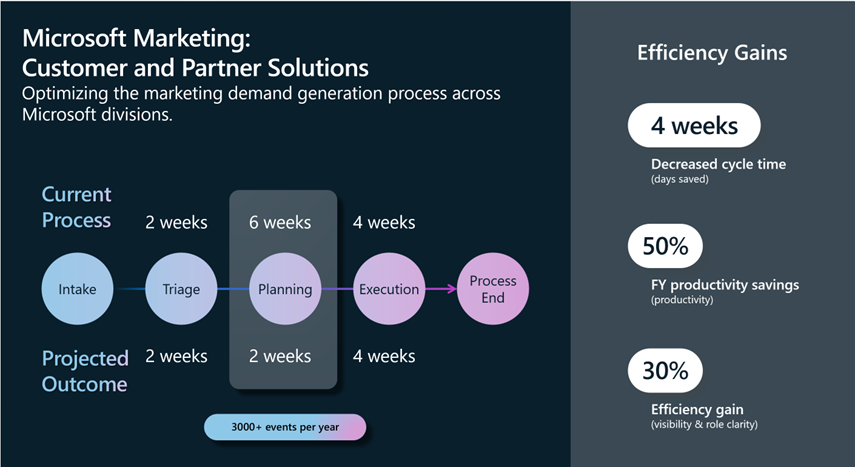
“With the recommendations using Power Automate with Process Mining, we project accelerated time in our demand generation process from twelve to eight weeks. Copilot has given us a lot of confidence as it allows us to scale process simplification as the tip of the spear for our digital transformation!”, says Sandeep Bhanot, Corporate Vice President within Microsoft Customer & Partner Solutions.
This case study is just one example that showcases the power of AI in transforming organizational processes. Within Microsoft Customer and Partner Solutions organization, process mining is being scaled to all business-critical sales processes to realize accelerated efficiencies through process simplification, improved seller productivity, increased compliance and accelerated time to value for Microsoft and our Customers. The team is projecting at least $20 million+ labor productivity improvement across these process areas.
By embracing Process Mining with AI-powered Copilots, businesses can achieve greater efficiency and agility, paving the way for innovation and success.
The post Transforming digital processes with AI: A Power Automate Process Mining Case Study at Microsoft Customer and Partner Solutions (MCAPS) appeared first on Microsoft Power Platform Blog.
How can businesses streamline their processes and optimize their performance with process mining? Microsoft Customer and Partner Solutions organization has been using Power Automate Process Mining with Copilot to analyze, improve, and monitor their sales processes. The results have been impressive for their marketing demand generation process. Read on to learn how they did it, and how you can benefit from Power Automate Process Mining too.
The enterprise journey toward operational excellence is ongoing, and the adoption of hyperautomation has become a pivotal milestone. Microsoft Power Platform stands at the forefront of this movement, offering a suite of tools that transform the way businesses approach digital transformation at scale – and Microsoft Power Automate is a key accelerator.
Imagine a world where every repetitive task, every mundane process, and every time-consuming operation is transformed into a symphony of automated actions, working in perfect harmony to deliver results at lightning speed. This isn’t just a fantasy; it’s a reality that Power Automate can bring, and it’s revolutionizing the way enterprises operate on a global scale.
Below you will learn about a comprehensive scenario with a Center of Excellence (CoE) team, using many of the capabilities in Power Automate, such as Microsoft Copilot, process mining, digital and robotic process automation (RPA), AI models, and more across Power Platform.
Watch the following overview video or continue reading for more details!
Take, for example, a large insurance company bogged down by the weight of its claims process. With the magic of Copilot and process mining in Power Automate, data is ingested from Microsoft Azure Data Lake. The data is analyzed, insights are provided, bottlenecks are identified, and recommendations from Copilot to create an app or automation moves you to action.
Watch the video below to go deeper or continue reading!
But why stop there? Power Automate doesn’t just automate; it hyperautomates. It takes the data from process mining and help crafts a late payment prediction AI model that can foresee issues before they arise. This predictive prowess is akin to having foresight, enabling better decision-making and resource allocation that can save time and money.
Watch the video below to go deeper or continue reading!
And let’s not forget the settlement approval process, often a maze of documentation, is now simplified with task mining. Power Automate, with its task mining capabilities, records each step and transforms them into a process map that’s as clear as day. It then guides the creation of an automation that uses AI, RPA, and API-based automation together to connect data to SAP.
Watch the video below to go deeper or continue reading!
Now we move from proof of concept (POC) to enterprise-wide deployment, where IT is empowered with robust Application Lifecycle Management (ALM) that extends across Power Platform. With custom dashboards, automation, apps, and more you can visually track and act on the transformative impact of hyperautomation.
Watch the video below to go deeper or continue reading!
Hyperautomation with Power Automate is not just about adopting new technology; it’s about embracing a future where efficiency and productivity are paramount. Let’s embark on this journey together, leveraging the power of hyperautomation to achieve a new standard of excellence.
The post Hyperautomation: Unleashing enterprise efficiency with Microsoft Power Automate appeared first on Microsoft Power Platform Blog.
The enterprise journey toward operational excellence is ongoing, and the adoption of hyperautomation has become a pivotal milestone. Microsoft Power Platform stands at the forefront of this movement, offering a suite of tools that transform the way businesses approach digital transformation at scale – and Microsoft Power Automate is a key accelerator.
Introducing a new data governance feature for desktop flows that allows administrators to control when desktop flow run action logs are captured or disable them completely
Power Automate for desktop comes with new additions in 2024 March’s release, including new functionalities for Power Fx enabled desktop flows, a new Excel action, and more.
General availability of auto-claim for Power Automate licenses, a feature that simplifies license management for admins and enhances the user experience.
Power Automate for desktop’s March release includes major updates for Power Fx enabled desktop flows (preview). IntelliSense capabilities, a revamped variable picker and a dedicated function picker assist makers in creating complex functions with minimal effort.
Microsoft Loop is a powerful productivity tool that enables collaborative work and flexible information organization. It provides teams with a shared workspace where they can create and collaborate on content such as notes, tasks, and files. Loop integrates seamlessly with Microsoft Power Automate, allowing users to automate repetitive tasks. By creating rules, you can trigger specific actions based on conditions, saving time and effort. For instance, you can set up a rule to send an email notification to your team whenever a new task is added to a project table in Loop. Overall, Loop enhances teamwork and streamlines communication by combining a shared workspace with automated workflows.
Power Automate for desktop comes with new additions in 2024 February’s release, including the Picture-in-Picture run mode.
We’re thrilled to share that AI Builder’s latest capabilities, which include automated custom invoice processing and the extraction of dates and numerical field types from documents, are officially available. These enhancements aim to streamline the configuration of bespoke AI models for automated data extraction from invoices and to enhance the precision of processing both structured and unstructured documents.
Power Automate for desktop comes with new additions in 2023 January’s release, including AI-suggested actions, the support of blank values, single sign-on and multiple new actions including Word dedicated ones.
Discover three new Power Automate templates that help you focus on your critical tasks and save time.
This is a post about the general availability of Process Mining in GCC.
We are excited to announce that GPT Prompts with Prompt Builder, a new feature of AI Builder, is now generally available! GPT Prompts are powerful tools that enable you to add Generative AI capabilities to your automated workflows.
Power Automate for desktop comes with new additions in 2023 December’s release, including the support of input variables to a run URL and the introduction of Power Fx to desktop flows.
Credential management is new feature that allows customers to create windows credentials using Azure Key vault secrets and use them in desktop flow connections.
Streamline your organization’s approval processes with the Approvals Kit – a no-code, ready-made kit built on top of Power Platform components. With over 20 cloud flows and a Power Apps app, the Approvals Kit offers sophisticated approvals such as conditional branching, delegation, admin overrides, and more. And the best part? You can configure all of this without writing a single line of code. Try the Approvals Kit now and see how it can empower every person in your organization to ‘do more with less’ for your approval needs.







