Security and IT teams move fast – and so does Security Copilot. This month, we’re delivering powerful new capabilities that help security and IT professionals investigate threats, manage identities, and automate protection with greater speed and precision. From AI-powered triage and policy optimization to smarter data exploration and expanded language support, these updates are designed to help you stay ahead of threats, reduce manual effort, and unlock new levels of efficiency.
Let’s dive into what’s new.
Improve IT efficiency with Copilot in Microsoft Intune – now generally available
IT admins can now use Security Copilot in Intune which includes a dedicated data exploration experience, allowing them to ask questions, extract insights, and take action – all from within the Intune admin center. Whether it’s identifying non-compliant devices, managing updates, or automating remediation, Copilot simplifies complex workflows and brings data and actions together in one place. Learn more: Copilot in Microsoft Intune announcement
Streamline identity security with Copilot in Microsoft Entra – now generally available
Security Copilot in Microsoft Entra now brings AI-assisted investigation and identity management directly into the Entra admin center. Admins can ask natural language questions to troubleshoot sign-ins, review access, monitor tenant health, and analyze role assignments – without writing queries or switching tools. With expanded coverage and improved performance, Copilot helps teams move faster, close gaps, and stay ahead of threats. Learn more: Copilot in Microsoft Entra announcement
Close gaps quickly with the Conditional Access Optimization Agent – now generally available
The Conditional Access Optimization Agent in Microsoft Entra brings AI-powered automation to identity workflows. The agent runs autonomously to detect gaps, overlaps, and outdated policy assignments – then recommends precise, one-click remediations to close them fast.
Key benefits include:
Autonomous protection: Automatically identifies users and apps not covered by policies
Explainable decisions: Plain-language summaries and visual activity maps
Custom adaptability: Learns from natural-language feedback and supports business rules
Full auditability: All actions logged for compliance and transparency
As one security leader put it:
“The Conditional Access Optimization Agent is like having a security analyst on call 24/7. It proactively identifies gaps in our Conditional Access policies and ensures every user is protected from day one… It’s a secure path to innovation that every chief information security officer can trust.” —Julian Rasmussen, Senior Consultant and Partner, Point Taken, Microsoft MVP Learn more: Conditional Access Optimization Agent in Microsoft Entra GA announcement
Investigate phishing alerts faster with the new Phishing Triage Agent in Microsoft Defender
The Phishing Triage Agent in Microsoft Defender is now in public preview, bringing autonomous, AI-powered threat detection to your SOC workflows. Powered by large language models, the agent performs deep semantic analysis of emails, URLs, and files to determine whether a submission is a phishing threat or a false alarm – without relying on static rules.
It learns from analyst feedback, adapts to your organization’s patterns, and provides clear, natural language explanations for every verdict. A visual decision map shows exactly how the agent reached its conclusion, making the process fully transparent and reviewable.
The Threat Intelligence Briefing Agent is now in Public Preview: Build organization-specific briefings in just minutes
The Threat Intelligence Briefing Agent has entered public preview in the Security Copilot standalone experience, transforming how security teams stay ahead of emerging threats. With this powerful agent, creating highly relevant, organization-specific threat intelligence briefings now takes minutes rather than hours or days, empowering teams to act with speed and confidence. Through real-time dynamic reasoning, the agent surfaces the most relevant threat intelligence based on attributes such as the organization’s industry, geographic location, and unique attack surface to deliver critical context and invaluable situational awareness.
Streamline operations with workspace-level management
Security Copilot now supports workspaces, giving organizations a flexible way to segment environments by team, region, or business unit. With workspaces now in public preview, admins can align access, data boundaries, and SCU capacity with operational and compliance needs. Each workspace supports role-based access control, localized prompt history, and independent capacity planning – making it easier to manage complex, distributed security and IT operations.
As part of this model, workspace-level plugin management is now generally available, allowing admins to configure plugin settings at the workspace or organization level. This eliminates the need for per-user setup and improves efficiency across large environments.
Plan smarter with the new Security Copilot Capacity Calculator
The Security Copilot Capacity Calculator is now available in the standalone experience (Azure account required), helping teams estimate how many SCUs they may need. Security Copilot supports:
Provisioned SCUs for predictable workloads
Overage SCUs to scale with variable workloads
Teams can estimate initial capacity using the capacity calculator, monitor usage in the in-product usage dashboard, and adjust their SCU allocation as needed. Learn more about Security Copilot pricing here.
Automate Entra workflows with embedded NL2API skill
Security Copilot can now reason over Microsoft Graph APIs to answer complex, multi-stage questions across Entra resources. This embedded experience in Entra, powered by the NL2API skill, is now generally available – bringing advanced automation and intelligence directly into your Entra workflows.
Get faster suggestions with dynamic suggested prompts for Entra skills
Dynamic suggested prompts are now generally available for Entra skills, offering faster and more deterministic follow-up suggestions using direct skill invocation – bypassing the orchestrator for improved performance.
Meet compliance needs with FedRAMP High authorization for Security Copilot
Security Copilot is now included within the Federal Risk and Authorization Management Program (FedRAMP) High Authorization for Azure Commercial. This Provisional Authorization to Operate (P-ATO) within the existing FedRAMP High Azure Commercial environment was approved by the FedRAMP Joint Authorization Board (JAB). This milestone marks a significant step forward in our mission to bring Microsoft Security Copilot’s cutting-edge AI-powered security capabilities to our Government Community Cloud (GCC) customers. Stay tuned for updates on when Security Copilot will be fully available for GCC customers.
Expand global reach with Korean language and Swiss data residency
Additionally, customers in Switzerland can now benefit from Swiss region data residency, ensuring Security Copilot data is stored within Swiss boundaries to meet local compliance requirements.
Improve accuracy and scale with GPT-4.1 and large output support
We’ve upgraded Security Copilot to support GPT-4.1 across all experiences at the evaluation level, offering larger context windows, improved interactions, and up to 50% accuracy improvements in some scenarios.
Also now generally available is large output support, which removes the previous 2MB limit for data used in LLMs – giving teams more flexibility when working with large datasets.
Audit agent changes with Purview UAL integration
Agent administration auditing is now generally available in Microsoft Purview Unified Audit Log, allowing teams to trace agent creation, updates, and deletions with detailed metadata for improved visibility and compliance.
Security Copilot is transforming how security and IT teams operate – bringing AI-powered insights, automation, and decision support into everyday workflows. With new capabilities landing every month, the pace of innovation is accelerating.
We’ll be back in September with more updates. Until then, explore these resources to get hands-on, deepen your understanding, and see what’s possible:
Don’t miss Microsoft Secure digital event on September 30th – we’ll be announcing exciting new capabilities for Security Copilot and sharing what’s next in AI-powered security. Register now to be the first to hear the announcements and see what’s coming.
Ever had a critical app crash at the worst possible moment, or a vital flow suddenly stop sending emails? With Monitor, you don’t have to wait for end-users to complain. Now generally available and enabled by default, no setup required, Monitor gives makers and admins real-time visibility, powerful metrics, and actionable recommendations to keep apps and automations running smoothly. From canvas and model-driven apps to cloud and desktop flows, Monitor helps you identify issues early, understand root causes, and optimize performance proactively—all from a single, integrated experience.
Power Platform Monitor enables operational insights for administratorsacross environments
Power Apps Monitor empowers makers with operational insights into the apps that they own or co-author
Monitor is available in the Power Platform admin center and in Power Apps at make.powerapps.com. This is a must-have business tool that will empower makers and administrators with deeper visibility into the operational health of their business-critical apps and automations.
Visibility that scales with your role
Monitor is designed to meet the needs of makers, Center of Excellence teams, Operations teams, and administrators. Makers can now access performance and health insights for the apps they own or co-author directly in make.powerapps.com. Additionally, people with administrative and governance responsibilities can use Monitor in the Power Platform admin center to monitor resources, enabling cross-tenant oversight.
This dual-surface approach ensures that everyone, from individual app builders to Center of Excellence teams, can identify issues faster, understand root causes, and take informed action.
What’s included
Monitor supports operational health metrics and recommendations for:
Canvas apps – available in both Power Apps and Power Platform Monitor
Model-driven apps – available in both surfaces
Cloud flows – available in Power Platform Monitor
Desktop flows – available in Power Platform Monitor
These insights go beyond raw telemetry. Monitor surfaces contextual recommendations, such as optimizing Power FX code to improve load time in canvas apps or identifying bottlenecks in flow execution, so you can improve performance and reliability without guesswork. We’re also excited to introduce configurable alerts, coming soon! These alerts will proactively monitor the health of your resources and notify you when the performance dips, so you can take action before issues escalate.
Built for action, not just observation
Monitor isn’t just about dashboards, it’s about driving outcomes. With this release, you can:
Quickly identify underperforming resources
Understand the impact of issues on users and business processes
Take guided steps to resolve problems before they escalate
And because Monitor is integrated into the tools you already use, there’s no need to switch contexts or learn a new interface.
Available now & no setup required
Monitor is now generally available and enabled by default. No configuration is needed to get started. Simply head to:
Last year, we launched Microsoft Security Copilot with a bold goal: to help organizations protect at the speed of AI. Since then, Security Copilot has been transforming how IT and security operations teams respond to threats and manage their environments. In fact, research from live operations indicates that Security Copilot users have seen impact like a 30% reduction in mean time to resolution for SOC teams, and a 54% decrease in time to resolve a device policy conflict for IT teams.
As adoption has grown, so has the complexity of customer needs. In many organizations, different teams, business units, and regions require distinct approaches to data access, capacity planning, and tooling. At the same time, customers want the flexibility to start small, test scenarios, and scale usage over time, without committing to long-term contracts.
To meet these needs, Security Copilot is offered as a consumptive solution, allowing organizations to provision Security Compute Units (SCUs) as needed. This flexible model lowers the barrier to entry and encourages experimentation. And now, with workspaces and the Security Copilot capacity calculator to help manage capacity, customers can adopt Security Copilot with even more confidence and control.
Workspaces
Security operations don’t happen in a vacuum – different teams, business units, and regions have unique operational needs. This is why we’re excited to launch workspaces in public preview – a major enhancement to how teams can manage access, resources, and collaboration within Security Copilot. Workspaces provide a flexible way to segment environments, making it easier to align access and capacity with organizational needs, legal structures, or compliance requirements.
Let’s take the example of a multinational organization with separate security and IT teams in North America, Europe, and Asia. With workspaces, this company can realize benefits in:
Data boundaries:Each regional team operates within its own dedicated workspace, keeping data like prompt history local and accessible only to that team. This isolation ensures information stays relevant to the team and supports compliance with regional data residency requirements and internal policies.
Role-based access control:Only authorized users specified by the admin have access to each workspace, and workspace management is restricted to users with administrator roles.
Capacity planning: SCUs can be provisioned per workspace, giving admins the ability to right-size capacity based on each team’s workload. APAC can scale up during a surge while the US conserves usage during a quiet period.
Note: multi-workspace support is now available in Security Copilot, enabling users to manage prompt sessions across multiple workspaces. However, available agents that run autonomously are currently limited to a single workspace, and embedded experiences continue to route traffic exclusively through the tenant-level default workspace. Please refer to the documentation for full details.
Security Copilot capacity calculator
One of the most common questions we hear from customers is: “How many SCUs do I need to get started with Security Copilot?” Given the dynamic nature of AI-powered security workflows, forecasting compute needs can be a challenge, especially for teams just starting their journey. To make planning easier, we’re excited to announce the launch of the Security Copilot capacitycalculator, now available in the Security Copilot standalone experience (Azure account required).
This tool offers a practical starting point to help estimate how many SCUs your organization may require. With a few clicks, customers can get an idea of estimated SCU usage based on inputs like number of users in an embedded Security Copilot experience. While actual consumption may vary as it depends on real-time prompt activity, the calculator serves as a helpful guide for initial provisioning and budget planning.
Once you’ve estimated your baseline needs, you can get started in Security Copilot or in the Azure portal. Security Copilot offers two flexible models to support both predictable workloads and unplanned spikes in usage:
Provisioned SCUs:Ideal for predictable, ongoing operations. A minimum of one provisioned SCU is required.
Overage SCUs: Designed for variable demand. Overage SCUs allow usage to scale seamlessly, and customers only pay for what they use, up to their chosen optional overage limit.
With the capacity calculator, organizations can confidently begin their Security Copilot journey and better manage usage to align with their business needs. After getting started, teams can monitor consumption through the in-product usage dashboard and adjust capacity as demand fluctuates. Learn more about Security Copilot pricing here.
Get Started with Security Copilot today
Together, workspaces and the capacity calculator provide organizations with deeper insight, flexibility, and control over their Security Copilot usage. These features address the real-world challenges of managing diverse teams, complex environments, and evolving workloads. Whether you’re just starting your Security Copilot journey or looking to optimize your existing usage, these tools help you right-size capacity, maintain compliance, and deliver actionable AI assistance for your security and IT teams.
Discover Security Copilot use cases, best practices, and customer success stories in the Security Copilot adoption hub. Learn more about our most recent Security Copilot innovations for IT teams here. If you have questions or need support, don’t hesitate to contact us or reach out to your account manager.
We’re entering the age of AI agents, a transformative moment reshaping the landscape of business applications and platforms. AI agents aren’t just making incremental improvements, they’re helping to redefine productivity and can fundamentally change how work gets done.
Published today, the 2025 release wave 2 for Microsoft Dynamics 365, Microsoft Power Platform, and Copilot offerings introduces new and improved capabilities that help organizations to harness the full potential of this new era. These plans compile new capabilities slated for release between October 2025 and March 2026. Integral to the wave 2 plans, AI assistants and agents not only help humans with day-to-day tasks, but also act as proactive partners to drive better business outcomes. Our upcoming release brings that vision to life, helping to make AI not just accessible but an essential component in daily operations. Whether it’s enabling sellers to close deals faster, providing service teams real-time trusted knowledge, or empowering finance professionals with AI-driven reconciliation and analysis, these enhancements can be transformative to the way we all work.
Be sure to stay updated on the latest features and create your personalized release plan using the release planner.
Highlights from Dynamics 365
The 2025 release wave 2 for Dynamics 365 brings new innovation to transform functions across your business.
Microsoft Dynamics 365 Customer Insights – Data enhances Microsoft Copilot and agents with real-time, unified customer profiles, enabling teams to act on insights within their workflow. With enriched data, seamless platform integration, and faster processing, businesses can deliver timely, personalized experiences that boost engagement and conversions.
Microsoft Dynamics 365 Customer Insights – Journeys empowers businesses to craft personalized, AI-driven customer experiences across all touchpoints. With Copilot, agents, and enhanced orchestration tools, teams can engage the right audiences at scale, streamline lead generation, and accelerate growth.
Microsoft Dynamics 365 Sales brings the power of AI to help sellers achieve their targets and automate busywork. Microsoft Copilot delivers actionable insights in the flow of work, while AI agents research and engage leads, drive purchase intent, and proactively bring key insights and emergent deal risks—helping sellers close more deals faster. A reimagined interface reorients sellers from data to insights. Watch this video to discover the new and enhanced features in this release wave for Dynamics 365 Sales.
Microsoft Dynamics 365 Customer Service continues to enhance agentic and Copilot capabilities for case and knowledge management, as well as AI-driven routing.
Microsoft Dynamics 365 Contact Center continues to enhance agentic and Copilot capabilities to automate the service journey across digital and voice channels, along with the introduction of new omnichannel and supervisor capabilities in the 2025 release wave 2.
Microsoft Dynamics 365 Field Service will deliver AI agents, enhanced scheduling tools, mobile usability improvements, and deeper Microsoft 365 integration in the upcoming release wave. With innovations across inspections, vendor coordination, and connectivity with Microsoft Dynamics 365 Project Operations, Field Service empowers organizations to deliver smarter, faster, and more seamless service at scale.
Microsoft Dynamics 365 Finance brings global-scale finance and agentic operations to our customers, including agents that can lead to faster financial close, and provide additional automation and optimization across large scale operations, as well as enhancements to business performance analytics and planning solutions.
Microsoft Dynamics 365 Supply Chain Management can enhance demand planning with event and promotion forecasting, and help improve quality management for sample handling; and the Supplier Communications Agent will automate vendor interactions. New supplier engagement tools and warehouse app upgrades will also be introduced to further streamline operations and boost efficiency.
Microsoft Dynamics 365 Project Operations will continue to deliver powerful enhancements across the project lifecycle. These include improved mobile and browser experiences for time and expense, better project planning with enterprise custom fields, streamlined billing and invoicing workflows, and expanded support for stocked items, investment projects, and migrations to the modern architecture.
Microsoft Dynamics 365 Human Resources can enhance the hire-to-retire journey with Microsoft Entra ID and Microsoft Viva Connections integration to help reduce duplication. New agentic capabilities will be introduced to streamline onboarding with guided experiences and automation. Recruiter assist will also now support job description generation and interview assistance, helping to improve efficiency across hiring and onboarding.
Microsoft Dynamics 365 Commerce advances in-store experiences by providing a mobile-first point-of-sale that provides business continuity even during a business outage. Improvements to the Adyen payment connector allows modern payments like Pay by Link across channels, offering more purchasing options for omnichannel customers. Additionally, omnichannel unified pricing enables retailers to establish more intricate pricing structures, helping them remain competitive.
Microsoft Dynamics 365 Business Central introduces AI agents to enhance efficiency and automation in the 2025 release wave 2. These agents seamlessly integrate to execute complex tasks, generate reports, automate processes, and optimize order creation using natural language processing. Additionally, this release focuses on quality management, subcontracting, sustainability, and e-document capabilities.
Highlights from Microsoft Power Platform and Microsoft Copilot Studio
2025 release wave 2 updates for Microsoft Power Platform bring new and updated ways for organizations to analyze, act on, and automate data to digitally transform their businesses.
Microsoft Copilot Studio continues its journey to make agent creation and operation even easier and more powerful with autonomous agents in Microsoft 365 Copilot, the ability to build complete teams of agents that work seamlessly together, and improved governance for enterprise scalability. Copilot Studio will offer even deeper integration with Azure AI Foundry and the Microsoft Graph, helping to ensure your agents can use the latest AI technology in coordination with your data in Microsoft Graph. Watch this video to discover how the latest enhancements to Copilot Studio can benefit your business.
Microsoft Power Apps enhances human and agent collaboration with a new agent feed to supervise the work of agents and extensible built-in agents for common tasks like enter, explore, visualize, and summarize data. Bring business problems to Plan Designer and a team of agents will help you build enterprise solutions, including apps, agents, Microsoft Power BI reports, and more. Vibe code with the App Agent to create data-connected experiences—just describe what you need or provide an image, and it can be done.
Microsoft Power Pages enables businesses to build secure, data-driven portals effortlessly. In this wave, we will further expedite site building for low-code makers and pro developers to help build intelligent sites for your employees, customers, and partners. The introduction of enhanced security agent features will further empower low-code makers, pro developers, and admins with actionable insights and abilities for securing their websites.
Microsoft Power Automate is transforming how enterprises automate complex business processes through new human-in-the-loop experiences, such as advanced approvals and AI-native capabilities, such as generative actions and intelligent document processing. To manage complex automations at scale, a comprehensive suite of governance, observability, and security controls will be introduced to the Automation Center and Power Platform admin center.
Microsoft Dataverse continues to serve as a trusted low-code data platform, enabling the creation of scalable agents, Copilot applications, and automations. This update introduces enhancements to core agentic capabilities, including Dataverse for Agents and Dataverse Search to support smarter, AI-ready experiences. New features such as Dataverse Model Context Protocol (MCP) Server and AI-powered business logic tools further expand the ability to build dynamic, intelligent solutions grounded in enterprise data.
Microsoft Power Platformgovernance and administration will become the unified governance hub for managing intelligent agents, agent-driven apps, and automated workflows across the Microsoft ecosystem in this release wave. This will provide a secure, governable, reliable platform for agent development.
Updates to Copilot offerings
Agents for Microsoft 365 Copilot help maximize business impact across sales, service, and finance. Learn more about the 2025 release wave 2 updates for Copilot offerings. Agent updates for sales will help sellers work smarter, engage strategically, and close deals faster. Agent updates for service will expand CRM connectivity and enhance email insights and drafting—all within the tools reps use daily. Updates for finance will offer easily customizable agents that can be launched from familiar tools like Excel, boosting efficiency and insight.
Starting August 4, 2025, customers and partners can validate the latest features in a non-production environment. These updates include user experience enhancements that will be automatically enabled in production environments by October 2025. Take advantage of the early access period to test these updates and effectively plan for your customer rollout. Explore the 2025 release wave 2 early access features for Dynamics 365 and Microsoft Power Platform or visit the early access FAQ page for more information.
For a complete list of new capabilities, please refer to the Dynamics 365 2025 release wave 2 plan, the Microsoft Power Platform 2025 release wave 2 plan, and Copilot offerings 2025 release wave 2. We also encourage you to share your feedback in the community forums for Dynamics 365 and Microsoft Power Platform.
When a security analyst turns to an AI system for help—whether to hunt threats, investigate alerts, or triage incidents—the first step is usually a natural language prompt. But if that prompt is too vague, too general, or not aligned with the system’s capabilities, the response won’t be helpful. In high-stakes environments like cybersecurity, that’s not just a missed opportunity, it’s a risk.
That’s exactly the problem we tackled in our recent paper, Dynamic Context-Aware Prompt Recommendations for Domain-Specific Applications, now published and deployed as a new skill in Security Copilot.
Why Prompting Is a Bigger Problem in Security Than It Seems
LLMs have made impressive progress in general-purpose settings—helping users write emails, summarize documents, or answer trivia. These systems often include smart prompt recommendations based on the flow of conversation. But when you shift into domain-specific systems like Microsoft Security Copilot, the game changes.
Security analysts don’t ask open-ended questions. They ask task-specific ones:
“List devices that ran a malicious file in the last 24 hours.”
“Correlate failed login attempts across services.”
“Visualize outbound traffic from compromised machines.”
These questions map directly to skills—domain-specific functions that query data, connect APIs, or launch workflows. And that means prompt recommendations need to be tightly aligned with the available skills, underlying datasets, and current investigation context. General-purpose prompt systems don’t know how to do that.
What Makes Domain-Specific Prompting Hard
Designing prompt recommendations for systems like Security Copilot comes with unique constraints:
Constrained Skill Set: The AI can only take actions it’s configured to support. Prompts must align with those skills—no hallucinations allowed.
Evolving Context: A single investigation might involve multiple rounds of prompts, results, follow-ups, and pivots. Prompt suggestions must adapt dynamically.
Deep Domain Knowledge: It’s not enough to suggest “Check network logs.” A useful prompt needs to reflect how real analysts work—across Defender, Sentinel, and more.
Scalability: As new skills are added, prompt systems must scale without requiring constant manual curation or rewriting.
Our Approach: Dynamic, Context-Aware, and Skill-Constrained
We introduce a dynamic prompt recommendation system for Security Copilot. The key innovations include:
Contextual understanding of the session: We track the user’s investigation path and surface prompts that are relevant to what they’re doing now, not just generic starters.
Skill-awareness: The system knows what internal capabilities exist (e.g., “list devices,” “query login events”) and only recommends prompts that can be executed via those skills.
Domain knowledge injection: By encoding metadata about products, datasets, and typical workflows (e.g., MITRE attack stages), the system produces prompts that make sense in security analyst workflows.
Scalable prompt generation: Rather than relying on hardcoded lists, our system dynamically generates and ranks prompt suggestions.
What It Looks Like in Action
The dynamic prompt suggestion system is now live in Microsoft Entra, available in both Embedded and Immersive experiences. When a user enters a natural language prompt, the system automatically suggests several context-aware follow-up prompts, based on the user’s prior interactions and the system’s understanding of the current task.
These suggestions are generated in real time—users can simply click on a suggestion, and it’s executed immediately, allowing for quick and seamless follow-up queries without needing to rephrase or retype.
Let’s walk through two examples:
Embedded Experience
We begin with the prompt: “How does Microsoft determine Risky Users?”
The system returns the response and generates 3 follow-up suggestions, such as: “List dismissed risky detections.”
We click on that suggestion, which executes the query and shows the results.
New suggestions continue to appear after each prompt execution, making it easy to explore related insights.
Immersive Experience
We start with a prompt: “Who am I?”
Among the 5 suggested prompts, we select: “List the groups user nase74@woodgrove.ms is a member of.”
The user clicks, the query runs, and more follow-up suggestions appear, enabling a natural, guided flow throughout the session.
Why This Matters for the Future of Security AI
Prompting isn’t just an interface detail—it’s the entry point to intelligence. And in cybersecurity, where time, accuracy, and reliability matter, we need AI systems that are not just capable, but cooperative. Our research contributes to a future where security analysts don’t have to be prompt engineers to get the most out of AI.
By making prompt recommendations dynamic, contextual, and grounded in real domain knowledge, we help close the gap between LLM potential and security reality.
If you’re using or building upon this work in your own research, we’d appreciate you citing our paper:
@article {tang2025dynamic,
title={Dynamic Context-Aware Prompt Recommendation for Domain-Specific AI Applications},
author={Tang, Xinye and Zhai, Haijun and Belwal, Chaitanya and Thayanithi, Vineeth and Baumann, Philip and Roy, Yogesh K},
journal={arXiv preprint arXiv:2506.20815},
year={2025}
}
Long-Term Retention (LTR) is one of data management tools that helps enterprises effectively manage their growing data estates while ensuring compliance with regulatory requirements. By archiving less frequently accessed data, LTR optimizes Dataverse storage usage and reduces costs.
Long-Term Retention (LTR) in Dataverse helps organizations retain data that’s no longer actively used but still required for regulatory or business purposes. Whether it’s for archiving operational records or meeting audit requirements like 5-year retention mandates, LTR ensures data remains secure, immutable, and compliant—at a fraction of the storage cost.
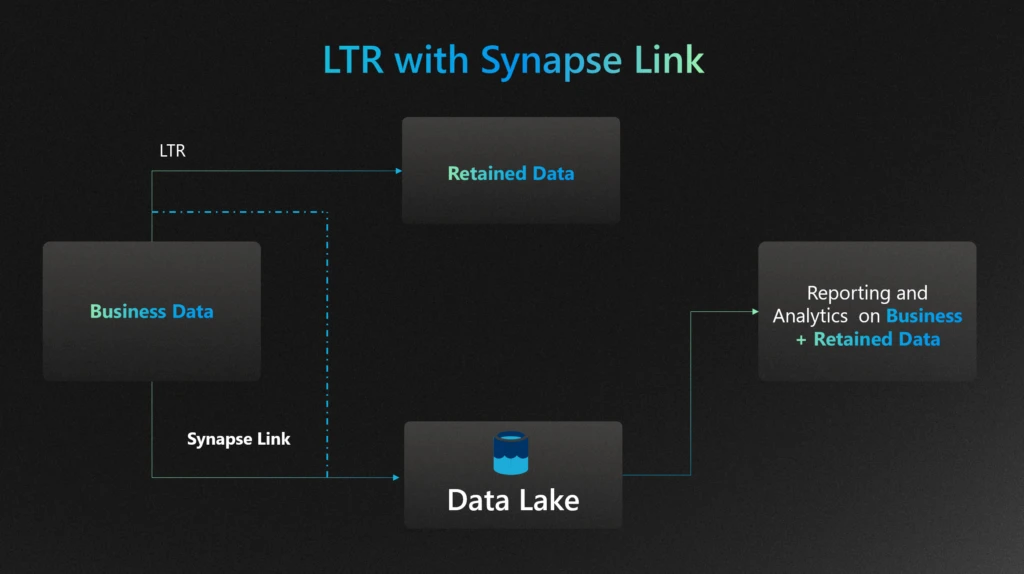
But LTR isn’t just about storage—it’s also built for analytics. Retained data is treated as a first-class citizen in Dataverse, seamlessly integrated into the real-time data warehouse. With Microsoft Fabric’s OneLake Shortcuts, you can analyze both live and archived data without copying or duplicating it. For customers preferring their own data lake, Synapse Link offers a flexible alternative for reporting and analytics on business and retained data.
This blog will focus on how implementing LTR can significantly reduce storage costs for enterprises, providing practical insights and strategies for leveraging LTR to achieve cost efficiency. We will also discuss how you can get deep insights from the retained data.
What is LTR and how can you enable
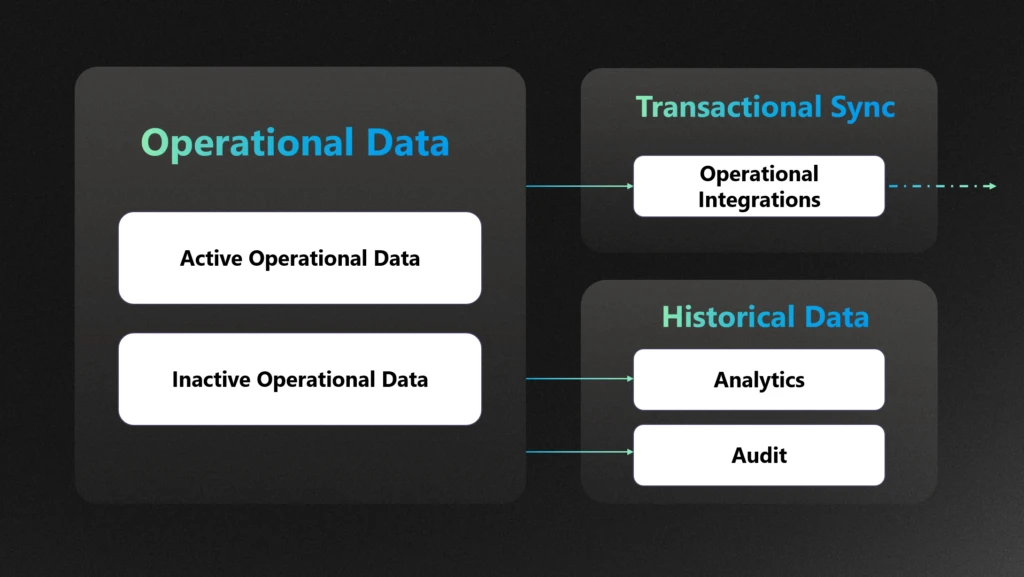
Long-Term Data Retention (LTR) streamlines your data strategy by automatically moving historical records from Microsoft Dataverse and Dynamics 365 Finance & Operations (F&O) into a managed data lake (MDL). This approach ensures efficient, scalable storage—freeing up space in your transactional databases while keeping retained data accessible for analytics and compliance.
Long-Term Retention (LTR) is a powerful tool for managing storage in Dataverse and Dynamics 365 Finance & Operations (F&O), but its value is maximized when applied to the right scenarios. LTR allows organizations to move inactive, compliance-bound, or infrequently accessed data to a cost-optimized, read-only storage tier—freeing up space in the primary database while maintaining access for reporting and audits.
Here’s when LTR is especially relevant:
✅ 1. Compliance-Driven Data Retention
If your organization operates in a regulated industry (e.g., finance, healthcare, public sector), you likely need to retain data for 5–10 years or more. LTR ensures that this data remains immutable and accessible for audits, without bloating your operational database.
Example: Financial records, customer invoices, and customer contracts that must be retained for legal or regulatory reasons.
✅ 2. Analytics on Historical Data
LTR doesn’t mean your data is locked away. Retained data can still be queried for trend analysis, forecasting, and AI workloads—especially when integrated with tools like Azure Synapse Link or OneLake shortcuts. This enables long-term insights without compromising performance.
Example: Analysing 7 years of sales data to forecast seasonal demand patterns.
✅ 3. Data Relevancy and Lifecycle Management
Not all data needs to be live forever. LTR helps you separate high-value, frequently accessed data from historical records that are still important but rarely used. This improves system responsiveness and reduces noise in day-to-day operations.
Example: Archiving closed cases, completed orders, or inactive customer records.
⚠️ What LTR Does Not Do
While LTR reduces your operational storage footprint, it does not reduce the size of your analytics store. If you’re exporting data to Synapse, OneLake, or other analytical platforms, you’ll still need to manage retention and tiering strategies there separately.
Cost savings with LTR
One of the most impactful benefits of implementing Long-Term Retention (LTR) in Dynamics 365 is the significant reduction in storage costs. On average, LTR compresses archived data by up to 80% and in some cases up to 90%, which can translate into substantial savings. For instance, archiving 1,000 GB of database data could reduce storage expenses from $80,000 to $10,000—a game-changer for data-heavy organizations.
Here are a few real-world examples of how customers are reaping the rewards:
🥨 A major American food company leveraged LTR to archive historical data in Finance & Operations (F&O), achieving a 50% reduction in data size and freeing up valuable system resources.
🧥 A global leader in outdoor apparel and equipment adopted LTR as part of a broader data archival strategy. By offloading historical records from core transactional systems, they not only cut storage costs but also improved overall system performance.
🍿 The largest private snack food company in the U.S. reduced their InventTrans table from 1.1 TB to 549 GB using LTR—again, a 50% reduction that directly impacted their bottom line.
A leading enterprise in the finance and operations space, they faced mounting challenges with data volume and storage costs. As part of their digital optimization strategy, they implemented Long-Term Retention (LTR) to offload historical data from their Dynamics 365 Finance & Operations (F&O) environment into a managed data lake—achieving a remarkable storage reduction of over 90%.
Seamless insights with combined data
With Long-Term Retention (LTR), your historical data is securely stored in a Managed Data Lake—keeping storage costs low. But that doesn’t mean you lose visibility.
Thanks to OneLake shortcuts and Synapse Link, you can seamlessly analyze both live and retained data together. This means you get a complete picture of your business—past and present—without sacrificing performance or budget.
Whether you’re running reports, building dashboards, or training models, your insights stay connected, and your costs stay optimized.
We’ll explore further in this blog, how to unlock seamless insights by combining live and retained data using OneLake shortcuts and Synapse Link. These tools allow you to query both retained and real-time data effortlessly—without compromising on performance or cost efficiency.
Strategy to use LTR to manage the storage
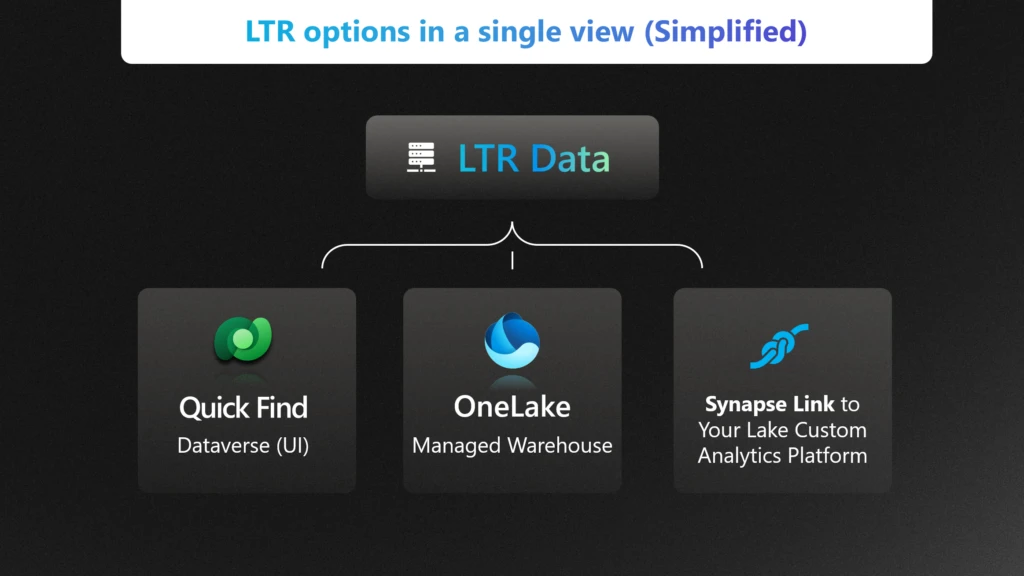
LTR integrates seamlessly with Quick find in the Dataverse, Bring Your Own Lake (BYOL) for Synapse Link and OneLake for both Dataverse and Finance & Operations (F&O) scenarios.
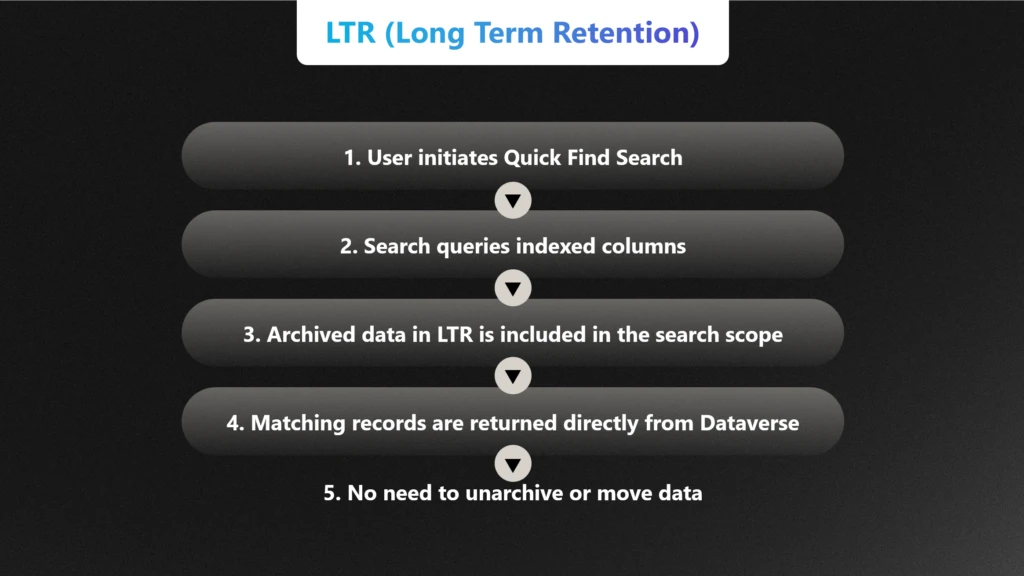
Quick Find: Instantly search archived data directly within Dataverse—no setup required.
OneLake: For integrated analytics using Microsoft Fabric OneLake.
Synapse Link: For syncing retained data to your own data lake for custom analytics and storage.
In this section, we will discuss how each strategy helps manage the storage, cost and meet the compliance requirements.
Quick find
Quick Find allows users to search across Dataverse tables using indexed columns. Even when data is archived via LTR, it remains within the Dataverse boundary and is still queryable through Quick Find—provided the relevant columns are indexed and the data is not purged. This means:
No need to unarchive: Users can locate, and view retained records directly through the familiar Dataverse UI.
No pipeline or duplication required: Unlike analytics scenarios that use OneLake or Synapse Link, Quick Find works natively within Dataverse
Use OneLake shortcut with LTR for Data Warehousing
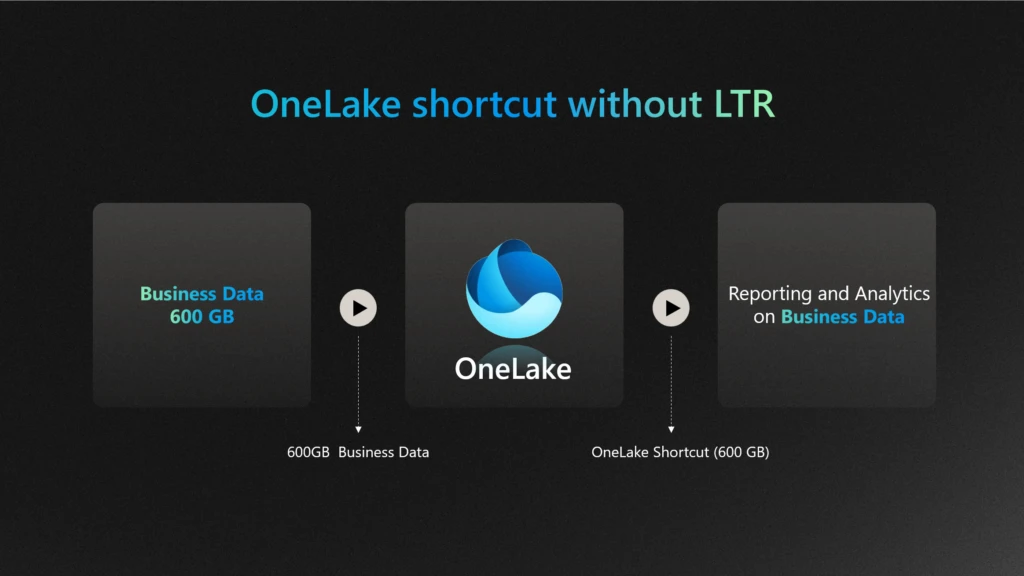
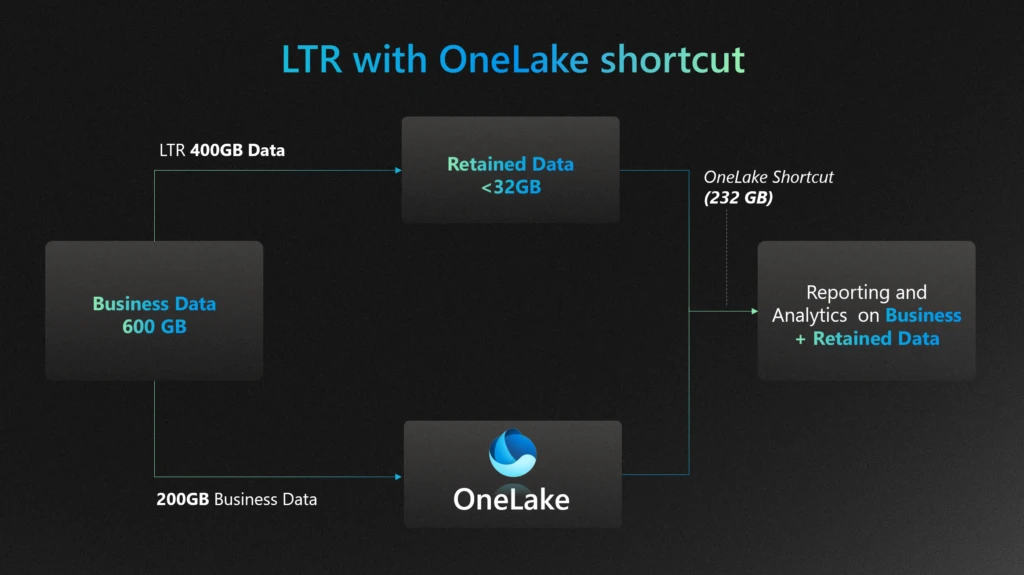
Enterprises adopting new technologies like OneLake shortcut can continue to use Long-Term Retention (LTR) to manage data storage, costs, and compliance by archiving historical data into Managed Lake storage. Archiving data in Managed Lake preserves cost savings for the scenario that involves accessing historical data while allowing enterprises to perform analytics by moving the data out to reporting and analytical databases.
If your enterprise has already invested in OneLake, you can further optimize your data strategy by leveraging OneLake shortcut. Unlike the full OneLake, which syncs data into OneLake, the Shortcut creates a pointer to your data—allowing Fabric to query it in place without duplicating storage or compromising data security.
This means you can continue to run analytics on both live and retained data while preserving the cost benefits of Long-Term Retention (LTR).
📊 In the diagram below, we illustrate how an enterprise can reduce storage costs by up to 80%—for example, compressing a 400GB business data down to less than 32GB using LTR—while still enabling seamless insights without incurring additional costs or compromising data security.
Since no data is physically moved, it also helps preserve LTR savings by avoiding duplication.
Without LTR:
With LTR:
Synapse link works seamlessly with LTR
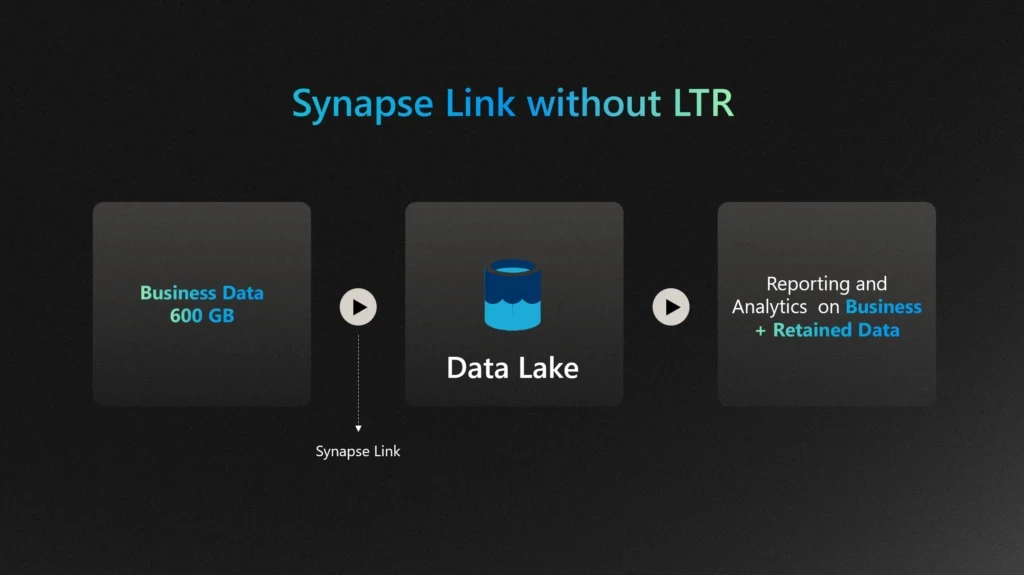
Enterprises that have invested in Bring Your Own Lake (BYOL) with Synapse Link can continue to leverage this setup for their data archival scenarios to manage storage, costs, and compliance. However, note that if the Synapse Link is created after the Long-Term Retention (LTR) process has already occurred, it will not include previously retained data. This approach allows enterprises to utilize LTR with their existing Synapse Link investment.
If your enterprise is already invested in Synapse Link, there’s an opportunity to take your data strategy even further. By pairing it with Long-Term Retention (LTR), you can maintain seamless access to both live and retained data—without duplicating storage or compromising security.
📊 In the diagram below, we illustrate how an enterprise can utilize their existing investment in synapse link while using LTR. For example, business data is retained in Managed Data Lake — while still enabling powerful analytics through Synapse Link, without incurring additional costs. This approach ensures your insights stay rich, your data stays secure, and your budget stays intact.
Without LTR:
With LTR:
Summary of Benefits
Throughout this blog, we have explored how Long-Term Retention (LTR) can significantly reduce storage costs for enterprises. By archiving less frequently accessed data, LTR optimizes storage usage, leading to substantial cost savings. Additionally, LTR ensures compliance with regulatory requirements, making it a crucial strategy for effective data management. Whether using Synapse Link or OneLake, LTR provides a seamless and efficient way to manage data storage and compliance needs.
Call to Action
We encourage you to consider implementing LTR in your organization to take advantage of these benefits. For further assistance or more information on how to get started with LTR, please visit our LTR article. Implementing LTR can help you achieve cost efficiency and compliance, ensuring your data management strategy is both effective and sustainable.
This blog details automating phishing email triage using Azure Logic Apps, Azure Function Apps, and Microsoft Security Copilot. Deployable in under 10 minutes, this solution primarily analyzes email intent without relying on traditional indicators of compromise, accurately classifying benign/junk, suspicious, and phishing emails. Benefits include reducing manual workload, improved threat detection, and (optional) integration seamlessly with Microsoft Sentinel – enabling analysts to see Security Copilot analysis within the incident itself.
Designed for flexibility and control, this Logic App is a customizable solution that can be self-deployed from GitHub. It helps automate phishing response at scale without requiring deep coding expertise, making it ideal for teams that prefer a more configurable approach and want to tailor workflows to their environment. The solution streamlines response and significantly reduces manual effort.
For teams looking for a more sophisticated, fully integrated experience, the Security Copilot Phishing Triage Agent represents the next generation of phishing response. Natively embedded in Microsoft Defender, the agent autonomously triages phishing incidents with minimal setup. It uses advanced LLM-based reasoning to resolve false alarms, enabling analysts to stay focused on real threats. The agent offers step-by-step decision transparency and continuously learns from user feedback. Read the official announcement here.
Introduction: Phishing Challenges Continue to Evolve
Phishing continues to evolve in both scale and sophistication, but a growing challenge for defenders isn’t just stopping phishing, it’s scaling response. Thanks to tools like Outlook’s “Report Phishing” button and increased user awareness, organizations are now flooded with user-reported emails, many of which are ambiguous or benign. This has created a paradox: better detection by users has overwhelmed SOC teams, turning email triage into a manual, rotational task dreaded for its repetitiveness and time cost, often taking over 25 minutes per email to review.
Our solution addresses that problem, by automating the triage of user-reported phishing through AI-driven intent analysis. It’s not built to replace your secure email gateways or Microsoft Defender for Office 365; those tools have already done their job. This system assumes the email:
Slipped past existing filters,
Was suspicious enough for a user to escalate,
Lacks typical IOCs like malicious domains or attachments.
As a former attacker, I spent years crafting high-quality phishing emails to penetrate the defenses of major banks. Effective phishing doesn’t rely on obvious IOCs like malicious domains, URLs, or attachments… the infrastructure often appears clean. The danger lies in the intent. This is where Security Copilot’s LLM-based reasoning is critical, analyzing structure, context, tone, and seasonal pretexts to determine whether an email is phishing, suspicious, spam, or legitimate.
What makes this novel is that it’s the first solution built specifically for the “last mile” of phishing defense, where human suspicion meets automation, and intent is the only signal left to analyze. It transforms noisy inboxes into structured intelligence and empowers analysts to focus only on what truly matters.
Solution Overview: How the Logic App Solution Works (and Why It’s Different)
Core Components:
Azure Logic Apps: Orchestrates the entire workflow, from ingestion to analysis, and 100% customizable.
Azure Function Apps: Parses and normalizes email data for efficient AI consumption.
Microsoft Security Copilot: Performs sophisticated AI-based phishing analysis by understanding email intent and tactics, rather than relying exclusively on predefined malicious indicators.
Key Benefits:
Rapid Analysis: Processes phishing alerts and, in minutes, delivers comprehensive reports that empower analysts to make faster, more informed triage decisions – compared to manual reviews that can take up to 30 minutes. And, unlike analysts, Security Copilot requires zero sleep!
AI-driven Insights: LLM-based analysis is leveraged to generate clear explanations of classifications by assessing behavioral and contextual signals like urgency, seasonal threats, Business Email Compromise (BEC), subtle language clues, and otherwise sophisticated techniques. Most importantly, it identifies benign emails, which are often the bulk of reported emails.
Detailed, Actionable Reports: Generates clear, human-readable HTML reports summarizing threats and recommendations for analyst review.
Robust Attachment Parsing: Automatically examines attachments like PDFs and Excel documents for malicious content or contextual inconsistencies.
Integrated with Microsoft Sentinel: Optional integration with Sentinel ensures central incident tracking and comprehensive threat management. Analysis is attached directly to the incident, saving analysts more time.
Customization: Add, move, or replace any element of the Logic App or prompt to fit your specific workflows.
Deployment Guide: Quick, Secure, and Reliable Setup
The solution provides Azure Resource Manager (ARM) templates for rapid deployment:
Prerequisites:
Azure Subscription with Contributor access to a resource group.
Microsoft Security Copilot enabled.
Dedicated Office 365 shared mailbox (e.g., phishing@yourdomain.com) with Mailbox.Read.Shared permissions.
(Optional) Microsoft Sentinel workspace.
Refer to the up to date deployment instructions on the Security Copilot GitHub page.
Technical Architecture & Workflow:
The automated workflow operates as follows:
Email Ingestion:
Monitors the shared mailbox via Office 365 connector.
Triggers on new email arrivals every 3 minutes.
Assumes that the reported email has arrived as an attachment to a “carrier” email.
Determine if the Email Came from Defender/Sentinel:
If the email came from Defender, it would have a prepended subject of “Phishing”, if not, it takes the “False” branch. Change as necessary.
Initial Email Processing:
Exports raw email content from the shared mailbox.
Determines if .msg or .eml attachments are in binary format and converts if necessary.
Email Parsing via Azure Function App:
Extracts data from email content and attachments (URLs, sender info, email body, etc.) and returns a JSON structure.
Prepares clean JSON data for AI analysis.
This step is required to “prep” the data for LLM analysis due to token limits.
Click on the “Parse Email” block to see the output of the Function App for any troubleshooting. You’ll also notice a number of JSON keys that are not used but provided for flexibility.
Security Copilot Advanced AI Reasoning:
Analyzes email content using a comprehensive prompt that evaluates behavioral and seasonal patterns, BEC indicators, attachment context, and social engineering signals.
Scores cumulative risk based on structured heuristics without relying solely on known malicious indicators.
Returns validated JSON output (some customers are parsing this JSON and performing other action).
This is where you would customize the prompt, should you need to add some of your own organizational situations if the Logic App needs to be tuned:
JSON Normalization & Error Handling:
A “normalization” Azure Function ensures output matches the expected JSON schema.
Sometimes LLMs will stray from a strict output structure, this aims to solve that problem.
If you add or remove anything from the Parse Email code that alters the structure of the JSON, this and the next block will need to be updated to match your new structure.
Detailed HTML Reporting:
Generates a detailed HTML report summarizing AI findings, indicators, and recommended actions.
Reports are emailed directly to SOC team distribution lists or ticketing systems.
Optional Sentinel Integration:
Adds the reasoning & output from Security Copilot directly to the incident comments. This is the ideal location for output since the analyst is already in the security.microsoft.com portal. It waits up to 15 minutes for logs to appear, in situations where the user reports before an incident is created.
The solution works pretty well out of the box but may require some tuning, give it a test. Here are some examples of the type of Security Copilot reasoning.
Benign email detection:
Example of phishing email detection:
More sophisticated phishing with subtle clues:
Enhanced Technical Details & Clarifications
Attachment Processing:
When multiple email attachments are detected, the Logic App processes each binary-format email sequentially.
If PDF or Excel attachments are detected, they are parsed for content and are evaluated appropriately for content and intent.
Security Copilot Reliability:
The Security Copilot Logic App API call uses an extensive retry policy (10 retries at 10-minute intervals) to ensure reliable AI analysis despite intermittent service latency.
If you run out of SCUs in an hour, it will pause until they are refreshed and continue.
Sentinel Integration Reliability:
Acknowledges inherent Sentinel logging delays (up to 15 minutes).
Implements retry logic and explicit manual alerting for unmatched incidents, if the analysis runs before the incident is created.
Security Best Practices:
Compare the Function & Logic App to your company security policies to ensure compliance.
Credentials, API keys, and sensitive details utilize Azure Managed Identities or secure API connections. No secrets are stored in plaintext.
Azure Function Apps perform only safe parsing operations; attachments and content are never executed or opened insecurely.
In this blog, I will walk through how you can build functions based on a Microsoft Sentinel Log Analytics workspace for use in custom KQL-based plugins for Security Copilot. The same approach can be used for Azure Data Explorer and Defender XDR, so long as you follow the specific guidance for either platform. A link to those steps is provided in the Additional Resources section at the end of this blog.
But first, it’s helpful to clarify what parameterized functions are and why they are important in the context of Security Copilot KQL-based plugins. Parameterized functions accept input details (variables) such as lookback periods or entities, allowing you to dynamically alter parts of a query without rewriting the entire logic
Parameterized functions are important in the context of Security Copilot plugins because of:
Dynamic prompt completion: Security Copilot plugins often accept user input (e.g., usernames, time ranges, IPs). Parameterized functions allow these inputs to be consistently injected into KQL queries without rebuilding query logic.
Plugin reusability: By using parameters, a single function can serve multiple investigation scenarios (e.g., checking sign-ins, data access, or alerts for any user or timeframe) instead of hardcoding different versions.
Maintainability and modularity: Parameterized functions centralize query logic, making it easier to update or enhance without modifying every instance across the plugin spec. To modify the logic, just edit the function in Log Analytics, test it then save it- without needing to change the plugin at all or re-upload it into Security Copilot. It also significantly reduces the need to ensure that the query part of the YAML is perfectly indented and tabbed as is required by the Open API specification, you only need to worry about formatting a single line vs several-potentially hundreds.
Validation: Separating query logic from input parameters improves query reliability by avoiding the possibility of malformed queries. No matter what the input is, it’s treated as a value, not as part of the query logic.
Plugin Spec mapping: OpenAPI-based Security Copilot plugins can map user-provided inputs directly to function parameters, making the interaction between user intent and query execution seamless.
Practical example
In this case, we have a 139-line KQL query that we will reduce to exactly one line that goes into the KQL plugin. In other cases, this number could be even higher. Without using functions, this entire query would have to form part of the plugin
Note: The rest of this blog assumes you are familiar with KQL custom plugins-how they work and how to upload them into Security Copilot.
With parameterized functions, follow these steps to simplify the plugin that will be built based on the query above
Define the variable/parameters upfront in the query (BEFORE creating the parameters in the UI). This will put the query in a “temporary” unusable state because the parameters will cause syntax problems in this state. However, since the plan is to run the query as a function this is ok
Fig. 1: Image showing partial query with the parameters to defined highlighted in red i.e. lookback and User_Dept
Create the parameters in the Log Analytics UI
Fig 2. Screenshot showing how the function menu in the Log Analytics UI
Give the function a name and define the parameters exactly as they show up in the query in step 1 above. In this example, we are defining two parameters: lookback – to store the lookback period to be passed to the time filter and User_Dept to the user’s department.
Fig. 3. Function menu showing the two parameters defined in the function creation menu of Log Analytics
3. Test the query. Note the order of parameter definition in the UI. i.e. first the User_Dept THEN the lookback period. You can interchange them if you like but this will determine how you submit the query using the function. If the User_Dept parameter was defined first then it needs to come first when executing the function. See the below screenshot. Switching them will result in the wrong parameter being passed to the query and consequently 0 results will be returned.
Fig. 4: Sample run of the function with the parameters specified in the correct order
Effect of switched parameters:
Fig. 5: Sample function run with the functions switched to show effect of this situation
To edit the function, follow the steps below:
Navigate to the Logs menu for your Log Analytics workspace then select the function icon
Fig. 6: Partial view of the function being edited within the Log Analytics UI
Fig. 7: Image showing how to select the code button in the function menu to edit the function code
Once satisfied with the query and function, build your spec file for the Security Copilot plugin. Note the parameter definition and usage in the sections highlighted in red below
Fig. 8: Partial view of the YAML plugin showing the encapsulation of the 139 lines of KWL into a single one
And that’s it, from 139 unwieldy KQL lines to one very manageable one! You are welcome 😊
Let’s now put it through its paces once uploaded into Security Copilot. We start by executing the plugin using its default settings via the direct skill invocation method. We see indeed that the prompt returns results based on the default values passed as parameters to the function:
Fig. 9: View of Secuity Copilot landing page showing an example of direct skill execution of the created pluginFig. 10: Sample output showing records of users from the Sales department
Next, we still use direct skill invocation, but this time specify our own parameters:
Fig. 11: Direct skill invocation example but with specified parameters-Department, and lookback periodFig 12: Prompt run showing the output corresponding to the selections of the previous direct skill invocation prompt
Lastly, we test it out with a natural language prompt:
Fig 13: Security Copilot prompt bar showing example of natural language prompt seeking events related to users in the Human Resources departmentFig 14: Output from previous natural language prompt focused on users from the HR department
Tip: The function does not execute successfully if the default summarize function is used without creating a variable i.e. If the summarize count() command is used in your query, it results in a system-defined output variable named count_. To bypass this issue, ensure to use a user-defined variable such as Event_Count as shown in line 77 below:
Fig. 15: Highlighting the creation of a variable to store results from the summarize count() command
Conclusion
In conclusion, leveraging parameterized functions within KQL-based custom plugins in Microsoft Security Copilot can significantly streamline your data querying and analysis capabilities. By encapsulating reusable logic, improving query efficiency, and ensuring maintainability, these functions provide an efficient approach for tapping into data stored across Microsoft Sentinel, Defender XDR and Azure Data Explorer clusters. Start integrating parameterized functions into your KQL-based Security Copilot plugins today and let us have your feedback.
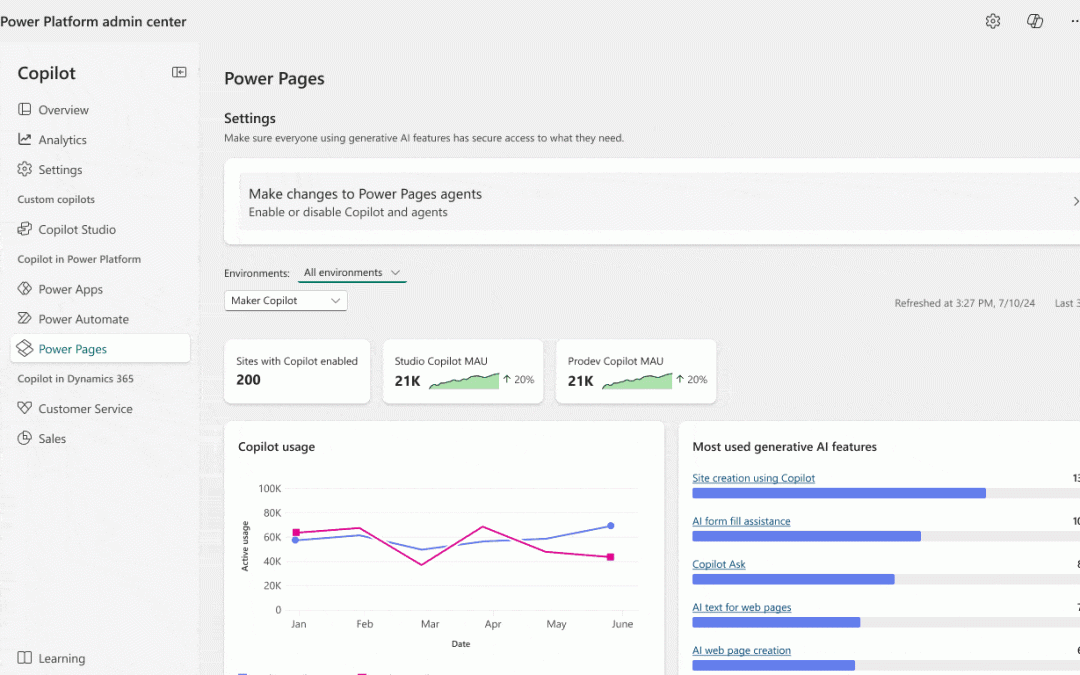
We’re excited to announce that Power Pages AI usage analytics and governance controls are now available in public preview through the Copilot Hub in the Power Platform admin center
With AI capabilities becoming core to digital experiences, organizations need visibility and control over how these features are used. The Copilot Hub in the Power Platform admin center answers this need by offering a centralized dashboard for AI usage analytics and governance across Power Platform products. Power Pages now integrates with the Copilot Hub to help admins:
Track adoption of AI-powered features
Gain actionable insights
Control exposure based on org needs and compliance
Deep Dive into Usage Insights
Admins can switch between Maker Copilot and End User Copilot views to understand how AI features are used by site builders and site visitors.
Maker Copilot Analytics include:
Monthly active makers using Studio Copilot or Pro Dev Copilot
Sites with Copilot enabled
Most-used AI features
Usage trends over time
End User Copilot Analytics provide insights on:
Chat agent (Site Copilot) usage
Search summaries and query volume
Summarization API usage
AI-powered form fill assistance
Generative summaries for list views
AI Governance – In Your Control
The Copilot Hub empowers admins to control AI feature availability at both environment and site levels, with settings to:
Enable/disable features for makers or end users
Allow granular control per feature (e.g., chatbot, summaries etc)
AI features can be enabled across all sites, specific sites, or excluded sites
Visibility into configurations across environments
Warnings and fallbacks when features are blocked due to org policies
Transition to the Copilot Hub
Important: Governance settings for Power Pages AI features are now managed exclusively in the Copilot Hub. Existing settings are retained, but we recommend reviewing and aligning them in the new experience to ensure consistency.
Maker & End User Experience
Makers see clear messages in Design Studio when AI features are disabled by admins. End users experience fallback behaviors (e.g., standard search results instead of AI summary) without disruption or confusion