
Apple M1 Support in Rider – Best IDE for .NET development in MacOS
Part 8 – Understanding Driver Patterns for Automation testing and writing better test code
What are the best ways to keep automation testing alive?

Microsoft 365 Conference – OneDrive, SharePoint, and Viva keynotes, sessions, and workshops
- What: Microsoft 365 Conference to learn more
- Register today | Review all sessions (now live)
- When & where: April 5-7, 2022 | In-person event – Las Vegas, Nevada – MGM Grand
- Content: 4 Microsoft keynotes || 200+ overall sessions | 20 full-day workshops (pre-day and post) – OneDrive, SharePoint, and Viva content listed in full below
- Presenters: 150+ speakers | Microsoft, MVPs, and community members
- Twitter & hashtag: @M365CONF | #M365CONF
- Cost: $1,649 early bird – full conference (additional costs for full-day workshops) – learn more
“Part of the value is you get to focus on all this technology, how it can be applied to your organization, and get to speak to the people building the product and other customers. Whether you’re looking for the latest technical information or to meet people in this incredibly vibrant tech community…. there is no experience like the Microsoft 365 Conference.” – Jeff Teper, Corporate Vice President, Teams, SharePoint, and OneDrive – Microsoft
Join Microsoft and community experts in person in one place. The Microsoft 365 Conference returns to Las Vegas, NV, April 5-7, 2021 – with two pre-event and one post-event workshop days. It’s dedicated to SharePoint, Teams, Viva, Power Platform, and related technologies. You’ll hear the latest news and roadmap from top industry experts, filled with real-world solutions across keynotes, sessions, and pre/post event deep-dive workshops to build your expertise – presented by Microsoft product team members, Microsoft MVPs, and community experts. We hope you join in to learn, share, and engage.
Microsoft keynotes, sessions, and workshops: SharePoint, Viva, OneDrive, and related technology
Microsoft keynotes
Hear from Microsoft leadership revealing the latest innovations shaping the flexible, innovative, and secure business environments of the future. [all times listed in PST]
- “The cloud is confusing. The cloud is a joy.” with Scott Hanselman – CVP, Cloud + AI Platform | Tuesday, April 5th, 8:00am – 9:15am [KEY02]
- “Microsoft 365 for the Hybrid Workplace” with Jeff Teper – CVP, OneDrive, SharePoint, and Teams | Tuesday, April 5th, 9:30am – 10:45am [KEY01]
- “Power Platform: What’s New and What’s Next” with Charles Lamanna – CVP, Business Applications & Platform | Wednesday, April 6th, 8:00am – 9:00am [KEY03]
- “People first approach to hybrid work” with Karuana Gatimu – Principal Manager, Customer Advocacy Group (Microsoft Teams) and Dan Holme – Principal Product Manager Lead (Yammer) | Thursday, April 7th, 8:00am – 9:00am [KEY04]
OneDrive, SharePoint, Viva, and Yammer — AMA and breakout sessions [45-60 minutes; all times listed in PST]
Take the opportunity to select the sessions best suited for your role and interests. All breakouts are packed with news, demos, customer stories, and insights into product and solution strategy. You can review all sessions with a subset of Microsoft-led sessions listed below:
“OneDrive and SharePoint AMA” (MSPAN01) with Jeff Teper, Liz Sundet, Chris McNulty, Erica Toelle, Dan Holme, Mark Kashman, and Naomi Moneypenny | Wednesday, April 6th, 11:00am – 12:00pm PST
Microsoft Viva and Yammer [sessions]
- “Microsoft Viva Overview” (MS09) with Liz Sundet
- “Viva Connections – Buy, Build, and Prototype Dashboard Cards” (coming soon) with Catherine Chuaga
- “Learn in the flow of work with Viva Learning” (coming soon) with Andrea Lum and John Mighell
- “Viva Connections – What’s New and Next” (MS06) with Liz Sundet and Donna Wynn
- “Viva Topics – What’s new and next” (MS08) with Naomi Moneypenny
- “Viva AMA” (MSPAN02) with Dan Holme, Steve Nguyen, Naomi Moneypenny, Mike Hollinshead, Liz Sundet, Catherine Chuaga, Donna Wynn, Andrea Lum, and John Mighell
- “Creating a knowledge sharing culture with Viva Topics” (MS07) with Naomi Moneypenny
- “Viva Connections – Deployment and Enablement for Success” (MS05) with Mike Hollinshead and Liz Sundet
- “Culture and Communications: Exploring Viva Connections, Yammer, and SharePoint” (MS04) with Dan Holme and Steve Nguyen
- “Community, communications, and knowledge sharing with Yammer, Teams, Outlook and Viva” (MS03) with Dan Holme and Steve Nguyen
- “Yammer Admin Masterclass: Configuration, Compliance, & Yammer power scenarios” (MS02) with Dan Holme and Steve Nguyen
SharePoint, OneDrive, Lists, Office, and related technology [sessions]
- “What’s new for file experiences in OneDrive, SharePoint, and Teams in Microsoft 365” (coming soon) with Arjun Tomar “An architect’s view of SharePoint Syntex + Viva Topics, better together” (MS14) with Chris Bortlik
- “Microsoft Stream overview” (MS12) with Saili Raje
- “Using SharePoint pages and news for internal communications” (MS15) with Mark Kashman
- “An overview of Microsoft 365 Compliance solutions” (coming soon) with Erica Toelle
- “Managing files across Microsoft 365” (MS11) with Erica Toelle
- “Preparing for an event using Microsoft Lists and Microsoft Teams” (MS13) with Mark Kashman
- “Supercharge Microsoft Lists and SharePoint libraries with the power of the Power Platform” (coming soon) with Sudha Narayanan
- “Migrate, manage, and monitor content in SharePoint admin center” (MS10) with Chris Bortlik
NOTE: Review the full-session details about the Microsoft teams track (link coming soon) and the Power Platform track (link coming soon).
Full-day, Microsoft-led workshops [all times listed in PST]
The learning and skilling continue, on your own time. Take a deep dive into technology to help refine your practices and bring learnings back to your team and organization to extend the application and use of your Microsoft 365 investment. All Microsoft 365 Conference workshops either take place pre-event on Sunday (Apr.3) or Monday (Apr.4) or post-event on Friday (Apr.8).
- “Beginner SPFx Bootcamp: Part 1” (PRECON08) with Hugo Bernier and David Warner | Sunday, April 3rd, 9:00am – 4:00pm
- “From Low Code to Pro Code – Building Solutions for Microsoft 365 — Powerclass” (PRECON11) with Hugo Bernier, David Warner, and Chris Kent | Monday, April 4th, 9:00am – 4:00pm
- “Advanced SPFx Bootcamp: Part 2” (POSTCON05) with Hugo Bernier and David Warner | Friday, April 8th, 9:00am – 4:00pm
Conference Health Protocols from the Microsoft 365 Conference event team
“The Microsoft 365 Conference is creating a safer space for you, please note Las Vegas is doing the same, requiring masks at all hotels and conference areas and proof of Covid-19 vaccinations at some concerts, sporting events, and conferences. In accordance with these local requirements, we will require that all attendees, staff, and speakers at the December conference provide proof of vaccination at registration via digital or paper vaccination card or a negative Covid-19 test within 72 hours.”
Learn more
Visit M365Conf.com and follow the action on @Twitter: @M365CONF, @SharePoint, @OneDrive, @MSPowerPlat, and @MicrosoftTeams.

Cheers,
Mark Kashman, senior product manager – Microsoft

Manage and expand your Viva Connections Feed to create a culture of connectivity
Viva Connections is a new employee experience platform that uses your Microsoft 365 environment to bring resources and conversations into one place. One of the biggest questions we get is how to effectively manage and curate the Feed for Viva Connections.
In this article we will explore how to instill a culture of connectivity in your organization, where everyone can engage and contribute to organizational communications using SharePoint news posts, Yammer communities, and Stream video.
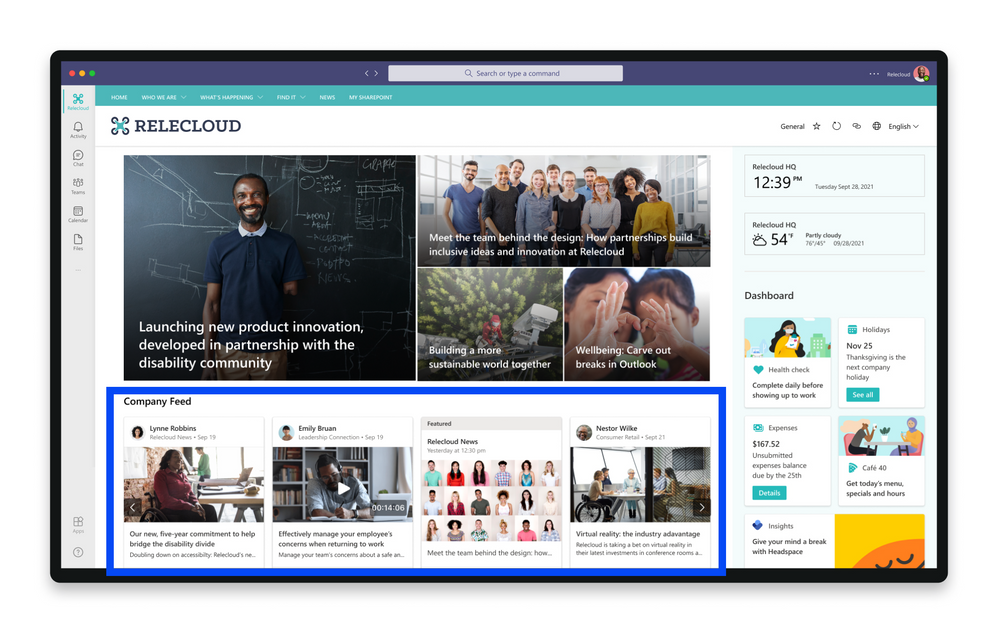

What is the Viva Connections Feed?
The Feed brings communications from across the organization into one place where it can be easily viewed. This Feed helps keep frontline workers, information workers, and hybrid workers alike engaged and informed on important news and announcements. This solution also gives content publishers a reliable method of distributing important news and information.
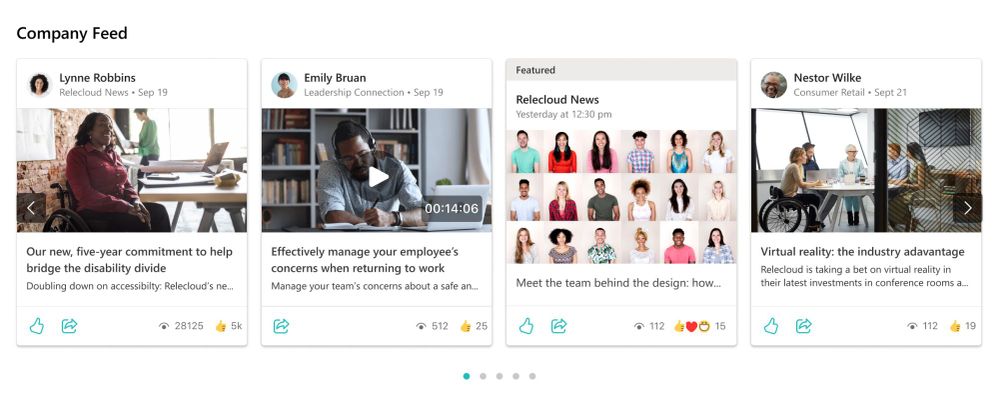
Each users’ Feed will look a little different because content in the Feed is personalized based on memberships and permissions. The Feed automatically balances fresh and engaging content with corporate communications to keep users interested, while also ensuring that they see the most important messages.
Where does content in the Feed come from?
Content is aggregated from organizational news posts, video news links, boosted news, and Yammer communities. The Feed will only display content that the user has existing permission to view in SharePoint and in Yammer.

How can I make sure my organization’s Feed is dynamic and engaging?
This is the question we get the most. To make sure the Feed always has relevant and dynamic content; we recommend you empower your organization to actively contribute to news in SharePoint and conversations in Yammer.
We’ve heard concerns from our customers – concerns about losing control of content in the feed, or that content will become less relevant, or perhaps that the Feed will become full of cat memes. We’ve got tips to share on how you can manage and promote content in the Feed. We also recommend that you check if you’ve got the right governance, communication plan, and feedback channels in place so you can feel confident embracing variability so that you can allow your organization to evolve into a culture that communicates openly and often.

Manage and promote content that’s viewed in the Feed
The Feed is designed to be dynamic, personalized, and a place where the most relevant news and announcements can be consumed. The Feed relies on a constant flow of new content and the best experience contains a balance of organizational news, organic content, and curated content. Follow these tips to promote and balance the most important content:
- Publish SharePoint news from official organizational news sources like the home site
- Use News boost to elevate the most important news posts on organizational news sites to surface news posts to the top of the feed
- Post news as a video news links hosted by stream to share updates, rebroadcast an all-hands meeting, or provide reusable training materials
- Encourage your organization to engage and participate in Yammer discussions, especially leaders and workplace champions
- Highlight community discussions by featuring posts in public Yammer communities that you’d like seen by the entire organization
- Use audience targeting to make sure specific content is seen by different audiences using Microsoft 365 groups
Create a communication plan to support flexible authoring
Having guidelines that are focused on communication expectations can help your organization align with existing business processes while making room for democratized news and community engagement. Like creating guidelines for SharePoint site usage or Yammer usage, communication guidelines can help the rest of the organization understand the approved methods of communication and expectations. Considerations for your organizations’ communication guidelines:
- When is it appropriate to create and share news posts in SharePoint?
- Who is allowed to post news in SharePoint?
- How long will the news posts be active?
- What topics are appropriate for communities in Yammer? What topics are not appropriate?
- What is the right course of action if you see inappropriate content?
Before you create and adopt a communication plan, it can be helpful to make sure you understand how current users engage with content. View popular content and activity in SharePoint to help you learn more about popular content, when content is read, and what device is being used.
Use the Yammer Activity report in the admin center at understand the level of engagement of your organization with Yammer by looking at the number of unique users using Yammer to post, like or read a message and the amount of activity generated across the organization.
Utilize feedback loops to measure content satisfaction and report inappropriate content
Part of your communication plan will include how users can provide feedback and what to do if inappropriate content is identified. Consider creating two feedback loops – one to gauge the overall satisfaction with content in the Feed and one that alerts the right team to misuse of the communication guidelines.
Gauging satisfaction can be accomplished in many ways. Consider how to add a question to an employee survey that is already in rotation. You could also add a card to the Viva Connections Dashboard that links to a Microsoft Form where users can provide more in-depth feedback. Or, you could add a poll to chats and channels in Microsoft Teams.
For direct feedback loops, start by setting up the option for end-users to report conversations in Yammer. Then, consider creating a Microsoft 365 group for the team that will be managing feedback. When you create the group, you’ll automatically get a shared email that can be linked to buttons and other calls-to-action.
Once the communication guidelines are finalized, meet users in the channels they are already using to share expectations. Consider announcing the communication guidelines at an upcoming all-hands meeting or during the launch of Viva Connections.
More ways to share announcements:
- Share an email in a Teams channel
- Post in Yammer by sending an email
- Add a SharePoint page, list, or document library as a tab in Teams
Use governance tools that enable open authoring with some guardrails
Clear communication guidelines paired with governance tools is key to fresh, engaging, and dynamic content in the Feed.
The Feed is made up of content from SharePoint and Yammer. Both applications offer several governing tools that can be included as part of your organization’s communication plan. More communication can mean more opportunities for information to be shared externally. Consider how your organization will keep content secure in Yammer and SharePoint. Set up policies that monitor keywords in Yammer for unacceptable or inappropriate content so you can intervene if necessary. For large organizations, use dynamic groups in Yammer to update group membership automatically as people join, leave, or move within your organization.
More resources to help you with the Feed
Frequently asked questions about the Feed for Viva Connections
Microsoft Viva adoption resources
Get started planning, building, and launching Viva Connections
Part 4 – Understanding Jobs in GitHub Actions and how to work with Marketplace actions
Integration Testing and its power while testing Microservices [Course Snippet]
Power Automate for desktop – February 2022 update
Power Automate for desktop comes with several new additions in February 2022 release, including a new monitoring notification window, more performance improvements during flow authoring and some new actions like ‘Display custom form’.







