
Posted at https://aka.ms/SharePoint/SPSE.
Today we’re excited to open the window to our vision, strategy, and future for SharePoint and provide a first look at the most recent developments with SharePoint Server. SharePoint has been a key accelerator for collaboration and productivity for decades, from the business value for organizations looking to modernize their workplace and infrastructure to the technical value delivers to IT professionals and developers, and more recently with new hybrid investments for those customers looking to enrich their existing investments with cloud innovation. With the 20th anniversary of SharePoint just behind us, it’s a great time to look back and provide a little historical SharePoint information.
20 years ago, “Exchange and SharePoint bec best friends”. Exchange Server worked on a new information store (Web Store) to support document, web content, and e-mail management. Codename Tahoe (the genesis of SharePoint Products and Technologies) advanced Exchange Server introducing document management capabilities through WebDAV (Document Authoring and Versioning) in addition to an improved search and indexing engine. Exchange Server and Tahoe would represent a new, next generation messaging, collaboration, and document management platform.
Now we’re delighted to share our progress towards the next generation of SharePoint, built on these same principles.
SharePoint Server Subscription Edition represents the next step in the SharePoint Server journey emphasizing the specific needs of our on-premises customers.
We designed SharePoint Server SE around the core principles of:
- Always up to date
- Secure and reliable
- Designed for you
Always up to date
Organizations require collaboration, communication, and productivity solutions to be both cost-effective and flexible. SharePoint Server Subscription Edition can help you achieve new levels of reliability and performance, delivering features and capabilities that simplify administration, protect communications and information, and empower people in your organization to achieve more.
Continuous updates
Pressure to optimize your IT infrastructure for ever-changing business conditions requires you to be agile, and that means investing in solutions that provide reliability and choice. SharePoint Server Subscription Edition provides the flexibility to tailor deployment based on your unique business needs.
With SharePoint Server Subscription Edition, you’ll end the cycle of long and costly major version upgrades to get new features and remain in support. Microsoft will deliver our latest innovations to customers through updates that can be installed on your SharePoint Server Subscription Edition farms.
Upgrade from where you are
SharePoint Server Subscription Edition makes it easy to get up and running with new upgrade options that allow you to upgrade directly from SharePoint Server 2016 without having to first upgrade to SharePoint Server 2019.
Secure and reliable
Complying with regulatory standards and preventing unauthorized access to business critical and personal data is a continual priority for organizations and corporate IT.
Modern infrastructure support
SharePoint Server Subscription Edition provides scalability, reliability, and security while allowing you to take advantage of the latest hardware innovations and computing technologies—making it capable of handling enormous amounts of data faster, more efficiently, and at a lower cost.
Secure communication
With the support for Windows Server 2022, you not only benefit from the latest in security, but also native support for features, such as TLS 1.3.
TLS 1.3 is the latest version of the internet’s most deployed security protocol, which encrypts data to provide a secure communication channel between two endpoints. TLS 1.3 eliminates obsolete cryptographic algorithms, enhances security over older versions, and aims to encrypt as much of the handshake as possible.
Designed for you
SharePoint Server Subscription Edition has been designed around the unique needs of on-premises scenarios, delivering the security, reliability, and management improvements specific to those needs. New features include OpenID Connect support, People Picker improvements and more.
OpenID Connect
SharePoint Server Subscription Edition adds support for the OpenID Connect (OIDC) 1.0 authentication protocol. OIDC is a modern authentication protocol that makes it easy to integrate applications and devices with your organization’s identity and authentication management solutions to better meet your evolving security and compliance needs. For example, you can enforce authentication policies such as multifactor authentication (MFA), conditional access policies based on device compliance, and more.
Enhanced People Picker for modern authentication
In SharePoint Server Subscription Edition, the People Picker has been enhanced to allow resolving users and groups from modern authentication (trusted identity providers), such as SAML 1.1 and OIDC 1.0. This allows the People Picker to only resolve valid users and groups without requiring a custom claims provider.
To learn more about all of the improvements in SharePoint Server Subscription Edition see https://go.microsoft.com/fwlink/?linkid=2168262.
This is just the beginning of what you can expect for SharePoint Server Subscription Edition.
To download SharePoint Server Subscription Edition Public Preview visit https://go.microsoft.com/fwlink/?linkid=2168051. Language Packs can be downloaded from https://go.microsoft.com/fwlink/?linkid=2168052.
Share your feedback and questions in our community forum at https://go.microsoft.com/fwlink/?linkid=2167959.

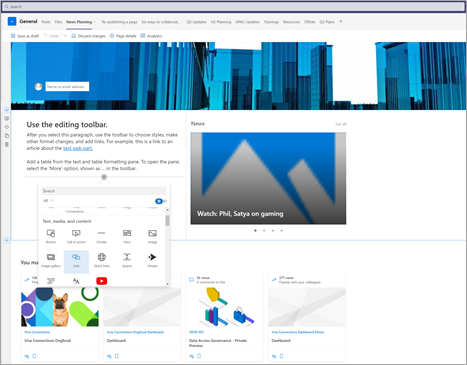
As a page author you will now be able to add or edit content, images & any other web part. |
|
|
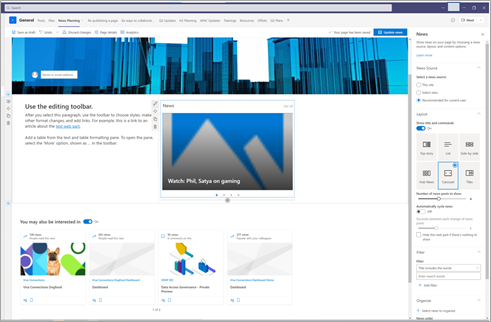
Page authors will be able to update any web part settings in the web part property pane like you would do in SharePoint.
|
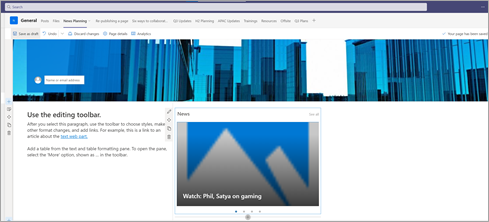
It is now easy for page authors to save & publish the edited pages within Teams.
|
|
|
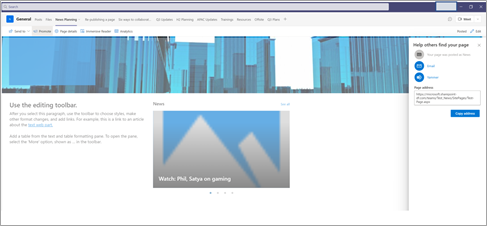
You can also promote your news articles in email and Yammer.
|
We are excited about bringing editing capabilities for your SharePoint Pages within Teams. Putting this capability in your hands wherever you work will unlock new collaboration and enable more scenarios. We look forward to gathering more feedback as you begin to edit your pages in Teams.
Have some ideas on what feature you want to see on page canvas or where the new page authoring entry points should be? Let us know in the comments.
We are thrilled to end the month of June with seven new connectors. These connectors provide solutions for sending Adaptative Cards, using CPQ software, and improving IT, Finance, and HR processes. To know more, check them out in this post.







