EDITORS NOTE 1/3/2019
We have updated the blog to reflect that we’ve expanded the ability to control if Office attachments are protected for recipients inside Office 365 – previously this was only supported for non-Office 365 users. Changes are reflected below in the blog.
Summary
Administrators can now control whether Office attachments are protected for recipients inside and outside of Office 365 when the Encrypt-Only template is used. This was a key ask from Office 365 Message Encryption customers and is now available as a tenant-level setting.
Background
We have now made it possible for administrators to control how Encrypt-Only behaves for attachments. By default, when a user sends an email and attachments using Encrypt-only, the Office attachments are also protected with Encrypt-Only permissions and that encryption persists throughout lifecycle of the content. To provide more flexible controls for recipients, organizations can control if recipients have unrestricted permissions on the attachment or not for Encrypt-Only emails. For example, one scenario this is valued is when a doctor shares a protected attachment to her patient, and the patient wants to share this with his family, the attachment is no longer encrypted so they can open the attachment without any additional steps.
What is available
Admins can control whether attachments have unrestricted permissions for Encrypt-Only emails. Details on implementing the settings are below.
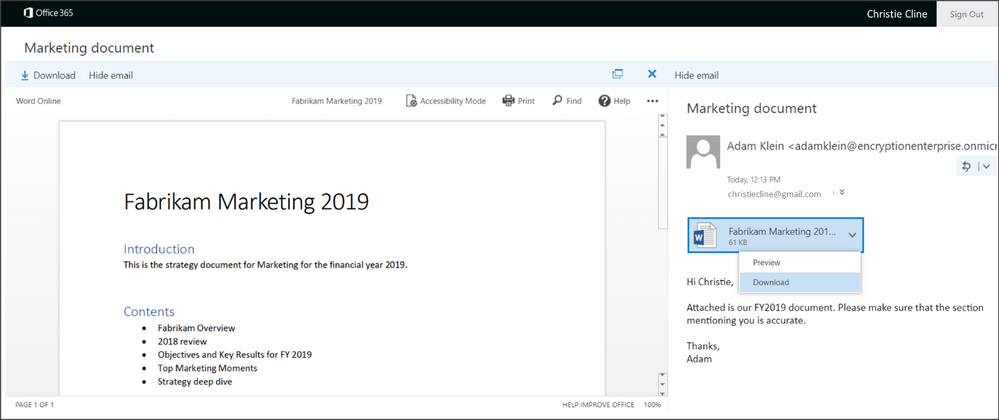
When the recipient signs-in to the Office 365 Message Encryption portal, they can preview attachments as before.
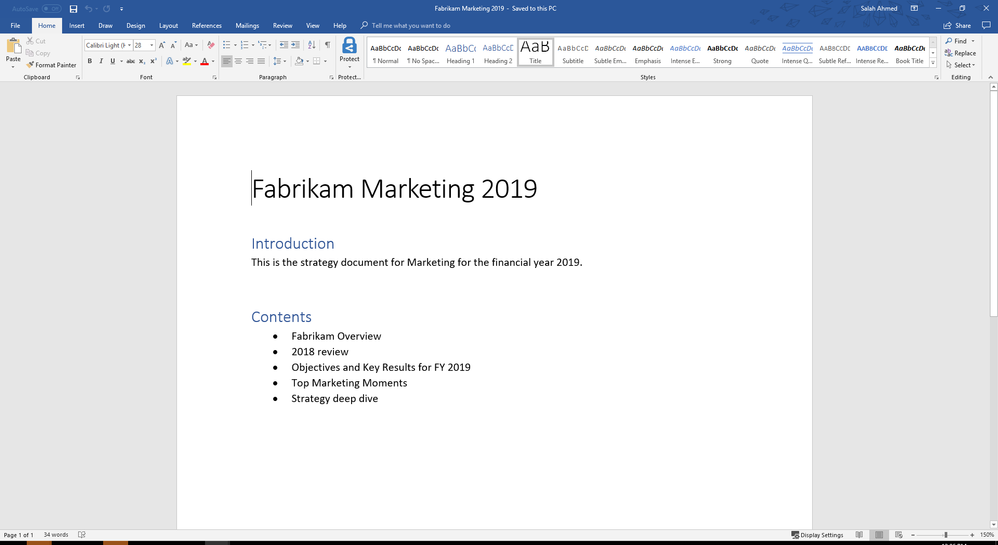
If the control to unrestrict the attachment is enabled, the document will be decrypted and the recipient will be able to view it normally. Additionally, the content will remain decrypted and unrestricted unless additional protections are applied.
Scope
This setting is available for the Encrypt-only template and not for the Do Not Forward or Custom templates.
It’s enforced at the tenant level.
How to control the setting
To manage whether to allow recipients to download Encrypt-only attachments without encryption, follow these steps:
Connect to Exchange Online Using Remote PowerShell (see https://aka.ms/exopowershell)
Run the Set-IRMConfiguration cmdlet with the DecryptAttachmentForEncryptOnly parameter as follows:
Set-IRMConfiguration – DecryptAttachmentForEncryptOnly <$true|$false>
For example, to allow download of attachments without protection for Encrypt-only:
Set-IRMConfiguration – DecryptAttachmentForEncryptOnly $true
If you decide that you want to revert the setting and keep attachments protected even after download:
Set-IRMConfiguration – DecryptAttachmentForEncryptOnly $false
Please note, as of 12/13/18, we have deprecated DecryptAttachmentFromPortal. It will continue working for existing customers who have run the old cmdlet but new customers should start using the new cmdlet (DecryptAttachmentForEncryptOnly) updated above.
Additional Resources
This was a key ask from organizations that had a broad set of scenarios which requires email recipients to “own” the attachment by unrestricting permissions on the attachment. We hope this additional control can provide more flexibility in collaborating on protected content for all users. Your feedback matters- leave us a comment below or go to uservoice and submit your feedback/vote!
For additional resources on Office 365 Message Encryption – you can find them below:
We’ve been on a journey to modernize user experiences throughout SharePoint.
Lists and libraries are the primary containers for data and content, enriched with custom metadata. Previously, we introduced column formatting, which lets you cut and paste JSON scripts into a formatting window to add interactions, color coding, visualizations, or other transformations on data in a list or library column. This summer we also introduced view formatting – which let you use the same JSON techniques to build transformation for every element in a view — such as multiline displays, Microsoft Flow buttons, or data integrated from Bing maps or other business services.
Today, there are dozens of sample scripts you can use in our SharePoint patterns and practices GitHub repository. Some of these are highlighted here on the TechCommunity Resource Cenrter. We recognize, however, that this is a more advanced technique, and most users are unfamiliar with JSON syntax.
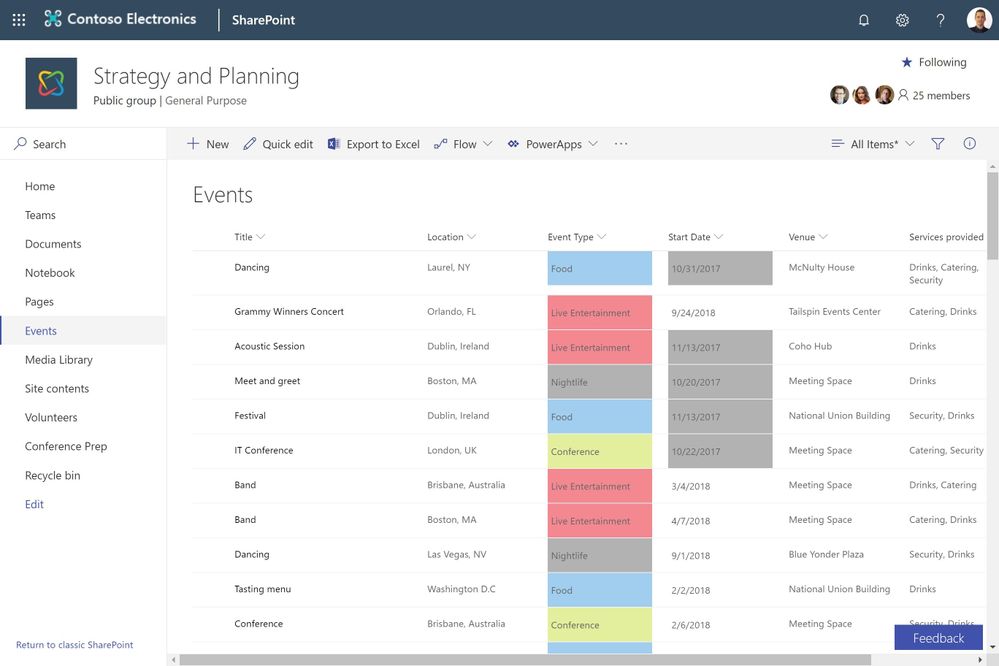
That’s why we’re excited to introduce custom formatting. It’s like column formatting, since it lets you add conditional coloring based on column values. However, custom formatting requires absolutely no scripting. Custom formatting works on choice, date and Boolean columns. When you select the “Format this column” option, you can apply a pre-built template, or you can adjust the colors if desired. For developers, you can still use “advanced mode” to apply a JSON script.
In the link below, you can experience custom formatting. It’s never been easier to transform and optimize the display of business data in SharePoint pages.
Custom formatting demo on TechCommunity
https://demobuilderwebcpptxz.blob.core.windows.net/custom-formatting/startdemo.html
Custom formatting will begin rolling out to targeted release customers in late December, with general release following in January. Later in 2019, we’ll add support for more column types.
We encourage you to share your thoughts and experience with us. Thank you, and happy holidays.
We’ve been on a journey to modernize user experiences throughout SharePoint.
Lists and libraries are the primary containers for data and content, enriched with custom metadata. Previously, we introduced column formatting, which lets you cut and paste JSON scripts into a formatting window to add interactions, color coding, visualizations, or other transformations on data in a list or library column. This summer we also introduced view formatting – which let you use the same JSON techniques to build transformation for every element in a view — such as multiline displays, Microsoft Flow buttons, or data integrated from Bing maps or other business services.
Today, there are dozens of sample scripts you can use in our SharePoint patterns and practices GitHub repository. Some of these are highlighted here on the TechCommunity Resource Cenrter. We recognize, however, that this is a more advanced technique, and most users are unfamiliar with JSON syntax.
That’s why we’re excited to introduce custom formatting. It’s like column formatting, since it lets you add conditional coloring based on column values. However, custom formatting requires absolutely no scripting. Custom formatting works on choice, date and Boolean columns. When you select the “Format this column” option, you can apply a pre-built template, or you can adjust the colors if desired. For developers, you can still use “advanced mode” to apply a JSON script.
In the link below, you can experience custom formatting. It’s never been easier to transform and optimize the display of business data in SharePoint pages.
Custom formatting demo on TechCommunity
https://demobuilderwebcpptxz.blob.core.windows.net/custom-formatting/startdemo.html
Custom formatting will begin rolling out to targeted release customers in late December, with general release following in January. Later in 2019, we’ll add support for more column types.
We encourage you to share your thoughts and experience with us. Thank you, and happy holidays.
We are happy to announce the release of page management and approvals, as we disclosed at Ignite 2018.
SharePoint page authoring makes it simple to craft beautiful immersive experiences that integrate applications, data, text, media and more. Pages are also essential for team news, which let you share impactful updates with an automated distribution engine that reaches portals, mobile, email, Microsoft Teams and more.
News pages can be highly visible, since they are automatically aggregated in hub sites, mobile apps and the SharePoint home page. Some organizations want to standardize page templates and layouts, and institute a review process to assure that all updates are approved.
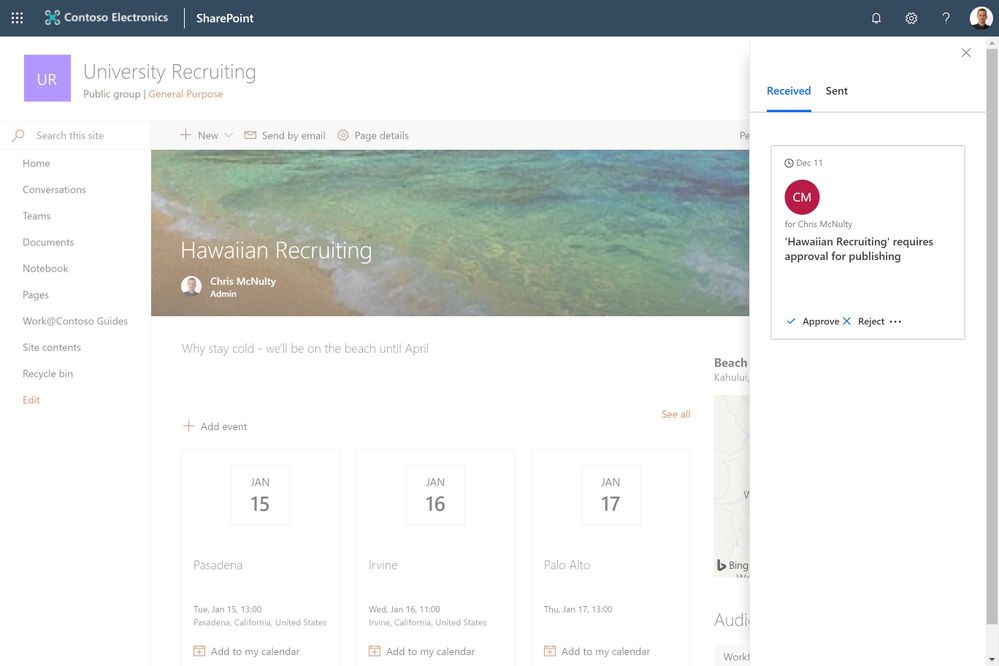
Now you can setup approval processes, based on Microsoft Flow, to ensure page review if required. Inside the pages library, you can use the Flow pulldown menu option to create an approval process with just a few mouse clicks.
You can use the immersive demo link below to expereince page management and approvals.
Tech Community Demos
https://demobuilderwebcpptxz.blob.core.windows.net/page-approvals/startdemo.html
Configuring approvals is optional – you can continue to publish pages without an approval step based on your governance and publication style. Page approvals will begin rolling out to targeted release in mid-December 2018.
We are happy to announce the release of page management and approvals, as we disclosed at Ignite 2018.
SharePoint page authoring makes it simple to craft beautiful immersive experiences that integrate applications, data, text, media and more. Pages are also essential for team news, which let you share impactful updates with an automated distribution engine that reaches portals, mobile, email, Microsoft Teams and more.
News pages can be highly visible, since they are automatically aggregated in hub sites, mobile apps and the SharePoint home page. Some organizations want to standardize page templates and layouts, and institute a review process to assure that all updates are approved.
Now you can setup approval processes, based on Microsoft Flow, to ensure page review if required. Inside the pages library, you can use the Flow pulldown menu option to create an approval process with just a few mouse clicks.
You can use the immersive demo link below to expereince page management and approvals.
Tech Community Demos
https://demobuilderwebcpptxz.blob.core.windows.net/page-approvals/startdemo.html
Configuring approvals is optional – you can continue to publish pages without an approval step based on your governance and publication style. Page approvals will begin rolling out to targeted release in mid-December 2018.
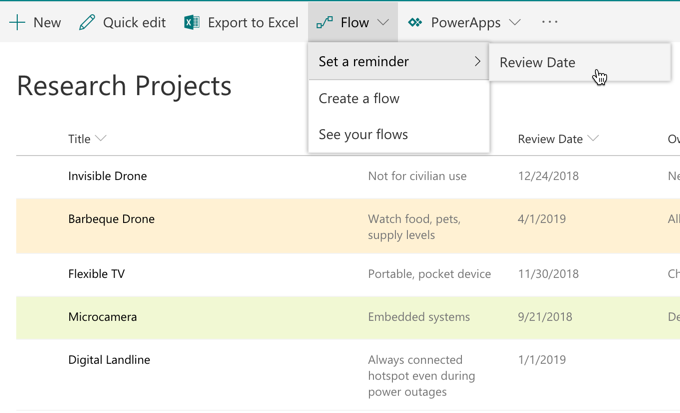
Personal productivity is essential to teamwork. SharePoint lists and libraries have long allowed to you defined custom metadata columns to track dates. As announced at Ignite 2018, we are releasing a new capability that lets you set reminders for any of these dates. You’ll be able to receive a personal email alert ‘x’ days in advance of a date on any document or item in SharePoint.
Create a reminder flow
To create the reminder flow, your list or library should have at least one date/time column in the current view. You’ll then able to create a reminder by selecting the Flow->Set a reminder menu.
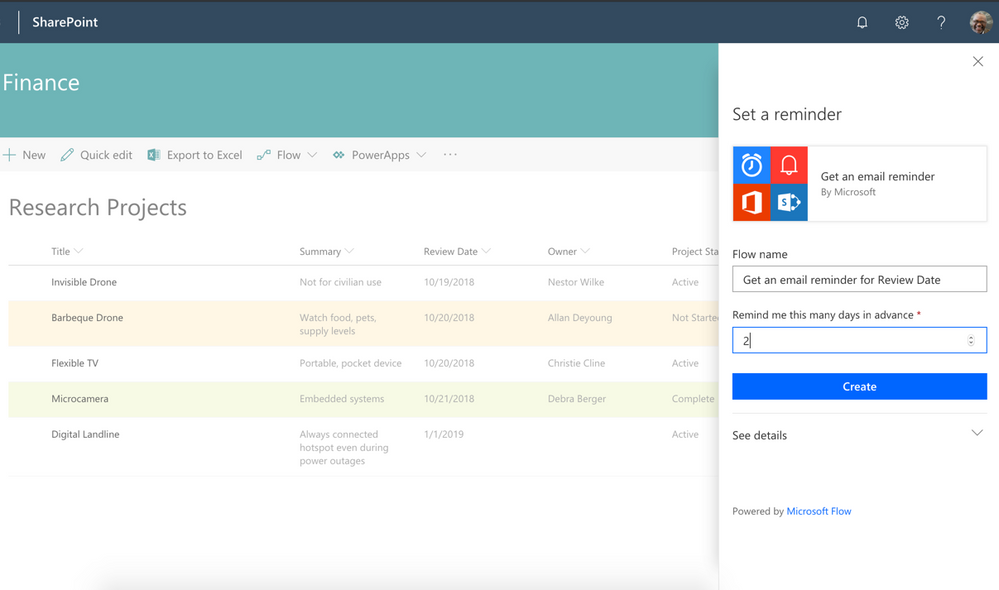
You can enter the number of days in advance for the reminder, based on the selected date column.
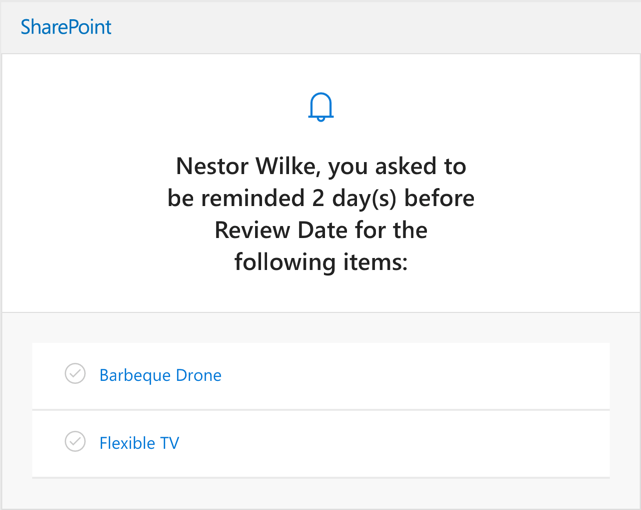
Based on your selection, you’ll get an email from Microsoft Flow for any items or documents ‘x’ days in advance of the selected data column value.
Once the flow is created, it can be edited from the Microsoft Flow website. You can modify “days in advance”, or add additional actions.
This feature is slated to begin rollout to Targeted Release on or about December 18, 2018. If you’d like to try it in advance, you can see reminders in action on the Business Apps Resource Center.
As always, we are listening for feedback. Please let us know if you have any questions or suggestions. Thanks.
Personal productivity is essential to teamwork. SharePoint lists and libraries have long allowed to you defined custom metadata columns to track dates. As announced at Ignite 2018, we are releasing a new capability that lets you set reminders for any of these dates. You’ll be able to receive a personal email alert ‘x’ days in advance of a date on any document or item in SharePoint.
Create a reminder flow
To create the reminder flow, your list or library should have at least one date/time column in the current view. You’ll then able to create a reminder by selecting the Flow->Set a reminder menu.
You can enter the number of days in advance for the reminder, based on the selected date column.
Based on your selection, you’ll get an email from Microsoft Flow for any items or documents ‘x’ days in advance of the selected data column value.
Once the flow is created, it can be edited from the Microsoft Flow website. You can modify “days in advance”, or add additional actions.
This feature is slated to begin rollout to Targeted Release on or about December 18, 2018. If you’d like to try it in advance, you can see reminders in action on the Business Apps Resource Center.
As always, we are listening for feedback. Please let us know if you have any questions or suggestions. Thanks.
Latest monthly summary of SharePoint Development guidance for SharePoint Online and on-premises now available from the Office 365 Dev Blog. Check the latest news, samples and other guidance from this summary.
Latest monthly summary of SharePoint Development guidance for SharePoint Online and on-premises now available from the Office 365 Dev Blog. Check the latest news, samples and other guidance from this summary.

Things have been very busy at the Geoff front. Work on the GUI version of GEBestBetAdder is being finalised. This tool will help you migrate and manage Best Bets from SharePoint 2010 enabling you to migrate to Promoted Results in SharePoint 2013 and beyond, including just some of the following features:
- Create Query Rules and Promoted Results into SharePoint 2013 and beyond from SharePoint 2010 Best Bets and Keywords
- Add, Edit and Delete custom Query Rules and Promoted Results without having to access SharePoint
- Export Query Rules, Promoted Results to Excel and XML formats
- Manage existing Query Rules on a site by site basis
The tool has been long in the making and has been great fun to build – its absolutely crammed with features. The tool will be made available on a trial basis very soon, am aiming for release by end of August 2019. It will even include the ability to migrate Query Rules to/from on-premise to Office 365. If you are interested please contact me and I’ll add you on the trial list.







