Electronic communication and collaboration services[1] such as Outlook.com, Skype, Gmail, Slack, and OneDrive carry valuable private and confidential communications that need protection. But these same services also provide a means for attackers to steal information or seize control of users’ computers for nefarious purposes, via viruses, worms, spam, phishing attacks, and other forms of malware.
Preventing the theft of user information and the dissemination of malware is a core feature of electronic communication and collaboration services. This requires significant processing of users’ communications and data both in-transit and after delivery. This processing can and should be done without compromising the user’s privacy or the confidentiality of their communications[2].
Message processing data flow:
To protect against malware distributed via electronic communications and collaboration systems such as email servers[3], the content follows a conceptually simple flow.
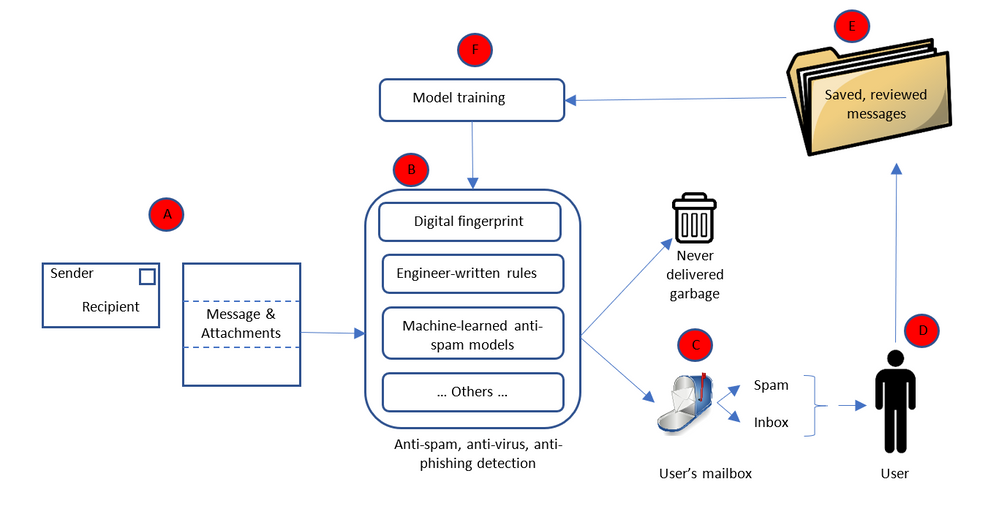
Starting with “A” the message is received by the recipient’s email service. The message’s envelope, as well as the message contents and any attachments, are passed on to the anti-malware portion of the email service (“B”) which determines whether or not the message is malware. Based on what the anti-malware service determines, the message is delivered to the user as appropriate (“C”). Some messages are determined to be malware with near certainty and are never delivered to the user. Instead they are deleted as quickly as possible[4]. Some messages are likely to be spam, however the service is not always certain. So the message is delivered to the user’s mailbox but into their spam/junk-mail folder. The remaining valid messages are delivered to the user’s inbox. The service can never determine with absolute certainty whether or not a message is malicious; it is always a probabilistic assessment. If the service is wrong either way; i.e. the user is exposed to malware or the user indicates that a message originally thought to be spam is not, the message may be added to a database of messages (“E”) used to train the next version of the anti-malware logic (“F”), thus permitting the system to “learn” over time and become more effective.
Clearly this entire process entails considerable processing of the messages. The types of processing are diverse and done in two key phases: message processing (“A” – “D”) and model building (“E” – “F”).
Anti-malware is particularly important for in-transit messages because attacks most typically enter the service through communications being transmitted. It is, however, also performed against already received and processed messages. As new attacks are identified – usually after the attack has been launched and some infected content has evaded the filters and been delivered to users – the anti-malware service is updated to defend against those attacks, and the service is rerun against recently delivered message to retroactively remove instances of said attack.
Processing message:
The types of processing done on messages to determine whether or not they are malicious include simple rules (e.g. messages without senders are likely not valid), reputations systems (messages from a certain set of IP addresses or senders are likely not valid, such as lists managed by the Spamhaus project[5]), digital thumbprints (comparing the thumbprint of the message or attachment to the thumbprints of known bad messages), honey pots (email addresses with no user and thus mailboxes that could never get any valid messages – anything delivered to them is spam or malware), and complex machine-learned models which process the contents of the message or the attachment[6]. As new forms of attack are encountered, new forms of defense must be quickly developed to keep users safe.
This requires processing of the message envelope, body, and attachment. For example:
- Message envelopes indicate not only the message recipient but also the supposed sender, and the server path which the message followed to reach the recipient. This is critical, not only to determine the recipient (needed to ensure the message is delivered to the intended recipients), but also to determine how probable it is that the sender is who they claim to be. It is common for attackers to “spoof” a sender, i.e. pretend they are a certain sender even though they are not. Knowing the path taken by the message can help determine if it has been sent by a spoof sender. For example, if a message originates from a trusted sending service which verifies the identity of the sender, then passes through a series of trusted intermediate services to the destination, the probability that the sender has been spoofed is much lower.
- Message bodies are among the most critical elements of the message which need to be processed to determine if the message is likely spam or a phishing attack. For example, text about “great deals on pharmaceuticals” is often indicative of spam. Without processing the body of the message, it is impossible to determine this. Attackers know that defenders watch out for such phrases, so they often try to hide them as text within an image. To the reader this looks similar, but defenders must run the images through optical character recognition algorithms to convert the images into text that can then be compared against a set of suspicious phrases. For example:
Another example of message body analysis is comparing the text of hyper-links to the URL. If a hyperlink’s text says “Click here to reset your Facebook password” but the URL points to “http://12345.contoso.com“, it is likely a phishing attack because Facebook password reset links should never be any URL other a correct Facebook one. Because most users do not check the URL before clicking on the hyperlink, it is important to protect them from such attacks. Without processing the message body, this is impossible.
- It is equally important to analyze attachments; otherwise attackers use them to deliver malicious payloads or contents to users. Attachments can be executables that open a user’s computer to attacker control. They can also be phishing attacks with the mismatched hyperlink text and URL scenario we described above embedded into the attachment. Any attack in the body of a message can appear in an attachment, and attachments can include additional forms of attack.
Model building:
Model building is the portion of machine learning in which the logic that does the evaluation is updated. It is the “learning” part of the machine learning; where the evaluation algorithm is updated based on new data so that it produces the desired output, not only based on data and results it has previous seen and been trained on, but also based on any new data or results.
The entire computer science sub-discipline of machine learning is the science of learning algorithms, and of this training phase, so a full treatise is beyond the scope of this paper. Generally speaking however, learning algorithms for detecting malware can be developed that respect the privacy of recipients because what is necessary is an understanding of the attack and the pattern of the attack, not the victims of that attack.
Privacy: data protection and confidentiality implications
Protecting the personal data of both sender and recipients, and communications confidentiality, during message processing (“A” – “D” above) can be done without diminishing the efficacy of the anti-malware service because that service acts as a stateless function. The service process the message and creates new metadata indicating whether or not the message should be delivered, without retaining any knowledge of the contents of the message and without exposing the message to anyone except the intended recipients. The recipient’s communication service processes and accesses the content on behalf of the recipient; and it is the recipient’s expectation to be protected against spam and malicious communications.. Failing to process every user’s every message would expose the entire service, and all its users, to known infections, which would be irresponsible.
Protecting personal data and confidentiality during the model building phase (“E” – “F” above) is done by a selection of algorithms and approaches that preserve privacy and confidentiality, those in which personal data is not retained or exposed (for example, selection of privacy preserving machine learning feature vectors), by restricting the use of the communication to building anti-malware capabilities[7], or by building user-specific models which solely benefit that user. The first two techniques have been used historically, but the third is becoming increasingly common as users’ expectations of what qualifies as nuisance communications (i.e. spam) become more individualized[8].
Using communication data for model building in anti-malware capabilities is done without explicit user consent. Malware is an ongoing struggle between attackers and the people providing the communications safety service, with attackers trying to find ways to get messages past the safety service. As new attacks emerge the safety service must respond quickly[9], using as much information as is available (which often necessitates sharing information with the anti-malware elements of other services). Attackers are increasingly using machine learning to create and launch attacks[10], requiring defenders to respond in kind with increasingly advanced machine learning-based defenses. One way to do this is to automate the creation of new versions of the anti-malware model so the service quickly inoculates all users against new attacks. The effectiveness of anti-malware depends on knowing about, and inoculating all users against, these attacks. This data can be used without exposing personal data or compromising confidentiality. All users of a service, and the entire service itself, are at risk if we fail to constantly process content in order to detect new forms of infection for every user. Similar to failing to inoculate a few members of a large population against an infectious disease, failing to process all users against these attacks would be irresponsible and would ultimately put the entire population at risk.
For anti-malware it important to note that the sender is generally malicious, and unlikely to grant consent to build better defenses against their attack. Requiring consent from all parties will make it impossible for services to provide a safe, secure, and nuisance-free communications and collaboration environment for all.
[1] It is difficult to differentiate between communication and collaboration, or between messages and other collaboration artifacts. Consider a document jointly authored by many people, each of whom leaves comments in the document to express ideas and input. Those same comments could be transmitted as email, chats, or through voice rather than comments in a document. Rather than treat them as separate, we recognize collaboration and communication as linked and refer to them interchangeably.
[2] Privacy, protection of personal data and confidentiality are frequently treated as synonymous, but we draw a distinction. For the purposes of this paper we treat data protection as the act of protecting knowledge of who a piece of data is about, and confidentiality as protecting that information. For example, consider a piece of data that indicates Bob is interested in buying a car. Data protection can be achieved by removing any knowledge that the data is about Bob; knowing simply that someone is interested in buying a car protects Bob’s privacy. Protecting confidentiality is preventing Bob’s data from being exposed to anyone but him. In this specific instance, Bob may only be concerned with protecting his personal data. However, if the information related to Microsoft’s interest in buying LinkedIn, Microsoft would be very interested in protecting the confidentiality of that data.
[3] Henceforth in this paper we will refer to this as an email service, but it is understood that similar problems and solutions apply to other communication and collaboration services.
[4] A staggering 77.8% of all messages sent to an email service are spam, with 90.4% of them being identified as such with sufficient certainty to prevent them ever being delivered to users.
[5] https://www.spamhaus.org/
[6] Use of machine learning in anti-spam services is one of the oldest, most pervasive, and most useful applications of that technology, dating back to at least 1998 (http://robotics.stanford.edu/users/sahami/papers-dir/spam.pdf)
[7] Services like Office365 that provide subscription-funded productivity services to users are incentivized to preserve the confidentiality of user data; the user is the customer, not the product.
[8] To my daughter, communications about new Lego toys are not a nuisance, they are interesting and desirable. However to me they are an imposition.
[9] Today, a typical spam campaign lasts under an hour. Yet in that time it gets through often enough to make it worthwhile to the attacker.
[10] https://erpscan.com/press-center/blog/machine-learning-for-cybercriminals
– Jim Kleewein, Technical Fellow, Microsoft
Electronic communication and collaboration services[1] such as Outlook.com, Skype, Gmail, Slack, and OneDrive carry valuable private and confidential communications that need protection. But these same services also provide a means for attackers to steal information or seize control of users’ computers for nefarious purposes, via viruses, worms, spam, phishing attacks, and other forms of malware.
Preventing the theft of user information and the dissemination of malware is a core feature of electronic communication and collaboration services. This requires significant processing of users’ communications and data both in-transit and after delivery. This processing can and should be done without compromising the user’s privacy or the confidentiality of their communications[2].
Message processing data flow:
To protect against malware distributed via electronic communications and collaboration systems such as email servers[3], the content follows a conceptually simple flow.
Starting with “A” the message is received by the recipient’s email service. The message’s envelope, as well as the message contents and any attachments, are passed on to the anti-malware portion of the email service (“B”) which determines whether or not the message is malware. Based on what the anti-malware service determines, the message is delivered to the user as appropriate (“C”). Some messages are determined to be malware with near certainty and are never delivered to the user. Instead they are deleted as quickly as possible[4]. Some messages are likely to be spam, however the service is not always certain. So the message is delivered to the user’s mailbox but into their spam/junk-mail folder. The remaining valid messages are delivered to the user’s inbox. The service can never determine with absolute certainty whether or not a message is malicious; it is always a probabilistic assessment. If the service is wrong either way; i.e. the user is exposed to malware or the user indicates that a message originally thought to be spam is not, the message may be added to a database of messages (“E”) used to train the next version of the anti-malware logic (“F”), thus permitting the system to “learn” over time and become more effective.
Clearly this entire process entails considerable processing of the messages. The types of processing are diverse and done in two key phases: message processing (“A” – “D”) and model building (“E” – “F”).
Anti-malware is particularly important for in-transit messages because attacks most typically enter the service through communications being transmitted. It is, however, also performed against already received and processed messages. As new attacks are identified – usually after the attack has been launched and some infected content has evaded the filters and been delivered to users – the anti-malware service is updated to defend against those attacks, and the service is rerun against recently delivered message to retroactively remove instances of said attack.
Processing message:
The types of processing done on messages to determine whether or not they are malicious include simple rules (e.g. messages without senders are likely not valid), reputations systems (messages from a certain set of IP addresses or senders are likely not valid, such as lists managed by the Spamhaus project[5]), digital thumbprints (comparing the thumbprint of the message or attachment to the thumbprints of known bad messages), honey pots (email addresses with no user and thus mailboxes that could never get any valid messages – anything delivered to them is spam or malware), and complex machine-learned models which process the contents of the message or the attachment[6]. As new forms of attack are encountered, new forms of defense must be quickly developed to keep users safe.
This requires processing of the message envelope, body, and attachment. For example:
- Message envelopes indicate not only the message recipient but also the supposed sender, and the server path which the message followed to reach the recipient. This is critical, not only to determine the recipient (needed to ensure the message is delivered to the intended recipients), but also to determine how probable it is that the sender is who they claim to be. It is common for attackers to “spoof” a sender, i.e. pretend they are a certain sender even though they are not. Knowing the path taken by the message can help determine if it has been sent by a spoof sender. For example, if a message originates from a trusted sending service which verifies the identity of the sender, then passes through a series of trusted intermediate services to the destination, the probability that the sender has been spoofed is much lower.
- Message bodies are among the most critical elements of the message which need to be processed to determine if the message is likely spam or a phishing attack. For example, text about “great deals on pharmaceuticals” is often indicative of spam. Without processing the body of the message, it is impossible to determine this. Attackers know that defenders watch out for such phrases, so they often try to hide them as text within an image. To the reader this looks similar, but defenders must run the images through optical character recognition algorithms to convert the images into text that can then be compared against a set of suspicious phrases. For example:
Another example of message body analysis is comparing the text of hyper-links to the URL. If a hyperlink’s text says “Click here to reset your Facebook password” but the URL points to “http://12345.contoso.com“, it is likely a phishing attack because Facebook password reset links should never be any URL other a correct Facebook one. Because most users do not check the URL before clicking on the hyperlink, it is important to protect them from such attacks. Without processing the message body, this is impossible.
- It is equally important to analyze attachments; otherwise attackers use them to deliver malicious payloads or contents to users. Attachments can be executables that open a user’s computer to attacker control. They can also be phishing attacks with the mismatched hyperlink text and URL scenario we described above embedded into the attachment. Any attack in the body of a message can appear in an attachment, and attachments can include additional forms of attack.
Model building:
Model building is the portion of machine learning in which the logic that does the evaluation is updated. It is the “learning” part of the machine learning; where the evaluation algorithm is updated based on new data so that it produces the desired output, not only based on data and results it has previous seen and been trained on, but also based on any new data or results.
The entire computer science sub-discipline of machine learning is the science of learning algorithms, and of this training phase, so a full treatise is beyond the scope of this paper. Generally speaking however, learning algorithms for detecting malware can be developed that respect the privacy of recipients because what is necessary is an understanding of the attack and the pattern of the attack, not the victims of that attack.
Privacy: data protection and confidentiality implications
Protecting the personal data of both sender and recipients, and communications confidentiality, during message processing (“A” – “D” above) can be done without diminishing the efficacy of the anti-malware service because that service acts as a stateless function. The service process the message and creates new metadata indicating whether or not the message should be delivered, without retaining any knowledge of the contents of the message and without exposing the message to anyone except the intended recipients. The recipient’s communication service processes and accesses the content on behalf of the recipient; and it is the recipient’s expectation to be protected against spam and malicious communications.. Failing to process every user’s every message would expose the entire service, and all its users, to known infections, which would be irresponsible.
Protecting personal data and confidentiality during the model building phase (“E” – “F” above) is done by a selection of algorithms and approaches that preserve privacy and confidentiality, those in which personal data is not retained or exposed (for example, selection of privacy preserving machine learning feature vectors), by restricting the use of the communication to building anti-malware capabilities[7], or by building user-specific models which solely benefit that user. The first two techniques have been used historically, but the third is becoming increasingly common as users’ expectations of what qualifies as nuisance communications (i.e. spam) become more individualized[8].
Using communication data for model building in anti-malware capabilities is done without explicit user consent. Malware is an ongoing struggle between attackers and the people providing the communications safety service, with attackers trying to find ways to get messages past the safety service. As new attacks emerge the safety service must respond quickly[9], using as much information as is available (which often necessitates sharing information with the anti-malware elements of other services). Attackers are increasingly using machine learning to create and launch attacks[10], requiring defenders to respond in kind with increasingly advanced machine learning-based defenses. One way to do this is to automate the creation of new versions of the anti-malware model so the service quickly inoculates all users against new attacks. The effectiveness of anti-malware depends on knowing about, and inoculating all users against, these attacks. This data can be used without exposing personal data or compromising confidentiality. All users of a service, and the entire service itself, are at risk if we fail to constantly process content in order to detect new forms of infection for every user. Similar to failing to inoculate a few members of a large population against an infectious disease, failing to process all users against these attacks would be irresponsible and would ultimately put the entire population at risk.
For anti-malware it important to note that the sender is generally malicious, and unlikely to grant consent to build better defenses against their attack. Requiring consent from all parties will make it impossible for services to provide a safe, secure, and nuisance-free communications and collaboration environment for all.
[1] It is difficult to differentiate between communication and collaboration, or between messages and other collaboration artifacts. Consider a document jointly authored by many people, each of whom leaves comments in the document to express ideas and input. Those same comments could be transmitted as email, chats, or through voice rather than comments in a document. Rather than treat them as separate, we recognize collaboration and communication as linked and refer to them interchangeably.
[2] Privacy, protection of personal data and confidentiality are frequently treated as synonymous, but we draw a distinction. For the purposes of this paper we treat data protection as the act of protecting knowledge of who a piece of data is about, and confidentiality as protecting that information. For example, consider a piece of data that indicates Bob is interested in buying a car. Data protection can be achieved by removing any knowledge that the data is about Bob; knowing simply that someone is interested in buying a car protects Bob’s privacy. Protecting confidentiality is preventing Bob’s data from being exposed to anyone but him. In this specific instance, Bob may only be concerned with protecting his personal data. However, if the information related to Microsoft’s interest in buying LinkedIn, Microsoft would be very interested in protecting the confidentiality of that data.
[3] Henceforth in this paper we will refer to this as an email service, but it is understood that similar problems and solutions apply to other communication and collaboration services.
[4] A staggering 77.8% of all messages sent to an email service are spam, with 90.4% of them being identified as such with sufficient certainty to prevent them ever being delivered to users.
[5] https://www.spamhaus.org/
[6] Use of machine learning in anti-spam services is one of the oldest, most pervasive, and most useful applications of that technology, dating back to at least 1998 (http://robotics.stanford.edu/users/sahami/papers-dir/spam.pdf)
[7] Services like Office365 that provide subscription-funded productivity services to users are incentivized to preserve the confidentiality of user data; the user is the customer, not the product.
[8] To my daughter, communications about new Lego toys are not a nuisance, they are interesting and desirable. However to me they are an imposition.
[9] Today, a typical spam campaign lasts under an hour. Yet in that time it gets through often enough to make it worthwhile to the attacker.
[10] https://erpscan.com/press-center/blog/machine-learning-for-cybercriminals
– Jim Kleewein, Technical Fellow, Microsoft
Electronic communication and collaboration services[1] such as Outlook.com, Skype, Gmail, Slack, and OneDrive carry valuable private and confidential communications that need protection. But these same services also provide a means for attackers to steal information or seize control of users’ computers for nefarious purposes, via viruses, worms, spam, phishing attacks, and other forms of malware.
Preventing the theft of user information and the dissemination of malware is a core feature of electronic communication and collaboration services. This requires significant processing of users’ communications and data both in-transit and after delivery. This processing can and should be done without compromising the user’s privacy or the confidentiality of their communications[2].
Message processing data flow:
To protect against malware distributed via electronic communications and collaboration systems such as email servers[3], the content follows a conceptually simple flow.
Starting with “A” the message is received by the recipient’s email service. The message’s envelope, as well as the message contents and any attachments, are passed on to the anti-malware portion of the email service (“B”) which determines whether or not the message is malware. Based on what the anti-malware service determines, the message is delivered to the user as appropriate (“C”). Some messages are determined to be malware with near certainty and are never delivered to the user. Instead they are deleted as quickly as possible[4]. Some messages are likely to be spam, however the service is not always certain. So the message is delivered to the user’s mailbox but into their spam/junk-mail folder. The remaining valid messages are delivered to the user’s inbox. The service can never determine with absolute certainty whether or not a message is malicious; it is always a probabilistic assessment. If the service is wrong either way; i.e. the user is exposed to malware or the user indicates that a message originally thought to be spam is not, the message may be added to a database of messages (“E”) used to train the next version of the anti-malware logic (“F”), thus permitting the system to “learn” over time and become more effective.
Clearly this entire process entails considerable processing of the messages. The types of processing are diverse and done in two key phases: message processing (“A” – “D”) and model building (“E” – “F”).
Anti-malware is particularly important for in-transit messages because attacks most typically enter the service through communications being transmitted. It is, however, also performed against already received and processed messages. As new attacks are identified – usually after the attack has been launched and some infected content has evaded the filters and been delivered to users – the anti-malware service is updated to defend against those attacks, and the service is rerun against recently delivered message to retroactively remove instances of said attack.
Processing message:
The types of processing done on messages to determine whether or not they are malicious include simple rules (e.g. messages without senders are likely not valid), reputations systems (messages from a certain set of IP addresses or senders are likely not valid, such as lists managed by the Spamhaus project[5]), digital thumbprints (comparing the thumbprint of the message or attachment to the thumbprints of known bad messages), honey pots (email addresses with no user and thus mailboxes that could never get any valid messages – anything delivered to them is spam or malware), and complex machine-learned models which process the contents of the message or the attachment[6]. As new forms of attack are encountered, new forms of defense must be quickly developed to keep users safe.
This requires processing of the message envelope, body, and attachment. For example:
- Message envelopes indicate not only the message recipient but also the supposed sender, and the server path which the message followed to reach the recipient. This is critical, not only to determine the recipient (needed to ensure the message is delivered to the intended recipients), but also to determine how probable it is that the sender is who they claim to be. It is common for attackers to “spoof” a sender, i.e. pretend they are a certain sender even though they are not. Knowing the path taken by the message can help determine if it has been sent by a spoof sender. For example, if a message originates from a trusted sending service which verifies the identity of the sender, then passes through a series of trusted intermediate services to the destination, the probability that the sender has been spoofed is much lower.
- Message bodies are among the most critical elements of the message which need to be processed to determine if the message is likely spam or a phishing attack. For example, text about “great deals on pharmaceuticals” is often indicative of spam. Without processing the body of the message, it is impossible to determine this. Attackers know that defenders watch out for such phrases, so they often try to hide them as text within an image. To the reader this looks similar, but defenders must run the images through optical character recognition algorithms to convert the images into text that can then be compared against a set of suspicious phrases. For example:
Another example of message body analysis is comparing the text of hyper-links to the URL. If a hyperlink’s text says “Click here to reset your Facebook password” but the URL points to “http://12345.contoso.com“, it is likely a phishing attack because Facebook password reset links should never be any URL other a correct Facebook one. Because most users do not check the URL before clicking on the hyperlink, it is important to protect them from such attacks. Without processing the message body, this is impossible.
- It is equally important to analyze attachments; otherwise attackers use them to deliver malicious payloads or contents to users. Attachments can be executables that open a user’s computer to attacker control. They can also be phishing attacks with the mismatched hyperlink text and URL scenario we described above embedded into the attachment. Any attack in the body of a message can appear in an attachment, and attachments can include additional forms of attack.
Model building:
Model building is the portion of machine learning in which the logic that does the evaluation is updated. It is the “learning” part of the machine learning; where the evaluation algorithm is updated based on new data so that it produces the desired output, not only based on data and results it has previous seen and been trained on, but also based on any new data or results.
The entire computer science sub-discipline of machine learning is the science of learning algorithms, and of this training phase, so a full treatise is beyond the scope of this paper. Generally speaking however, learning algorithms for detecting malware can be developed that respect the privacy of recipients because what is necessary is an understanding of the attack and the pattern of the attack, not the victims of that attack.
Privacy: data protection and confidentiality implications
Protecting the personal data of both sender and recipients, and communications confidentiality, during message processing (“A” – “D” above) can be done without diminishing the efficacy of the anti-malware service because that service acts as a stateless function. The service process the message and creates new metadata indicating whether or not the message should be delivered, without retaining any knowledge of the contents of the message and without exposing the message to anyone except the intended recipients. The recipient’s communication service processes and accesses the content on behalf of the recipient; and it is the recipient’s expectation to be protected against spam and malicious communications.. Failing to process every user’s every message would expose the entire service, and all its users, to known infections, which would be irresponsible.
Protecting personal data and confidentiality during the model building phase (“E” – “F” above) is done by a selection of algorithms and approaches that preserve privacy and confidentiality, those in which personal data is not retained or exposed (for example, selection of privacy preserving machine learning feature vectors), by restricting the use of the communication to building anti-malware capabilities[7], or by building user-specific models which solely benefit that user. The first two techniques have been used historically, but the third is becoming increasingly common as users’ expectations of what qualifies as nuisance communications (i.e. spam) become more individualized[8].
Using communication data for model building in anti-malware capabilities is done without explicit user consent. Malware is an ongoing struggle between attackers and the people providing the communications safety service, with attackers trying to find ways to get messages past the safety service. As new attacks emerge the safety service must respond quickly[9], using as much information as is available (which often necessitates sharing information with the anti-malware elements of other services). Attackers are increasingly using machine learning to create and launch attacks[10], requiring defenders to respond in kind with increasingly advanced machine learning-based defenses. One way to do this is to automate the creation of new versions of the anti-malware model so the service quickly inoculates all users against new attacks. The effectiveness of anti-malware depends on knowing about, and inoculating all users against, these attacks. This data can be used without exposing personal data or compromising confidentiality. All users of a service, and the entire service itself, are at risk if we fail to constantly process content in order to detect new forms of infection for every user. Similar to failing to inoculate a few members of a large population against an infectious disease, failing to process all users against these attacks would be irresponsible and would ultimately put the entire population at risk.
For anti-malware it important to note that the sender is generally malicious, and unlikely to grant consent to build better defenses against their attack. Requiring consent from all parties will make it impossible for services to provide a safe, secure, and nuisance-free communications and collaboration environment for all.
[1] It is difficult to differentiate between communication and collaboration, or between messages and other collaboration artifacts. Consider a document jointly authored by many people, each of whom leaves comments in the document to express ideas and input. Those same comments could be transmitted as email, chats, or through voice rather than comments in a document. Rather than treat them as separate, we recognize collaboration and communication as linked and refer to them interchangeably.
[2] Privacy, protection of personal data and confidentiality are frequently treated as synonymous, but we draw a distinction. For the purposes of this paper we treat data protection as the act of protecting knowledge of who a piece of data is about, and confidentiality as protecting that information. For example, consider a piece of data that indicates Bob is interested in buying a car. Data protection can be achieved by removing any knowledge that the data is about Bob; knowing simply that someone is interested in buying a car protects Bob’s privacy. Protecting confidentiality is preventing Bob’s data from being exposed to anyone but him. In this specific instance, Bob may only be concerned with protecting his personal data. However, if the information related to Microsoft’s interest in buying LinkedIn, Microsoft would be very interested in protecting the confidentiality of that data.
[3] Henceforth in this paper we will refer to this as an email service, but it is understood that similar problems and solutions apply to other communication and collaboration services.
[4] A staggering 77.8% of all messages sent to an email service are spam, with 90.4% of them being identified as such with sufficient certainty to prevent them ever being delivered to users.
[5] https://www.spamhaus.org/
[6] Use of machine learning in anti-spam services is one of the oldest, most pervasive, and most useful applications of that technology, dating back to at least 1998 (http://robotics.stanford.edu/users/sahami/papers-dir/spam.pdf)
[7] Services like Office365 that provide subscription-funded productivity services to users are incentivized to preserve the confidentiality of user data; the user is the customer, not the product.
[8] To my daughter, communications about new Lego toys are not a nuisance, they are interesting and desirable. However to me they are an imposition.
[9] Today, a typical spam campaign lasts under an hour. Yet in that time it gets through often enough to make it worthwhile to the attacker.
[10] https://erpscan.com/press-center/blog/machine-learning-for-cybercriminals
– Jim Kleewein, Technical Fellow, Microsoft

Last year, at Inspire, we unveiled Microsoft 365, bringing together Office 365, Windows 10 and Enterprise Mobility + Security, to deliver a complete, intelligent and secure solution for the modern workplace. In October Microsoft 365 Business reached general availability, representing an integrated solution designed to simplify IT for small and medium-sized businesses.
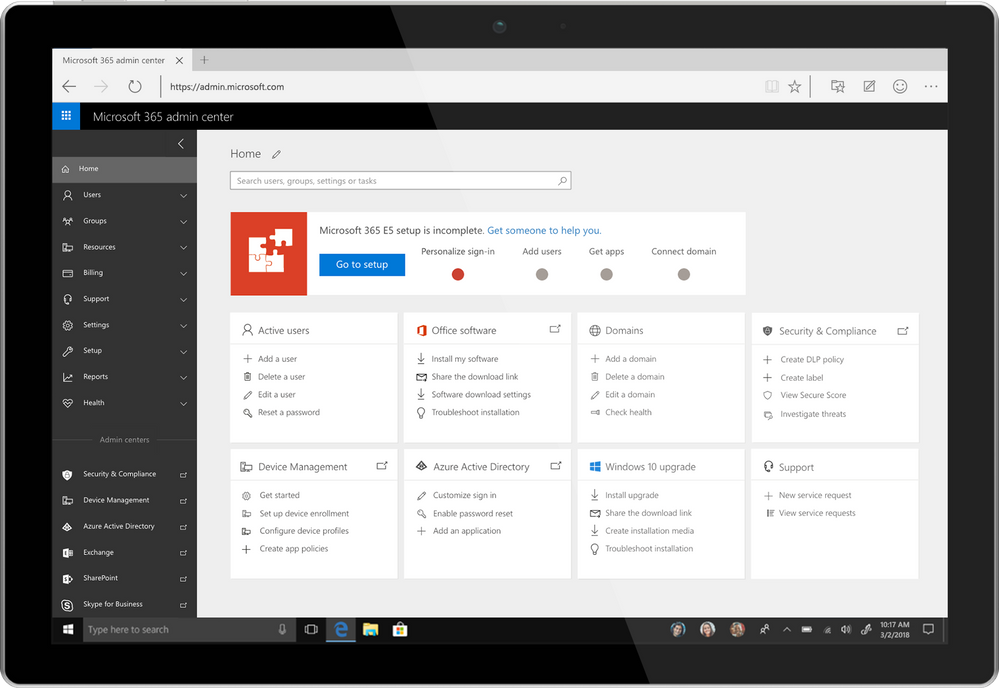
We know that our customers, from small businesses to large enterprises, rely on the admin center for a broad set of activities. From an administration perspective, our vision for Microsoft 365 is to help simplify IT by unifying management across users, devices, apps and services. Today marks an important step in that vision as we are rolling out a new admin experience for Microsoft 365 enterprise customers. This will be a single place for admins to get started with Microsoft 365 and discover the breadth of management capabilities and experiences available to them.
Integrated into this admin center is both the new Microsoft 365 Security & Compliance Center, dedicated to providing security and compliance specialists with integrated management capabilities across Office 365, Windows, and EMS, as well as Microsoft 365 Device Management, dedicated to providing integrated device management capabilities across Intune, Office, and Windows. The Security and Compliance Center will be available shortly, with Device Management to follow afterwards. Please look forward to additional details.
Over the coming months we will continue investing in more integrated, streamlined administration experiences across Microsoft 365 to help organizations become more productive and secure while optimizing their IT resources. We will also continue to improve the admin’s user experience, so admins can complete their tasks faster and easier and get more done with their day.
For Microsoft 365 customers, once this is rolled out to your tenant, you will automatically have the new admin experience. You can login as you usually do, or navigate to admin.microsoft.com to try out the new admin experience.

Our most-popular Office 365 apps—Excel, PowerPoint, and Word—are designed for the modern workplace, with cutting-edge features like real-time co-authoring, AutoSave, and more. With our newest version of Office for Mac, version 16.9.0, we’ve extended these capabilities to Apple users; in fact, this release marks the first time in 20 years that Office shares the same codebase across Windows, Mac, iOS, and Android for core functionalities.
This achievement means users across platforms will gain access to new Office capabilities faster than ever. We’ll prioritize the release of these capabilities based on top customer requests and feedback, along with integration and validation considerations for each platform. All Office capabilities will be tailored to the platform’s specific UI, giving them a native feel, and take advantage of certain unique features, like the MacBook Pro’s Touch Bar.
Read on to learn more about new Mac capabilities available with this release, and in our latest release on iPad. Please note, some of these features require an Office 365 subscription. Such features are marked with an asterisk below.
Boost collaboration and ease-of-use across the core Office apps
With this release, co-authoring in PowerPoint and Word is more powerful than ever. You and your colleagues can create a PowerPoint presentation or edit a Word document on Mac in real-time, seeing each other’s changes as they happen. User flags indicate exactly which slide or sentence your colleagues are editing. For Excel, we’re excited to bring basic co-authoring to Excel for Mac users for the first time. In all the core Office apps, presence thumbnails show you who else is currently working in the file. We’ve extended these capabilities to Office Online, too, so you and your team can work together on files from virtually anywhere. Co-authoring is only available in files stored on OneDrive or SharePoint Online.
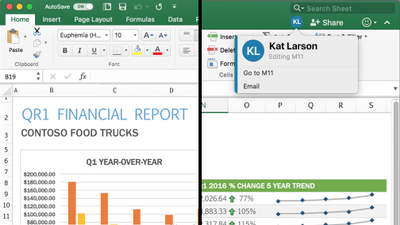
AutoSave*—All core Office apps are now equipped with AutoSave for files stored on OneDrive or SharePoint Online. AutoSave is exactly what it sounds like: Your file is automatically saved every few seconds. Plus, if other people are working in the same file, they can see your changes almost instantaneously. And if you need to roll back, simply check your file’s version history for a list of changes and access earlier copies. AutoSave can be switched on and off using a dedicated toggle button in the ribbon.
Get more data insights faster in Excel
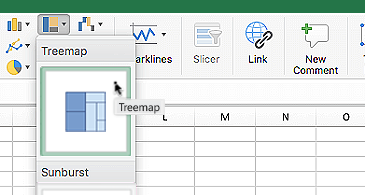
New chart types—Excel’s multitude of charts and graphs has made it one of the world’s premier data analysis tools. Excel 2016 for Mac now includes even more chart types, including sunburst, treemap, histogram, waterfall, and more, to help you visualize your data in new, meaningful ways.
New worksheet functions*—We’ve introduced a pair of new worksheet functions, IFS and SWITCH, for Excel users on Mac to simplify data calculations. The IFS formula takes the place of multiple nested IF statements, making formulas with multiple conditions easier to comprehend. The SWITCH formula evaluates one value against a list of values, and returns the result corresponding to the first matching value.
Table slicers—Using slicers, you can filter table and PivotTable data to quickly curate only the information you need. Slicers also indicate the current filtering state, making it easy to understand what exactly is shown in a filtered table.
Faster calculations—We first introduced multithreaded recalculations in Excel 2007, and have since refined it to help calculations in Excel 2016 for Mac run even faster. To speed up formula outputs, Excel tries identifying parts of the calculation that can be recalculated concurrently on different threads. Read the article on multithreaded recalculations in the Microsoft Dev Center for examples and formula restrictions.
Keep your audience engaged with new PowerPoint features
Trim media*—The best PowerPoint presentations are those that use powerful imagery, instead of words, to convey a message. But what if that imagery is video or audio that’s too long to sensibility include in your presentation? The Trim tool in PowerPoint addresses this issue. With it you can cut unwanted content from the beginning and end of video and audio clips. This feature is only available for media you’ve inserted from your computer and not from the web.

QuickStarter*—If you’re building a research-heavy presentation, using QuickStarter is the perfect way to begin. QuickStarter creates an outline for you based on your presentation’s subject. After conducting initial research, the tool builds out several slides—a title slide, a table of content slides, one slide for each sub-topic, and more—that you can choose to keep or delete. The result is a set of slides that gives you a strong foundation for developing a detailed and factually accurate presentation.
Highlighted changes*—Part of the newly introduced co-authoring feature, PowerPoint automatically highlights changes others made to a shared presentation while you were away. This way, you can quickly see what was updated, when, and by who.
Laser pointer—Turn your mouse into a laser pointer to draw attention to specific parts of your PowerPoint while presenting. You can also change the color of the laser pointer to match the style of your presentation or company.
Do more on mobile in Word
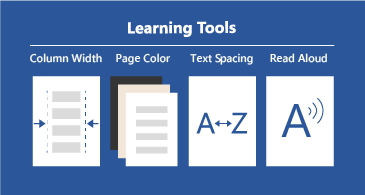
Learning Tools*—Learning Tools in Word for iPad and Word Online was designed to help you improve your reading skills and word pronunciation. Perfect for students or non-native speakers, Learning Tools comes with a variety of features: Read Aloud lets you hear your document; Syllables breaks down words into syllables; Text Spacing increases the space between characters; Column Width reduces visual crowding so you can just focus on the words; and, Page Color gives you the option to change the background to a softer color.
Your feedback is important to us—it’s the primarily reason these capabilities were chosen for this release. Please visit our UserVoice sites for Excel, PowerPoint, and Word to submit your ideas for future features. We invite you to follow Microsoft Office on Twitter and Facebook for the latest news and helpful tips for getting the most out of your Office apps. You can also follow the social feeds for Excel (Twitter and Facebook) and PowerPoint (Twitter) for more specific updates.
* Feature requires an Office 365 on Mac subscription.
Last September, we announced new capabilities in Office 365 Message Encryption that enable users to seamlessly collaborate on protected emails with anyone. This release included Do Not Forward an out-of-the-box policy that encrypts emails and Office attachments, and restricts the content and email from being forwarded, printed or copied.
Today, we are happy to share that we are releasing another out-of-the-box policy called encrypt only. With the encrypt-only policy, users can send encrypted email to any recipient, whether they are inside or outside the organization, and the protection follows the lifecycle of the email. That means recipients can copy, print and forward the email, and encryption will not be removed. This new policy provides more flexibility in the type of protection that can be applied to your sensitive emails.
This is valuable for organizations that want persistent encryption, but do not want to add additional restrictions. For example, a doctor looking to protect an email containing sensitive personal information, can apply the encrypt-only policy, and the patient receiving the email can easily consume the protected message regardless of their email provider, and forward that email to another trusted party.
With this new, flexible policy, users and admins can apply different levels of protection to best fit their data protection needs.
Read more to understand what the encrypt-only policy looks like and how to apply the policy.
How the encrypt-only policy works
The encrypt-only policy is an out-of-the box policy that can be used without additional configuration, and as the name suggests, only applies encryption to the email. You can apply the policy through end-user controls in Outlook or through automatic admin managed controls in the Exchange admin center. Users can apply this policy to individual emails through end-user controls in Outlook, and Admins can apply this policy automatically to any email that matches the set criteria through admin-managed controls in the Exchange admin center.
Customers that have enabled the new Office 365 Message Encryption capabilities will see the encrypt-only policy first through Outlook on the web and in the Exchange admin center under mail flow rules. Updates to Outlook for Windows and Outlook for Mac are planned for the coming months.
How to send an email with the encrypt-only policy in Outlook on the web
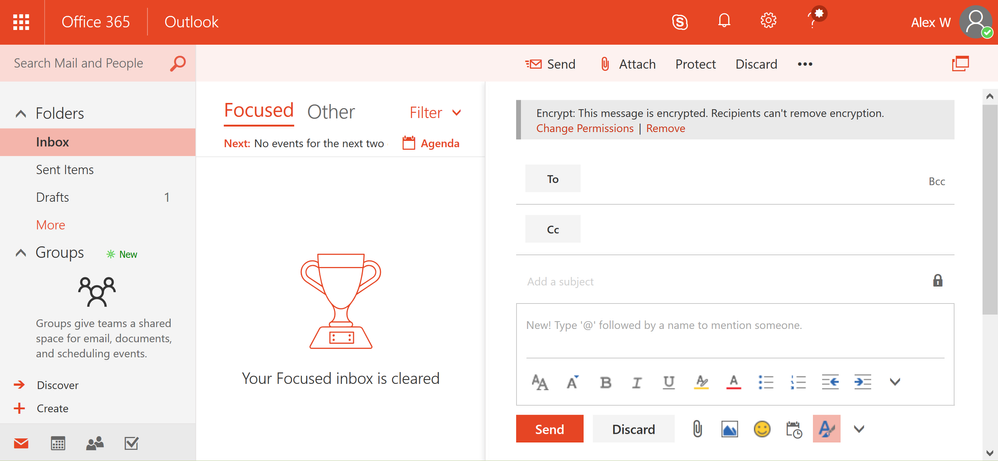
Users can apply protection with the encrypt-only policy by clicking on the protect button and changing the permissions to just encrypt. While the other options encrypt the message, the encrypt option will apply the encrypt-only policy to the message, therefore enabling recipients to forward, copy and print the message.
Applying this option will offer added flexibility for recipients to share the email with other trusted parties while encryption continues to persist and throughout the lifecycle of the email.
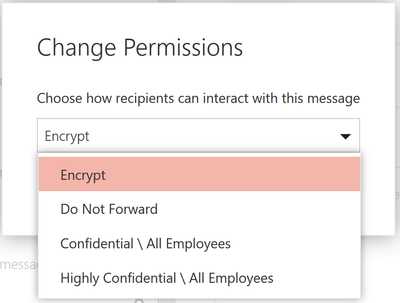 In Outlook on the web, users can click on the protect button to change the permissions of the email. Once a user clicks on protect, the users can click on encrypt, to only encrypt the email. Once the encrypt-only policy is applied, the user will see a notification that encryption has been applied.
How to apply the encrypt-only policy through Exchange mail flow rules
As an administrator, you can apply the encrypt-only policy automatically to emails that meet certain conditions by creating a mail flow rule. When you do this, email affected by the encrypt-only policy is encrypted in transport by Office 365.
For instructions on creating a mail flow rule that employs the encrypt-only policy, see define mail flow rules to encrypt email messages in Office 365.
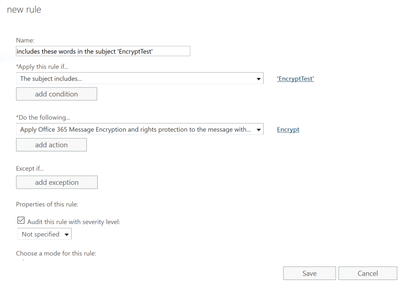 You as an administrator can create new mail flow rule to automatically apply the encrypt-only policy to emails.
How to read encrypt-only email using Outlook on the web and Outlook mobile
Office 365 recipients can easily read and reply to emails that have been applied with the encrypt-only policy using Outlook on the web and Outlook mobile directly from the client.
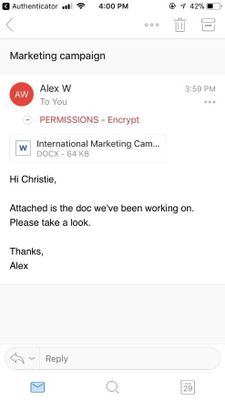 Users can read the encrypted message natively directly in Outlook on the web and Outlook mobile.
The inline reading experience for Outlook desktop (Windows and Mac) will be available in the coming months. In the meantime, Office 365 users using Outlook desktop will see the encrypted mail as an html mail with an rpmsg_v2 attachment.
How to read encrypt-only emails for non-Office 365 users (on-prem, Gmail, and Outlook.com users)
Non-Office 365 users, receive an html mail with an rpmsg_v4 attachment. Once they click Read Message they are redirected to the Office 365 Message Encryption portal where they can reply, forward, print, or take other allowed actions. More information can be found in this article.
Get started!
The new encrypt-only policy rolls out starting today as part of Office 365 Message Encryption.
Office 365 Message Encryption is offered in Office 365 E3 and E5, or as an add-on -you can find the full list of where Office 365 Message Encryption is offered here.
Please let us know what you think here or give us your feedback on uservoice!
Last September, we announced new capabilities in Office 365 Message Encryption that enable users to seamlessly collaborate on protected emails with anyone. This release included Do Not Forward an out-of-the-box policy that encrypts emails and Office attachments, and restricts the content and email from being forwarded, printed or copied.
Today, we are happy to share that we are releasing another out-of-the-box policy called encrypt only. With the encrypt-only policy, users can send encrypted email to any recipient, whether they are inside or outside the organization, and the protection follows the lifecycle of the email. That means recipients can copy, print and forward the email, and encryption will not be removed. This new policy provides more flexibility in the type of protection that can be applied to your sensitive emails.
This is valuable for organizations that want persistent encryption, but do not want to add additional restrictions. For example, a doctor looking to protect an email containing sensitive personal information, can apply the encrypt-only policy, and the patient receiving the email can easily consume the protected message regardless of their email provider, and forward that email to another trusted party.
With this new, flexible policy, users and admins can apply different levels of protection to best fit their data protection needs.
Read more to understand what the encrypt-only policy looks like and how to apply the policy.
How the encrypt-only policy works
The encrypt-only policy is an out-of-the box policy that can be used without additional configuration, and as the name suggests, only applies encryption to the email. You can apply the policy through end-user controls in Outlook or through automatic admin managed controls in the Exchange admin center. Users can apply this policy to individual emails through end-user controls in Outlook, and Admins can apply this policy automatically to any email that matches the set criteria through admin-managed controls in the Exchange admin center.
Customers that have enabled the new Office 365 Message Encryption capabilities will see the encrypt-only policy first through Outlook on the web and in the Exchange admin center under mail flow rules. Updates to Outlook for Windows and Outlook for Mac are planned for the coming months.
How to send an email with the encrypt-only policy in Outlook on the web
Users can apply protection with the encrypt-only policy by clicking on the protect button and changing the permissions to just encrypt. While the other options encrypt the message, the encrypt option will apply the encrypt-only policy to the message, therefore enabling recipients to forward, copy and print the message.
Applying this option will offer added flexibility for recipients to share the email with other trusted parties while encryption continues to persist and throughout the lifecycle of the email.
In Outlook on the web, users can click on the protect button to change the permissions of the email. Once a user clicks on protect, the users can click on encrypt, to only encrypt the email. Once the encrypt-only policy is applied, the user will see a notification that encryption has been applied.
How to apply the encrypt-only policy through Exchange mail flow rules
As an administrator, you can apply the encrypt-only policy automatically to emails that meet certain conditions by creating a mail flow rule. When you do this, email affected by the encrypt-only policy is encrypted in transport by Office 365.
For instructions on creating a mail flow rule that employs the encrypt-only policy, see define mail flow rules to encrypt email messages in Office 365.
You as an administrator can create new mail flow rule to automatically apply the encrypt-only policy to emails.
How to read encrypt-only email using Outlook on the web and Outlook mobile
Office 365 recipients can easily read and reply to emails that have been applied with the encrypt-only policy using Outlook on the web and Outlook mobile directly from the client.
Users can read the encrypted message natively directly in Outlook on the web and Outlook mobile.
The inline reading experience for Outlook desktop (Windows and Mac) will be available in the coming months. In the meantime, Office 365 users using Outlook desktop will see the encrypted mail as an html mail with an rpmsg_v2 attachment.
How to read encrypt-only emails for non-Office 365 users (on-prem, Gmail, and Outlook.com users)
Non-Office 365 users, receive an html mail with an rpmsg_v4 attachment. Once they click Read Message they are redirected to the Office 365 Message Encryption portal where they can reply, forward, print, or take other allowed actions. More information can be found in this article.
Get started!
The new encrypt-only policy rolls out starting today as part of Office 365 Message Encryption.
Office 365 Message Encryption is offered in Office 365 E3 and E5, or as an add-on -you can find the full list of where Office 365 Message Encryption is offered here.
Please let us know what you think here or give us your feedback on uservoice!
Last September, we announced new capabilities in Office 365 Message Encryption that enable users to seamlessly collaborate on protected emails with anyone. This release included Do Not Forward an out-of-the-box policy that encrypts emails and Office attachments, and restricts the content and email from being forwarded, printed or copied.
Today, we are happy to share that we are releasing another out-of-the-box policy called encrypt only. With the encrypt-only policy, users can send encrypted email to any recipient, whether they are inside or outside the organization, and the protection follows the lifecycle of the email. That means recipients can copy, print and forward the email, and encryption will not be removed. This new policy provides more flexibility in the type of protection that can be applied to your sensitive emails.
This is valuable for organizations that want persistent encryption, but do not want to add additional restrictions. For example, a doctor looking to protect an email containing sensitive personal information, can apply the encrypt-only policy, and the patient receiving the email can easily consume the protected message regardless of their email provider, and forward that email to another trusted party.
With this new, flexible policy, users and admins can apply different levels of protection to best fit their data protection needs.
Read more to understand what the encrypt-only policy looks like and how to apply the policy.
How the encrypt-only policy works
The encrypt-only policy is an out-of-the box policy that can be used without additional configuration, and as the name suggests, only applies encryption to the email. You can apply the policy through end-user controls in Outlook or through automatic admin managed controls in the Exchange admin center. Users can apply this policy to individual emails through end-user controls in Outlook, and Admins can apply this policy automatically to any email that matches the set criteria through admin-managed controls in the Exchange admin center.
Customers that have enabled the new Office 365 Message Encryption capabilities will see the encrypt-only policy first through Outlook on the web and in the Exchange admin center under mail flow rules. Updates to Outlook for Windows and Outlook for Mac are planned for the coming months.
How to send an email with the encrypt-only policy in Outlook on the web
Users can apply protection with the encrypt-only policy by clicking on the protect button and changing the permissions to just encrypt. While the other options encrypt the message, the encrypt option will apply the encrypt-only policy to the message, therefore enabling recipients to forward, copy and print the message.
Applying this option will offer added flexibility for recipients to share the email with other trusted parties while encryption continues to persist and throughout the lifecycle of the email.
In Outlook on the web, users can click on the protect button to change the permissions of the email. Once a user clicks on protect, the users can click on encrypt, to only encrypt the email. Once the encrypt-only policy is applied, the user will see a notification that encryption has been applied.
How to apply the encrypt-only policy through Exchange mail flow rules
As an administrator, you can apply the encrypt-only policy automatically to emails that meet certain conditions by creating a mail flow rule. When you do this, email affected by the encrypt-only policy is encrypted in transport by Office 365.
For instructions on creating a mail flow rule that employs the encrypt-only policy, see define mail flow rules to encrypt email messages in Office 365.
You as an administrator can create new mail flow rule to automatically apply the encrypt-only policy to emails.
How to read encrypt-only email using Outlook on the web and Outlook mobile
Office 365 recipients can easily read and reply to emails that have been applied with the encrypt-only policy using Outlook on the web and Outlook mobile directly from the client.
Users can read the encrypted message natively directly in Outlook on the web and Outlook mobile.
The inline reading experience for Outlook desktop (Windows and Mac) will be available in the coming months. In the meantime, Office 365 users using Outlook desktop will see the encrypted mail as an html mail with an rpmsg_v2 attachment.
How to read encrypt-only emails for non-Office 365 users (on-prem, Gmail, and Outlook.com users)
Non-Office 365 users, receive an html mail with an rpmsg_v4 attachment. Once they click Read Message they are redirected to the Office 365 Message Encryption portal where they can reply, forward, print, or take other allowed actions. More information can be found in this article.
Get started!
The new encrypt-only policy rolls out starting today as part of Office 365 Message Encryption.
Office 365 Message Encryption is offered in Office 365 E3 and E5, or as an add-on -you can find the full list of where Office 365 Message Encryption is offered here.
Please let us know what you think here or give us your feedback on uservoice!
Last September, we announced new capabilities in Office 365 Message Encryption that enable users to seamlessly collaborate on protected emails with anyone. This release included Do Not Forward an out-of-the-box policy that encrypts emails and Office attachments, and restricts the content and email from being forwarded, printed or copied.
Today, we are happy to share that we are releasing another out-of-the-box policy called encrypt only. With the encrypt-only policy, users can send encrypted email to any recipient, whether they are inside or outside the organization, and the protection follows the lifecycle of the email. That means recipients can copy, print and forward the email, and encryption will not be removed. This new policy provides more flexibility in the type of protection that can be applied to your sensitive emails.
This is valuable for organizations that want persistent encryption, but do not want to add additional restrictions. For example, a doctor looking to protect an email containing sensitive personal information, can apply the encrypt-only policy, and the patient receiving the email can easily consume the protected message regardless of their email provider, and forward that email to another trusted party.
With this new, flexible policy, users and admins can apply different levels of protection to best fit their data protection needs.
Read more to understand what the encrypt-only policy looks like and how to apply the policy.
How the encrypt-only policy works
The encrypt-only policy is an out-of-the box policy that can be used without additional configuration, and as the name suggests, only applies encryption to the email. You can apply the policy through end-user controls in Outlook or through automatic admin managed controls in the Exchange admin center. Users can apply this policy to individual emails through end-user controls in Outlook, and Admins can apply this policy automatically to any email that matches the set criteria through admin-managed controls in the Exchange admin center.
Customers that have enabled the new Office 365 Message Encryption capabilities will see the encrypt-only policy first through Outlook on the web and in the Exchange admin center under mail flow rules. Updates to Outlook for Windows and Outlook for Mac are planned for the coming months.
How to send an email with the encrypt-only policy in Outlook on the web
Users can apply protection with the encrypt-only policy by clicking on the protect button and changing the permissions to just encrypt. While the other options encrypt the message, the encrypt option will apply the encrypt-only policy to the message, therefore enabling recipients to forward, copy and print the message.
Applying this option will offer added flexibility for recipients to share the email with other trusted parties while encryption continues to persist and throughout the lifecycle of the email.
In Outlook on the web, users can click on the protect button to change the permissions of the email. Once a user clicks on protect, the users can click on encrypt, to only encrypt the email. Once the encrypt-only policy is applied, the user will see a notification that encryption has been applied.
How to apply the encrypt-only policy through Exchange mail flow rules
As an administrator, you can apply the encrypt-only policy automatically to emails that meet certain conditions by creating a mail flow rule. When you do this, email affected by the encrypt-only policy is encrypted in transport by Office 365.
For instructions on creating a mail flow rule that employs the encrypt-only policy, see define mail flow rules to encrypt email messages in Office 365.
You as an administrator can create new mail flow rule to automatically apply the encrypt-only policy to emails.
How to read encrypt-only email using Outlook on the web and Outlook mobile
Office 365 recipients can easily read and reply to emails that have been applied with the encrypt-only policy using Outlook on the web and Outlook mobile directly from the client.
Users can read the encrypted message natively directly in Outlook on the web and Outlook mobile.
The inline reading experience for Outlook desktop (Windows and Mac) will be available in the coming months. In the meantime, Office 365 users using Outlook desktop will see the encrypted mail as an html mail with an rpmsg_v2 attachment.
How to read encrypt-only emails for non-Office 365 users (on-prem, Gmail, and Outlook.com users)
Non-Office 365 users, receive an html mail with an rpmsg_v4 attachment. Once they click Read Message they are redirected to the Office 365 Message Encryption portal where they can reply, forward, print, or take other allowed actions. More information can be found in this article.
Get started!
The new encrypt-only policy rolls out starting today as part of Office 365 Message Encryption.
Office 365 Message Encryption is offered in Office 365 E3 and E5, or as an add-on -you can find the full list of where Office 365 Message Encryption is offered here.
Please let us know what you think here or give us your feedback on uservoice!

Oh yes, I love automation. Having a mountain of robots, and building them (especially my DR Who full sized dalek), fascinates me in the wonder how invented things can move without human intervention (except I suppose the dalek because I will be driving it – haha).
There are various products which all elude to automation in my arena of Microsoft Office systems and services. And now that they are being brought all together under the Office365 hood, now is the time to understand the nature of Service Delivery and Automation.
This quick article is my take on what it is from my standpoint giving some arguments as to what it means from a basic viewpoint. Note that this view is one I have had for many years, because the model, and my notion, stems all the way back to my Systems Analysis days.
Ahem, a little check first… Automation and associated service delivery has been around in systems since the age of software. It is not new. Unfortunately, by many, it is an art which is glossed over, and as such, when someone says ‘lets automate process using powershell’ that’s only a small link in chain mail armour. But now, we have entered the realm of convergence, the advent of ‘connected’ systems. This means automation takes an evolved step, into the land of systems with software beyond human reach, beyond scripting, beyond coding, beyond one platform (e.g. SharePoint), beyond Office365, into and beyond cloud services, to the nether regions of connected systems and connected data. The fact that more data is available to be accessed which can then be scrutinized, re-modeled and then used to automate other processes makes this an exciting time in the land of software design. The fact that time-to-live for the company process becomes shorter, the re-use and revamp of automation becomes an enterprise imperative, and the need for a complete ‘coded’ approach is not the answer. Also, the following video gives even more reasons why automation and service delivery are becoming more important.
Why Service Delivery and Automation is important
As a younger lad, having been introduced to Systems Analysis and Design (which includes programming in a multitude of computer languages using a multitude of platforms and technologies), as I see that as time marches on with new technologies, so does the increased need to maintain and therefore automate, endpoints of legacy with endpoints to current with endpoints of the ‘external’. Critically, and in every solution devised, there is service delivery. The absolute imperative to ensure that whatever solution being devised is maintainable, available, repeatable by design and resilient. This resiliency is not just to do with things like Disaster Recovery or Business Continuity, it goes right to the heart of making sure that the solution is fit for purpose. Service Delivery flows through every part of enterprise architecture, from the idea, to analysis, to design, to production, to support and thrives within that solutions and connected solutions lifecycles. It includes the physical and digital technology that makes up the solution – yes, the servers, and the software, and the storage etc. That means, that even more crucially, it does not matter whether you are a business analyst, a programmer, an administrator, an engineer, a product manager or programme manager. You will be thinking service delivery in whatever you do, whether you like it or not. As you may know, my site is a haven to all things service delivery and includes another passion of mine, which is automation. Why? Because automation is the connector that allows the solution to be flexible, to scale, to morph, to carry out processes without human intervention (which then means better accuracy) – it supports service delivery. Of course, I don’t aim to create a wonderful robot of automation to win a prize, but am absolutely keen to learn and use my integration expertise with it!  Anyway, lets go back to why you should understand the importance of service delivery automation. For example, lets quickly mention Office 365 as an example. Any administrative process that you are carrying out when interacting with the admin centre of Office365 carries out a robotic process. A robotic process is one where you interact with the product, and yet, the back end product is not wholly under your control. Rather, you are automating the software to carry out functions, as opposed to you directly influencing the software. You do not have access to any server based tools – you are automating those tools to carry out a process, in fact, you are being non-invasive – that’s robotic automation. Robotic automation also includes things like system upgrade, data entry and transactional processing. And the high chances are that you will not have direct access to those systems in a multi-departmental organisation. Robotic automation is definitely coming on leaps and bounds in a multi-server environment where you need information from a collection of systems. I spoke to a company which has a desire to manage specific services wanting to not only control web services on a particular group of pre-production servers, but also wanted to store results securely online because they had support groups which did not have access to those servers.
Automation comes with a price
But automation carries with it a price. The increase in automation has a detrimental affect on wisdom, that is, it will curtail the ability to continually review an already automated created process. Reasoning is that once something has been automated, it is then difficult and/or cumbersome, and therefore not desirable (particularly for large automated processes), to alter that process, without then impacting on other processes connected to it. Take for example the process to automatically upload data into SharePoint which then automatically stamps metadata on that data. Lets assume for a moment that it starts off as simple as this:
- Get a file from a network share
- Upload that file into a SharePoint document library
- Set metadata, the Title becomes the filename
Sounds simple? Yes, until you add a simple automation with that file, like:
- Once the file has been uploaded, alert the members
- Gather details from the file to pass onto a data management system
For alerting, sounds simple because you would simply set an e-mail alert, yes? But it is not so simple if that alert needs to be customised beyond what SharePoint does, or if the alert needs to trigger some other process, like having its contents interrogated to be used in another system. And as for the data being passed onto a data management system, that means additional management of ensuring the right data gets across. Then there’s the service delivery angle, ensuring that the automative process continues to be maintainable, available, resilient and supportable. So that means, either code it, or use say a workflow to customise a notification that fires as soon as the file is added and carry out other functions. The point is this. Once something becomes a target for automation, the human desire to do more with it comes arises, but that impacts on wisdom because the need to change things does not happen at the same speed as when the process came into action. This speed decreases with every new connection to systems and other processes, because of amount of work required to identify and service deliver all steps in the process end-to-end. This affects wisdom, as the sheer added number of steps in a process make it more cumbersome to confirm things like performance, audit, human response tracking, etc. Of course, one may argue that certain workflow tools tracks performance in each step. But that rarely comes from a central point – that generally comes from the application system running that step. If are able to centralise all processes under one system banner, then maybe, well done! But, I am not talking about just one tool. I am talking about automation that does not just include that tool working in one system, but all the other systems that tool may be a part of in an automative process (that is, all endpoints).
Automation is not just writing an app to display a form or a workflow
In essence, automation is one of the keys in which systems work in harmony to fuel a seemlessly connected process, machine driven and harvesting intelligence. Service delivery automation encompasses all parts of a process that requires automation in order to meet one or more of the imperatives at the bottom of this section. It is more than simply the need for someone to fill in a form (that is simply an aspect of a process).
For example, if HR wants an individual to fill in a form online once they are on-boarded, that form must be sent to specific individuals, then to other departments to assign resources, then needs to be stored, and needs to be applicable to audit (or used again when that new person changes departments or even leaves the company). So writing an app to get someone to fill in a form is not automation of a process, it is a step in that process. Another example. You want to be able to collect information on the status of all servers in your estate – specifically, the status of specific services and want to display that centrally. You don’t have access to SCOM (System Center Operations Manager), and you don’t want to code it. Again, writing an app to display the status of all the services is not automation of that process, it is a step in that process, because automation of display of that information does not end with it simple being displayed. You want to be able to act on the data, or take some automated action to resolve issues if the status is not as expected.
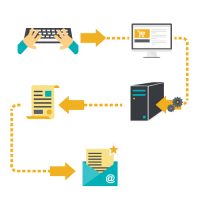
Automation using any technology is decided upon because one needs to address all of the following, but only works if by connecting technologies using automation techniques minimises disruption:
- Quality
- Speed
- Accuracy
- Productivity
- Efficiency
- Scaleability
- Flexibility
Don’t automate everything!
Just because you have a bicycle does not mean you fix it so it rides itself. By doing that you miss the simple enjoyment of doing anything physical, like exercising your legs. The same thing comes with automation. Just because you want to cut costs to achieve additional benefits by reducing or eliminating human involvement doesn’t mean you should immediately automate the process. A factory which distributes milk has automated the entire factory floor so that robots move the milk containers around the factory. But they still need humans to keep an eye on the robots. Certain processes you will want to be operated by humans, because at the very least you will still maintain some modicum of control, and to mitigate risk. Otherwise, you might as well consign yourself as a cyborg or a member of the Borg from Star Trek. You only automate things that you think will reduce time around time, or will reduce the requirement to chase actions. But improving things to simply reduce headcount is not going to solve anything, unless you can absolutely guarantee that nothing will happen to upset the automated process. Some companies where automation has been a success is were they actively introduce business continuity. I’ve even seen companies use a back to paper continuity plan if the automated process through computers fail. This is where, for example, they utilise legacy equipment and where they need to guarantee a process if that legacy equipment fails.
Conclusion – and a new beginning?
If you are not thinking automation for your technology set, you should be. I think that it is time to take stock of your automation alternatives. Automation of an enterprise solution using multiple technologies requires an adoption of an suite that allows you flexibility. Remember that using a tool within one platform is not enough. Maintainability, Availability, Resiliency and Supportability is key. Automation in the SharePoint space is already taking place, is driven by transactional processes across systems, to ring-fenced workflow against specific processes, to Web Analytics across Office365 and on-premise SharePoint. As this increases, so will be the need to review automation tools. On my voyage of discovery, a few of the companies I have surveyed taking automation seriously have mentioned to be a product called Automate 10, owned by HelpSystems LLC. This product provides a none scripting platform to integrate and automate a myriad of services from Amazon through to FTP through to WMI automation and across multiple servers and services in the enterprise. Am running some demos of this myself and the product seems to be very useful. Check out some automation case-studies from some products which I recommend if you are considering enterprise wide automation (not sticking to one technology or one sticking to one scripting language). Click the below screenshot to see the number of services (note – Azure is also listed!).  There are other links to articles you should also check out, to see how some other organisations are dealing with automation.