One of the most useful documents in my view in planning implementations of Office365 is understanding data encryption and data backup and the standards applied. Microsoft have provided audit reports covering their cloud stack (Dynamics CRM, Office365, Yammer and Azure). These SOC and ISO reports include testing and trust principles in these areas:
Data Transmission and Encryption
Security Development Lifecycle
Data Replication and Data Backup
To access these reports, you will need to access the Security and Compliance area in your Office365 tenant.
As said, these cover the Microsoft Cloud Stack, however, the two key documents for Office365 are:
Office 365 ISO 27001-ISO 27018-ISO 27017 – this is an audit document confirming whether Office365 fulfils the standards and criteria against ISO 27001, 27018 and 27017.
Key points:
PII is included in Office365 because it is run over Public Cloud for multi-tenant customers.
Cloud Security is included in Office365 because it is defined as a SaaS (Software as a Service)
All encryption adheres to TLS requirements and hashing (specific)
Office 365 SOC 2 AT 101 Audit Report 2016 – this is an audit document looking at the controls relevant to Security, Availability, Confidentiality and Processing Integrity.
Key points:
Details on the services concerning planning, performance, SLAs, hiring process (including background checks of staff) are provided.
Control Monitoring, Access and Identify Management, Data Transmission (encryption between Microsoft, Client and data centres) are described.
Project requirements through to Final Approval concerning the SDLC process is described
Availability, Data Replication and Backup is covered.
Summary
The above SOC and ISO are extremely useful in aiding any risk assessment that you should take to confirm the service assurance of Office365 going forward. Risk assessments are not a ‘one shot’ task. They should be carried out on an annual basis. The Office365 service is a rich offering of Infrastructure, Software, People, Procedures and Data. Each requires security controls and confirmation that they meet standards which can be dovetailed into your organisation. The audits go into great detail concerning the controls (especially things like Data in Transit / Rest – SSL / TLS). A lot of questions is asked by customers concerning security controls – the video below is a good method of getting you to understand (and your clients) how Microsoft ensures proactive protection, and you should definitely check out the Microsoft Trust Centre for great information concerning encryption.
Learn to make the most of Office 365 innovation by bringing cloud innovation to your on-premises SharePoint infrastructure. Why? Cloud computing has become a popular and successful computing model that enables organizations to reduce their capital and operational expenditures, renew IT innovation, and gain the advantage of more rapid software delivery to meet their business needs. The session below allows you to get get a detailed overview of the latest innovation in cloud-connected hybrid scenarios, along with a look at the capabilities and features in the hybrid SharePoint and Office 365 roadmap.
On the 20th, 21st and 22nd February for the first Microsoft Most Valuable Professional (MVP) led TechDays Online of 2017. On day one, MVPs and community leaders will delve into the World of Mobile Development, BOTs and Data Science followed by day two, where MVPs from around the Globe will share their knowledge of cross platform development on Microsoft Azure. Day three will end this online event with a look to the future with Blockchain, Quantum Computing and Deep Learning. As always, each session will be led by MVPs from the UK and across the World, along with Microsoft Technical Evangelists. It is a three day online event ‘not to be missed’. The full agenda will be published in early January 2017, and each day will begin at 10.00am and end at 4.00pm. All MVP led sessions will appear live on Channel 9 and please register your interest here. Below is a snippet and schedule of the event.
One of the biggest challenges in supporting Office365 is getting a real statement on issues that have been put by users and also those known by Microsoft.
As part of the knowledge base on this site, I’ve provided direct from Microsoft a list of the most common Office365 answers concerning Office, SharePoint, Internet Explorer, Lync and Outlook. Use the below as an indicator; select the relevant technology, and then select the PLUS (+) icon next to the statement to get more information.
A major challenge in businesses is a misconception, that data is 100% secure concerning any part of its data processing within that business. This data processing concerns the content management lifecycle; from creation, to storage, to distribution, to workflow and eventually archive of that data. The misconception? “Security Breach? Its not going to happen to us” mentality. It is vital that there is an understanding of Information security and Information Assurance in content management security. As an information security professional (or Architect covering security), you should be prepared for any aspect of secure breach can happen that can affect the confidentiality, availability, and integrity of the data. Any service delivery disruption caused by a security breach is harmful to the profitability, and has far reach consequences which could include liability, status and much more.
One of the most compelling challenges for Office 365 is centralised monitoring. Those working in the SharePoint arena will know only too well importance of monitoring and reporting across the platforms they manage. This is not simply from a technical but also from proof of service; the availability and evolution of those services.
Platform Governance is there to help bridge the communications gap between the business and technological groups; ensure ROI, mitigate risks associated with IT Projects impacting SharePoint, and provide a key cog for SharePoint Service Delivery, capability of service.
When a SharePoint solution is delivered, you need to ensure the continued availability of that service to related customers. You will need to protect the integrity of that SharePoint solution. You will need to prove that the SharePoint solution is capable (that is, that things like Change, Risk and Issues concerning the SharePoint solution are managed and communicated and documented).
Take this scenario:
Fabrikam is a manufacturing organization and has a project management office. Their IT team gets SharePoint and installs a site for the project management office. The company culture isn’t strict in terms of website control, and the IT team do not create documentation concerning the design or installation. The small site expands as more projects are added, and more features are added. Again, no documentation concerning changes was made. Six months into the project management office site, and there is a request to add more functionality which will change the way in which the project management office runs. However, in order to do that information is needed about the features applied and the reasons behind why they have been applied. Chaos ensues as no-one has any idea on how the sites evolved; the IT team is squarely blamed for not having adequate documentation about the sites history
Check out my book 'Implementing and Managing SharePoint Projects 2010'
This section comes from my book, Implementing and Managing SharePoint 2010 Projects, which is a great read covering lots of service delivery topics to aid SharePoint programme delivery.
Clearly, not a scenario that you would ever like to find yourself in! Therefore, you should use Configuration Management techniques to control specifications, drawings, software assets and related documentation which define the functional and physical characteristics of a SharePoint solution, down to the lowest level required to assure standardization. Control of those elements also means you control the SharePoint solutions and its Platform, under a Change Control regime and to control release of SharePoint solutions into your SharePoint platform. This enforcement of change control is linked to Platform Governance. The Configuration Management (CM) process also provides a documented, traceable history of the development lifecycle of SharePoint in an organisation, including any modification, upgrades or variants, and should be used to hook into your Change Management processes with SharePoint.
SharePoint when implemented is defined by identifying configurable items based on its technical, administrative and maintainability criticality. The selection process is one of separating the elements of SharePoint on a hierarchical basis for the purpose of managing their baseline characteristics.
Any item associated with the SharePoint solution, including deployment and any associated asset is subject to Configuration Management.
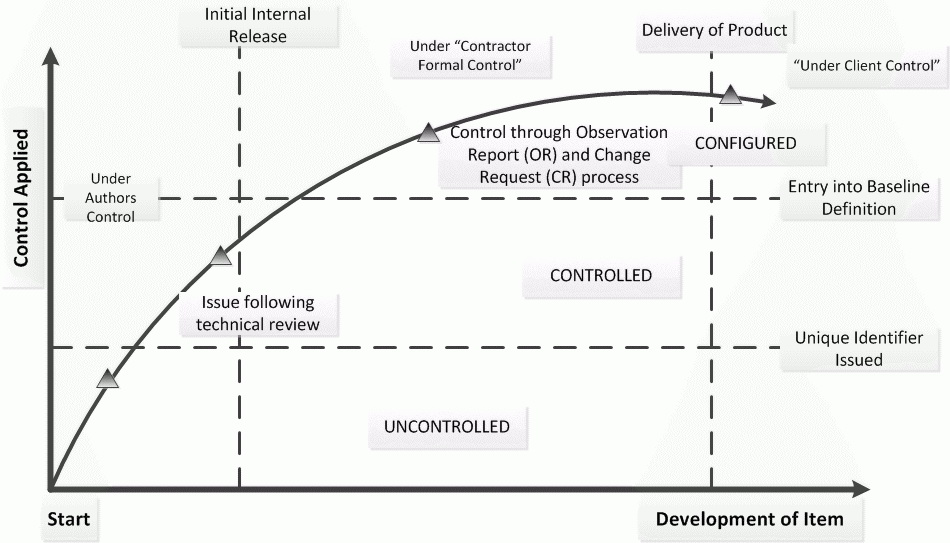
The diagram below illustrates the degrees of control applied to a configurable item during its implementation lifecycle.
Initially an item is uncontrolled whilst under development by the author. It becomes controlled once a unique identified has been allocated and the item is subject to review. Once the development of an identified configurable item is sufficiently stable to declare a baseline standard, it will be subject to configuration control processes. On small projects, configuration management techniques may be applied by the project staff using a simple SharePoint list to control baselines and record the version / issue status of the identified configurable items.
On larger projects, particularly where a large number of hardware drawings or modules of SharePoint features have been produced, Configuration Management may be delegated to specialist staff. The advantage of a central site CM facility, with its own specialized staff and archive, is the long term maintenance of project configuration records. However, the production of SharePoint add on features (e.g. Web Parts, Automation, Branding, Site Definitions etc.) is particularly well suited to the use of configuration management and tools, remaining under project control.
Check out my book 'Implementing and Managing SharePoint Projects 2010'
This section comes from my book, Implementing and Managing SharePoint 2010 Projects, which is a great read covering lots of service delivery topics to aid SharePoint programme delivery.
How to apply Configuration Management in SharePoint
To apply Configuration Management in SharePoint you will need to state a policy for its use and its procedure. You will need to ensure that any deviation from this policy, together with designated configuration management authorities for the SharePoint delivery program is documented. Other configuration management details may be contained in a separate configuration management plan, depending on any contractual arrangements or the size and complexity of SharePoint being implemented.
As the SharePoint Delivery Planning initiates, so should Configuration Management. You must choose a set of methods, procedures and tools to satisfy the requirements below. If the client organization does not have any Configuration Management processes in place you will need to create those processes. A method of recording these is via a central SharePoint site for the purpose of storing CM documentation and history of changes to the solution. If you intend on doing this, and if the client does have a full configuration management process running, investigate and find out if either (a) there is connectivity between that and the SharePoint site and/or (b) that the configuration management process in place includes the requirements below:
Enable unique identification and description of the SharePoint solution and components
Enable the evolution of products and their components to be controlled and traced
Enable identification and control of the means by which products will evolve in order to satisfy their requirements
Record securely and maintain all the information required
Provide validated, identical copies of products
To satisfy these fundamental requirements, the configuration management system should provide the following:
Methods for unique identification and version control for all products and all components of a product
Methods for receiving and acting on observations concerning a product and for recording and controlling changes arising
Methods for keeping track of all items being produced or utilised by a project, including items inherited or sub-contracted
Methods for defining the means by which a product may be build or re-built and which must include any special requirements after delivery or after project completion
Methods for marking, storage and handling of all required media types
Procedures for controlling replication and distribution of products
Configuration Management Applies to SharePoint
Configuration Management is mandatory for all SharePoint Delivery programs. You cannot have a controlled SharePoint environment without records concerning is makeup and traceability concerning changes made. Even from the perspective of a handover of a SharePoint solution, as a Delivery Management you cannot simply handover a SharePoint solution by stating “I’ve finished implementing SharePoint for you, off you go”. CM provides a structured system handover meaning everything that the delivery program can be audited on, everything that the delivery program has an asset of (and that includes all documentation, technical specifications, software assets etc.)
Configuration Management is needed for any deliverable of hardware or software or where there is a change to either of those in a production arena. Configuration Management applies to configured items that are used in the development of a SharePoint product but are not a deliverable in their own right. Typical configuration items include:
SharePoint Software Assets, and if any additional development applied to SharePoint, any code, program listings, associated documentation
Service or User ManualsOther items to which Configuration Management applies must be identified as part of any SharePoint solution delivery and subject to review.
The Delivery Manager Specifies the Configuration Management Policy
The Delivery Manager is responsible for creating a configuration policy and the techniques to be applied. If this policy deviates from that stated in the Configuration Management procedures, those deviations must be defined in the SharePoint 2010 Quality Plan.
Additional issues that also need to be recorded are:
The designated configuration management authorities for the project
The identity of the root document or source from which all configuration status records can be traced
The Delivery Manager should appoint a configuration authority who will control the CM activities (SharePoint Solution Architect).
Configuration Management Glossary of Terms
Configuration Item
An item selected for configuration management. Configuration Items are established on a hierarchical basis with one item comprising the complete product (hardware / software). This is then broken down into its lower level constituent items or parts, each with its own reference number
Configuration Baseline
A specification or product that has been reviewed and agreed on that therefore services as a basis for further development. A baseline can be modified only through formal change control processes.
Controlled Item
An items that is not identified as a Configured Item but still requires controlling in a formal manner
Configuration Control
The systematic evaluation, co-ordination, approval and dissemination of proposed changes and implementation of all approved changes in a Configured Item
Master Record Index
The index(es) to the master set of drawings, specifications which define the configuration item. This term is used generally to refer to a set of indexes that provides a record of the Configuration Items.
Bring the SharePoint Item under Control as it Develops
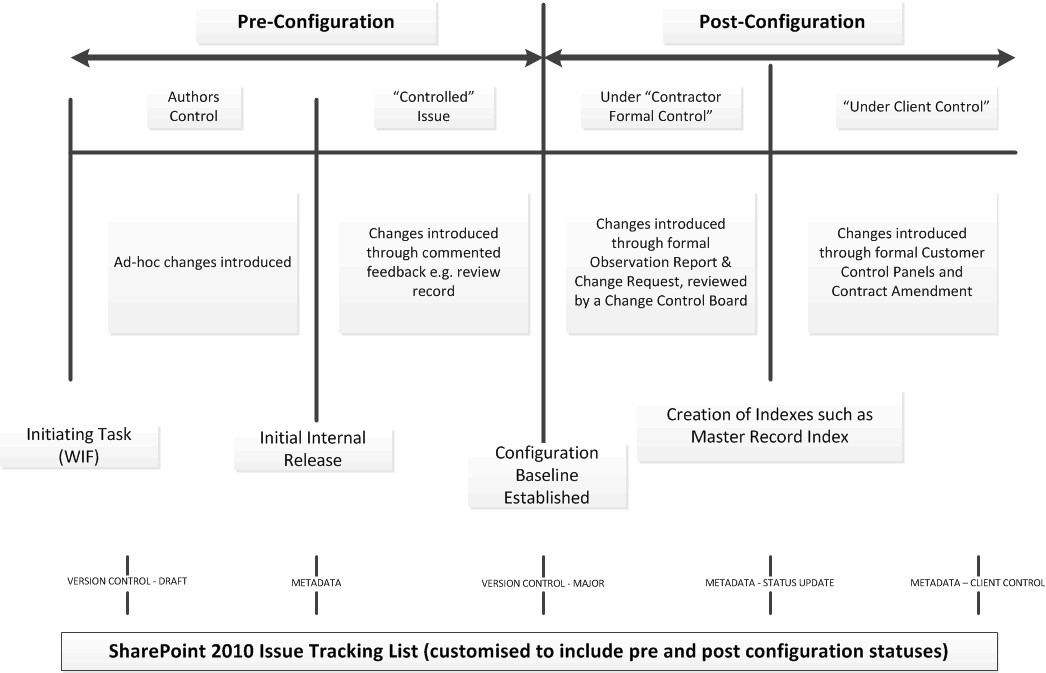
The following diagram illustrates when a SharePoint item should be brought under change control (note – whilst it refers to SharePoint 2010, the process is agnostic of SharePoint version):
Check out my book 'Implementing and Managing SharePoint Projects 2010'
This section comes from my book, Implementing and Managing SharePoint 2010 Projects, which is a great read covering lots of service delivery topics to aid SharePoint programme delivery.
The diagram above shows the passage of a configurable item from its generation to the point where it comes under customer control through change control. Each of the vertical lines represents a formal stage in the development of the item. Once the internal review cycle is complete the item will be raised to version 1, or, if being updated, to the next appropriate version number and issued for external use. From that point on its status shall be recorded in the Configuration Baseline Index and any changes to the item must be introduced via formal configuration control procedures (see the below section Changes to Configured Item Must be Controlled). When the client takes delivery / control of the product, there will be a need for a formal Master Record Index to be generated for each Configuration Item.
Control the Item Prior to Configuration Management
Whilst a configuration item is being developed during the pre-configuration stage, the author is free to make whatever changes that may be necessary on a day to day basis. Understanding the development of the item is still important and significant changes should be recorded as part of the configuration item.
Historical information needs to be maintained for Configuration Management auditing purposes. In SharePoint, you could, as shown in the above diagram, construct a list with Version Control switched on utilizing Minor and Major Versions. Those allow you to enter comments as the item moves from draft to draft version until it becomes a configured item.
Bring the Configured Item under Configuration Management at the Right Time
As the development of the item stabilizes, the baseline standard can be declared and the item brought under configuration control. Each configuration item must be given a unique reference number. All configurable items must be regularly reviewed. The review record may initiate further changes to the item, causing the draft number to be raised. Maintaining all the comment copies of a technical document is not necessary, provided the record and / or minutes are maintained to provide the traceability of the review process
Establish a Configuration Baseline for Each Item
A configuration baseline index shall be formally maintained as a status and history record of the project’s configuration items. The index must include the hierarchy and inter relationships of the items.
At appropriate points in the project development and certainly when the product is ready for delivery, it is necessary to product an index of all the configuration Items. This index is often called the Master Record Index (MRI). For software products, a Build Definition which defines the software and computing content of the release must be prepared.
A Configuration Status Account Provides History
Configuration status accounting is a mechanism for providing records of the current status of all the projects configuration items. The configuration status records provide complete traceability of what has happened to the configuration to date. These records can be centralized into a SharePoint CM site. For example, you could have an item subject to version control and carrying metadata – a multi-choice column called Configuration Status, for example. This configuration status column could have values defining the configuration level of the item. This means that not only do you have traceable history but you can also identify when and who made alterations to the configuration status and if there were any comments made at the time they would also be available.
Changes to Configured Items must be Controlled
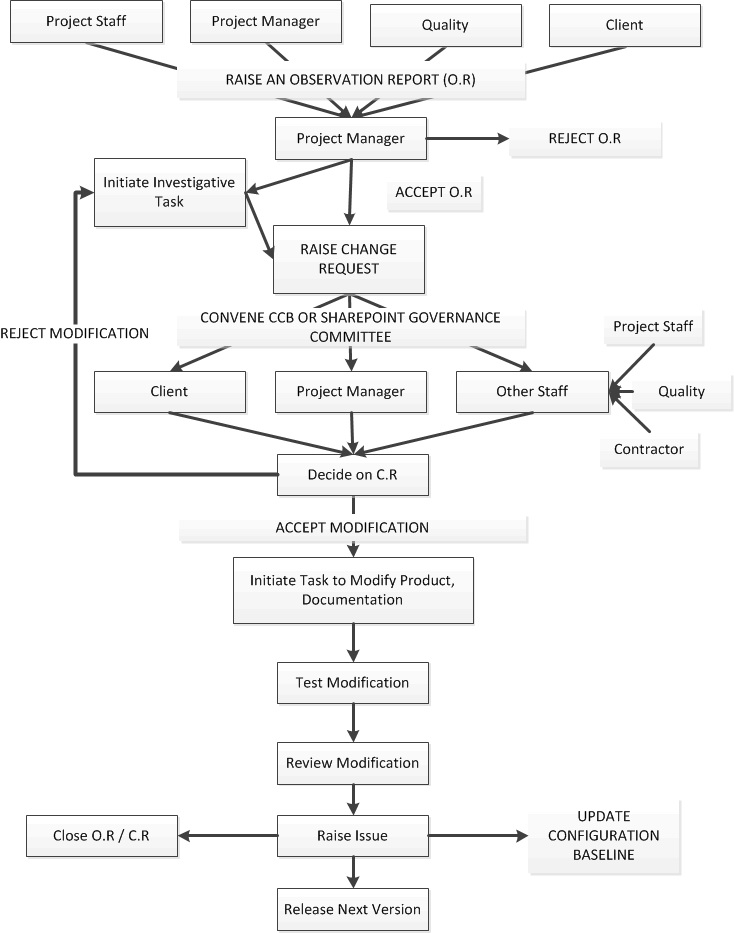
Once an item comes under configuration control, changes can only be introduced by means of a formal change control process. All items in a SharePoint production and SharePoint User Acceptance come under configuration management. The following example of a processing chain concerning SharePoint Delivery through Change Control is shown in the below diagram:
Check out my book 'Implementing and Managing SharePoint Projects 2010'
This section comes from my book, Implementing and Managing SharePoint 2010 Projects, which is a great read covering lots of service delivery topics to aid SharePoint programme delivery.
Every item concerning SharePoint running in a production environment is subject to configuration management; whose rules are bound by Platform Governance. You may wish to argue that Configuration Management is overkill; that there is far too much ‘process’ and it would hamper SharePoint delivery. My response is the following question:
How do you know who created what?
If you cannot answer what constitute SharePoint operations under change control you do not have an environment under control. You do not have an environment duly documented to show the purpose, premise and operation of your SharePoint environment.
Configuration Management manages and records and brings a logical change control process, so that anything that takes place to deliver a product has a history from the point it was designed to the point it was implemented. SharePoint configuration management defines processes that describe the following:
Makeup of Infrastructure
Software and Hardware Assets
Modification
Procurement and Delivery (for example, third party solutions).
Tracking and AuditUnderstand the ComponentsItem Identifications
The basic or lowest level of configuration items for SharePoint under which configuration management (CM) will apply is the software under which SharePoint operates. However, any feature that comes off that is an item under CM process. For example, the Initial design of a site if not under strict control does not need to come under formal configuration but you should use sound judgement and identify whether changes to the site in the future could impact on customer experience and satisfaction.
Ensure that you know what makes up your SharePoint platform. Even before providing a SharePoint solution (even if it is the platform itself), and even before someone mentions – “hey what kind of solution do you want?” You need to document what makes up the SharePoint solution. Assuming that you have done that and have defined the specification, you then need to ensure you that the level of documentation is sufficient not just for you, but for anyone whose services you consume, and for those who would need that information as part of the CM process.
Am pretty humbled and pleased as punch to be renewed today, July 1st 2016, as a SharePoint MVP for the SIXTH year running. A big thanks of course goes out to all I have managed to reach out to enabling me to share my expertise with others and help individuals maximize their use of SharePoint and Office products. Of course, this works the other way around in being part of a great MVP group, all of whom are committed to providing knowledge, aid and expertise back into a growing and evolving community – and I’ve learned so much from the MVP group, the MS Product team and so many more. Many thanks therefore go to their support and yours, in helping me share knowledge and helping me to keep focusing on providing continued blogging, getting to grips with tweeting, forum support, presenting, helping with user groups, writing, helping organize events and much more!
Cyber security is about data loss prevention, detection and response. Service delivery includes ensuring the protection and managing the integrity of content through its lifecycle. This is cross platform, and cross industry, so in relation to whether you are using SharePoint on / off premise, or SharePoint is at the centre of an estate of multiple technologies, cyber security concerns all of these. These requirements directly relate to a technology current and future state – according to Gartner (and covered in my last keynote):
By 2016 Biometric sensors will be featured in 40% of smartphones shipped to end users.
By 2017 one-third of consumers in emerging markets will have never owned a windows device.
By 2018 more than 50% of users will use a tablet or smartphone first for all online activities.
By 2020 40% of enterprises will specify Wi-Fi as the default connection for non-mobile devices.
With the match of evolving technologies related to the above points, such as Internet of Things (IOT), Content Analytics, Hybrid Cloud Computing, Big Data, In Memory Database Management and more about to become widespread; how to provide integrity, protection, and governance to data becomes more important. We all work with data, utilising physical and digital technology in our daily lives. We use countless methods to create and use data, and assume that the accessed data has security maintained. In providing measures, providers of secure access to data provide measures to ensure legitimate access. Consequences resulting from unauthorised access to data could include:
Time, effort and monetary resources to correct.
Damage, deletion and compromise.
Damage to reputation.
From a global perspective there are security challenges in the ‘digital developed’ versus ‘digital developing’ world. For the developed world, users’ access information through a digital framework; internet services provisioned over high level Wi-Fi and 3G/4G networks. But, in the developing world, there some 950 million people still without the means to connect to these networks. Security provision is not a one-fits-all. Additional global challenges are ‘Freedom of Speech’, ‘Country A Trust Country B Trusts Country C’ and the ‘Political Will’.
From a company perspective, the primary objective is to ensure the management of security; enforcing breach policies and governance is vitally important to ensure their data integrity. The challenge is that the company workplace is changing, and so is the physical infrastructure. Whilst physical and digital technology has become increasingly sophisticated, like dongles, passwords, data encryption, the task is convincing staff – from senior manages to entry level employees that they need to become more security accountable, becomes harder due to their emotions about security and privacy.
From a personal perspective, security intertwines with privacy. Advances in technology threatens privacy, reducing the amount of control over data. Privacy affects technology use. The challenge is the space in which this takes place in the digital world, which is completely online through the use of the internet, which never corrects and never forgets.
In summary, humans adopt any cyber security imperative. Technology is neutral. This means work must be done in the governance, training, and management of data to protect integrity and at the same time provide detection and contingency against loss. Opportunities include:
Proactive security reporting
Automated content filtering
Protection of content via search engines
Child Protection, for example, Extremist content removal
Security Automation – for example, E-mail Scanning
Service delivery includes the protection and the integrity of content created. Like security, compliance is cross platform, cross industry. It does not matter whether you are simply using SharePoint, or using multiple platforms to service content into SharePoint.
Compliance concerns:
Monitoring, isolation, automated operations, secure network and encrypted data.
Security best practice, and the customer controls.
DPL, audit and retention, eDiscovery and Data spillage.
Standards such as ISO 27001, FISMA, HIPAA BAA, EU Model Clauses, and the CSA.
Note – this article is geared to looking at SharePoint on-premise. Office 365 is pretty much covered on encryption technologies. There is a wealth of information concerning this and more the Microsoft Office 365 article on this link: Data Encryption Technologies in Office 365. Also, there is also a huge amount of information available in its Trust Centre. There is a specific section concerning compliance on this link:Continuous Compliance in Office 365
Encryption is a solution against Data Breaches
Data Breaches are not simply relegated to external infringement of data by those who should not have access. This is an ongoing problem, and regulators are ramping up audits and confirming standards to ensure companies are taking heed. Some data breaches can occur for any of the following reasons:
Data copied and taken off premises
Downloading information then emailing the data unprotected to external parties
Saving content to a folder which is publicly available online
Provisioning of production data in test or development systems
Protecting against data breaches therefore must consider the data at the location where it is saved. Encryption of the data is without doubt the highest level of protection the data can get to prevent that data being subject to a data breach. However, the human culture of how they handle security matters is also extremely important.
SharePoint Data Security
When data ends up in SharePoint, the content is stored in SQL (at rest), except in the case of RBS (Remote Blob Storage). The data in SQL is ‘unstructured’, meaning, that it is not ‘easy’ to simply dive in and set security on specific bits of data. The data is also ‘unknown’, meaning that it is not also ‘easy’ to identify what data relates to what area and in what context – and even if you could, securing that would be a difficult in the extreme.
SharePoint, ‘Out-Of-The-Box’, provides access controls only to protect the data based on the role of the user. These access controls include:
Permissions access to the data
Auditing controls, stamping of data, lock down.
However, there are data encryption components provided ‘Out of the Box’ for SharePoint. Data could be read in a number of ways (described below). And again, confusion reigns from people trying to get to grips with the options. Some people even confuse authentication with encryption. I have even heard a client state that surely provisioning SSL will provide encryption. That client had to be informed that SSL only secures the network connection to the link where the data can be accessed (that is, Data in Transit, NOT Data at Rest). It does not protect the data from being ‘read’ at its source. Anyone unsure of this should check out this article Do you need SSL?
Compounded is the challenge humans the culture they apply to security – it is not simply a ‘one hat fits all’. From people I have spoken to and worked with on this topic, it is generally stated that users are simply not taking enough security measures to protect the data. Yes, one could very easily apply role permissions to ensure that individuals cannot read, write, or even upload. Provision of auditing tools to alert individuals of unwanted access is possible. Locking down of data so that the data cannot be modified or downloaded is possible. However, those solutions is not on the same plain as the protection (encryption) of the data where it is stored. For example, if a disk holding data was subject to attack / access from those who should not be able to read the data at source, then surely that is an out of compliance and classed as security risk. Indeed, taking a SQL SharePoint content database off a disk, and then applying that content database into another web application in another farm is relatively easy. Even if that operation takes place unless under strict and controlled circumstances (note that in some cases a challenge to implement, especially when working with multiple technical teams like a separated team for SQL, Windows, SharePoint, etc.) the mere fact that the data is in a read-able form when transmitted could be still construed as a data compliance issue.
The solution is looking at the data within SQL; that requires ‘security hardening’ and encryption solve these challenges.
Implementing encryption for Data at Rest starring SQL
As pointed out, SharePoint data resides in SQL. That is the point where encryption should be brought into play. Microsoft recognised this way back with the implementation of SQL 2008 and provided two technologies to protect ‘data at rest’ meeting various compliance standards. Thankfully, the architecture is in place to provide, since SQL provides the ability to have the data encrypted, using the following technologies:
Switching on encryption is not just a ‘fire and forget’ action. A number of tasks must be completed beforehand in order to deliver the service:
The environment must be modelled first; for example, identifying the number of users, size of documents, underlying infrastructure, specific technical roles and skill set.
Disaster Recovery environment and enabled technologies. Check the infrastructure applied to the SharePoint farm concerning DR. Check whether RBS is in use which will impact on how encryption is to be applied – note that TDE does not apply to content in a file stream because that content is not encrypted in SQL so additional encryption methods would have to be applied.
Key management – who is responsible for managing the key – is it the SharePoint team? The SQL team? The Security team?
Advise your corporate security team including any stakeholders of the impact of encryption. There is a technical as well as business impact. The technical side is a degradation of overall performance. From investigations I’ve been advised this could be up to 2% overall. On the business side is an impact on support, particularly from SQL and Security, since they have an extra accountability to the management of the encryption. Note also, that you should test this thoroughly in a isolated test environment and against DR and run DR tests.
Apply Encryption at Rest for SQL, and for this, TDE must be implemented. Remember, TDE is used to prevent the restoration or attachment of databases into another SQL instance. This means that a master key needs setup, the database requires configuration, and the encryption password (stored in the certificate) must be backed up. Then, all must be tested (i.e. backup, restore – which should fail – then restore again along with the key – which should work).
Ensure connections to SQL are encrypted. This means protection from those attempting to use tools to get at the data. This means forcing encryption settings to enabled for the SQL server and applying the certificate.
Prevent other machines accessing the SQL instance (i.e. attempting to connect a different farm, or a machine outside of the ‘allowed server authentication list’ to a SQL instance being protected), you would setup isolation rules by configuring the firewall on the relevant servers themselves.
Note – doing this by yourself in a company with multiple teams looking after the infrastructure is unwise. You should seek aid from your SQL teams, as well as advice from Server teams.
To get detailed information on how to technically deliver encryption for SQL as well as isolation, step by step, check out the excellent article on this link:
A key aspect of Data Compliance is the protection of data. Companies use data compliance to protect data, provide policies, processes and systems, and this stretches to governments and individuals. This is cross platform, and cross technology.
In Sharepoint, in order to meet data compliancy challenges and provide solutions through service delivery, there must be understanding that there is encryption tools available to data where that data resides. Encryption is the keyword here, since through this article I have explained how data can be securely stored and protected from unwarranted access.
SQL provides encryption and key management tools so that the data becomes unreadable to anyone except those who should have access to that data, using key management to automatically convert data back to its original, readable form. There are additional opportunities available to harden the SQL platform so that there is isolation and authenticated access.
The implementation of encryption though, whilst relatively easy from a technical viewpoint, provides many challenges to overcome in implementation. Security awareness, and identifying shortfalls in the surrounding infrastructure is vital, along with the marrying up of the roadmap of SharePoint. Implementing future technologies down the line will have an impact on encryption, so ensuring that you continually review encryption usage and change management is necessary.