Got a great read today I thought I should share with you all. Got to read a thought leadership piece from Forrester focusing on Cloud Change Agents. This report is the result of a study Microsoft commissioned with Forrester to explore the status of cloud as a business transformation driver among a selection of UK businesses.
The Cloud Change Agents report is a new study conducted by Forrester Consulting and commissioned by Microsoft Ltd to show how cloud computing is acting as a ‘big switch’ to drive transformation in businesses. The study shows how a certain set of individuals in UK businesses – change agents – working with IT leaders are leading the way, seizing on the cloud to accelerate projects with minimal risk, low cost, little administration overhead and providing the ability to trial and then quickly scale up.
The research shows that these change agents are coming from everywhere in the business. They spot business opportunities and then team up with IT and use the cloud to make their visions reality. Often they might not even be aware that their new project sits ‘in the cloud’, only that they have discovered a fast, convenient way of working.
Of course, change agents have always existed but the cloud provides a way of delivering IT services that suits them very well, enabling new dimensions and the chance to change radically the way businesses operate, add new services, open additional sales channels, market in new ways and provide greater transparency all round. For people with the vision, strength of conviction, passion and drive to lead change, the cloud is a gift.
Read the foreword from Rob Fraser, Cloud Services CTO, Microsoft Ltd here and to download a copy of the report go here.
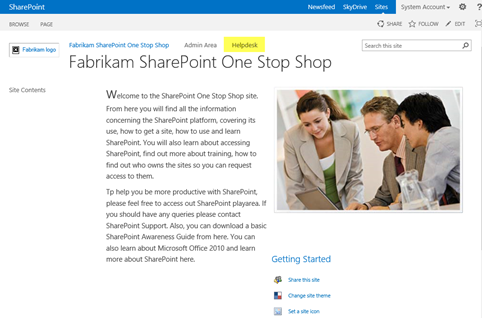
I have created a basic SharePoint 2013 helpdesk template which you can try out, modify and apply as a helper to their SharePoint support desks. The reason for supplying this is to (a) give an understanding of the ability of SharePoint to provide basic helpdesk functionality using built in features and (b) to introduce you to the concept of centralising a helpdesk in a ‘one stop shop site’ concept. Please note, I am not providing this as a suggestion that you drop any helpdesk product you are using – this is not supposed to in anyway detract you from using that!!
(more…)

Office is definitely the topic of the moment and below is some information about this great new release along with details about the consumer and community support offerings now available.
Yesterday Microsoft reached another very exciting milestone on our journey to a devices and services company, with the launch of the new Office to consumers.
This is the biggest and most ambitious release of Office yet, and builds on a fantastic launch year for the company. Steve Ballmer made a blog post detailing four important announcements:

Additional Information:
Office 365 Home Premium
Also, Office 365 Home Premium is a great new option for consumers and the benefits include:
- All the Office Professional applications
- A household license for up to 5 PCs/Macs/mobile devices
- An extra 20GB of SkyDrive Storage
- 60 minutes of Skype calling each month
- A service that is always up to date.

The following downloads are worksheets designed to help plan aspects of a SharePoint 2010 or a SharePoint 2013 implementation, and at the same time ensure that decisions in the design are captured.So, you should use these in conjunction with the development of the following documents:
1: SharePoint User Requirements – these define SharePoint collaborative environments for the users based on their requirements, and provides a fundamental understanding of interconnected tools and applications the organization uses in conjunction with the platform. SharePoint User Requirements also identify where content should be consolidated, reduce and improve data management; reduce duplication and boost productivity as defined by the clients’ vision of SharePoint.
2: SharePoint System Specification (also known as SharePoint Solution Specification) – expands the User Requirements, Planning and Decisions concerning SharePoint as technical requirements. The system specification is a clear, complete and unambiguous set of documentation, describing the SharePoint for the organization in terms of its function, performance, interfaces and design constraints.
The below is divided as follows:
- Area – Specific SharePoint area
- Link – where the document can be downloaded from
- Type – the kind of information captured and which document is more associated with its output. UR = User Requirements, SS = System Specifications
Where it helps – describes the context and areas of SharePoint design gathering these documents can be used. Note that I have also indicated whether the worksheet is for SharePoint 2010 or SharePoint 2013.
I’m going to add some more documents to aid gathering of information relevant to other areas of SharePoint user requirements and system specification. You should also take a look at my user requirements article – that can help you determine the format of those documents and how the above can link.

I put together an article concerning SharePoint Training and Resources for IMIS (Institute of Management Information Systems), this is now available on line
(more…)

SharePoint Service Delivery concerns itself with capability, and the methods used to ensure that the clients SharePoint vision and goals align with the users, and includes focusing how those responsible for managing the platform (the technical teams) fit and provide that service through guiding principles. These, if followed will ensure that your SharePoint environment can be managed in a structured and measured way.
(more…)
I’m speaking at the European SharePoint Conference 2013 and I’m delighted to be a part of this fantastic gathering of the SharePoint Community, Feb 4-7 2013, in Copenhagen, Denmark. I will also be conducted a session on “Ten Steps to Creating a SharePoint Support Model” aimed at Business Decision Makers and End Users.
Ten Steps to Creating a SharePoint Support Model
There is nothing like a smoothly running SharePoint support environment – but is that possible? In creating a great support SharePoint environment helps foster great user adoption and great SharePoint champions. This presentation attempts to show a strategic approach where the questions to be answered on how to build a true support model for SharePoint be based on ‘What has to happen, why and where’?, and attempts to describe a basic support model of ten key steps; from knowing what resources make up your SharePoint environment to keeping in contact with customers
I am speaking alongside renowned experts on SharePoint as well as sharing the stage with some of Microsoft’s product team from Redmond covering Search, Apps, Social, Cloud, Project, Migration & Upgrade, Governance and much more.
With over 110 SharePoint sessions, keynotes, hands on labs, SharePoint Shootouts, ask the experts, community lounge, tutorials, Europe’s largest SharePoint focused expo, SharePints, parties, meetings, networking events, competitions and more…. this is a MUST attend event for all SharePoint enthusiasts! Check out the full Conference Programme to see all sessions and topics that are being covered by myself and many others.
Prices start as low as €995! There is also special group discounts for bookings of 3 or more people. Book Now and I’ll see you in Copenhagen this February.

In Chapter 4 of my forthcoming book SharePoint 2013 User Adoption Planning and Governance, there is a section titled ‘Collaborative Ownership’; it is my take on the creation of simple rules to manage a SharePoint solution (note – an implementation of a SharePoint environment could be defined as a solution)…
(more…)

Excerp: “For those entrenched in trying to get information workers to buy into using SharePoint, SharePoint User Adoption seems to be a black art. In a way, it is because the kind of enticements and methods you use will be relative to the product that is being supplied. In reality, complexity of User Adoption is based on the breadth of the SharePoint solution being implemented.
This article shows the different types of people there are in terms of the User Adoption (which has a lifecycle), and attempts to identify the related high priority areas where you should focus your communication and training programmes. Note. The kind of users involved are ‘generic’; and therefore you should use this as a model for any SharePoint solution – irrespective of version. The key areas of SharePoint I will focus on relate to Information Architecture, Term Store, Search and User Profiles and in SharePoint 2013”.
The article I wrote for MSDN newsletter is located here:
http://blogs.msdn.com/b/ukmsdn/archive/2012/11/13/sharepoint-user-adoption-key-things-to-mention-for-sharepoint-2013.aspx
One of the key methods of gaining User Adoption of SharePoint is ensuring and pushing the integration it has with Microsoft Office to information workers. After all, information workers generally use Outlook as their ‘mother-ship’. Getting those users to switch immediately to SharePoint or, asking them to visit a document library in a SharePoint site which they will need to access could take time, especially since it means opening a browser, navigating to the site, covering their beloved Outlook client in the process.
(more…)