
Learn all you can do with Microsoft Lists – Your smart information tracking app in Microsoft 365. Pick your time zone and join a free virtual workshop (happening May 10-14, 2021) to help you become a Microsoft Lists pro!
See how Lists evolve from SharePoint lists to empower individuals and teams to create, share and track information – including innovation in Microsoft Teams, information side-by-side your team conversations. We will teach you how to use and create views, configure conditional formatting, adjust forms and more. Plus, we will highlight extending lists with the integrated Power Platform and answer all frequently, or infrequently, asked questions.
Microsoft Lists virtual workshops, “Go further with Microsoft Lists” – delivered five times across various regions.
Select a virtual workshop in your time zone!
Register today | Submit a question in advance (answered in the time zone you select)
Date & time
|
Target region
|
Presenter(s)
|
Add to calendar (.ics file)
|
Monday, May 10
11:00 AM PT
|
AMER time zone
|
Andrea Lum, Miceile Barrett, and Paul Diamond
|
Save the date (AMER)
|
Tuesday, May 11
9:00 AM IST
|
India (presented in Hindi)
|
Niket Jain, Saurabh Sood, and Bharath Manoj Manda
|
Save the date (India)
|
Wednesday, May 12
10:00 AM CEST
|
EMEA time zone
|
Andrea Lum and Harini Saladi
|
Save the date (EMEA)
|
Thursday, May 13
10:00 AM BRT
|
LATAM time zone
|
Mark Kashman
|
Save the date (LATAM)
|
Friday, May 14
11:30 AM CST
|
APAC time zone
|
Shreyas Sundararaman and Mark Kashman
|
Save the date (APAC)
|
Learn about:
- Creating a list and using ready-made templates.
- Working with Lists in Microsoft Teams.
- Customizing a list that works for you.
- Extend lists with integrated Power Platform.
Why attend?
- Learn | Gain a better understanding of Microsoft Lists and learn how easy it is to create, share, and track lists with anyone on any device.
- Connect | Hear from product experts and ask them questions about how to create and organize lists to track information within your organization.
- Inspire | Adopting what you’ve learned from this workshop to quickly simply your workflow and inspire your colleagues to easily collaborate on Microsoft Lists.
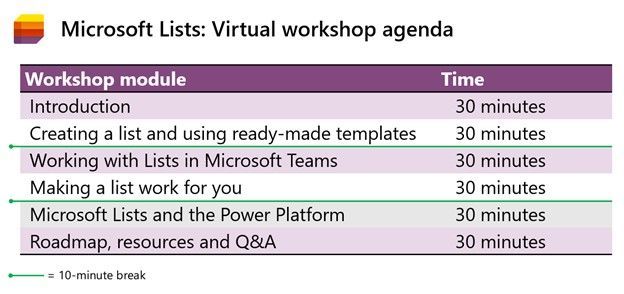 Microsoft Lists virtual workshop proposed agenda (3 hours)
Register | Submit a question in advance (answered in the time zone you select)
Get more done with Microsoft Lists.
Cheers and see you there, Mark Kashman, senior product manager – Microsoft

Attendees, to the starting line!
Get those electrolytes flowing, the Microsoft 365 Virtual Marathon is coming to Onlinetown. Speakers are prepping content, ready to coach you through each mile. And the content, the content is what’ll get you across the finish line. A lot of great sessions on all types of products and solutions.
Jeff Teper (CVP), Karuana Gatimu (Principal manager), Heather Newman (Principal PM manager), and Laurie Pottmeyer (Community lead) will be giving Microsoft keynote and overview sessions that’ll get you up-to-speed across our most recent updates and announcements. Plus, we’ll have Microsoft speakers delivering breakout sessions among thought leaders and community members from around the world.
What: Microsoft 365 Virtual Marathon to lean more | Register today
When: April 26 – 28, 2021 (60-hours / 3 days)
Presenters: 240+ speakers speaking in 7 different languages; view all sessions
Cost: Free
Primary Twitter hashtag: #M365VM
Microsoft 365 Virtual Marathon – April 26-28, 2021 (online training – keynotes and breakout sessions)
The Marathon event team has content going the whole time with speakers from around the globe. This event is free for all wanting to attend. Join in to learn about the many different pieces of Microsoft 365, including Azure.
Below is a list of the Microsoft sessions and presenters – including Jeff’s keynote:
- Keynote | “Update on Roadmap and Plans for Teams, SharePoint, OneDrive and Viva” by Jeff Teper
- “Microsoft 365 adoption best practices” by Karuana Gatimu
- “Introducing Microsoft Viva Connections” by Adam Harmetz
- “Microsoft Viva Topics: Put knowledge to work with content and AI” by Chris McNulty and Naomi Moneypenny
- “Improve IT efficiency and agility and stay informed as you enable self-service tasks” by Karissa Larson
- “Microsoft 365 Groups overview and architecture deep dive” by Arunkumaran Varadharajan
- “Microsoft 365 network connectivity for remote users” by Roshan Padmanabhan Kanaka Sabapaty
- “Metadata Services in Microsoft 365: Deep Dive with the Product Team” by Anupam Francis
- “Build a Beautifully Designed Intranet: Tips and Tricks from the Product Team” by Katie Swanson and Cathy Dew
- “Make data-driven decisions with Power BI and Visio” by Mukul Kumar and Shilpa Goyal
- “Liven up your Intranet with SharePoint Spaces: Be there virtually with 360° virtual tours” by Matt Crisler
- “Make Microsoft Search uniquely yours with new customization options” by Roshan Dheram and Ram Poornalingam
- “Video in Microsoft 365” by Segun Bright and Struan Robertson
Shout out to community members , , , and and the #M365VM team for putting together the online race, mapping the course and for supporting and promoting the knowledge and expertise that reaffirms this: Microsoft 365 has the best tech community in the world – with the endurance to prove it.
Cheers,
Mark “Huffin’ and Puffin’” Kashman 🏃🏻

Note: Please take extreme caution before making any changes in Production. Make sure you test the changes in a test environment first.
Recently due to a spate of updates to various endpoints in SharePoint, Azure, and the AAD auth login endpoints, we are seeing projects compiled with version of .NET before 4.6 cause TLS errors which don’t always show as TLS errors in the PHA.
The error messages The underlying connection was closed” or “System.Net.Sockets.SocketException: An existing connection was forcibly closed by the remote host” you are seeing is mainly due to deprecation of TLS1 1.0 & 1.1. Please see:
Preparing for TLS 1.2 in Office 365 and Office 365 GCC – Microsoft 365 Compliance | Microsoft Docs
Enable TLS 1.2 on servers – Configuration Manager | Microsoft Docs
TLS 1.0 and 1.1 deprecation – Microsoft Tech Community
The updates were communicated in the Office 365 message center.
- MC218794 – July 17, 2020 | TLS 1.0 and 1.1 retirement date in Office 365 to be October 15, 2020
- MC240160 – Feb 16, 2021 | Reminder: Disabling TLS 1.0 and TLS 1.1 in Microsoft 365
If the PHA app web is hosted on a remote physical server, then.
3 ways you can resolve the error:
1] You can either update applications web.config file and update httpRuntime to 4.7 example:
<httpRuntime targetFramework=”4.7″/>
Or
2] You can add the following registry key settings on your remote app web server(s):
[HKEY_LOCAL_MACHINESOFTWAREMicrosoft.NETFrameworkv4.0.30319]
“SystemDefaultTlsVersions” = dword:00000001
“SchUseStrongCrypto” = dword:00000001
Note: You may need to restart your server(s)
Or
3] Add this one line of code above each instantiation of the ClientContext in your code:
System.Net.ServicePointManager.SecurityProtocol = System.Net.SecurityProtocolType.Tls12;
Note: Extensive code updates will be needed.
If the App web is hosted on Azure, then.
Log into the Azure portal (portal.azure.com) with an account with admin rights on the web app in question.
Once you open the App Services and select the web app hosting the PHA site, click on the App Service Editor (Preview).
This will open the editor, then select the web.config file and change the circled targetFramework attribute to 4.7 preferably (any setting higher than 4.6 will work too). Note the status in the upper right will say ‘DIRTY’ for a bit, then it should auto-save and change back to ‘SAVED’-

At this point you should be set, refresh the page with the PHA and all should be good.
if the application is a Azure WebJob, then.
You will have to re-target/re-compile the app to 4.6+ (recommend 4.7) and re-upload it to fix it.
You can’t use the config file for the exe to re-target the same way we can for a web application.

Let’s give GlobalCon a collective high-5 and make it GlobalCon5. Hey, don’t leave me hangin’! I’m pleased to be joining in the fun along with a wonderful lineup of speakers and depth of content.
Yes, the Collab 365 team is at it again. I don’t think they ever stopped. They have been paving the way forward for virtual events for some time, and this go around won’t disappoint. They’re planning great, unique training, presented by world-class trainers and new content – across three days. It’s easy to plug in no matter where you live, engaging Q&A throughout, with much to take with you and learn at your own pace.
GlobalCon5: “I feel the need, the need for speed!” (that’s the kind of high-5 I’m talkin’ about) 😉
GlobalCon5 – March 16-18, 2021 (online training)
Microsoft 365 is big and changes often – the GC5 team could run a conference every week! Each session brings a fresh new perspective. You’ll learn the latest to keep your skills fresh. GlobalCon5 covers Teams, Power Platform, SharePoint, and everything else stacked into Microsoft 365.
Below is a quick view of the sessions by day – including my kickoff session:
- Day 1 sessions | March 16th
- Day 2 sessions | March 17th
- Day 3 workshops | March 18th
Shout out to community “high-5’ers” Helen Jones, Mark Jones, and the #GlobalCon5 crew who are navigating this conference by day and night, supporting, and promoting the knowledge and expertise that reaffirms this: Microsoft 365 has the best tech community in the world – one that spans the globe.
See you there, Mark
The pandemic has fundamentally changed how we all live, learn, and work. As we begin to recover from the pandemic and plan our return to the office, many organizations are rethinking the future of work:
- Over 80% of managers surveyed expect to have more flexible work from home policies post-pandemic.
- More than 70% of the employees and managers reported a desire to continue working from home at least part-time.
Source: Harris Poll survey commissioned by Microsoft, May 2020
At Microsoft, we believe the future of work is hybrid. The essence of hybrid work is extreme flexibility, in terms of where and when people work. Organizations are creating new policies that empower employees to spend some portions of their week working from home, as well as flexible working hours. While certain measures may need to be put in place to optimize hybrid workplace functions, there is no turning back when it comes to the future of work. A large majority of people prefer a mix of remote-work and office-work instead of a return to the traditional work model, or permanent all-remote work.
As we return to the workplace, moving to a hybrid work model will not just be about continuing the great work-from-home experiment many of us have been participating in for almost 12 months now. We will need to change our behavior by developing new skills and habits to help us stay healthy, finding new ways to engage and stay connected as we adopt this new way of working. It is going to take a collective effort for organizations to make a successful transition to a hybrid workplace.
There are big changes ahead for those of us moving to a hybrid work model. Like any organizational change initiative, we must be thoughtful about how we guide people through the journey. If not, organizations face risks such as decreased productivity, increased turnover, or employees that are just not engaged.
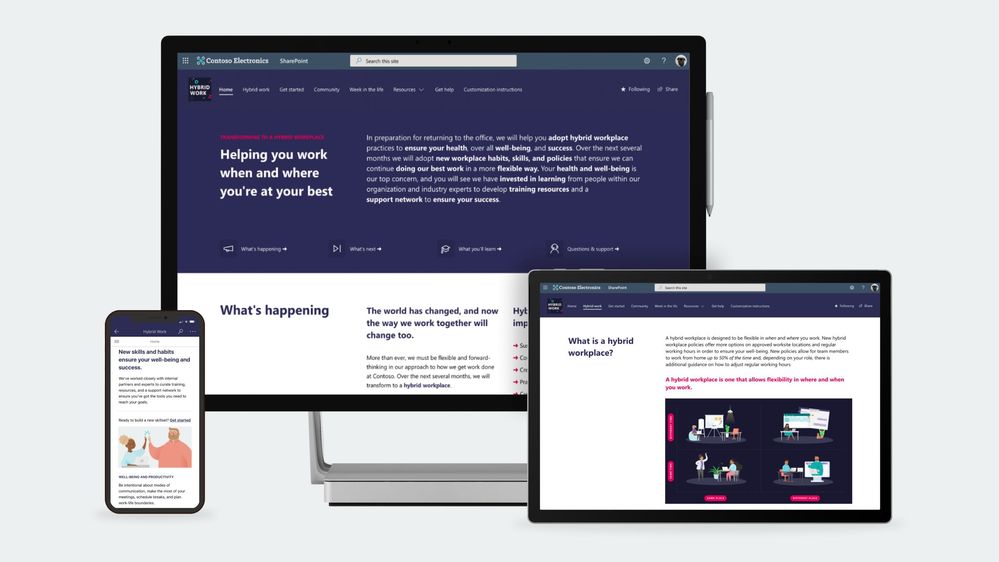
To help our customers lead their organization’s transition to a hybrid workplace we have launched a SharePoint site template on the SharePoint look book called the Workplace transformation site as well as new end-user training to help employees learn new habits and skills that support hybrid work.
Workplace transformation site
The Workplace transformation site template helps organizations:
- Inspire employees on the new possibilities the hybrid workplace offers.
- Provide employees with the information, resources, and support they will need to buy-in and adopt the new way of working.
- Prepare employees for a successful transition to a hybrid workplace with a change journey checklist and quick tips.
The Workplace transformation site features:
- A fully configured and customizable hybrid work transformation site built on SharePoint communication sites: The Workplace transformation site brings together information architecture, pre-populated content, site design and webparts to help inform and support employees through the transition to a new way of working. The site can be customized to add your organization’s content and to align with its look and feel.
- Hybrid work checklist: Any organizational change initiative can be stressful for employees. Help your employees through the change process by providing them a curated change journey checklist. Guide employees through organizational changes with a customizable activity list of tasks such as required training courses and learning events.
- Inspirational help content: Understanding how the day-to-day workplace will change in the new hybrid model is key to helping onboard employees. The Workplace transformation site includes “quick tip” guides for employees and managers, and a week in the hybrid workplace content.
- Support resources: As employees’ transition to a hybrid work model, they will need multiple levels of support from self-service support like FAQs to one-on-one help from champions. The hybrid work transformation site includes a champions program overview page, a Yammer community web part, and pre-populated FAQs to help support employees.
- Mobile-ready: The Workplace transformation site can be easily accessed on mobile devices so employees can continue their hybrid work transition journey from wherever they may be working.
Hybrid work end user training
To help employees develop new hybrid workplace habits and discover new tools that set them up for success, we have developed new end-user training content based on Microsoft research insights. The training content is focused on collaboration and meetings in a hybrid world, using asynchronous collaboration methods, well-being, productivity, security, and data protection. Embed hybrid workplace training content into your Workplace transformation site using Microsoft 365 learning pathways – a free, on-demand training solution. Microsoft 365 learning pathways can be easily deployed in your Microsoft 365 tenant environment and can be used to customize new hybrid work training playlists to suit your organization, along with other Microsoft-maintained product training playlists.
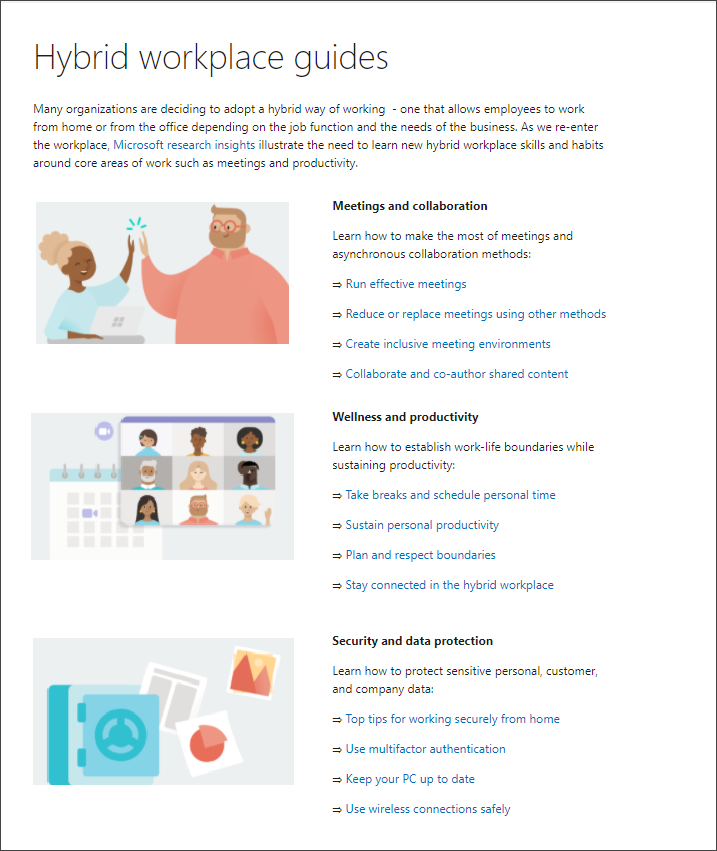
Learn more about the Workplace transformation site template and new end user training. Provision the Workplace transformation site to your tenant today and customize it to help your colleagues transition to a new way of working.
Frequently asked questions:
Question: What are the requirements for installing the Workplace transformation site into my tenant environment?
Answer:
Ensure SharePoint Online is enabled in your environment.
The individual that will provision the hybrid work transformation site must be the tenant admin.
Question: How long will it take to install the site in our tenant environment?
Answer: Based on our testing of the installation, it should take 10 minutes or less. Individual tenant configurations could cause differences in installation duration. This does not include time to customize the site to your organizations’ requirements.
Question: What customization options are available for the Workplace transformation site?
Answer: The site can be fully customized to fit the needs of your change management project, users, and organization. Review the Workplace transformation site template provisioning and customization guidance before getting started.







