We are happy to announce Microsoft Graph Security connectors for Azure Logic Apps, Microsoft Flow, and PowerApps, which greatly simplify the development of automated security workflows. By building playbooks that use the Microsoft Graph Security connector, you can automate common security tasks across multiple security solutions. This reduces the time and resources required to triage, investigate, and remediate security alerts, without the cost and complexity of building and maintaining multiple integrations. For further details on integrating with the Microsoft Graph Security API, learn about the API and access the schema.
Getting Started
Use these connectors now in your existing workflows or create new workflows. The steps are similar for Azure Logic Apps, Flow, and PowerApps. We’ll use Azure Logic Apps as an example here. Refer to the documentation and connector reference for further details.
- Your Azure Active Directory (AD) tenant administrator must first grant consent for the connector; follow the steps in the connector documentation.
- Sign in to the Azure portal, and open a new or an existing Logic App in Logic App Designer.
- For a blank Logic App, first start with a trigger, such as the Recurrence trigger. For existing Logic Apps, add an action to the end of a workflow by clicking ‘+ Next Step’ or between steps by clicking the (+) sign and selecting ‘Add an action’.
- Search for “Microsoft graph security” and select an action from the list.
- Provide the necessary details for your selected action and continue building your Logic App workflow.
Supported Actions
The Microsoft Graph Security connectors enable the following actions:
- Get alerts – Use this action to get a list of alerts filtered on one or more alert properties. For example, get a list of alerts with Provider equals Azure Security Center or Palo Alto Networks.
- Get alert by ID – Use this action to get a specific alert by alert id property.
- Update alert – Update a specific alert by specifying the alert id property. Refer to the list of the editable properties of alerts to ensure required and editable properties are passed in your request. For example, you can update alert assigned to property to assign the alert to a security analyst for investigations.
- Create subscriptions – Use this action to create a Graph webhook subscription that notifies you of any changes, filtered to certain types of alerts you are interested in. For example, you can create a subscription that notifies you of high severity alerts.
- Get active subscriptions – Use this action to get a list of unexpired subscriptions to manage the list of subscriptions
- Update subscription – Update your subscription by specifying the subscription id. For example, you can update the expirationDateTime property of the subscription to extend the subscription.
- Delete subscription – Delete your subscription by specifying the subscription id.
User Scenarios
You can mash up the Microsoft Graph Security connector with the 200+ Microsoft and non-Microsoft connectors available for Azure Logic Apps, Flow and PowerApps to build end-to-end scenarios based on your requirements. We have provided a few examples of scenarios that can be enabled using the Microsoft Graph Security and other connectors.
Automating Security Monitoring and Management
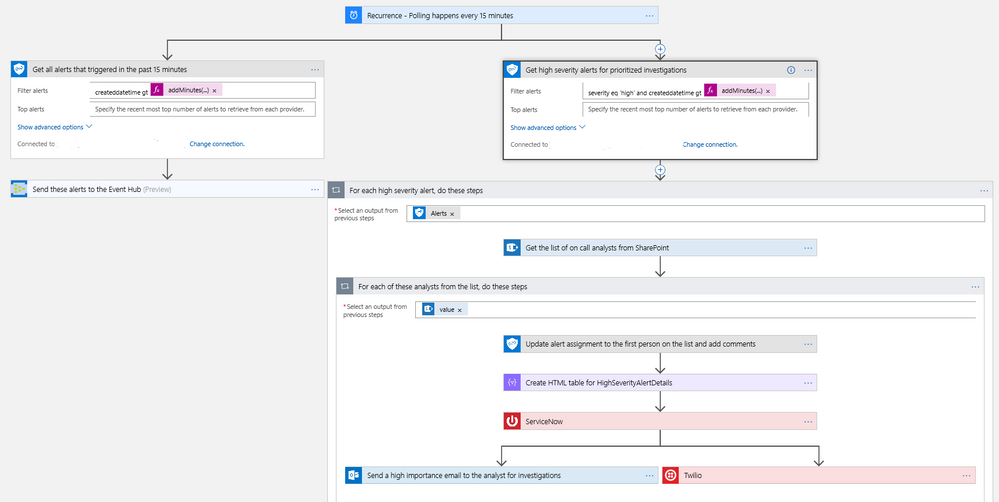
It’s always been a challenge to get notified of critical alerts that needs immediate action in an automated manner. At the same time, not all alerts are of equal priority and needs to be handled differently for optimal security management. You can now use the Microsoft Graph Security connector to get your high severity alerts across various security products like Azure Security Center, Windows Defender ATP, Palo Alto Networks, etc. and route those for immediate action. This example workflow below segregates alerts based on severity and routes high severity alerts for investigations.
- This workflow starts with a Recurrence trigger set for polling every 15 minutes. Two workflows kick off in parallel.
- Refer to the left branch.
- Refer to the right branch.
Diagram 1 – Automate Security Monitoring and Management
Automating Security Response Handling
To reduce the workload of security analysts, alerts about suspicious user actions, such as logging in from unusual locations or atypical data access, can be investigated further and in some cases automatically resolved with input from the user in question. An example workflow for this using the Microsoft Graph Security Connector is as follows.
- The workflow starts with a Recurrence trigger like the previous examples.
- For each new alert, check for a user principal name. If present, use the Outlook connector to email the user asking them to provide feedback about the alert, such as IgnoreThisAlert if the activity was legitimate or I’mUnsure if it’s not known.
- If the user responds as I’mUnsure, further investigation of the alert is needed; initiate a Teams channel with the security analysts for further investigations using the Microsoft Teams connector. This can be supplemented by SMS, etc. as well as covered in the earlier example.
- If the user responds as IgnoreThisAlert, update the alert status to closed using the Microsoft Graph Security connector and add comments to track resolution based on user input.
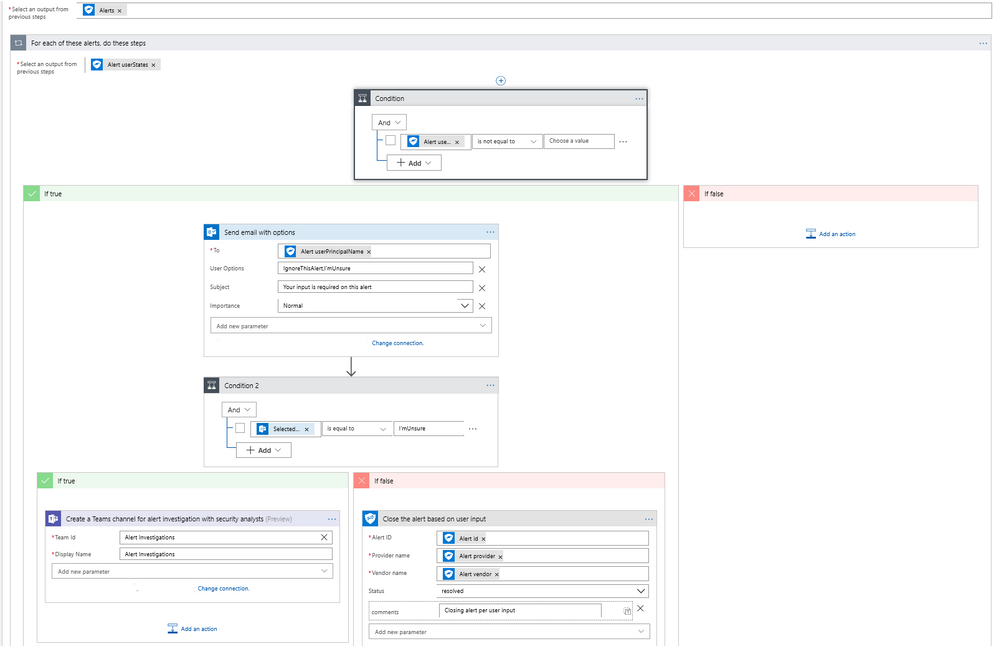 Diagram 2 – Automate Security Response Handling
Automating Security Investigations
The often-manual process of correlating related alerts during an investigation can be automated using the Microsoft Graph Security connector. In this example workflow, all recent alerts for the host IP being investigated are automatically collected. This same example can be leveraged to find alerts for a specific file, user, or process user under investigation or other alert properties.
- The workflow starts with a Recurrence trigger like the previous examples.
- For each high severity alert, check for a host private IP address. If available, compare the address with that of all alerts generated in the past 2 hours using the Microsoft Graph Security connector.
- Email a list of related alerts to the security analyst team for investigation using the Outlook connector.
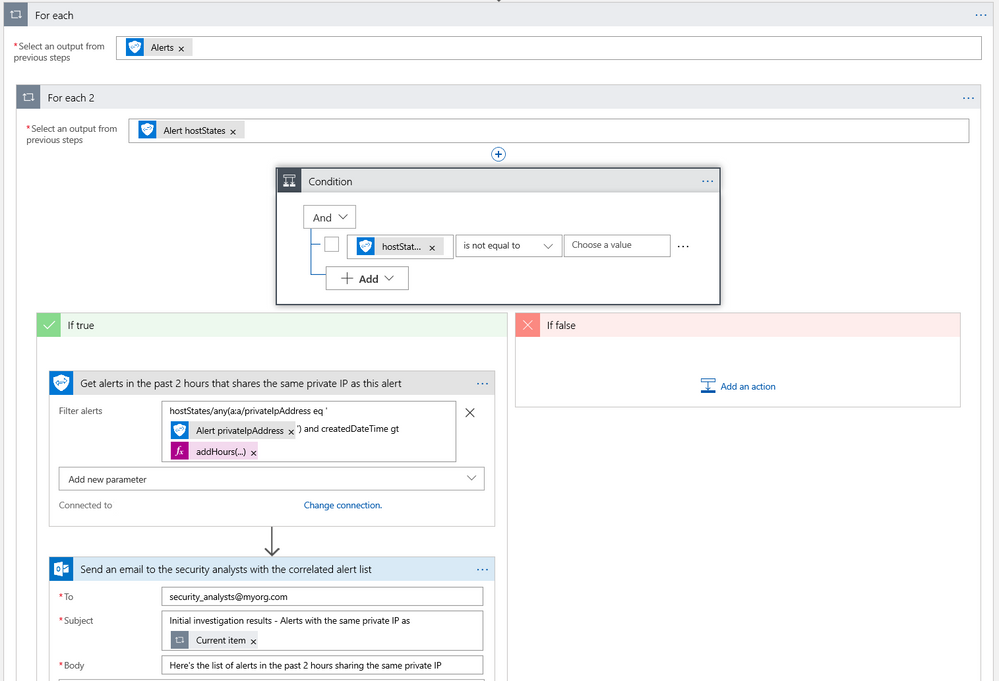 Diagram 3 – Automate Security Investigations
What’s Next?
We are working on templates for the Microsoft Graph Security connector to simplify the process of building your security playbooks. Fill out the feedback form to help us design templates for the workflows you need most.
Try the Microsoft Graph Security connector and please share your feedback by filing a GitHub issue or by engaging on the Microsoft Security Graph API tech community or StackOverflow.
We are happy to announce Microsoft Graph Security connectors for Azure Logic Apps, Microsoft Flow, and PowerApps, which greatly simplify the development of automated security workflows. By building playbooks that use the Microsoft Graph Security connector, you can automate common security tasks across multiple security solutions. This reduces the time and resources required to triage, investigate, and remediate security alerts, without the cost and complexity of building and maintaining multiple integrations. For further details on integrating with the Microsoft Graph Security API, learn about the API and access the schema.
Getting Started
Use these connectors now in your existing workflows or create new workflows. The steps are similar for Azure Logic Apps, Flow, and PowerApps. We’ll use Azure Logic Apps as an example here. Refer to the documentation and connector reference for further details.
- Your Azure Active Directory (AD) tenant administrator must first grant consent for the connector; follow the steps in the connector documentation.
- Sign in to the Azure portal, and open a new or an existing Logic App in Logic App Designer.
- For a blank Logic App, first start with a trigger, such as the Recurrence trigger. For existing Logic Apps, add an action to the end of a workflow by clicking ‘+ Next Step’ or between steps by clicking the (+) sign and selecting ‘Add an action’.
- Search for “Microsoft graph security” and select an action from the list.
- Provide the necessary details for your selected action and continue building your Logic App workflow.
Supported Actions
The Microsoft Graph Security connectors enable the following actions:
- Get alerts – Use this action to get a list of alerts filtered on one or more alert properties. For example, get a list of alerts with Provider equals Azure Security Center or Palo Alto Networks.
- Get alert by ID – Use this action to get a specific alert by alert id property.
- Update alert – Update a specific alert by specifying the alert id property. Refer to the list of the editable properties of alerts to ensure required and editable properties are passed in your request. For example, you can update alert assigned to property to assign the alert to a security analyst for investigations.
- Create subscriptions – Use this action to create a Graph webhook subscription that notifies you of any changes, filtered to certain types of alerts you are interested in. For example, you can create a subscription that notifies you of high severity alerts.
- Get active subscriptions – Use this action to get a list of unexpired subscriptions to manage the list of subscriptions
- Update subscription – Update your subscription by specifying the subscription id. For example, you can update the expirationDateTime property of the subscription to extend the subscription.
- Delete subscription – Delete your subscription by specifying the subscription id.
User Scenarios
You can mash up the Microsoft Graph Security connector with the 200+ Microsoft and non-Microsoft connectors available for Azure Logic Apps, Flow and PowerApps to build end-to-end scenarios based on your requirements. We have provided a few examples of scenarios that can be enabled using the Microsoft Graph Security and other connectors.
Automating Security Monitoring and Management
It’s always been a challenge to get notified of critical alerts that needs immediate action in an automated manner. At the same time, not all alerts are of equal priority and needs to be handled differently for optimal security management. You can now use the Microsoft Graph Security connector to get your high severity alerts across various security products like Azure Security Center, Windows Defender ATP, Palo Alto Networks, etc. and route those for immediate action. This example workflow below segregates alerts based on severity and routes high severity alerts for investigations.
- This workflow starts with a Recurrence trigger set for polling every 15 minutes. Two workflows kick off in parallel.
- Refer to the left branch.
- Refer to the right branch.
Diagram 1 – Automate Security Monitoring and Management
Automating Security Response Handling
To reduce the workload of security analysts, alerts about suspicious user actions, such as logging in from unusual locations or atypical data access, can be investigated further and in some cases automatically resolved with input from the user in question. An example workflow for this using the Microsoft Graph Security Connector is as follows.
- The workflow starts with a Recurrence trigger like the previous examples.
- For each new alert, check for a user principal name. If present, use the Outlook connector to email the user asking them to provide feedback about the alert, such as IgnoreThisAlert if the activity was legitimate or I’mUnsure if it’s not known.
- If the user responds as I’mUnsure, further investigation of the alert is needed; initiate a Teams channel with the security analysts for further investigations using the Microsoft Teams connector. This can be supplemented by SMS, etc. as well as covered in the earlier example.
- If the user responds as IgnoreThisAlert, update the alert status to closed using the Microsoft Graph Security connector and add comments to track resolution based on user input.
Diagram 2 – Automate Security Response Handling
Automating Security Investigations
The often-manual process of correlating related alerts during an investigation can be automated using the Microsoft Graph Security connector. In this example workflow, all recent alerts for the host IP being investigated are automatically collected. This same example can be leveraged to find alerts for a specific file, user, or process user under investigation or other alert properties.
- The workflow starts with a Recurrence trigger like the previous examples.
- For each high severity alert, check for a host private IP address. If available, compare the address with that of all alerts generated in the past 2 hours using the Microsoft Graph Security connector.
- Email a list of related alerts to the security analyst team for investigation using the Outlook connector.
Diagram 3 – Automate Security Investigations
What’s Next?
We are working on templates for the Microsoft Graph Security connector to simplify the process of building your security playbooks. Fill out the feedback form to help us design templates for the workflows you need most.
Try the Microsoft Graph Security connector and please share your feedback by filing a GitHub issue or by engaging on the Microsoft Security Graph API tech community or StackOverflow.
We have heard from customers the challenges with maintaining compliance in the modern workplace, and the desire to reduce the complexity and friction of core compliance processes such as records management. For many organizations, maintaining and validating critical business records is imperative to maintaining business continuity. Today we are announcing new capabilities integrated into Microsoft 365 to help you simplify and streamline core records management processes.
Working closely with several customer development partners, we have understood the importance of using the in-place archive within Office 365 core workloads such as Exchange email and SharePoint online. Organizations are already starting to realize the benefit of the in-place archival capabilities of Office 365 for a variety of content across both communications and collaboration. With these new updates, now organizations will be able to do more with the integrated archive and records management capabilities.
First we are excited to announce a new assessment of Exchange based content including email, chats, teams messages and more to meet the SEC 17a-4 compliance requirement for WORM (Write once, ready many) and non-WORM storage and immutability of records. This assessment was completed by an independent third party, Cohasset Associates, and covers SEC 17a-4, FINRA Rule 4511c and CFTC 1.31 (c-d) and provides a credible confirmation of the features built into Office 365 and their ability to help your organization meet your requirements for immutability and records retention. Learn more about this assessment and download your own copy here.
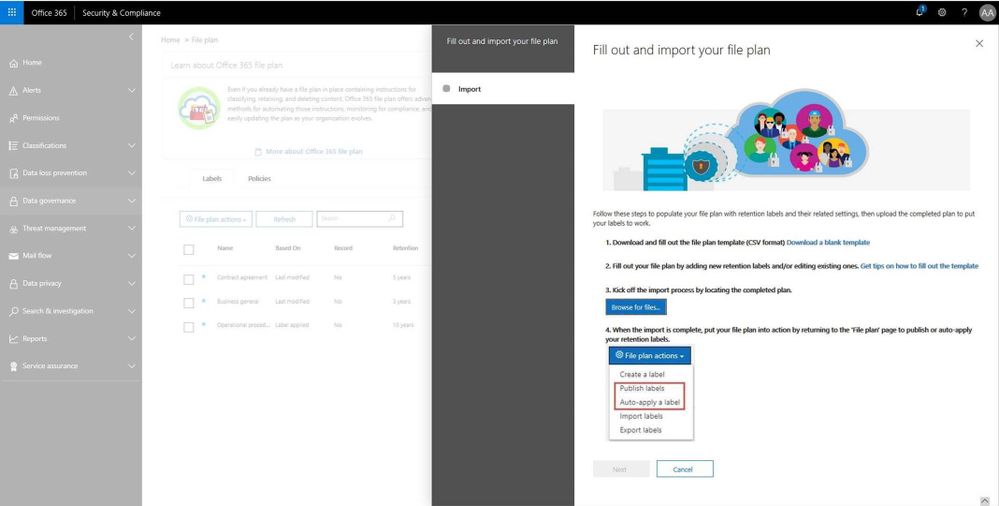
In addition, file plan manager is now generally available. This new capability allows records manager to automate retention schedules policies throughout the lifecycle using intelligent analytics and insights. Record managers can also migrate complex records retention schedules from existing on-prem or other systems into Office 365 and maintain a cohesive experience. Simplified Import and export along with file plan descriptors can be used to create a hierarchical file plan. File plan will also provide into Microsoft Information Protection analytics described below.
Read more about file plan manager here.
We are also releasing enhancements to the disposition workflow, allowing record managers to defensibility delete content and produce a certificate of destruction within the integrated workflow. Read more about this update here
The API supporting Event Based Retention based on triggers from outside systems and workflows is now generally available. Now organizations can trigger retention based on employee departure from HR systems, or accomplish other retention triggers from customer relationship management or financial systems. Read more about this and how to set this up here.
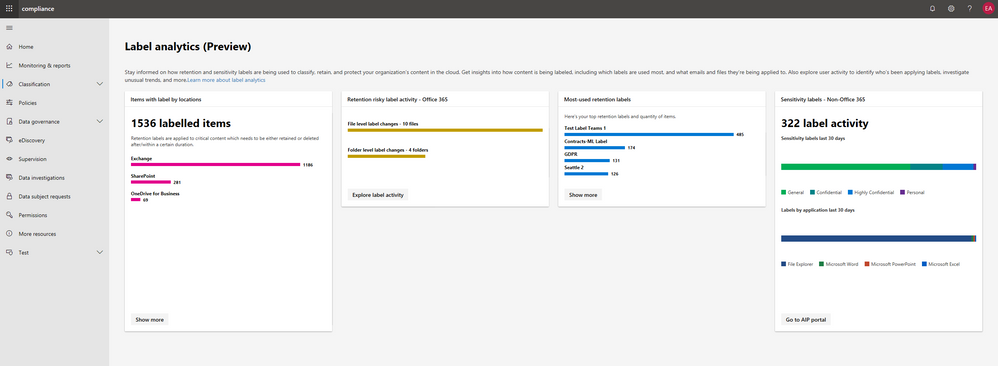
Finally, we know that visibility and ability to derive insights from classification, protection and management of records is critical and ensures confidence in the fidelity of advanced services like auto-classification. Today, along with the introduction of the Microsoft 365 Compliance Center we are announcing the preview of Microsoft Information Protection label analytics, bringing together label insights across Office 365 and Azure Information Protection to share classification and labeling of Office 365 and non-Office 365 data in your environment. This helps deliver a comprehensive view of your digital estate, sensitive data and protection and retention polices that are in place. Read more about the compliance and these updates here.
Get started with these capabilities today.
– Maithili Dandige, Group Program Manager, Microsoft 365 Compliance Solutions
We have heard from customers the challenges with maintaining compliance in the modern workplace, and the desire to reduce the complexity and friction of core compliance processes such as records management. For many organizations, maintaining and validating critical business records is imperative to maintaining business continuity. Today we are announcing new capabilities integrated into Microsoft 365 to help you simplify and streamline core records management processes.
Working closely with several customer development partners, we have understood the importance of using the in-place archive within Office 365 core workloads such as Exchange email and SharePoint online. Organizations are already starting to realize the benefit of the in-place archival capabilities of Office 365 for a variety of content across both communications and collaboration. With these new updates, now organizations will be able to do more with the integrated archive and records management capabilities.
First we are excited to announce a new assessment of Exchange based content including email, chats, teams messages and more to meet the SEC 17a-4 compliance requirement for WORM (Write once, ready many) and non-WORM storage and immutability of records. This assessment was completed by an independent third party, Cohasset Associates, and covers SEC 17a-4, FINRA Rule 4511c and CFTC 1.31 (c-d) and provides a credible confirmation of the features built into Office 365 and their ability to help your organization meet your requirements for immutability and records retention. Learn more about this assessment and download your own copy here.
In addition, file plan manager is now generally available. This new capability allows records manager to automate retention schedules policies throughout the lifecycle using intelligent analytics and insights. Record managers can also migrate complex records retention schedules from existing on-prem or other systems into Office 365 and maintain a cohesive experience. Simplified Import and export along with file plan descriptors can be used to create a hierarchical file plan. File plan will also provide into Microsoft Information Protection analytics described below.
Read more about file plan manager here.
We are also releasing enhancements to the disposition workflow, allowing record managers to defensibility delete content and produce a certificate of destruction within the integrated workflow. Read more about this update here
The API supporting Event Based Retention based on triggers from outside systems and workflows is now generally available. Now organizations can trigger retention based on employee departure from HR systems, or accomplish other retention triggers from customer relationship management or financial systems. Read more about this and how to set this up here.
Finally, we know that visibility and ability to derive insights from classification, protection and management of records is critical and ensures confidence in the fidelity of advanced services like auto-classification. Today, along with the introduction of the Microsoft 365 Compliance Center we are announcing the preview of Microsoft Information Protection label analytics, bringing together label insights across Office 365 and Azure Information Protection to share classification and labeling of Office 365 and non-Office 365 data in your environment. This helps deliver a comprehensive view of your digital estate, sensitive data and protection and retention polices that are in place. Read more about the compliance and these updates here.
Get started with these capabilities today.
– Maithili Dandige, Group Program Manager, Microsoft 365 Compliance Solutions
We have heard from customers the challenges with maintaining compliance in the modern workplace, and the desire to reduce the complexity and friction of core compliance processes such as records management. For many organizations, maintaining and validating critical business records is imperative to maintaining business continuity. Today we are announcing new capabilities integrated into Microsoft 365 to help you simplify and streamline core records management processes.
Working closely with several customer development partners, we have understood the importance of using the in-place archive within Office 365 core workloads such as Exchange email and SharePoint online. Organizations are already starting to realize the benefit of the in-place archival capabilities of Office 365 for a variety of content across both communications and collaboration. With these new updates, now organizations will be able to do more with the integrated archive and records management capabilities.
First we are excited to announce a new assessment of Exchange based content including email, chats, teams messages and more to meet the SEC 17a-4 compliance requirement for WORM (Write once, ready many) and non-WORM storage and immutability of records. This assessment was completed by an independent third party, Cohasset Associates, and covers SEC 17a-4, FINRA Rule 4511c and CFTC 1.31 (c-d) and provides a credible confirmation of the features built into Office 365 and their ability to help your organization meet your requirements for immutability and records retention. Learn more about this assessment and download your own copy here.
In addition, file plan manager is now generally available. This new capability allows records manager to automate retention schedules policies throughout the lifecycle using intelligent analytics and insights. Record managers can also migrate complex records retention schedules from existing on-prem or other systems into Office 365 and maintain a cohesive experience. Simplified Import and export along with file plan descriptors can be used to create a hierarchical file plan. File plan will also provide into Microsoft Information Protection analytics described below.
Read more about file plan manager here.
We are also releasing enhancements to the disposition workflow, allowing record managers to defensibility delete content and produce a certificate of destruction within the integrated workflow. Read more about this update here
The API supporting Event Based Retention based on triggers from outside systems and workflows is now generally available. Now organizations can trigger retention based on employee departure from HR systems, or accomplish other retention triggers from customer relationship management or financial systems. Read more about this and how to set this up here.
Finally, we know that visibility and ability to derive insights from classification, protection and management of records is critical and ensures confidence in the fidelity of advanced services like auto-classification. Today, along with the introduction of the Microsoft 365 Compliance Center we are announcing the preview of Microsoft Information Protection label analytics, bringing together label insights across Office 365 and Azure Information Protection to share classification and labeling of Office 365 and non-Office 365 data in your environment. This helps deliver a comprehensive view of your digital estate, sensitive data and protection and retention polices that are in place. Read more about the compliance and these updates here.
Get started with these capabilities today.
– Maithili Dandige, Group Program Manager, Microsoft 365 Compliance Solutions
We have heard from customers the challenges with maintaining compliance in the modern workplace, and the desire to reduce the complexity and friction of core compliance processes such as records management. For many organizations, maintaining and validating critical business records is imperative to maintaining business continuity. Today we are announcing new capabilities integrated into Microsoft 365 to help you simplify and streamline core records management processes.
Working closely with several customer development partners, we have understood the importance of using the in-place archive within Office 365 core workloads such as Exchange email and SharePoint online. Organizations are already starting to realize the benefit of the in-place archival capabilities of Office 365 for a variety of content across both communications and collaboration. With these new updates, now organizations will be able to do more with the integrated archive and records management capabilities.
First we are excited to announce a new assessment of Exchange based content including email, chats, teams messages and more to meet the SEC 17a-4 compliance requirement for WORM (Write once, ready many) and non-WORM storage and immutability of records. This assessment was completed by an independent third party, Cohasset Associates, and covers SEC 17a-4, FINRA Rule 4511c and CFTC 1.31 (c-d) and provides a credible confirmation of the features built into Office 365 and their ability to help your organization meet your requirements for immutability and records retention. Learn more about this assessment and download your own copy here.
In addition, file plan manager is now generally available. This new capability allows records manager to automate retention schedules policies throughout the lifecycle using intelligent analytics and insights. Record managers can also migrate complex records retention schedules from existing on-prem or other systems into Office 365 and maintain a cohesive experience. Simplified Import and export along with file plan descriptors can be used to create a hierarchical file plan. File plan will also provide into Microsoft Information Protection analytics described below.
Read more about file plan manager here.
We are also releasing enhancements to the disposition workflow, allowing record managers to defensibility delete content and produce a certificate of destruction within the integrated workflow. Read more about this update here
The API supporting Event Based Retention based on triggers from outside systems and workflows is now generally available. Now organizations can trigger retention based on employee departure from HR systems, or accomplish other retention triggers from customer relationship management or financial systems. Read more about this and how to set this up here.
Finally, we know that visibility and ability to derive insights from classification, protection and management of records is critical and ensures confidence in the fidelity of advanced services like auto-classification. Today, along with the introduction of the Microsoft 365 Compliance Center we are announcing the preview of Microsoft Information Protection label analytics, bringing together label insights across Office 365 and Azure Information Protection to share classification and labeling of Office 365 and non-Office 365 data in your environment. This helps deliver a comprehensive view of your digital estate, sensitive data and protection and retention polices that are in place. Read more about the compliance and these updates here.
Get started with these capabilities today.
– Maithili Dandige, Group Program Manager, Microsoft 365 Compliance Solutions
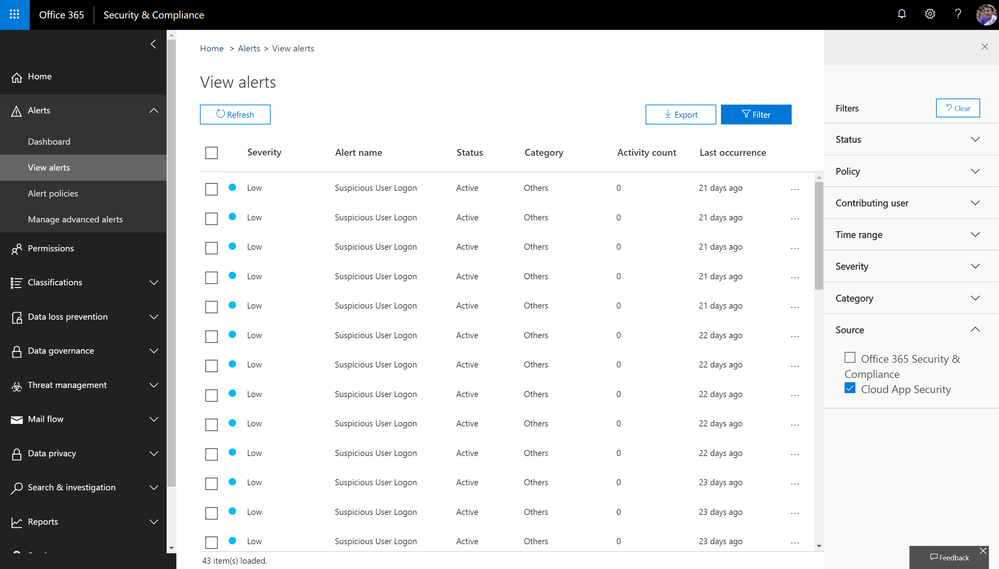
We have heard from customers that in today’s modern workplace and threat landscape, alerts and insights are a key tool to maintain visibility and control in your environment. Office 365 alert policies and insights in Security & Compliance Center are effective tools for organizations to detect threats, monitor anomalous activities and enhance protection in Office 365. This month, we are rolling out new capabilities to enhance your alert and insight experience in Office 365.
Consume Cloud App Security alerts in Office 365 Security and Compliance center
Microsoft Cloud App Security alerts related to Office apps and services are now available in the Office 365 security and compliance center on the view alerts page. With the addition of these alerts in the compliance center, you now have a central view within one portal. In addition, these same alerts are now available via the Management Activity API.
For more details, please refer to this section in documentation.
Alerts signal available in Management Activity API
Availability of the alerts signal in the Management Activity API has been one of the top feature requests from both customers and partners. Starting now, Office 365 Security & Compliance Alerts can be retrieved from Management Activity API as a signal. This means that you can now consume Office 365 alerts in your own way by simply integrating it with your SIEM or self-created solution.
Meanwhile, this also means that these signals can be searched from “Search-UnifiedAuditLog” for Cmdlet based log access.
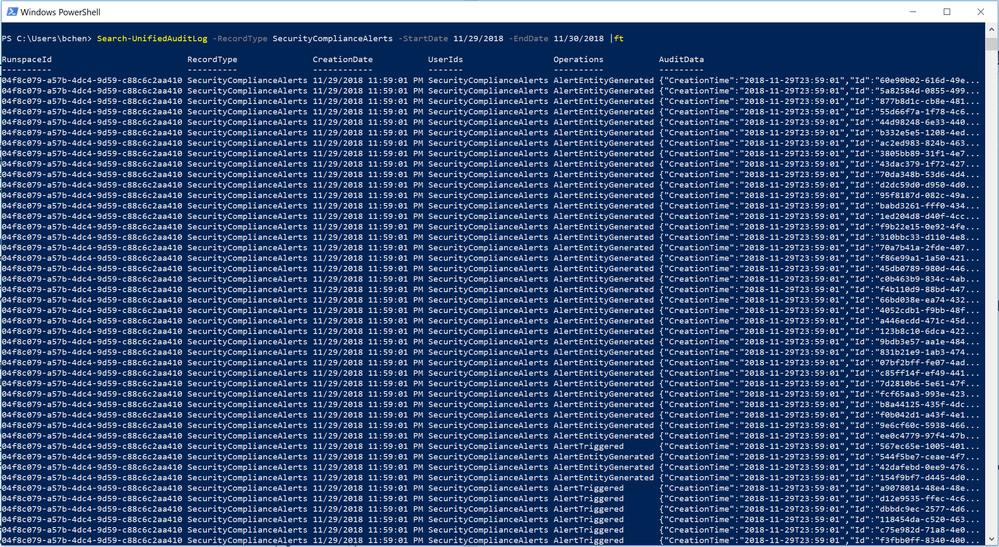
For more details, please refer to the schema documentation for Office 365 Security & Compliance alerts in Management Activity API.
Manage access to alerts with role-based permissions
Admins with various roles come to the Security and Compliance center to consume alerts. Until now, the permission for viewing alerts has been universal across the entire organization, creating a challenge for access to alerts for specific scenarios such as data loss, or privileged access. As we expand the scenarios that alert policies support across Security & Compliance, the necessity for a more granular permission model emerges. This month, we will start to roll out the role-based access to alerts. For example, a Compliance admin will no longer have permission to see Threat management alerts in “View alerts” page. Read more about this update here.
Insights signal available in Management Activity API
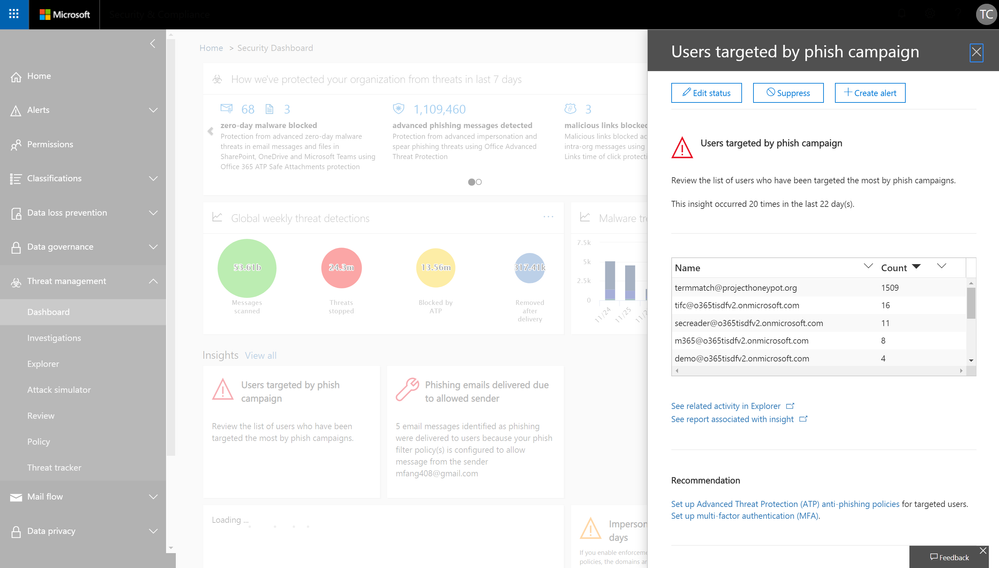
In various places in Security & compliance Center, Office 365 provides you with insights about potential threats or configuration issues that we have identified on your behalf, such as “Users targeted by phishing campaign” or “Spam mails delivered due to allowed IP”, along with actionable recommendations for you to resolve or mitigate these issues.
To date, we have introduced about 30 such insights. And now, we are excited to share that these insight signals can also be retrieved via the Management Activity API. This update will start to roll out later this month.
Alert policies based on S&CC insights
Along with the availability of insight signals in Management Activity API, we are also allowing admins to configure alert policies and receive email notifications based on these insights from S&CC. Certain insight based alerts will be rolled up as on-by-default alert policies.
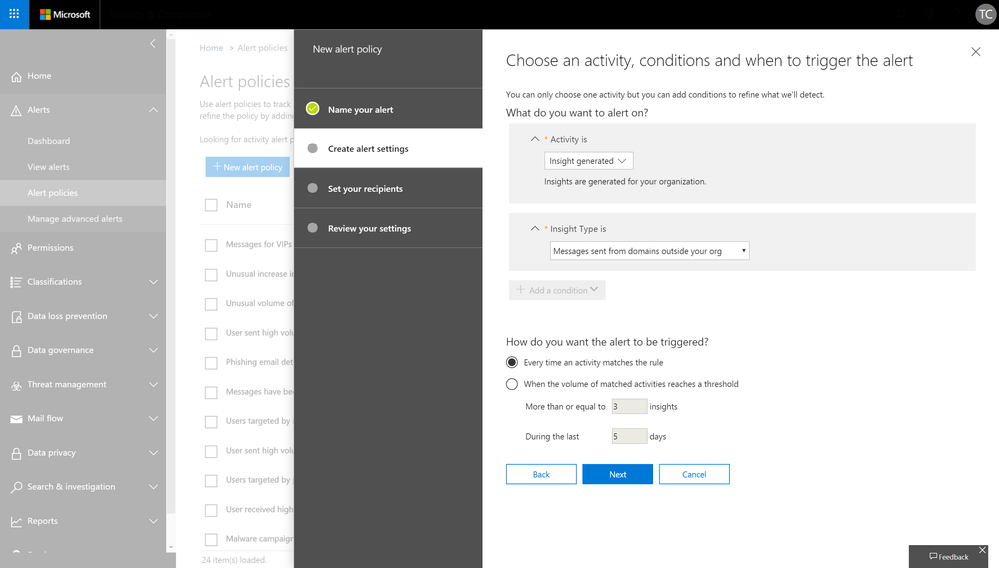
This capability is also starting to roll out later this month. Check back for updates on related documentation.
- Binyan Chen, Sr Program Manager, Microsoft 365 Compliance Solutions
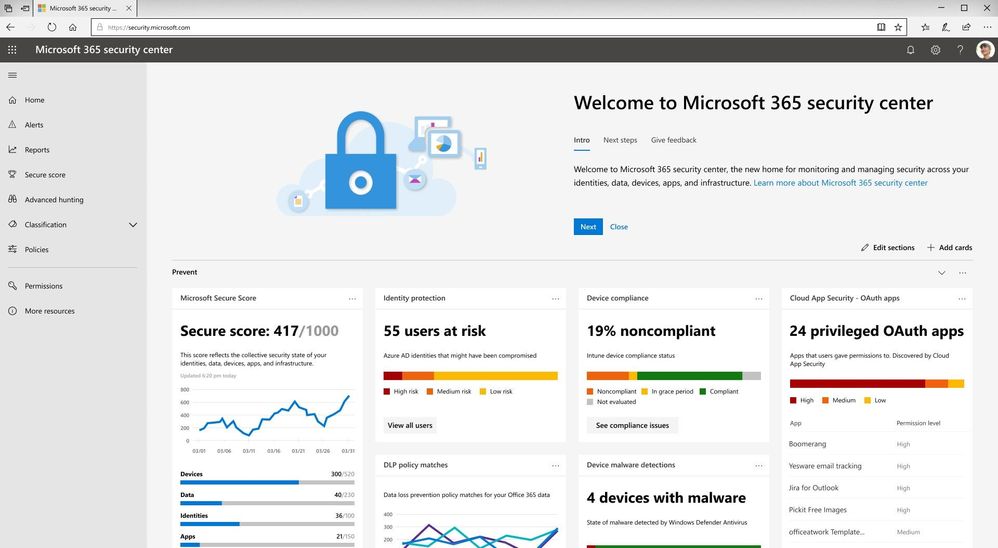
In the past few years, we have been heavily investing in the security and compliance areas to help organizations safeguard their digital estate and achieve compliance. According to recent customer research, we heard that while security and compliance are both top of mind areas in data protection, most organizations have different teams working in these two spaces. To empower your security and compliance professionals to work more efficiently in dedicated platforms, we are excited to announce the availability of Microsoft 365 security center (security.microsoft.com) and Microsoft 365 compliance center (compliance.microsoft.com).
The new specialized workspaces enable your security and compliance teams to have centralized management across your Microsoft 365 services, bringing together Office 365, Windows 10, and Enterprise Mobility + Security (EMS), with several Azure capabilities.
In both specialized centers, you can easily find actionable insights, alerts, and scores to help you understand your security and compliance risks and leverage artificial intelligence to strengthen your security and compliance posture. You can find more details about each center in the following paragraphs.
Microsoft 365 security center
The new Microsoft 365 security center provides security administrators and other risk management professionals with a centralized hub and specialized workspace that enables them to manage and take full advantage of Microsoft 365 intelligent security solutions for identity and access management, threat protection, information protection, and security management. With it they’ll gain the visibility, control, and guidance necessary to understand and act on the threats that their organization is facing today, have faced in the past, and may face in the future.
This new workspace is organized around the products that make up Microsoft Threat Protection by rendering them in a completely new way, one that’s focused on the entities that our customers must secure across their entire digital estate. We have consolidated the experience across Microsoft 365 products and designed around the concepts of Identity, Endpoints, User Data, Cloud App and Infrastructure, and not the underlying products that help secure them. This enables end-to-end security insights and management and paves the way for a comprehensive Microsoft 365 security solution.
In addition, the Microsoft 365 security center enables organizations to reduce security risks by providing them with the tools necessary to assess their current and historical security postures and to determine the appropriate set of actions to take to mitigate future risks. These tools consist of rich dashboards, reports, and interactive experiences like Microsoft Secure Score, each of which are designed to provide security administrators with the visibility, controls, and guidance they need to drive maximum security posture improvements. Microsoft 365 security center also provides experiences for security operators (SecOps) through the integration of incident response capabilities such as a centralized alerts view and hunting capabilities which can be used to perform ad-hoc investigations.
Microsoft 365 compliance center
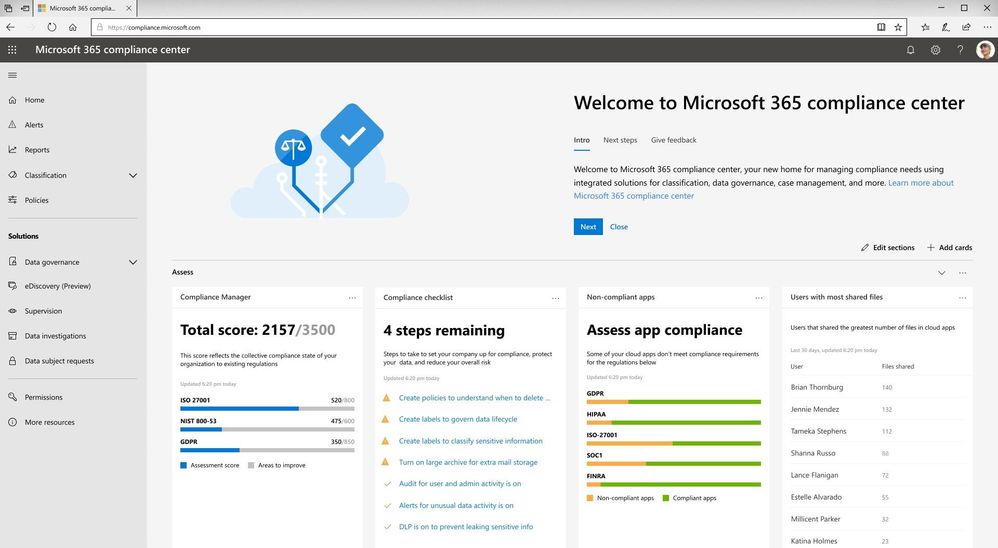
The new Microsoft 365 compliance center is a specialized workspace for your compliance, privacy, and risk management professionals. In the new center, you can assess your compliance risks through Compliance Manager, protect and govern your data with sensitivity and retention labels, respond to regulatory requests like Data Subject Requests, and access to more other compliance and privacy solutions.
The new experience helps you reduce compliance risks and protect your digital estate more easily and effectively with three new insights:
- With the Compliance Manager integration, Microsoft 365 compliance center provides you with visibility into your compliance posture against key regulations and standards like the GDPR, ISO 27001, NIST 800-53, and more on the homepage. You can then perform risk assessments and follow step-by-step guidance to enhance your compliance and privacy controls.
- Additionally, to help you label data more accurately, the new Microsoft 365 Label Analytics preview can enable you to analyze and validate how sensitivity and retention labels are being used beyond your Office 365 workloads.
- We also brought in the Microsoft Cloud App Security (MCAS) insights into Microsoft 365 compliance center to help you identify compliance risks across applications, discover shadow IT, and monitor employees’ non-compliant behaviors.
We will be gradually rolling out the new experience from the end of January, and the rollout will be completed worldwide by the end of March. Once this new experience is rolled out, you can access it by visiting security.microsoft.com or compliance.microsoft.com or from the Microsoft 365 admin center.
You can learn more about the new Microsoft 365 security center and Microsoft 365 compliance center in our technical supporting document.
We have heard from customers that in today’s modern workplace and threat landscape, alerts and insights are a key tool to maintain visibility and control in your environment. Office 365 alert policies and insights in Security & Compliance Center are effective tools for organizations to detect threats, monitor anomalous activities and enhance protection in Office 365. This month, we are rolling out new capabilities to enhance your alert and insight experience in Office 365.
Consume Cloud App Security alerts in Office 365 Security and Compliance center
Microsoft Cloud App Security alerts related to Office apps and services are now available in the Office 365 security and compliance center on the view alerts page. With the addition of these alerts in the compliance center, you now have a central view within one portal. In addition, these same alerts are now available via the Management Activity API.
For more details, please refer to this section in documentation.
Alerts signal available in Management Activity API
Availability of the alerts signal in the Management Activity API has been one of the top feature requests from both customers and partners. Starting now, Office 365 Security & Compliance Alerts can be retrieved from Management Activity API as a signal. This means that you can now consume Office 365 alerts in your own way by simply integrating it with your SIEM or self-created solution.
Meanwhile, this also means that these signals can be searched from “Search-UnifiedAuditLog” for Cmdlet based log access.
For more details, please refer to the schema documentation for Office 365 Security & Compliance alerts in Management Activity API.
Manage access to alerts with role-based permissions
Admins with various roles come to the Security and Compliance center to consume alerts. Until now, the permission for viewing alerts has been universal across the entire organization, creating a challenge for access to alerts for specific scenarios such as data loss, or privileged access. As we expand the scenarios that alert policies support across Security & Compliance, the necessity for a more granular permission model emerges. This month, we will start to roll out the role-based access to alerts. For example, a Compliance admin will no longer have permission to see Threat management alerts in “View alerts” page. Read more about this update here.
Insights signal available in Management Activity API
In various places in Security & compliance Center, Office 365 provides you with insights about potential threats or configuration issues that we have identified on your behalf, such as “Users targeted by phishing campaign” or “Spam mails delivered due to allowed IP”, along with actionable recommendations for you to resolve or mitigate these issues.
To date, we have introduced about 30 such insights. And now, we are excited to share that these insight signals can also be retrieved via the Management Activity API. This update will start to roll out later this month.
Alert policies based on S&CC insights
Along with the availability of insight signals in Management Activity API, we are also allowing admins to configure alert policies and receive email notifications based on these insights from S&CC. Certain insight based alerts will be rolled up as on-by-default alert policies.
This capability is also starting to roll out later this month. Check back for updates on related documentation.
- Binyan Chen, Sr Program Manager, Microsoft 365 Compliance Solutions
In the past few years, we have been heavily investing in the security and compliance areas to help organizations safeguard their digital estate and achieve compliance. According to recent customer research, we heard that while security and compliance are both top of mind areas in data protection, most organizations have different teams working in these two spaces. To empower your security and compliance professionals to work more efficiently in dedicated platforms, we are excited to announce the availability of Microsoft 365 security center (security.microsoft.com) and Microsoft 365 compliance center (compliance.microsoft.com).
The new specialized workspaces enable your security and compliance teams to have centralized management across your Microsoft 365 services, bringing together Office 365, Windows 10, and Enterprise Mobility + Security (EMS), with several Azure capabilities.
In both specialized centers, you can easily find actionable insights, alerts, and scores to help you understand your security and compliance risks and leverage artificial intelligence to strengthen your security and compliance posture. You can find more details about each center in the following paragraphs.
Microsoft 365 security center
The new Microsoft 365 security center provides security administrators and other risk management professionals with a centralized hub and specialized workspace that enables them to manage and take full advantage of Microsoft 365 intelligent security solutions for identity and access management, threat protection, information protection, and security management. With it they’ll gain the visibility, control, and guidance necessary to understand and act on the threats that their organization is facing today, have faced in the past, and may face in the future.
This new workspace is organized around the products that make up Microsoft Threat Protection by rendering them in a completely new way, one that’s focused on the entities that our customers must secure across their entire digital estate. We have consolidated the experience across Microsoft 365 products and designed around the concepts of Identity, Endpoints, User Data, Cloud App and Infrastructure, and not the underlying products that help secure them. This enables end-to-end security insights and management and paves the way for a comprehensive Microsoft 365 security solution.
In addition, the Microsoft 365 security center enables organizations to reduce security risks by providing them with the tools necessary to assess their current and historical security postures and to determine the appropriate set of actions to take to mitigate future risks. These tools consist of rich dashboards, reports, and interactive experiences like Microsoft Secure Score, each of which are designed to provide security administrators with the visibility, controls, and guidance they need to drive maximum security posture improvements. Microsoft 365 security center also provides experiences for security operators (SecOps) through the integration of incident response capabilities such as a centralized alerts view and hunting capabilities which can be used to perform ad-hoc investigations.
Microsoft 365 compliance center
The new Microsoft 365 compliance center is a specialized workspace for your compliance, privacy, and risk management professionals. In the new center, you can assess your compliance risks through Compliance Manager, protect and govern your data with sensitivity and retention labels, respond to regulatory requests like Data Subject Requests, and access to more other compliance and privacy solutions.
The new experience helps you reduce compliance risks and protect your digital estate more easily and effectively with three new insights:
- With the Compliance Manager integration, Microsoft 365 compliance center provides you with visibility into your compliance posture against key regulations and standards like the GDPR, ISO 27001, NIST 800-53, and more on the homepage. You can then perform risk assessments and follow step-by-step guidance to enhance your compliance and privacy controls.
- Additionally, to help you label data more accurately, the new Microsoft 365 Label Analytics preview can enable you to analyze and validate how sensitivity and retention labels are being used beyond your Office 365 workloads.
- We also brought in the Microsoft Cloud App Security (MCAS) insights into Microsoft 365 compliance center to help you identify compliance risks across applications, discover shadow IT, and monitor employees’ non-compliant behaviors.
We will be gradually rolling out the new experience from the end of January, and the rollout will be completed worldwide by the end of March. Once this new experience is rolled out, you can access it by visiting security.microsoft.com or compliance.microsoft.com or from the Microsoft 365 admin center.
You can learn more about the new Microsoft 365 security center and Microsoft 365 compliance center in our technical supporting document.
We have heard from customers that in today’s modern workplace and threat landscape, alerts and insights are a key tool to maintain visibility and control in your environment. Office 365 alert policies and insights in Security & Compliance Center are effective tools for organizations to detect threats, monitor anomalous activities and enhance protection in Office 365. This month, we are rolling out new capabilities to enhance your alert and insight experience in Office 365.
Consume Cloud App Security alerts in Office 365 Security and Compliance center
Microsoft Cloud App Security alerts related to Office apps and services are now available in the Office 365 security and compliance center on the view alerts page. With the addition of these alerts in the compliance center, you now have a central view within one portal. In addition, these same alerts are now available via the Management Activity API.
For more details, please refer to this section in documentation.
Alerts signal available in Management Activity API
Availability of the alerts signal in the Management Activity API has been one of the top feature requests from both customers and partners. Starting now, Office 365 Security & Compliance Alerts can be retrieved from Management Activity API as a signal. This means that you can now consume Office 365 alerts in your own way by simply integrating it with your SIEM or self-created solution.
Meanwhile, this also means that these signals can be searched from “Search-UnifiedAuditLog” for Cmdlet based log access.
For more details, please refer to the schema documentation for Office 365 Security & Compliance alerts in Management Activity API.
Manage access to alerts with role-based permissions
Admins with various roles come to the Security and Compliance center to consume alerts. Until now, the permission for viewing alerts has been universal across the entire organization, creating a challenge for access to alerts for specific scenarios such as data loss, or privileged access. As we expand the scenarios that alert policies support across Security & Compliance, the necessity for a more granular permission model emerges. This month, we will start to roll out the role-based access to alerts. For example, a Compliance admin will no longer have permission to see Threat management alerts in “View alerts” page. Read more about this update here.
Insights signal available in Management Activity API
In various places in Security & compliance Center, Office 365 provides you with insights about potential threats or configuration issues that we have identified on your behalf, such as “Users targeted by phishing campaign” or “Spam mails delivered due to allowed IP”, along with actionable recommendations for you to resolve or mitigate these issues.
To date, we have introduced about 30 such insights. And now, we are excited to share that these insight signals can also be retrieved via the Management Activity API. This update will start to roll out later this month.
Alert policies based on S&CC insights
Along with the availability of insight signals in Management Activity API, we are also allowing admins to configure alert policies and receive email notifications based on these insights from S&CC. Certain insight based alerts will be rolled up as on-by-default alert policies.
This capability is also starting to roll out later this month. Check back for updates on related documentation.
- Binyan Chen, Sr Program Manager, Microsoft 365 Compliance Solutions
In the past few years, we have been heavily investing in the security and compliance areas to help organizations safeguard their digital estate and achieve compliance. According to recent customer research, we heard that while security and compliance are both top of mind areas in data protection, most organizations have different teams working in these two spaces. To empower your security and compliance professionals to work more efficiently in dedicated platforms, we are excited to announce the availability of Microsoft 365 security center (security.microsoft.com) and Microsoft 365 compliance center (compliance.microsoft.com).
The new specialized workspaces enable your security and compliance teams to have centralized management across your Microsoft 365 services, bringing together Office 365, Windows 10, and Enterprise Mobility + Security (EMS), with several Azure capabilities.
In both specialized centers, you can easily find actionable insights, alerts, and scores to help you understand your security and compliance risks and leverage artificial intelligence to strengthen your security and compliance posture. You can find more details about each center in the following paragraphs.
Microsoft 365 security center
The new Microsoft 365 security center provides security administrators and other risk management professionals with a centralized hub and specialized workspace that enables them to manage and take full advantage of Microsoft 365 intelligent security solutions for identity and access management, threat protection, information protection, and security management. With it they’ll gain the visibility, control, and guidance necessary to understand and act on the threats that their organization is facing today, have faced in the past, and may face in the future.
This new workspace is organized around the products that make up Microsoft Threat Protection by rendering them in a completely new way, one that’s focused on the entities that our customers must secure across their entire digital estate. We have consolidated the experience across Microsoft 365 products and designed around the concepts of Identity, Endpoints, User Data, Cloud App and Infrastructure, and not the underlying products that help secure them. This enables end-to-end security insights and management and paves the way for a comprehensive Microsoft 365 security solution.
In addition, the Microsoft 365 security center enables organizations to reduce security risks by providing them with the tools necessary to assess their current and historical security postures and to determine the appropriate set of actions to take to mitigate future risks. These tools consist of rich dashboards, reports, and interactive experiences like Microsoft Secure Score, each of which are designed to provide security administrators with the visibility, controls, and guidance they need to drive maximum security posture improvements. Microsoft 365 security center also provides experiences for security operators (SecOps) through the integration of incident response capabilities such as a centralized alerts view and hunting capabilities which can be used to perform ad-hoc investigations.
Microsoft 365 compliance center
The new Microsoft 365 compliance center is a specialized workspace for your compliance, privacy, and risk management professionals. In the new center, you can assess your compliance risks through Compliance Manager, protect and govern your data with sensitivity and retention labels, respond to regulatory requests like Data Subject Requests, and access to more other compliance and privacy solutions.
The new experience helps you reduce compliance risks and protect your digital estate more easily and effectively with three new insights:
- With the Compliance Manager integration, Microsoft 365 compliance center provides you with visibility into your compliance posture against key regulations and standards like the GDPR, ISO 27001, NIST 800-53, and more on the homepage. You can then perform risk assessments and follow step-by-step guidance to enhance your compliance and privacy controls.
- Additionally, to help you label data more accurately, the new Microsoft 365 Label Analytics preview can enable you to analyze and validate how sensitivity and retention labels are being used beyond your Office 365 workloads.
- We also brought in the Microsoft Cloud App Security (MCAS) insights into Microsoft 365 compliance center to help you identify compliance risks across applications, discover shadow IT, and monitor employees’ non-compliant behaviors.
We will be gradually rolling out the new experience from the end of January, and the rollout will be completed worldwide by the end of March. Once this new experience is rolled out, you can access it by visiting security.microsoft.com or compliance.microsoft.com or from the Microsoft 365 admin center.
You can learn more about the new Microsoft 365 security center and Microsoft 365 compliance center in our technical supporting document.
We have heard from customers that in today’s modern workplace and threat landscape, alerts and insights are a key tool to maintain visibility and control in your environment. Office 365 alert policies and insights in Security & Compliance Center are effective tools for organizations to detect threats, monitor anomalous activities and enhance protection in Office 365. This month, we are rolling out new capabilities to enhance your alert and insight experience in Office 365.
Consume Cloud App Security alerts in Office 365 Security and Compliance center
Microsoft Cloud App Security alerts related to Office apps and services are now available in the Office 365 security and compliance center on the view alerts page. With the addition of these alerts in the compliance center, you now have a central view within one portal. In addition, these same alerts are now available via the Management Activity API.
For more details, please refer to this section in documentation.
Alerts signal available in Management Activity API
Availability of the alerts signal in the Management Activity API has been one of the top feature requests from both customers and partners. Starting now, Office 365 Security & Compliance Alerts can be retrieved from Management Activity API as a signal. This means that you can now consume Office 365 alerts in your own way by simply integrating it with your SIEM or self-created solution.
Meanwhile, this also means that these signals can be searched from “Search-UnifiedAuditLog” for Cmdlet based log access.
For more details, please refer to the schema documentation for Office 365 Security & Compliance alerts in Management Activity API.
Manage access to alerts with role-based permissions
Admins with various roles come to the Security and Compliance center to consume alerts. Until now, the permission for viewing alerts has been universal across the entire organization, creating a challenge for access to alerts for specific scenarios such as data loss, or privileged access. As we expand the scenarios that alert policies support across Security & Compliance, the necessity for a more granular permission model emerges. This month, we will start to roll out the role-based access to alerts. For example, a Compliance admin will no longer have permission to see Threat management alerts in “View alerts” page. Read more about this update here.
Insights signal available in Management Activity API
In various places in Security & compliance Center, Office 365 provides you with insights about potential threats or configuration issues that we have identified on your behalf, such as “Users targeted by phishing campaign” or “Spam mails delivered due to allowed IP”, along with actionable recommendations for you to resolve or mitigate these issues.
To date, we have introduced about 30 such insights. And now, we are excited to share that these insight signals can also be retrieved via the Management Activity API. This update will start to roll out later this month.
Alert policies based on S&CC insights
Along with the availability of insight signals in Management Activity API, we are also allowing admins to configure alert policies and receive email notifications based on these insights from S&CC. Certain insight based alerts will be rolled up as on-by-default alert policies.
This capability is also starting to roll out later this month. Check back for updates on related documentation.
- Binyan Chen, Sr Program Manager, Microsoft 365 Compliance Solutions
In the past few years, we have been heavily investing in the security and compliance areas to help organizations safeguard their digital estate and achieve compliance. According to recent customer research, we heard that while security and compliance are both top of mind areas in data protection, most organizations have different teams working in these two spaces. To empower your security and compliance professionals to work more efficiently in dedicated platforms, we are excited to announce the availability of Microsoft 365 security center (security.microsoft.com) and Microsoft 365 compliance center (compliance.microsoft.com).
The new specialized workspaces enable your security and compliance teams to have centralized management across your Microsoft 365 services, bringing together Office 365, Windows 10, and Enterprise Mobility + Security (EMS), with several Azure capabilities.
In both specialized centers, you can easily find actionable insights, alerts, and scores to help you understand your security and compliance risks and leverage artificial intelligence to strengthen your security and compliance posture. You can find more details about each center in the following paragraphs.
Microsoft 365 security center
The new Microsoft 365 security center provides security administrators and other risk management professionals with a centralized hub and specialized workspace that enables them to manage and take full advantage of Microsoft 365 intelligent security solutions for identity and access management, threat protection, information protection, and security management. With it they’ll gain the visibility, control, and guidance necessary to understand and act on the threats that their organization is facing today, have faced in the past, and may face in the future.
This new workspace is organized around the products that make up Microsoft Threat Protection by rendering them in a completely new way, one that’s focused on the entities that our customers must secure across their entire digital estate. We have consolidated the experience across Microsoft 365 products and designed around the concepts of Identity, Endpoints, User Data, Cloud App and Infrastructure, and not the underlying products that help secure them. This enables end-to-end security insights and management and paves the way for a comprehensive Microsoft 365 security solution.
In addition, the Microsoft 365 security center enables organizations to reduce security risks by providing them with the tools necessary to assess their current and historical security postures and to determine the appropriate set of actions to take to mitigate future risks. These tools consist of rich dashboards, reports, and interactive experiences like Microsoft Secure Score, each of which are designed to provide security administrators with the visibility, controls, and guidance they need to drive maximum security posture improvements. Microsoft 365 security center also provides experiences for security operators (SecOps) through the integration of incident response capabilities such as a centralized alerts view and hunting capabilities which can be used to perform ad-hoc investigations.
Microsoft 365 compliance center
The new Microsoft 365 compliance center is a specialized workspace for your compliance, privacy, and risk management professionals. In the new center, you can assess your compliance risks through Compliance Manager, protect and govern your data with sensitivity and retention labels, respond to regulatory requests like Data Subject Requests, and access to more other compliance and privacy solutions.
The new experience helps you reduce compliance risks and protect your digital estate more easily and effectively with three new insights:
- With the Compliance Manager integration, Microsoft 365 compliance center provides you with visibility into your compliance posture against key regulations and standards like the GDPR, ISO 27001, NIST 800-53, and more on the homepage. You can then perform risk assessments and follow step-by-step guidance to enhance your compliance and privacy controls.
- Additionally, to help you label data more accurately, the new Microsoft 365 Label Analytics preview can enable you to analyze and validate how sensitivity and retention labels are being used beyond your Office 365 workloads.
- We also brought in the Microsoft Cloud App Security (MCAS) insights into Microsoft 365 compliance center to help you identify compliance risks across applications, discover shadow IT, and monitor employees’ non-compliant behaviors.
We will be gradually rolling out the new experience from the end of January, and the rollout will be completed worldwide by the end of March. Once this new experience is rolled out, you can access it by visiting security.microsoft.com or compliance.microsoft.com or from the Microsoft 365 admin center.
You can learn more about the new Microsoft 365 security center and Microsoft 365 compliance center in our technical supporting document.
EDITORS NOTE 1/3/2019
We have updated the blog to reflect that we’ve expanded the ability to control if Office attachments are protected for recipients inside Office 365 – previously this was only supported for non-Office 365 users. Changes are reflected below in the blog.
Summary
Administrators can now control whether Office attachments are protected for recipients inside and outside of Office 365 when the Encrypt-Only template is used. This was a key ask from Office 365 Message Encryption customers and is now available as a tenant-level setting.
Background
We have now made it possible for administrators to control how Encrypt-Only behaves for attachments. By default, when a user sends an email and attachments using Encrypt-only, the Office attachments are also protected with Encrypt-Only permissions and that encryption persists throughout lifecycle of the content. To provide more flexible controls for recipients, organizations can control if recipients have unrestricted permissions on the attachment or not for Encrypt-Only emails. For example, one scenario this is valued is when a doctor shares a protected attachment to her patient, and the patient wants to share this with his family, the attachment is no longer encrypted so they can open the attachment without any additional steps.
What is available
Admins can control whether attachments have unrestricted permissions for Encrypt-Only emails. Details on implementing the settings are below.
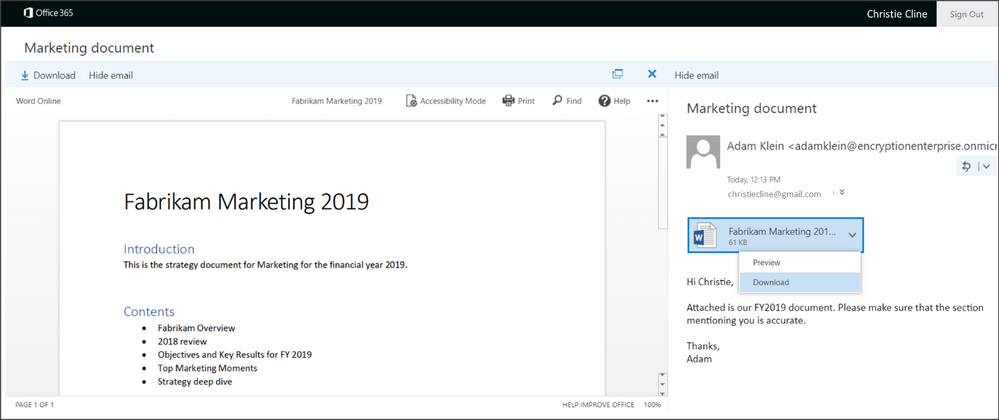
When the recipient signs-in to the Office 365 Message Encryption portal, they can preview attachments as before.
If the control to unrestrict the attachment is enabled, the document will be decrypted and the recipient will be able to view it normally. Additionally, the content will remain decrypted and unrestricted unless additional protections are applied.
Scope
This setting is available for the Encrypt-only template and not for the Do Not Forward or Custom templates.
It’s enforced at the tenant level.
How to control the setting
To manage whether to allow recipients to download Encrypt-only attachments without encryption, follow these steps:
Connect to Exchange Online Using Remote PowerShell (see https://aka.ms/exopowershell)
Run the Set-IRMConfiguration cmdlet with the DecryptAttachmentForEncryptOnly parameter as follows:
Set-IRMConfiguration – DecryptAttachmentForEncryptOnly <$true|$false>
For example, to allow download of attachments without protection for Encrypt-only:
Set-IRMConfiguration – DecryptAttachmentForEncryptOnly $true
If you decide that you want to revert the setting and keep attachments protected even after download:
Set-IRMConfiguration – DecryptAttachmentForEncryptOnly $false
Please note, as of 12/13/18, we have deprecated DecryptAttachmentFromPortal. It will continue working for existing customers who have run the old cmdlet but new customers should start using the new cmdlet (DecryptAttachmentForEncryptOnly) updated above.
Additional Resources
This was a key ask from organizations that had a broad set of scenarios which requires email recipients to “own” the attachment by unrestricting permissions on the attachment. We hope this additional control can provide more flexibility in collaborating on protected content for all users. Your feedback matters- leave us a comment below or go to uservoice and submit your feedback/vote!
For additional resources on Office 365 Message Encryption – you can find them below:
EDITORS NOTE 1/3/2019
We have updated the blog to reflect that we’ve expanded the ability to control if Office attachments are protected for recipients inside Office 365 – previously this was only supported for non-Office 365 users. Changes are reflected below in the blog.
Summary
Administrators can now control whether Office attachments are protected for recipients inside and outside of Office 365 when the Encrypt-Only template is used. This was a key ask from Office 365 Message Encryption customers and is now available as a tenant-level setting.
Background
We have now made it possible for administrators to control how Encrypt-Only behaves for attachments. By default, when a user sends an email and attachments using Encrypt-only, the Office attachments are also protected with Encrypt-Only permissions and that encryption persists throughout lifecycle of the content. To provide more flexible controls for recipients, organizations can control if recipients have unrestricted permissions on the attachment or not for Encrypt-Only emails. For example, one scenario this is valued is when a doctor shares a protected attachment to her patient, and the patient wants to share this with his family, the attachment is no longer encrypted so they can open the attachment without any additional steps.
What is available
Admins can control whether attachments have unrestricted permissions for Encrypt-Only emails. Details on implementing the settings are below.
When the recipient signs-in to the Office 365 Message Encryption portal, they can preview attachments as before.
If the control to unrestrict the attachment is enabled, the document will be decrypted and the recipient will be able to view it normally. Additionally, the content will remain decrypted and unrestricted unless additional protections are applied.
Scope
This setting is available for the Encrypt-only template and not for the Do Not Forward or Custom templates.
It’s enforced at the tenant level.
How to control the setting
To manage whether to allow recipients to download Encrypt-only attachments without encryption, follow these steps:
Connect to Exchange Online Using Remote PowerShell (see https://aka.ms/exopowershell)
Run the Set-IRMConfiguration cmdlet with the DecryptAttachmentForEncryptOnly parameter as follows:
Set-IRMConfiguration – DecryptAttachmentForEncryptOnly <$true|$false>
For example, to allow download of attachments without protection for Encrypt-only:
Set-IRMConfiguration – DecryptAttachmentForEncryptOnly $true
If you decide that you want to revert the setting and keep attachments protected even after download:
Set-IRMConfiguration – DecryptAttachmentForEncryptOnly $false
Please note, as of 12/13/18, we have deprecated DecryptAttachmentFromPortal. It will continue working for existing customers who have run the old cmdlet but new customers should start using the new cmdlet (DecryptAttachmentForEncryptOnly) updated above.
Additional Resources
This was a key ask from organizations that had a broad set of scenarios which requires email recipients to “own” the attachment by unrestricting permissions on the attachment. We hope this additional control can provide more flexibility in collaborating on protected content for all users. Your feedback matters- leave us a comment below or go to uservoice and submit your feedback/vote!
For additional resources on Office 365 Message Encryption – you can find them below:
EDITORS NOTE 1/3/2019
We have updated the blog to reflect that we’ve expanded the ability to control if Office attachments are protected for recipients inside Office 365 – previously this was only supported for non-Office 365 users. Changes are reflected below in the blog.
Summary
Administrators can now control whether Office attachments are protected for recipients inside and outside of Office 365 when the Encrypt-Only template is used. This was a key ask from Office 365 Message Encryption customers and is now available as a tenant-level setting.
Background
We have now made it possible for administrators to control how Encrypt-Only behaves for attachments. By default, when a user sends an email and attachments using Encrypt-only, the Office attachments are also protected with Encrypt-Only permissions and that encryption persists throughout lifecycle of the content. To provide more flexible controls for recipients, organizations can control if recipients have unrestricted permissions on the attachment or not for Encrypt-Only emails. For example, one scenario this is valued is when a doctor shares a protected attachment to her patient, and the patient wants to share this with his family, the attachment is no longer encrypted so they can open the attachment without any additional steps.
What is available
Admins can control whether attachments have unrestricted permissions for Encrypt-Only emails. Details on implementing the settings are below.
When the recipient signs-in to the Office 365 Message Encryption portal, they can preview attachments as before.
If the control to unrestrict the attachment is enabled, the document will be decrypted and the recipient will be able to view it normally. Additionally, the content will remain decrypted and unrestricted unless additional protections are applied.
Scope
This setting is available for the Encrypt-only template and not for the Do Not Forward or Custom templates.
It’s enforced at the tenant level.
How to control the setting
To manage whether to allow recipients to download Encrypt-only attachments without encryption, follow these steps:
Connect to Exchange Online Using Remote PowerShell (see https://aka.ms/exopowershell)
Run the Set-IRMConfiguration cmdlet with the DecryptAttachmentForEncryptOnly parameter as follows:
Set-IRMConfiguration – DecryptAttachmentForEncryptOnly <$true|$false>
For example, to allow download of attachments without protection for Encrypt-only:
Set-IRMConfiguration – DecryptAttachmentForEncryptOnly $true
If you decide that you want to revert the setting and keep attachments protected even after download:
Set-IRMConfiguration – DecryptAttachmentForEncryptOnly $false
Please note, as of 12/13/18, we have deprecated DecryptAttachmentFromPortal. It will continue working for existing customers who have run the old cmdlet but new customers should start using the new cmdlet (DecryptAttachmentForEncryptOnly) updated above.
Additional Resources
This was a key ask from organizations that had a broad set of scenarios which requires email recipients to “own” the attachment by unrestricting permissions on the attachment. We hope this additional control can provide more flexibility in collaborating on protected content for all users. Your feedback matters- leave us a comment below or go to uservoice and submit your feedback/vote!
For additional resources on Office 365 Message Encryption – you can find them below:
EDITORS NOTE 1/3/2019
We have updated the blog to reflect that we’ve expanded the ability to control if Office attachments are protected for recipients inside Office 365 – previously this was only supported for non-Office 365 users. Changes are reflected below in the blog.
Summary
Administrators can now control whether Office attachments are protected for recipients inside and outside of Office 365 when the Encrypt-Only template is used. This was a key ask from Office 365 Message Encryption customers and is now available as a tenant-level setting.
Background
We have now made it possible for administrators to control how Encrypt-Only behaves for attachments. By default, when a user sends an email and attachments using Encrypt-only, the Office attachments are also protected with Encrypt-Only permissions and that encryption persists throughout lifecycle of the content. To provide more flexible controls for recipients, organizations can control if recipients have unrestricted permissions on the attachment or not for Encrypt-Only emails. For example, one scenario this is valued is when a doctor shares a protected attachment to her patient, and the patient wants to share this with his family, the attachment is no longer encrypted so they can open the attachment without any additional steps.
What is available
Admins can control whether attachments have unrestricted permissions for Encrypt-Only emails. Details on implementing the settings are below.
When the recipient signs-in to the Office 365 Message Encryption portal, they can preview attachments as before.
If the control to unrestrict the attachment is enabled, the document will be decrypted and the recipient will be able to view it normally. Additionally, the content will remain decrypted and unrestricted unless additional protections are applied.
Scope
This setting is available for the Encrypt-only template and not for the Do Not Forward or Custom templates.
It’s enforced at the tenant level.
How to control the setting
To manage whether to allow recipients to download Encrypt-only attachments without encryption, follow these steps:
Connect to Exchange Online Using Remote PowerShell (see https://aka.ms/exopowershell)
Run the Set-IRMConfiguration cmdlet with the DecryptAttachmentForEncryptOnly parameter as follows:
Set-IRMConfiguration – DecryptAttachmentForEncryptOnly <$true|$false>
For example, to allow download of attachments without protection for Encrypt-only:
Set-IRMConfiguration – DecryptAttachmentForEncryptOnly $true
If you decide that you want to revert the setting and keep attachments protected even after download:
Set-IRMConfiguration – DecryptAttachmentForEncryptOnly $false
Please note, as of 12/13/18, we have deprecated DecryptAttachmentFromPortal. It will continue working for existing customers who have run the old cmdlet but new customers should start using the new cmdlet (DecryptAttachmentForEncryptOnly) updated above.
Additional Resources
This was a key ask from organizations that had a broad set of scenarios which requires email recipients to “own” the attachment by unrestricting permissions on the attachment. We hope this additional control can provide more flexibility in collaborating on protected content for all users. Your feedback matters- leave us a comment below or go to uservoice and submit your feedback/vote!
For additional resources on Office 365 Message Encryption – you can find them below:
Today we announced the launch of the Microsoft Graph Security Hackathon. We invite you to join it and submit your creative applications that can help improve organizations’ cyber defenses. You’ll have the chance to win* a piece of the $15,000 cash prize pool as well as a speaking opportunity at Microsoft Build 2019.
Tap into the Microsoft Graph Security API and mash up with other APIs to build solutions that can help streamline security operations. The Microsoft Graph Security API connects multiple security solutions, with a unified schema, to enable easier correlation of alerts, provide access to rich contextual information, and simplify automation. This empowers organizations to quickly gain insights and take actions across their security products, while reducing the cost and complexity of building and maintaining multiple integrations.
What is the Graph Security Hackathon?
Microsoft Graph Security Hackathon is an online Hackathon available at https://graphsecurityhack.devpost.com/ and is open to individuals, teams and organizations for participation. The goal is to build an application using the Microsoft Graph Security API – feel free to add Microsoft Graph and other APIs to the mix.
Why should I participate?
In addition to positively impacting organizational security, you have an opportunity to win* a piece of $15,000 cash in prizes with some additional opportunities to be promoted on Microsoft blog channels.
When is this?
Submission window for this Hackathon runs from December 1, 2018 until March 1, 2019
How to participate?
Further Details
Review the Microsoft Graph Security Hackathon blog post and visit the Hackathon website.
Why wait? Join the #graphsecurityhackathon and invite your friends to join the fun!
*No purchase necessary. Open only to new and existing Devpost users who are the age of majority in their country. Game ends March 1, 2019 at 5:00 PM Eastern Time. For details, see Official Rules.
Today we announced the launch of the Microsoft Graph Security Hackathon. We invite you to join it and submit your creative applications that can help improve organizations’ cyber defenses. You’ll have the chance to win* a piece of the $15,000 cash prize pool as well as a speaking opportunity at Microsoft Build 2019.
Tap into the Microsoft Graph Security API and mash up with other APIs to build solutions that can help streamline security operations. The Microsoft Graph Security API connects multiple security solutions, with a unified schema, to enable easier correlation of alerts, provide access to rich contextual information, and simplify automation. This empowers organizations to quickly gain insights and take actions across their security products, while reducing the cost and complexity of building and maintaining multiple integrations.
What is the Graph Security Hackathon?
Microsoft Graph Security Hackathon is an online Hackathon available at https://graphsecurityhack.devpost.com/ and is open to individuals, teams and organizations for participation. The goal is to build an application using the Microsoft Graph Security API – feel free to add Microsoft Graph and other APIs to the mix.
Why should I participate?
In addition to positively impacting organizational security, you have an opportunity to win* a piece of $15,000 cash in prizes with some additional opportunities to be promoted on Microsoft blog channels.
When is this?
Submission window for this Hackathon runs from December 1, 2018 until March 1, 2019
How to participate?
Further Details
Review the Microsoft Graph Security Hackathon blog post and visit the Hackathon website.
Why wait? Join the #graphsecurityhackathon and invite your friends to join the fun!
*No purchase necessary. Open only to new and existing Devpost users who are the age of majority in their country. Game ends March 1, 2019 at 5:00 PM Eastern Time. For details, see Official Rules.







