We have heard from customers the challenges with maintaining compliance in the modern workplace, and the desire to reduce the complexity and friction of core compliance processes such as records management. For many organizations, maintaining and validating critical business records is imperative to maintaining business continuity. Today we are announcing new capabilities integrated into Microsoft 365 to help you simplify and streamline core records management processes.
Working closely with several customer development partners, we have understood the importance of using the in-place archive within Office 365 core workloads such as Exchange email and SharePoint online. Organizations are already starting to realize the benefit of the in-place archival capabilities of Office 365 for a variety of content across both communications and collaboration. With these new updates, now organizations will be able to do more with the integrated archive and records management capabilities.
First we are excited to announce a new assessment of Exchange based content including email, chats, teams messages and more to meet the SEC 17a-4 compliance requirement for WORM (Write once, ready many) and non-WORM storage and immutability of records. This assessment was completed by an independent third party, Cohasset Associates, and covers SEC 17a-4, FINRA Rule 4511c and CFTC 1.31 (c-d) and provides a credible confirmation of the features built into Office 365 and their ability to help your organization meet your requirements for immutability and records retention. Learn more about this assessment and download your own copy here.
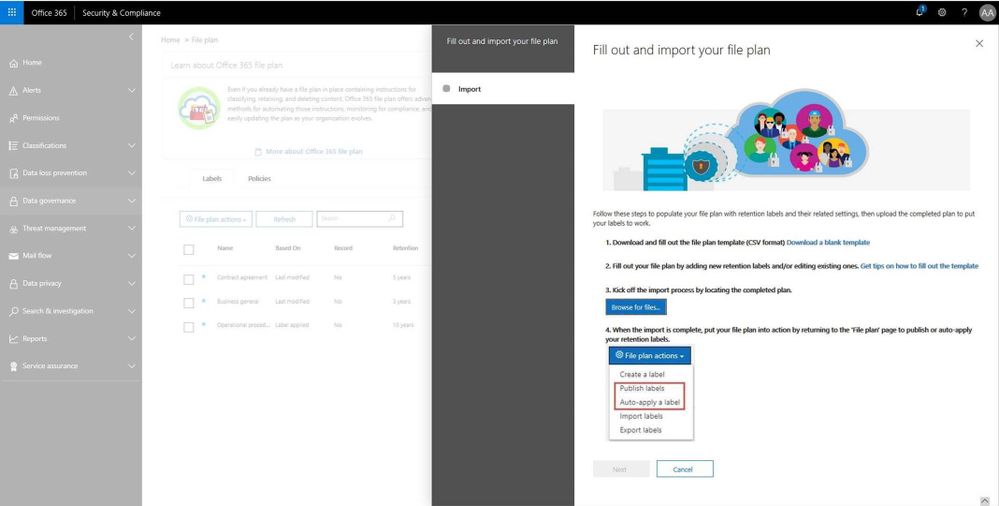
In addition, file plan manager is now generally available. This new capability allows records manager to automate retention schedules policies throughout the lifecycle using intelligent analytics and insights. Record managers can also migrate complex records retention schedules from existing on-prem or other systems into Office 365 and maintain a cohesive experience. Simplified Import and export along with file plan descriptors can be used to create a hierarchical file plan. File plan will also provide into Microsoft Information Protection analytics described below.
Read more about file plan manager here.
We are also releasing enhancements to the disposition workflow, allowing record managers to defensibility delete content and produce a certificate of destruction within the integrated workflow. Read more about this update here
The API supporting Event Based Retention based on triggers from outside systems and workflows is now generally available. Now organizations can trigger retention based on employee departure from HR systems, or accomplish other retention triggers from customer relationship management or financial systems. Read more about this and how to set this up here.
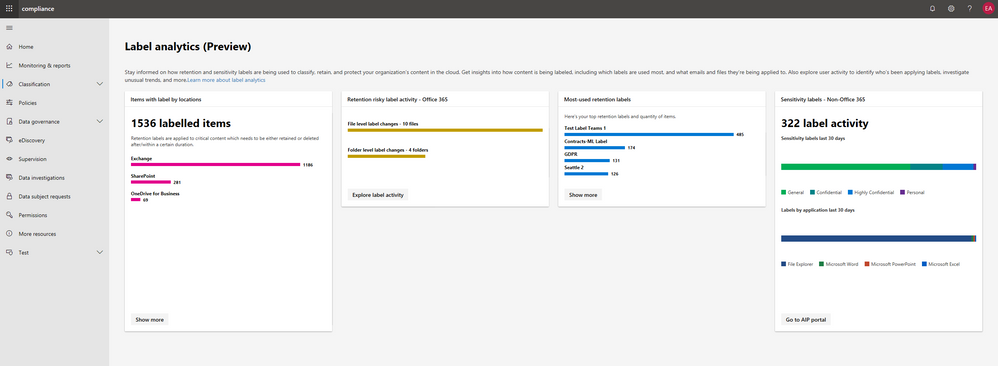
Finally, we know that visibility and ability to derive insights from classification, protection and management of records is critical and ensures confidence in the fidelity of advanced services like auto-classification. Today, along with the introduction of the Microsoft 365 Compliance Center we are announcing the preview of Microsoft Information Protection label analytics, bringing together label insights across Office 365 and Azure Information Protection to share classification and labeling of Office 365 and non-Office 365 data in your environment. This helps deliver a comprehensive view of your digital estate, sensitive data and protection and retention polices that are in place. Read more about the compliance and these updates here.
Get started with these capabilities today.
– Maithili Dandige, Group Program Manager, Microsoft 365 Compliance Solutions
We have heard from customers the challenges with maintaining compliance in the modern workplace, and the desire to reduce the complexity and friction of core compliance processes such as records management. For many organizations, maintaining and validating critical business records is imperative to maintaining business continuity. Today we are announcing new capabilities integrated into Microsoft 365 to help you simplify and streamline core records management processes.
Working closely with several customer development partners, we have understood the importance of using the in-place archive within Office 365 core workloads such as Exchange email and SharePoint online. Organizations are already starting to realize the benefit of the in-place archival capabilities of Office 365 for a variety of content across both communications and collaboration. With these new updates, now organizations will be able to do more with the integrated archive and records management capabilities.
First we are excited to announce a new assessment of Exchange based content including email, chats, teams messages and more to meet the SEC 17a-4 compliance requirement for WORM (Write once, ready many) and non-WORM storage and immutability of records. This assessment was completed by an independent third party, Cohasset Associates, and covers SEC 17a-4, FINRA Rule 4511c and CFTC 1.31 (c-d) and provides a credible confirmation of the features built into Office 365 and their ability to help your organization meet your requirements for immutability and records retention. Learn more about this assessment and download your own copy here.
In addition, file plan manager is now generally available. This new capability allows records manager to automate retention schedules policies throughout the lifecycle using intelligent analytics and insights. Record managers can also migrate complex records retention schedules from existing on-prem or other systems into Office 365 and maintain a cohesive experience. Simplified Import and export along with file plan descriptors can be used to create a hierarchical file plan. File plan will also provide into Microsoft Information Protection analytics described below.
Read more about file plan manager here.
We are also releasing enhancements to the disposition workflow, allowing record managers to defensibility delete content and produce a certificate of destruction within the integrated workflow. Read more about this update here
The API supporting Event Based Retention based on triggers from outside systems and workflows is now generally available. Now organizations can trigger retention based on employee departure from HR systems, or accomplish other retention triggers from customer relationship management or financial systems. Read more about this and how to set this up here.
Finally, we know that visibility and ability to derive insights from classification, protection and management of records is critical and ensures confidence in the fidelity of advanced services like auto-classification. Today, along with the introduction of the Microsoft 365 Compliance Center we are announcing the preview of Microsoft Information Protection label analytics, bringing together label insights across Office 365 and Azure Information Protection to share classification and labeling of Office 365 and non-Office 365 data in your environment. This helps deliver a comprehensive view of your digital estate, sensitive data and protection and retention polices that are in place. Read more about the compliance and these updates here.
Get started with these capabilities today.
– Maithili Dandige, Group Program Manager, Microsoft 365 Compliance Solutions
We have heard from customers the challenges with maintaining compliance in the modern workplace, and the desire to reduce the complexity and friction of core compliance processes such as records management. For many organizations, maintaining and validating critical business records is imperative to maintaining business continuity. Today we are announcing new capabilities integrated into Microsoft 365 to help you simplify and streamline core records management processes.
Working closely with several customer development partners, we have understood the importance of using the in-place archive within Office 365 core workloads such as Exchange email and SharePoint online. Organizations are already starting to realize the benefit of the in-place archival capabilities of Office 365 for a variety of content across both communications and collaboration. With these new updates, now organizations will be able to do more with the integrated archive and records management capabilities.
First we are excited to announce a new assessment of Exchange based content including email, chats, teams messages and more to meet the SEC 17a-4 compliance requirement for WORM (Write once, ready many) and non-WORM storage and immutability of records. This assessment was completed by an independent third party, Cohasset Associates, and covers SEC 17a-4, FINRA Rule 4511c and CFTC 1.31 (c-d) and provides a credible confirmation of the features built into Office 365 and their ability to help your organization meet your requirements for immutability and records retention. Learn more about this assessment and download your own copy here.
In addition, file plan manager is now generally available. This new capability allows records manager to automate retention schedules policies throughout the lifecycle using intelligent analytics and insights. Record managers can also migrate complex records retention schedules from existing on-prem or other systems into Office 365 and maintain a cohesive experience. Simplified Import and export along with file plan descriptors can be used to create a hierarchical file plan. File plan will also provide into Microsoft Information Protection analytics described below.
Read more about file plan manager here.
We are also releasing enhancements to the disposition workflow, allowing record managers to defensibility delete content and produce a certificate of destruction within the integrated workflow. Read more about this update here
The API supporting Event Based Retention based on triggers from outside systems and workflows is now generally available. Now organizations can trigger retention based on employee departure from HR systems, or accomplish other retention triggers from customer relationship management or financial systems. Read more about this and how to set this up here.
Finally, we know that visibility and ability to derive insights from classification, protection and management of records is critical and ensures confidence in the fidelity of advanced services like auto-classification. Today, along with the introduction of the Microsoft 365 Compliance Center we are announcing the preview of Microsoft Information Protection label analytics, bringing together label insights across Office 365 and Azure Information Protection to share classification and labeling of Office 365 and non-Office 365 data in your environment. This helps deliver a comprehensive view of your digital estate, sensitive data and protection and retention polices that are in place. Read more about the compliance and these updates here.
Get started with these capabilities today.
– Maithili Dandige, Group Program Manager, Microsoft 365 Compliance Solutions
We have heard from customers that in today’s modern workplace and threat landscape, alerts and insights are a key tool to maintain visibility and control in your environment. Office 365 alert policies and insights in Security & Compliance Center are effective tools for organizations to detect threats, monitor anomalous activities and enhance protection in Office 365. This month, we are rolling out new capabilities to enhance your alert and insight experience in Office 365.
Consume Cloud App Security alerts in Office 365 Security and Compliance center
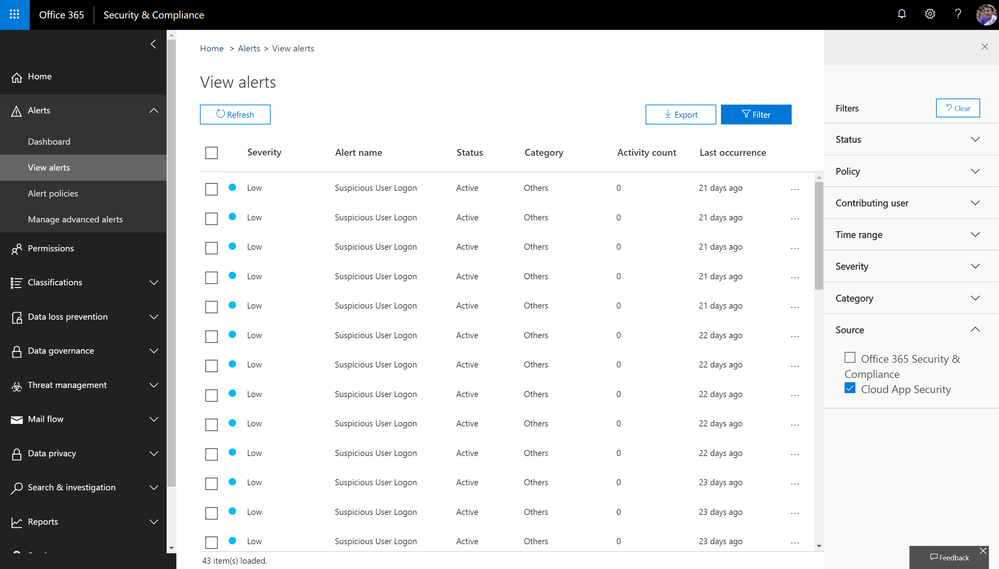
Microsoft Cloud App Security alerts related to Office apps and services are now available in the Office 365 security and compliance center on the view alerts page. With the addition of these alerts in the compliance center, you now have a central view within one portal. In addition, these same alerts are now available via the Management Activity API.
For more details, please refer to this section in documentation.
Alerts signal available in Management Activity API
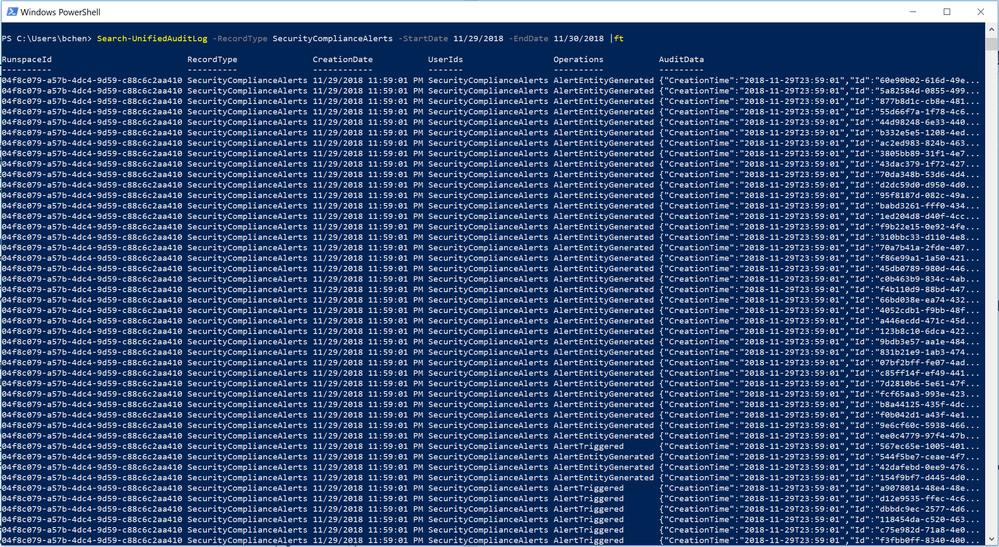
Availability of the alerts signal in the Management Activity API has been one of the top feature requests from both customers and partners. Starting now, Office 365 Security & Compliance Alerts can be retrieved from Management Activity API as a signal. This means that you can now consume Office 365 alerts in your own way by simply integrating it with your SIEM or self-created solution.
Meanwhile, this also means that these signals can be searched from “Search-UnifiedAuditLog” for Cmdlet based log access.
For more details, please refer to the schema documentation for Office 365 Security & Compliance alerts in Management Activity API.
Manage access to alerts with role-based permissions
Admins with various roles come to the Security and Compliance center to consume alerts. Until now, the permission for viewing alerts has been universal across the entire organization, creating a challenge for access to alerts for specific scenarios such as data loss, or privileged access. As we expand the scenarios that alert policies support across Security & Compliance, the necessity for a more granular permission model emerges. This month, we will start to roll out the role-based access to alerts. For example, a Compliance admin will no longer have permission to see Threat management alerts in “View alerts” page. Read more about this update here.
Insights signal available in Management Activity API
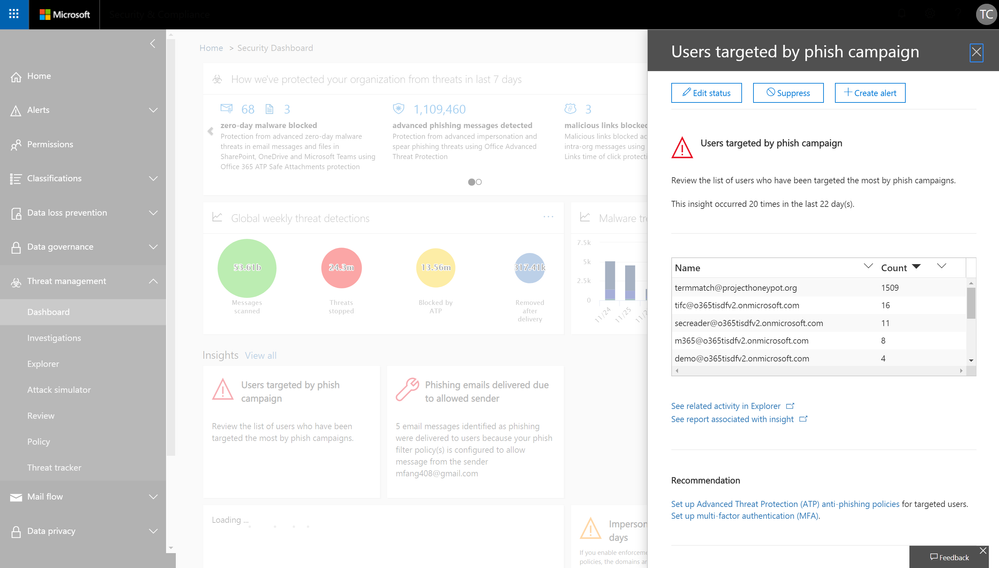
In various places in Security & compliance Center, Office 365 provides you with insights about potential threats or configuration issues that we have identified on your behalf, such as “Users targeted by phishing campaign” or “Spam mails delivered due to allowed IP”, along with actionable recommendations for you to resolve or mitigate these issues.
To date, we have introduced about 30 such insights. And now, we are excited to share that these insight signals can also be retrieved via the Management Activity API. This update will start to roll out later this month.
Alert policies based on S&CC insights
Along with the availability of insight signals in Management Activity API, we are also allowing admins to configure alert policies and receive email notifications based on these insights from S&CC. Certain insight based alerts will be rolled up as on-by-default alert policies.
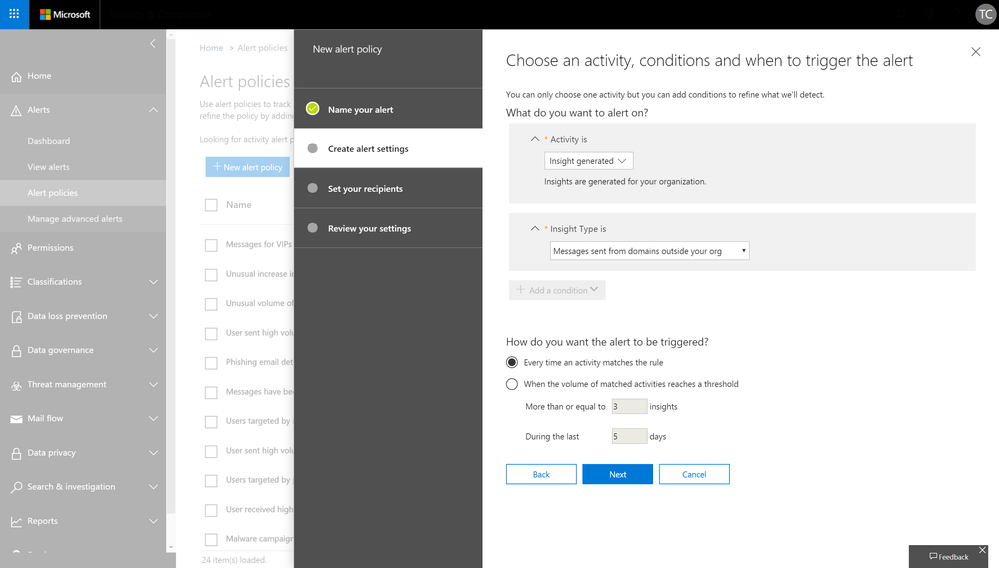
This capability is also starting to roll out later this month. Check back for updates on related documentation.
- Binyan Chen, Sr Program Manager, Microsoft 365 Compliance Solutions
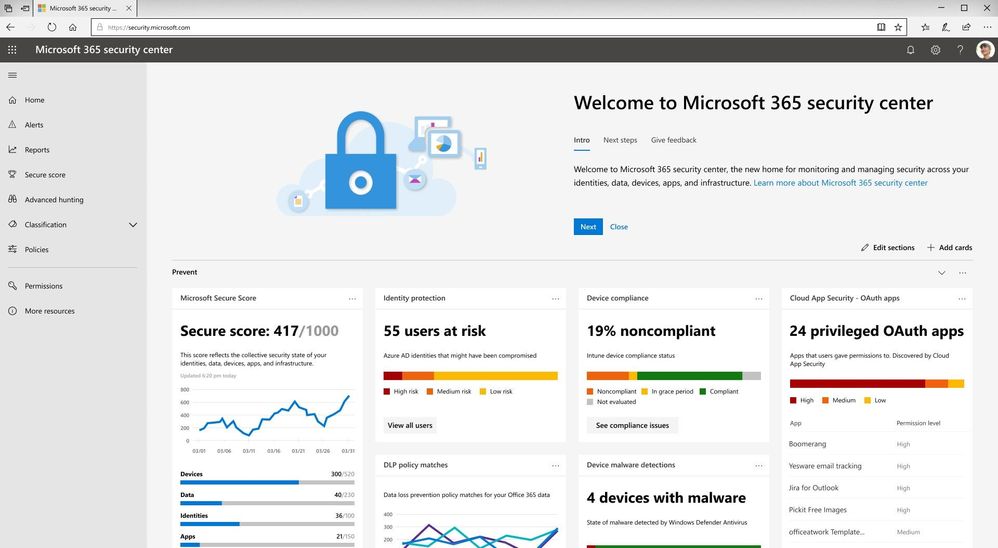
In the past few years, we have been heavily investing in the security and compliance areas to help organizations safeguard their digital estate and achieve compliance. According to recent customer research, we heard that while security and compliance are both top of mind areas in data protection, most organizations have different teams working in these two spaces. To empower your security and compliance professionals to work more efficiently in dedicated platforms, we are excited to announce the availability of Microsoft 365 security center (security.microsoft.com) and Microsoft 365 compliance center (compliance.microsoft.com).
The new specialized workspaces enable your security and compliance teams to have centralized management across your Microsoft 365 services, bringing together Office 365, Windows 10, and Enterprise Mobility + Security (EMS), with several Azure capabilities.
In both specialized centers, you can easily find actionable insights, alerts, and scores to help you understand your security and compliance risks and leverage artificial intelligence to strengthen your security and compliance posture. You can find more details about each center in the following paragraphs.
Microsoft 365 security center
The new Microsoft 365 security center provides security administrators and other risk management professionals with a centralized hub and specialized workspace that enables them to manage and take full advantage of Microsoft 365 intelligent security solutions for identity and access management, threat protection, information protection, and security management. With it they’ll gain the visibility, control, and guidance necessary to understand and act on the threats that their organization is facing today, have faced in the past, and may face in the future.
This new workspace is organized around the products that make up Microsoft Threat Protection by rendering them in a completely new way, one that’s focused on the entities that our customers must secure across their entire digital estate. We have consolidated the experience across Microsoft 365 products and designed around the concepts of Identity, Endpoints, User Data, Cloud App and Infrastructure, and not the underlying products that help secure them. This enables end-to-end security insights and management and paves the way for a comprehensive Microsoft 365 security solution.
In addition, the Microsoft 365 security center enables organizations to reduce security risks by providing them with the tools necessary to assess their current and historical security postures and to determine the appropriate set of actions to take to mitigate future risks. These tools consist of rich dashboards, reports, and interactive experiences like Microsoft Secure Score, each of which are designed to provide security administrators with the visibility, controls, and guidance they need to drive maximum security posture improvements. Microsoft 365 security center also provides experiences for security operators (SecOps) through the integration of incident response capabilities such as a centralized alerts view and hunting capabilities which can be used to perform ad-hoc investigations.
Microsoft 365 compliance center
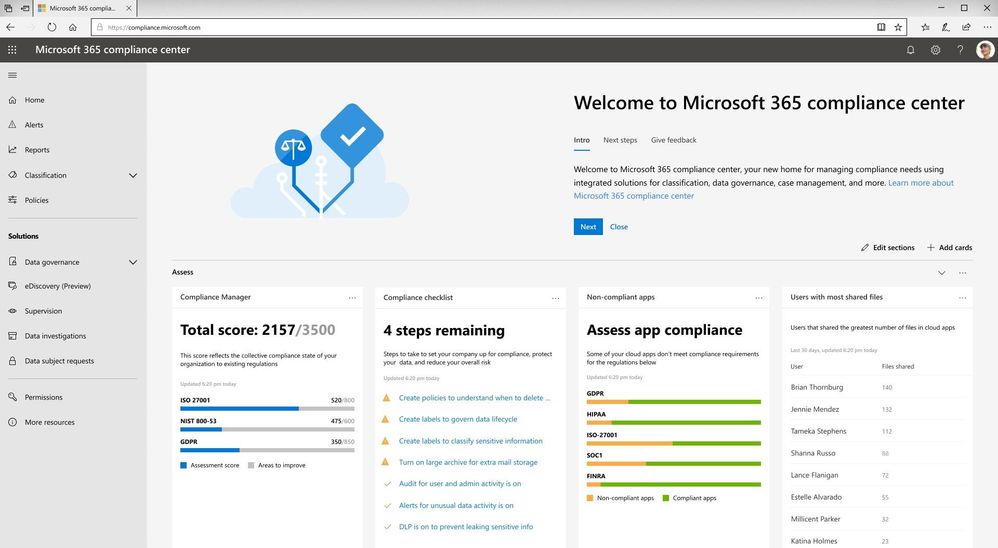
The new Microsoft 365 compliance center is a specialized workspace for your compliance, privacy, and risk management professionals. In the new center, you can assess your compliance risks through Compliance Manager, protect and govern your data with sensitivity and retention labels, respond to regulatory requests like Data Subject Requests, and access to more other compliance and privacy solutions.
The new experience helps you reduce compliance risks and protect your digital estate more easily and effectively with three new insights:
- With the Compliance Manager integration, Microsoft 365 compliance center provides you with visibility into your compliance posture against key regulations and standards like the GDPR, ISO 27001, NIST 800-53, and more on the homepage. You can then perform risk assessments and follow step-by-step guidance to enhance your compliance and privacy controls.
- Additionally, to help you label data more accurately, the new Microsoft 365 Label Analytics preview can enable you to analyze and validate how sensitivity and retention labels are being used beyond your Office 365 workloads.
- We also brought in the Microsoft Cloud App Security (MCAS) insights into Microsoft 365 compliance center to help you identify compliance risks across applications, discover shadow IT, and monitor employees’ non-compliant behaviors.
We will be gradually rolling out the new experience from the end of January, and the rollout will be completed worldwide by the end of March. Once this new experience is rolled out, you can access it by visiting security.microsoft.com or compliance.microsoft.com or from the Microsoft 365 admin center.
You can learn more about the new Microsoft 365 security center and Microsoft 365 compliance center in our technical supporting document.
We have heard from customers that in today’s modern workplace and threat landscape, alerts and insights are a key tool to maintain visibility and control in your environment. Office 365 alert policies and insights in Security & Compliance Center are effective tools for organizations to detect threats, monitor anomalous activities and enhance protection in Office 365. This month, we are rolling out new capabilities to enhance your alert and insight experience in Office 365.
Consume Cloud App Security alerts in Office 365 Security and Compliance center
Microsoft Cloud App Security alerts related to Office apps and services are now available in the Office 365 security and compliance center on the view alerts page. With the addition of these alerts in the compliance center, you now have a central view within one portal. In addition, these same alerts are now available via the Management Activity API.
For more details, please refer to this section in documentation.
Alerts signal available in Management Activity API
Availability of the alerts signal in the Management Activity API has been one of the top feature requests from both customers and partners. Starting now, Office 365 Security & Compliance Alerts can be retrieved from Management Activity API as a signal. This means that you can now consume Office 365 alerts in your own way by simply integrating it with your SIEM or self-created solution.
Meanwhile, this also means that these signals can be searched from “Search-UnifiedAuditLog” for Cmdlet based log access.
For more details, please refer to the schema documentation for Office 365 Security & Compliance alerts in Management Activity API.
Manage access to alerts with role-based permissions
Admins with various roles come to the Security and Compliance center to consume alerts. Until now, the permission for viewing alerts has been universal across the entire organization, creating a challenge for access to alerts for specific scenarios such as data loss, or privileged access. As we expand the scenarios that alert policies support across Security & Compliance, the necessity for a more granular permission model emerges. This month, we will start to roll out the role-based access to alerts. For example, a Compliance admin will no longer have permission to see Threat management alerts in “View alerts” page. Read more about this update here.
Insights signal available in Management Activity API
In various places in Security & compliance Center, Office 365 provides you with insights about potential threats or configuration issues that we have identified on your behalf, such as “Users targeted by phishing campaign” or “Spam mails delivered due to allowed IP”, along with actionable recommendations for you to resolve or mitigate these issues.
To date, we have introduced about 30 such insights. And now, we are excited to share that these insight signals can also be retrieved via the Management Activity API. This update will start to roll out later this month.
Alert policies based on S&CC insights
Along with the availability of insight signals in Management Activity API, we are also allowing admins to configure alert policies and receive email notifications based on these insights from S&CC. Certain insight based alerts will be rolled up as on-by-default alert policies.
This capability is also starting to roll out later this month. Check back for updates on related documentation.
- Binyan Chen, Sr Program Manager, Microsoft 365 Compliance Solutions
In the past few years, we have been heavily investing in the security and compliance areas to help organizations safeguard their digital estate and achieve compliance. According to recent customer research, we heard that while security and compliance are both top of mind areas in data protection, most organizations have different teams working in these two spaces. To empower your security and compliance professionals to work more efficiently in dedicated platforms, we are excited to announce the availability of Microsoft 365 security center (security.microsoft.com) and Microsoft 365 compliance center (compliance.microsoft.com).
The new specialized workspaces enable your security and compliance teams to have centralized management across your Microsoft 365 services, bringing together Office 365, Windows 10, and Enterprise Mobility + Security (EMS), with several Azure capabilities.
In both specialized centers, you can easily find actionable insights, alerts, and scores to help you understand your security and compliance risks and leverage artificial intelligence to strengthen your security and compliance posture. You can find more details about each center in the following paragraphs.
Microsoft 365 security center
The new Microsoft 365 security center provides security administrators and other risk management professionals with a centralized hub and specialized workspace that enables them to manage and take full advantage of Microsoft 365 intelligent security solutions for identity and access management, threat protection, information protection, and security management. With it they’ll gain the visibility, control, and guidance necessary to understand and act on the threats that their organization is facing today, have faced in the past, and may face in the future.
This new workspace is organized around the products that make up Microsoft Threat Protection by rendering them in a completely new way, one that’s focused on the entities that our customers must secure across their entire digital estate. We have consolidated the experience across Microsoft 365 products and designed around the concepts of Identity, Endpoints, User Data, Cloud App and Infrastructure, and not the underlying products that help secure them. This enables end-to-end security insights and management and paves the way for a comprehensive Microsoft 365 security solution.
In addition, the Microsoft 365 security center enables organizations to reduce security risks by providing them with the tools necessary to assess their current and historical security postures and to determine the appropriate set of actions to take to mitigate future risks. These tools consist of rich dashboards, reports, and interactive experiences like Microsoft Secure Score, each of which are designed to provide security administrators with the visibility, controls, and guidance they need to drive maximum security posture improvements. Microsoft 365 security center also provides experiences for security operators (SecOps) through the integration of incident response capabilities such as a centralized alerts view and hunting capabilities which can be used to perform ad-hoc investigations.
Microsoft 365 compliance center
The new Microsoft 365 compliance center is a specialized workspace for your compliance, privacy, and risk management professionals. In the new center, you can assess your compliance risks through Compliance Manager, protect and govern your data with sensitivity and retention labels, respond to regulatory requests like Data Subject Requests, and access to more other compliance and privacy solutions.
The new experience helps you reduce compliance risks and protect your digital estate more easily and effectively with three new insights:
- With the Compliance Manager integration, Microsoft 365 compliance center provides you with visibility into your compliance posture against key regulations and standards like the GDPR, ISO 27001, NIST 800-53, and more on the homepage. You can then perform risk assessments and follow step-by-step guidance to enhance your compliance and privacy controls.
- Additionally, to help you label data more accurately, the new Microsoft 365 Label Analytics preview can enable you to analyze and validate how sensitivity and retention labels are being used beyond your Office 365 workloads.
- We also brought in the Microsoft Cloud App Security (MCAS) insights into Microsoft 365 compliance center to help you identify compliance risks across applications, discover shadow IT, and monitor employees’ non-compliant behaviors.
We will be gradually rolling out the new experience from the end of January, and the rollout will be completed worldwide by the end of March. Once this new experience is rolled out, you can access it by visiting security.microsoft.com or compliance.microsoft.com or from the Microsoft 365 admin center.
You can learn more about the new Microsoft 365 security center and Microsoft 365 compliance center in our technical supporting document.
We have heard from customers that in today’s modern workplace and threat landscape, alerts and insights are a key tool to maintain visibility and control in your environment. Office 365 alert policies and insights in Security & Compliance Center are effective tools for organizations to detect threats, monitor anomalous activities and enhance protection in Office 365. This month, we are rolling out new capabilities to enhance your alert and insight experience in Office 365.
Consume Cloud App Security alerts in Office 365 Security and Compliance center
Microsoft Cloud App Security alerts related to Office apps and services are now available in the Office 365 security and compliance center on the view alerts page. With the addition of these alerts in the compliance center, you now have a central view within one portal. In addition, these same alerts are now available via the Management Activity API.
For more details, please refer to this section in documentation.
Alerts signal available in Management Activity API
Availability of the alerts signal in the Management Activity API has been one of the top feature requests from both customers and partners. Starting now, Office 365 Security & Compliance Alerts can be retrieved from Management Activity API as a signal. This means that you can now consume Office 365 alerts in your own way by simply integrating it with your SIEM or self-created solution.
Meanwhile, this also means that these signals can be searched from “Search-UnifiedAuditLog” for Cmdlet based log access.
For more details, please refer to the schema documentation for Office 365 Security & Compliance alerts in Management Activity API.
Manage access to alerts with role-based permissions
Admins with various roles come to the Security and Compliance center to consume alerts. Until now, the permission for viewing alerts has been universal across the entire organization, creating a challenge for access to alerts for specific scenarios such as data loss, or privileged access. As we expand the scenarios that alert policies support across Security & Compliance, the necessity for a more granular permission model emerges. This month, we will start to roll out the role-based access to alerts. For example, a Compliance admin will no longer have permission to see Threat management alerts in “View alerts” page. Read more about this update here.
Insights signal available in Management Activity API
In various places in Security & compliance Center, Office 365 provides you with insights about potential threats or configuration issues that we have identified on your behalf, such as “Users targeted by phishing campaign” or “Spam mails delivered due to allowed IP”, along with actionable recommendations for you to resolve or mitigate these issues.
To date, we have introduced about 30 such insights. And now, we are excited to share that these insight signals can also be retrieved via the Management Activity API. This update will start to roll out later this month.
Alert policies based on S&CC insights
Along with the availability of insight signals in Management Activity API, we are also allowing admins to configure alert policies and receive email notifications based on these insights from S&CC. Certain insight based alerts will be rolled up as on-by-default alert policies.
This capability is also starting to roll out later this month. Check back for updates on related documentation.
- Binyan Chen, Sr Program Manager, Microsoft 365 Compliance Solutions
In the past few years, we have been heavily investing in the security and compliance areas to help organizations safeguard their digital estate and achieve compliance. According to recent customer research, we heard that while security and compliance are both top of mind areas in data protection, most organizations have different teams working in these two spaces. To empower your security and compliance professionals to work more efficiently in dedicated platforms, we are excited to announce the availability of Microsoft 365 security center (security.microsoft.com) and Microsoft 365 compliance center (compliance.microsoft.com).
The new specialized workspaces enable your security and compliance teams to have centralized management across your Microsoft 365 services, bringing together Office 365, Windows 10, and Enterprise Mobility + Security (EMS), with several Azure capabilities.
In both specialized centers, you can easily find actionable insights, alerts, and scores to help you understand your security and compliance risks and leverage artificial intelligence to strengthen your security and compliance posture. You can find more details about each center in the following paragraphs.
Microsoft 365 security center
The new Microsoft 365 security center provides security administrators and other risk management professionals with a centralized hub and specialized workspace that enables them to manage and take full advantage of Microsoft 365 intelligent security solutions for identity and access management, threat protection, information protection, and security management. With it they’ll gain the visibility, control, and guidance necessary to understand and act on the threats that their organization is facing today, have faced in the past, and may face in the future.
This new workspace is organized around the products that make up Microsoft Threat Protection by rendering them in a completely new way, one that’s focused on the entities that our customers must secure across their entire digital estate. We have consolidated the experience across Microsoft 365 products and designed around the concepts of Identity, Endpoints, User Data, Cloud App and Infrastructure, and not the underlying products that help secure them. This enables end-to-end security insights and management and paves the way for a comprehensive Microsoft 365 security solution.
In addition, the Microsoft 365 security center enables organizations to reduce security risks by providing them with the tools necessary to assess their current and historical security postures and to determine the appropriate set of actions to take to mitigate future risks. These tools consist of rich dashboards, reports, and interactive experiences like Microsoft Secure Score, each of which are designed to provide security administrators with the visibility, controls, and guidance they need to drive maximum security posture improvements. Microsoft 365 security center also provides experiences for security operators (SecOps) through the integration of incident response capabilities such as a centralized alerts view and hunting capabilities which can be used to perform ad-hoc investigations.
Microsoft 365 compliance center
The new Microsoft 365 compliance center is a specialized workspace for your compliance, privacy, and risk management professionals. In the new center, you can assess your compliance risks through Compliance Manager, protect and govern your data with sensitivity and retention labels, respond to regulatory requests like Data Subject Requests, and access to more other compliance and privacy solutions.
The new experience helps you reduce compliance risks and protect your digital estate more easily and effectively with three new insights:
- With the Compliance Manager integration, Microsoft 365 compliance center provides you with visibility into your compliance posture against key regulations and standards like the GDPR, ISO 27001, NIST 800-53, and more on the homepage. You can then perform risk assessments and follow step-by-step guidance to enhance your compliance and privacy controls.
- Additionally, to help you label data more accurately, the new Microsoft 365 Label Analytics preview can enable you to analyze and validate how sensitivity and retention labels are being used beyond your Office 365 workloads.
- We also brought in the Microsoft Cloud App Security (MCAS) insights into Microsoft 365 compliance center to help you identify compliance risks across applications, discover shadow IT, and monitor employees’ non-compliant behaviors.
We will be gradually rolling out the new experience from the end of January, and the rollout will be completed worldwide by the end of March. Once this new experience is rolled out, you can access it by visiting security.microsoft.com or compliance.microsoft.com or from the Microsoft 365 admin center.
You can learn more about the new Microsoft 365 security center and Microsoft 365 compliance center in our technical supporting document.
We have heard from customers that in today’s modern workplace and threat landscape, alerts and insights are a key tool to maintain visibility and control in your environment. Office 365 alert policies and insights in Security & Compliance Center are effective tools for organizations to detect threats, monitor anomalous activities and enhance protection in Office 365. This month, we are rolling out new capabilities to enhance your alert and insight experience in Office 365.
Consume Cloud App Security alerts in Office 365 Security and Compliance center
Microsoft Cloud App Security alerts related to Office apps and services are now available in the Office 365 security and compliance center on the view alerts page. With the addition of these alerts in the compliance center, you now have a central view within one portal. In addition, these same alerts are now available via the Management Activity API.
For more details, please refer to this section in documentation.
Alerts signal available in Management Activity API
Availability of the alerts signal in the Management Activity API has been one of the top feature requests from both customers and partners. Starting now, Office 365 Security & Compliance Alerts can be retrieved from Management Activity API as a signal. This means that you can now consume Office 365 alerts in your own way by simply integrating it with your SIEM or self-created solution.
Meanwhile, this also means that these signals can be searched from “Search-UnifiedAuditLog” for Cmdlet based log access.
For more details, please refer to the schema documentation for Office 365 Security & Compliance alerts in Management Activity API.
Manage access to alerts with role-based permissions
Admins with various roles come to the Security and Compliance center to consume alerts. Until now, the permission for viewing alerts has been universal across the entire organization, creating a challenge for access to alerts for specific scenarios such as data loss, or privileged access. As we expand the scenarios that alert policies support across Security & Compliance, the necessity for a more granular permission model emerges. This month, we will start to roll out the role-based access to alerts. For example, a Compliance admin will no longer have permission to see Threat management alerts in “View alerts” page. Read more about this update here.
Insights signal available in Management Activity API
In various places in Security & compliance Center, Office 365 provides you with insights about potential threats or configuration issues that we have identified on your behalf, such as “Users targeted by phishing campaign” or “Spam mails delivered due to allowed IP”, along with actionable recommendations for you to resolve or mitigate these issues.
To date, we have introduced about 30 such insights. And now, we are excited to share that these insight signals can also be retrieved via the Management Activity API. This update will start to roll out later this month.
Alert policies based on S&CC insights
Along with the availability of insight signals in Management Activity API, we are also allowing admins to configure alert policies and receive email notifications based on these insights from S&CC. Certain insight based alerts will be rolled up as on-by-default alert policies.
This capability is also starting to roll out later this month. Check back for updates on related documentation.
- Binyan Chen, Sr Program Manager, Microsoft 365 Compliance Solutions







