A few weeks ago, we released a public preview for Attack Simulator for Office 365 Threat Intelligence. Today, we’re excited to announce that Attack Simulator is now generally available. Attack Simulator for Office 365 Threat Intelligence is available to all Office 365 E5 or Office 365 Threat Intelligence customers.
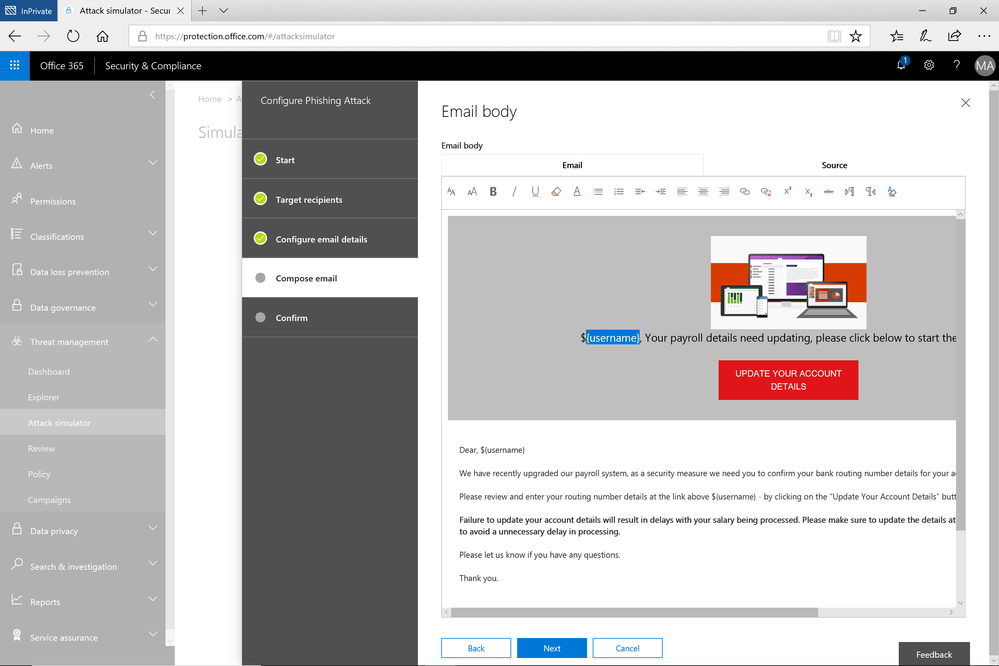
With Attack Simulator, customers can launch simulated attacks on their end users, determine how end users behave in the event of an attack, and update policies and ensure that appropriate security tools are in place to protect the organization from threats. The GA of Attack Simulator adds a new HTML editor so realistic looking HTML emails can be sent in simulations of spear-phishing. Also, two spear-phishing templates are available for immediate use in the spear phishing simulation.
Figure 1. Email template for spear phish simulation using a fake email from an organization’s payroll department.
Attack Simulator includes the three attack scenarios from our public preview.
- Display Name Spear Phishing Attack: Phishing is the generic term for socially engineered attacks designed to harvest credentials or personally identifiable information (PII). Spear phishing is a subset of this phishing and is more targeted, often aimed at a specific group, individual, or organization. These attacks are customized and tend to leverage a sender name that generates trust with the recipient.
- Password Spray Attack: To prevent bad actors from constantly guessing the passwords of user accounts, often there are account lockout policies. For example, an account will lockout after a certain number of bad passwords are guessed for a user. However, if you were to take a single password and try it against every single account in an organization, it would not trigger any lockouts. The password spray attack leverages commonly used passwords and targets many accounts in an organization with the hope that one of the account holder uses a common password that allows a hacker to enter the account and take control of it. From this compromised account, a hacker can launch more attacks by assuming the identity of account holder.
- Brute Force Password Attack: This type of attack consists of a hacker trying many passwords or passphrases with the hope of eventually guessing correctly. The attacker systematically checks all possible passwords and passphrases until the correct one is found.
This video demonstrates how Attack Simulator can help organizations educate users to become more secure from cyber threats. With Attack Simulator, admins can train all their end users, and especially those who are attacked most often. This proactive training is a powerful way to ensure that your organization can prevent the impact from advanced threats. Over the coming months, more threat simulations will be added to Attack Simulator so organizations can simulate the most prevalent threat types from the modern threat landscape.
Begin Educating your End Users Today
Experience the benefits of Attack Simulator for Office 365 Threat Intelligence by beginning an Office 365 E5 trial or Office 365 Threat Intelligence Trial today. Also, learn more about how Microsoft leverages threat intelligence and the value of threat intelligence. Your feedback is one of the most important drivers of our innovation, so please let us know what you think.
A few weeks ago, we released a public preview for Attack Simulator for Office 365 Threat Intelligence. Today, we’re excited to announce that Attack Simulator is now generally available. Attack Simulator for Office 365 Threat Intelligence is available to all Office 365 E5 or Office 365 Threat Intelligence customers.
With Attack Simulator, customers can launch simulated attacks on their end users, determine how end users behave in the event of an attack, and update policies and ensure that appropriate security tools are in place to protect the organization from threats. The GA of Attack Simulator adds a new HTML editor so realistic looking HTML emails can be sent in simulations of spear-phishing. Also, two spear-phishing templates are available for immediate use in the spear phishing simulation.
Figure 1. Email template for spear phish simulation using a fake email from an organization’s payroll department.
Attack Simulator includes the three attack scenarios from our public preview.
- Display Name Spear Phishing Attack: Phishing is the generic term for socially engineered attacks designed to harvest credentials or personally identifiable information (PII). Spear phishing is a subset of this phishing and is more targeted, often aimed at a specific group, individual, or organization. These attacks are customized and tend to leverage a sender name that generates trust with the recipient.
- Password Spray Attack: To prevent bad actors from constantly guessing the passwords of user accounts, often there are account lockout policies. For example, an account will lockout after a certain number of bad passwords are guessed for a user. However, if you were to take a single password and try it against every single account in an organization, it would not trigger any lockouts. The password spray attack leverages commonly used passwords and targets many accounts in an organization with the hope that one of the account holder uses a common password that allows a hacker to enter the account and take control of it. From this compromised account, a hacker can launch more attacks by assuming the identity of account holder.
- Brute Force Password Attack: This type of attack consists of a hacker trying many passwords or passphrases with the hope of eventually guessing correctly. The attacker systematically checks all possible passwords and passphrases until the correct one is found.
This video demonstrates how Attack Simulator can help organizations educate users to become more secure from cyber threats. With Attack Simulator, admins can train all their end users, and especially those who are attacked most often. This proactive training is a powerful way to ensure that your organization can prevent the impact from advanced threats. Over the coming months, more threat simulations will be added to Attack Simulator so organizations can simulate the most prevalent threat types from the modern threat landscape.
Begin Educating your End Users Today
Experience the benefits of Attack Simulator for Office 365 Threat Intelligence by beginning an Office 365 E5 trial or Office 365 Threat Intelligence Trial today. Also, learn more about how Microsoft leverages threat intelligence and the value of threat intelligence. Your feedback is one of the most important drivers of our innovation, so please let us know what you think.
![Use custom domains in Office 365 to build your brand and empower your work force]()
Organizations of all sizes win customers and create trust with a consistent and recognizable brand. Web and email addresses that match your organization’s name build brand equity and establish credibility. If your business is called Fourth Coffee, a web address of fourthcoffee.com makes you easy to find online, and email addresses that end in @fourthcoffee.com reassure your customers that they are dealing directly with you.
Microsoft makes it easy to integrate your custom domain with comprehensive collaboration tools like email from Office 365. Let’s look at your options.
Purchase a custom domain with your Office 365 subscription
For organizations creating their online presence for the first time, Microsoft makes it easy to purchase a custom domain and integrate it with Office 365. This new domain will instantly be linked with your Office 365 account, meaning that all your email addresses will include your new custom domain where you can also host your website. You can purchase this new custom domain from Microsoft at the same time as your subscription to Office 365 or later.
We’ve posted step by step instructions on how to purchase a custom domain directly from Microsoft in our support documentation.

Automatically join your own GoDaddy or 1&1 domain with Office 365 (UPDATED)
Many organizations will purchase a domain as soon as they have a name. As they grow and implement more advanced IT solutions, it can be challenging to integrate that custom domain. Microsoft makes it easy to join some domains to Office 365 services through an open standard called Domain Connect. Domain Connect automates many of the manual processes typically required for configuring web hosting and email service. Microsoft has enabled this standard in Office 365 to make it easy to integrate your Domain Connect enabled domains with your Office 365 subscription.
We’re excited to announce today that 1&1, a leading domain provider, has integrated the Domain Connect standard. This new partnership makes it easy to integrate your custom domain from 1&1 with your Office 365 subscription. 1&1 and GoDaddy are the first domain providers to offer compliance with the Domain Connect standard, with more on the way.
If you’re currently using another provider for your organization’s email service, it’s easy to migrate those email addresses and messages to your Office 365 subscription.
Check out the support documentation for more on how you can automatically join your existing domain to your Office 365 subscription and migrate your messages.
Manually join your domain with Office 365
You can still join your custom domain with your Office 365 services if you did not purchase it from Microsoft or a Domain Connect compliant provider. There are a few more steps to take, but it’s straight forward. The outcomes and benefits are the same.
The support documentation contains a step by step procedure for manually joining your domain to your Office 365 services.

Easier to manage; easier to focus on your goals
Automatically connecting your custom domain with your Office 365 services is another example of how we want to simplify your IT management experience so that you can focus on your actual work. Join the Office 365 Tech Community to stay up to date on the latest news and releases.
In order to drive consistent protection for US Government information, employees, and infrastructure, the Department of Homeland Security issued requirements for Federal agencies using email and web services. The “Enhance Email and Web Security” Binding Operational Directive (BOD 18-01) outlines specific controls and configurations to be applied to email servers and web services within 30, 60, and 120 days of issuance.
The Department of Homeland Security is responsible for developing and enforcing binding operational directives under the Federal Information Security Modernization Act of 2014 (FISMA) (Id. § 3553(b)(2)), and BODs are mandatory for federal, executive branch, departments and agencies (44 U.S.C. § 3552(b)(1)). While the BOD 18-01 is not compulsory for the Department of Defense, Intelligence Community, or State and Local Governments, these policies and security protocols are strongly recommended and should be heeded by all agencies in public sector, as well as commercial companies.
The cybersecurity requirements issued by the Department of Homeland Security will help protect information by enforcing encryption and more secure connections when government employees use internet systems for email and websites. Additionally, emails will require a digital signature that makes it harder to fake an email address to deliver malware or trick users into providing passwords. (Learn more in Dan Lohrmann’s cybersecurity blog on govtech.com)
Microsoft’s cloud makes it easy to enhance email and web security to comply with BOD 18-01.
(Action may be required to configure SPF/DMARC policies. Resources can be found below.)
All agencies are required to:
- Within 30 calendar days after issuance of this directive, develop and provide to DHS an “Agency Plan of Action for BOD 18-01” to:
- Enhance email security by:
- Within 90 days after issuance of this directive, configuring:
- All internet-facing mail servers to offer STARTTLS, and
- All second-level agency domains to have valid SPF/DMARC records, with at minimum a DMARC policy of “p=none” and at least one address defined as a recipient of aggregate and/or failure reports.
- Within 120 days after issuance of this directive, ensuring:
- Secure Sockets Layer (SSL)v2 and SSLv3 are disabled on mail servers, and
- 3DES and RC4 ciphers are disabled on mail servers.
- Within 15 days of the establishment of centralized National Cybersecurity & Communications Integration Center (NCCIC) reporting location, adding the NCCIC as a recipient of DMARC aggregate reports.
- Within one year after issuance of this directive, setting a DMARC policy of “reject” for all second-level domains and mail-sending hosts.
- Enhance web security by:
- Within 120 days after issuance of this directive, ensuring:
- All publicly accessible Federal websites and web services provide service through a secure connection (HTTPS-only, with HSTS),
- SSLv2 and SSLv3 are disabled on web servers, and
- 3DES and RC4 ciphers are disabled on web servers.
- Identifying and providing a list to DHS of agency second-level domains that can be HSTS preloaded, for which HTTPS will be enforced for all subdomains.
- Upon delivery of its Agency Plan of Action for BOD 18-01 within 30 days of this directive per required action 1, begin implementing that plan.
- At 60 calendar days after issuance of this directive, provide a report to DHS on the status of that implementation. Continue to report every 30 calendar days thereafter until implementation of the agency’s BOD 18-01 plan is complete.
Source: https://cyber.dhs.gov/
Email security with Exchange Online:
- Uses opportunistic TLS and possible to force TLS
- SSLv2 and SSLv3 are disabled
- RC4 cipher is disabled
- 3DES cipher will be disabled in the future
- Configuring DMARC and SPF within Office 365 is simple
Dynamics 365 (all environments and offerings):
- SSLv2 and SSLv3 are disabled
- RC4 cipher is disabled
- 3DES will be disabled by the end of January
Resources:
On disabling ciphers via GPO:
This entry does not exist in the registry by default. For information about ciphers that are used by the Schannel SSP, see Supported Cipher Suites and Protocols in the Schannel SSP.
Registry path: HKLM SYSTEMCurrentControlSetControlSecurityProvidersSCHANNEL
To disable a cipher, create an Enabled entry in the appropriate subkey. This entry does not exist in the registry by default. After you have created the entry, change the DWORD value to 0. When you disable any algorithm, you disallow all cipher suites that use that algorithm. To enable the cipher, change the DWORD value to 1.
Source: https://technet.microsoft.com/en-us/library/dn786418(v=ws.11).aspx#BKMK_SchannelTR_Ciphers
Want to stay up to date on technology trends in government, Microsoft 365 for US Government product updates, and the musings of a Microsoft product manager? Follow @brian_levenson on Twitter.
![Use custom domains in Office 365 to build your brand and empower your work force]()
We’re incredibly lucky to have millions of passionate OneNote users around the globe, and we love learning how we can help you remember, think, and organize better. In spending time with you, we heard a recurring theme: you want a single version of OneNote on Windows that combines all the benefits of the modern Windows 10 app with the depth and breadth of capabilities in the older OneNote 2016. We took that feedback to heart, and over the last few years we’ve been focused on making OneNote for Windows 10 the best version of OneNote on Windows.
Beginning with the launch of Office 2019 later this year, OneNote for Windows 10 will replace OneNote 2016 as the default OneNote experience for both Office 365 and Office 2019. Why OneNote for Windows 10? The app has improved performance and reliability, and it’s powered by a brand new sync engine (which we’re also bringing to web, Mac, iOS, and Android). You don’t need to worry about being on the latest version since it’s always up-to-date via the Microsoft Store, and it lets us deliver updates faster than ever before. In fact, over the last year and a half we’ve added more than 100 of your favorite OneNote 2016 features based on your feedback (thank you!), with more improvements on the way including tags and better integration with Office documents.
We’d love for you to start using OneNote for Windows 10 today, however we know some of you might not be ready yet. Maybe you rely on a feature we don’t yet support on Windows 10 (please let us know using the Feedback Hub), or you don’t want to store your notebooks in the cloud. If so, you’re more than welcome to continue using OneNote 2016.
What’s happening to OneNote 2016?
While we’re no longer adding new features to OneNote 2016, it’ll still be there if you need it. OneNote 2016 is optionally available for anyone with Office 365 or Office 2019, but it will no longer be installed by default. If you currently use OneNote 2016, you won’t notice any changes when you update to Office 2019. We’ll continue to offer support, bug fixes, and security updates for OneNote 2016 for the duration of the Office 2016 support lifecycle, which runs through October 2020 for mainstream support and October 2025 for extended support. For more details, please refer to this FAQ.
A preview of what’s to come
We’ve been listening to your feedback about what you like—and what you don’t—and working hard to address it in the product. Your opinions, feature requests, and, yes, complaints have been critical in helping us shape the current experience. Today, we’d like to walk you through some of the work we’ve done to bring your favorite features from OneNote 2016 to OneNote for Windows 10, highlight some of the capabilities that are only available in the Windows 10 app, and give you a sneak peek at a few of the improvements coming this year.
Your favorite features, improved
OneNote for Windows 10 was designed to feel natural with any input method, from mouse and keyboard to pen and touch, and it contains numerous improvements under the hood for better performance, reliability, and battery life. It also has a number of new features not available in OneNote 2016, including ink effects* and dramatically improved ink-to-text (check it out—it’ll even preserve your ink color, size, and highlights!), Researcher*, a notification center, deep integration with Windows 10, and much more.
Your browser does not support the video tag.
For many of you, shifting our focus to the Windows 10 app won’t come as a surprise. Aside from a handful of targeted improvements, we haven’t added any new features to OneNote 2016 in some time. Instead we’ve been focusing on consistency, ensuring that nearly all your favorite features in OneNote 2016 are also available in OneNote for Windows 10. We’re almost there, and in the coming months we’ll be adding even more top-requested features.
Top-requested features coming soon to OneNote for Windows 10
Here’s what you can expect later this summer:
-
Insert and search for tags: OneNote 2016’s popular tags feature is coming to OneNote for Windows 10! Soon you’ll be able to insert, create, and search for custom tags, making it easy to mark key information and find it later. Tags you create will now roam with you to across your devices, and OneNote will even show you tags other people have used in a shared notebook so you don’t have to recreate them yourself. The new tags experience was designed based on your feedback, and it will be available later this summer.

-
View and edit files: See live previews of Office files in OneNote, work together on attached documents, and save space in your notebooks with cloud files. You’ll get all the benefits of saving a file on OneDrive with the context and convenience of an attachment or preview on a OneNote page.

These are just a few of the improvements coming soon to OneNote for Windows 10. The app is updated every month with new functionality, and we have a lot of cool stuff in the works—including page templates. Stay tuned for more exciting announcements.
An improved sync experience
We’ve been hard at work making sync faster and more reliable on OneNote for Windows 10, as well as on Mac, iOS, Android, and web. Since a picture is worth a thousand words, here’s a look at the new sync engine in action:
Your browser does not support the video tag.
You can try the first set of improvements today by opening a OneDrive notebook in OneNote for Windows 10, Mac, iOS, or Android. These improvements will be rolled out to OneNote Online in the coming months, as well as notebooks on OneDrive for Business and SharePoint.
Improving the user experience
Last year, we unveiled a new look and feel for OneNote on Windows 10, Mac, iOS, Android, and OneNote Online that aligned the disparate designs into a single, unified interface. In addition to bringing consistency to our apps, the new user experience scales much better for large notebooks and significantly improves accessibility for those who rely on assistive technologies. To learn more about the new design, check out our help article.

This is just a quick look at OneNote for Windows 10, but we’re not done yet. We’ll continue listening to your feedback and incorporating it into our future plans, so leave us a comment below or add your feature request using the Feedback Hub. You can also join the Office Insider program for early access to the latest updates. And before we sign off, we want to say a huge thank you for your support. We really hope you love the new OneNote for Windows!
—OneNote Team
*Requires Office 365 subscription
Event based retention is now generally available to help organizations manage retention of content based on a certain event trigger. Whether an employee departure, or the close of a project, you can now establish certain event triggers and create retention or deletion policies associated to those events.
Watch the Mechanics video to learn more about how this will work and learn more about this capability here.
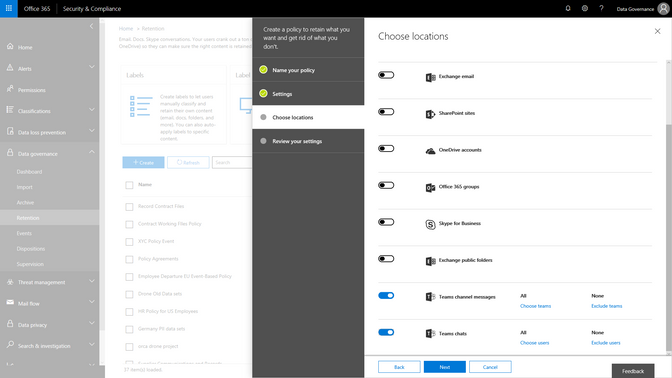
As organizations adopt modern ways of working, like the chat based workspace Microsoft Teams, we are excited to announce that Microsoft Teams chats and team channels are now rolling out to be included in the Data Governance features of the Security & Compliance center. Set retention policies to Teams content, similar to the way that you have the option to choose locations across Exchange, SharePoint, OneDrive and Groups today. This addition will expand your ability to meet retention and regulatory requirements with confidence across Office 365 applications.
A core component of protecting content is deleting it when it has reached the end of its useful life. As email ends its useful life, enabling the ability to manually dispose of that email enables peace of mind and smoother processing. You will be able to start to test manual email disposition features in preview starting later this month. Learn more about this update here.
Finally, we are also announcing that our new Labels Explorer dashboard is now available in preview. You will be able to harness the labels widgets and dashboard to gain insight into labels usage in your organization.
![]()
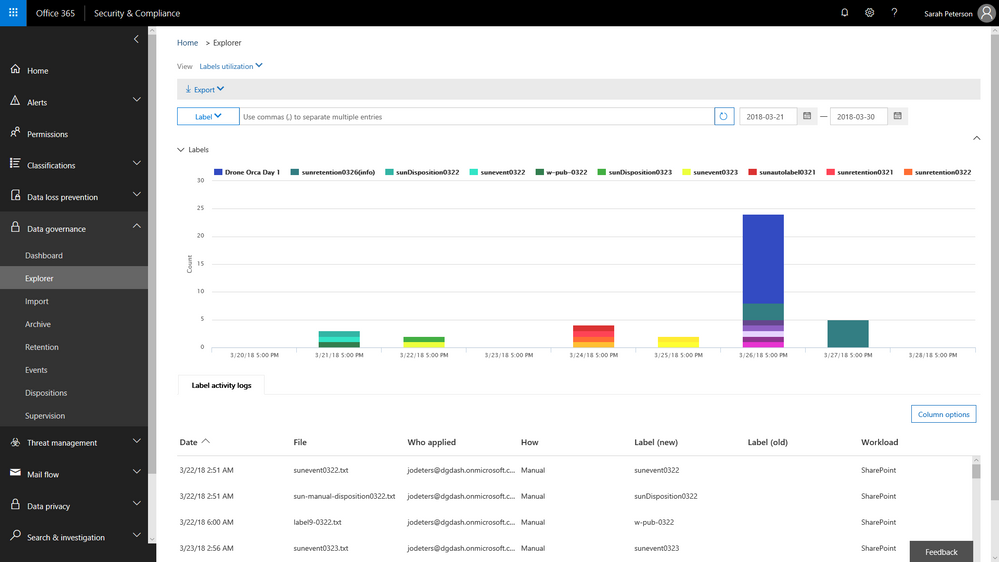 Labels Explorer dashboard is now available in preview
 Ben Robbins, eDiscovery, Forensics & Information Governance lead from LinkedIn
As Ben Robbins says: “The Advanced Data Governance and Advanced Ediscovery features in the Microsoft 0365 Security and Compliance Center contains all the components necessary to establish and improve enterprise content controls, investigative analytics, and unstructured data management. LinkedIn has been able to take advantage of these products which help improve business process and accelerate productivity to help us in our mission to connect the world’s professionals.“
Event based retention is now generally available to help organizations manage retention of content based on a certain event trigger. Whether an employee departure, or the close of a project, you can now establish certain event triggers and create retention or deletion policies associated to those events.
Watch the Mechanics video to learn more about how this will work and learn more about this capability here.
As organizations adopt modern ways of working, like the chat based workspace Microsoft Teams, we are excited to announce that Microsoft Teams chats and team channels are now rolling out to be included in the Data Governance features of the Security & Compliance center. Set retention policies to Teams content, similar to the way that you have the option to choose locations across Exchange, SharePoint, OneDrive and Groups today. This addition will expand your ability to meet retention and regulatory requirements with confidence across Office 365 applications.
A core component of protecting content is deleting it when it has reached the end of its useful life. As email ends its useful life, enabling the ability to manually dispose of that email enables peace of mind and smoother processing. You will be able to start to test manual email disposition features in preview starting later this month. Learn more about this update here.
Finally, we are also announcing that our new Labels Explorer dashboard is now available in preview. You will be able to harness the labels widgets and dashboard to gain insight into labels usage in your organization.
![]()
Labels Explorer dashboard is now available in preview
Ben Robbins, eDiscovery, Forensics & Information Governance lead from LinkedIn
As Ben Robbins says: “The Advanced Data Governance and Advanced Ediscovery features in the Microsoft 0365 Security and Compliance Center contains all the components necessary to establish and improve enterprise content controls, investigative analytics, and unstructured data management. LinkedIn has been able to take advantage of these products which help improve business process and accelerate productivity to help us in our mission to connect the world’s professionals.“
Event based retention is now generally available to help organizations manage retention of content based on a certain event trigger. Whether an employee departure, or the close of a project, you can now establish certain event triggers and create retention or deletion policies associated to those events.
Watch the Mechanics video to learn more about how this will work and learn more about this capability here.
As organizations adopt modern ways of working, like the chat based workspace Microsoft Teams, we are excited to announce that Microsoft Teams chats and team channels are now rolling out to be included in the Data Governance features of the Security & Compliance center. Set retention policies to Teams content, similar to the way that you have the option to choose locations across Exchange, SharePoint, OneDrive and Groups today. This addition will expand your ability to meet retention and regulatory requirements with confidence across Office 365 applications.
A core component of protecting content is deleting it when it has reached the end of its useful life. As email ends its useful life, enabling the ability to manually dispose of that email enables peace of mind and smoother processing. You will be able to start to test manual email disposition features in preview starting later this month. Learn more about this update here.
Finally, we are also announcing that our new Labels Explorer dashboard is now available in preview. You will be able to harness the labels widgets and dashboard to gain insight into labels usage in your organization.
![]()
Labels Explorer dashboard is now available in preview
Ben Robbins, eDiscovery, Forensics & Information Governance lead from LinkedIn
As Ben Robbins says: “The Advanced Data Governance and Advanced Ediscovery features in the Microsoft 0365 Security and Compliance Center contains all the components necessary to establish and improve enterprise content controls, investigative analytics, and unstructured data management. LinkedIn has been able to take advantage of these products which help improve business process and accelerate productivity to help us in our mission to connect the world’s professionals.“
Event based retention is now generally available to help organizations manage retention of content based on a certain event trigger. Whether an employee departure, or the close of a project, you can now establish certain event triggers and create retention or deletion policies associated to those events.
Watch the Mechanics video to learn more about how this will work and learn more about this capability here.
As organizations adopt modern ways of working, like the chat based workspace Microsoft Teams, we are excited to announce that Microsoft Teams chats and team channels are now rolling out to be included in the Data Governance features of the Security & Compliance center. Set retention policies to Teams content, similar to the way that you have the option to choose locations across Exchange, SharePoint, OneDrive and Groups today. This addition will expand your ability to meet retention and regulatory requirements with confidence across Office 365 applications.
A core component of protecting content is deleting it when it has reached the end of its useful life. As email ends its useful life, enabling the ability to manually dispose of that email enables peace of mind and smoother processing. You will be able to start to test manual email disposition features in preview starting later this month. Learn more about this update here.
Finally, we are also announcing that our new Labels Explorer dashboard is now available in preview. You will be able to harness the labels widgets and dashboard to gain insight into labels usage in your organization.
![]()
Labels Explorer dashboard is now available in preview
Ben Robbins, eDiscovery, Forensics & Information Governance lead from LinkedIn
As Ben Robbins says: “The Advanced Data Governance and Advanced Ediscovery features in the Microsoft 0365 Security and Compliance Center contains all the components necessary to establish and improve enterprise content controls, investigative analytics, and unstructured data management. LinkedIn has been able to take advantage of these products which help improve business process and accelerate productivity to help us in our mission to connect the world’s professionals.“
While the GDPR poses new challenges for organizations working to support the privacy rights of individuals, it also encourages companies to become more accountable for developing and leveraging innovative technology to protect personal and sensitive information. Given the sheer volume of available resources across Microsoft’s many platforms and services, it can be challenging to find the right resources to support GDPR. To address these challenges, we’ve enhanced the Service Trust Portal (STP), to centralize resources to help you with your needs around data protection, compliance, and privacy, and of course, the GDPR.
The STP continues to include independent third-party audit reports, such as FedRAMP, ISO, and SOC reports, in-depth information such as whitepapers, security assessment reports, and data protection guides. In February this year, we released a new tool on the STP called Compliance Manager, which helps organizations to manage compliance activities and perform risk assessments on Microsoft Cloud services.
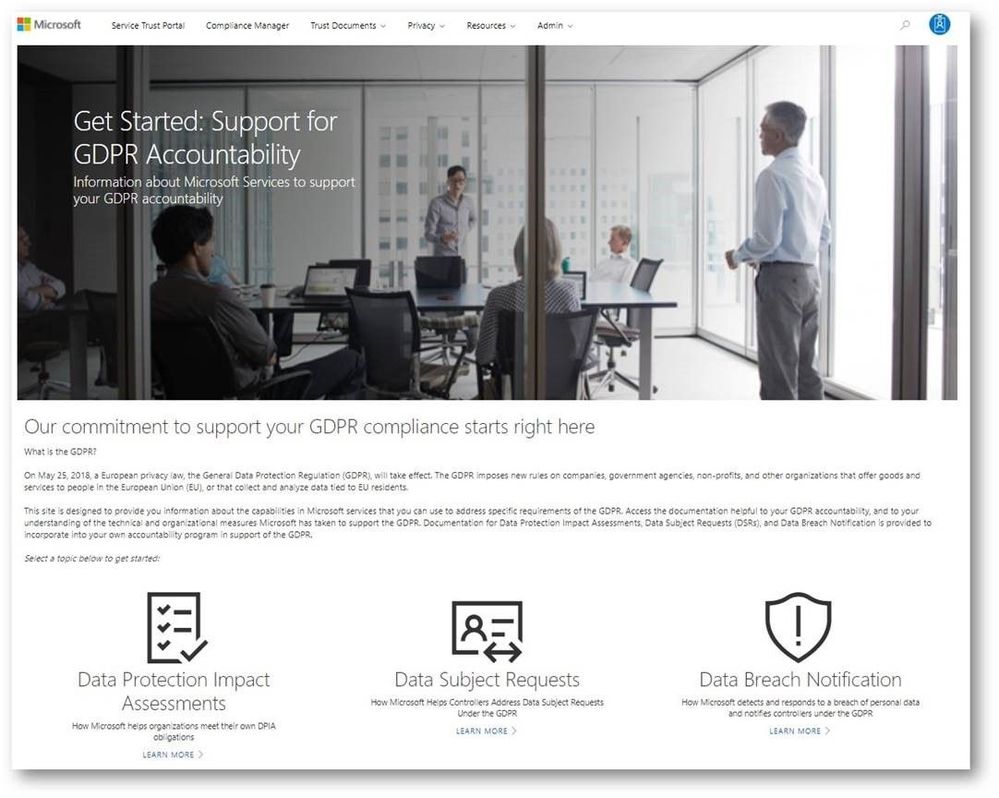
To help you navigate the collection of GDPR resources, we’re publicly previewing a new Privacy area on the STP which provides you with guidance on how Microsoft services will support you in the event of a personal data breach, and with tools and technical documents to help you respond to data subject requests. You can find more details about each scenario below:
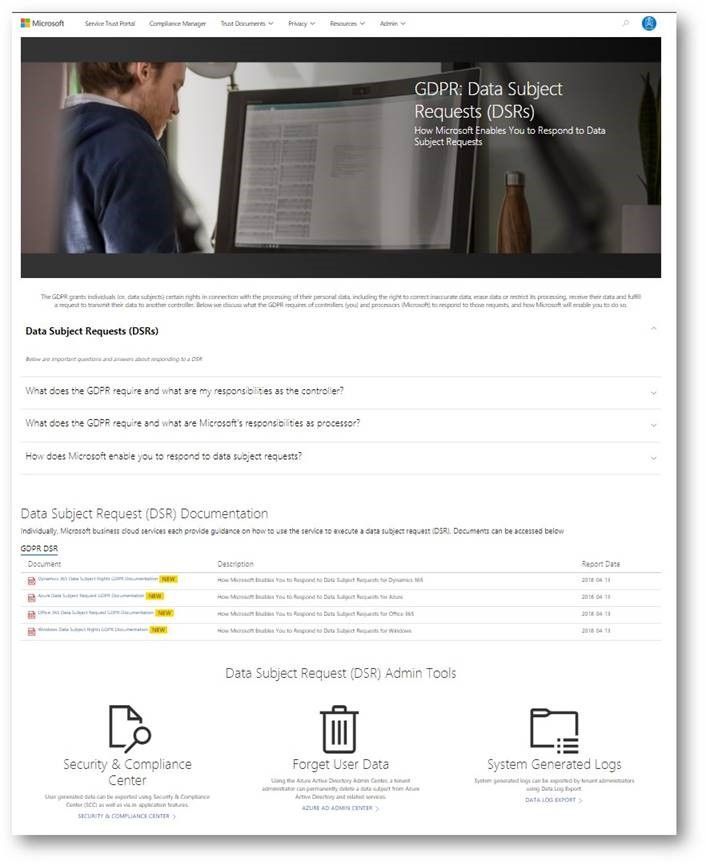
Data subject requests resources
The GPDR provides data subjects with increased rights to control their personal data, including the ability to obtain a copy of their personal data and to have their personal data erased from data systems used by a data controller.
The new data subject requests (DSR) section in STP centralizes all the DSRs resources, and provides you with tools and guidance that you can leverage to locate, export, and erase data across Microsoft’s Cloud services.
Breach notification resources
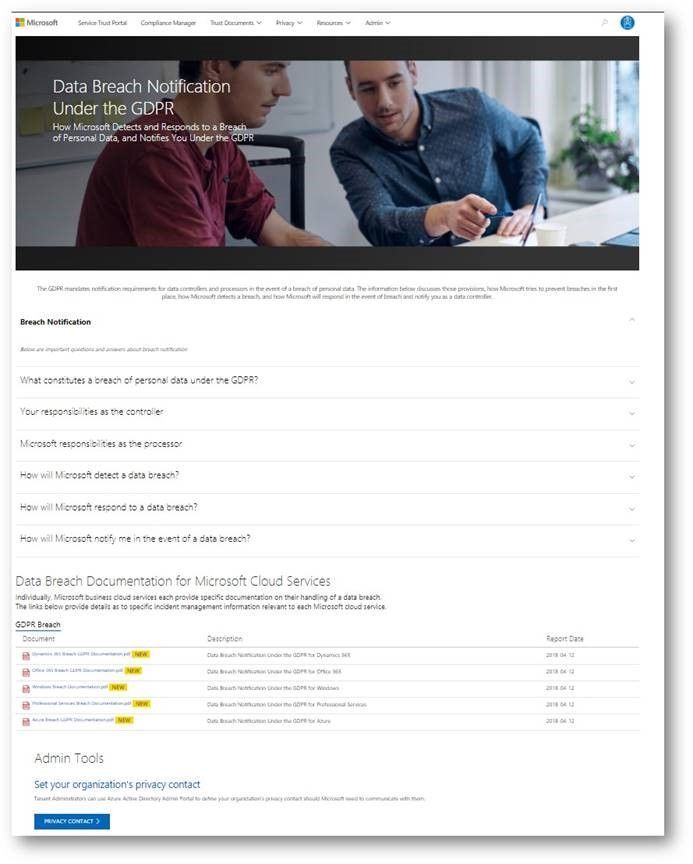
The GDPR imposes specific requirements around breach notification. After becoming aware of a breach of personal data that puts individuals at risk, data controllers must notify the supervisory authority and data subjects without undue delay. These requirements are similar to other regulations, such as the Health Insurance Portability and Accountability Act (HIPAA).
The data breach notification section of the new Privacy area describes how Microsoft services support your personal data breach obligations, and which tools to use to make sure Microsoft can reach to appropriate people in your organization without delay.
Data Protection Impact Assessments documents
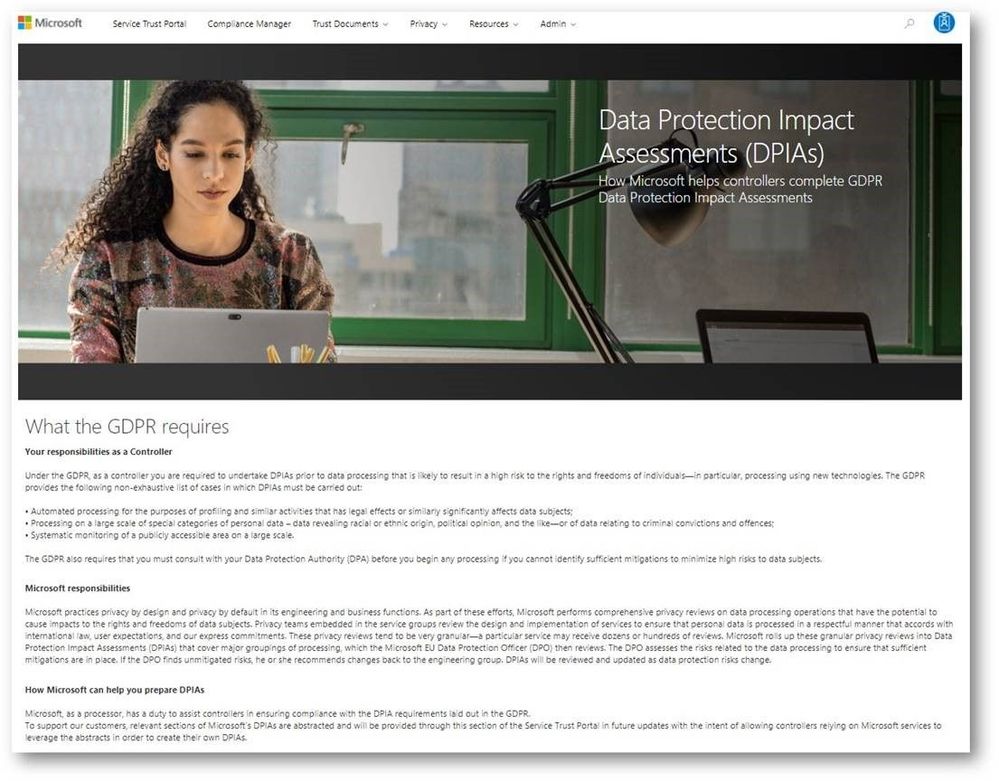
A critical part of GDPR preparedness involves creating Data Protection Impact Assessments (DPIAs) of data processing activities that are likely to result in high risk to the rights and freedoms of individuals.
Coming soon, the data protection impact assessments (DPIAs) section will provide organizations with information you need to create your own DPIAs as a data controller. We will share DPIA-related information for specific Microsoft Cloud services in the next few weeks.
Compliance Manager updates
In addition to the new sections we introduced above, we highly recommend that organizations manage their GDPR compliance activities using Compliance Manager, which provides you with a holistic assessment and built-in tools for end-to-end GDPR compliance management, mapping the GDPR obligations to operational and technical controls used by Microsoft services to support GDPR compliance. You can use Compliance Manager and the information it provides to enhance your accountability and compliance programs.
In addition, we just released the updated version of the GDPR Detailed Assessment, a question-driven assessment tool for preparing for the GDPR. It now integrates with Compliance Manager, directing organizations to specific controls in Compliance Manager and providing guidance for every GDPR scenario in the assessment questionnaire. The updated GDPR Detailed Assessment toolkit can be downloaded here.
Check out the new GDPR and privacy-related resources we’ve introduced today on Service Trust Portal, which is available publicly but requires you to log in using your Microsoft subscription accounts (Azure, Dynamics 365, or Office 365 account, etc.) to access restricted documents like audit reports and tools like Compliance Manager.







