
Last week, I attended a great Microsoft session concerning Compliance and Data Protection across the Office products, focusing on Archiving, Retention / Hold, Discovery and Data Loss Protection concerning compliance in 2013 products. I mentioned that I have clients who are interested in Office 365 but need some comfort concerning compliance, and queried if there was further information available. Was informed that there was a document available that described this which I must share with you all.
This document covers topics such as Office 365 Built in Security, like monitoring, isolation, automated operations, secure network and encrypted data. It describes security best practice, and the customer controls. It talks about how compliance is enabled through DPL, audit and retention, eDiscovery and Data spillage. It also describes the standards of compliance met, like ISO 27001, FISMA, HIPAA BAA, EU Model Clauses, and the CSA (Cloud Security Alliance).
If you are embarking on SharePoint migration to Office 365, or having a hybrid operation with on-premise SharePoint and Office 365, I would recommend reading this paper, as it will give you valuable information proving to the customer that Office 365 includes security features, protects data and provides administrators with the ability to configure, integrate and manage security.
To give you a taster, here’s the intro:
The ability for organizations to control and customize security features in cloud-based productivity services, such as email, calendars, content management, collaboration, and unified communications, is becoming an essential requirement for virtually every company. Today, IT teams are being required to deliver access to productivity services and associated documents and data from more devices, platforms, and places than ever before. While user benefits are undeniable, broader access makes security management more challenging. Each endpoint represents a potential attack surface and another point of management for security professionals. At the same time, organizations face ever-evolving threats from around the world and must manage the risk created by their own users accidentally losing or compromising sensitive data. For these reasons, organizations require a cloud service that has both (a) built-in robust security features and (b) a wide variety of customizable security features that organizations can tune to meet their individual requirements. Organizations expanding remote access while maintaining security best practices may find it difficult and expensive to add this combination of security functionality if they deploy productivity services solely on-premises.
You can download the article from here:
http://www.geoffevelyn.com/downloads/Security-in-Office-365-Whitepaper.pdf
And from here:
http://www.microsoft.com/en-us/download/details.aspx?id=26552

In SharePoint, there are topology concepts to understand and consider. Servers have roles such as Web, Query, Index, Calculation, Application, and Database. Farms have relationships such as Authoring, Publishing, Development, Test, Staging, and Production as well as service applications covering Search, Profile, Access, Business Data Connectivity, Excel, Machine Translation, Managed Metadata, PerformancePoint, Secure Store, Word Automation, Work Management, Usage/Health, Visio and others. In a SharePoint farm, SharePoint is comprised of Servers, Web Applications, Databases, Site Collections, Sites, Lists, and Items (and in that order from a hierarchical perspective in that order).
The concept of this is difficult to describe graphically, and especially if you are going to design a topology for a customer you will need a good approach. I use Visio for designing topology diagrams, and I managed to get a couple of documents that provides an overview of topology concepts for SharePoint 2013. These are pretty good, if you need to understand the topology and therefore some other concepts such as performance, scale, fault tolerance, etc. These diagrams include topologies, based on the traditional approaches to building SharePoint architectures in these documents.
They are available for download here:
PDF: http://www.geoffevelyn.com/downloads/sps_2013_traditional_topology_model.pdf
VISIO: http://www.geoffevelyn.com/downloads/sps_2013_traditional_topology_model.vsd
I have been asked a lot about the actual process of upgrade from SharePoint 2010 and whether there is any best practice material. Yes there is, and its pretty good! This model explains the process that you use when you upgrade from SharePoint Foundation 2010 or SharePoint Server 2010 to SharePoint Foundation 2013 or SharePoint Server 2013.
They are available for download here:
PDF: http://www.geoffevelyn.com/downloads/sp2013-upgrade-process.pdf
VISIO: http://www.geoffevelyn.com/downloads/sp2013-upgrade-process.vsd
The article is located here: http://www.microsoft.com/en-gb/download/details.aspx?id=30371

One of the most difficult areas of delivering a SharePoint solution is identifying not just who should be targetted for User Adoption, but, going forward, how to sustain that User Adoption through communication. Reasons include rapid changes in the business culture, direction, and changes in technology concerning the methods used to communicate (e.g. business process changes from manual to email notification to automation, etc.). Moreover, if you have developed a customer list for Service Delivery purposes (e.g. support, user adoption, training, governance, etc.) then you will need to keep tabs on customer culture, communication technology and apply communication tactics and strategies.
(more…)

Sustained User Adoption is vital to ensure people using SharePoint remain productive and proactive. Pro-activity is key, since the reliance on SharePoint support will grow based – success breeds success; on solving user queries, meeting and solving business information and collaborative challenges using SharePoint, delivering solutions. A significant number of queries will come from the use of Microsoft Office with SharePoint. Particularly since virtually all interaction with content in SharePoint will come from the use of Microsoft Products such as Word, Excel, PowerPoint, Outlook, and even moving beyond into the lands of Project, Visio, OneNote (the list continues).
If you want sustainable User Adoption, amongst other techniques, focus on the information workers core toolset – Microsoft Office. For information workers to remain SharePoint productive, to make them more empowered, to give them a sense of achievement, you should consider informing and evangelizing to them the Microsoft Office Specialist certification, of which SharePoint is part.
(more…)

Got a great read today I thought I should share with you all. Got to read a thought leadership piece from Forrester focusing on Cloud Change Agents. This report is the result of a study Microsoft commissioned with Forrester to explore the status of cloud as a business transformation driver among a selection of UK businesses.
The Cloud Change Agents report is a new study conducted by Forrester Consulting and commissioned by Microsoft Ltd to show how cloud computing is acting as a ‘big switch’ to drive transformation in businesses. The study shows how a certain set of individuals in UK businesses – change agents – working with IT leaders are leading the way, seizing on the cloud to accelerate projects with minimal risk, low cost, little administration overhead and providing the ability to trial and then quickly scale up.
The research shows that these change agents are coming from everywhere in the business. They spot business opportunities and then team up with IT and use the cloud to make their visions reality. Often they might not even be aware that their new project sits ‘in the cloud’, only that they have discovered a fast, convenient way of working.
Of course, change agents have always existed but the cloud provides a way of delivering IT services that suits them very well, enabling new dimensions and the chance to change radically the way businesses operate, add new services, open additional sales channels, market in new ways and provide greater transparency all round. For people with the vision, strength of conviction, passion and drive to lead change, the cloud is a gift.
Read the foreword from Rob Fraser, Cloud Services CTO, Microsoft Ltd here and to download a copy of the report go here.
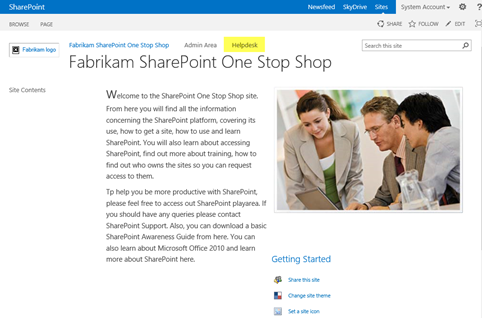
I have created a basic SharePoint 2013 helpdesk template which you can try out, modify and apply as a helper to their SharePoint support desks. The reason for supplying this is to (a) give an understanding of the ability of SharePoint to provide basic helpdesk functionality using built in features and (b) to introduce you to the concept of centralising a helpdesk in a ‘one stop shop site’ concept. Please note, I am not providing this as a suggestion that you drop any helpdesk product you are using – this is not supposed to in anyway detract you from using that!!
(more…)

Office is definitely the topic of the moment and below is some information about this great new release along with details about the consumer and community support offerings now available.
Yesterday Microsoft reached another very exciting milestone on our journey to a devices and services company, with the launch of the new Office to consumers.
This is the biggest and most ambitious release of Office yet, and builds on a fantastic launch year for the company. Steve Ballmer made a blog post detailing four important announcements:

Additional Information:
Office 365 Home Premium
Also, Office 365 Home Premium is a great new option for consumers and the benefits include:
- All the Office Professional applications
- A household license for up to 5 PCs/Macs/mobile devices
- An extra 20GB of SkyDrive Storage
- 60 minutes of Skype calling each month
- A service that is always up to date.

The following downloads are worksheets designed to help plan aspects of a SharePoint 2010 or a SharePoint 2013 implementation, and at the same time ensure that decisions in the design are captured.So, you should use these in conjunction with the development of the following documents:
1: SharePoint User Requirements – these define SharePoint collaborative environments for the users based on their requirements, and provides a fundamental understanding of interconnected tools and applications the organization uses in conjunction with the platform. SharePoint User Requirements also identify where content should be consolidated, reduce and improve data management; reduce duplication and boost productivity as defined by the clients’ vision of SharePoint.
2: SharePoint System Specification (also known as SharePoint Solution Specification) – expands the User Requirements, Planning and Decisions concerning SharePoint as technical requirements. The system specification is a clear, complete and unambiguous set of documentation, describing the SharePoint for the organization in terms of its function, performance, interfaces and design constraints.
The below is divided as follows:
- Area – Specific SharePoint area
- Link – where the document can be downloaded from
- Type – the kind of information captured and which document is more associated with its output. UR = User Requirements, SS = System Specifications
Where it helps – describes the context and areas of SharePoint design gathering these documents can be used. Note that I have also indicated whether the worksheet is for SharePoint 2010 or SharePoint 2013.
I’m going to add some more documents to aid gathering of information relevant to other areas of SharePoint user requirements and system specification. You should also take a look at my user requirements article – that can help you determine the format of those documents and how the above can link.

I put together an article concerning SharePoint Training and Resources for IMIS (Institute of Management Information Systems), this is now available on line
(more…)

SharePoint Service Delivery concerns itself with capability, and the methods used to ensure that the clients SharePoint vision and goals align with the users, and includes focusing how those responsible for managing the platform (the technical teams) fit and provide that service through guiding principles. These, if followed will ensure that your SharePoint environment can be managed in a structured and measured way.
(more…)







