FAST Search Server Capabilities

FAST Search Server Capabilities

Been asked about the abilities of FAST Search Server; thought I’d share the following with you. The FAST Search Server can give advanced search capabilities to SharePoint 2010.

  • Synonyms: SharePoint 2010 allows for one way synonyms, FAST extends this concept to allow for one and two way synonyms.
  • Property Extraction: This automatically pulls key information such as company and people from item and create properties.
  • Rank Profiles: Allow administrators to change the ranking algorithm by adjusting how much weight is given to attributes such as freshness, proximity, authority, rank and other attributes.
  • Document Thumbnails: Word and PowerPoint presentations can be viewed directly from within search results
  • Visual Best Bets: Best bets can be configured to contain rich interactive elements
  • Result Collapsing: Documents that are identical (have identical checksum) will be shown as collapsed and will have the ability to expand the results and see all versions of the result
  • Relevancy Tuning By Document or Site Promotion: Within a FAST search results page users can choose to promote items with the result set that will then increase the visibility of the item when another search occurs.
  • Sort on Managed Properties: Users can sort on any managed property within a FAST results page (standard search only allow sorting by date or relevance)
  • Similar Results: A link is provided to similar results for greater search clarity.

Capabilities

Feature

SharePoint Foundation 2010

Search Server 2010 Express

Search Server 2010

SharePoint Server 2010

FAST Search Server 2010 for SharePoint

Basic search

Y

Y

Y

Y

Y

Best Bets


Y

Y

Y

Y

Visual Best Bets


Y

Similar Results


Y

Duplicate Results


Y

Search Scopes


Y

Y

Y

Y

Search Enhancement based on user context


Y

Crawled and Managed Properties


Y

Y

Y

Y*

Query Federation


Y

Y

Y

Y

Query Suggestions


Y

Y

Y

Y

Sort Results on Managed Properties or Rank Profiles


Y

Relevancy Tuning by Document or Site Promotions


Y

Y

Y

Y*

Shallow Results Refinement


Y

Y

Y

Y

Deep Results Refinement


Y

Document Preview


Y

Windows 7 Federation


Y

Y

Y

Y

People Search


Y

Y

Social Search


Y

Y

Taxonomy Integration


Y

Y

Multi-Tenant Hosting


Y

Y

Rich Web Indexing Support


Y


Roles, Features, and IIS Management Compatibility required for SharePoint 2010

Roles, Features, and IIS Management Compatibility required for SharePoint 2010

Watch out for this one, its possible whilst installing IIS on Server 2008 its easy to forget that you’ll need the Management Compatibilty Components – goodness knows why I kept forgetting it!

Install the IIS 6.0 Management Compatibility Components in Windows Server 2008 R2 or in Windows Server by using the Server Manager tool
   1. Click Start, click Administrative Tools, and then click Server Manager.
2. In the navigation pane, expand Roles, right-click Web Server (IIS), and then click Add Role Services.
3. In the Select Role Services pane, scroll down to IIS 6 Management Compatibility.
4. Click to select the IIS 6 Metabase Compatibility and IIS 6 Management Console check boxes.
5. In the Select Role Services pane, click Next, and then click Install at the Confirm Installations Selections pane.
6. Click Close to exit the Add Role Services wizard.


Install the IIS 6.0 Management Compatibility Components in Windows 7 or in Windows Vista from Control Panel


   1. Click Start, click Control Panel, click Programs and Features, and then click Turn Windows features on or off.
2. Open Internet Information Services.
3. Open Web Management Tools.
4. Open IIS 6.0 Management Compatibility.
5. Select the check boxes for IIS 6 Metabase and IIS 6 configuration compatibility and IIS 6 Management Console.
6. Click OK.
Installing Roles and Features

Also, a good link to visit when installing SharePoint 2010 and not too clear on what roles and features are required is here: http://sharepointnomad.wordpress.com/2010/07/23/installing-sharepoint-2010-on-windows-server-2008-r2-which-server-roles-and-features-do-i-need/

Installing SharePoint in various forms, Single, Farm etc

But, a really good place to ensure you have all the pre-requisities for installation is Technet – here:

http://technet.microsoft.com/en-us/sharepoint/ee518643.aspx ​​

SharePoint – The Spend, the Schedule, the Scope

SharePoint – The Spend, the Schedule, the Scope

A SharePoint Implementation combining a detailed Project Plan and Quality Plan allows you to capture key pieces of information; namely, the commitment to spend (i.e. what the budget is); the schedule (when it is needed by) and the scope (what is SharePoint going to solve).

If you are about to implement SharePoint and the client states a nebulous scope of a project on the level of “I’ll take all of it right now, please; as soon as you can” then that sounds like the client is ordering a meal at a fast-food restaurant. If that happens, take a deep breath, sit the client down and negotiate the scope. Ask questions that help you determine the client’s requirements and vision for SharePoint.

Ask questions concerning the budget the client has allocated, and not just to cover the cost of hiring project members. You should be sure that the budget covers the technical costs, such as the cost of servers, software, licenses, third-party products, and so forth. To determine the budget, you need to define the top-level scope and work out the basics of the SharePoint 2010 implementation.

Time framing the project is also vitally important. There is little point of doing the project if you have no idea when the client wants it completed. It is like being in a bar, ordering a drink, and saying to the bartender, “Just bring the drink when you are ready.” At that point, the bartender has no compulsion to bring you anything and your budget will linger for a long time without anything being delivered.

Make sure SharePoint fits the organizations client tools – are they using Microsoft Office or Open Office for example? I think it is probably one of the most important aspects of ensuring you have a proper scope and you don’t end up biting off more than you can chew.

Take this scenario, for example:

A client would like to implement SharePoint in an organization where there is a Linux-based environment. They are using Open Office and have been for the last 3 years. The client wants only the installation of SharePoint and training to use the product, and wants no productivity issues from the addition of the product. After some investigation, this requirement is deemed to more costly to the client. The investigation determined that extra servers would have to be purchased, additional software would have to be installed, training would take longer and become complex, support would be a challenge to implement, and so on. Before long, the client would be looking at a monster of a project, amounting to an organizational technology refresh.

I’m not saying that as soon as you hear “They use Linux!” that you should dash out of the door. What I am saying is that you have to clearly state in your Project Overview document what you intend to provide to the client. This means that if the client wants SharePoint 2010 implemented you need to list the parts of SharePoint 2010 you will implement, including any components that support its installation.

Check out more information concerning the production of SharePoint Quality and Project Plans in the book Managing and Implementing SharePoint 2010 Projects.

Build Template

Build Template

This is a SharePoint Build Template. It is designed so that you can record the content of the SharePoint installation in terms of its software, and refer to the documents that will guide the installation of SharePoint.
The Software Build Template is referred from my book, Managing and Implementing SharePoint 2010 Projects.

(more…)

Build Template

Risk Management

SharePoint Project Risk Management  Definition: Risk Management is the identification and evaluation of risks to an organization – including risks to its existence, profits and reputation –  and the acceptance, elimination, controlling or mitigation of the risks and the effects of the risks.

(more…)

Build Template

Content Control

This article is concerned with how the management of documents and data in a site related to the delivery of a SharePoint solution, thus allowing the control, storage and management of information related to a SharePoint delivery program. (more…)

Avoiding the Failure of SharePoint Implementation Projects

Avoiding the Failure of SharePoint Implementation Projects

 Here’s a little section from my forthcoming book concerning Managing and Implementing SharePoint 2010 Projects.

Large SharePoint implementation and upgrade projects are the nightmare of many corporate boardrooms. Decisions regarding goals for the organization concerning how SharePoint should be used, internal misunderstanding about the need for a business process overhaul and entrenched resistance to change all create friction among the CEO, CFO, CIO, vendors, consultants and users. Costs escalate as scope creep takes over and the capabilities of the new system are modified to accommodate current rather than optimal procedures. The result is that another project runs into red ink and IT gets another black eye. Industries reports show that cost overruns of 1 million, 10 million, even 100 million, are the reality of attempting to change mission critical SharePoint and systems.
It doesn’t have to be this way. Here are some observations that keep a SharePoint implementation project on track.
1: SharePoint acquisition is not about technology, but about business processes.
Many people believe that a new shiny SharePoint platform is a “magic potion” that will fix whatever glitches there are in the way people work in the organization. They assume that after installation, profits will be up, down time will be decreased and productivity will have gone through the roof. That is not the case. If the current process for tracking an invoice or managing customer relations is inefficient, then simply putting in SharePoint will merely speed up a bad process. Customers wind up getting duplicate mailings in two days rather than three! The first step in any SharePoint implementation must be to find out how things are really being done in a department and not what the training manual describes as the process. This is called ‘Making sure SharePoint meets User Requirements’. Then, changes can be made to design the optimal process to achieve success using the new technology.
2: SharePoint acquisition is more about people than about technology.
SharePoint adoption requires that users alter the way they have always done it. This means leaving their comfort zone and people don’t like change. They tend to resist, complain and often, leave the company. Unless the users are involved from the beginning, a new acquisition is something done to them and they feel powerless. The people doing the work are invaluable assets in the task of trying to make their job more efficient. Make sure that you define SharePoint Governance, engage with your users both business and technical looking critically at user requirements from both camps.
3: Wisely choose and train a cross-organizational team to set goals and priorities.
The best and the brightest from each department make good working partners with senior management when choosing new systems. That way, no one gets surprised by the costs in terms of money or effort when implementation time comes around. Creating a cooperative atmosphere, of course, is key to making this work. Buy–in doesn’t happen automatically. Often, the attitude of line operators is that their presence is merely window dressing and that the senior managers will make the final decision regardless of their input. A skilled facilitator is necessary to get past this distrust. You need an evangelistic Project (or depending on the scale of the technology release – if SharePoint and other new technologies are involved, a Programme) Manager to enhance client understanding and create a vision using ‘SharePoint Project Mantra’.
4: Establish good protocols for interviewing the client and users.
It’s easy for the user or client to be overwhelmed by slick SharePoint presentations, particularly when the presenter is talking about things that most people don’t completely understand. Showmanship gets in the way of real capabilities. Unless the review team is judging each vendor against the same list of needs, with the same understanding of the significance of each rating, “likeability” can win over capability. Make sure you use people who can get interactive with the users – Business Analysts are very important in making sure that as well as demonstrations being provided that they can illicit responses from the client and users. The purpose of interviewing is learning on both ends – the client / users learn about the platform, the interviewers learn about what the client / users do and what they need from SharePoint.
Generating a list of requirements is hard work. If the team hasn’t bonded before these discussions, a power struggle ensues, with each faction holding out for its own “essential” specifications. An outsider with no ties to any internal group is usually better able to bring about consensus than someone from the inside. The overarching goal is to produce a list of standards that support the mission of the enterprise. The more immediate goal is to create a unity that transcends the narrowness of each participant’s vision of that mission. The team meeting that follows each presentation must reinforce the common purpose while giving everyone a chance to voice their understanding or lack of it as well as their concerns.
5: Obtain “real” agreement on user and client requirements.
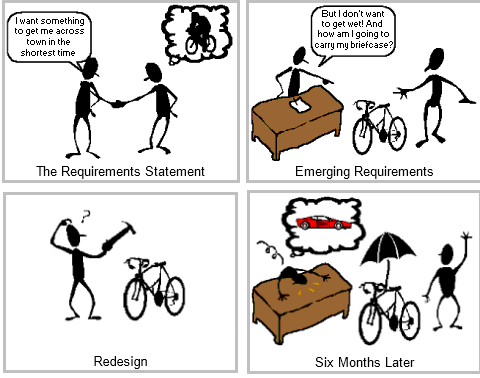
Creating SharePoint requirements means multi-solutions to multi–criteria problems. Every business wants high quality, easy–to–use SharePoint that gets implemented instantly and costs next to nothing! Of course, that doesn’t exist. It’s the actual frontline users who will be responsible for making the new system add value to the enterprise. Even if management do not provide their requirements, the project will proceed faster, more efficiently and with a better result if the frontline people have a real voice in the selection. Getting their buy-in at the start seems like a delay, but it results in a shorter, better project in the long run.
6: Identify system requirements without alienating the users.
Getting agreement on system and user requirements is an art as well as a science. It involves communication between people who have many obstacles to clarity of meaning. It is a frustrating process, but when done right, it is the foundation for success. When the people who will be most affected by the change are motivated to have project success and see the value to them as well as the company, then the requirements will be an exciting design adventure, not a boring, confusing chore. The key is training the parties in communication and team effort. With both knowledge and practical exercise, you can build the team that will succeed.
7: Work with the users and client during implementation.
Success means everyone succeeds. The users, company management, implementation partners and the SharePoint / hardware vendors must all achieve common success – or all fail. When the entire company team agrees on vendors and implementation partners, the road is much smoother. When the vendors, implementation partners and company team are adversaries, the road leads to disaster. Everyone must believe that success requires everyone to succeed.
8: Prepare the users to adapt to the changes required by the new system
Change management is a process, not an event. It should occur continuously throughout the course of the procurement and implementation. Management should not assume that everyone is going to accept the new system without a great deal of preparation. The selection and implementation teams have been consumed for significant time with bringing their project to completion. However, it hasn’t even appeared on the mental radar screen of most users unless there is a deliberate effort to raise awareness of the coming change. Because people don’t like change in general, it’s hard to introduce a particular one without having changed their initial attitude about the concept. This is the first and most essential level of change management. After that has been addressed, then people are more apt to be open to the detailed changes that will be required. Use SharePoint Governance and create Training and Education strategies to ensure that users will continually engage with SharePoint – SharePoint grows and becomes more an Enterprise platform the more users feel comfortable, become more productive, and feel that they have a stake in the future of SharePoint in the organization.


The New World of SharePoint Administration 2010

The New World of SharePoint Administration 2010

Joel Olsons description of some of the new features in SharePoint Administration – good for anyone who wants to know what fundamental things have changed in 2010 that impacts on how you administer Sharepoint – reporting, monitoring, throttling etc.

(more…)

Verify and Validate SharePoint solutions

Verify and Validate SharePoint solutions

As SharePoint Delivery Manager, it is your responsibility to ensure that the SharePoint solution being delivered meets SharePoint sponsor technical requirements and fulfil most, if not all the objectives and expectations of service. This means you must Verify and Validate the SharePoint solution, whether that solution is a full-blown deployment of a SharePoint platform, a third party addon, or an internally or externally developed SharePoint app.

(more…)