
Microsft today released a new feature for Office 365. Eligible organizations will soon have access to Sway for Office 365. Sway is an intelligent storytelling app for business that helps create content using a web-based canvas. This could prove extremely useful for those using Office 365 in education.
Sway works by using a design engine helps the production of reports, presentations and more without the need for extensive formatting or additional training. Sway helps by helping the pull together all sorts of content without leaving the app, allowing drag and drop of images, text, videos and charts right onto the canvas.
Note you need to check to see if your Office 365 subscription is eligible to use Sway, visit:
https://support.microsoft.com/kb/3080969.
To learn more about Sway and frequently-asked questions from Office 365 Administrators about the Sway experience, visit:
https://aka.ms/SwayAdminFAQ.
To get more information about today’s Sway announcement on the Office Blog, visit:
https://blogs.office.com/2015/08/05/sway-general-availability

Hi there folks!
Sometime ago I created a quick ten step guide and had it published on TechNet – amazed to find so much interest, and great comments! ShareGate contacted me and asked if they could turn it into an info-graphic (which looks great); now available on their site and is displayed below – enjoy!
(more…)
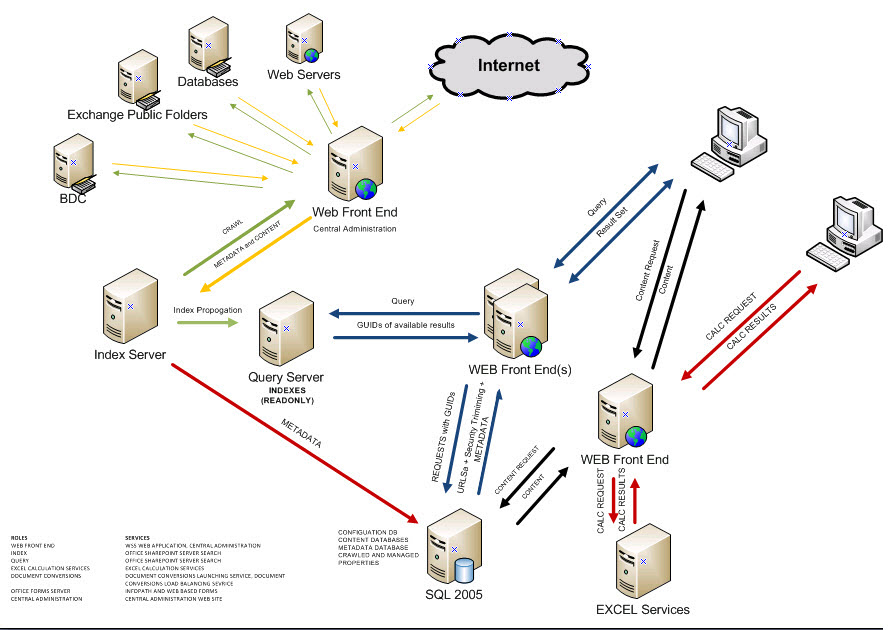
Getting hands on deployment information concerning SharePoint 2019 can be a challenge. Managed to locate this guide which is created by Microsoft detailing the process!
(more…)

Had some fun trying to get a domain validated with Office365. Here’s the issue.
When going for validation, you will be given instructions on setting a TXT or MX record and will be given a validation code to enter with your provider. If the provider given on the page is not yours you could then take a look at the
help screen that gives more details and step by step instructions.
However, it is difficult to ascertain whether the TXT record has been set.
NSLOOKUP comes to the rescue:
- Bring up a Command Prompt
- Enter NSLOOKUP <PRESS RETURN>
- type set q=txt <PRESS RETURN>
- Enter your Domain Name <Press Return>
You should then get a
response that looks something like this:
Non-authoritative answer:
yourdomain.com text =
“MS=ms1625352”
yourdomain.com nameserver = ns2.123-reg.co.uk
yourdomain.com nameserver = ns.123-reg.co.uk
ns1 internet address = xxx.xxx.xxx.xxx
ns2 internet address = xxx.xxx.xxx.xxx
Notice the MS line above – thats the TXT record, and thats what the validation looks for. If you see this, then your domain should be validated successfully.

Being an Office 365 administrator is challenging. Simply being on top of the changes in Office365 would be difficult in the extreme, simply because you may need to feed into more than one client, and trying to pass information directly to them in their form may be challenging. The key focus of service delivery is repeatability; the attempt to apply one solution for all as a generic standpoint. One of the key tools for Office 365 is the Public Roadmap, which I use to show clients and customers what is happening in the world of Office 365 and how quickly the information can be obtained.
(more…)


Hi All – I wanted to let you know about a great free event that Microsoft and the MVPs are putting on, May 14th & 15th. Join Microsoft MVPs from the Americas’ region as they share their knowledge and real-world expertise during a free event, the MVP Virtual Conference.
The MVP Virtual Conference will showcase 95 sessions of content for IT Pros, Developers and Consumer experts designed to help you navigate life in a mobile-first, cloud-first world. Microsoft’s Corporate Vice President of Developer Platform, Steve Guggenheimer, will be on hand to deliver the opening Key Note Address.
Why attend MVP V-Conf? The conference will have 5 tracks, IT Pro English, Dev English, Consumer English, Portuguese mixed sessions & Spanish mixed sessions, there is something for everyone!
Come learn from the best and brightest in the tech world today. All of the sessions will all be delivered by the Americas’ Region Microsoft MVPs. These MVPs are experts who present at premiere conferences, independent community events and local user groups all over the globe.
This is a technical conference focused on helping attendees to learn and develop skills for everything from everyday technical work to wackier weekend projects. Whether it is on the IT Pro, Dev or Consumer side of things, you can bet that the content of MVP V-Conf will be cutting edge, exciting and relevant.
Be sure to register quickly to hold your spot and tell your friends & colleagues.
The conference will be widely covered on social media, you can join the conversation by following @MVPAward and using the hashtag #MVPvConf.
Register now and feel the power of community!


Welcome to an article which goes into the land of SharePoint Training. This attempts to examine various levels of training and how they can and are being mapped to SharePoint information workers, irrespective of whether they are SharePoint on-premise, or SharePoint through Office365. Please note, that whilst I go into some detail on training delivery that I am not a SharePoint Trainer; however, I think I’ve got enough experience through the implementation of SharePoint Training strategies for many organizations, so I suppose I’ve got some points that may be useful either to you as a trainer, or SharePoint user, or even a programme manager seeking to identify the key areas of SharePoint training delivery.
Let us begin with a typical picture facing a SharePoint support perspective, featuring the SharePoint Administrator on-premise…. Put yourself in the shoes of such SharePoint Administrator, monitoring a SharePoint environment, and through the wonderful event viewer on SharePoint servers see a whole bunch of reds (Errors) in an Application Event log. After trawling through the sea of ULS logs, Web.Configs and IIS logs on the screen for several hours, trying this and that, crashing out on numerous occasions; you’ve may have just about had enough. Your pride may already hurting from the fact that the SharePoint reference manuals are piled high all over the desk, and still the flashes of understanding and inspiration simply won’t come…
And if you are thinking “Hey that’s easier in SharePoint Online, there’s no event logs to worry about” – think again. Here is an example. User calls in stating that they have problems viewing their site on their phone. So you need to find out the kind of phone they are using, what the mobile settings are, whether the site settings for mobility have been applied and to ensure that all the services they use whilst in the SharePoint site are also accessible. The issue about the SharePoint Administrator simply looking at ‘SharePoint’ is gone. Therefore, looking for the inspirational flashes would become more difficult.
Another example, starring the SharePoint Information Worker:
You have joined an organization who has adopted SharePoint. You have been told to use a SharePoint site so you can store your work content in. After accessing your site for the first time you are daunted by the options there. Site Actions? What’s that? What’s the Breadcrumb Trail? Someone said to get to the ‘Projects Document Library’ by looking in the Quick Launch Bar – What’s that and where is that? In fact, what’s a Document Library? Faced with these bewildering features and options, and faced with having to just read a book to try to understand what they all mean, you decide to use e-mail.
One more example, this time to the ‘experienced’ SharePoint Worker – typically called a Poweruser:
Yes, you may be one of them. You are a person who is comfortable with SharePoint, because SharePoint does what you want it to. You are aware of the relevant functions in SharePoint that makes you productive, but want to learn more.
So where do you go to get the answers you need?
We are already in the world where we have our ‘intelligent agents’ (known to previous tech generations as a genie or guardian angel) can be summoned using good ole’ Google, to hunt down that famous and grail-like Blog, TechNet article, Google Answers, Yahoo Answers – ad-infinitum’. However, as we all know life as a SharePoint Admin, Developer or Architect doesn’t necessarily mean you find the information you want first time! Sometime, hunting down the right answer is like looking for a needle in a stack of needles! For example, in the above example concerning Office365 and setting a mobile to view a site eventually took me to this article:
https://support.office.com/en-us/article/Set-up-a-mobile-device-using-Office-365-for-business-7dabb6cb-0046-40b6-81fe-767e0b1f014f
In truth, there is not yet that silver bullet in training where, at a click of a button, or using some kind of ‘Star Trek like’ speaking into your computer response to answer your SharePoint queries. The ‘Hey; computer – tell me how to setup Kerberos on SharePoint’, or ‘show me what the version history is on my documents” is just not there – yet…
So, perhaps some good old fashioned training is better than nothing. To a lot of people, especially developers in SharePoint I’ve seen, training is ‘the T word’, and almost an admission of defeat.
However, as I’ll describe in this article, there are many ways SharePoint training can be delivered – through the written and spoken word, on the desktop as well as the classroom. Most which are inexpensive and above all, interesting and fun.
Also, lots of SharePoint tools are available that go some way towards realising the equivalent of the genie in the bottle 🙂
Contents:
1 A potted theory of learning 2
2 Self Paced Training 3
3 Computer Based Training 4
4 Support Resources 5
5 Learning Centres 6
6 The Human Touch 6
7 A Model Student 7
-
A potted theory of learning
Just in case you’ve never considered how or why you’ve ever learned anything – from being able to read this article to driving a car, let’s go back to basics.
The Competency Ladder.
If you view learning primarily as a ‘damage limitation’ process whilst trying to acquire competency in SharePoint, the following series of stages can be applied to most situations:
Stage 1: Unconscious incompetence – Making large amounts of mistakes.
Stage 2: Conscious incompetence – I see and admit to myself and others I’m making mistakes.
Stage 3: Conscious competence – I am learning new concepts and skills, my error rate is decreasing (normally in a non-linear fashion :)).
Stage 4: Unconscious competence – or ‘what was all the fuss about?’
Now, this four stage cycle is sometimes referred to as the Competency Model for (hopefully) obvious reasons. Where do you think you are on this model? If you are implementing SharePoint, where do you think those about to use SharePoint would be?
Additionally, the competency model really does come into its own when considering your role in SharePoint. Let’s take the SharePoint Administrator situation again. If the SharePoint Administrator is at Stage 1, then making ‘mission critical’ mistakes could result in damage to the relevant SharePoint environment. For SharePoint Information workers, making many mistakes could result in a loss of productivity and confidence in using SharePoint. Both of course could also result in the company loosing money.
In order to move up the competency ladder, we tend to accept that Stages 1 and 2 shouldn’t last for too long at all, and that Stage 3 is worth investing time and money in training. However, learning is never a Stage 1 to 4 kind of deal. It’s a loop as we consider new areas of SharePoint to learn; and; we ensure there are tools available to mitigate Stage 1 and 2 (for example, getting a SharePoint test site to play in).
Training = competency = Training.
So, it is very important to consider that training surrounds the level of competency one has relevant to the tasks they have to perform. Consider the common activity of learning to drive a car. Think of all the would-be Michael Schumachers in cars displaying ‘L’ plates, their terrified parents, and the huge number of driving schools that make a multi-billion pound business from the accepted norm of the need for formal training.
The other accepted of ‘mission critical’ competency is that we need to prove Stage 4 has been reached (hence the driving test) and achieve recognition and certification (the driving license). This certification then allows us to perform various other job roles and for some people it acts as a pre-requisite qualification to apply for a further specialist training, such as the Heavy Goods Vehicle (HGV) License.
The final point to note is the model of cyclical, that is, the tendency is for skills needing to be renewed or modified over time. This is not just because ‘familiarity breeds contempt’, but for the environment in which the original skill set was valid has probably changed. Consider the continued debates about including motorway driving as part of the standard test?
The amount of training you think you need is based on the amount of knowledge to cover your ‘mission critical’ needs. What I mean by ‘mission critical’ needs are the basic skills needed to ensure that what you do is carried out to the satisfaction of ‘your peers, makes you productive and meets / enhances the profile of yourself and the organisation you work for.
So, do you identify your ‘mission critical’ training needs? If you don’t, consider that if crashing your car is obviously a bad thing, then as a SharePoint Administrator isn’t regularly crashing your SharePoint environment equally unacceptable?
If the answer is ‘yes’ then doesn’t that mean from the outset, without admitting defeat, that some investment in training is justified?
Even if you answer ‘no’, implying your using SharePoint as a hobby, not as a means to make a living, would not investing in training help you achieve more satisfaction and avoid some sleepless nights in the process?
Specialist Learning and Exams.
There are some specialist areas of SharePoint where training is very important. SharePoint web development, administration or architecture involves diverse skill sets and key underpinning knowledge of SharePoint. To ensure competency for those roles can be measured there are recognised Microsoft Certification sets (for example; MCTS for 2007, MCITP for 2010, MCSA for Office365, and MCSE for SharePoint 2013). These cover the technical side of SharePoint, namely in application development and configuration in SharePoint.
This is seen as effectively a version of the driving test for those engaged in the technical side of SharePoint.
However, SharePoint is not simply seen as a technical toy! The SharePoint Information Worker is definitely included in terms of competency measurement. When Office 2010 was released, SharePoint became more tightly integrated with Office, and that provided MOS for SharePoint. MOS stands for MOS (Microsoft Office Specialist). The reach of this certification is even greater since it extends to the user of Office of which SharePoint is a partner. Microsoft certification exams are now also aimed at those using SharePoint from an end-users perspective.
People take it as faith that when somebody goes for SharePoint training, they will return wiser and better for the experience. In most cases, they may see a gain in productivity, but whether they failed to learn to their full potential because the course was too easy or too advanced is normally impossible to judge unless some kind of pre-requisite test is available.
-
Self Paced Training
Given the intangible nature of traditional training benefits, there is a natural appeal to invest in tangible training products, as well as the additional benefits that self-paced training brings – savings in travel and accommodation costs, consistency of delivery, reusability and so on.
Generally, self-paced training always begins with the humble book, yes, in the beginning was the word. The book is the original self-paced training package, and still provides the low-cost learning option, and may be sufficient if your learning requirements are modest or you have no time pressures.
Dividing this into three camps, end user, administration and development, development is more a practical skill. In this respect, books that include the opportunity for hands-on are a more useful choice. In the early days, this included the good ole ‘CDrom’ at the back of the book (and in some amazing examples, USB sticks!), and snippets of information that could be entered. Whilst this also occurs for SharePoint Administrators, the format is different.
For instance, programming related books would contain many worked through examples of code ready used. Administrator books would include scripts and maybe code blocks to apply to SharePoint site collections and servers. End user books would include practice files to apply as you followed guides in the book.
Nowadays though, virtually all SharePoint books now come as e-Books making that kind of information easier to get to. So has the eBook fully replaced the book? An interesting argument. In chatting to a SharePoint Architect the other day, they indicated that having an e-book cluttered the desktop, as opposed to having the book opened so they could work through a problem and fully understand how to do something without having to swop between screens. In other cases, people have found the eBook easier because of its portability, and additionally because it’s easier to copy a script from an eBook than having to rekey all of it or having to access a CDrom, or USB Stick, or Network Share, or OneDrive to get to the information.
The key here though is to understand that self-paced training is based on the resources that you use. E-Books and Books are not the only resources available. There are online resources as well from sites providing blocks of information related to a particular aspect of SharePoint, to those other which cover entire courses and include ‘check’ exams at the end.
-
Computer Based Training
CBT (Computer Based Training) is one of those touchstones (like AI) that promises much but often disappoints – corporates in millions invest in CBT projects – unfortunately, this often results in delivering too little, too late.
Part of the problem was the need for high cost specialist software and/or lack of mainstream, high level authoring tools and the special skills required to create the relevant packages.
Another problem is the amount of overhead administration given that the CBT would most likely record results of the ‘student’ and these would need to be audited and managed to gauge user productivity and usability of the product.
That said, there is a mass of computer based training for SharePoint; the only thing that needs to be done is to define the scope of training that needs to be provided at either end user, developer, administrator and then to provide that. To do that takes time simply because of the need to factor SharePoint training with desktop software training e.g. Microsoft Office Suite.
For example, there is VLE (Virtual Learning Environment) type training available or even build you own like the SharePoint Learning Kit (this was firstly provided in SharePoint 2007, then arrived on Codeplex for SharePoint 2010 and has been released for SharePoint 2013). There’s Open Learning courses on all things SharePoint at the Microsoft Learning Centre. There’s video clips relevant to carrying out popular tasks and also explaining SharePoint concepts on Youtube, You can also get FAQ and Question and Answer support at Technet (SharePoint Forums).
Additionally, you can also use SharePoint itself to host your very own training centre, because SharePoint has the ability to store and playback images, Flash Hypermedia, so hours of audio-visual tuition could be created by you (a simple web cam and some video editing software will do). This has been done to great effect by SharePoint uber admins out there, some making these learning centres called ‘How Do I(‘ as part of a home for SharePoint in their organisation (like a One Stop Shop ).
However, the sign of a good quality CBT is the inclusion of challenge testing so that students can quickly ‘opt out’ of a section of check understanding plus animated expert solutions and demonstrations to help in those difficult moments. If the product behaves like a linear book with nothing more than electronic page turning, what value does it add over a paper based book?
CBT has come a long way from the earlier days of SharePoint.
For SharePoint 2007, there is a Learning package available for SharePoint which will enable users to actively learn how to use SharePoint and their learning is tracked; it’s on this link:
http://www.microsoft.com/downloads/details.aspx?FamilyID=673dc932-626a-4e59-9dca-16d685600a51&displaylang=en
For SharePoint 2010, the Productivity Hub is targeted at those who need to quickly setup a central location for a knowledge base on SharePoint, Word, Lync and more.
It’s a downloadable product that can be further customised. Additional modules can be added that meet business requirements.
http://www.microsoft.com/downloads/en/details.aspx?FamilyID=4aaa9862-e420-4331-8bc3-469d7bae0ff1
For SharePoint 2013, there is a SharePoint Learning Kit available download in Codeplex. This is a e-learning delivery and tracking application, built as a SharePoint solution, and amongst other things allows assignment, tracking and grading of e-learning and non-e-learning content.
There are also other CBT’s; that could be provided, but you need to pay for them – again, you need to carry out appraisals to identify which best fits the requirement. An example is OnTidWit (which provides a learning platform of collected resources which can be selected) – see http://sharepointgeoff.ontidwit.com for an example.
-
Support Resources
Strictly speaking, Support Resources are not training tools, but are part of the renewal process once Stage 4 (unconscious competence) has been reached, providing ‘on the job’ information at your fingertips. The most basic form is the electronic manual with a search and retrieval engine, with linked hypertext, a memory of topics visited, suggested related topics and the ability to copy and paste code and scripts for SharePoint.
Microsoft Press now has a good collection of SharePoint books located on this link:
https://www.microsoftpressstore.com/search/index.aspx?query=sharepoint&x=0&y=0
There is the Support Office site which in particular provides information about SharePoint Online – in particular describing the major feature areas:
https://support.office.com/en-au/article/Find-content-about-SharePoint-Online-0ff4f5c6-b8b3-4d6a-be9a-99e6dcb9a3b7?ui=en-US&rs=en-AU&ad=AU
The Office365 Learning Centre for Business and Education is also an extremely useful resource. This resource helps when providing a SharePoint service – the Discover SharePoint section advises users how to start using a team site, controlling access, customising navigation and many more topics. Additionally, there links to training resources. Check this one out for example, the ‘Organize files in your SharePoint libraries‘ training course.
Additionally, there are a vast list of online resources, like Technet, WSSDemo, EndSharePoint and many others. Again, with all of this information available the issue is the same as having someone ask for a SharePoint site but doesn’t know what to put in it – meaning, what do I need, where do I need it, how will I record it, how will I retrieve it.
Increasingly, there are a number of online providers now pushing Knowledge Bases on SharePoint. Slowly, these are becoming more structured and standardised into their own lands of expertise.
This I think is a good thing. Someone once said to me ‘I’m going to provide a central blog on the Internet that will provide information on everything to do with SharePoint’. I said ‘Wow… That’s going to either take a long time or you will need a hell of a lot of help’ (thinking of it at the time I was being diplomatic – its impossible to provide let along support that resource unless you know everything there is to know about SharePoint and have a huge amount of time to gathering and maintaining that resource).
Note that whilst I call these ‘support resources’ they are definitely not designed to simply be a replacement for your SharePoint company support resource. Information provides on these resources should be tested in your own test environments and validated before putting them into your production environment.
-
Learning Centres
In SharePoint land, in fact, probably with any kind of development, workers find that the normal workplace is not suitable for self-paced learning. They are subject to many interruptions and cannot dedicate the time needed to learn or develop.
Self-Paced products can form the core of a facilitated ‘Learning Centre’. That Learning Centre concept uses training technology to help people learn and become more effective. It does this by recording their activities; how long they are working through a topic and pointers as to where they may get further information concerning an aspect of SharePoint.
Microsoft provides a Learning Centre which displays end user courses, and provides material that should be used when the user wishes to engage in Microsoft Certifications. For SharePoint and Office365, there are specific areas of interest covering End Users, IT Pros and Developers. SharePoint has its own learning segment which includes over 10 separated courses which have been rated.
Microsoft also provides a Certification Roadmap which shows the popular Skills and Certification Roadmap to reflect the latest skills development and certification information, including the new Devices MCSE, Azure exams and exam electives. For a one-stop source for certification pathways, download the roadmap. When looking at the Roadmap, it is interesting to see how SharePoint certification has changed over the ages. The clearer distinction in the fact of simply taking a non-compulsory training course grants an MTA (Microsoft Technology Associate). Also the MCSA Office365 and MCSE SharePoint 2013 are closer together.
https://borntolearn.mslearn.net/b/weblog/archive/2015/01/29/ace-newsbyte-exam-times-they-are-a-changing
What resources are there to help people with taking technical exams?
MeasureUp provides material in the form of test questions to allow individuals to prepare for product certification.
Certiport provides end user certification and provides the MOS (Microsoft Office Specialist) certification tracks for Microsoft Office which includes SharePoint.
MOS 2010:
http://www.certiport.com/Portal/desktopdefault.aspx?page=common/pagelibrary/mos2010.html
MOS 2013:
http://www.certiport.com/Portal/desktopdefault.aspx?page=common/pagelibrary/mos2013.html
These are just the ones I am aware of but there will undoubtedly be others. How valid they are depends on the strategy you adopt for yourself and others, especially if you are setting out a strategy for SharePoint training in the organisation.
-
The Human Touch
Whilst self-paced courses can provide the majority of training needed, do not forget the value human experience can bring. A hybrid approach is to attend scheduled events where an experienced trainer is available to provide assistance and advice as the student progresses through a self-paced programme. The student also gains from meeting other SharePoint developers, administrators, architects, program managers, exchanging ideas and attending optional break-out sessions on additional topics given by the class leader.
Certain technologies may be best covered by traditional means involving lectures and presentations. Some of these may include:
Microsoft Seminars and Conferences. These are very useful since they bring additional training sessions and normally rolled into the cost. Additionally good to meet with other SharePoint peeps, learn best practices and find out how others are using SharePoint. These are regional and there are many of these. A search on google gave this:
SharePoint Conferences
SharePoint User Groups.
There are so many benefits to belonging to a SharePoint user group. You can learn about SharePoint related events applicable to your user group when they become available. You can find out how your peers are solving problems and even sharpen your leadership and managerial skills by serving as a user group manager. The reason why user groups appear as a human touch is because social events usually evolve around them. User groups, whilst revolving around a bulletin board or forum, are regional / local so getting to see faces is definitely an option. This is very useful since it increases your social network and allows you to focus your training resources. Don’t get me wrong, forums are great – SharePoint Technet forum is really good, but to expand your social network there’s nothing like a user group where you can put blogs and articles to faces.
Externally Provided Training
Going back to competency, if you want human touch training you had better make sure that you choose a relevant arena – in SharePoint, there are a number of these – I’ve listed the key ones and in no particular order:
- Content Management
- Findability
- Social Computing
- Business Productivity
- Look and Feel
- Deployment
- Administration
- Business Solutions
Within these sections you will find training companies providing resources and instructors in one or more of those arenas. In my experience, make sure you define a strategy for training that connects SharePoint to the business in terms of what other tools SharePoint integrates with. Get a trainer who can instruct and provide resources on those additional levels. There are a number of success stories which details how organisations seeking a training model have managed to provide training to their staff, not only on the different aspects of the technology, but also in combining the best of differing provisions I have covered in this article (CBT, On-Line, Classroom, etc.) – crucially from one training provider. Check out the following case study for more information on how they succeeded.
Johnson Matthey’s Training Case Study
Finding a good training company can be daunting, like looking for a needle in a stack of needles. Make sure you choose wisely, read-up on their credentials, customer reviews and associated case studies. A good source to get started on choosing a SharePoint training company is here:
http://www.sharepointreviews.com/training-companies.html
-
Are you a ‘Model Student’?
In the land of SharePoint everyday I learn something new about the product. Whether it is a technical bit of knowledge or even business, governance, implementation – everyday is a voyage of discovery. I am I think, a student but far from being a model student. I reckon a model student is that who has all the resources at hand for the topic area they wish to cover.
So after reading this article, ask yourself these questions.
- What kind of training suits you the most? Book? e-Book? Online Training? CBT? A combination?
- Where do you stand on the competency ladder?
- Do you have access to the resources you need? How do you collate them? Can you quickly find the answers in the resources you have?
- What area do you excel in? Do you have a blog and is this communicated to others?
- How did you learn SharePoint? Reading? Diving into the Platform? Certification? A combination?
- Whatever happens, when tackling SharePoint Training, try to get a vision of where would want to get to, whether you need training to prove to others you are competent, whether you want to solve a problem, or even whether you are attempting to build a strategy for others. Doing this will help you identify the planning that needs to be done, how long it will take and what is needed to succeed.

When delivering an Office 365 service, you will need to ensure that the customer has access to resources to help them understand and get up to speed. As seen with SharePoint ‘getting the users on-board’, there is always a danger of ‘recreating’ adoption content, simply because information is non-centralised – that also means having to spend time gathering and crafting that content so that it is visually appealing (for example)..
(more…)

Challenge. You are asked to get a listing of document libraries in a site where there are email address IDs set against them. Or – you are asked to get a listing of documents in a specific document library and also list who has got READ access to those documents.
(more…)

Introduction
If you run and/or own an Office365 tenant, you are guaranteed 99.9% uptime, you get a Service Health Dashboard, and you can see a Planned Maintenance Schedule.
Whilst these features are crucial to ensuring a resilient platform that gives visibility of status, it is important to recognise that there is another support plan which addresses compliance – particularly when it comes to who is responsible for the service, protection of connection and encryption.
Office 365 (enterprise version) offers enhanced versions of Microsoft Exchange Online, Microsoft SharePoint Online, and Microsoft Lync Online dedicated support plans that are designed to support the security, privacy, and regulatory compliance meeting the following:
• U.S. federal government agencies requiring certification under the Federal Information Security Management Act (FISMA) of 2002.
• Commercial entities subject to International Traffic in Arms Regulations (ITAR).
This document describes the advanced security and privacy features that are available in the ITAR-support plans from Office 365.
It also calls out any significant feature differences between Office 365 ITAR-support plan solutions and Office 365 dedicated plan solutions.
What is ITAR
Microsoft Office 365 ITAR-support plans are a variation of the Microsoft Office 365 dedicated plans. The primary difference is that ITAR-support plan solutions are designed to meet the security, privacy, and regulatory FISMA/FedRAMP compliance requirements for U.S. federal government agencies and support the regulatory needs of companies operating under ITAR.
These enhanced services are offered to customers under the Office 365 ITAR-support subscription plans (“ITAR-support plans”).
The ITAR dedicated support plan attempts to address frustrations of having to deal with generic (raise a support call into a ‘global queue’) helpdesk tickets regarding compliance and security. Another benefit of this support plan is the ability for those providing Office365 to help the customer build SLAs and at the same time provides more confidence in the use of online systems. Since ITAR is specific, the support resources applied will be closer to the relevant issues and will define solutions specific to those relevant issues.
Summary of ITAR
Data Protection
Encryption at Rest and Encryption in Transit
Encryption at Rest and Encryption in Transit is covered, describing that documents would be encrypted using AD RMS. Effectively, this means that users would access AD RMS documents using AD authentication. Note that Encryption at Rest only applies to Exchange and SharePoint Online. As for Encryption in Transit, there is a description concerning dedicated and Internet Connectivity.
Environment and Customer Isolation
Environment Isolation, which is the isolation of the Office 364 Environment. Per Customer Isolation – describes where data is held and how as an ITAR plan customer hardware is provisioned and segregated. Note that this segregation covers only Exchange, SharePoint and Lync online.
Connectivity Protection
Trusted Connection
Trusted Internet Connection. Very useful for thise customers who need support for TIC requirements, Office365 ITAR support plans provide a dedicated connection, rather than an direct internet connection to data centres. This service is provided to SharePoint, Exchange and Lync only.
Two Factor Authentication
Smart cards using PIV (Personal Identity Verification) can be used to ensure secure authentication of clients. However, there are a number of client responsibilities described, including PIV implementation, client side authentication, including PKI and card management. This ITAR supported provision covers Exchange and SharePoint only.
Compliance and Support considerations
Described is the ITAR level plan information concerning compliance with FISMA (Federal Information Security Management Act) covering service hosting, and Microsofts’ plans to to comply with FEDRAMP (Federal Risk and Authorization Management Program). Also, discussed are the security and screening features concerning dedicated hardware, infrastructure location, security access and screening.
Personnel and Background Checks
ITAR ensures that those responsible for supporting Office365 systems on behalf of customers undergo stringent personnel and background checks as follows:
- Employment History Check
- Education Verification
- Social Security Number (SSN) Search
- Criminal History Check
- Office of Foreign Assets Control List (OFAC)
- Bureau of Industry and Security List (BIS)
- Office of Defense Trade Controls Debarred Persons List (DDTC)
- Fingerprinting Check
The article details what kind of checks are carried out and that they are recurring checks. This is applied to Exchange, SharePoint and Lync.
Further Reading
Whilst reading up on ITAR, I found a number of other documents which are extremely useful and I would strongly suggest you check them out:
Federal Information Security Management Act of 2002 – FISMA
Recognises the importance of information security to the economic and national security interests of the United States. The act requires each federal agency to develop, document, and implement an agency-wide program to provide information security for the information and information systems that support the operations and assets of the agency, including those provided or managed by another agency, contractor, or other source.
International Traffic in Arms Regulations – ITAR
Controls the export and import of defense-related articles and services on the United States Munitions List (USML).
Federal Risk and Authorization Management Program – FEDRAMP
For security in Cloud computing, the US Government has compliance audits such as Federal Information Security Management Act of 2002 (FISMA) which cloud providers can go through to meet security standards.
FEDRAMP is a program which develops relationships between Federal agencies and cloud service providers. The program is designed to be compliant with FISMA.
Microsoft Office 365 ITAR-Support Service and Network Descriptions
Documents that support and further describe FISMA and ITAR-Support Solutions Service Description and the Network Service Description for Office 365 ITAR Support Plans
Office 365 Dedicated
Resources covering Office 365 dedicated service descriptions, deployment guidance and dedicated administration.







