
A key aspect of implementing SharePoint in an organisation is relevant to security of content. The success of SharePoint in an organisation is due not only to how comfortable users are with using their current technology with SharePoint, it is also down to ensuring that the users are comfortable knowing the data they manage on their SharePoint sites are secure…
(more…)

Merry Christmas Everyone!
As the seasonal period quickly approaches, the discussions concerning what happens to supporting SharePoint over the holiday either approaches, or has been covered, or even assumed. The Christmas period is of course where your SharePoint sponsors are more likely to show a little more concern than normal about how their SharePoint platforms are going to be monitored over the period.
So then, lets remind ourselves of the holiday period in question – basically, the days that will relate to anyone, is the week of Christmas starting from the 23rd through to the 28th. There are two days pretty much important to us guys in the UK over the seasonal period, especially in Scotland – Christmas Day and New Years day. Then there is Boxing day when it’s likely that you would be relaxing in front of the telly, or sledging, or skiing – using that day to wind down after the Christmas day madness. Then there’s the two days after boxing day, the 26th and the 27th, where relaxation, relief and playing with the various presents, and getting stuck in to food 🙂
So that means that over the period you are likely to do over those two days, probably a combination of one or more of the following not be in the Office, switch off the mobile, inform people you are not available?
So chances are, that on the days in question, you will be chilling out, and possibly even like me having a choice Mince pie, a Glass of port (or more – like Rum)…
But this is not about what you will be doing over those periods away from the office. It is about how you are going to support SharePoint, isn’t it?
First, let’s consider the available types of support:
- On Premise SharePoint Support / IT Support combined / Outsourced
- Off-Premise Office 365 Microsoft provisioned Support
- Third party product support
-
Throwing caution to the wind
My dad once said to me when I was a lot younger that in order for Santa Claus to know what present I would like, that I should write a letter, and throw it into the wind when it was blowing north, so that the letter would reach the north pole.
Of course, by doing that I eventually realized that the letter would not get there, unless my dad without me seeing ran like the clappers to retrieve the letter once I threw it out of the window.
Clearly, I was throwing caution to the wind, assuming things would happen – luckily for me, most of the times when I did throw that letter, things would work out – but only because there was a contingency – my dad, running like the clappers.
This relates in a way to the lack of responsibility those charged with SharePoint management judge the level of the support needed to ensure the availability of SharePoint services over an important period, like Christmas! There is not enough preparation carried out preceding the Christmas period by some organizations, to ensure that there is adequate coverage of SharePoint support. In some organizations, instead, there is a laissez faire approach, by simply throwing caution to the wind. Or, worse still, their IT support departments will not think to include SharePoint as system that should be monitored, and instead not including those with basic knowledge of SharePoint on the support desk.
Take this real scenario which happened a while back. Fictional company used though, however, if their now SharePoint support individuals are reading this article, they will definitely remember this event!
Five days leading up to Christmas day. Fabrikam has an IT Support department, and a number of individuals who are tasked solely with looking after SharePoint, called ‘SharePoint Admins’. These SharePoint Admins look after the platform solely, there are no monitoring systems in place except for the server monitoring systems (alarm bells ringing already – no pun intended). A member of IT Support asks what the SharePoint Administrators will be doing on Christmas day.
“We won’t be around, that’s for sure…” … “SharePoint looks after itself” – pipped the SharePoint Administrators. “We will just take a peek at midday to make sure all is well”.
IT Support reports this discussion to the IT Support Manager. The IT Support Manager waves his arm saying ‘that’s not a problem, we have IT Support people on the desk who know a little of SharePoint, nothing can really go wrong’.
Over the next 4 days, no more is mentioned as the company ‘winds down’. On the 23rd of December, the CEO puts a Christmas message to the communication team who then puts the message in an announcement list on the Fabrikam SharePoint Extranet.
Christmas Day. At 9.30am that day, the CEO of the company, with his family in the Seychelles, decides to show a friend the message that was put on the SharePoint Portal on the 23rd. When attempting to display the announcement, the web page displays an error. Concerned, he raises a call into IT Support. IT Support try to get hold of the SharePoint Administrator, who has switched off his mobile because he is at the top of the hill where he lives, sledging. The CEO asks whether there is anyone else who can help, but IT Support have no knowledge of anyone and neither do they have any other contact number for the SharePoint Administrator.
The SharePoint Administrator calls in at midday to find chaos. The CEO is fuming because he has no idea whether anyone saw the announcement, and even if they tried saw the error which was embarrassing. IT Support have stated to the CEO that they do not know how to fix the problem, which is embarrassing. And, guess what, the SharePoint Administrator, who fixes the issue in minutes finds that the rest of his day is spent building confidence with the CEO and IT Support – he is embarrassed.
That SharePoint Admin threw caution to the wind. And in doing so, assumed the following:
1: No one will care whether SharePoint is available or not
2: The SharePoint Admins does not care whether SharePoint is available or not
3: The SharePoint Admins assumed that the problem will ‘fix itself’
4: The SharePoint Admins assumed that they will eventually be told or will find out themselves that there is a problem, and that no one will moan when they do, or how long it takes to correct the problem.
5: That if a problem occurs where SharePoint is not available that there is no financial impact or otherwise
-
Preparing for Christmas
You must prepare your SharePoint environment to be supported over the Christmas period. This is just like preparing for Christmas itself. Doing things like putting up a Christmas tree, carefully putting up decorations without falling off ladders, writing Christmas cards, posting them, wrapping presents (carefully) without getting the sellotape stuck on the wrong part of the wrapping paper and making a mess. You put effort into doing all of that because you want to make others comfortable and yourself prepared. Therefore, there is no difference when it comes to SharePoint support.
There are a nine things you could put in place, so that you can ensure that SharePoint is supported over the Christmas period:
- Make it clear the days when there will be SharePoint cover over the period. When on holiday, for example, ensure that there are phone contacts and that is communicated to IT Support and your SharePoint sponsor.
- Ensure that the contact details have a backup. One number is not enough. Consider adding on the home phone number or the number of the place you will be staying / visiting on the key days. Reasons for this could be bad mobile coverage, or you could be travelling
- Ensure that there is a remote method of you accessing the SharePoint environment. Most organisations using on-premise SharePoint have a method whereby individuals can log in over the Internet using say a Citrix / VPN / Xen Desktop etc. connection.
- Ensure that a member of the IT Support team is aware of any resolutions that can be used for ‘possible issues’. For example, one issue could be that in order to quickly reset an application pool for a SharePoint site to go into IIS on a relevant server, etc.
- Ensure that there is a list of the infrastructure, and details of any specific login information.
- Based on point (3) above, try to log into the SharePoint environment at least once a day to quickly check the status of the environment.
- Ensure that relevant third party information concerning their levels of support is listed and the details made known to IT Support.
- Provision monitoring systems for IT support which includes the status of key services to the SharePoint platform (on-premise).
- Provision monitoring services which includes the status of services for Office 365 Tenants
-
On-Premise and Off-Premise Support are that different
At a very basic level, the provision of support for SharePoint over a Christmas could be divided two segments – the SharePoint ‘supporter’ – the associated services ‘supporter’.
For on-premise SharePoint, the levels of support are:
1: The SharePoint ‘supporter’. The person(s) responsible for managing the products provided in SharePoint services.
2: The Associated services ‘supporter’. The person(s) responsible for providing support for the infrastructure and associated services.
The interesting aspect of Off-Premise (e.g. Office 365) Support is that there is in effect, also two levels:
1: The SharePoint ‘supporter’. The person(s) responsible for managing the products provided in the Office 365 tenant – e.g. SharePoint Team Sites and relevant products in those sites.
2: The Associated services ‘supporter’. The person(s) responsible for providing support for the Office 365 tenant.
Both of these, on-premise and Office 365 have monitoring tools. Both have the priorities and service delivery of support defined to SLAs, which is communicated to the person responsible for managing the products provided. This information is then cascaded in an understandable form to the client.
There is a huge amount of monitoring tools available to on-premise SharePoint support (default and third party provisioned), which I will not go into (and there are a huge number of articles that describe them). SharePoint Online now has a good amount of services and tools for monitoring. The Office 365 Admin app for which allows those responsible for supporting Office 365 to connect to their organization’s Office 365 service status on the go. The app enables them to view service health information and maintenance status updates from their mobile device. You can also filter information by service subscriptions and configure app data refresh intervals.
To get the app, go here:
https://www.microsoft.com/en-us/store/apps/office-365-admin/9wzdncrdtbmj
Office 365 also has the Office Message Centre. The Message Centre is located in the Microsoft Online Portal. The Message Centre is the central hub for communicating with you about Office 365. And in there you will find the topics including those in the Admin Task Newsletter, messages on new feature releases, and other important information. The Office Message Centre also links with the Office365 Admin app, so you can have messages concerning the state of services sent direct to your mobile device.
More information about the Office Message Centre: http://blogs.office.com/b/office365tech/default.aspx
There are also methods of logging transactional data through code. Microsoft is releasing the Office 365 Management Activity API which allows visibility of all user and admin transactions within Office365 covering activity logs. These logs would include information like tenant, service, action, object, user location, IP Address and more.
More information about the Office 365 Management Activity API: https://blogs.office.com/2015/04/21/announcing-the-new-office-365-management-activity-api-for-security-and-compliance-monitoring/
Additionally, for those who have access to Microsoft System Centre Operations Manager, there are of course services available to monitor SharePoint on-premise, and to monitor Office 365. For those who have not done this before, or need to get further information, I wrote a blog ‘Office 365 Monitoring using System Centre Operations Manager’ located here:
http://blogs.msdn.com/b/mvpawardprogram/archive/2015/07/08/office365-monitoring-using-system-centre-operations-manager.aspx
-
Conclusion
I hope by reading this article you have understood the importance of providing adequate and understandable SharePoint support over the Christmas period. The ability for you as a SharePoint ‘supporter’ to be forewarned of issues so that at the very least clients can be informed is vital. For on-premise, the ability to be contacted, or the ability provided to IT support to be able to deal with common issues, provides a service which in the eyes of the SharePoint sponsor is ‘good’. So I do hope that you are able to take points from this article and apply them to your SharePoint support cover proposals….
I’d like to finish up by wishing you and yours a wonderful holiday season!

This quick article is going to explain the basis of Microsoft Office Systems Service Delivery (centered a little on SharePoint, ahem) and why it is so important to have in your organization. Also, check out my book (on this link) which covers a lot more on this topic.
(more…)

Introduction.
Web analytics, is of course about, at its heart, about user journeys. Web Analytics is a subject of complete interpretation, and reminds me of the very famous quote by Mark Twain. To explain, Mark Twain popularized the saying in “Chapters from My Autobiography”, which was published in the North American Review in 1906. Mark Twain wrote “Figures often beguile me, particularly when I have the arranging of them myself, there are three kinds of lies: lies, damned lies, and statistics.'” This is quite poignant since when applying the quote to understanding data, there is a lesson in terms of the misuse and misinterpretation. Also, in treating ‘statistics as lies’ one could be ignoring the valuable aspects of information that we deal with.
For me, Web Analytics is useful weapon for managing site control, and is one of the cornerstones of service delivery in any SharePoint solution provided to users. Web Analytics improves the usability of the SharePoint solution, drives collaboration, boosts ROI (Return On Investment); and thus enhances the overall productivity of SharePoint users. SharePoint workers could very easily describe Web Analytics as “the analysis of SharePoint content, in order to improve the customer experience for owners and visitors”.
Web Analytics is everywhere on websites. It is possible for owners to get information concerning a myriad of customer behaviour interactions. But that then creates a conundrum. There are many tools trying to fill the space. There are many online search engine service even offers analytics for free to ’embed’ into websites. Therefore, the challenge is that whilst there are tools to do the job, the procedures and systems in gathering the information is little understood, and therefore, makes it harder for owners to make decisions.
So this article will detail some “insights” concerning Web Analytics, why Web Analytics is needed, what are some of the challenges organisations face in managing Web Analytics, and what process needs to be put in place to choose from the myriad of Web Analytical tools available.
Note. This article does not single out or argue the case for a particular Web Analytics tool, and neither will this article will not advise that you should use solution over another. However, I should point out, that in order to write this article that I have access to quite a few providers and other case studies. Should you require further information concerning providers, or wish a demo of a particular solution, then by all means please contact me using the Contacts link at the top of the page.
Ok, to the article. The article presented as is set in the following segments:
- Why is Web Analytics so powerful and important?
- What are the challenges faced by organisations managing Web Analytic data
- Why is a method to provision a Web Analytics solution required?
- Step 1 – Agree with the Business where the site requires Web Analytics
- Step 2 – What is available from using SharePoint Built-In Features?
- Step 3 – Work the Business Requirement
- Step 4 – Wrap Service Delivery into the Web Analytics solution provision
- Conclusion
- Also, check out the presentation as this is directly associated with this article.
Why is Web Analytics so powerful and important?
Any organisation using SharePoint needs some method of identifying SharePoint usage. It is critical to measuring adoption of SharePoint solutions, identifying support needs current and future, auditing and controlling access to content, helping the formation, management and enforcement of business rules concerning content use, providing a yard-stick in terms of measuring that all important ROI. And because of those reasons, Web Analytics is powerful. Web Analytics defines a ‘make’ or ‘break’ of a SharePoint solution. Web Analytics defines the market possibility to provision a SharePoint solution and ascertain its success. Here are a few more reasons:
- You can measure and track results across time. Web Analytics can show you what pages on the sites are viewed and that will show why they are not accessing the relevant areas, identifying what content has value, and what content does not.
- You can understand site visitors and prospects. Web Analytics can show you the terms customers are using to find content.
- You can improve site experience. Web Analytics will help you to understand customers experience in terms of what they like and dis-like and how they interact with site components.
- Analytics is vital for those managing websites. An interesting aspect is this blog that indicates Google reports over 10 million websites are using google analytics. This is simply an aid to prove that analytics is not new. Notably though, Google Analytics is not a good fit for SharePoint Intranets or for any website where data privacy is a concern.
- Data Scientist is the Sexist job of the 21st century according to Harvard Business Review. There are many breakthroughs concerning Big Data, like Hadoop, Open Source tools, Data Visualization and Cloud Computing. However, there are challenges associated with this which is the demand on people resources, such as Data Scientists. Once organisations have data they will definitely need people who can find insights and extract value from that data. Check out this companion article which describes why Data Scientists are so important.
What are the challenges faced by organisations managing Web Analytic data?
For organisations utilising web analytics, there are a number of challenges. The following are those reported by a number of organisations using various tools and methods. There are a number of challenges concerning the process of providing Web Analytics – they are:
- Owners do not know what kind of analytics they require to help make decisions. An owner is an individual responsible for site management. They typically come from the business and own the data on the site. Therefore, they have the knowledge of what data is important, and what is not. What data is structured, and what data is not. From that, they would typically be responsible for sending out data to sponsors and stakeholders concerning site usage, growth, etc. Of course, owners are hard workers. And because of the requirement for web analytics data, they will send out reports on a regular basis. However, not all owners actually understand the data or ask questions to those creating the data about the data importance as it is worked on in the site. This could be down to lack of knowledge, organisational culture, implementation issues, or the wrong person as the owner (someone from IT not from the business), or a combination. Whatever the reason, if the no-one understands or questions the data on the site, then there is no understanding concerning the data importance and therefore when the analytics is surfaced there is no impact – effectively the analytics becomes ‘ignored’ and therefore, misunderstood and untrusted.
- Web Analytics seen as “not important” for User Adoption Success. The most practical method of measuring User Adoption of a SharePoint solution is to extract data concerning its usage, growth. Additionally, when a SharePoint solution is developed (in fact even before it is) the basic understanding of the solution premise is set. For example, someone wants a SharePoint Finance site, so through planning, design and implementation a site matching the requirements of a Finance site is created, and as such, the premise of that site is known. User Adoption means the definition of that site from a business perspective – not a site which is for ‘content storage’. That definition includes information on what content is important, what process that creates that content, the output and therefore the value of that content. Successful User Adoption means that there are questions and answers concerning, for example, why the site exists (its justification), the lifecycle of the key content stored there, what content makes it thrive, what parts of the site does analytics needs focus on. Web Analytics needs to be factored into the User Adoption process.
- Needed Procedures and Systems to handle Web Analytics not understood. I have witnessed enterprises taking on sophisticated Web Analytic tools and complex processes, producing the most beautiful of dashboards, and yet, the very people there to manage the human process have very little to no understanding of how to manage the process. Automated tools, using a ‘fire and forget’ deployment mentality, with no method of training other than reading on-line help guides has no long-term value and will result in chaos. Enterprises faced with this situation understand unfortunately very late that there needs to be a process that ensures the right people get keep it up to date, the right people provision the reports using the relevant methods, and that there can be decisions make to affect the site related to those reports.
- There are lots of tools, difficult for owners to make the right choices. Just because there are millions using a particular Web Analytics tool does not make it the best around. The decision concerning the Web Analytics tool must take into consideration the functionality within SharePoint, work out the value of that tool through weighing alternatives, and the process needs to come from the alignment of business (including the business and owning the solution) and IT.
Why is a method to provision a Web Analytics solution required?
Someone from your department where you have a SharePoint site says “Hey I think we should have some web usage statistics”. To fulfil any requirement like that, including creating a consistent approach, you need to consider the following four points:
- Sophisticated data harvesting will require good data collection capabilities. The interaction of the customer does not simply begin at visiting the site; there is a myriad of interactions which may needs to be analysed. So it goes without saying that the system employed must be capable of capturing those interactions, whilst not being overly unobtrusive or effecting platform performance. A good example of this failing is one customer who was using a sophisticated analytics product, but found that it took over 30 seconds to access the site because the product was gathering interactions of that user. Clearly, whilst being sophisticated this impacted on the user ability to actually use the solution, resulting in a problem for user adoption and more issues to deal with at the support end.
- Ensure there is a human method in place to collect and distribute the reports. Whatever system is in place to collect the analytics and then to distribute them via an automated process, the requirement to have a human process wrapped around that is important. For example, the process of producing the reports may require schedules (once a day / week / month) to be sent to sponsors, and to highlight insights for the sponsors to view and decide upon. There will be requirements to have those reports produced in various methods, and distributed using various methods. Those methods must be not only easy to follow, but needs to be mapped into part of the site management process. For example, there may be a requirement once every two weeks to review site activity, or to check on the usage of the site following a campaign. Irrespective of the audience, you must ensure that the methods in place are easy to set in place and follow.
- Reporting features and capabilities is not as important as usability. The tool providing analytics needs to be easy to operate. That may include the creation of reports, distribution. That also includes modification, configuration. Usability also includes supportability. Whether there is self-help available, and the levels of support available.
- The business needs to help determine what metrics are required. I visited a customer using SharePoint who pointed out that they do not have any SharePoint site business owners – instead, their ‘information’ department was responsible for owning the data. I cautioned that customer indicating that as well as a mass of other problems that decision creates, that there is absolutely no way that any individual from SharePoint support would immediately be able to advise what content they should be getting analytics on, as they are not responsible for defining the value of the content. You must engage with the business to determining the nuggets of site interaction, the important focus areas, and the important content.
So, now that you are aware of why steps are needed to provision analytics, the challenges that you will face, and the reasons why analytics is vital to user adoption, here are the four steps needed to provision web analytics.
Step 1 – Agree with the Business where the site requires Web Analytics
First, you will need to query the site owner and business stakeholders of the site, and the output is the purpose of providing Web Analytics associated with the premise of the site. The following questions must be put:
- Why does site exist?
- What is the sites focus?
- What level of usage of the site indicates success or failure?
- What areas of the site, when analysed will deliver juicy business insights?
- What parts of the site should you focus web analytics on first?
- Is there going to be any site marketing strategies?
Ensure you check out this article as it will give you further information concerning the kind of questions you should ask: Business Requirements Gathering in SharePoint.
Step 2 – What is available from using SharePoint Built-In Features?
You will need to know what Web Analytic features are in SharePoint 2013. This is so you can judge whether the requirements obtained from step 1 can be met quickly. Also, you can use this step to further advise the customer on the features available from SharePoint as part of the tool selection process, and the process required to gather and provision the reports. SharePoint has site web analytics measure a visitor’s behaviour once on the site. SharePoint 2013 has includes two types of built- in features covering Analytics and Auditing reports. These are titled Popularity and Search Reports, and Audit Log Reports. The Popularity and Search Reports contain these report types:
- Usage
- Number of Queries
- Top Queries by Day and Month
- Abandoned Queries by Day and Month
- No Result Queries by Day and Month
- Query Rule Usage by Day and Month
TechNet provides further information concerning Popularity and Search Reports here: http://technet.microsoft.com/en-us/library/jj219554.aspx.
As for Audit Log Reports, this is the ability provided in SharePoint 2013 to report on who has been accessing, opening, modifying content in a site. SharePoint provides Audit Log Reports which allows Activity Tracking. The audit log reports can be used by SharePoint owners to determine whether business rules concerning that the usage of relevant content are being met. Audit Reports cover Content Management, Information Management Policy, and Security and Site Settings. You can use Audit Reports to track the following Activities: tracked are and resulted into Audit Reports are as follows:
• List Access
• Library Access
• Opening of Documents
• Editing Items
• Check In and Check Out
• Copying, Moving, and Deleting items
• Searching
• Editing Permissions
Because of these options, there are a number of reports available as follows:
| Report |
Description |
| Content viewing |
This report shows all events where a user viewed content in this site. |
| Content modifications |
This report shows all events that modified content in this site. |
| Deletion |
This report shows all events that caused content in this site to be deleted or restored from the Recycle Bin. |
| Content type and list modifications |
This report shows all events that modified content types and lists in this site. |
| Policy modifications |
This report shows all events related to the creation and use of information management policies on content in this site. |
| Expiration and Disposition |
This report shows all events related to the expiration and disposition of content in this site. |
| Auditing settings |
This report shows all events that change the auditing settings of Microsoft SharePoint Foundation. |
| Security settings |
This report shows all events that change the security configuration of Microsoft SharePoint Foundation. |
| Custom Reports |
Run a custom report |
More information concerning Audit Log Reports is located on TechNet here:
http://office.microsoft.com/en-us/sharepoint-help/view-audit-log-reports-HA102772739.aspx.
Data Visualization Options. Whilst the data output by these reports are, in the majority, in EXCEL format, there are Microsoft Excel add-ins to help. The usage reports output by SharePoint allows you to then set them out in a dashboard very quickly using a Microsoft tool called POWER BI (provided free of charge for 1GB total usage – at the time of writing this article), or on a charged basis per user. More information is provided at https://powerbi.microsoft.com/en-us/
Office365 Reporting Dashboard. At the time of writing, Microsoft are still finalising the release of the Office365 Dashboard tool. This could be useful in providing statistics across the entirety of an Office 365 provision, however, this is not directly web analytics as statistics concerning all the other components of Office 365 would be displayed, and is too generalistic for this article. Screen shots are available in the presentation. The Office 365 dashboard view would be available only in the Office 365 Admin Center. The dashboard will show trend and aggregate views of the Office 365 services. It will have the capability to drill down into the individual, detailed activity reports.
Step 3 – Work the Business Requirement
Now you will need to factor the actual business requirement and then determine whether features of SharePoint 2013 can be applied, whether a third party product can be applied, or other alternatives. This part is not wholly technical, it is understanding that attention must be paid to ensuring that the requirement can be met, and that once it is met, that the same process can be applied (i.e. repeated) for any other request without having to carry out a significant amount of rework.
First you will require a design statement. A design statement is a number of lines which states who requires the analytics, the focus that needs to be applied, the key requirements of the analytics, including any other key items of information concerning distribution, etc.
Note. Remember to use the Business Gathering article to help you formulate a design statement.
I have given an example of a design statement below concerning a Human Resources site in an organization called Fabrikam Manufacturing.
Scenario: Human Resources department in Fabrikam Manufacturing have a SharePoint site. On that site, they provide forms for holiday, sickness, leave, job applications. As a company rule, all sickness forms must be filled and then uploaded into a document library in the Human Resources site. Human Resources needs a monthly report showing all interaction with the procedure documents on the site, so they can measure and the usage of the documents. They need to see this in chart format along and the report needs to contain those who have accessed the procedure documents.
Let’s work the Human Resources requirement. First, we start by having Human Resources answer these questions.
- Are the users who need to view the report site owners?
- Are Human Resources expected to have input to the report?
- Do Human Resources team members have Excel skills?
- Does the report have to be generated on a particular date?
- Does the report have to include rolling statistics?
- Is it possible that Human Resources will require more charts covering other aspects of the site?
- Is it possible that Human Resources will require more information about the form usage?
- Does the report need to be presented as a dashboard on the Human Resources site?
Once these requirements are gathered, we need to be able to map those objectives and prioritise as necessary. This is done so we can then derive what the best solution is to meet the objectives. Again, this is not wholly a technical exercise – it is needed to choose what alternatives should be addressed to determine which is the most suitable in terms of cost, support, usability – in short, most of the factors noted in the questions just covered.
Identify Alternatives
Using value management techniques, you could identify whether SharePoint 2013 meets all the relevant questions (plus some others). Once done, you will be able to see things from a technical and business perspective, giving you an idea on how the solution would operate, using the identified alternatives (e.g. do nothing, adopt SharePoint built in feature, adopt Third Party, get a Developer).
You should visit this page which describes how to apply value management in determining what technology can be used to address business requirements.
Using value management techniques you can then create primary and secondary objectives which will inform you what features are required from the Web Analytics tool. This is further depicted in Figure 1.0 below.

Figure 1.0. Value Management to prioritise and add weighting to each key objective and sub-objectives.
Using the map defined from the question and answer session with the business as the example in Figure 1.0, a matrix showing a number of products, and a test to see if the above requirements can be met by those products. This is shown in Table 1.0 below. Try to see which one you should go for. If you chose Product A well done!
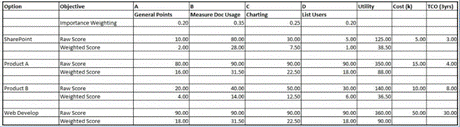
Table 1.0: Value Engineering to identify the best product to meet the requirements.
Note that for each of the alternatives in Table 1.0 it is not simply a case of writing down numbers and hoping for the best. A significant amount of work must take place to ensure that you appraise each of the products. For example, I am going to take a look at one of the alternatives from the table, SharePoint).
Use SharePoint built Web Analytics. From a technical perspective, you could get this data by using, for example, the events obtained from the audit log reports on the site. Specifically those which relate to opening, downloading documents, or other events like checking out etc. This information would have to be exported to Excel 2013, and then from there, could be forwarded to Human Resources, or be pushed back into the Human Resources site and then consumed using Excel services onto a specific page in the Human Resources site. In SharePoint 2013, in the document library where the form is located, the user could highlight the form, and from the ribbon click Popularity. Note that no information concerning list of users is available.
Use SharePoint built in feature. From a business perspective, Human Resources would have to be mindful that there is a human element involved, which is the creation of the chart in Microsoft Excel, the manual provision of the document to a SharePoint site. Of course, this means that the resource would have to be provided to do this work. If they did not create the chart based on the report, then someone would have to get the report to expose the relevant chart. It is also possible therefore, that there will be times when the report could not be produced on time, or is subject to human error in the creation of the chart. Additionally, there is a support overhead, and a skills overhead to consider.
The only real advantage of the SharePoint built in feature from Table 1.0 in the value management exercise is ‘Can be provisioned using built in features’. The disadvantages (which is possibly why Web Analytics is ‘glossed over’) are that people are required, specific skill sets are required, management of the report is required, and the output will need to be ‘tweaked’ to show the data required. In short, it’s all about the actual processes required to get the report to give meaningful data – and that requires resources. Some companies faced with this, even employ analytics personnel to come in, harvest the data and then present back to them the information needed in the form of charts using a mass of business intelligence. And because of all of this, the cost to provision is not cheap. The time taken for the report to be created by possibly more than one person, and the cost of even bringing in consultants may outweigh the value of providing the report. And the key disadvantage is that the requirement is not fulfilled since Human Resources need the list of users who have accessed the procedural document. That is not available unless a separate output is done using the audit reports, and again, that needs to be cleaned up in Excel.
The two links below will provide you with detailed instructions on how to apply Value Management techniques which will help you model out a method of choosing from a list of alternatives.
Understand how Value Management can be used to test business requirements
Understand how to determine best alternatives from the Value Management exercise
Step 4 – Wrap Service Delivery into the Web Analytics solution provision
Provision of a web analytics solution is effectively an enterprise SharePoint solution directly linked to proving the premise and sustainability of multiple sites and content. Therefore, the solution needs to be usable, repeatable, supportable and extensible. That means making sure that the solution provided covers most business boundaries and without increasing the relevant work to manage the solution. I wrote an article concerning Usability which will help you understand aspects of the Design, Development, Commonality, Consistency, Tools, Cross Platform, Environmental aspects. Check out this article for more information. There are other concerns. Ensure that the solution is repeatable. That the process for the deployment of the web analytics system can be followed on a platform to platform basis agnostic of version. That the upgrades for the platform can be provisioned and automated. Ensure that the solution is supportable. That there is a knowledge bank available to all relevant audiences (technical and business). That the details of the solution has proper version control applied. That there is a portal that can be visited to launch tickets, get more information, contact the product team. That there is the provision of SLA (Service Level Agreements) that can provide a level of comfort to the customer. That there is adequate provision for the solution to be audited for performance, health checks, sustainment. Finally ensure the solution is extensible. That the solution can be augmented without having to completely redeploy the solution. That the solution is compatible with the version of SharePoint that is in use, and that it is forward and backward compatible. For example, if the solution has been provisioned on a SharePoint 2010 farm that it is compatible with SharePoint 2013, and there are provisions for the same tool to connect backward to SharePoint 2007.
Conclusion
Web Analytics is not new. We are starting to see a major revolution in trying to retain existing customers and research for new customers, and that means using Web Analytics. Company thrive on a cycle of innovation to cash flow. So that means needing to know more about the activity surrounding processes, particularly online. That means needing to know more about online customer interaction. Therefore, there is a big buzz about Web Analytics. 2014 is definitely the year for that revolution, as companies move further into cloud provided services. This article has provided an approach which empowers us with a sustainable and repeatable process of not only determining the kind of Web analytics that will aid user adoption, but also the actual tools needed to produce web analytics going forward.
Data collection and reporting are fundamental and must be accomplished effectively. But these steps in the process should also be efficient. Find ways to minimize the time being spent on these efforts, or delegate to junior staff. Automate as much as possible through using great tools.
The majority of your focus should be on analysing the data, articulating the implications for business and coaching your colleagues through the implementation. What the data means and what your team is supposed to do with it are the priorities. The tighter your analysis and the more you focus on performance indicators that tie to the bottom line, the more successful you’re going to be.
Data for data’s sake isn’t a good investment. Data must drive actions that generate conversions and revenue. Tie your data collection and analysis efforts specifically to your bottom line.
Providing analytics aids service delivery which in turn improves adoption of the solution. This article has given you four steps that will help you provision Web Analytics, irrespective of the technology. You have learned:
- Step 1: To identify why the site requires analytics, and where
- Step 2: To understand what is currently available in SharePoint 2013
- Step 3: To work through the business requirement, prioritise as required and identify alternatives
- Step 4: To ensure service delivery is wrapped around whatever solution is in place.
Key reference: Microsoft SharePoint 2013: Planning for Adoption and Governance for more information concerning User Adoption importance in Web Analytics and Value Management techniques to identify the best alternatives when choosing a SharePoint solution to meet specific objectives.
Note – click the big arrow to start the presentation, and then click FULLSCREEN in the bottom right to get full benefit. Press ESCAPE to come out of FULLSCREEN at the end.

Look through the job advertisements for any online job site or computer journal for an indicator of what most organizations seems to regard as a key attribute of SharePoint support staff. The need, desire, and hunt for technical knowledge seems to jump out at you from the pages. I have seen advertisements for SharePoint members that reads like a list of SharePoint third party products and affiliated integrated Microsoft products. The closest match of the candidate to that list is the first step towards being interviewed.
Indeed, even Microsoft seems to lay great store by this. Microsoft provides a range of qualifications which can be pursued. These qualifications become a marketable commodity; a SharePoint support person whose technical competence is measured by a Microsoft endorsed certificate commands a higher salary and is in greater demand than one whose ability is not so endorsed. In fact, an entire market is already in operational to provide Microsoft recognised training courses, with a range of quality, pace and price to suit most pockets.
This makes me suspicious about the training courses just mentioned. Of course, they create some kind of measure of a support person’s technical knowledge, and that is a useful aid for an organisation seeking to employ a proven SharePoint support individual. However, a Microsoft certificate is rarely a true indicator of real knowledge. It is an indicator of the individual to get through the relevant training programme. Additionally, the knowledge learnt is transient. In six months, Microsoft will probably have another version of the relevant product. In two years, the product may well look and operate very differently to when the original course was taken. Nevertheless, the certificate will still be valid even if what it is being measured against is no longer valid.
With certification programmes, SharePoint software producing companies have nothing to lose, and so very much to gain. They can sell training courses, appoint recognised trainers. They can ride on the back of the hype the qualification brings in its wake. They can reduce their support burden by encouraging customers to pay to be able to do their own support.
Even so, organizations generally face issues in finding the right level of technical support for their products. SharePoint could be considered to be different in the mix of Microsoft products because SharePoint is a platform. That means more interaction from support level to the business, not just solving technical issues. The support the business is after from a SharePoint perspective goes beyond into the land of solving business challenges. Questions like the following are normal directed to SharePoint support:
- I need to provide a method of people to collaborate in a single location
- I need to store and manage my content
- I have trouble understanding how to do something
- Can you fix the issue I have
But what exactly makes up a great SharePoint support person. Is it simply technical? Definitely not. This article attempts to answer the fundamental questions concerning how to determine what constitutes a ‘super-duper’ SharePoint support person. To do that, I am going to break the article into seven points. Each point relates to an attribute that a SharePoint support member should have. I have also tried to keep this article version agnostic. I will not be going into any particular version of SharePoint, or product.
So, let’s kick off with a basic statement. SharePoint Service Delivery is about capability. The solution being provided to users must be capable of fulfilling their requirements. At the same time, the relevant solution needs to be supported by individuals who will be able to provide help and aid to those using the relevant solution. Therefore, it goes without saying that the skills of those who need to support users’ needs to go beyond just technical aspects of the solution being provided.
A 2013 Gartner report called “ITs Aspirations Require Addressing Current Realities” described a disturbing trend:
“CIOs have consistently reported a lack of skills as the single biggest factor limiting IT’s successes”.
The report goes on to say:
“One in four CIOs believe that the IT labor market is ‘working’.”
That can mean at least two things. First, that those being recruited to provide support are not skilled enough. Secondly, that the recruitment process in identifying the right person to provide support is not working. And, the key to organisations having the right people is based on their capability to provide support services.
In addition, the constantly changing face of technology as it expands and morphs will lead people to become continuously productive as explained in this article:
http://www.businessinsider.com/next-generation-of-tools-make-us-constantly-productive-2013-9
This will therefore impact on how support is provided, particularly for those products which are in the centre of collaborative tools. In order for SharePoint to be capable of providing a support service to the user base, the user base needs to be adequately supported. The environment in which SharePoint can be employed, for example, on-premise in an organization, off-premise through Office 365, and on any mobile device, being smartphone, tablet, etc. means that the environments in which SharePoint support could be employed is also varied:
- Telephone Call Centres. SharePoint support is provided in an environment where the call is likely to be solved over the telephone, or escalated to another tier in the support organization.
- SharePoint Support provided by the parent organization. Typically for on-premise, though for a hybrid support is provided by the same SharePoint Support provision.
- It Support provided by third party. An third party SharePoint support provision is on-contract to an organization to provide a level of support.
- Through an Internet Service Provider. The Internet Service Provider provides the platform and also the support required for users to collaborate within the platform provided. Generally, those users then provide, or are automatically ‘set’, to have administrators who provide a first level of support.
Irrespective of the environment (which may in fact be a combination of the above), SharePoint support persons require particular attributes to ensure that a SharePoint service can be effectively provided.
1: They can do multiple roles
As a member of SharePoint Support, part of the job is to support end users and troubleshoot various types of tasks. However, their tasks involve much more than simply resolving a problem. They must be able to listen to a user, gather information from that user, diagnose and resolve the problem (or escalate the problem to a senior technician or system administrator), and properly document the resolution of the problem in the manner dictated by company policy.
A SharePoint Support team member is expected to fulfil a number of roles in the support environment. A good SharePoint Support team member must possess both technical skills and non-technical skills, such as interpersonal skills that are necessary for building rapport with the user to better troubleshoot and resolve the user issues. Some of the primary roles of the SharePoint Support team member include:
- A public face for the company – in most cases, the only human point of contact
- A knowledgeable resource who is familiar with the product and able to perform hardware and software installation tasks and system monitoring and maintenance
- A source of information, because even if you do not know the answer, you know where to get the answer or to redirect the end user
- An effective communicator, because customers are not calling to be sociable – many of them are distressed or upset, and you will need to manage the interaction effectively
- A good trouble-shooter who is able to quickly diagnose the issue by performing specific tasks
2: They get back to basics
As stated in the section “1: Carry multiple roles”, a SharePoint support persons job is to provide end user support in a At a high level, the SharePoint support person should be prepared to perform the following tasks:
- Perform general troubleshooting of SharePoint and integrated applications and solutions that will be used with SharePoint
- Provide customer service, including listening to the customer, defining and solving the problem, and educating the user on how to avoid the problem in the future.
- Install, configure, and upgrade packages and solutions.
- Monitor and maintain the SharePoint platform
- Document calls and close them or escalate them as required by company policy and time limits set by Service Level Agreements (SLAs).
Note that whilst the above appear to be technical, the key is to support the customer. The mission statement simply means ‘Quickly Resolve the Problem’:
- If a SharePoint solution is unavailable, service restoration is the first priority
- Incidents, problems and known errors must be clearly distinguishable from one another
- Service levels are governed by an SLA
- Customer interact with the SharePoint support for the resolution of problems
- Electronic self-help does not make human representatives obsolete
Within IT Support, there would generally be a support model. This covers, problem, service management and IT helpdesk support. Without going into any detail concerning how the IT Support model operates, the key is to understand that it is the duty of any member of SharePoint support is to provide a service understood by their customer. Therefore, for every issue to be resolved SharePoint support persons must get back to basics with every customer (and non-customer).
Here is a scenario:
Fabrikam is a coffee research company with offices in London and New York. They have a SharePoint installation which is supported by a SharePoint dedicated team. Fabrikam, at the start of setting up the SharePoint support model was aware of the time difference, and elected to have SharePoint support provisions in both time zones, but managed by IT Support. All calls would be logged centrally so that all IT Support teams and SharePoint support teams could see the work being carried out in New York and London.
The above scenario is a simple reminder that in order to have adequate support you need to understand the working time zones of the users. There is little point of proving that all your users are supported if your SharePoint support team is asleep when customers using your SharePoint provision need support on the other side of the planet. However, the above example is general. Let’s take the example back to specifically why it is important that each member of your SharePoint support team takes things back to basics. I have a large lawn to mow at my house. I use a lawnmower provided by a company in my nearest town. That lawnmower always breaks down, and generally, it’s my fault. Either I hit a stone, try to cut grass that’s far too long that plugs up the grass scoop, and more besides. I am getting better at working with that lawnmower, and that’s because the guys who supplied the lawnmower, who seem to fix things faster than you can say ‘Jack Robertson’, will always pass on a good bit of information when it is fixed, will always ask ‘what was you doing before the problem started’, and will always give demonstrations of using parts of the lawnmower which I didn’t think existed.
So, why is that important? Well, imagine that you are new to SharePoint. You need to upload a document, but cannot remember how to do that. You call your SharePoint support member. The SharePoint support member responds with something like this:
‘You dolt. It is easy to upload that file. Just click the New Document link. Why bother me with that’ – mutter… mutter…
In terms of even a relationship with SharePoint support that response guarantees service delivery ‘epic fail’.
Good SharePoint support persons get back to basics. They ask what the user was trying to do. They give step by step information on how to upload documents. They inform the user that there are places where the user can go to get more information. They state alternatives to using the New Document link in a document library. They empathise with the user (more on that later).
This does not mean that when the user calls SharePoint support that they have to wait while SharePoint support scrolls through a list of possible solutions or navigates around a decision tree, especially if the payoff does not appear to come quickly.
The reason why it is so important to go back to basics, is simply not because you want to teach SharePoint 101 basic stuff to SharePoint people. It is because the comfort factor of those calling SharePoint support increases. If that increases, they become more confident. If they become more confident, they learn, and want to learn. If this is not done, you will start seeing users ‘switch off’ from using SharePoint support. Or even worse, they will inform other users not to contact SharePoint support and will use other methods of finding out how to do things. Or even worse than that, they will stop using SharePoint all together!
3: They turn customers into enthusiastic customers
Imagine you set up a SharePoint support service. You may find that many customer simply will not call that support service. Some will not call because they do not know about SharePoint support. Some may even complain about SharePoint when it does not do what they expect it to do, but they will not call because of their experiences with any other customer service, whether it is a airline, telephone company, car park fining, cinema ticket purchasing, etc.
A successful SharePoint support service has enthusiastic customers. There are so many ways in which SharePoint support team members can make customers enthusiastic customers. First, let me describe what it is that defines an enthusiastic customer.
Humans are forever needing to find easier ways to get things done. They love shortcuts. This is because at work humans are doing multiple things and making multiple decisions. And because they are doing multiple things, when they are shown how to increase the speed (and productivity) of certain things in their daily tasks, they will become more enthusiastic. This goes with any software application, or any business process they work in. The key however, is to not get technical, don’t use jargon. Speak in their language. Here is a scenario.
Scenario: Telling something to a customer that helps them associated to the problem at hand. User tries Search for the first time in SharePoint and whilst they understand how to use the interface, you ask how they carry out searches without using SharePoint. Customer states that they have used the Explorer to search for files using Windows 7. You state that by using the search option “Search in Windows Explorer” in Enterprise Search that the user is able to ‘connect’ Windows Explorer Search to SharePoint search.
The result is a customer who has learned something new, and passes this onto other customers.
4: They are prepared to take the blame
Scenario: Customer calls into SharePoint support stating that they were working on a document which they had ‘checked-out’ from SharePoint, then something happened on their computer forcing the application to crash, and now they could not re-open the document because it was already checked out. The customer tried various ways of attempting to open the document, but had given up and called SharePoint support. By the time they did, they were angry, frustrated, and even more frustrated when they found that they had to wait for over an hour before anyone called back.
The point here is that first SharePoint support takes the blame. Irrespective of the problem, whether the user is at fault, whether SharePoint is at fault, the key is not to identify who or what is at fault in the first instance. The key is to get the customer to calm down, and to understand that you are the face of SharePoint and that you will resolve the issue one way or another.
To relate to this, another scenario is where a customer, in a restaurant, states that the service provided has not been to their approval. The restaurant manager, instead of apologising and stating they will seek to address the issue, says the customer is wrong to state the service is at fault, and instead states that the customer should not have come to their restaurant in the first place. Clearly this is the wrong move, because the customer can then easily state to others that the service was bad and no one took any attention to sort out the problem.
5: They are prepared to say the things they don’t want to say
When someone complains, its easy to get caught up emotionally in the situation. This is particularly when the very thing you are supporting is the thing that the customer is complaining about.
Scenario. A customer calls stating that their document library displays an error every time they attempt to upload a document. The customer is quite frustrated and says that SharePoint is “rubbish”.
As a SharePoint support individual does not immediately become furious and state ‘How dare you say that?! I have never had a complaint from anyone else!’. Instead, they say ‘That’s terrible, please tell me what happened so I can make sure it never happens again’.
6: They create a career path
SharePoint support individuals will require technical abilities; however, that does not mean they come from a technical background. Organisations choosing SharePoint support individuals would be looking for the appropriate personal skills to deal with the users. That is because the users come first.
Training is another area to consider. Check out this article here: https://serviceautomation.online/articles-2/training/
There is something that I think all SharePoint support persons should be aware of. And it is a certification called MCDST. MCDST stands for Microsoft Certified Desktop Support Technician. I did this when I was running a IT Support department, and needed to ensure that all my technicians did that course and the exam. I also did the same course and exam.
For more information on MCDST, check out this link:
http://www.microsoft.com/es-es/learning/certification/mcdst.aspx#tab3
The reason why I did the course was twofold. Firstly, to understand the issues concerned with providing support for the current operating system. Secondly, to understand the implications of providing a service to end-users. And do not be deterred by the fact that the course covers operating systems. A key element of the course is understanding customer service and what it means to be in support.
7: They put themselves in the customers shoes
SharePoint support people understand their user expectation. This ‘expectation’ is rational, reviewable and realistic. Rational because support can understand how the user uses SharePoint, and therefore, is able to estimate the needs of their users with a degree of accuracy. For example, if the usage patterns of SharePoint appear to be heavy on a Thursday, but Friday is quiet – but Monday is difficult because that’s is when all the queries come in regarding any issues on Thursday, then SharePoint support can glean that carrying out maintenance on a Thursday, and testing on a Friday is best.
Conclusion
Relentless pursuit of technical acclaim distracts so much from the attributes we really want in our SharePoint support staff. If SharePoint support individuals only ever dealt with SharePoint technical issues and the servers SharePoint runs on, then technical ability is all we could ever reasonably ask of them. But they do not – they deal with people. This is particularly in the wake of support being provided through Office 365, where there is far less emphasis on technical ability on working with the SharePoint server side, but an increased awareness required on integrated products like Office, Exchange, Lync. Irrespective of the knowledge required to provide support, SharePoint support must be dedicated to maintaining continued, hour by hour productivity through user support. Therefore, what is needed is people and methods that increase or maintain user productivity. User productivity is not just an “I’ve got a bug in this SharePoint site” issue. It is a “Help me to know how I go about producing the output I need using SharePoint” issue. The first query requires technical ability. The second query requires technical knowledge coupled with an ability to convey that knowledge in terms the user can understand and believe in.
Therefore, to back up the 7 ways of identifying a super-duper SharePoint support person, there are the 7 attributes as follows:
- Patience – to be able to listen to a user describe a situation
- Thoroughness – to give the user confidence in their ability to solve the problem and to ensure that the job is done
- Enthusiasm – to enjoy the job and stay motivated
- Responsibility and Empathy – to be able to take on the burden of a task, and to be able to put oneself in the users position
- Technical knowledge – to have acquired the sort of knowledge the job requires
- Communicative ability – to be able to use language well enough to convey confidence
- Works well under pressure – to be able to remain positive

This article, split into three blogs, goes into detail on describing Managing Value for SharePoint, and the basis of the two key tools to Managing Value. To help you understand the concepts, I will be drawing on real life projects and showing how using the techniques described was able to determine the best solution.
(more…)

This is the second part of the article concerning the delivery of SharePoint solutions. I will start by recapping on why I have produced these set of free articles, which will combine into an e-Book soon, check out this article. In essence, a successful solution delivery process encapsulates a design, creation, provision and support framework – that’s what makes up a SharePoint solution.
As stated in the first article, I am not designing a new process, rather, giving ideas surrounding theory, and actions for the reader to use.
The first article in the series, first looked into the understanding of creating a Usable SharePoint solution. A usable SharePoint solution takes into consideration the service standards applicable like design, development, commonality, consistency, tools and cross platform standards that can be applied when working with SharePoint. In learning the standards relating to usability, repeatability, supportability and extensibility you will be able to continually provision solutions easily, slicker and also help the client learn how to manage the solution once handed over.
A danger in writing these kind of articles is that the reader may be fooled into assuming that this is a business article, and somehow, not related to anything technical in SharePoint. In fact, service delivery is combination of the two – known as Systems Analysis which has been around as long as software has!
This is the second article in the series, concentrating on the key aspect of providing a sustainable solution – repeatability. In essence, this is the use of common processes, components, and products to build SharePoint solutions; continually – meaning using a repeatable method. Before thinking ‘this isn’t for me’ – wrong. As a SharePoint worker, you will be using a ‘repeatable’ process when even the simplest of SharePoint site solutions. For example, a document template re-use is defined as using a repeatable process. A web service that provides solutions such as say copying files from one place to another can be set to carry out the same process on another source and destination with minor customisation. Even a SharePoint site carrying a common structure can be easily created using a template, such as a Team Site Template. Apps are ‘repeatable’. Other examples could include workflows which are re-purposed, like Approval workflows.
The challenge is that most people, faced with constructing a SharePoint solution using components do not understand the principle of re-use which is a key aspect of a repeatable SharePoint solution delivery process. They may understand that something such as a template can be used again and again of course; however, they do not understand why a process ensuring why and when that a re-use management process can be applied; from the lowest component, to sites, site collections, web applications or farms. Even the provision of an Office365 tenant to a client is defined as a repeatable process. If there is no understanding, even a laissez faire approach, no standard or structure applied. And, as time marches on, as components morph, change and multiply, the potential for chaos ensues, where people simply have no idea what component should be used for what solution – instead, a patchwork of ‘guessing’ takes place!
Time I think to put a spin on helping you understand the principles of a ‘repeatable’ SharePoint solution. Again, this is a really challenging article to write, but an enjoyable one as well (like all my articles!).
First, time to get back to basics. Am going to start this section with a strange analogy – IKEA tables.
I went to IKEA Edinburgh last week looking for tables. My partner wanted some new tables to brighten up the conservatory, the kitchen and the cinema room. Now, browsing around IKEA for tables (well in fact anything in IKEA as I am not a great shopper) can be a bit of an experience, and sometimes, an annoyance. Trying the find the right colour, size took a huge wedge of the day to find what would look right.
So, in the end after hunting for tables in IKEA, we decided on three tables, put them into the horsebox and drove back home with them. Once home, I spent the following day putting the tables together. The first attempt at building a table was a nightmare. Yes, the instructions are easy to follow, but unfortunately I am not that great in following IKEA instructions; I dove in blindly with the screwdriver – then once I started getting things wrong, I went to the manual. It took me over 3 hours to build the table. Finally, I managed to put the first table together. Then, onto the second table. This was easier to put together, simply because I remembered all the wrong things I did about the first, and because I followed the manual :). The third was such a blur of activity – I simply didn’t need the manual, and I placed all the components in the order of building – the time taken to build was a fraction of the time to build the first.
Of course, stating that building tables is not a great and wonderful idea of delivering SharePoint solutions using repeatable exercises. But it is a great analogy because of two key reasons:
- All components fit together because the form an object
- A manual is there to guide you through the process
That means this two simple reasons can easily be applied to SharePoint to ensure a repeatable process. Surely it is easier to put a SharePoint site solution together if there are common components that can be reused at will? Surely, if there is a documented process that aids the creation of the SharePoint solution which utilises those common components, then that defines a repeatable method of creating those solutions. However, the concepts I have mentioned are unfortunately not carried out, or is a challenge to understand how to put them in place – and this is because the capabilities that describe how a SharePoint solution can be made ‘efficient’, through its delivery process is not at hand. I am going to attempt to address that, by describing the key capabilities that make the SharePoint solution efficient in terms of its development, deployment and maintenance.
The capabilities that you should consider, which in my view help you create a SharePoint solution (requiring the roles of Systems Analysis, Development, Architecture and Administration) and by definition can help build a ‘repeatable’ framework are:
- Create Service Blocks. Service blocks are a common set of high level components that can be reused. Examples of these are pre-configured Apps (site, repository, third party products and integrated services, workflow templates) which can be combined build SharePoint solutions. A great example of this are workflow templates that can be constructed by the fabric ‘or snippets’ from other workflow templates (Nintex provides a great way of doing this).
- Set a Common Schema. Creating a common format that can be applied to multiple solutions. Examples include branded custom pages, format of the quick launch bar, top line bar, enterprise taxonomy, navigation, etc. House the combined solution designs in a central location armed with keywords and categories to identify them.
- Discover and build the skills necessary. Creating a common set of training and guidance material for the solution that allows the user-base to learn the product, explore and use the relevant possibilities that are available.
- Ensure products can be Self-Provisioned. Users are empowered if the solutions they have constructed can be re-used to solve likewise problems for themselves and others. This aids the productivity of the individual, their peers and enhances the ability of support.
- Build Enterprise Policies. The creation, re-use and management of policies which will aid in the adoption, design, structure, implementation and deployment of the solution.
- Factor in Deployment Management. Drives the configuration management process whereby a SharePoint solution can get from idea to Test to UAT (User Acceptance Test) to Production. Aids the version control management of the solution in terms of how the solution can be updated and upgraded. Aids the document and data control process so that the solution can be adequately documented.
Service Delivery
Service delivery of the relevant solution needs to be efficient. This means being understood and managed by the stakeholders, since they are responsible for managing / devolving the management of the solution going forward.
For Service Delivery to be efficient, the solution delivery mechanism needs to be carried out in a sequenced and logical approach that the customer will understand and be part of. For example, if SharePoint is going to be employed in an organisation, the client needs to understand the part that SharePoint is going to play. This means understanding the information framework, and applying that, including controls for managing and locating that information. The fact that SharePoint is going to be used is irrelevant at that stage, since through the evaluation of the information flow in the organisation, the tools being used, the culture of the organization, amongst other key issues like control, security will influence the platform being employed.
So, a service delivery mechanism which encapsulates vision, decision, design, build, support, sustain, control needs to be defined first. A key outcome of creating a service delivery mechanism provides the stakeholder with the knowledge and comfort that an understood process (which they will manage) is clear and can be adhered to.
This means providing a number of service blocks that can be provided whenever releasing a SharePoint service. Examples of this are:
- Maintaining and managing a list of owners that also concerns who the owners are, the key stakeholders and users.
- Maintaining and managing a list of the key resources used both SharePoint oriented and people who will be using the solution
Efficient Service Deployment
There is confusion on the terminology surrounding the term ‘Service Deployment’. It seems that it is a technological term, and therefore, something related to getting some software from somewhere and installing it. I have witnessed situations where someone says ‘We are going to deploy the software service by following the installation process given in the manual’. In other words, download the product from somewhere and follow the automated installation process by clicking ‘Setup.exe’….
No.
Service Deployment is the process under which the SharePoint solution is deployed from a full implementation perspective and involves all resources necessary for that to take place. That means including people. That is the first simple rule. Keep the users involved.
Example. An app has been sanctioned to be deployed to a SharePoint online team site. The procedure that was followed to get the product sanctioned is a tried and tested method of user requirements, testing, user acceptance.
Efficient Service Deployment is part of a Software Delivery Process. A process by which the deployment of the solution is simply part of its lifecycle. That lifecycle includes the design, build, maintenance, support and any other aspect that defines the solution.
Henceforth, knowing what makes up the SharePoint solution is vital since that naturally produces the information required to ensure that the solution can be deployed. There are a number of documents which should be created:
- Hardware Components
- Software
- Installation Guide
- Related Productions
- UAT Provisioning
- Release Notes
Capability
Because the people must be capable in using the delivered SharePoint solution. Therefore, the solution must be capable in enabling and enhancing business productivity, knowledge, and solving information and management collaboration challenges.
So, in order to repeat the process of creating successful SharePoint solutions, the capability (structure, roles) of the support service team responsible for designing, crafting and, deploying and most likely supporting the solution must be repeatable from solution to solution.
This means that:
- SharePoint support services must be capable of supporting the delivered solution in line with customer expectations
- SharePoint delivery teams must be capable on delivering on the promises that were made about time and quality
- Any relevant SharePoint support services must be capable of standing over any key performance indicators or service level agreements.
Scalability
Scenario: You are going to deliver a SharePoint platform to a client. You gather their information requirements and process. You provision a ‘Proof of Concept’ SharePoint platform open to key stakeholders to showcase, demo, and gather further requirements. The client wants SharePoint. From there, you provision a UAT (User Acceptance Test) environment which maps to their requirements in terms of infrastructure, availability, scalability, extensibility, support. You then open that up to key stakeholders. Workshops ensue. The client still wants SharePoint, the UAT environment provided appears to meet functional and system requirements. You then provision a Production environment which matches the infrastructure provided at UAT level, and then deploy SharePoint services to the client as prescribed in UAT.
The above is a simplistic approach concerning the delivery of SharePoint to a client, following a design, build, deploy process. A repeatable SharePoint Service Delivery mechanism focusing on implementation.
However, the point being made about the scenario given about is a word which encompasses the delivery – future-proofing. ‘Future-proofing’, means that the solution being provided will not only meet the client requirements at the point of inception, but can also in the future because it can be scaled, and therefore will continue to meet changing requirements.
Scaling a SharePoint platform and any relevant solutions is not a single event exercise. Any alteration, addition or deletion to the solutions provided within the SharePoint platform requires a review to determine the impact on the scalability of SharePoint. For example, take the addition of a third party app to SharePoint, which becomes important, an app which the users cannot do without. The impact to the scalability of SharePoint comes into question if, for example, that app cannot itself scale to the next ‘hotfix’ of SharePoint, let alone the next version of SharePoint!
Actions
A lifecycle of delivering SharePoint solution needs to be based on being repeatable. Reasons for doing this have been stressed in this section, but to summarise:
- Stakeholder map per solution. Carrying analysis on the gathered maps will show connections between the common components being used across multiple solutions and also the key individuals helping to create a focal / champion group.
- Efficient Service Deployment. Due to re-use, there will be reduced requirements to bring in key resources build likewise solutions and components leading to reduced cost and management issues.
- Efficient Maintenance. Updates to repeated solutions can be applied generically, change management is easier to define, business policies and rules related to the solutions are easier to enforce and get buy-in.
- Capability. Users and Support gain knowledge and maintain that knowledge more readily than disparate solutions non repeated solutions.
- Scalability. Easier to plan, coordinate and carry out configuration management processes on repeated solutions.
In the Scalability section above, I gave a simple scenario based on deployment of SharePoint and boiled this into a repeatable solution exercise. That’s not the only scenario that uses Repeatable as a method to service deliver SharePoint solutions. SharePoint provides virtually all the components and tools that allows components to be configured, connected and scaled. SharePoint provides the ability for modules of functionality, developed internally or externally to the organization and contained in Apps. Apps that can be re-deployed, and further enhanced based on changing needs of the client, and can be deployed centrally from a bank of other Apps. For example, a simple document library App may alter need the ability to be connected to a third party tool, or may require further enhancement concerning views and sort, or may be required to lookup information from another repository. When completed, the entire configuration of the document library can be transformed into an ‘App’ which can then be redeployed elsewhere without having to re-develop from scratch. Other Apps include Site Apps, and Third Party Apps.
Third Party Apps throw a different kind of repeatable solution scenario because of the added dimension in providing automation, which then leads to the ‘Supportable’ element of the SharePoint Service Framework. This is simply due to the fact that Third Party Apps cannot be successful unless there is a support group. The sheer number of Apps available from the Office Store for SharePoint compounds scenarios concerning re-use, consumption, implementation and administration.
As per all things when implementing a solution in SharePoint, the answer to solving business and information challenges requires you to continually and critically review the requirements to find nuggets of functionality that has already been created. Analyse thoroughly the various elements of the SharePoint solution, so you can identify common areas that can be defined generically and as repeatable components. Harvest them into deliverable chunks and rework to see if they can be repeated. Remember the DEV to UAT to Production model – this applies to any kind of solution (design, develop, test, make it live).
If this sounds a little convoluted, remember the client perspective. Generally, they will not care what the resolution is made up from, is as long as it works – however, they will care, if the solution is usable, whether the solution once implementation can be repeated to meet a likewise requirement elsewhere without having to pay extra, whether the solution can be supported and whether the solution can be extended as the SharePoint platform scales.
Before going onto the relevant actions concerning what you need to implement, how the customers can consume, and how you can administer a SharePoint solution that can be repeated, check out these articles which all have a bearing on this section.
In conclusion to this article, which I will continually come back to update, you should also consider the three actions that you should consider in building a ‘repeatable’ SharePoint solution framework – Implementation, Consumption and Administration.
· Implementation
- List the common attributes of ALL solutions and group them into the four key aspects of SharePoint service provisioning – Support, Automation, Management, Reporting
- When designing solutions, record aspects of those solutions (if not in their entirety) that could be included in other solutions into a knowledge base.
- Record the aspects that allow third party products to export configurations that could be re-used. For example, you could develop a simple SharePoint site that houses developed and them exported Nintex workflow templates, thus making them accessible for re-use to others. In other cases, you could even export workflow templates and have them available for download in other sites.
· Consumption
- Build a process whereby users can provision solutions which are available in a library.
- Communicate available solutions and review all solutions in that library so that you can be sure they are being used effectively
- Record usage of the solutions in terms of where, how and popularity of the solution
· Administration
- Create enterprise policies that ensure users follow rules in terms of re-using ready-made solutions and link them to support
- In relationship to consumption, associate business rules and policies concerning the solutions that are in your library of solution
This article is part of Delivering SharePoint Solutions – Areas of Importance.

Microsoft has released a tool, called SARA, that can help diagnose issues with Office 365. Currently, its configured to help setting up Outlook with Office365.
SARA is the Support and Recovery Assistant for Office365, and can help diagnose issues from you entering the Office365 account, and then using the Support topic options to get help with. SARA is an on-demand application, so it only needs to be used when there is a problem indicated. Of course, access to the Office365 tenant will be required to use this tool! Its early days for SARA as I write this quick blog,, but, I guess it would be useful to keep an eye on this tool, as Microsoft continues to upgrade it to help support issues with other products in the Office365 suite.
Check the below video for more information, and download link is below the video.

Are you into technology? Really? Software Design? Coding? Systems Analysis? Would you like a chance for your ideas to be heard? Want to join the worlds only Institute dedicated to those who design, build, test, implement and analyse software solutions? Then you should consider writing for the Institute of Analysts and Programmers.
The Institute of Analysts and Programmers is Britain’s leading professional organisation for people who work in the development, installation and testing of business systems and computer software. The institute produces every quarter the ‘Software Development Practice’ (I’m on its Editorial Team).
We’re always keen to see new articles from anyone working in the systems analysis and programming fields, so why not go for creating an article to the Software Development Journal? To find out more about the Institute of Analysts and Programmers go here: http://www.iap.org.uk/main/. For more Information concerning article submission go here: http://software-development-practice.iap.org.uk/submitting-articles/
Am particularly keen for any SharePoint articles relating to software / web / app development or systems analysis, so for any further information about submission please contact me

Oooo… Things are gaining ground in the SharePoint 2016 arena. A fantastic set of links to resources, concerning planning, setup, operations, upgrading and lot more is available on the TechNet site.
(more…)







